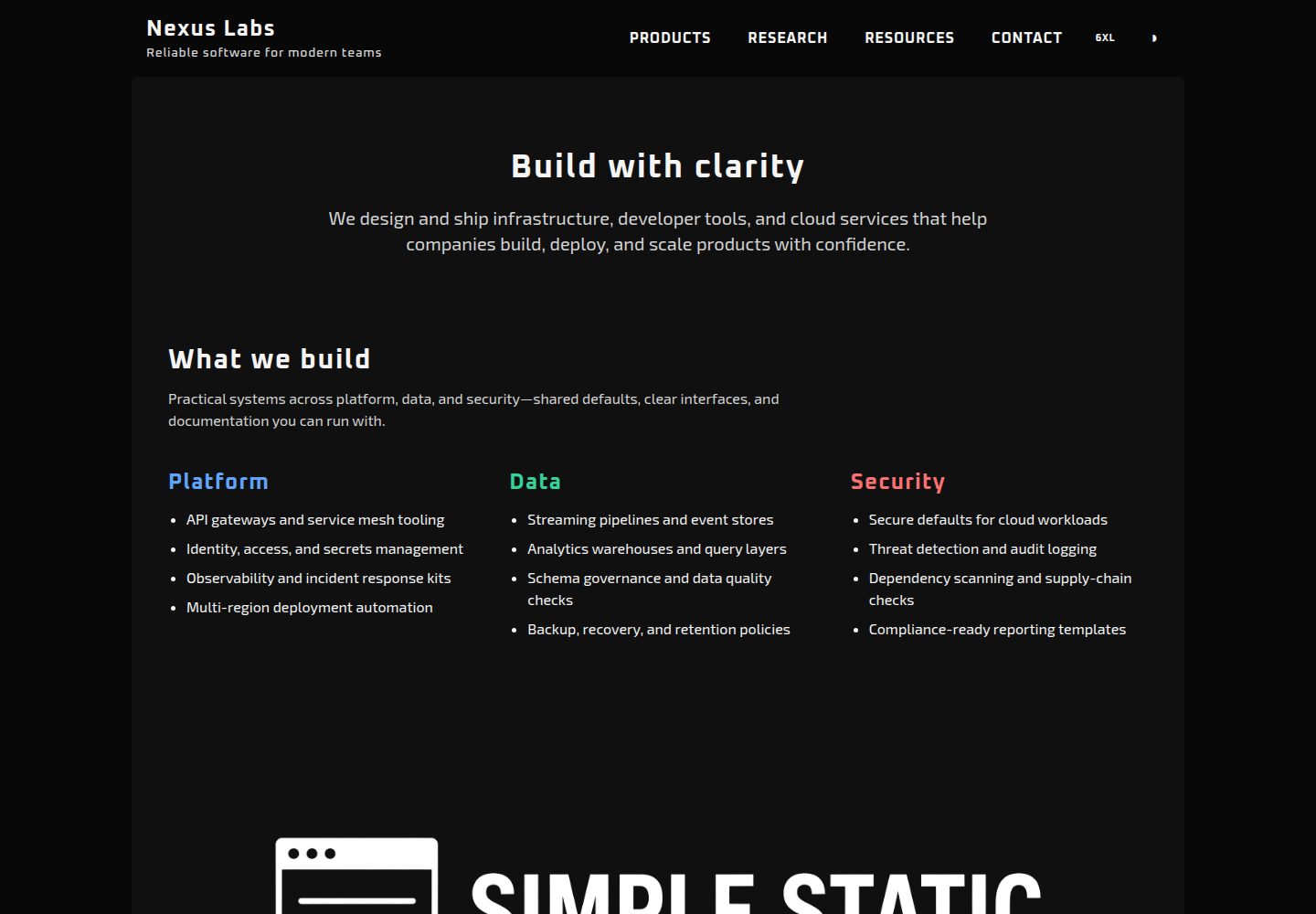
多页静态输出:每个 pages/ 下的 HTML 文件对应一个 URL,构建后扁平化到 dist 根目录
Vite启动器
sswt — Vite 启动器模板
作者 alkontek
SSWT 是一个基于 Vite 的多页静态网站启动模板,使用 Tailwind CSS 与 Sass 构建样式,并可选集成 Alpine.js 和 Anime.js。
看看你的网站会是什么样
浏览真实页面截图,比较内容排版与手机效果。点击下方缩略图切换,放大查看整页细节。
全部页面与视图 3
截图用于了解视觉与布局,交互效果请以实际项目为准。
采集于 2026-10-02查看来源
值得关注的模板亮点
从已有项目资料中,快速了解它的特点。
共享页头与页脚通过 Vite 内联 partial 实现,无需复制粘贴
六色主题令牌系统,同一套变量名在 html.inverse 下重新映射,支持浅色与深色
自托管可变字体与主题感知横幅图片,首屏不请求 Google Fonts
可选 Alpine.js 与 Anime.js,示例站点不依赖二者即可运行
第三方分析代码通过标记包裹,仅在构建产物中保留
模板详细介绍
SSWT(Simple Static Website Template)是一个刻意保持轻量的多页静态网站启动模板。页面为纯 HTML,样式由 Tailwind CSS 工具类与 Sass 主题令牌共同构成,构建工具为 Vite。模板不依赖路由或运行时框架,示例站点本身不需要 Alpine.js 或 Anime.js 即可运行,这两个库作为可选依赖提供。
模板包含共享的页头与页脚 partial、六色主题令牌(含浅色/深色映射)、内容宽度切换、自托管可变字体、主题感知横幅图片、仅在构建产物中保留的第三方分析代码,以及 favicon 与 web manifest。导航、主题切换和宽度切换由原生 JavaScript 模块处理,移动端菜单在 md 断点以下折叠。
使用限制方面:新增页面需要手动在 vite.config.js 的 rollupOptions.input 中注册;页面间跳转时主题可能短暂闪烁;主题切换与宽度偏好通过 localStorage 持久化。示例图片、字体等第三方素材需单独核对许可,BSD-2-Clause 仅覆盖代码本身。
Vite启动器
适合你的项目吗?
适用场景
- 需要多页静态站点但不想引入前端框架或路由的开发者
- 希望用 Tailwind CSS 与 Sass 令牌快速搭建可定制主题的静态页面
- 需要将构建产物直接部署到 GitHub Pages、Netlify、Cloudflare Pages、nginx 或 S3 等静态托管
- 作为小型企业官网、产品介绍页或文档站点的起始骨架
适合人群
- 熟悉 HTML、CSS 和基础 JavaScript 的前端开发者
- 偏好轻量工具链、不希望引入运行时框架的静态站点项目
- 需要浅色/深色主题切换与内容宽度调节的展示型网站
上手与定制指南
结合仓库当前版本的说明,按下面的资料检查内容、配置与运行要求。
- 1
克隆仓库后执行 npm install,再运行 npm run dev 启动开发服务器
- 2
新增页面需在 pages/ 下创建 HTML 文件,并在 vite.config.js 的 build.rollupOptions.input 中注册
- 3
以 _ 开头的文件是 partial,不应加入 rollupOptions.input
- 4
生产构建使用 npm run build,输出到 dist/,可用 npm run preview 本地预览
- 5
主题令牌集中在 src/theme.scss,字体、favicon 和图片放在 public/ 目录
授权与来源资料
使用条件与限制
免费使用 · 保留许可声明本次收录的是公开仓库中采用 BSD-2-Clause 许可的免费版本;免费范围为该版本代码,不代表外部服务或第三方素材免费。
使用时需要遵守
- 允许免费使用、修改、商用以及源代码或二进制形式的分发。
- 源代码分发需保留版权声明、两项条件和免责声明;二进制分发需在文档或随附材料中重现这些内容。
- 代码按现状提供;担保与责任限制以原许可证及适用法律为准。
额外费用与待核对事项
- 新增页面不是自动路由:必须在 pages/ 下创建 HTML 文件,并手动在 vite.config.js 的 build.rollupOptions.input 中注册,否则该页面不会进入构建输出。
- 以 _ 开头的文件(如 _header.html、_footer.html)是内联 partial,不是独立路由,不应加入 rollupOptions.input,否则会被当作页面处理。
- 页面间跳转时主题可能短暂闪烁:标记先渲染,随后 head 脚本才应用 localStorage 中的偏好;Vite 开发模式下因 CSS 经 JS 加载,闪烁更明显。
- 第三方分析等脚本需用 PROD_ONLY_START/END 标记包裹,插件会在开发服务器中剥离、仅在构建产物中保留;未包裹的第三方代码不会被自动处理。
- 模板不包含 CMS、托管搜索、表单后端或组件库;表单提交、搜索等功能需自行接入外部服务。
- 表单控件、按钮组、flash/toast、模态框、分页、面包屑等仅为示例资源页上的“计划中”条目,模板并未提供,需要自行用 HTML 和类实现。
- 字体为自托管可变字体文件(Oxanium、Space Grotesk、Exo 2),其许可需单独核对;BSD-2-Clause 仅覆盖代码,不覆盖字体与图片等素材。
- 主题横幅图片通过 CSS 变量切换,需同时提供浅色与深色两套图片资源,否则切换主题时横幅不会变化。
- 演示图片、字体、图标及其他第三方素材需按各自许可核对,不能仅凭代码的 BSD-2-Clause 许可判断。
- 域名、托管、数据库、支付或 AI 等外部服务可能另外收费。
查看原文依据
Redistribution and use in source and binary forms, with or without modification, are permitted
许可证原文
Add a page: 1. Create `pages/about.html` (copy an existing page). 2. Register it in `vite.config.js` under `build.rollupOptions.input`.
README 原文
Files starting with `_` are partials, not routes — do not add them to `rollupOptions.input`.
README 原文
Moving between pages can still flash the opposite theme for a frame: markup paints first (`class="inverse"` or not), then the head script applies the stored preference. Vite dev is worse because CSS arrives via JS.
README 原文
Wrap third-party snippets in markers. The Vite plugin strips them from the dev server and leaves them in the build.
README 原文
No CMS. No hosted search. No form backend. No component library with fifty variants.
README 原文
Planned on the sample resources list and not required to ship a site: form controls, button groups, flash/toast, modals, pagination, breadcrumbs.
README 原文
Variable fonts in `public/font/` (Oxanium, Space Grotesk, Exo 2). No Google Fonts request on first paint.
README 原文
https://github.com/alkontek/sswt/blob/master/LICENSEhttps://github.com/alkontek/sswt/blob/master/README.mdBanners swap with the theme through a CSS variable, not a second `<img>`:
README 原文
DeepSeek 根据仓库许可证和 README 整理 ·2026-10-02。结果仅覆盖已读取资料,依赖、图片、字体及后续条款变更以各自原文为准。
项目核对记录与介绍依据
模板资料
- 来源平台
- GitHub
- 资料与维护参考分
- 资料较完整 · 83 / 100
- 技术栈
- Vite
- 网站类型
- 启动器
这个分数如何计算
本站按许可资料(最高30分)、演示链接(12分)、预览图(10分)、Star数(15分)、记录的维护时间(15分)、描述完整度(8分)、功能记录(5分)和分类资料(5分)计算。它不是代码、安全或性能测试,也不是 Google 评分;有链接不代表已实测可用。
这个项目需要核对什么
- 记录的仓库更新时间
- 2026-09-09
- 截图检查日期
- 2026-10-02
已收录演示链接。请用你的内容与屏幕尺寸检查;有演示不代表表单、认证或支付已经可用。
目录记录的主要技术栈是 Vite。请通过依赖清单和锁文件核对实际版本与托管要求。这些说明基于收录资料,不代表代码审计或部署实测。
查看具体选型方法 →介绍的制作与核对状态
介绍由 AI 辅助整理目录与仓库资料。仓库作者不等于这篇介绍的审核者。
已完成服务器许可规则与 AI 来源核对;未经过人工编辑审核。
查看当时使用的来源资料
SHA-256: 6538c83cffcc5c52860957ea43881c36c3e1685db53b3d06f9512d2a345ac105
2026-10-02T08:39:26.284Z
来源文件 / 仓库<!-- SPDX-FileCopyrightText: 2026 ALKONTEK <[email protected]> --> <!-- SPDX-License-Identifier: BSD-2-Clause --> # Simple Static Website Template A multi-page static site starter that stays small on purpose. HTML pages, a short CSS token system, and a few vanilla JS modules. Vite builds it. Tailwind and Sass style it. Alpine.js and Anime.js are on the shelf if you need them — the sample site does not require either one to run. The layout is **fully responsive**: fluid grids, adaptive spacing, and a desktop nav that collapses to a mobile menu. **Example website:** [https://sswt.tekfed.org](https://sswt.tekfed.org)  --- ## Why this exists Most "simple" starters are either too bare (one HTML file, no theme) or too heavy (a framework, a component library, a CMS). This template sits in the middle: - **Simple** — plain HTML pages, no router, no runtime framework required, no build plugins beyond Vite itself. - **Robust** — multi-page production output, theme tokens that survive light/dark, persisted UI prefs, a shared layout shell, and a small set of components you can copy without learning a new API. - **Responsive** — works from narrow phones to wide desktops without a separate mobile site or framework. Five runtime/dev packages. That is the whole toolchain. | Package | Kind | What it does | |--------------------------------------|------------------|-------------------------------------------------| | `vite` | dev | Dev server, bundling, multi-page build | | `tailwindcss` + `vite` + `postcss` | dev | Utility layout | | `sass` | dev | Theme tokens and component styles | | `alpinejs` | optional runtime | Declarative UI when you outgrow a click handler | | `animejs` | optional runtime | Motion, when you want it | **No store, no compiler, no hydration.** --- ## Quick start ```bash git clone https://github.com/alkontek/simple_static_website_template.git cd simple_static_website_template npm install npm run dev ``` | Script | Result | |-------------------|------------------------------------------------------------| | `npm run dev` | Vite dev server. Pages in `pages/` are served from `/` | | `npm run build` | Production build into `dist/` (HTML flattened to the root) | | `npm run preview` | Serve the production build locally | Drop `dist/` on any static host: GitHub Pages, Netlify, Cloudflare Pages, nginx, S3. --- ## What you get ### Multipage, still static Pages live in `pages/`. Vite is configured with one input per page. Two tiny plugins keep URLs honest: - **dev** — `/products.html` is rewritten to `/pages/products.html` - **build** — HTML is emitted at `dist/products.html`, not `dist/pages/products.html` Add a page: 1. Create `pages/about.html` (copy an existing page). 2. Register it in `vite.config.js` under `build.rollupOptions.input`. No file-based router. No magic folders. ### Shared header and footer Chrome is not copy-pasted. `pages/_header.html` and `pages/_footer.html` are inlined by Vite in both `dev` and `build`: ```html <body class="flex min-h-dvh flex-col"> <!-- include:_header.html --> <main class="flex min-h-0 flex-1 flex-col">…</main> <!-- include:_footer.html --> </body> ``` Files starting with `_` are partials, not routes — do not add them to `rollupOptions.input`. Edit a partial and the dev server reloads every page. ### A six-color theme, not a design system Tokens live in `src/theme.scss` as CSS variables. Each color has three stops: `lum` (lighter), base, and `dark`. | Token | Role | |-----------------|--------------------------------| | `paper-white` | Surfaces and page background | | `ink-black` | Primary text and chrome | | `neutral-gray` | Borders, captions, muted UI | | `signal-blue` | Links and primary actions | | `alert-red` | Errors and destructive actions | | `confirm-green` | Success and positive state | The same names are remapped under `html.inverse`. Change the hex values once; light and dark stay in sync. ### Inverse theme that does not flash A few lines in `<head>` read `localStorage` before paint and set `html.inverse` / `data-site-width`. The toggle button only flips the class and persists the choice. ```html <script> try { if (localStorage.getItem('theme') === 'inverse') { document.documentElement.classList.add('inverse'); } } catch (_) {} </script> ``` Default the homepage to inverse by putting `class="inverse"` on `<html>`. The toggle still overrides it. > #### Navigation flash > Moving between pages can still flash the opposite theme for a frame: markup paints first (`class="inverse"` or not), then the head script applies the stored preference. Vite dev is worse because CSS arrives via JS. If you only need one variant, there is nothing to reconcile — leave `html` as light or `class="inverse"`, drop `#theme_toggle`, and skip the theme `localStorage` script. The switch can stay disabled. ### Content width you can feel `4xl` → `6xl` (default) → `full`. One attribute on `<html>`: ```html <html data-site-width="6xl"> ``` Header, main, and footer all read `--site-max-width`. Preference is stored as `siteWidth`. ### Layout shell Every sample page uses the same three regions: ```html <body class="flex min-h-dvh flex-col"> <!-- include:_header.html --> <main class="flex min-h-0 flex-1 flex-col"> <div class="container main-behavior">…</div> </main> <!-- include:_footer.html --> </body> ``` `header-behavior`, `main-behavior`, and `footer-behavior` keep padding and max-width consistent. `padded-content-0` / `-1` / `-2` are the only inner-spacing presets. ### Desktop nav + mobile menu Plain buttons. No Alpine required. - `#nav_toggle` / `#nav_menu` — hamburger below `md` - `#theme_toggle` — light / inverse - `#width_toggle` — width cycle, desktop only ### Self-hosted fonts and theme-aware images Variable fonts in `public/font/` (Oxanium, Space Grotesk, Exo 2). No Google Fonts request on first paint. Banners swap with the theme through a CSS variable, not a second `<img>`: ```html <img src="/images/banner-lum.png" alt="Banner" class="theme-banner mx-auto"> ``` `html.inverse` points `--theme-banner` at the dark asset. ### Analytics only in production Wrap third-party snippets in markers. The Vite plugin strips them from the dev server and leaves them in the build. ```html <!-- PROD_ONLY_START --> <script async src="https://www.googletagmanager.com/gtag/js?id=G-XXXXXXXXXX"></script> <!-- PROD_ONLY_END --> ``` ### Favicons and a web manifest `public/` already has the usual PNG/ICO set plus `site.webmanifest`. They copy to the site root as-is. --- ## Feature examples ### Theme classes Each `theme-*` class colors **text** by default. Add a modifier for fill, outline, or the lighter stop. Hover helpers opt into the darker or lighter shade. ```html <p class="theme-ink-black">Body copy</p> <div class="theme-ink-black bg">Dark panel (text still uses the token)</div> <a class="theme-signal-blue border">Link-colored outline</a> <span class="theme-neutral-gray lum">Muted caption</span> <button class="theme-signal-blue hover-dark">Darker on hover</button> ``` | Modifier | Effect | |--------------|-------------------------| | *(none)* | Text color = base token | | `lum` | Lighter text | | `bg` | Background fill | | `border` | Border color | | `hover-dark` | Darker shade on hover | | `hover-lum` | Lighter shade on hover | Combine freely: `theme-alert-red bg hover-dark`. ### Cards and chips ```html <div class="theme-card border rounded-md p-4 space-y-2"> <h2 class="theme-signal-blue text-xl">Starter Kit</h2> <p class="neutral-gray-dark">HTML pages, tokens, and a layout shell.</p> </div> <span class="theme-signal-blue bg rounded px-2 py-1 text-sm paper-white">signal</span> <span class="theme-confirm-green bg rounded px-2 py-1 text-sm paper-white">confirm</span> <span class="theme-alert-red bg rounded px-2 py-1 text-sm paper-white">alert</span> <span class="theme-neutral-gray border rounded px-2 py-1 text-sm">neutral</span> ``` `.theme-card` is a raised surface (`paper-white-dark`). Add `.border` when you want an edge. `.theme-hover-accent` is the nav/button hover: ink text, signal-blue on hover, focus ring included. ### Resource tables One table class, four border themes. ```html <table class="resource-table blue-table"> <thead> <tr> <th>Layer</th> <th>Choice</th> <th>Role</th> </tr> </thead> <tbody> <tr> <td>Build</td> <td>Vite</td> <td>Dev server and production bundling</td> </tr> <tr> <td>Style</td> <td>Tailwind CSS + Sass</td> <td>Utility layout and theme stylesheets</td> </tr> </tbody> </table> ``` Swap `blue-table` for `gray-table`, `green-table`, or `red-table`. First-column cells use the luminous gray so scans stay readable in both themes. ### Dividers ```html <div class="divider-bar divider-bar-blue"></div> <div class="divider-bar divider-bar-green divider-bar-my-4"></div> <div class="divider-bar divider-bar-red divider-bar-my-6"></div> <div class="divider-bar divider-bar-white divider-bar-my-8"></div> ``` Animated gradient bars in signal, confirm, alert, or ink. Spacing helpers: `divider-bar-my-4` through `divider-bar-my-12`. ### Status labels in lists Used on the resources page to mark maturity without extra components: ```html <li>Inverse mode (<code>html.inverse</code>) <small class="theme-confirm-green">stable</small></li> <li>Motion helpers (Anime.js available) <small class="theme-signal-blue">partial</small></li> <li>Modal dialogs <small class="theme-alert-red">planned</small></li> ``` ### A contact block in two cards ```html <div class="grid grid-cols-1 md:grid-cols-2 gap-4"> <div class="theme-card rounded-md p-4 text-center space-y-2"> <h2 class="text-xl">General</h2> <p class="contact-text mt-0">Questions about the template.</p> <p><a href="mailto:[email protected]">[email protected]</a></p> </div> <div class="theme-card rounded-md p-4 text-center space-y-2"> <h2 class="text-xl">Business</h2> <p class="contact-text mt-0">Partnerships and custom work.</p> <p><a href="mailto:[email protected]">[email protected]</a></p> </div> </div> ``` --- ## Project layout ``` ├── pages/ HTML entries (one file = one URL) │ ├── index.html │ ├── _header.html Shared header + nav (inlined) │ ├── _footer.html Shared footer (inlined) │ ├── products.html │ ├── research.html │ ├── resources.html │ └── contact.html ├── public/ Copied to site root as-is │ ├── font/ Variable TTF files │ ├── images/ Banners (light + dark) │ ├── favicon.ico Low-res website icon (default) │ ├── favicon*.png High-res website icons │ └── site.webmanifest ├── src/ │ ├── styles.css Tailwind + Sass entry │ ├── styles.scss Layout, type, nav, tables │ ├── theme.scss Tokens and theme-* utilities │ ├── site.js Bootstraps navigation │ └── nav.js Menu, theme, width ├── vite.config.js Vite and page configuration └── postcss.config.cjs ``` Keep pages in `pages/`. Keep fonts, favicons, and images in `public/`. Keep tokens in `theme.scss`. That is the contract. --- ## Customizing **Rename the site.** Change the name and slogan in `pages/_header.html` and the line in `pages/_footer.html`. Vite bakes them into every page. **Retheme.** Edit the hex values in `:root` and `html.inverse` inside `src/theme.scss`. Class names stay the same. **Add a font.** Drop a file in `public/font/`, add an `@font-face` in `styles.scss`, register it in `@theme`. **Use Alpine or Anime.** They are already in `package.json`. Import them from a page module when you actually need a dropdown state or a motion sequence. Until then, they do not ship in the critical path of `site.js`. **Add a page to the build.** ```js // vite.config.js input: { index: page('index.html'), products: page('products.html'), // ... // nested admin: page('admin', 'index.html'), adminSettings: page('admin', 'settings.html'), } ``` --- ## What this is not No CMS. No hosted search. No form backend. No component library with fifty variants. Planned on the sample resources list and not required to ship a site: form controls, button groups, flash/toast, modals, pagination, breadcrumbs. If you need those, add them as HTML and a few classes. The token layer is already there. --- ## Sample pages | Page | What it demonstrates | |------------------------|---------------------------------------------------------| | `pages/index.html` | Hero, three-column lists, theme banner, audience copy | | `pages/products.html` | Card grid, chips, colored dividers, status copy | | `pages/research.html` | Long-form sections on a shared shell | | `pages/resources.html` | Feature inventory, stack table, colored resource tables | | `pages/contact.html` | Two-up `theme-card` contact blocks | Replace the "Nexus Labs" copy. Keep the classes.
看看同类模板
对比同技术栈与用途的模板,找到更适合的视觉与内容结构。

react-starter-kit
Modern React starter kit with Bun, TypeScript, Tailwind CSS, tRPC, Stripe, and Cloudflare Workers. Production-…
Vite · SaaS

cove
The Cove Stack: 🏝️ minimal TanStack Start template with Vite+, Better Auth, Drizzle ORM, shadcn/ui
Vite · SaaS

vite-react-boilerplate
A production ready, scalable starter template for Vite + React
Vite · 启动器

react-vite-admin
This Starter utilizes React, Recoil, React Query, React Hooks, Typescript, Axios And Vite. 全新技术栈的后台管理系统
Vite · 后台

typescript-react_best_practices-vite_template
<⚡⚛️> Start your React project with Vite following code best practices (TypeScript, Linting, testing, CI/CD…)
Vite · 启动器

cloudflare-starter-kit
Template (boilerplate) repository for scaffolding Cloudflare Workers projects
Vite · 启动器