Multi-page static output: each HTML file under pages/ corresponds to a URL, flattened to the dist root after build
ViteStarter
sswt — Vite Starter Template
By alkontek
SSWT is a Vite-based multi-page static website starter template that uses Tailwind CSS and Sass for styling, with optional Alpine.js and Anime.js integration.
Explore the design
Compare the page layouts and mobile experience. Open any screenshot for a closer look.
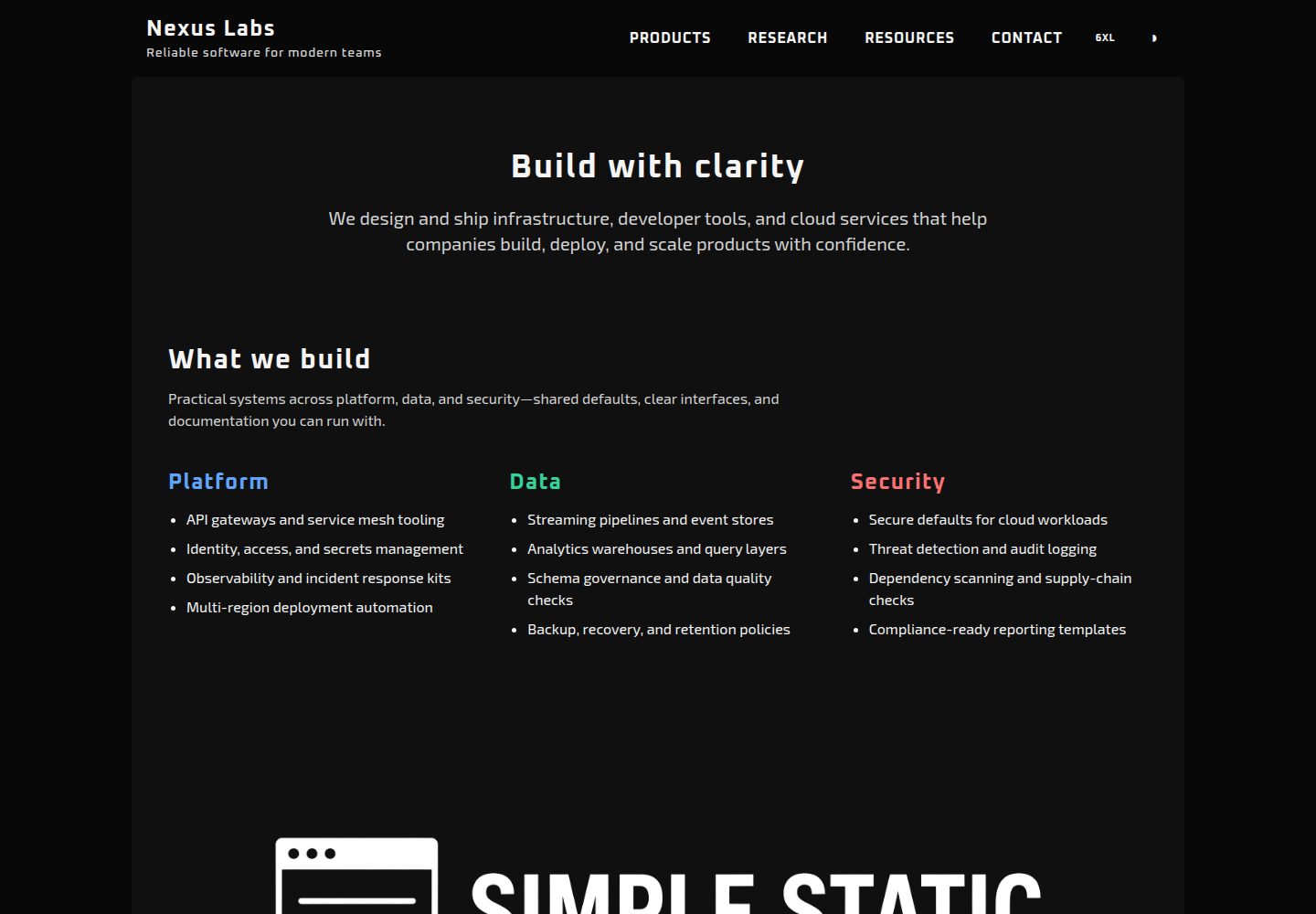
Desktop homepage1 / 3
Desktop captureTop of page
Actual screenshot captured by the server browser.
All pages & views 3
Screenshots show visual appearance; interactive behavior may differ.
Recorded 2026-10-02View source
What stands out
A quick read of the recorded project description.
Shared header and footer via Vite inline partials, no copy-pasting required
Six-color theme token system with the same variable names remapped under html.inverse, supporting light and dark modes
Self-hosted variable fonts and theme-aware banner images, no Google Fonts requests on first load
Optional Alpine.js and Anime.js; the example site runs without either
Third-party analytics code wrapped in markers, retained only in the build output
Template Details
SSWT (Simple Static Website Template) is a deliberately lightweight multi-page static website starter template. Pages are plain HTML, styles are composed of Tailwind CSS utility classes and Sass theme tokens, and the build tool is Vite. The template does not rely on a router or runtime framework; the example site itself runs without Alpine.js or Anime.js, which are provided as optional dependencies.
The template includes shared header and footer partials, six-color theme tokens (with light/dark mappings), content width toggling, self-hosted variable fonts, theme-aware banner images, third-party analytics code retained only in the build output, and a favicon and web manifest. Navigation, theme switching, and width toggling are handled by native JavaScript modules, and the mobile menu collapses below the md breakpoint.
Usage limitations: new pages must be manually registered in vite.config.js under rollupOptions.input; the theme may briefly flash when navigating between pages; theme and width preferences are persisted via localStorage. Third-party assets such as example images and fonts require separate license verification; BSD-2-Clause covers only the code itself.
Vitestarter
Is it right for your project?
Use Cases
- Developers who need a multi-page static site but do not want to introduce a frontend framework or router
- Those who want to quickly build customizable themed static pages using Tailwind CSS and Sass tokens
- Deploying the build output directly to static hosting such as GitHub Pages, Netlify, Cloudflare Pages, nginx, or S3
- As a starting skeleton for a small business website, product introduction page, or documentation site
Suitable For
- Frontend developers familiar with HTML, CSS, and basic JavaScript
- Static site projects that prefer a lightweight toolchain and do not want a runtime framework
- Showcase websites that need light/dark theme switching and content width adjustment
Getting started & customization
Use these recorded setup notes alongside the repository instructions for your chosen version.
- 1
After cloning the repository, run npm install, then npm run dev to start the development server
- 2
New pages require creating an HTML file under pages/ and registering it in vite.config.js under build.rollupOptions.input
- 3
Files starting with _ are partials and should not be added to rollupOptions.input
- 4
Production builds use npm run build, output to dist/, and can be previewed locally with npm run preview
- 5
Theme tokens are centralized in src/theme.scss; fonts, favicon, and images go in the public/ directory
License & source material
Usage conditions & limitations
Free to use · keep license noticeThis entry covers the free version in the public repository under the BSD-2-Clause license; the free scope is the code of that version and does not imply that external services or third-party assets are free.
Must comply with when using
- Free use, modification, commercial use, and distribution in source or binary form are permitted.
- Source distributions must retain the copyright notice, the two conditions, and the disclaimer; binary distributions must reproduce these in the documentation or accompanying materials.
- The code is provided as is; warranties and limitations of liability are governed by the original license and applicable law.
Additional costs & items to verify
- New pages are not automatically routed: you must create an HTML file under pages/ and manually register it in vite.config.js under build.rollupOptions.input, otherwise the page will not be included in the build output.
- Files starting with _ (such as _header.html and _footer.html) are inline partials, not standalone routes, and should not be added to rollupOptions.input, or they will be treated as pages.
- The theme may briefly flash when navigating between pages: the markup renders first, then the head script applies the localStorage preference; the flash is more noticeable in Vite development mode because CSS is loaded via JS.
- Third-party scripts such as analytics must be wrapped with PROD_ONLY_START/END markers; the plugin strips them in the development server and retains them only in the build output. Unwrapped third-party code is not handled automatically.
- The template does not include a CMS, hosted search, form backend, or component library; features such as form submission and search require integrating external services yourself.
- Form controls, button groups, flash/toast, modals, pagination, breadcrumbs, etc. are only 'planned' items on the example resources page; the template does not provide them and they must be implemented with HTML and classes.
- Fonts are self-hosted variable font files (Oxanium, Space Grotesk, Exo 2) whose licenses require separate verification; BSD-2-Clause covers only the code, not assets such as fonts and images.
- Theme banner images are switched via CSS variables; you must provide both light and dark image assets, otherwise the banner will not change when switching themes.
- Demo images, fonts, icons, and other third-party assets require verification under their respective licenses and cannot be judged solely by the code's BSD-2-Clause license.
- External services such as domains, hosting, databases, payments, or AI may incur additional charges.
View Original Text Basis
Redistribution and use in source and binary forms, with or without modification, are permitted
Original License Text
Add a page: 1. Create `pages/about.html` (copy an existing page). 2. Register it in `vite.config.js` under `build.rollupOptions.input`.
Original README
Files starting with `_` are partials, not routes — do not add them to `rollupOptions.input`.
Original README
Moving between pages can still flash the opposite theme for a frame: markup paints first (`class="inverse"` or not), then the head script applies the stored preference. Vite dev is worse because CSS arrives via JS.
Original README
Wrap third-party snippets in markers. The Vite plugin strips them from the dev server and leaves them in the build.
Original README
No CMS. No hosted search. No form backend. No component library with fifty variants.
Original README
Planned on the sample resources list and not required to ship a site: form controls, button groups, flash/toast, modals, pagination, breadcrumbs.
Original README
Variable fonts in `public/font/` (Oxanium, Space Grotesk, Exo 2). No Google Fonts request on first paint.
Original README
https://github.com/alkontek/sswt/blob/master/LICENSEhttps://github.com/alkontek/sswt/blob/master/README.mdBanners swap with the theme through a CSS variable, not a second `<img>`:
Original README
Compiled by DeepSeek based on repository license and README ·2026-10-02. Results only cover the materials read; dependencies, images, fonts, and subsequent term changes are subject to their respective original texts.
Project checks & description sources
Template Information
- Source platforms
- GitHub
- Documentation and maintenance reference score
- More documented · 83 / 100
- Technologies
- Vite
- Website type
- Starter
How this score is calculated
Our heuristic uses license records (up to 30), a demo link (12), a preview (10), stars (15), recorded maintenance (15), description completeness (8), feature records (5) and classification data (5). It is not a code, security or performance test, or a Google score. A link does not establish tested functionality.
What to verify for this project
- Repository update recorded
- 2026-09-09
- Screenshot last checked
- 2026-10-02
A demo link is listed. Check it with your own content and viewport sizes; its presence does not confirm that forms, authentication or payments work.
The catalog identifies Vite as the primary stack. Check the actual dependency manifest and lockfile for versions and hosting requirements. These notes use recorded metadata, not a code audit or a deployment test.
Use a selection guide →How this description was prepared
AI-assisted description based on catalog records and repository material. Repository authors are not automatically the reviewers of this description.
Automatically checked against source and license rules; no manual editorial review.
Inspect the recorded source material
SHA-256: 6538c83cffcc5c52860957ea43881c36c3e1685db53b3d06f9512d2a345ac105
2026-10-02T08:39:26.284Z
Source file / repository<!-- SPDX-FileCopyrightText: 2026 ALKONTEK <[email protected]> --> <!-- SPDX-License-Identifier: BSD-2-Clause --> # Simple Static Website Template A multi-page static site starter that stays small on purpose. HTML pages, a short CSS token system, and a few vanilla JS modules. Vite builds it. Tailwind and Sass style it. Alpine.js and Anime.js are on the shelf if you need them — the sample site does not require either one to run. The layout is **fully responsive**: fluid grids, adaptive spacing, and a desktop nav that collapses to a mobile menu. **Example website:** [https://sswt.tekfed.org](https://sswt.tekfed.org)  --- ## Why this exists Most "simple" starters are either too bare (one HTML file, no theme) or too heavy (a framework, a component library, a CMS). This template sits in the middle: - **Simple** — plain HTML pages, no router, no runtime framework required, no build plugins beyond Vite itself. - **Robust** — multi-page production output, theme tokens that survive light/dark, persisted UI prefs, a shared layout shell, and a small set of components you can copy without learning a new API. - **Responsive** — works from narrow phones to wide desktops without a separate mobile site or framework. Five runtime/dev packages. That is the whole toolchain. | Package | Kind | What it does | |--------------------------------------|------------------|-------------------------------------------------| | `vite` | dev | Dev server, bundling, multi-page build | | `tailwindcss` + `vite` + `postcss` | dev | Utility layout | | `sass` | dev | Theme tokens and component styles | | `alpinejs` | optional runtime | Declarative UI when you outgrow a click handler | | `animejs` | optional runtime | Motion, when you want it | **No store, no compiler, no hydration.** --- ## Quick start ```bash git clone https://github.com/alkontek/simple_static_website_template.git cd simple_static_website_template npm install npm run dev ``` | Script | Result | |-------------------|------------------------------------------------------------| | `npm run dev` | Vite dev server. Pages in `pages/` are served from `/` | | `npm run build` | Production build into `dist/` (HTML flattened to the root) | | `npm run preview` | Serve the production build locally | Drop `dist/` on any static host: GitHub Pages, Netlify, Cloudflare Pages, nginx, S3. --- ## What you get ### Multipage, still static Pages live in `pages/`. Vite is configured with one input per page. Two tiny plugins keep URLs honest: - **dev** — `/products.html` is rewritten to `/pages/products.html` - **build** — HTML is emitted at `dist/products.html`, not `dist/pages/products.html` Add a page: 1. Create `pages/about.html` (copy an existing page). 2. Register it in `vite.config.js` under `build.rollupOptions.input`. No file-based router. No magic folders. ### Shared header and footer Chrome is not copy-pasted. `pages/_header.html` and `pages/_footer.html` are inlined by Vite in both `dev` and `build`: ```html <body class="flex min-h-dvh flex-col"> <!-- include:_header.html --> <main class="flex min-h-0 flex-1 flex-col">…</main> <!-- include:_footer.html --> </body> ``` Files starting with `_` are partials, not routes — do not add them to `rollupOptions.input`. Edit a partial and the dev server reloads every page. ### A six-color theme, not a design system Tokens live in `src/theme.scss` as CSS variables. Each color has three stops: `lum` (lighter), base, and `dark`. | Token | Role | |-----------------|--------------------------------| | `paper-white` | Surfaces and page background | | `ink-black` | Primary text and chrome | | `neutral-gray` | Borders, captions, muted UI | | `signal-blue` | Links and primary actions | | `alert-red` | Errors and destructive actions | | `confirm-green` | Success and positive state | The same names are remapped under `html.inverse`. Change the hex values once; light and dark stay in sync. ### Inverse theme that does not flash A few lines in `<head>` read `localStorage` before paint and set `html.inverse` / `data-site-width`. The toggle button only flips the class and persists the choice. ```html <script> try { if (localStorage.getItem('theme') === 'inverse') { document.documentElement.classList.add('inverse'); } } catch (_) {} </script> ``` Default the homepage to inverse by putting `class="inverse"` on `<html>`. The toggle still overrides it. > #### Navigation flash > Moving between pages can still flash the opposite theme for a frame: markup paints first (`class="inverse"` or not), then the head script applies the stored preference. Vite dev is worse because CSS arrives via JS. If you only need one variant, there is nothing to reconcile — leave `html` as light or `class="inverse"`, drop `#theme_toggle`, and skip the theme `localStorage` script. The switch can stay disabled. ### Content width you can feel `4xl` → `6xl` (default) → `full`. One attribute on `<html>`: ```html <html data-site-width="6xl"> ``` Header, main, and footer all read `--site-max-width`. Preference is stored as `siteWidth`. ### Layout shell Every sample page uses the same three regions: ```html <body class="flex min-h-dvh flex-col"> <!-- include:_header.html --> <main class="flex min-h-0 flex-1 flex-col"> <div class="container main-behavior">…</div> </main> <!-- include:_footer.html --> </body> ``` `header-behavior`, `main-behavior`, and `footer-behavior` keep padding and max-width consistent. `padded-content-0` / `-1` / `-2` are the only inner-spacing presets. ### Desktop nav + mobile menu Plain buttons. No Alpine required. - `#nav_toggle` / `#nav_menu` — hamburger below `md` - `#theme_toggle` — light / inverse - `#width_toggle` — width cycle, desktop only ### Self-hosted fonts and theme-aware images Variable fonts in `public/font/` (Oxanium, Space Grotesk, Exo 2). No Google Fonts request on first paint. Banners swap with the theme through a CSS variable, not a second `<img>`: ```html <img src="/images/banner-lum.png" alt="Banner" class="theme-banner mx-auto"> ``` `html.inverse` points `--theme-banner` at the dark asset. ### Analytics only in production Wrap third-party snippets in markers. The Vite plugin strips them from the dev server and leaves them in the build. ```html <!-- PROD_ONLY_START --> <script async src="https://www.googletagmanager.com/gtag/js?id=G-XXXXXXXXXX"></script> <!-- PROD_ONLY_END --> ``` ### Favicons and a web manifest `public/` already has the usual PNG/ICO set plus `site.webmanifest`. They copy to the site root as-is. --- ## Feature examples ### Theme classes Each `theme-*` class colors **text** by default. Add a modifier for fill, outline, or the lighter stop. Hover helpers opt into the darker or lighter shade. ```html <p class="theme-ink-black">Body copy</p> <div class="theme-ink-black bg">Dark panel (text still uses the token)</div> <a class="theme-signal-blue border">Link-colored outline</a> <span class="theme-neutral-gray lum">Muted caption</span> <button class="theme-signal-blue hover-dark">Darker on hover</button> ``` | Modifier | Effect | |--------------|-------------------------| | *(none)* | Text color = base token | | `lum` | Lighter text | | `bg` | Background fill | | `border` | Border color | | `hover-dark` | Darker shade on hover | | `hover-lum` | Lighter shade on hover | Combine freely: `theme-alert-red bg hover-dark`. ### Cards and chips ```html <div class="theme-card border rounded-md p-4 space-y-2"> <h2 class="theme-signal-blue text-xl">Starter Kit</h2> <p class="neutral-gray-dark">HTML pages, tokens, and a layout shell.</p> </div> <span class="theme-signal-blue bg rounded px-2 py-1 text-sm paper-white">signal</span> <span class="theme-confirm-green bg rounded px-2 py-1 text-sm paper-white">confirm</span> <span class="theme-alert-red bg rounded px-2 py-1 text-sm paper-white">alert</span> <span class="theme-neutral-gray border rounded px-2 py-1 text-sm">neutral</span> ``` `.theme-card` is a raised surface (`paper-white-dark`). Add `.border` when you want an edge. `.theme-hover-accent` is the nav/button hover: ink text, signal-blue on hover, focus ring included. ### Resource tables One table class, four border themes. ```html <table class="resource-table blue-table"> <thead> <tr> <th>Layer</th> <th>Choice</th> <th>Role</th> </tr> </thead> <tbody> <tr> <td>Build</td> <td>Vite</td> <td>Dev server and production bundling</td> </tr> <tr> <td>Style</td> <td>Tailwind CSS + Sass</td> <td>Utility layout and theme stylesheets</td> </tr> </tbody> </table> ``` Swap `blue-table` for `gray-table`, `green-table`, or `red-table`. First-column cells use the luminous gray so scans stay readable in both themes. ### Dividers ```html <div class="divider-bar divider-bar-blue"></div> <div class="divider-bar divider-bar-green divider-bar-my-4"></div> <div class="divider-bar divider-bar-red divider-bar-my-6"></div> <div class="divider-bar divider-bar-white divider-bar-my-8"></div> ``` Animated gradient bars in signal, confirm, alert, or ink. Spacing helpers: `divider-bar-my-4` through `divider-bar-my-12`. ### Status labels in lists Used on the resources page to mark maturity without extra components: ```html <li>Inverse mode (<code>html.inverse</code>) <small class="theme-confirm-green">stable</small></li> <li>Motion helpers (Anime.js available) <small class="theme-signal-blue">partial</small></li> <li>Modal dialogs <small class="theme-alert-red">planned</small></li> ``` ### A contact block in two cards ```html <div class="grid grid-cols-1 md:grid-cols-2 gap-4"> <div class="theme-card rounded-md p-4 text-center space-y-2"> <h2 class="text-xl">General</h2> <p class="contact-text mt-0">Questions about the template.</p> <p><a href="mailto:[email protected]">[email protected]</a></p> </div> <div class="theme-card rounded-md p-4 text-center space-y-2"> <h2 class="text-xl">Business</h2> <p class="contact-text mt-0">Partnerships and custom work.</p> <p><a href="mailto:[email protected]">[email protected]</a></p> </div> </div> ``` --- ## Project layout ``` ├── pages/ HTML entries (one file = one URL) │ ├── index.html │ ├── _header.html Shared header + nav (inlined) │ ├── _footer.html Shared footer (inlined) │ ├── products.html │ ├── research.html │ ├── resources.html │ └── contact.html ├── public/ Copied to site root as-is │ ├── font/ Variable TTF files │ ├── images/ Banners (light + dark) │ ├── favicon.ico Low-res website icon (default) │ ├── favicon*.png High-res website icons │ └── site.webmanifest ├── src/ │ ├── styles.css Tailwind + Sass entry │ ├── styles.scss Layout, type, nav, tables │ ├── theme.scss Tokens and theme-* utilities │ ├── site.js Bootstraps navigation │ └── nav.js Menu, theme, width ├── vite.config.js Vite and page configuration └── postcss.config.cjs ``` Keep pages in `pages/`. Keep fonts, favicons, and images in `public/`. Keep tokens in `theme.scss`. That is the contract. --- ## Customizing **Rename the site.** Change the name and slogan in `pages/_header.html` and the line in `pages/_footer.html`. Vite bakes them into every page. **Retheme.** Edit the hex values in `:root` and `html.inverse` inside `src/theme.scss`. Class names stay the same. **Add a font.** Drop a file in `public/font/`, add an `@font-face` in `styles.scss`, register it in `@theme`. **Use Alpine or Anime.** They are already in `package.json`. Import them from a page module when you actually need a dropdown state or a motion sequence. Until then, they do not ship in the critical path of `site.js`. **Add a page to the build.** ```js // vite.config.js input: { index: page('index.html'), products: page('products.html'), // ... // nested admin: page('admin', 'index.html'), adminSettings: page('admin', 'settings.html'), } ``` --- ## What this is not No CMS. No hosted search. No form backend. No component library with fifty variants. Planned on the sample resources list and not required to ship a site: form controls, button groups, flash/toast, modals, pagination, breadcrumbs. If you need those, add them as HTML and a few classes. The token layer is already there. --- ## Sample pages | Page | What it demonstrates | |------------------------|---------------------------------------------------------| | `pages/index.html` | Hero, three-column lists, theme banner, audience copy | | `pages/products.html` | Card grid, chips, colored dividers, status copy | | `pages/research.html` | Long-form sections on a shared shell | | `pages/resources.html` | Feature inventory, stack table, colored resource tables | | `pages/contact.html` | Two-up `theme-card` contact blocks | Replace the "Nexus Labs" copy. Keep the classes.
Explore similar templates
Compare previews and descriptions within the same stack and category.

react-starter-kit
A full-stack SaaS monorepo starter built on Vite and React, with Bun, TypeScript, tRPC, Drizzle ORM, Better Auth, Stripe, and Cloudflare Workers. It includes email OTP, passkey, Google OAuth, organizations, subscription billing, Drizzle migrations, seed scripts, and Terraform infrastructure.
Vite · SaaS

cove
Cove is a minimal TanStack Start starter template maintained by mugnavo, integrating React, TanStack Router/Query, Tailwind CSS, shadcn/ui, Drizzle ORM with PostgreSQL, Better Auth, Vite Plus, and Nitro.
Vite · SaaS

vite-react-boilerplate
A production-ready Vite + React starter template with TypeScript, Tailwind CSS, TanStack Router/Query/Table, Storybook, React Hook Form + Zod, Vitest and Playwright testing, plus Husky/Commitizen/Commitlint commit conventions.
Vite · Starter

react-vite-admin
A backend management starter built on Vite and React, integrating Recoil, React Query, TypeScript, and Axios, with Ant Design-style interface screenshots. Suitable as a starting point for management-side projects, licensed under MIT, with Chinese documentation and common scripts.
Vite · Admin dashboard

typescript-react_best_practices-vite_template
A Vite + React + TypeScript starter template by CodelyTV, preconfigured with Jest and React Testing Library unit tests, Cypress end-to-end tests, ESLint and Prettier using Codely's shared configuration, GitHub Actions workflows, a Makefile, and Sass.
Vite · Starter

cloudflare-starter-kit
A Cloudflare Workers project scaffolding template maintained by kriasoft, using Vite and TypeScript, with three built-in workspaces: api, app, and edge, and preconfigured local testing, multiple environments, and a GitHub Actions deployment workflow.
Vite · Starter