在 users 表迁移中新增 role 字段,取值 admin、user、viewer
Laravel后台启动器
laravel10-multiauthentication-starter-pack — Laravel 后台模板
作者 AndrejWeb
基于 Laravel 的多角色认证演示项目,通过 role 字段、中间件与 Blade 指令区分 admin、user、viewer 三类用户的可见内容。
看看你的网站会是什么样
浏览真实页面截图,比较内容排版与手机效果。点击下方缩略图切换,放大查看整页细节。
目前有 1 张原始预览,可打开完整图片查看设计细节。
截图用于了解视觉与布局,交互效果请以实际项目为准。
采集于 2026-10-13查看来源
值得关注的模板亮点
从已有项目资料中,快速了解它的特点。
User 模型提供 isAdmin、isUser、isViewer 三个角色判断方法
为每种用户类型提供独立中间件,并在 Kernel 中注册别名后绑定到路由
通过 BladeServiceProvider 注册 ifAdmin、ifUser、ifViewer 指令,按角色渲染导航与页面内容
未授权访问会被重定向到首页
UserSeeder 预置三个示例账号,可直接登录体验不同角色
模板详细介绍
这是一个 Laravel 演示应用,用于展示同一套页面如何按用户类型呈现不同内容。项目在 users 表迁移中新增 role 字段,取值建议为 admin、user、viewer;User 模型提供 isAdmin、isUser、isViewer 三个判断方法。访问控制由 AdminMiddleware、UserMiddleware、ViewerMiddleware 三个中间件实现,在 Kernel 中注册别名后绑定到 routes/web.php 的路由;未通过校验的请求会被重定向到首页。界面层通过 BladeServiceProvider 注册 ifAdmin、ifUser、ifViewer 三个自定义指令,在导航和页面内容中按角色渲染对应菜单与区块。项目附带 UserSeeder,用于在 users 表中写入三个示例账号,便于分别登录体验各角色的授权范围。README 给出的启动流程包含安装 Breeze 认证脚手架、执行迁移与填充、启动前端开发服务器和本地服务,属于演示性质的起步代码,未说明生产部署、权限粒度扩展或第三方素材授权情况。
Laravel后台启动器
适合你的项目吗?
适用场景
- 学习 Laravel 中基于角色字段的访问控制实现方式
- 为后台或管理界面搭建多角色登录与内容区分的起步结构
- 演示中间件与 Blade 自定义指令配合完成按角色渲染
- 作为教学或原型项目,验证不同用户类型看到不同菜单与页面的效果
适合人群
- 正在学习 Laravel 认证与授权机制的开发者
- 需要多角色演示原型用于教学或内部讲解的团队
- 希望参考 role 字段加中间件方案实现角色隔离的项目
上手与定制指南
结合仓库当前版本的说明,按下面的资料检查内容、配置与运行要求。
- 1
将 .env.example 复制或重命名为 .env,并填写数据库连接信息
- 2
依次执行 composer install、php artisan breeze:install、php artisan migrate、npm install、npm run dev
- 3
另开终端执行 php artisan db:seed 写入示例用户,再运行 php artisan serve 启动本地服务
- 4
示例账号的邮箱与密码可在 app/database/seeders/UserSeeder.php 中查看
- 5
演示图片等第三方素材需按各自许可单独核对,代码的 MIT 许可不覆盖这些素材
授权与来源资料
使用条件与限制
免费使用 · 保留许可声明本次收录的是公开仓库中采用 MIT 许可的免费版本;免费范围为该版本代码,不代表外部服务或第三方素材免费。
使用时需要遵守
- 允许免费使用、修改、商用和分发该版本代码。
- 分发代码副本或实质性部分时,保留原作者版权声明和完整 MIT 许可声明。
- 代码按现状提供;担保与责任限制以原许可证及适用法律为准。
额外费用与待核对事项
- 演示图片、字体、图标及其他第三方素材需按各自许可核对,不能仅凭代码的 MIT 许可判断。
- 域名、托管、数据库、支付或 AI 等外部服务可能另外收费。
- 项目自述为演示应用,仅用于展示三种用户类型看到不同内容,并非可直接用于生产的完整产品。
- 使用前必须自行配置数据库连接信息,需要本地或外部数据库服务。
- 示例账号依赖执行 db:seed 填充,账号邮箱与密码需在 UserSeeder.php 中查看。
- 默认以本地 localhost:8000 运行,属于本地开发演示环境。
查看原文依据
Permission is hereby granted, free of charge
许可证原文
This is a demo app which demonstrates different content being shown for 3 user types: admin, user and viewer.
README 原文
Copy / rename `.env.example` to `.env`. Enter your database credentials in `.env`
README 原文
Open another terminal and run the db:seed command, so you have 3 users added in the table `users` via the seeder `UserSeeder.php`
README 原文
https://github.com/AndrejWeb/laravel10-multiauthentication-starter-pack/blob/main/LICENSEhttps://github.com/AndrejWeb/laravel10-multiauthentication-starter-pack/blob/main/README.mdNow the application should be running at `http://localhost:8000`
README 原文
DeepSeek 根据仓库许可证和 README 整理 ·2026-10-13。结果仅覆盖已读取资料,依赖、图片、字体及后续条款变更以各自原文为准。
项目核对记录与介绍依据
模板资料
- 来源平台
- GitHub
- 资料与维护参考分
- 资料一般 · 61 / 100
- 技术栈
- Laravel
- 网站类型
- 后台 · 启动器
这个分数如何计算
本站按许可资料(最高30分)、演示链接(12分)、预览图(10分)、Star数(15分)、记录的维护时间(15分)、描述完整度(8分)、功能记录(5分)和分类资料(5分)计算。它不是代码、安全或性能测试,也不是 Google 评分;有链接不代表已实测可用。
这个项目需要核对什么
- 记录的仓库更新时间
- 2023-10-25
- 截图检查日期
- 2026-10-13
目前没有记录演示链接。请依据仓库说明在本地评估;仅凭截图无法确认交互行为。
目录记录的主要技术栈是 Laravel。请通过依赖清单和锁文件核对实际版本与托管要求。这些说明基于收录资料,不代表代码审计或部署实测。
查看具体选型方法 →介绍的制作与核对状态
介绍由 AI 辅助整理目录与仓库资料。仓库作者不等于这篇介绍的审核者。
审核声明: [email protected] · 2026-10-13
查看当时使用的来源资料
SHA-256: 0d5b18685dc8d7a493b5debac3676268d8d45d00ad87856616a376ade3d75941
2026-10-13T10:04:07.167Z
来源文件 / 仓库<p align="center"><a href="https://laravel.com" target="_blank"><img src="https://raw.githubusercontent.com/laravel/art/master/logo-lockup/5%20SVG/2%20CMYK/1%20Full%20Color/laravel-logolockup-cmyk-red.svg" width="400" alt="Laravel Logo"></a></p>
# Laravel 10 Multiauthentication Starter Pack
This is a demo app which demonstrates different content being shown for 3 user types: admin, user and viewer. Depending on the user type, the user can access the authorized content. Admins can see admin intended content, users can see user intended content and viewers can see viewer intended content.
### How it's done?
In the migration `create_users_table`, a new field called `role` is added
`$table->string('role');`
Suggested values for this column in the database table are: `admin`, `user`, `viewer`
In the model `User` there are 3 functions `isAdmin`, `isUser`, `isViewer` which check the user type. Here's the code for `isAdmin`
```
public function isAdmin()
{
return $this->role === 'admin';
}
```
There are middlewares for each user type - `AdminMiddleware`, `UserMiddleware`, `ViewerMiddleware`. Their code is similar. Here's the code for `AdminMiddleware`
```
public function handle(Request $request, Closure $next): Response
{
if (auth()->check() && auth()->user()->isAdmin()) {
return $next($request);
}
return redirect('/');
}
```
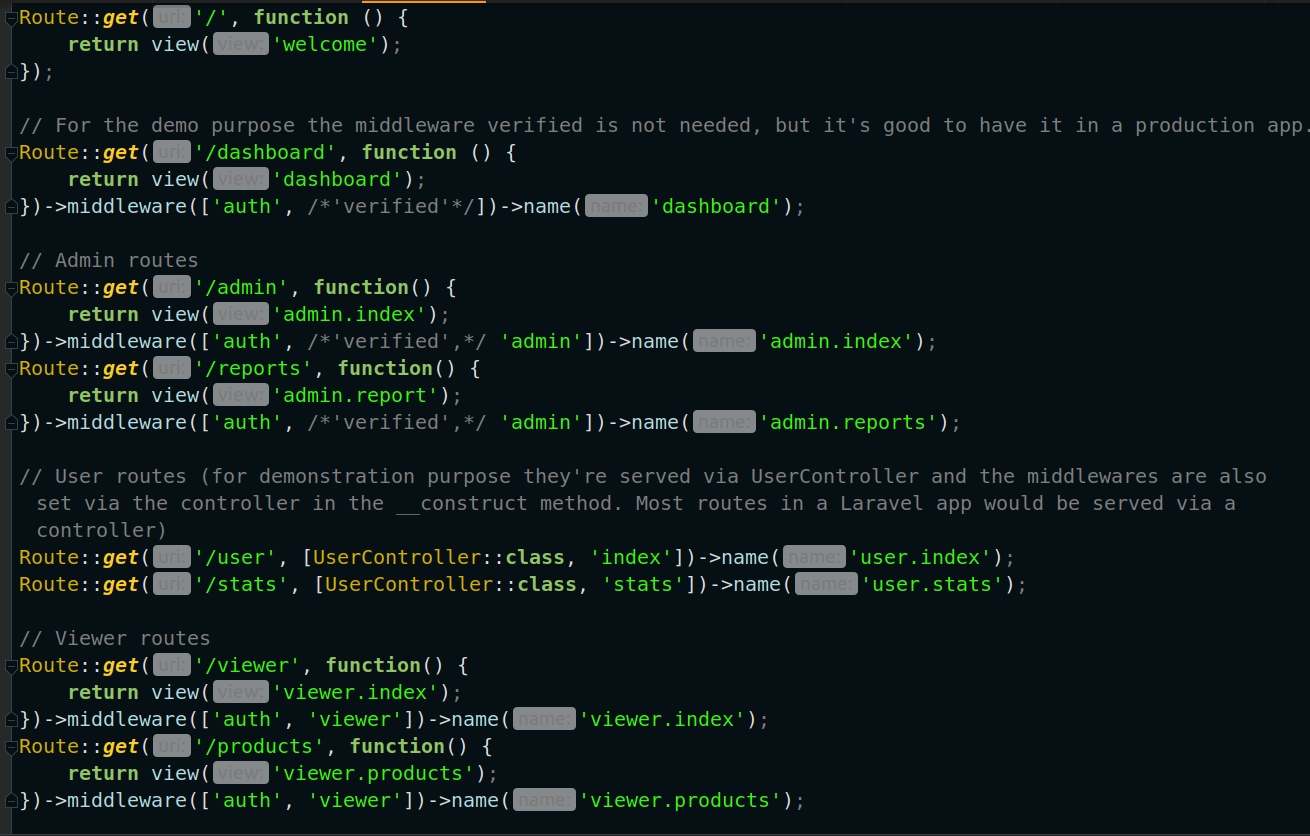
The middlewares are given alias names in `app\Http\Kernel.php` in the array `protected $middlewareAliases`. Then the middlewares are assigned to routes in `routes\web.php`
In order to render the appropriate menu items for each user and user specific page content, 3 custom Blade directive are created - `ifAdmin`, `ifUser`, `ifViewer`. Check out `app\Providers\BladeServiceProvider.php` file for this and `resources\views\layouts\navigation.blade.php` how they are used.
### How to use the app
Download / clone the repository.
Copy / rename `.env.example` to `.env`. Enter your database credentials in `.env`
Run these commands in terminal in the app's root directory:
1) `composer install`
2) `php artisan breeze:install`
3) `php artisan migrate`
4) `npm install`
5) `npm run dev`
Open another terminal and run the db:seed command, so you have 3 users added in the table `users` via the seeder `UserSeeder.php` located in `app\database\seeders\UserSeeder.php`. In this file you can see the users email and password. Use them to login later.
6) `php artisan db:seed`
7) `php artisan serve`
Now the application should be running at `http://localhost:8000`
Login as each user type to see the user intended content. Try to access route which you are not authorized to view and you will be redirected to home page.
### Screenshots
<img src="https://i.imgur.com/PDdvT68.jpg" />
<img src="https://i.imgur.com/jELTO4P.jpg" />
<img src="https://i.imgur.com/9YyKnTn.jpg" />
<img src="https://i.imgur.com/B1bKHGz.jpg" />
<img src="https://i.imgur.com/YD9mL8B.jpg" />
<img src="https://i.imgur.com/W6q3r9k.jpg" />
看看同类模板
对比同技术栈与用途的模板,找到更适合的视觉与内容结构。

sage
WordPress starter theme with Laravel Blade components and templates, Tailwind CSS, and block editor support
Laravel · 启动器

wave
Wave - The Software as a Service Starter Kit, designed to help you build the SAAS of your dreams 🚀 💰
Laravel · SaaS

coreui-free-laravel-admin-template
CoreUI Free Laravel Bootstrap Admin Template
Laravel · 后台

sneat-bootstrap-html-laravel-admin-template-free
Most Powerful & Comprehensive Free Bootstrap 5 HTML Laravel Admin Dashboard Template built for developers!
Laravel · 后台

filament-starter
A beautiful starting point for your next TALL stack project using Filament. ⚡
Laravel · 启动器

electrik
Laravel SaaS starter kit: auth, teams, Stripe billing, and Slate 3 — Composer package for Laravel 12
Laravel · SaaS