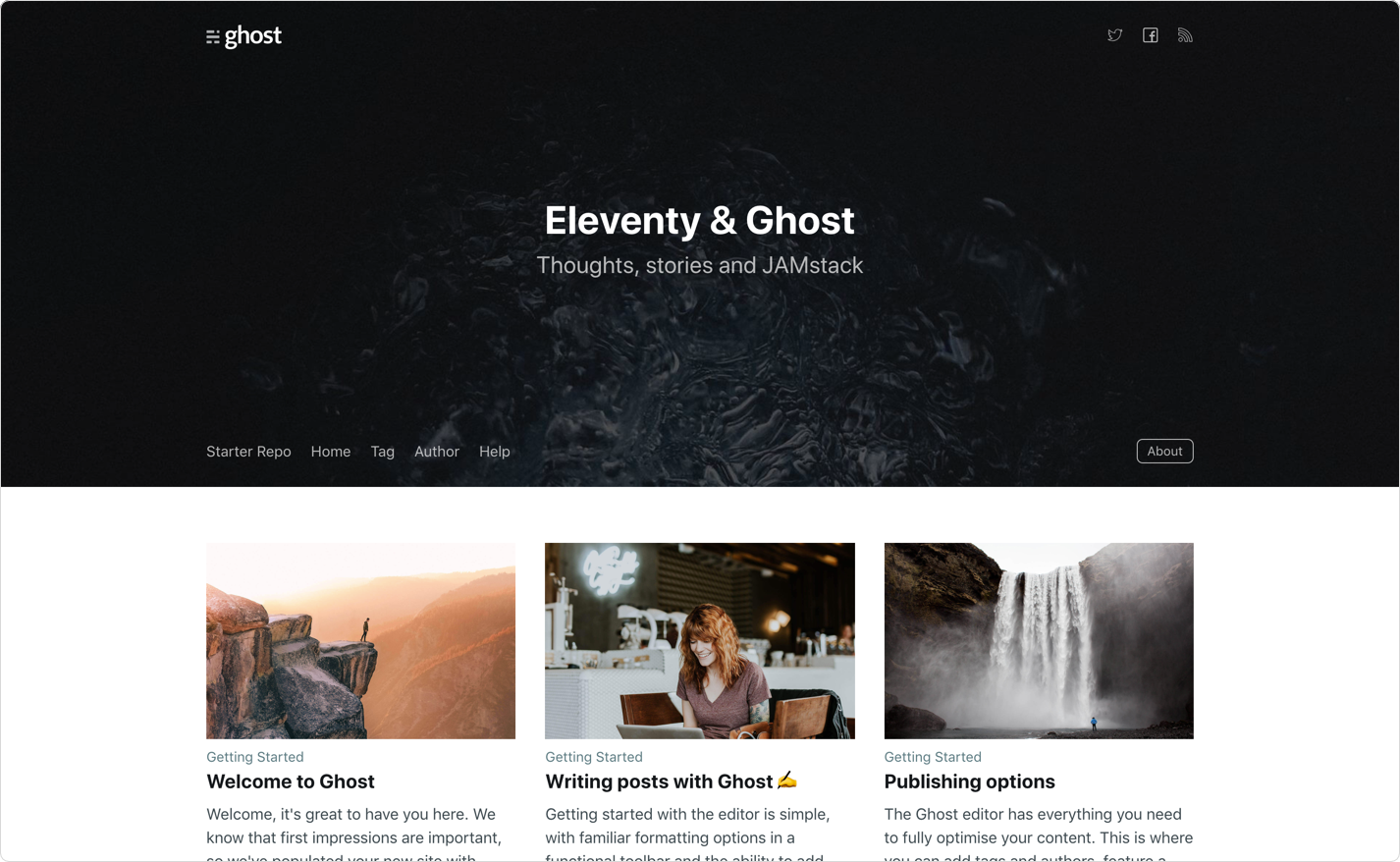
使用 Ghost 作为无头 CMS,Eleventy 在构建时生成完全静态的网站
Eleventy启动器
eleventy-starter-ghost — Eleventy 启动器模板
作者 Ashutosh102
基于 Eleventy 与 Ghost 内容 API 的静态站点启动器,从 Ghost 拉取内容生成完全静态的网站,并提供 Netlify 部署配置。
看看你的网站会是什么样
浏览真实页面截图,比较内容排版与手机效果。点击下方缩略图切换,放大查看整页细节。
目前有 1 张原始预览,可打开完整图片查看设计细节。
截图用于了解视觉与布局,交互效果请以实际项目为准。
采集于 2026-09-30查看来源
值得关注的模板亮点
从已有项目资料中,快速了解它的特点。
默认从 https://eleventy.ghost.io 拉取演示内容,可通过 .env 中的 contentApiKey 切换到自己的 Ghost 站点
内置 netlify.toml、headers.njk、redirects.njk 三个 Netlify 部署相关配置文件
headers.njk 输出默认安全响应头到 /_headers,redirects.njk 输出自定义重定向到 /_redirects
可在 Ghost 中开启 Make this site private 关闭其自带主题前端,并输出 noindex 让 Eleventy 前端负责 SEO
模板详细介绍
这是一个把 Ghost 当作无头 CMS、用 Eleventy 生成静态页面的启动器模板。构建时通过 Ghost 的 Content API 读取内容,输出完全静态的站点,因此前端不依赖 Ghost 主题渲染。默认情况下,模板会从 https://eleventy.ghost.io 这个 Ghost 演示站点拉取内容,方便先跑通流程。
要接入自己的内容,需要在 .env 配置文件中填写 Ghost 的凭据,其中 contentApiKey 可在 Ghost 后台的 Integrations 页面获取。README 说明 Ghost 最低版本要求为 2.10.0。开发时运行 yarn start 启动本地服务,yarn build 用于本地构建。
仓库内包含三个面向 Netlify 的配置文件:netlify.toml 负责构建设置,headers.njk 生成默认安全响应头(输出到 /_headers),redirects.njk 生成自定义域名重定向(输出到 /_redirects)。部署到 Netlify 后,可以再配置 Ghost 与 Netlify 的集成,用部署钩子在 Ghost 内容变化时触发重新构建。
模板还提到一种优化方式:在 Ghost 设置中开启 Make this site private,关闭 Ghost 自带 Handlebars 主题的前端输出,同时加上 noindex 元标签,让 Eleventy 生成的前端成为 SEO 的唯一来源。需要注意的是,该模板最后更新于 2022 年,依赖版本与 Ghost API 的兼容性需自行核对;演示图片等第三方素材的授权也需单独确认。
Eleventy启动器
适合你的项目吗?
适用场景
- 希望用 Ghost 编辑内容、但对外发布纯静态页面的网站
- 准备部署到 Netlify,并需要预置构建、安全头和重定向配置的项目
- 想通过 Ghost 与 Netlify 集成,在内容更新时自动触发站点重建
适合人群
- 已在使用或愿意使用 Ghost 作为内容后台的开发者
- 需要静态输出、不依赖服务端渲染的博客或内容站点
- 以 Netlify 为主要托管平台的项目
上手与定制指南
结合仓库当前版本的说明,按下面的资料检查内容、配置与运行要求。
- 1
从源码安装:git clone 仓库后进入目录,运行 yarn 安装依赖
- 2
开发运行 yarn start,本地构建运行 yarn build
- 3
默认内容来自 https://eleventy.ghost.io;使用自己的 Ghost 需编辑 .env,contentApiKey 在 Ghost 后台 Integrations 页面获取
- 4
README 说明 Ghost 最低版本要求为 2.10.0
- 5
部署到 Netlify 可使用仓库内的 netlify.toml、headers.njk、redirects.njk;Content API Key 也可改为在 Netlify 环境变量中设置
授权与来源资料
使用条件与限制
免费使用 · 保留许可声明本次收录的是公开仓库中采用 MIT 许可的免费版本;免费范围为该版本代码,不代表外部服务或第三方素材免费。
使用时需要遵守
- 允许免费使用、修改、商用和分发该版本代码。
- 分发代码副本或实质性部分时,保留原作者版权声明和完整 MIT 许可声明。
- 代码按现状提供;担保与责任限制以原许可证及适用法律为准。
额外费用与待核对事项
- 默认从 Ghost 官方演示站点 https://eleventy.ghost.io 拉取内容,需自行替换为自有 Ghost 站点。
- 使用自有内容需在 .env 中填写 Ghost 凭据,contentApiKey 须在 Ghost 后台 Integrations 页面获取,即依赖外部 Ghost 服务与账号。
- 要求 Ghost 版本不低于 2.10.0,低于该版本可能无法正常使用。
- 部署需使用 Netlify 账号,属于外部托管服务,可能产生相应服务费用。
- 内容更新自动重建需额外配置 Ghost 与 Netlify 集成,依赖两个外部服务的配合。
- 演示图片、字体、图标及其他第三方素材需按各自许可核对,不能仅凭代码的 MIT 许可判断。
- 域名、托管、数据库、支付或 AI 等外部服务可能另外收费。
查看原文依据
Permission is hereby granted, free of charge
许可证原文
By default, the starter will populate content from a default Ghost install located at https://eleventy.ghost.io.
README 原文
To use your own install, edit the `.env` config file with your credentials. You can find your `contentApiKey` in the "Integrations" screen in Ghost Admin.
README 原文
The minimum required version for Ghost is `2.10.0` in order to use this starter without issues.
README 原文
To deploy to your Netlify account, hit the button below.
README 原文
https://github.com/Ashutosh102/eleventy-starter-ghost/blob/main/LICENSEhttps://github.com/Ashutosh102/eleventy-starter-ghost/blob/main/README.mdOnce deployed, you can set up a [Ghost + Netlify Integration](https://docs.ghost.org/integrations/netlify/) to use deploy hooks from Ghost to trigger Netlify rebuilds.
README 原文
DeepSeek 根据仓库许可证和 README 整理 ·2026-10-01。结果仅覆盖已读取资料,依赖、图片、字体及后续条款变更以各自原文为准。
项目核对记录与介绍依据
模板资料
- 来源平台
- GitHub
- 资料与维护参考分
- 资料一般 · 56 / 100
- 技术栈
- Eleventy
- 网站类型
- 启动器
这个分数如何计算
本站按许可资料(最高30分)、演示链接(12分)、预览图(10分)、Star数(15分)、记录的维护时间(15分)、描述完整度(8分)、功能记录(5分)和分类资料(5分)计算。它不是代码、安全或性能测试,也不是 Google 评分;有链接不代表已实测可用。
这个项目需要核对什么
- 记录的仓库更新时间
- 2022-05-14
- 截图检查日期
- 2026-10-01
目前没有记录演示链接。请依据仓库说明在本地评估;仅凭截图无法确认交互行为。
目录记录的主要技术栈是 Eleventy。请通过依赖清单和锁文件核对实际版本与托管要求。这些说明基于收录资料,不代表代码审计或部署实测。
查看具体选型方法 →介绍的制作与核对状态
介绍由 AI 辅助整理目录与仓库资料。仓库作者不等于这篇介绍的审核者。
已完成服务器许可规则与 AI 来源核对;未经过人工编辑审核。
查看当时使用的来源资料
SHA-256: 6a6310c69e4e7a2398b8fbfc2ee06043fc4fbc275f4e55691e582c907e41098c
2026-10-01T14:10:25.359Z
来源文件 / 仓库# Eleventy Starter Ghost A starter template to build completely static websites with [Ghost](https://ghost.org) & [Eleventy](https://www.11ty.io) **Demo:** https://627fc7648889307ff8082294--silver-starship-be9aea.netlify.app/  # Installing ```bash # From Source git clone https://github.com/TryGhost/eleventy-starter-ghost.git cd eleventy-starter-ghost ``` Then install dependencies ```bash yarn ``` # Running Start the development server ```bash yarn start ``` You now have a completely static site pulling content from Ghost running as a headless CMS. By default, the starter will populate content from a default Ghost install located at https://eleventy.ghost.io. To use your own install, edit the `.env` config file with your credentials. You can find your `contentApiKey` in the "Integrations" screen in Ghost Admin. The minimum required version for Ghost is `2.10.0` in order to use this starter without issues. # Deploying with Netlify The starter contains three config files specifically for deploying with Netlify. A `netlify.toml` file for build settings, a `headers.njk` file with default security headers set for all routes (builds to `/_headers` path), and `redirects.njk` to set Netlify custom domain redirects (builds to `/_redirects` path). To deploy to your Netlify account, hit the button below. [](https://app.netlify.com/start/deploy?repository=https://github.com/TryGhost/eleventy-starter-ghost) Content API Keys are generally not considered to be sensitive information, they exist so that they can be changed in the event of abuse; so most people commit it directly to their `.env` config file. If you prefer to keep this information out of your repository you can remove this config and set [Netlify ENV variables](https://www.netlify.com/docs/continuous-deployment/#build-environment-variables) for production builds instead. Once deployed, you can set up a [Ghost + Netlify Integration](https://docs.ghost.org/integrations/netlify/) to use deploy hooks from Ghost to trigger Netlify rebuilds. That way, any time data changes in Ghost, your site will rebuild on Netlify. # Optimising You can disable the default Ghost Handlebars Theme front-end by enabling the `Make this site private` flag within your Ghost settings. This enables password protection in front of the Ghost install and sets `<meta name="robots" content="noindex" />` so your Eleventy front-end becomes the source of truth for SEO. # Extra options ```bash # Build the site locally yarn build ``` # Copyright & License Copyright (c) 2013-2022 Ghost Foundation - Released under the [MIT license](LICENSE).
看看同类模板
对比同技术栈与用途的模板,找到更适合的视觉与内容结构。

eleventy-base-blog
A starter repository for a blog web site using the Eleventy static site generator.
Eleventy · 博客

eleventy-garden
:seedling: A starter site for building a mind garden with eleventy
Eleventy · 启动器

eleventastic
An Eleventy Starter Kit
Eleventy · 启动器

neat-starter
Starter Template for Netlify CMS, Eleventy, Alpine JS & Tailwind CSS
Eleventy · 启动器

Eleventy-Starter-Boilerplate
🚀 Eleventy Starter is production-ready with SEO-friendly for quickly starting a blog. ⚡ Built with Eleventy, …
Eleventy · 博客

eleventy-plus-vite
A clean and fast Eleventy Starter Project with Vite
Eleventy · 启动器