tRPC 在服务端与客户端之间传递类型,配合共享 Zod 校验减少类型漂移
ViteReact启动器
agentic-react-express-ts — Vite 启动器模板
作者 Avinava
面向 AI 编码代理的全栈 TypeScript 启动器,内置 React + Vite 前端、Express + tRPC 服务端、Prisma + PostgreSQL 数据层,并附带可运行的 CRM 演示与代理技能文件。
看看你的网站会是什么样
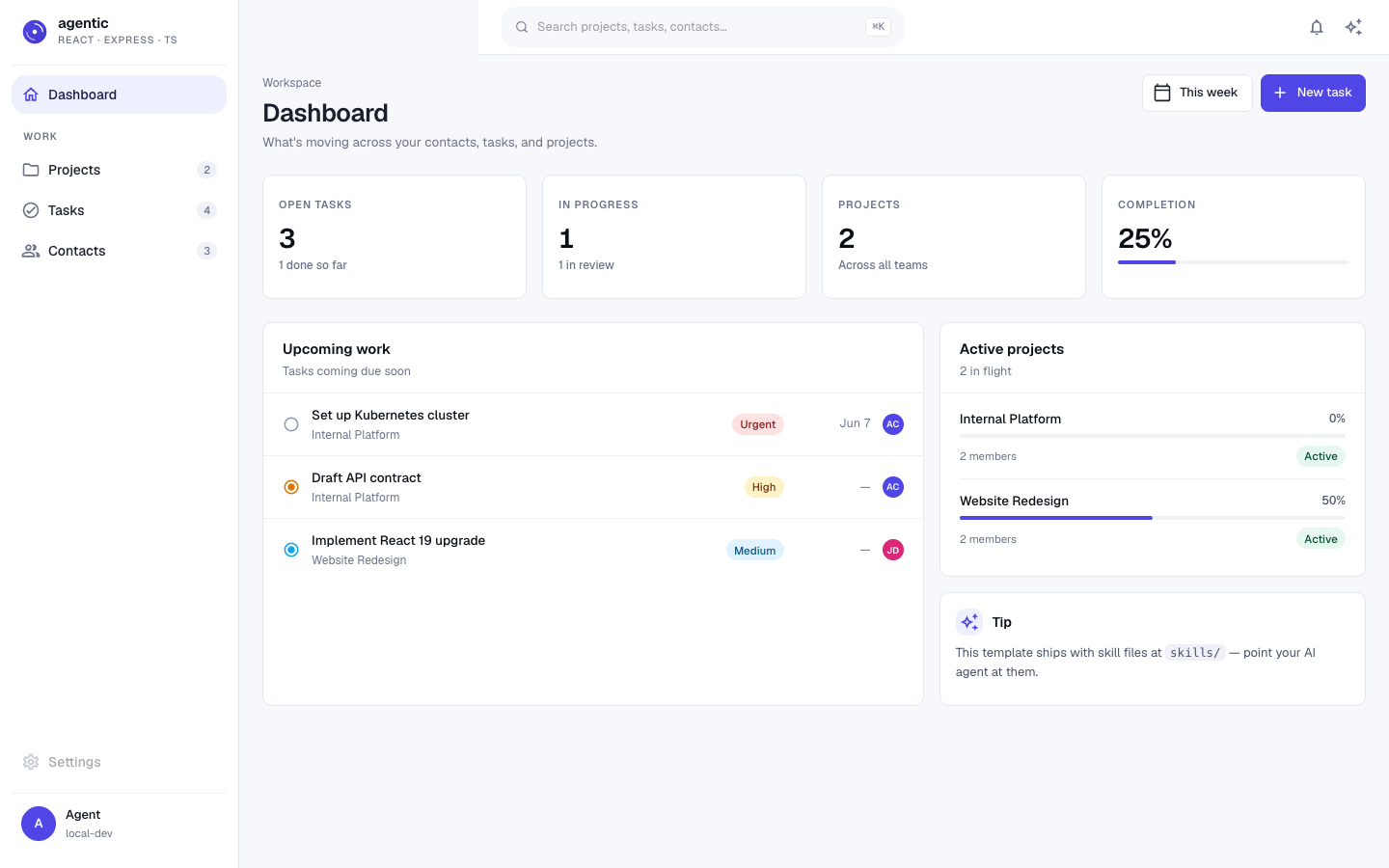
浏览真实页面截图,比较内容排版与手机效果。点击下方缩略图切换,放大查看整页细节。
目前有 1 张原始预览,可打开完整图片查看设计细节。
截图用于了解视觉与布局,交互效果请以实际项目为准。
采集于 2026-10-06查看来源
值得关注的模板亮点
从已有项目资料中,快速了解它的特点。
ESLint 强制 src/server、src/client、src/shared 的导入边界,客户端仅允许以 import type 引用服务端的 AppRouter
提交时由 Lefthook 并行运行 Prettier、Knip、ESLint、TypeScript、Vitest、Gitleaks 与 Commitlint 等检查
提供 AGENTS.md 及 CLAUDE.md、GEMINI.md、.github/copilot-instructions.md 等代理接入文件
skills/ 目录包含 onboard-an-agent、add-resource、remove-demo-code、self-correcting-loop、deploy-checklist 等技能文件
附带可运行的 CRM 演示,含联系人、任务、项目及关联关系与种子数据
模板详细介绍
这是一个全栈 TypeScript 应用模板,仓库定位为「agentic era」的启动器:前端使用 React 与 Vite,服务端使用 Express 与 tRPC,数据层使用 Prisma 与 PostgreSQL,客户端与服务端共享 Zod 校验。模板强调类型端到端贯通,tRPC 将服务端类型传递到客户端,并配有 ESLint 边界规则约束 src/server、src/client、src/shared 之间的导入关系。
模板内置一个可运行的 CRM 演示,包含联系人、任务、项目三类数据及其关联关系,并提供种子数据。仓库同时提供面向 AI 编码代理的说明文件(AGENTS.md、CLAUDE.md、GEMINI.md、.github/copilot-instructions.md)以及 skills/ 目录下的技能文件,覆盖首次接入、添加资源、移除演示代码、自纠正循环与部署检查等流程。提交时通过 Lefthook 并行运行 Prettier、Knip、ESLint、TypeScript、Vitest、Gitleaks 与 Commitlint 等检查。
使用前需要 Node 22+ 与本地运行的 PostgreSQL,按 README 步骤执行安装、环境变量配置、数据库初始化与种子数据导入后即可启动开发服务。模板采用 MIT 许可,免费范围限于该版本代码;演示图片、字体、图标等第三方素材以及域名、托管、数据库等外部服务的费用需另行核对。
ViteReact启动器
适合你的项目吗?
适用场景
- 以 TypeScript 全栈方式启动新项目,并希望前端、服务端与数据层类型贯通
- 在 AI 编码代理(如 Claude Code、Copilot、Codex、Gemini CLI)参与开发时,使用技能文件与提交检查约束生成代码
- 需要一个包含真实可运行演示(CRM)的起点,再按技能文件移除演示并添加自有资源
- 使用 React + Vite 前端、Express + tRPC 服务端、Prisma + PostgreSQL 数据层的组合进行开发
- 在提交阶段自动执行格式、未使用导出、类型、测试与密钥扫描等检查
适合人群
- 熟悉 TypeScript、React、Express、Prisma 与 PostgreSQL 的开发者
- 希望把 AI 编码代理纳入日常开发流程并为其提供明确工作流的团队
- 需要从可运行的全栈演示出发、逐步替换为自有业务资源的项目
- 接受在提交时运行多项检查、并愿意按检查结果修正代码的开发者
上手与定制指南
结合仓库当前版本的说明,按下面的资料检查内容、配置与运行要求。
- 1
前置条件为 Node 22+ 以及本地运行的 PostgreSQL
- 2
通过 npx degit Avinava/agentic-react-express-ts my-project 或 git clone 获取项目
- 3
执行 npm install 后,复制 example.env 为 .env 并配置 DATABASE_URL
- 4
依次运行 npm run setup、npm run db:setup、npm run db:seed,然后 npm run dev 启动
- 5
开发服务默认客户端在 3000 端口、服务端在 3001 端口
授权与来源资料
使用条件与限制
免费使用 · 保留许可声明本次收录的是公开仓库中采用 MIT 许可的免费版本;免费范围为该版本代码,不代表外部服务或第三方素材免费。
使用时需要遵守
- 允许免费使用、修改、商用和分发该版本代码。
- 分发代码副本或实质性部分时,保留原作者版权声明和完整 MIT 许可声明。
- 代码按现状提供;担保与责任限制以原许可证及适用法律为准。
额外费用与待核对事项
- 演示图片、字体、图标及其他第三方素材需按各自许可核对,不能仅凭代码的 MIT 许可判断。
- 域名、托管、数据库、支付或 AI 等外部服务可能另外收费。
- 使用前需本地运行 PostgreSQL 数据库,并安装 Node 22 或更高版本;不满足该环境要求则无法按 README 步骤启动模板。
- 必须自行创建 .env 并配置 DATABASE_URL 连接串,模板不会自动提供可用的数据库连接。
- 部署需要同时具备 Node 运行环境与 PostgreSQL 数据库的外部托管平台,相关托管与数据库费用需自行承担。
- 提交时不得使用 --no-verify 跳过 Lefthook 钩子检查;若检查失败需修正代码后重试,而非绕过钩子。
查看原文依据
Permission is hereby granted, free of charge
许可证原文
**Prerequisites:** Node 22+, PostgreSQL running locally.
README 原文
cp example.env .env # edit DATABASE_URL
README 原文
Any platform that runs Node + Postgres works.
README 原文
https://github.com/Avinava/agentic-react-express-ts/blob/main/LICENSEhttps://github.com/Avinava/agentic-react-express-ts/blob/main/README.md**NEVER `--no-verify`.** If hooks fail, the code is wrong, not the hooks.
README 原文
DeepSeek 根据仓库许可证和 README 整理 ·2026-10-06。结果仅覆盖已读取资料,依赖、图片、字体及后续条款变更以各自原文为准。
项目核对记录与介绍依据
模板资料
- 来源平台
- GitHub
- 资料与维护参考分
- 资料较完整 · 85 / 100
- 技术栈
- Vite · React
- 网站类型
- 启动器
这个分数如何计算
本站按许可资料(最高30分)、演示链接(12分)、预览图(10分)、Star数(15分)、记录的维护时间(15分)、描述完整度(8分)、功能记录(5分)和分类资料(5分)计算。它不是代码、安全或性能测试,也不是 Google 评分;有链接不代表已实测可用。
这个项目需要核对什么
- 记录的仓库更新时间
- 2026-10-06
- 截图检查日期
- 2026-10-06
已收录演示链接。请用你的内容与屏幕尺寸检查;有演示不代表表单、认证或支付已经可用。
目录记录的主要技术栈是 Vite。请通过依赖清单和锁文件核对实际版本与托管要求。这些说明基于收录资料,不代表代码审计或部署实测。
查看具体选型方法 →介绍的制作与核对状态
介绍由 AI 辅助整理目录与仓库资料。仓库作者不等于这篇介绍的审核者。
审核声明: [email protected] · 2026-10-07
查看当时使用的来源资料
SHA-256: fb18f4f777163b4d5437f8143d79ca84f00faa7eb373c14c42ef3beaa9edeaa4
2026-10-06T18:32:30.820Z
来源文件 / 仓库# agentic-react-express-ts <p align="center"> <img src="./public/logo.svg" alt="agentic-react-express-ts" height="120"> </p> <p align="center"> <img src="https://img.shields.io/badge/TypeScript-3178C6.svg?style=flat-square&logo=TypeScript&logoColor=white" alt="TypeScript"> <img src="https://img.shields.io/badge/React-19-61DAFB.svg?style=flat-square&logo=React&logoColor=black" alt="React 19"> <img src="https://img.shields.io/badge/Vite-7-646CFF.svg?style=flat-square&logo=Vite&logoColor=white" alt="Vite 7"> <img src="https://img.shields.io/badge/Express-5-000000.svg?style=flat-square&logo=Express&logoColor=white" alt="Express 5"> <img src="https://img.shields.io/badge/tRPC-11-398CCB.svg?style=flat-square&logo=tRPC&logoColor=white" alt="tRPC 11"> <img src="https://img.shields.io/badge/Prisma-7-2D3748.svg?style=flat-square&logo=Prisma&logoColor=white" alt="Prisma 7"> <img src="https://img.shields.io/badge/PostgreSQL-4169e1.svg?style=flat-square&logo=PostgreSQL&logoColor=white" alt="PostgreSQL"> <img src="https://img.shields.io/badge/license-MIT-blue.svg?style=flat-square" alt="MIT"> </p> <p align="center"><strong>A production-ready full-stack TypeScript template for the agentic era.</strong></p> This is the spiritual successor to [`simple-vite-react-express`](https://github.com/Avinava/simple-vite-react-express). Same proven stack, modernized for how people actually build in 2026 — with Claude Code, Copilot, Codex, and Gemini sitting in your editor. The template is **agent-native**: types flow end-to-end so generated code can be type-checked, every commit runs guardrails so bad code gets rejected in seconds, and common workflows live as skill files your agent reads step-by-step. Inspired by [`agentic-guardrail-ts`](https://github.com/Avinava/agentic-guardrail-ts) — same "drop-in for your AI coding agent" UX, but as a full application template rather than a guardrail kit. --- ## Why this template - **Type-safe end-to-end.** tRPC carries types from server to client. Edit a router, the client auto-typechecks. Zero schema drift. - **Guardrails in every commit.** Lefthook runs ESLint, TypeScript, Knip, Vitest, Gitleaks, and Commitlint in parallel (~3s). Bad code gets rejected before it lands. See [skills/self-correcting-loop](skills/self-correcting-loop/SKILL.md). - **Skill files your agent reads.** `skills/<name>/SKILL.md` give your AI step-by-step recipes for the operations that matter: adding a resource, stripping the demo, deploying safely. - **Working demo, not empty files.** A real CRM with contacts/tasks/projects you can run in minutes. --- ## Quick start **Prerequisites:** Node 22+, PostgreSQL running locally. ```bash # Start a new project from this template (no git history) npx degit Avinava/agentic-react-express-ts my-project cd my-project # Or clone if you want history git clone [email protected]:Avinava/agentic-react-express-ts.git my-project cd my-project # Install & set up npm install cp example.env .env # edit DATABASE_URL npm run setup npm run db:setup npm run db:seed # Run npm run dev ``` Open <http://localhost:3000>. --- ## For agents Point your coding agent at the project. It will pick up [`AGENTS.md`](AGENTS.md) (the canonical guide), or the agent-specific pointer files: [`CLAUDE.md`](CLAUDE.md), [`GEMINI.md`](GEMINI.md), or [`.github/copilot-instructions.md`](.github/copilot-instructions.md). > [!TIP] > **Paste this exact line to your AI agent** (Claude Code, Codex, Cursor, Copilot, or Gemini CLI) the first time you open the repo. It runs the full onboarding interview, builds a plan, and implements step-by-step — no clone required for the agent to read context. > > ``` > Fetch and follow these in order: > 1. https://raw.githubusercontent.com/Avinava/agentic-react-express-ts/main/AGENTS.md > 2. https://raw.githubusercontent.com/Avinava/agentic-react-express-ts/main/skills/onboard-an-agent/SKILL.md > Then fetch the other skills as needed: > - https://raw.githubusercontent.com/Avinava/agentic-react-express-ts/main/skills/add-resource/SKILL.md > - https://raw.githubusercontent.com/Avinava/agentic-react-express-ts/main/skills/remove-demo-code/SKILL.md > - https://raw.githubusercontent.com/Avinava/agentic-react-express-ts/main/skills/self-correcting-loop/SKILL.md > - https://raw.githubusercontent.com/Avinava/agentic-react-express-ts/main/skills/deploy-checklist/SKILL.md > Interview me about what I want to build on top of this template. Once we agree on scope, produce a step-by-step plan (which skills you will follow, what resources to add, what to strip from the CRM demo). Confirm the plan with me before any destructive change, then implement it: prefer add-resource for new resources and remove-demo-code when clearing the CRM. After each milestone, run `npm run typecheck && npm run lint && npm run lint:unused && npm run test:run` and only commit when all four pass — never use --no-verify. > ``` When the agent hits a task with a matching skill, it should read that skill first: | Task | Read | | ------------------------------------- | --------------------------------------------------------------------- | | First time opening the repo | [`skills/onboard-an-agent`](skills/onboard-an-agent/SKILL.md) | | Adding a new full-stack resource | [`skills/add-resource`](skills/add-resource/SKILL.md) | | Commit got rejected | [`skills/self-correcting-loop`](skills/self-correcting-loop/SKILL.md) | | Stripping the demo for a real project | [`skills/remove-demo-code`](skills/remove-demo-code/SKILL.md) | | About to deploy | [`skills/deploy-checklist`](skills/deploy-checklist/SKILL.md) | --- ## Stack | Layer | Tool | | ------------ | --------------------------------------------------- | | Language | TypeScript 5 (`strict`, `noUncheckedIndexedAccess`) | | Client | React 19 + Vite 7 + MUI 7 + React Router 7 | | Server | Express 5 + tRPC 11 | | Data | Prisma 7 + PostgreSQL | | Validation | Zod (shared between client and server) | | Forms | React Hook Form + Zod resolver | | Server state | TanStack Query | | Tests | Vitest 4 + React Testing Library | --- ## Project structure ``` . ├── .github/ │ ├── workflows/ci.yml # lint + typecheck + knip + test + build │ └── copilot-instructions.md # Copilot pointer ├── prisma/ │ ├── schema.prisma # CRM schema (Contact, Task, Project) │ └── seed.ts # demo data ├── public/logo.svg ├── screenshots/ # README screenshots ├── scripts/ │ ├── setup.ts # interactive setup │ └── typecheck-staged.sh ├── skills/ # agent-readable workflows │ ├── onboard-an-agent/SKILL.md │ ├── add-resource/SKILL.md │ ├── self-correcting-loop/SKILL.md │ ├── remove-demo-code/SKILL.md │ └── deploy-checklist/SKILL.md ├── src/ │ ├── client/ # React app │ ├── server/ # Express + tRPC │ └── shared/ # Zod schemas (both sides) ├── AGENTS.md CLAUDE.md GEMINI.md ├── eslint.config.js lefthook.yml commitlint.config.ts knip.json ├── tsconfig.json tsconfig.server.json ├── vite.config.ts vitest.config.ts └── package.json ``` **Boundary rules** (enforced by ESLint): - `src/server/**` ↮ `src/client/**` (no value imports across the line) - `src/shared/**` is the safe shared zone - Client may `import type` from server for the tRPC `AppRouter` only --- ## Guardrails — the self-correcting commit loop Every `git commit` triggers: ``` Agent generates code ↓ git commit → Lefthook runs checks in parallel (~3s) ↓ ┌─ Prettier ────── auto-fixes formatting ✓ ├─ Knip ────────── detects unused export ✗ ├─ ESLint ──────── catches import from wrong tier ✗ ├─ TypeScript ──── finds type error ✗ ├─ Vitest ──────── runs related tests ✓ ├─ Gitleaks ────── scans for secrets ✓ └─ Commitlint ──── validates commit message ✓ ↓ Commit REJECTED — agent reads errors, fixes, retries ↓ All checks pass → CI runs full pipeline → merge ✓ ``` **The key insight:** AI coding agents respect git hooks. When a commit fails, the agent sees the errors, fixes them, and retries — no human intervention. See [skills/self-correcting-loop](skills/self-correcting-loop/SKILL.md) for the full read-errors-fix-retry workflow. **NEVER `--no-verify`.** If hooks fail, the code is wrong, not the hooks. --- ## Scripts | Script | What it does | | ----------------------------------------------------------- | ------------------------------------------- | | `npm run dev` | Client (:3000) + server (:3001) in parallel | | `npm run build` | Build client (Vite) and server (tsc) | | `npm run start` | Run the production server | | `npm run typecheck` | TypeScript check for client + server | | `npm run lint` / `lint:fix` | ESLint | | `npm run lint:unused` | Knip — unused exports/deps | | `npm run format` / `format:check` | Prettier | | `npm run test` / `test:run` / `test:coverage` | Vitest | | `npm run db:setup` | `prisma migrate dev` + `prisma generate` | | `npm run db:migrate` / `db:seed` / `db:studio` / `db:reset` | Prisma | --- ## Demo The template ships with a working CRM: contacts, tasks, and projects with relationships. <p align="center"> <img src="./screenshots/homepage.png" alt="Homepage" width="800"> <br><em>Homepage</em> </p> <p align="center"> <img src="./screenshots/contacts.png" alt="Contacts" width="800"> <br><em>Contacts</em> </p> <p align="center"> <img src="./screenshots/tasks.png" alt="Tasks" width="800"> <br><em>Tasks</em> </p> <p align="center"> <img src="./screenshots/projects.png" alt="Projects" width="800"> <br><em>Projects</em> </p> When you're ready to build something real, read [skills/remove-demo-code](skills/remove-demo-code/SKILL.md). --- ## Customization - **Branding** — replace `public/logo.svg` and update the title in `index.html`. - **Theme** — edit `src/client/theme/theme.ts` (MUI palette). - **Domain** — see [skills/remove-demo-code](skills/remove-demo-code/SKILL.md) to strip the CRM, then [skills/add-resource](skills/add-resource/SKILL.md) for each new resource. - **DB** — swap Postgres for another Prisma-supported DB by editing `prisma/schema.prisma`'s `datasource` and the `DATABASE_URL`. --- ## Deploy Any platform that runs Node + Postgres works. Recommended: - **Railway** — one-click Postgres + Node, deploy on push. - **Fly.io** — `fly launch` autodetects the Node app; provision Postgres separately. - **Render** — same shape as Railway. Before deploying, run [skills/deploy-checklist](skills/deploy-checklist/SKILL.md). --- ## Contributing See [CONTRIBUTING.md](CONTRIBUTING.md). --- ## Credits - Builds on [`simple-vite-react-express`](https://github.com/Avinava/simple-vite-react-express) — same author, this is the modernized successor. - Guardrail patterns inspired by [`agentic-guardrail-ts`](https://github.com/Avinava/agentic-guardrail-ts). --- ## License [MIT](LICENSE)
看看同类模板
对比同技术栈与用途的模板,找到更适合的视觉与内容结构。

react-starter-kit
Modern React starter kit with Bun, TypeScript, Tailwind CSS, tRPC, Stripe, and Cloudflare Workers. Production-…
Vite · SaaS

cove
The Cove Stack: 🏝️ minimal TanStack Start template with Vite+, Better Auth, Drizzle ORM, shadcn/ui
Vite · SaaS

vite-react-boilerplate
A production ready, scalable starter template for Vite + React
Vite · 启动器

react-vite-admin
This Starter utilizes React, Recoil, React Query, React Hooks, Typescript, Axios And Vite. 全新技术栈的后台管理系统
Vite · 后台

typescript-react_best_practices-vite_template
<⚡⚛️> Start your React project with Vite following code best practices (TypeScript, Linting, testing, CI/CD…)
Vite · 启动器

cloudflare-starter-kit
Template (boilerplate) repository for scaffolding Cloudflare Workers projects
Vite · 启动器