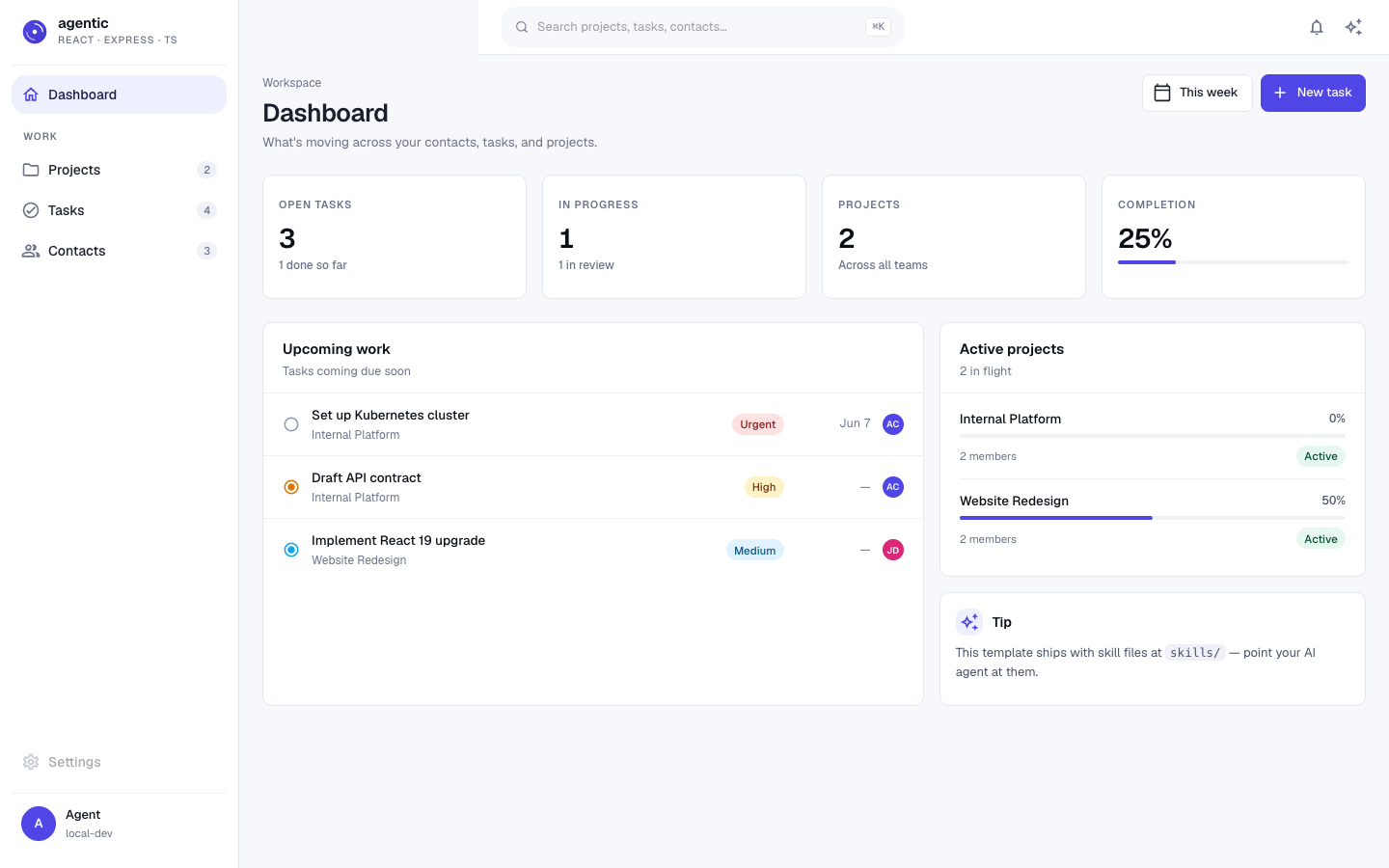
tRPC passes types between server and client, with shared Zod validation to reduce type drift
ViteReactStarter
agentic-react-express-ts — Vite Starter Template
By Avinava
A full-stack TypeScript starter for AI coding agents, with a React + Vite frontend, Express + tRPC server, Prisma + PostgreSQL data layer, and a runnable CRM demo plus agent skill files.
Explore the design
Compare the page layouts and mobile experience. Open any screenshot for a closer look.
Author preview
Author-provided preview
Preview provided in the project README.
One original preview is available. Open the full image to inspect the design.
Screenshots show visual appearance; interactive behavior may differ.
Recorded 2026-10-06View source
What stands out
A quick read of the recorded project description.
ESLint enforces import boundaries among src/server, src/client, and src/shared; the client may reference the server's AppRouter only via import type
On commit, Lefthook runs Prettier, Knip, ESLint, TypeScript, Vitest, Gitleaks, and Commitlint checks in parallel
Provides AGENTS.md and agent onboarding files such as CLAUDE.md, GEMINI.md, and .github/copilot-instructions.md
The skills/ directory contains skill files such as onboard-an-agent, add-resource, remove-demo-code, self-correcting-loop, and deploy-checklist
Includes a runnable CRM demo with contacts, tasks, projects, their relationships, and seed data
Template Details
This is a full-stack TypeScript application template positioned as a starter for the "agentic era": the frontend uses React and Vite, the server uses Express and tRPC, the data layer uses Prisma and PostgreSQL, and client and server share Zod validation. The template emphasizes end-to-end type flow, with tRPC passing server types to the client, and includes ESLint boundary rules that constrain imports among src/server, src/client, and src/shared.
The template includes a runnable CRM demo with contacts, tasks, and projects, their relationships, and seed data. The repository also provides instruction files for AI coding agents (AGENTS.md, CLAUDE.md, GEMINI.md, .github/copilot-instructions.md) and skill files under skills/, covering onboarding, adding resources, removing demo code, self-correcting loops, and deployment checks. On commit, Lefthook runs Prettier, Knip, ESLint, TypeScript, Vitest, Gitleaks, and Commitlint checks in parallel.
Before use, Node 22+ and a locally running PostgreSQL are required. After following the README steps for installation, environment variable configuration, database initialization, and seed data import, the development server can be started. The template is MIT licensed, and the free scope is limited to this version of the code; third-party assets such as demo images, fonts, and icons, as well as external services such as domains, hosting, and databases, require separate verification of their costs.
ViteReactStarter
Is it right for your project?
Use Cases
- Starting a new project as a full-stack TypeScript application with end-to-end types across frontend, server, and data layer
- Using skill files and commit checks to constrain generated code when AI coding agents such as Claude Code, Copilot, Codex, or Gemini CLI participate in development
- Needing a starting point that includes a real runnable demo (CRM), then removing the demo and adding your own resources according to the skill files
- Developing with a combination of React + Vite frontend, Express + tRPC server, and Prisma + PostgreSQL data layer
- Automatically running formatting, unused export, type, test, and secret scanning checks at commit time
Suitable For
- Developers familiar with TypeScript, React, Express, Prisma, and PostgreSQL
- Teams that want to incorporate AI coding agents into their daily development workflow and provide them with a clear process
- Projects that need to start from a runnable full-stack demo and gradually replace it with their own business resources
- Developers who accept running multiple checks at commit time and are willing to fix code according to the check results
Getting started & customization
Use these recorded setup notes alongside the repository instructions for your chosen version.
- 1
Prerequisites are Node 22+ and a locally running PostgreSQL
- 2
Obtain the project via npx degit Avinava/agentic-react-express-ts my-project or git clone
- 3
After running npm install, copy example.env to .env and configure DATABASE_URL
- 4
Run npm run setup, npm run db:setup, and npm run db:seed in order, then start with npm run dev
- 5
By default, the development server runs the client on port 3000 and the server on port 3001
License & source material
Usage conditions & limitations
Free to use · keep license noticeThis entry covers the free version of the public repository under the MIT license; the free scope is limited to this version of the code and does not mean external services or third-party assets are free.
Must comply with when using
- You may use, modify, commercialize, and distribute this version of the code for free.
- When distributing copies or substantial portions of the code, retain the original author's copyright notice and the full MIT license notice.
- The code is provided as is; warranties and limitations of liability are governed by the original license and applicable law.
Additional costs & items to verify
- Demo images, fonts, icons, and other third-party assets must be checked against their respective licenses; the code's MIT license alone is not sufficient to determine this.
- External services such as domains, hosting, databases, payments, or AI may incur separate charges.
- Before use, a local PostgreSQL database must be running and Node 22 or higher must be installed; if this environment requirement is not met, the template cannot be started according to the README steps.
- You must create .env yourself and configure the DATABASE_URL connection string; the template does not automatically provide a usable database connection.
- Deployment requires an external hosting platform with both a Node runtime and a PostgreSQL database, and the related hosting and database costs are your responsibility.
- Do not use --no-verify to skip Lefthook hook checks at commit time; if checks fail, fix the code and retry rather than bypassing the hooks.
View Original Text Basis
Permission is hereby granted, free of charge
Original License Text
**Prerequisites:** Node 22+, PostgreSQL running locally.
Original README
cp example.env .env # edit DATABASE_URL
Original README
Any platform that runs Node + Postgres works.
Original README
https://github.com/Avinava/agentic-react-express-ts/blob/main/LICENSEhttps://github.com/Avinava/agentic-react-express-ts/blob/main/README.md**NEVER `--no-verify`.** If hooks fail, the code is wrong, not the hooks.
Original README
Compiled by DeepSeek based on repository license and README ·2026-10-06. Results only cover the materials read; dependencies, images, fonts, and subsequent term changes are subject to their respective original texts.
Project checks & description sources
Template Information
- Source platforms
- GitHub
- Documentation and maintenance reference score
- More documented · 85 / 100
- Technologies
- Vite · React
- Website type
- Starter
How this score is calculated
Our heuristic uses license records (up to 30), a demo link (12), a preview (10), stars (15), recorded maintenance (15), description completeness (8), feature records (5) and classification data (5). It is not a code, security or performance test, or a Google score. A link does not establish tested functionality.
What to verify for this project
- Repository update recorded
- 2026-10-06
- Screenshot last checked
- 2026-10-06
A demo link is listed. Check it with your own content and viewport sizes; its presence does not confirm that forms, authentication or payments work.
The catalog identifies Vite as the primary stack. Check the actual dependency manifest and lockfile for versions and hosting requirements. These notes use recorded metadata, not a code audit or a deployment test.
Use a selection guide →How this description was prepared
AI-assisted description based on catalog records and repository material. Repository authors are not automatically the reviewers of this description.
Review declaration: [email protected] · 2026-10-07
Inspect the recorded source material
SHA-256: fb18f4f777163b4d5437f8143d79ca84f00faa7eb373c14c42ef3beaa9edeaa4
2026-10-06T18:32:30.820Z
Source file / repository# agentic-react-express-ts <p align="center"> <img src="./public/logo.svg" alt="agentic-react-express-ts" height="120"> </p> <p align="center"> <img src="https://img.shields.io/badge/TypeScript-3178C6.svg?style=flat-square&logo=TypeScript&logoColor=white" alt="TypeScript"> <img src="https://img.shields.io/badge/React-19-61DAFB.svg?style=flat-square&logo=React&logoColor=black" alt="React 19"> <img src="https://img.shields.io/badge/Vite-7-646CFF.svg?style=flat-square&logo=Vite&logoColor=white" alt="Vite 7"> <img src="https://img.shields.io/badge/Express-5-000000.svg?style=flat-square&logo=Express&logoColor=white" alt="Express 5"> <img src="https://img.shields.io/badge/tRPC-11-398CCB.svg?style=flat-square&logo=tRPC&logoColor=white" alt="tRPC 11"> <img src="https://img.shields.io/badge/Prisma-7-2D3748.svg?style=flat-square&logo=Prisma&logoColor=white" alt="Prisma 7"> <img src="https://img.shields.io/badge/PostgreSQL-4169e1.svg?style=flat-square&logo=PostgreSQL&logoColor=white" alt="PostgreSQL"> <img src="https://img.shields.io/badge/license-MIT-blue.svg?style=flat-square" alt="MIT"> </p> <p align="center"><strong>A production-ready full-stack TypeScript template for the agentic era.</strong></p> This is the spiritual successor to [`simple-vite-react-express`](https://github.com/Avinava/simple-vite-react-express). Same proven stack, modernized for how people actually build in 2026 — with Claude Code, Copilot, Codex, and Gemini sitting in your editor. The template is **agent-native**: types flow end-to-end so generated code can be type-checked, every commit runs guardrails so bad code gets rejected in seconds, and common workflows live as skill files your agent reads step-by-step. Inspired by [`agentic-guardrail-ts`](https://github.com/Avinava/agentic-guardrail-ts) — same "drop-in for your AI coding agent" UX, but as a full application template rather than a guardrail kit. --- ## Why this template - **Type-safe end-to-end.** tRPC carries types from server to client. Edit a router, the client auto-typechecks. Zero schema drift. - **Guardrails in every commit.** Lefthook runs ESLint, TypeScript, Knip, Vitest, Gitleaks, and Commitlint in parallel (~3s). Bad code gets rejected before it lands. See [skills/self-correcting-loop](skills/self-correcting-loop/SKILL.md). - **Skill files your agent reads.** `skills/<name>/SKILL.md` give your AI step-by-step recipes for the operations that matter: adding a resource, stripping the demo, deploying safely. - **Working demo, not empty files.** A real CRM with contacts/tasks/projects you can run in minutes. --- ## Quick start **Prerequisites:** Node 22+, PostgreSQL running locally. ```bash # Start a new project from this template (no git history) npx degit Avinava/agentic-react-express-ts my-project cd my-project # Or clone if you want history git clone [email protected]:Avinava/agentic-react-express-ts.git my-project cd my-project # Install & set up npm install cp example.env .env # edit DATABASE_URL npm run setup npm run db:setup npm run db:seed # Run npm run dev ``` Open <http://localhost:3000>. --- ## For agents Point your coding agent at the project. It will pick up [`AGENTS.md`](AGENTS.md) (the canonical guide), or the agent-specific pointer files: [`CLAUDE.md`](CLAUDE.md), [`GEMINI.md`](GEMINI.md), or [`.github/copilot-instructions.md`](.github/copilot-instructions.md). > [!TIP] > **Paste this exact line to your AI agent** (Claude Code, Codex, Cursor, Copilot, or Gemini CLI) the first time you open the repo. It runs the full onboarding interview, builds a plan, and implements step-by-step — no clone required for the agent to read context. > > ``` > Fetch and follow these in order: > 1. https://raw.githubusercontent.com/Avinava/agentic-react-express-ts/main/AGENTS.md > 2. https://raw.githubusercontent.com/Avinava/agentic-react-express-ts/main/skills/onboard-an-agent/SKILL.md > Then fetch the other skills as needed: > - https://raw.githubusercontent.com/Avinava/agentic-react-express-ts/main/skills/add-resource/SKILL.md > - https://raw.githubusercontent.com/Avinava/agentic-react-express-ts/main/skills/remove-demo-code/SKILL.md > - https://raw.githubusercontent.com/Avinava/agentic-react-express-ts/main/skills/self-correcting-loop/SKILL.md > - https://raw.githubusercontent.com/Avinava/agentic-react-express-ts/main/skills/deploy-checklist/SKILL.md > Interview me about what I want to build on top of this template. Once we agree on scope, produce a step-by-step plan (which skills you will follow, what resources to add, what to strip from the CRM demo). Confirm the plan with me before any destructive change, then implement it: prefer add-resource for new resources and remove-demo-code when clearing the CRM. After each milestone, run `npm run typecheck && npm run lint && npm run lint:unused && npm run test:run` and only commit when all four pass — never use --no-verify. > ``` When the agent hits a task with a matching skill, it should read that skill first: | Task | Read | | ------------------------------------- | --------------------------------------------------------------------- | | First time opening the repo | [`skills/onboard-an-agent`](skills/onboard-an-agent/SKILL.md) | | Adding a new full-stack resource | [`skills/add-resource`](skills/add-resource/SKILL.md) | | Commit got rejected | [`skills/self-correcting-loop`](skills/self-correcting-loop/SKILL.md) | | Stripping the demo for a real project | [`skills/remove-demo-code`](skills/remove-demo-code/SKILL.md) | | About to deploy | [`skills/deploy-checklist`](skills/deploy-checklist/SKILL.md) | --- ## Stack | Layer | Tool | | ------------ | --------------------------------------------------- | | Language | TypeScript 5 (`strict`, `noUncheckedIndexedAccess`) | | Client | React 19 + Vite 7 + MUI 7 + React Router 7 | | Server | Express 5 + tRPC 11 | | Data | Prisma 7 + PostgreSQL | | Validation | Zod (shared between client and server) | | Forms | React Hook Form + Zod resolver | | Server state | TanStack Query | | Tests | Vitest 4 + React Testing Library | --- ## Project structure ``` . ├── .github/ │ ├── workflows/ci.yml # lint + typecheck + knip + test + build │ └── copilot-instructions.md # Copilot pointer ├── prisma/ │ ├── schema.prisma # CRM schema (Contact, Task, Project) │ └── seed.ts # demo data ├── public/logo.svg ├── screenshots/ # README screenshots ├── scripts/ │ ├── setup.ts # interactive setup │ └── typecheck-staged.sh ├── skills/ # agent-readable workflows │ ├── onboard-an-agent/SKILL.md │ ├── add-resource/SKILL.md │ ├── self-correcting-loop/SKILL.md │ ├── remove-demo-code/SKILL.md │ └── deploy-checklist/SKILL.md ├── src/ │ ├── client/ # React app │ ├── server/ # Express + tRPC │ └── shared/ # Zod schemas (both sides) ├── AGENTS.md CLAUDE.md GEMINI.md ├── eslint.config.js lefthook.yml commitlint.config.ts knip.json ├── tsconfig.json tsconfig.server.json ├── vite.config.ts vitest.config.ts └── package.json ``` **Boundary rules** (enforced by ESLint): - `src/server/**` ↮ `src/client/**` (no value imports across the line) - `src/shared/**` is the safe shared zone - Client may `import type` from server for the tRPC `AppRouter` only --- ## Guardrails — the self-correcting commit loop Every `git commit` triggers: ``` Agent generates code ↓ git commit → Lefthook runs checks in parallel (~3s) ↓ ┌─ Prettier ────── auto-fixes formatting ✓ ├─ Knip ────────── detects unused export ✗ ├─ ESLint ──────── catches import from wrong tier ✗ ├─ TypeScript ──── finds type error ✗ ├─ Vitest ──────── runs related tests ✓ ├─ Gitleaks ────── scans for secrets ✓ └─ Commitlint ──── validates commit message ✓ ↓ Commit REJECTED — agent reads errors, fixes, retries ↓ All checks pass → CI runs full pipeline → merge ✓ ``` **The key insight:** AI coding agents respect git hooks. When a commit fails, the agent sees the errors, fixes them, and retries — no human intervention. See [skills/self-correcting-loop](skills/self-correcting-loop/SKILL.md) for the full read-errors-fix-retry workflow. **NEVER `--no-verify`.** If hooks fail, the code is wrong, not the hooks. --- ## Scripts | Script | What it does | | ----------------------------------------------------------- | ------------------------------------------- | | `npm run dev` | Client (:3000) + server (:3001) in parallel | | `npm run build` | Build client (Vite) and server (tsc) | | `npm run start` | Run the production server | | `npm run typecheck` | TypeScript check for client + server | | `npm run lint` / `lint:fix` | ESLint | | `npm run lint:unused` | Knip — unused exports/deps | | `npm run format` / `format:check` | Prettier | | `npm run test` / `test:run` / `test:coverage` | Vitest | | `npm run db:setup` | `prisma migrate dev` + `prisma generate` | | `npm run db:migrate` / `db:seed` / `db:studio` / `db:reset` | Prisma | --- ## Demo The template ships with a working CRM: contacts, tasks, and projects with relationships. <p align="center"> <img src="./screenshots/homepage.png" alt="Homepage" width="800"> <br><em>Homepage</em> </p> <p align="center"> <img src="./screenshots/contacts.png" alt="Contacts" width="800"> <br><em>Contacts</em> </p> <p align="center"> <img src="./screenshots/tasks.png" alt="Tasks" width="800"> <br><em>Tasks</em> </p> <p align="center"> <img src="./screenshots/projects.png" alt="Projects" width="800"> <br><em>Projects</em> </p> When you're ready to build something real, read [skills/remove-demo-code](skills/remove-demo-code/SKILL.md). --- ## Customization - **Branding** — replace `public/logo.svg` and update the title in `index.html`. - **Theme** — edit `src/client/theme/theme.ts` (MUI palette). - **Domain** — see [skills/remove-demo-code](skills/remove-demo-code/SKILL.md) to strip the CRM, then [skills/add-resource](skills/add-resource/SKILL.md) for each new resource. - **DB** — swap Postgres for another Prisma-supported DB by editing `prisma/schema.prisma`'s `datasource` and the `DATABASE_URL`. --- ## Deploy Any platform that runs Node + Postgres works. Recommended: - **Railway** — one-click Postgres + Node, deploy on push. - **Fly.io** — `fly launch` autodetects the Node app; provision Postgres separately. - **Render** — same shape as Railway. Before deploying, run [skills/deploy-checklist](skills/deploy-checklist/SKILL.md). --- ## Contributing See [CONTRIBUTING.md](CONTRIBUTING.md). --- ## Credits - Builds on [`simple-vite-react-express`](https://github.com/Avinava/simple-vite-react-express) — same author, this is the modernized successor. - Guardrail patterns inspired by [`agentic-guardrail-ts`](https://github.com/Avinava/agentic-guardrail-ts). --- ## License [MIT](LICENSE)
Explore similar templates
Compare previews and descriptions within the same stack and category.

react-starter-kit
A full-stack SaaS monorepo starter built on Vite and React, with Bun, TypeScript, tRPC, Drizzle ORM, Better Auth, Stripe, and Cloudflare Workers. It includes email OTP, passkey, Google OAuth, organizations, subscription billing, Drizzle migrations, seed scripts, and Terraform infrastructure.
Vite · SaaS

cove
Cove is a minimal TanStack Start starter template maintained by mugnavo, integrating React, TanStack Router/Query, Tailwind CSS, shadcn/ui, Drizzle ORM with PostgreSQL, Better Auth, Vite Plus, and Nitro.
Vite · SaaS

vite-react-boilerplate
A production-ready Vite + React starter template with TypeScript, Tailwind CSS, TanStack Router/Query/Table, Storybook, React Hook Form + Zod, Vitest and Playwright testing, plus Husky/Commitizen/Commitlint commit conventions.
Vite · Starter

react-vite-admin
A backend management starter built on Vite and React, integrating Recoil, React Query, TypeScript, and Axios, with Ant Design-style interface screenshots. Suitable as a starting point for management-side projects, licensed under MIT, with Chinese documentation and common scripts.
Vite · Admin dashboard

typescript-react_best_practices-vite_template
A Vite + React + TypeScript starter template by CodelyTV, preconfigured with Jest and React Testing Library unit tests, Cypress end-to-end tests, ESLint and Prettier using Codely's shared configuration, GitHub Actions workflows, a Makefile, and Sass.
Vite · Starter

cloudflare-starter-kit
A Cloudflare Workers project scaffolding template maintained by kriasoft, using Vite and TypeScript, with three built-in workspaces: api, app, and edge, and preconfigured local testing, multiple environments, and a GitHub Actions deployment workflow.
Vite · Starter