所有内容集中在 site.config.ts 中配置,无需改动组件代码
Astro作品集
portfolio (backstabslash) — Astro 作品集模板
作者 backstabslash
基于 Astro 的配置驱动开发者作品集模板,支持深色/浅色主题、粒子背景,可部署到 Kubernetes 或任意静态托管。
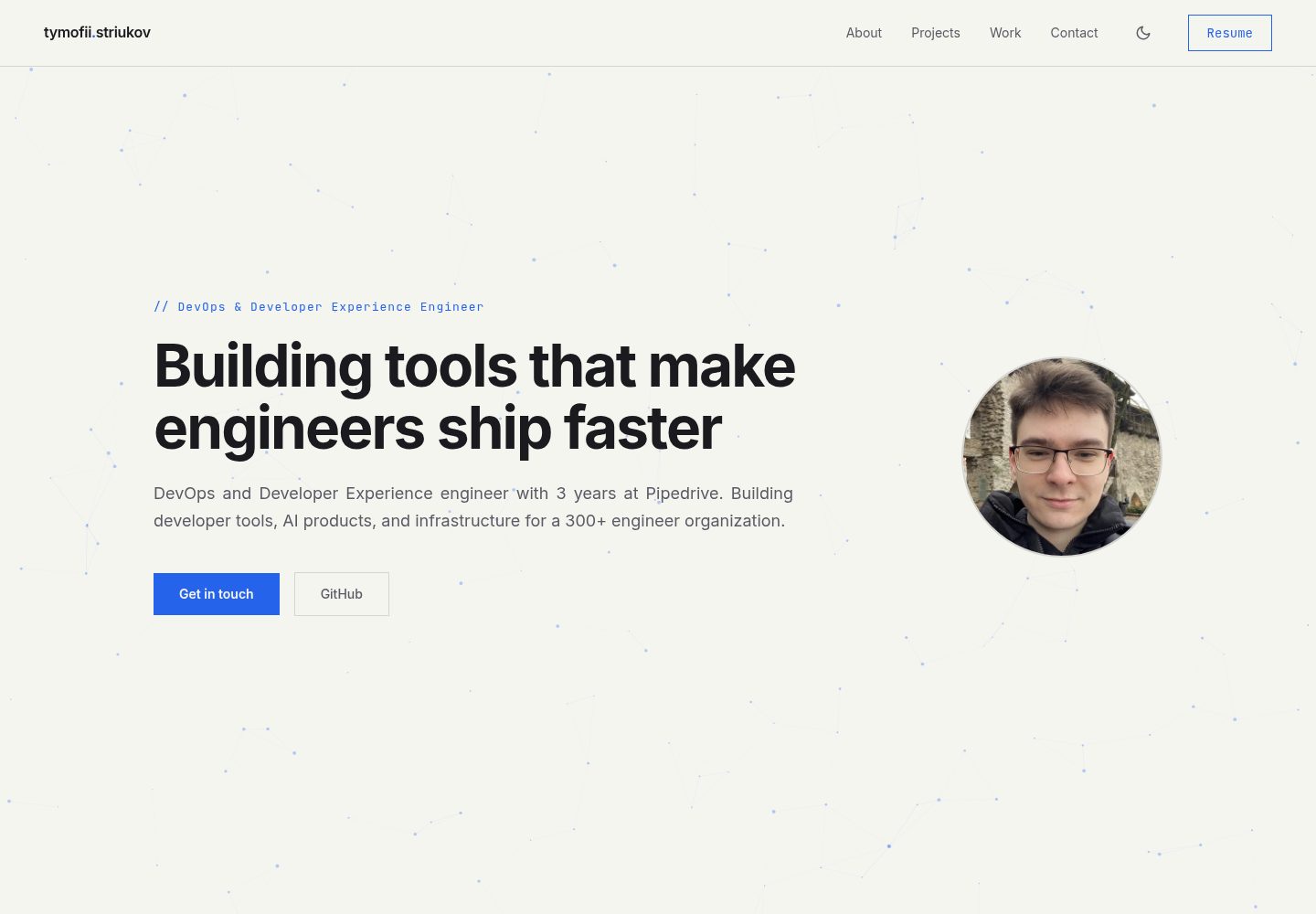
看看你的网站会是什么样
浏览真实页面截图,比较内容排版与手机效果。点击下方缩略图切换,放大查看整页细节。
全部页面与视图 2
截图用于了解视觉与布局,交互效果请以实际项目为准。
采集于 2026-10-12查看来源
值得关注的模板亮点
从已有项目资料中,快速了解它的特点。
内置深色与浅色两套独立调色板,各自可设置强调色
图片放入 src/assets/images/ 后由 Astro 在构建时优化为 WebP 并输出响应式变体
提供 Docker 与 k3s + Traefik 的 Kubernetes 部署示例
包含 ESLint、Prettier、Vitest 单元测试和 Playwright 端到端测试脚本
模板详细介绍
这是一个用 Astro 构建的开发者作品集模板,所有内容集中在 site.config.ts 一个文件里配置,包括姓名、职位、简介、联系方式、社交链接、技能分组、项目列表和工作经历。页面包含 Hero、About、Projects、Work、Contact 等区块,主题颜色(深色与浅色两套调色板及各自的强调色)也在同一配置文件中以十六进制值定义。
图片放在 src/assets/images/ 目录,在配置中以 /images/ 虚拟路径引用,构建时由 Astro 优化为 WebP 并生成响应式变体。README 给出了头像、About 图和项目截图的最低尺寸建议。
运行方面,模板提供开发、构建、预览、Lint、单元测试(Vitest)和端到端测试(Playwright)脚本。部署方式包括 Docker 镜像、k3s 配合 Traefik 的 Kubernetes 清单(含 ingress 与 deployment 示例),以及将 dist/ 目录交给任意静态托管平台。README 称除粒子背景外没有运行时 JS。
使用限制:模板本身只提供前端静态站点与部署示例,不包含后端、数据库或内容管理后台;Kubernetes 部署需要自行准备集群、域名和 kubeconfig 密钥。演示图片、字体、图标等第三方素材的许可需单独核对,MIT 许可只覆盖仓库代码。
Astro作品集
适合你的项目吗?
适用场景
- 个人开发者搭建展示项目与工作经历的作品集站点
- 需要深色/浅色主题切换和粒子背景效果的静态个人主页
- 希望用单个配置文件维护全部内容、避免逐页编辑的站点
- 计划将静态站点部署到 Kubernetes 集群或任意静态托管平台
适合人群
- 熟悉 Astro 或愿意按 README 修改 TypeScript 配置文件的开发者
- 需要可自行托管、不依赖内容管理后台的个人作品集
- 有 Docker 或 Kubernetes 部署经验的用户
上手与定制指南
结合仓库当前版本的说明,按下面的资料检查内容、配置与运行要求。
- 1
Fork 仓库后执行 npm install 与 npm run dev,然后编辑 site.config.ts 填入个人信息
- 2
图片放入 src/assets/images/,在配置中以 /images/ 前缀引用;头像建议至少 440x440px,About 图至少 864x1080px,项目截图至少 1048x655px
- 3
Kubernetes 部署前需修改 k8s/ingress.yaml 的域名和 k8s/deployment.yaml 的镜像名,并在 GitHub 仓库添加 base64 编码的 KUBECONFIG_DATA 密钥
- 4
静态托管方式为运行 npm run build 后部署 dist/ 目录
- 5
演示图片、字体、图标等第三方素材需按各自许可单独核对
授权与来源资料
使用条件与限制
免费使用 · 保留许可声明本次收录的是公开仓库中采用 MIT 许可的免费版本;免费范围为该版本代码,不代表外部服务或第三方素材免费。
使用时需要遵守
- 允许免费使用、修改、商用和分发该版本代码。
- 分发代码副本或实质性部分时,保留原作者版权声明和完整 MIT 许可声明。
- 代码按现状提供;担保与责任限制以原许可证及适用法律为准。
额外费用与待核对事项
- 演示图片、字体、图标及其他第三方素材需按各自许可核对,不能仅凭代码的 MIT 许可判断。
- 域名、托管、数据库、支付或 AI 等外部服务可能另外收费。
- 使用 Kubernetes 部署方式时,需要在 GitHub 仓库中配置名为 KUBECONFIG_DATA 的密钥,内容为 base64 编码的 kubeconfig,属于外部服务凭据要求。
- Kubernetes 部署前必须自行修改 ingress 中的域名和 deployment 中的镜像名,模板不提供可直接使用的集群配置。
- 部署目标为 Kubernetes 或静态托管,模板本身不包含后端、数据库或内容管理后台。
查看原文依据
Permission is hereby granted, free of charge
许可证原文
Add `KUBECONFIG_DATA` secret to your GitHub repo (base64-encoded kubeconfig)
README 原文
1. Update `k8s/ingress.yaml` with your domain 2. Update `k8s/deployment.yaml` with your image name
README 原文
https://github.com/backstabslash/portfolio/blob/main/LICENSEhttps://github.com/backstabslash/portfolio/blob/main/README.mdDeploy to Kubernetes or any static host.
README 原文
DeepSeek 根据仓库许可证和 README 整理 ·2026-10-12。结果仅覆盖已读取资料,依赖、图片、字体及后续条款变更以各自原文为准。
项目核对记录与介绍依据
模板资料
- 来源平台
- GitHub
- 资料与维护参考分
- 资料较完整 · 80 / 100
- 技术栈
- Astro
- 网站类型
- 作品集
这个分数如何计算
本站按许可资料(最高30分)、演示链接(12分)、预览图(10分)、Star数(15分)、记录的维护时间(15分)、描述完整度(8分)、功能记录(5分)和分类资料(5分)计算。它不是代码、安全或性能测试,也不是 Google 评分;有链接不代表已实测可用。
这个项目需要核对什么
- 记录的仓库更新时间
- 2026-05-21
- 截图检查日期
- 2026-10-12
已收录演示链接。请用你的内容与屏幕尺寸检查;有演示不代表表单、认证或支付已经可用。
目录记录的主要技术栈是 Astro。请通过依赖清单和锁文件核对实际版本与托管要求。这些说明基于收录资料,不代表代码审计或部署实测。
查看具体选型方法 →介绍的制作与核对状态
介绍由 AI 辅助整理目录与仓库资料。仓库作者不等于这篇介绍的审核者。
审核声明: [email protected] · 2026-10-13
查看当时使用的来源资料
SHA-256: bdbbc9bd5d762bd655355a5d8487ffa8601cc6f1b13f936396748075024d7c86
2026-10-12T10:59:39.913Z
来源文件 / 仓库[](https://github.com/backstabslash/portfolio/actions/workflows/ci.yml)
[](LICENSE)
[](https://astro.build)
A config-driven developer portfolio built with Astro. Dark/light theme, interactive particle background, zero runtime JS (except particles). Deploy to Kubernetes or any static host.
## Quick start
```bash
# Fork this repo, then:
git clone https://github.com/YOUR_USERNAME/portfolio
cd portfolio
npm install
npm run dev
```
Edit `site.config.ts` with your info, that's the only file you need to change.
## Configuration
All content lives in `site.config.ts`:
| Field | Type | Description |
| -------------- | ------ | ------------------------------------------------------------------- |
| `name` | string | Your full name |
| `title` | string | Job title / tagline |
| `headline` | string | Hero section headline |
| `bio` | string | Short bio paragraph |
| `profileImage` | string | Path to profile photo, e.g. `/images/profile.jpg` |
| `email` | string | Contact email |
| `links` | object | `github`, `linkedin`, `resume` URLs |
| `about` | object | `image` path and `text` (supports `\n\n` for paragraphs) |
| `skills` | array | `{ label, items }` skill groups |
| `projects` | array | `{ title, description, image, tech, github, url?, stars?, label? }` |
| `work` | array | `{ title, description, tag }` professional work items |
| `contact` | object | `heading` and `description` for the contact section |
| `theme` | object | `colors.accentDark/accentLight` + `dark` and `light` palettes (hex) |
## Images
Drop your images in `src/assets/images/` and reference them in `site.config.ts` as `/images/filename.jpg` (the `/images/` prefix is a virtual path, not a folder). At build time Astro optimizes them to WebP and emits responsive variants via `srcset`, so oversized source files are fine.
| Image | Minimum size | Used in |
| ------------------- | ------------ | ------------- |
| `profile.jpg` | 440x440px | Hero section |
| `about.jpg` | 864x1080px | About section |
| Project screenshots | 1048x655px | Project cards |
## Theming
Edit `theme` in `site.config.ts` to change colors. All values are hex colors.
Each theme has its own accent color (`accentDark`, `accentLight`) that drives section labels, tech tags, particle color, primary buttons, and hover states.
Dark and light palettes are independent - each defines `bg`, `card`, `border`, `text`, and their variants.
## Development
```bash
npm run dev # Start dev server
npm run build # Production build
npm run preview # Preview production build
npm run lint # ESLint + Prettier check
npm run lint:fix # Auto-fix lint issues
npm run test # Unit tests (Vitest)
npm run test:e2e # E2E tests (Playwright)
```
## Deployment
### Docker (any host)
```bash
docker build -t portfolio .
docker run -p 80:80 portfolio
```
### Kubernetes (k3s with Traefik)
1. Update `k8s/ingress.yaml` with your domain
2. Update `k8s/deployment.yaml` with your image name
3. Add `KUBECONFIG_DATA` secret to your GitHub repo (base64-encoded kubeconfig)
4. Push to main - CI/CD handles the rest
### Other platforms
Run `npm run build` and deploy the `dist/` folder to any static host (Vercel, Netlify, Cloudflare Pages, etc).
看看同类模板
对比同技术栈与用途的模板,找到更适合的视觉与内容结构。

astro-theme-cactus
A simple Astro theme. Use it to create your blog or website.
Astro · 作品集

astrofy
Astrofy is a free and open-source template for your Personal Portfolio Website built with Astro and TailwindCS…
Astro · 作品集

astro-nano
Astro Nano is a static, minimalist, lightweight, lightning fast portfolio and blog.
Astro · 作品集

astro-erudite
An opinionated, unstyled static blogging template built with Astro and native CSS.
Astro · 作品集

astro-sphere
Astro Sphere is a static, minimalist, lightweight, lightning fast portfolio and blog.
Astro · 作品集

astro-micro
Blog theme for Astro with search and comments built-in. Zero frameworks.
Astro · 作品集