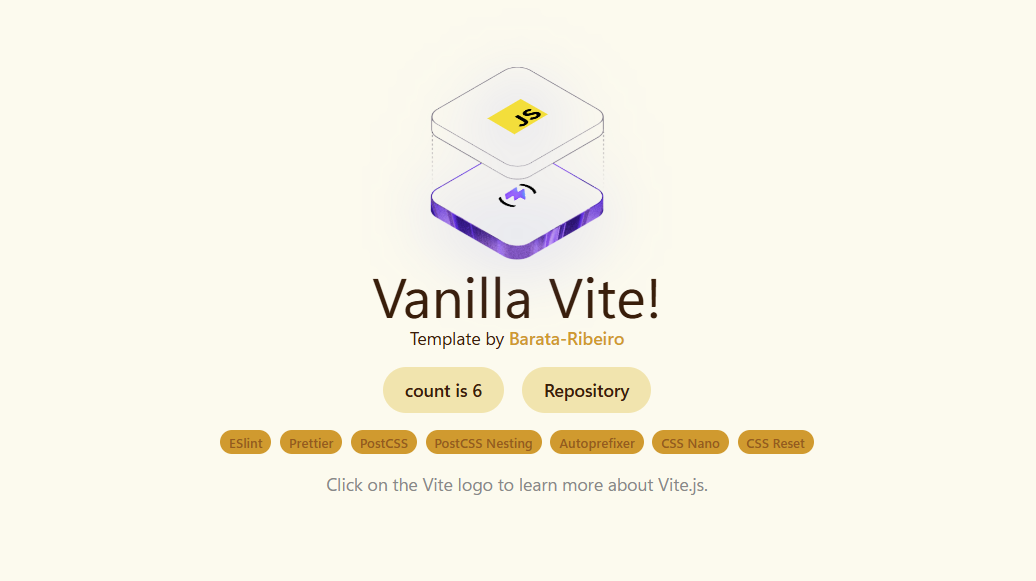
基于 Vite 的原生 JavaScript 项目结构,不依赖前端框架
ViteHTML启动器
vite-vanilla-js-template — Vite 启动器模板
作者 Barata-Ribeiro
基于 Vite 的原生 JavaScript 启动模板,内置 ESLint、Prettier 与 PostCSS 工具链,用于快速开始一个纯 HTML/CSS/JS 项目。
看看你的网站会是什么样
浏览真实页面截图,比较内容排版与手机效果。点击下方缩略图切换,放大查看整页细节。
目前有 1 张原始预览,可打开完整图片查看设计细节。
截图用于了解视觉与布局,交互效果请以实际项目为准。
采集于 2026-10-02查看来源
值得关注的模板亮点
从已有项目资料中,快速了解它的特点。
内置 ESLint(Flat Config)与 Prettier,并通过插件接入 Vite 构建流程
使用 PostCSS 搭配 autoprefixer、cssnano 与 postcss-nesting 处理样式
引入 the-new-css-reset 作为基础 CSS 重置
提供 dev、lint、lint:fix、format、build、preview 等 npm 脚本
支持 git clone 或 degit 两种方式获取模板
模板详细介绍
这是一个面向原生 JavaScript 的 Vite 启动模板,作者最初为个人项目搭建。它不引入前端框架,只提供 Vite 构建流程以及一套代码质量与样式处理工具,适合从零开始编写 HTML、CSS 和 JavaScript 的项目。
模板已配置 ESLint(使用 Flat Config API)与 Prettier,并通过 eslint-plugin-import、eslint-plugin-prettier、eslint-config-prettier 等插件把两者整合进 Vite 构建流程。样式方面使用 PostCSS 配合 autoprefixer、cssnano 和 postcss-nesting,并引入 the-new-css-reset 作为 CSS 重置。
使用方式有两种:直接 git clone 仓库,或通过 degit 拉取模板到新目录。README 明确说明安装依赖时需加 --legacy-peer-deps 以规避与 ESLint 10 相关的依赖冲突,待依赖更新后可去掉该参数。克隆后需要手动清理:删除 .git 目录并重新 git init、清空 README 与示例样式、删除示例图片和 .github 目录、更新 package.json 与 LICENSE。
需要注意,模板本身不包含页面结构、组件或业务逻辑,也不提供路由、状态管理、测试或部署配置;这些都需要使用者自行添加。仓库以 MIT 许可发布,但示例截图、图标等第三方素材需单独核对其许可。
ViteHTML启动器
适合你的项目吗?
适用场景
- 用原生 HTML/CSS/JavaScript 开始一个不需要框架的新项目
- 需要一个已配置好 lint 与格式化规则的 Vite 起点
- 在小型页面、演示或静态站点中使用现代 CSS 嵌套与自动前缀
- 作为学习 Vite 构建流程与 ESLint/Prettier 集成的参考项目
适合人群
- 希望使用原生 JavaScript 而非框架的开发者
- 需要轻量构建工具链的个人项目或原型
- 习惯 ESLint + Prettier 工作流的开发者
- 愿意在克隆后手动清理示例内容的使用者
上手与定制指南
结合仓库当前版本的说明,按下面的资料检查内容、配置与运行要求。
- 1
克隆后需删除 .git 目录并重新执行 git init,同时清理 README、示例样式、示例图片和 .github 目录
- 2
安装依赖时按 README 要求使用 npm install --legacy-peer-deps,以避免与 ESLint 10 相关的依赖冲突
- 3
克隆后按需更新 package.json 与 LICENSE,并移除 src/js/main.js 中除样式导入外的示例代码
- 4
模板不包含路由、状态管理、测试或部署配置,需要自行添加
- 5
示例截图、图标等第三方素材的许可需单独核对,不能仅依据代码的 MIT 许可判断
授权与来源资料
使用条件与限制
免费使用 · 保留许可声明本次收录的是公开仓库中采用 MIT 许可的免费版本;免费范围为该版本代码,不代表外部服务或第三方素材免费。
使用时需要遵守
- 允许免费使用、修改、商用和分发该版本代码。
- 分发代码副本或实质性部分时,保留原作者版权声明和完整 MIT 许可声明。
- 代码按现状提供;担保与责任限制以原许可证及适用法律为准。
额外费用与待核对事项
- 安装依赖时必须使用 --legacy-peer-deps 参数,否则会因 ESLint 10 相关依赖冲突导致安装失败;待依赖更新后方可移除该参数。
- 克隆后需删除 .git 目录并重新执行 git init 以清理提交历史,属于使用前必须执行的手动清理步骤。
- 需自行调整 LICENSE 文件以适配自身项目,模板不代为处理授权归属。
- 需删除示例截图与图标等素材,这些第三方素材的许可需单独核对,不能仅依据代码的 MIT 许可判断。
- 演示图片、字体、图标及其他第三方素材需按各自许可核对,不能仅凭代码的 MIT 许可判断。
- 域名、托管、数据库、支付或 AI 等外部服务可能另外收费。
查看原文依据
Permission is hereby granted, free of charge
许可证原文
npm install --legacy-peer-deps
README 原文
Remove the .git directory and run `git init` to clean the commit history.
README 原文
Adapt the LICENSE file to your project.
README 原文
https://github.com/Barata-Ribeiro/vite-vanilla-js-template/blob/main/LICENSEhttps://github.com/Barata-Ribeiro/vite-vanilla-js-template/blob/main/README.mdDelete `public/vite.svg`, `public/screenshot`, `src/assets/images/javascript.svg`, and `src/assets/images/vite.svg`.
README 原文
DeepSeek 根据仓库许可证和 README 整理 ·2026-10-02。结果仅覆盖已读取资料,依赖、图片、字体及后续条款变更以各自原文为准。
项目核对记录与介绍依据
模板资料
- 来源平台
- GitHub
- 资料与维护参考分
- 资料较完整 · 80 / 100
- 技术栈
- Vite · HTML
- 网站类型
- 启动器
这个分数如何计算
本站按许可资料(最高30分)、演示链接(12分)、预览图(10分)、Star数(15分)、记录的维护时间(15分)、描述完整度(8分)、功能记录(5分)和分类资料(5分)计算。它不是代码、安全或性能测试,也不是 Google 评分;有链接不代表已实测可用。
这个项目需要核对什么
- 记录的仓库更新时间
- 2026-10-01
- 截图检查日期
- 2026-10-02
目前没有记录演示链接。请依据仓库说明在本地评估;仅凭截图无法确认交互行为。
目录记录的主要技术栈是 Vite。请通过依赖清单和锁文件核对实际版本与托管要求。这些说明基于收录资料,不代表代码审计或部署实测。
查看具体选型方法 →介绍的制作与核对状态
介绍由 AI 辅助整理目录与仓库资料。仓库作者不等于这篇介绍的审核者。
已完成服务器许可规则与 AI 来源核对;未经过人工编辑审核。
查看当时使用的来源资料
SHA-256: f1bf73085ef2f942d013f88c095244620af5f201c26078601977f0200497c538
2026-10-02T11:37:36.015Z
来源文件 / 仓库# Vite Vanilla JS Template  Initially built for personal use, I created this template for starting a new project with Vite.js and Vanilla Javascript. It is already set up with standard development tools like ESLint and Prettier for easy code formatting and linting, with Vite for a robust, modern build process. ## Dependencies This template uses the following dependencies: - **[Vite](https://vitejs.dev/):** A next-generation frontend build tool that offers a fast dev server and optimized builds. - **[ESLint](https://eslint.org/):** An open-source JavaScript linting utility that helps maintain a consistent code style. - **[Prettier](https://prettier.io/):** An opinionated code formatter that enforces a consistent style across your project. - **[@eslint/js](https://www.npmjs.com/package/@eslint/js) and [eslint-config-prettier](https://www.npmjs.com/package/eslint-config-prettier):** The official ESLint recommended config via `@eslint/js` (used with ESLint v9) and a Prettier-compatible config that disables stylistic rules which might conflict with Prettier. - **[eslint-plugin-import](https://www.npmjs.com/package/eslint-plugin-import) and [eslint-plugin-prettier](https://www.npmjs.com/package/eslint-plugin-prettier):** ESLint plugins that enforce ES2015+ import/export syntax and integrate Prettier with ESLint. - **[autoprefixer](https://www.npmjs.com/package/autoprefixer) and [postcss](https://postcss.org/):** Autoprefixer automatically adds vendor prefixes to CSS, while PostCSS provides a way to transform CSS with JavaScript. - **[cssnano](https://cssnano.github.io/cssnano/):** A tool that helps to compress and optimize CSS files. - **[postcss-nesting](https://www.npmjs.com/package/postcss-nesting):** A PostCSS plugin that allows you to use modern CSS Nesting in your stylesheets. - **[vite-plugin-eslint](https://www.npmjs.com/package/vite-plugin-eslint):** Integrates ESLint into the Vite build process for on-the-fly linting. - **[the-new-css-reset](https://elad2412.github.io/the-new-css-reset/):** A modern, CSS reset for your styles. ## Cloning 1. To start using this template, clone the repository with this command: ```bash git clone https://github.com/Barata-Ribeiro/vite-vanilla-js-template.git ``` 2. Then proceed to the folder and install dependencies: ```bash cd vite-vanilla-js-template npm install --legacy-peer-deps # Until some deps are properly updated to work with eslint 10, use the --legacy-peer-deps flag to avoid dependency conflicts. Remove this flag once all dependencies are updated to work with eslint 10. ``` **or** ```bash npm install -g degit # if you don't have degit installed... #degit documentation at: https://github.com/Rich-Harris/degit ``` 1. Use 'degit' to create a folder project using this template: ```bash degit Barata-Ribeiro/vite-vanilla-js-template your-project-name ``` 2. Then proceed to the folder and install dependencies: ```bash cd your-project-name npm install --legacy-peer-deps # Until some deps are properly updated to work with eslint 10, use the --legacy-peer-deps flag to avoid dependency conflicts. Remove this flag once all dependencies are updated to work with eslint 10. ``` ## Post-Cloning Steps After cloning the template, make sure to clean up and update the following: 1. Remove the .git directory and run `git init` to clean the commit history. 2. Clean up the README.md file. 3. Adapt the LICENSE file to your project. 4. Delete `public/vite.svg`, `public/screenshot`, `src/assets/images/javascript.svg`, and `src/assets/images/vite.svg`. 5. Delete the content from `src/styles/style.css`. 6. In the `src/js/main.js` file, leave only these import statements: `import "../../styles/style.css";` and `import "the-new-css-reset/css/reset.css";`. 7. Adapt the `package.json` file with your project's own information. 8. Delete the .github folder. ## Scripts Use the following scripts for your development workflow: ```bash # Start the development server npm run dev # Checks your code for any linting errors npm run lint # Tries to automatically fix any linting errors present in your code npm run lint:fix # Formats your code in a consistent, predefined style using Prettier npm run format # Build for production npm run build # Preview the build npm run preview # Build and preview the project npm run buildpreview ``` ## Folder Structure This is the structure of the project: ```plaintext / ├── .github # Github actions and workflows ├── node_modules # Node.js dependencies for the project. ├── public # Public assets and resources ├── src # Source code │ ├── assets # General assets for your project │ │ ├── images # Store your images here │ ├── js # Javascript files of your project │ ├── styles # CSS styles for your project ├── .editorconfig # Configuration for the EditorConfig plugin ├── eslint.config.js # Configuration for ESLint (using the new Flat Config API) ├── .gitignore # Files and folders to be ignored by Git ├── .prettierignore # Files to be ignored by Prettier ├── .prettierrc # Configuration for Prettier ├── index.html # The HTML file for your project ├── LICENSE # The license for your project ├── package-lock.json # Lockfile for your project's dependencies ├── package.json # Defines your project and its dependencies ├── postcss.config.cjs # Configuration for PostCSS ├── README.md # This file ├── vite.config.js # Configuration for Vite ``` ## License This template was created under the [MIT License](LICENSE.md). **Happy coding!** 👨💻
看看同类模板
对比同技术栈与用途的模板,找到更适合的视觉与内容结构。

react-starter-kit
Modern React starter kit with Bun, TypeScript, Tailwind CSS, tRPC, Stripe, and Cloudflare Workers. Production-…
Vite · SaaS

cove
The Cove Stack: 🏝️ minimal TanStack Start template with Vite+, Better Auth, Drizzle ORM, shadcn/ui
Vite · SaaS

vite-react-boilerplate
A production ready, scalable starter template for Vite + React
Vite · 启动器

react-vite-admin
This Starter utilizes React, Recoil, React Query, React Hooks, Typescript, Axios And Vite. 全新技术栈的后台管理系统
Vite · 后台

typescript-react_best_practices-vite_template
<⚡⚛️> Start your React project with Vite following code best practices (TypeScript, Linting, testing, CI/CD…)
Vite · 启动器

cloudflare-starter-kit
Template (boilerplate) repository for scaffolding Cloudflare Workers projects
Vite · 启动器