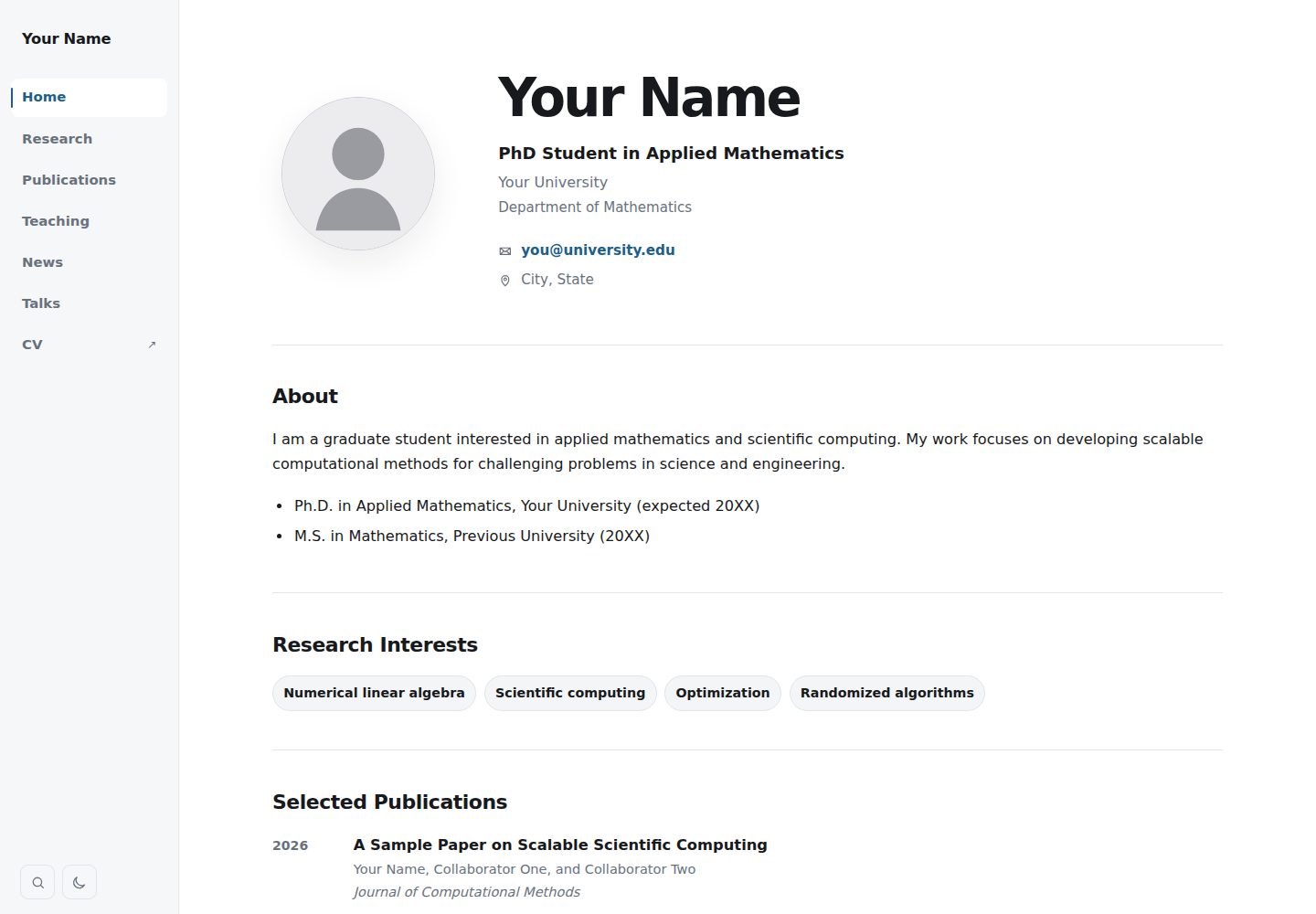
单文件配置:data/profile.toml 控制姓名、头衔、机构、简介、教育经历、研究兴趣、CV、社交链接、主题、搜索、精选论文、侧边栏与内容宽度、强调色等
HTML作品集
academic-builder — HTML 作品集模板
作者 BhattHarshit
Academic Builder 是一个基于 Hugo 的学术个人网站模板,通过 data/profile.toml 单文件配置姓名、头衔、单位、简介、教育经历、研究方向、社交链接与主题等,并支持 Markdown 页面自动生成导航标签、TOML 管理论文列表和 GitHub Pages 自动部署。
看看你的网站会是什么样
浏览真实页面截图,比较内容排版与手机效果。点击下方缩略图切换,放大查看整页细节。
全部页面与视图 2
截图用于了解视觉与布局,交互效果请以实际项目为准。
采集于 2026-10-15查看来源
值得关注的模板亮点
从已有项目资料中,快速了解它的特点。
论文数据集中在 data/publications.toml,Publications 页面与首页精选论文区自动更新,条目支持 DOI、PDF、代码、摘要、BibTeX 和 selected 标记
在 content/ 下新建顶层 Markdown 文件即可自动生成桌面与移动端导航标签,按 weight 排序,并支持 menu、toc、math、search、external_url 等可选 front matter
提供 GitHub Actions 工作流,将仓库 Source 设为 GitHub Actions 后可自动部署到 GitHub Pages
基于 Hugo 构建,可选通过 MathJax 排版 LaTeX 数学公式
CV 通过替换 static/files/cv.pdf 提供,CV 标签直接打开 PDF
模板详细介绍
Academic Builder 是一个面向学术个人主页的 Hugo 模板,仓库为 BhattHarshit/academic-builder。README 说明其定位是「easy setup and advanced navigation tools」的学术网站模板,并提供了在线演示链接。
配置方式以单文件为核心:编辑 data/profile.toml 即可控制姓名、头衔、机构、院系、邮箱、所在地、头像、个人简介、教育经历、研究兴趣、CV、社交链接、主题行为、搜索、精选论文、侧边栏宽度、内容宽度和强调色。论文数据单独放在 data/publications.toml,Publications 页面与首页 Selected Publications 区域会随之更新,条目可包含 DOI、PDF、代码、摘要、BibTeX 以及 selected = true 标记。CV 通过替换 static/files/cv.pdf 提供,CV 标签直接打开该 PDF,路径或标签可在 profile.toml 中调整。
页面扩展方式是在 content/ 下新建顶层 Markdown 文件,填写 title 与 weight 后会自动成为桌面端和移动端导航标签,weight 越小越靠前。可选 front matter 包括 menu: false(保留页面但隐藏导航标签)、toc: true(显示页内目录)、math: true(加载 MathJax 排版 LaTeX)、search: false(将该页排除出站内搜索)、external_url(让标签指向外部页面)。
部署流程依赖 GitHub:使用模板创建名为 your_Github_username.github.io 的仓库,在 Settings → Pages 中将 Source 设为 GitHub Actions,然后提交 data/profile.toml 的修改,或手动运行 Actions 中的 Deploy Hugo site to GitHub Pages 工作流,站点即发布在 https://your_Github_username.github.io/。本地预览需安装 Hugo Extended 后执行 hugo server。
技术实现方面,README 说明模板使用 Hugo 构建,可选使用 MathJax 做数学排版,主要结构包含 content/、data/、layouts/、static/css/site.css、static/js/site.js、static/images/、static/files/cv.pdf 与 .github/workflows/。README 未提供具体框架版本号、浏览器兼容性、无障碍支持、性能数据或除 GitHub Pages 之外的其他部署方式说明。模板在致谢中说明其灵感部分来自 MIT 许可的 al-folio 项目,为独立的 Hugo 实现。
HTML作品集
适合你的项目吗?
适用场景
- 搭建个人学术主页,集中展示姓名、头衔、机构、简介、教育经历与研究兴趣
- 维护论文列表,并在 Publications 页面和首页精选论文区同步呈现 DOI、PDF、代码、摘要与 BibTeX
- 通过 Markdown 文件扩展 Projects、Teaching 等自定义页面,并自动加入导航标签
- 在 GitHub Pages 上发布站点,借助 GitHub Actions 完成构建与部署
- 在需要时用 MathJax 在页面中排版 LaTeX 数学公式
适合人群
- 希望用少量配置文件维护学术个人网站的教师、研究人员或学生
- 已使用 GitHub 并愿意通过 GitHub Pages 发布站点的用户
- 需要论文列表、CV 下载、导航标签和站内搜索等学术主页常见模块的用户
- 习惯用 Markdown 撰写页面内容、用 TOML 管理结构化数据的用户
上手与定制指南
结合仓库当前版本的说明,按下面的资料检查内容、配置与运行要求。
- 1
在 GitHub 上点击 Use this template 创建新仓库,仓库名需为 your_Github_username.github.io
- 2
在 Settings → Pages 的 Build and deployment 中将 Source 设为 GitHub Actions
- 3
编辑 data/profile.toml 并提交,或手动运行 Actions 中的 Deploy Hugo site to GitHub Pages 工作流以触发部署
- 4
替换 static/images/avatar.svg 与 static/files/cv.pdf 为个人文件,并按需修改 data/publications.toml
- 5
本地预览需安装 Hugo Extended,然后执行 hugo server
授权与来源资料
使用条件与限制
免费使用 · 保留许可声明本次收录的是公开仓库中采用 MIT 许可的免费版本;免费范围为该版本代码,不代表外部服务或第三方素材免费。
使用时需要遵守
- 允许免费使用、修改、商用和分发该版本代码。
- 分发代码副本或实质性部分时,保留原作者版权声明和完整 MIT 许可声明。
- 代码按现状提供;担保与责任限制以原许可证及适用法律为准。
额外费用与待核对事项
- 演示图片、字体、图标及其他第三方素材需按各自许可核对,不能仅凭代码的 MIT 许可判断。
- 域名、托管、数据库、支付或 AI 等外部服务可能另外收费。
- 需要 GitHub 账号并登录后才能使用模板创建仓库。
- 部署到 GitHub Pages 需在仓库 Settings → Pages 中将 Source 设为 GitHub Actions。
- 本地预览需安装 Hugo Extended。
- 可选使用 MathJax 进行数学排版,属于外部服务。
查看原文依据
Permission is hereby granted, free of charge
许可证原文
1. Create a GitHub account if you don't have one and log in with it.
README 原文
4. Open **Settings → Pages** and under **Build and deployment**, set **Source** to **GitHub Actions**.
README 原文
Install Hugo Extended, then run:
README 原文
https://github.com/BhattHarshit/academic-builder/blob/main/LICENSEhttps://github.com/BhattHarshit/academic-builder/blob/main/.github/README.mdThe template is built with [Hugo](https://gohugo.io/) and optionally uses [MathJax](https://www.mathjax.org/) for mathematical typesetting.
README 原文
DeepSeek 根据仓库许可证和 README 整理 ·2026-10-15。结果仅覆盖已读取资料,依赖、图片、字体及后续条款变更以各自原文为准。
项目核对记录与介绍依据
模板资料
- 来源平台
- GitHub
- 资料与维护参考分
- 资料较完整 · 80 / 100
- 技术栈
- HTML
- 网站类型
- 作品集
这个分数如何计算
本站按许可资料(最高30分)、演示链接(12分)、预览图(10分)、Star数(15分)、记录的维护时间(15分)、描述完整度(8分)、功能记录(5分)和分类资料(5分)计算。它不是代码、安全或性能测试,也不是 Google 评分;有链接不代表已实测可用。
这个项目需要核对什么
- 记录的仓库更新时间
- 2026-10-14
- 截图检查日期
- 2026-10-15
已收录演示链接。请用你的内容与屏幕尺寸检查;有演示不代表表单、认证或支付已经可用。
目录记录的主要技术栈是 HTML。请通过依赖清单和锁文件核对实际版本与托管要求。这些说明基于收录资料,不代表代码审计或部署实测。
查看具体选型方法 →介绍的制作与核对状态
介绍由 AI 辅助整理目录与仓库资料。仓库作者不等于这篇介绍的审核者。
审核声明: codex-user-requested-batch-review-20261015 · 2026-10-15
查看当时使用的来源资料
SHA-256: a3d628c307e30cae20c0a7d632358f3232dfa2c56bef4cc40ae21d8389359de5
2026-10-15T01:40:41.960Z
来源文件 / 仓库# Academic Builder
An academic website template with easy setup and advanced navigation tools.
<p align="center">
<a href="https://bhattharshit.github.io/academic-builder/">
<img src="../static/images/demo.gif"
alt="Academic Website Template Demo"
width="900">
</a>
</p>
<p align="center">
<a href="https://bhattharshit.github.io/academic-builder/">
<strong>View Live Demo →</strong>
</a>
</p>
## Quick start
1. Create a GitHub account if you don't have one and log in with it.
2. Click **Use this template** in the top right corner.
3. Create a **new repository** and name it: `your_Github_username.github.io`.
4. Open **Settings → Pages** and under **Build and deployment**, set **Source** to **GitHub Actions**.
5. Edit `data/profile.toml` slightly and commit changes. (OR, open **Actions → Deploy Hugo site to GitHub Pages → Run workflow**.)
4. Your website will be available at: `https://your_Github_username.github.io/`
5. Edit `data/profile.toml` to update your information and replace `static/images/avatar.svg` and `static/files/cv.pdf` with your files.
## One-file site customization
Edit only:
```text
data/profile.toml
```
It controls your name, title, institution, department, email, location, profile image, bio, education, research interests, CV, social links, theme behavior, search, selected publications, sidebar width, content width, and accent colors.
## Add a page/tab
Create any top-level Markdown file in `content/`:
```yaml
---
title: "Projects"
weight: 25
---
Your content here.
```
It automatically becomes a desktop and mobile navigation tab. Lower `weight` values appear first.
Useful optional front matter:
```yaml
menu: false # keep the page but hide its navigation tab
toc: true # show an on-page table of contents
math: true # load MathJax for LaTeX
search: false # omit the page from site search
external_url: "https://example.com" # make the tab open an external page
```
## Publications
Edit:
```text
data/publications.toml
```
The Publications page and homepage Selected Publications section update automatically. Entries can include DOI, PDF, code, abstract, BibTeX, and a `selected = true` flag.
## CV
Replace:
```text
static/files/cv.pdf
```
The CV tab opens the PDF directly. Change its path or label in `data/profile.toml` if needed.
## Run locally (optional)
Install Hugo Extended, then run:
```bash
hugo server
```
## Main structure
```text
content/ # Independent Markdown pages / navigation tabs
data/profile.toml # Site-wide identity, links, design, and features
data/publications.toml # Publication records
layouts/ # Hugo templates and publication renderer
static/css/site.css # Visual system
static/js/site.js # Theme, mobile menu, search, back-to-top
static/images/ # Profile image and site images
static/files/cv.pdf # CV
.github/workflows/ # GitHub Pages deployment
```
## Acknowledgements
This website template is an independent Hugo implementation inspired in part by [**al-folio**](https://github.com/alshedivat/al-folio), an open-source academic website project by Maruan Al-Shedivat and contributors, distributed under the MIT License.
The template is built with [Hugo](https://gohugo.io/) and optionally uses [MathJax](https://www.mathjax.org/) for mathematical typesetting.
**Design and Hugo implementation:** [Harshit Bhatt](https://bhattharshit.github.io/).
看看同类模板
对比同技术栈与用途的模板,找到更适合的视觉与内容结构。

simplefolio
⚡️ A minimal portfolio template for Developers
HTML · 作品集

Freelancer
Freelancer 是 Start Bootstrap 出品的单页作品集模板,专为自由职业者、设计师和小型工作室设计。 页面结构清晰,包含多个内容区块、响应式作品集网格,每个作品项目配有模态窗口展示详情。
HTML · 作品集

Resume
Resume 是 Start Bootstrap 推出的简历与 CV 主题,基于 Bootstrap 构建,采用固定侧边栏加内容区块的结构。
HTML · 作品集

Creative
Creative 是 Start Bootstrap 团队维护的一款单页营销模板,定位明确:为创意机构或产品服务提供一个以作品展示和行动号召为核心的落地页。
HTML · 企业官网

Grayscale
Grayscale 是 Start Bootstrap 出品的深色系单页 HTML 模板,基于 Bootstrap 构建。 它的视觉重心放在大尺寸首屏和清晰的内容分区上,整体氛围偏暗,适合摄影、活动或品牌叙事类网站。
HTML · 企业官网

startbootstrap-stylish-portfolio
Stylish Portfolio 是 Start Bootstrap 维护的单页作品集主题,基于 Bootstrap 构建,采用多个内容区块加离屏导航菜单的结构。
HTML · 作品集