以 11ty 生成静态页面,页面源文件位于 src/site,构建输出到 dist
Eleventy工具站启动器
bymattlee-11ty-starter — Eleventy 工具站模板
作者 bymattlee
由 11ty 驱动的静态站点启动模板,集成 Sanity 内容 API、Gulp 构建流程、Tailwind CSS、rollup.js、Alpine.js 与 Taxi.js 页面过渡。
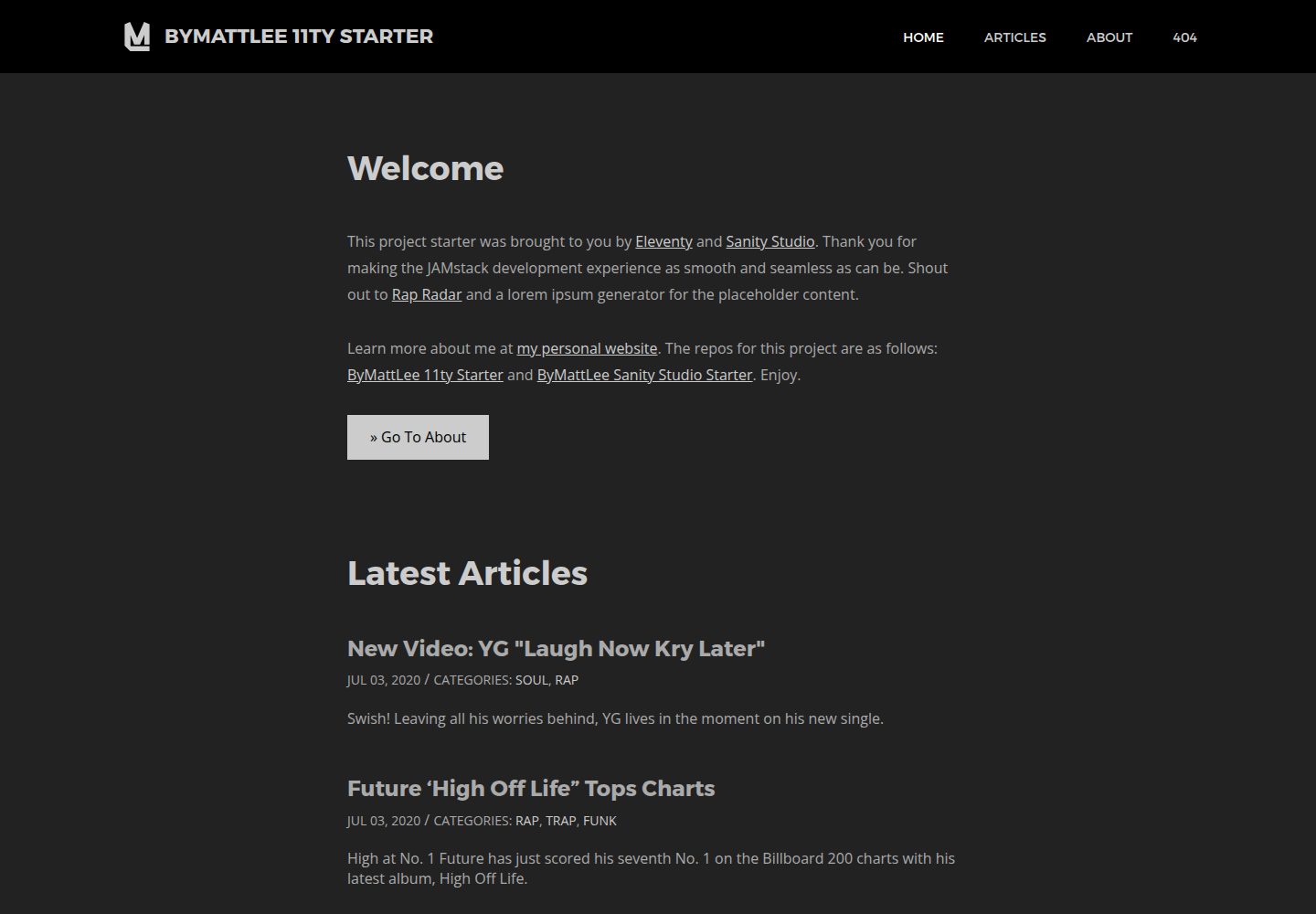
看看你的网站会是什么样
浏览真实页面截图,比较内容排版与手机效果。点击下方缩略图切换,放大查看整页细节。
全部页面与视图 3
截图用于了解视觉与布局,交互效果请以实际项目为准。
采集于 2026-09-30查看来源
值得关注的模板亮点
从已有项目资料中,快速了解它的特点。
内容数据来自 Sanity Cloud API,可与同作者的 Sanity Studio 启动模板配合
使用 Gulp 作为构建流程,负责渲染 HTML、编译样式与脚本并优化资源
样式层采用 Tailwind CSS,配合 SCSS、Stylelint、autoprefixer、压缩与 sourcemap
脚本层使用 rollup.js 打包,集成 Alpine.js 与 Taxi.js 页面过渡
构建时生成响应式图片、SVG sprite、sitemap 与 robots.txt
模板详细介绍
这是一个面向静态站点开发的启动模板,仓库名为 bymattlee-11ty-starter,采用 MIT 许可。它把 11ty 作为静态站点生成器,页面放在 src/site 下,构建后输出到 dist;基础布局位于 src/site/_includes/layouts/base.njk,可复用片段放在 src/site/_includes/partials。内容数据来自 Sanity Cloud API,README 说明可与同作者的 Sanity Studio 启动模板配合使用,Sanity 相关选项和编译用环境 URL 在 config.js 中配置。
样式层使用 Tailwind CSS,SCSS 文件位于 src/assets/scss,main.scss 作为入口并编译为 dist/assets/css/main.min.css;构建流程包含 Stylelint、autoprefixer、压缩和 sourcemap,staging 与 production 构建会通过 PurgeCSS 移除未使用的 CSS。脚本层使用 rollup.js 打包,入口为 src/assets/js/main.js,本地组件放在 src/assets/js/components,第三方脚本可手动放入 src/assets/js/vendors;同时集成 Taxi.js 用于页面过渡、Alpine.js 用于声明式 DOM 操作,并包含一套用于内容动画的自定义框架。
资源处理方面,未优化的图片放入 src/assets/images,构建时优化并输出到 dist/assets/images,同时按 200w 到 1800w 的宽度生成响应式图片,模板中可用 imageSrc 短代码输出 srcset;SVG 放入 src/assets/svg,优化后合并为 dist/assets/svg/sprite.svg;字体、视频等其他资源从 src/assets 复制到 dist/assets。构建还会基于 dist 中的 HTML 文件生成 sitemap,并生成 robots.txt,其配置位于 src/site/robots.njk。
使用限制与注意事项:README 要求安装 Node 16.17.1 LTS 并使用 Yarn 安装依赖;开发、staging 与 production 分别通过 yarn dev、yarn stage、yarn prod 执行,开发环境由 Browsersync 提供本地服务,NJK、JS、图片、SVG 或资源文件更新时刷新浏览器,SCSS 更新时注入样式。模板依赖 Sanity 云 API 提供数据,因此使用前需要配置 Sanity 相关选项;演示图片、字体、图标等第三方素材需按各自许可核对,外部服务可能另外收费。
Eleventy工具站启动器
适合你的项目吗?
适用场景
- 需要以 11ty 搭建静态站点并希望预置构建流程与资源处理的项目
- 使用 Sanity 作为内容源、需要将云端数据编译为静态页面的站点
- 希望以 Tailwind CSS 编写样式并保留 SCSS 自定义能力的开发场景
- 需要页面过渡、声明式 DOM 操作和内容动画框架的前端项目
- 需要自动生成响应式图片、SVG sprite、sitemap 与 robots.txt 的站点
适合人群
- 熟悉 Node、Yarn 与 11ty 的前端开发者
- 使用 Sanity 管理内容并输出静态站点的团队
- 需要 Tailwind CSS 与 SCSS 混合样式方案的开发者
- 需要 Gulp 与 rollup.js 构建流程的静态站点项目
上手与定制指南
结合仓库当前版本的说明,按下面的资料检查内容、配置与运行要求。
- 1
安装 Node 16.17.1 LTS,并通过 npm i -g yarn 安装 Yarn
- 2
在项目根目录执行 yarn 安装全部依赖
- 3
在 config.js 中更新 Sanity 选项和编译用环境 URL
- 4
使用 yarn dev 启动开发与监听,yarn stage 构建 staging,yarn prod 构建 production
授权与来源资料
使用条件与限制
免费使用 · 保留许可声明本次收录的是公开仓库中采用 MIT 许可的免费版本;免费范围为该版本代码,不代表外部服务或第三方素材免费。
使用时需要遵守
- 允许免费使用、修改、商用和分发该版本代码。
- 分发代码副本或实质性部分时,保留原作者版权声明和完整 MIT 许可声明。
- 代码按现状提供;担保与责任限制以原许可证及适用法律为准。
额外费用与待核对事项
- 站点数据依赖 Sanity 云 API,使用前必须在 config.js 中配置 Sanity 项目选项,并可能需要注册 Sanity 账号及获取 API 密钥。
- 构建环境要求安装 Node 16.17.1 LTS 版本,其他 Node 版本可能无法正常构建。
- 依赖安装需使用 Yarn(npm i -g yarn),而非 npm 直接安装。
- 演示图片、字体、图标及其他第三方素材需按各自许可核对,不能仅凭代码的 MIT 许可判断。
- 域名、托管、数据库、支付或 AI 等外部服务可能另外收费。
查看原文依据
Permission is hereby granted, free of charge
许可证原文
Data is coming from the Sanity Cloud API.
README 原文
Install Node 16.17.1 LTS
README 原文
https://github.com/bymattlee/bymattlee-11ty-starter/blob/master/LICENSE.mdhttps://github.com/bymattlee/bymattlee-11ty-starter/blob/master/README.mdInstall Yarn
README 原文
DeepSeek 根据仓库许可证和 README 整理 ·2026-10-01。结果仅覆盖已读取资料,依赖、图片、字体及后续条款变更以各自原文为准。
项目核对记录与介绍依据
模板资料
- 来源平台
- GitHub
- 资料与维护参考分
- 资料较完整 · 77 / 100
- 技术栈
- Eleventy
- 网站类型
- 工具站 · 启动器
这个分数如何计算
本站按许可资料(最高30分)、演示链接(12分)、预览图(10分)、Star数(15分)、记录的维护时间(15分)、描述完整度(8分)、功能记录(5分)和分类资料(5分)计算。它不是代码、安全或性能测试,也不是 Google 评分;有链接不代表已实测可用。
这个项目需要核对什么
- 记录的仓库更新时间
- 2023-07-14
- 截图检查日期
- 2026-10-01
已收录演示链接。请用你的内容与屏幕尺寸检查;有演示不代表表单、认证或支付已经可用。
目录记录的主要技术栈是 Eleventy。请通过依赖清单和锁文件核对实际版本与托管要求。这些说明基于收录资料,不代表代码审计或部署实测。
查看具体选型方法 →介绍的制作与核对状态
介绍由 AI 辅助整理目录与仓库资料。仓库作者不等于这篇介绍的审核者。
已完成服务器许可规则与 AI 来源核对;未经过人工编辑审核。
查看当时使用的来源资料
SHA-256: fe4c9c36aa774c73d558d6659cded355e3d84ac4a807341c852fac987d6b2fc6
2026-10-01T14:43:44.138Z
来源文件 / 仓库
# ByMattLee 11ty Starter
A starter boilerplate powered by [11ty](https://www.11ty.dev/), [Sanity](https://www.sanity.io/), [Gulp](https://gulpjs.com/), [Tailwind CSS](https://tailwindcss.com/), [rollup.js](https://rollupjs.org/), [Alpine.js](https://alpinejs.dev/) and [Taxi.js](https://taxi.js.org/).
[VIEW DEMO](https://bymattlee-11ty-starter.netlify.app/)
---
## Installation
##### 1. Install Node 16.17.1 LTS: <https://nodejs.org/>
##### 2. Install Yarn
```
$ npm i -g yarn
```
##### 3. Install all dependencies
```
$ yarn
```
---
## Configuration
In `config.js`, update Sanity options and environment URLs for project compilation.
---
## Use
##### Build Files For Development And Initialize Watch
```
$ yarn dev
```
##### Build Files For Staging
```
$ yarn stage
```
##### Build Files For Production
```
$ yarn prod
```
---
## General Features
- Features [Gulp](https://gulpjs.com/) as the build pipeline that renders HTML, compiles styles and scripts, and optimizes assets.
- Data is coming from the Sanity Cloud API. This pairs perfectly with the [ByMattLee Sanity Studio Starter](https://github.com/bymattlee/bymattlee-sanity-studio-starter)
- Spins up a local development environment through Browsersync
- Browser reload when NJK, JS, image, SVG or asset files are updated
- Styles are injected when SCSS files are updated
##### Markup
- Features [11ty](https://www.11ty.dev/) as the static site generator
- Markup is minified in staging and production environments
- Site data can be set in `src/site/_data`
- Pages in `src/site` will be compiled to `dist`
- `src/site/_includes/layouts/base.njk` serves as the base template for the site
- `src/site/_includes/partials` contains site partials and components that are reused across the site (modular HTML)
##### Styles
- Features [Tailwind CSS](https://tailwindcss.com/), a utility-first framework
- Includes linter (Stylelint), autoprefixer, minification and sourcemap creation
- SCSS files are located in `src/assets/scss`
- `main.scss` in `src/assets/scss` serves as the base that includes the other dependent SASS files
- `main.scss` gets compiled to `dist/assets/css/main.min.css`
- `.stylelintrc` contains the settings for Stylelint
- Info about class namespacing can be found in `src/assets/scss/main.scss`
- Unused CSS (PurgeCSS) will be removed in staging and production builds
##### Scripts
- Features [rollup.js](https://rollupjs.org/guide/en/) as the module bundler
- Includes linting (ESLint), concatenation, minification and sourcemap creation
- Includes [Taxi.js](https://taxi.js.org/) for seamless page transitions
- Includes a custom framework for reuseable content animations
- Includes [Alpine.js](https://alpinejs.dev/) for declarative DOM manipulation
- `main.js` in `src/assets/js` serves as the main JS file that includes and runs all components and will be compiled to `dist/assets/js/main.min.js`
- All local components should be placed in `src/assets/js/components`
- All vendor JS can be manually added to `src/assets/js/vendors` if not found on Yarn
- `.eslintrc` contains the settings for ESLint
##### Images
- Place all unoptimized images in the `src/assets/images` directory
- They will then be optimized and placed in `dist/assets/images`
- Responsive images will be generated at the following widths (if larger): 200w, 400w, 600w, 800w, 1000w, 1200w, 1400w, 1600w, 1800w
- Use `imageSrc` shortcode to render responsive `srcset` in markup
##### SVGS
- Place all SVG files in the `src/assets/svg` directory
- They will then be optimized and added to a sprite at `dist/assets/svg/sprite.svg`
##### Other Assets
- All assets (fonts, videos, swfs, etc) under `src/assets` will be copied to `dist/assets` on build
##### Sitemap
- Generates a sitemap based on the HTML files in `dist`
##### Robots.txt
- Generates a robots.txt file
- Configuration can be found in `src/site/robots.njk`
---
## Tailwind CSS Notes
- All Tailwind settings can be found in `./tailwind.config.js`
- Most styles should be written as utility classes in the template markup but custom SCSS can be used for unique properties and/or magic numbers
- Utilize the [`@apply`](https://tailwindcss.com/docs/functions-and-directives#apply) directive when writing custom SCSS for efficiency:
```scss
svg {
@apply u-inline-block u-fill-current;
}
```
- Tailwind settings can be accessed with the [`theme()`](https://tailwindcss.com/docs/functions-and-directives#theme) function:
```scss
.button {
animation-duration: theme('transitionDuration.normal');
}
```
- Media queries can be used with the shorthand `screen()` function:
```scss
.button {
margin-right: 2.8rem;
@screen sm {
margin-right: 4.2rem;
}
}
```
---
## Contact
- Matt Lee - `@bymattlee` on most platforms
- Visit my website at [bymattlee.com](https://bymattlee.com)
[](https://twitter.com/bymattlee)
看看同类模板
对比同技术栈与用途的模板,找到更适合的视觉与内容结构。

eleventy-base-blog
A starter repository for a blog web site using the Eleventy static site generator.
Eleventy · 博客

eleventy-garden
:seedling: A starter site for building a mind garden with eleventy
Eleventy · 启动器

eleventastic
An Eleventy Starter Kit
Eleventy · 启动器

neat-starter
Starter Template for Netlify CMS, Eleventy, Alpine JS & Tailwind CSS
Eleventy · 启动器

Eleventy-Starter-Boilerplate
🚀 Eleventy Starter is production-ready with SEO-friendly for quickly starting a blog. ⚡ Built with Eleventy, …
Eleventy · 博客

eleventy-plus-vite
A clean and fast Eleventy Starter Project with Vite
Eleventy · 启动器