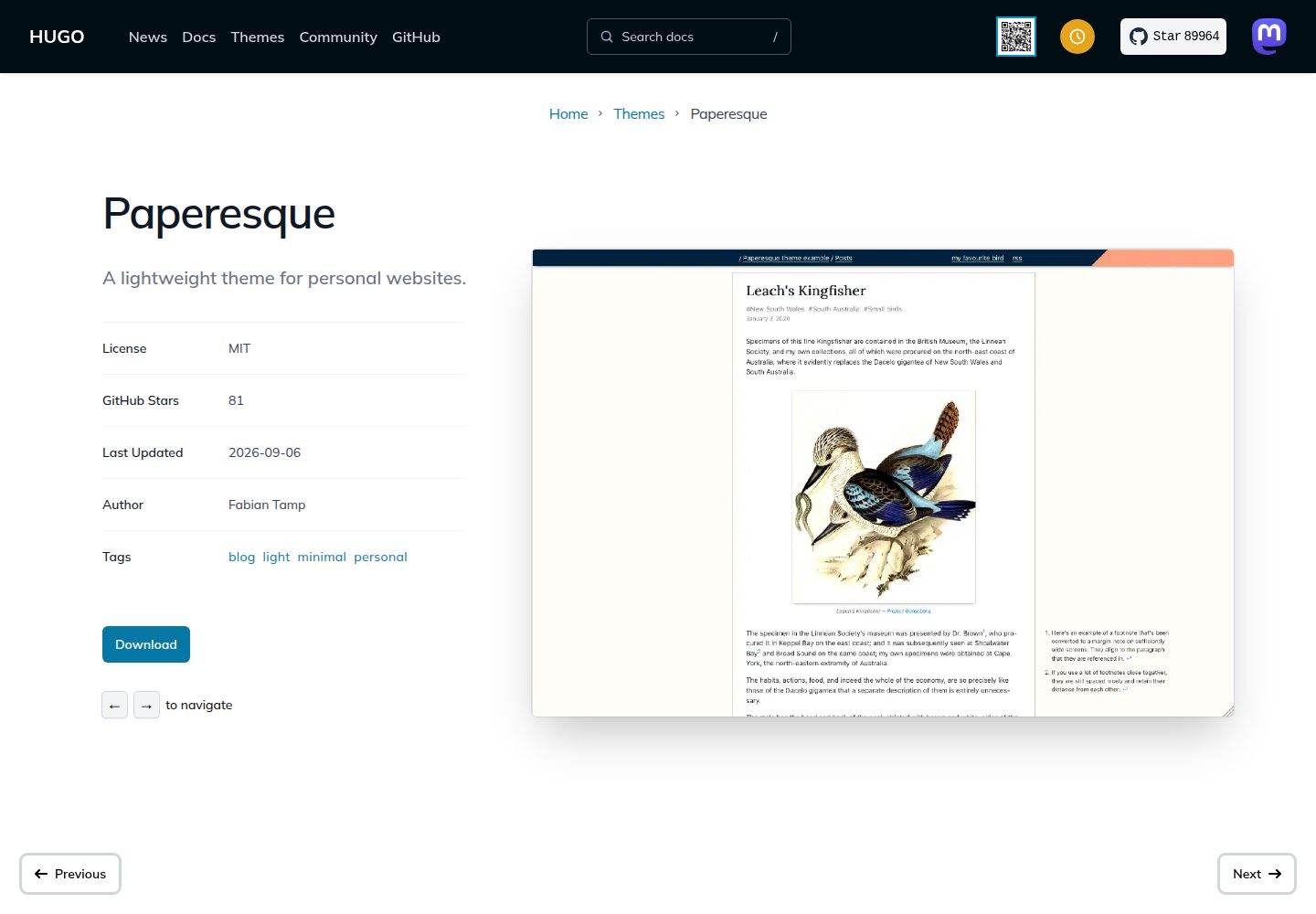
fitfigure 短代码自动将图片缩放至容器宽度,并输出 1x、2x 两种分辨率
Hugo启动器
paperesque — Hugo 启动器模板
作者 capnfabs
Paperesque 是一个轻量级 Hugo 主题,提供图片自适应缩放、脚注边注转换、草稿视觉标记和页面半隐藏等编辑控制功能。
看看你的网站会是什么样
浏览真实页面截图,比较内容排版与手机效果。点击下方缩略图切换,放大查看整页细节。
全部页面与视图 3
截图用于了解视觉与布局,交互效果请以实际项目为准。
采集于 2026-10-02查看来源
值得关注的模板亮点
从已有项目资料中,快速了解它的特点。
配套 drop-resources.py 脚本可在构建后移除原始图片,默认关闭
脚注在空间足够时自动转为边注,支持站点级或页面级关闭
草稿页面始终以橙色条纹背景显示,无法关闭
可通过 front-matter 将页面设为仅凭 URL 访问,不进入列表与站点地图
顶部菜单链接由 config.toml 的 params.topmenu 配置驱动
模板详细介绍
Paperesque 是面向 Hugo 的轻量级主题,作者在 capnfabs.net 上实际使用。主题提供 fitfigure 短代码,可将图片自动缩放至容器宽度并输出 1x/2x 分辨率,同时配套 drop-resources.py 脚本在构建后移除原始图片。脚注在空间足够时自动转为边注,可通过站点参数或页面 front-matter 关闭。草稿页面始终以橙色条纹背景区分,无法关闭。页面可通过 front-matter 中的 sitemap.disable 与 params.mostlyHidden 组合实现仅凭 URL 访问。首页有两种方案:自定义链接列表,或分区加侧边栏内容。顶部菜单链接由 config.toml 的 params.topmenu 配置驱动。
使用限制:mostlyHidden 依赖 Hugo 0.125.0 及以上版本;移除原始图片的 drop-resources.py 默认关闭,启用后会在输出中生成 .droplist 文件;修改主题 JavaScript 需要 yarn 与 parcel 工具链。
Hugo启动器
适合你的项目吗?
适用场景
- 为 Hugo 站点添加带图片自适应与边注功能的博客主题
- 需要区分草稿与已发布内容视觉状态的写作流程
- 希望将部分页面仅通过 URL 分享、不公开列出的场景
- 使用 Hugo 构建以文章为主、需要控制图片输出体积的站点
适合人群
- 使用 Hugo 构建个人博客或文章站点的开发者
- 需要图片自动缩放与原始文件清理功能的站点
- 希望脚注以边注形式呈现的写作场景
- 需要草稿视觉标记与页面半隐藏控制的编辑流程
上手与定制指南
结合仓库当前版本的说明,按下面的资料检查内容、配置与运行要求。
- 1
推荐使用 git subtree 将主题复制到 themes/paperesque,也可用 git submodule
- 2
在 config.toml 中设置 theme = "paperesque"
- 3
顶部菜单通过 params.topmenu 数组配置 name 与 url
- 4
启用原始图片移除需在 config.toml 添加 outputs.page = ["HTML", "droplist"],并在构建后运行 buildscripts/drop-resources.py
- 5
mostlyHidden 依赖 Hugo 0.125.0 及以上版本
授权与来源资料
使用条件与限制
免费使用 · 保留许可声明本次收录的是公开仓库中采用 MIT 许可的免费版本;免费范围为该版本代码,不代表外部服务或第三方素材免费。
使用时需要遵守
- 允许免费使用、修改、商用和分发该版本代码。
- 分发代码副本或实质性部分时,保留原作者版权声明和完整 MIT 许可声明。
- 代码按现状提供;担保与责任限制以原许可证及适用法律为准。
额外费用与待核对事项
- 页面半隐藏功能中的 sitemap.disable 依赖 Hugo 0.125.0 及以上版本,使用该功能需确保构建环境满足此版本要求。
- 移除原始图片功能默认关闭;启用后会在构建输出中生成 .droplist 文件,需自行处理这些文件。
- 修改主题 JavaScript 需要先安装 yarn 包管理器,并使用 parcel 工具链进行构建。
- 演示图片、字体、图标及其他第三方素材需按各自许可核对,不能仅凭代码的 MIT 许可判断。
- 域名、托管、数据库、支付或 AI 等外部服务可能另外收费。
查看原文依据
Permission is hereby granted, free of charge
许可证原文
Note that `sitemap.disable` is only available since [Hugo 0.125.0](https://github.com/gohugoio/hugo/releases/tag/v0.125.0), so ensure you're building with that if you're relying upon this feature.
README 原文
This is _off by default_ because it peppers your build output with `.droplist` files, and if you're not expecting them, it's going to be an unpleasant surprise.
README 原文
https://github.com/capnfabs/paperesque/blob/mainline/LICENSE.mdhttps://github.com/capnfabs/paperesque/blob/mainline/README.mdFirst, you need to [install the `yarn` package manager](https://yarnpkg.com/getting-started/install).
README 原文
DeepSeek 根据仓库许可证和 README 整理 ·2026-10-02。结果仅覆盖已读取资料,依赖、图片、字体及后续条款变更以各自原文为准。
项目核对记录与介绍依据
模板资料
- 来源平台
- Hugo Themes
- 资料与维护参考分
- 资料较完整 · 87 / 100
- 技术栈
- Hugo
- 网站类型
- 启动器
这个分数如何计算
本站按许可资料(最高30分)、演示链接(12分)、预览图(10分)、Star数(15分)、记录的维护时间(15分)、描述完整度(8分)、功能记录(5分)和分类资料(5分)计算。它不是代码、安全或性能测试,也不是 Google 评分;有链接不代表已实测可用。
这个项目需要核对什么
- 记录的仓库更新时间
- 2026-09-06
- 截图检查日期
- 2026-10-02
已收录演示链接。请用你的内容与屏幕尺寸检查;有演示不代表表单、认证或支付已经可用。
目录记录的主要技术栈是 Hugo。请通过依赖清单和锁文件核对实际版本与托管要求。这些说明基于收录资料,不代表代码审计或部署实测。
查看具体选型方法 →介绍的制作与核对状态
介绍由 AI 辅助整理目录与仓库资料。仓库作者不等于这篇介绍的审核者。
已完成服务器许可规则与 AI 来源核对;未经过人工编辑审核。
查看当时使用的来源资料
SHA-256: fc3fbb4bfe59f8a06cf01031965a1fee0b525284b2b9e04392d35435bf942ce4
2026-10-02T23:12:56.664Z
来源文件 / 仓库# Paperesque
A lightweight [Hugo](https://gohugo.io) theme with a couple of neat tricks.
You can see it in action on [capnfabs.net](https://capnfabs.net).
Here's what makes it special:
- Has a shortcode for resizing images to fit the page, _and_ tools for removing originals from the output
- Footnotes turn into margin notes when there's enough space.
- Tools for editing and controlling publication:
- Visual differentiation for drafts
- The ability to "mostly hide" pages so that they're only accessible by knowing the URL.
## Install
### git subtree (easiest!)
Copy the files into your repo using `git subtree` (this is way easier to use than submodules; [here's an explainer](https://www.atlassian.com/git/tutorials/git-subtree)):
```sh
git subtree add --prefix themes/paperesque https://github.com/capnfabs/paperesque mainline --squash
```
This will add a commit to your repo with everything ready to go. You'll probably want to modify parts of this theme for your own usage! Subtree makes that easy, because you've just copied the code into your repo ✨
### git submodules
If you're sure you want to use git submodules:
```sh
git submodule add -b mainline https://github.com/capnfabs/paperesque themes/paperesque
```
### Select the theme in your `config.toml`
Add / Modify the `theme` field in your `config.toml` for your hugo site:
```toml
theme = "paperesque"
```
## Using Features
### Homepage
You've got two options for the homepage:
#### 1. A custom list of links.
**Example**: see [examples/1-with-homepage-menu](examples/1-with-homepage-menu/).
This was the _only_ thing supported until Dec 2022-ish.
See the [example readme](examples/1-with-homepage-menu/README.md) for details on how to implement this.
#### 2. A section + custom content in a sidebar.
**Example**: see [examples/2-with-homepage-sidebar-content](examples/2-with-homepage-sidebar-content/).
This is what's in use on capnfabs.net today. I like it much better.
See the [example readme](examples/2-with-homepage-sidebar-content/README.md) for details on how to implement this.
### Links in the top-right corner
These are config driven! Add this to your `config.toml` (for example):
```toml
[[params.topmenu]]
name = "about"
url = "about/"
[[params.topmenu]]
name = "contact"
url = "contact/"
[[params.topmenu]]
name = "rss"
url = "posts/index.xml"
```
### Removing original images after resizing
The `fitfigure` shortcode is exactly the same as the `figure` shortcode, but it automatically resizes your images to fit the container, _and_ provides different resolutions for different DPIs (1x, 2x).
Whenever you use this shortcode, the theme makes a mental note of the resource you specified.
Now, you need to do some configuration if you want the originals to be removed from the output.
First, add this to your site's `config.toml`:
```toml
[outputs]
page = ["HTML", "droplist"]
```
Now, as part of your build process, run:
```sh
./themes/paperesque/buildscripts/drop-resources.py [hugo-output-directory]
```
(the Hugo output directory is usually `./public`).
That's it! Resized resources will be removed.
This is _off by default_ because it peppers your build output with `.droplist` files, and if you're not expecting them, it's going to be an unpleasant surprise.
### Visual differentiation for drafts
This one's on, and can't be switched off. Drafts have an orange stripey background everywhere. You can't miss them.
### Footnotes turn into margin notes
This is _on by default_.
You can switch it off site-wide by adding `disableMarginNotes = true` to your `params` in your `config.toml`, i.e.
```toml
[params]
disableMarginNotes = true
```
Alternatively, you can turn it off per-page by adding the `disableMarginNotes = true` to your front-matter for the page.
### Make pages only visible / accessible by URL
You can prevent a page from being publicly visible (included in lists etc) by adding the following to your front-matter:
```toml
sitemap:
disable: true
params:
mostlyHidden: true
```
- Note that `sitemap.disable` is only available since [Hugo 0.125.0](https://github.com/gohugoio/hugo/releases/tag/v0.125.0), so ensure you're building with that if you're relying upon this feature.
## Testing against the example site
You can build the example site with this theme with:
```
cd examples/[example]
hugo serve --themesDir=../../..
```
## Hacking / Modifying the JS
The javascript in use (`assets/js/main.js`) is built from the `./js/` directory. Here are instructions for how to modify the JS:
### Set up
First, you need to [install the `yarn` package manager](https://yarnpkg.com/getting-started/install).
Then, run:
```sh
yarn install
```
to install the required dependencies.
### Dev builds
Run:
```sh
npx parcel watch
```
Simple as that!
### Production builds (i.e. before you commit code / deploy code)
```sh
npx parcel build --no-source-maps
```
### Other resources
- The explanation for how a lot of this works is in [this blog post](https://capnfabs.net/posts/hugo-theme-exclude-processed-images/), so take a look there if you get stuck or want to borrow some of the ideas without grabbing all of them.
- You can see who else is using this theme by [searching Github for `paperesque filename:config.toml`](https://github.com/search?q=paperesque+filename%3Aconfig.toml&type=Code) (requires login).
看看同类模板
对比同技术栈与用途的模板,找到更适合的视觉与内容结构。

hugo-xmin
eXtremely Minimal Hugo theme: about 140 lines of code in total, including HTML and CSS (with no dependencies)
Hugo · 启动器

hugo-theme-gallery
Gallery Theme for Hugo
Hugo · 启动器

reveal-hugo
📽️ Create rich HTML-based presentations with Hugo and Reveal.js
Hugo · 启动器

anatole
Anatole is a minimalistic two-column theme for Hugo.
Hugo · 启动器

hugo-theme-diary
Moments piled up. A Hugo theme ported from SumiMakito/hexo-theme-Journal.
Hugo · 启动器

risotto
A minimalist, responsive hugo theme inspired by terminal ricing aesthetics.
Hugo · 启动器