基于 Astro 构建,样式层使用 Tailwind CSS 与 DaisyUI
Astro作品集博客工具站
portfolio (chcoomilk) — Astro 作品集模板
作者 chcoomilk
基于 Astro 的个人作品集网站模板,包含项目展示、CV 时间线、分页博客、RSS 与商店页面,采用 MIT 许可,可部署到 GitHub Pages 等静态托管。
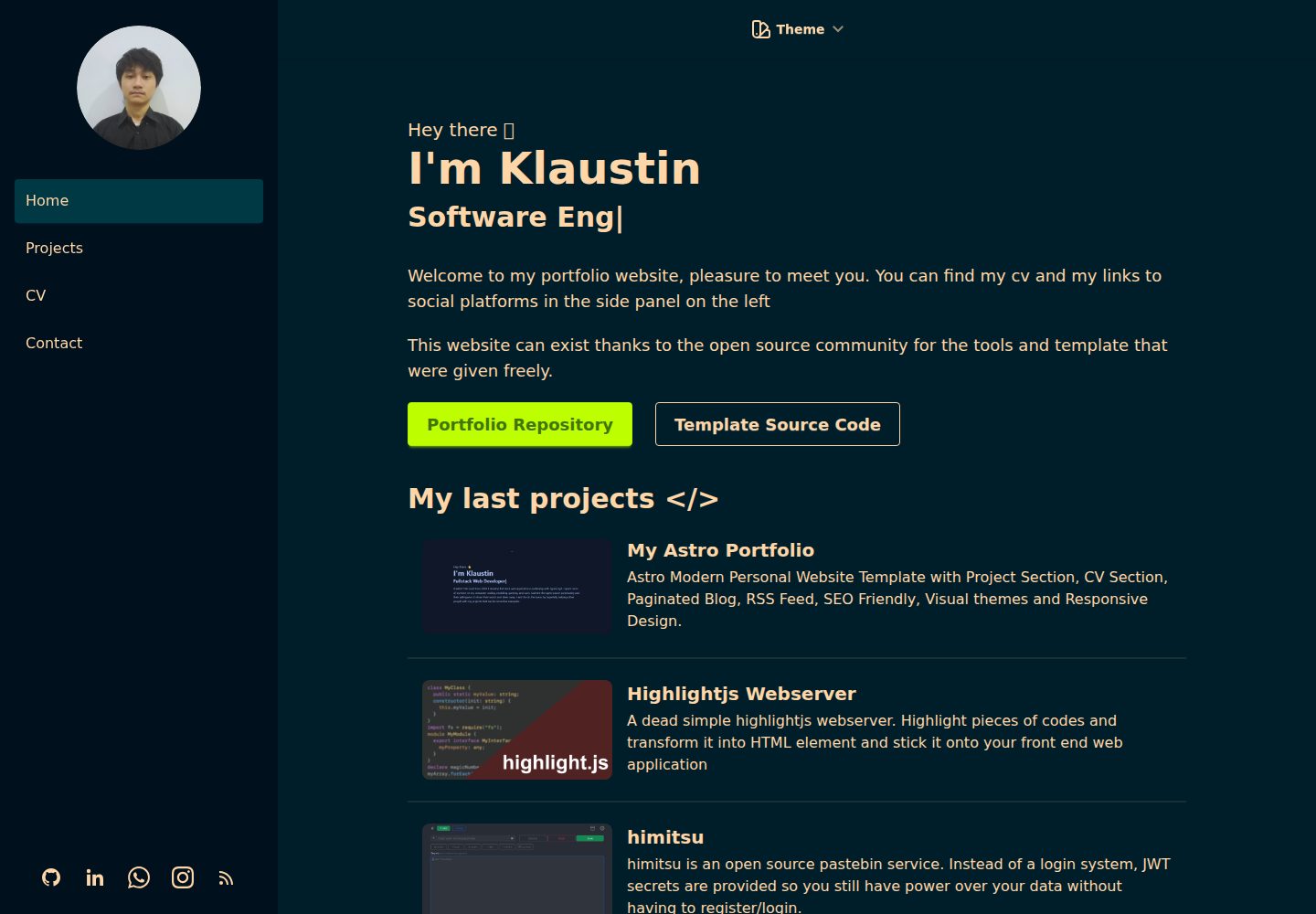
看看你的网站会是什么样
浏览真实页面截图,比较内容排版与手机效果。点击下方缩略图切换,放大查看整页细节。
全部页面与视图 2
截图用于了解视觉与布局,交互效果请以实际项目为准。
采集于 2026-10-03查看来源
值得关注的模板亮点
从已有项目资料中,快速了解它的特点。
包含项目展示、CV 时间线、分页博客、RSS 与商店页面等模块
博客与商店内容以 Markdown 文件维护,通过 frontmatter 配置字段
通过 html 标签的 data-theme 属性切换 DaisyUI 主题
构建时自动生成站点地图,并提供 robots.txt 供更新站点 URL
采用 MIT 许可,可部署到 GitHub Pages、Vercel、Netlify 等静态托管
模板详细介绍
这是一个基于 Astro 的个人作品集网站模板,仓库由 chcoomilk 维护,模板源自 manuelernestog 的 Astro Modern Personal Website,当前站点通过 GitHub Pages 部署。模板使用 Astro 构建,样式层依赖 Tailwind CSS 与 DaisyUI,提供项目展示、CV 时间线、分页博客、RSS 订阅以及商店页面等模块。
页面结构上,src/pages 下包含 index、projects、cv、blog 与 shop 等路由;博客和商店内容以 Markdown 文件形式放在对应目录,通过 frontmatter 声明标题、描述、日期、图片、价格等字段,[page].astro 负责分页列表。布局由 BaseLayout 与 PostLayout 承担,BaseHead、Header、Footer、SideBar 等组件已接入布局体系,侧边栏用于维护全站页面链接。主题通过 BaseLayout.astro 中 html 标签的 data-theme 属性切换,可使用 DaisyUI 提供的主题或自定义主题。
需要注意的限制:README 明确指出博客分页使用动态路由参数实现,该格式目前与 SSR 部署配置不兼容,应使用默认的静态部署方式;站点地图在构建时自动生成,需要同步更新 public 目录下 robots.txt 中的站点 URL;演示图片、字体、图标等第三方素材需按各自许可单独核对,代码的 MIT 许可不覆盖这些素材。
Astro作品集博客工具站
适合你的项目吗?
适用场景
- 搭建个人作品集网站,集中展示项目与个人经历
- 维护带分页与 RSS 订阅的个人博客
- 用时间线组件整理并呈现 CV 或履历信息
- 搭建带价格、徽章与结账链接的简单商品展示页
适合人群
- 希望用 Astro 与 Markdown 维护个人站点内容的开发者
- 需要项目、博客、CV 与商店模块组合的个人主页
- 计划将站点部署到 GitHub Pages 等静态托管平台的用户
- 接受使用 DaisyUI 主题体系并愿意自行调整样式的使用者
上手与定制指南
结合仓库当前版本的说明,按下面的资料检查内容、配置与运行要求。
- 1
安装依赖使用 npm install,本地开发使用 npm run dev
- 2
博客文章放在 src/pages/blog/,商店条目放在 src/pages/shop/,均以 Markdown 文件维护
- 3
切换主题需修改 BaseLayout.astro 中 html 标签的 data-theme 属性
- 4
构建后需更新 public 目录下 robots.txt 中的站点 URL 以匹配自动生成的站点地图
- 5
博客分页与 SSR 部署配置不兼容,部署时应使用默认的静态部署方式
授权与来源资料
使用条件与限制
免费使用 · 保留许可声明本次收录的是公开仓库中采用 MIT 许可的免费版本;免费范围为该版本代码,不代表外部服务或第三方素材免费。
使用时需要遵守
- 允许免费使用、修改、商用和分发该版本代码。
- 分发代码副本或实质性部分时,保留原作者版权声明和完整 MIT 许可声明。
- 代码按现状提供;担保与责任限制以原许可证及适用法律为准。
额外费用与待核对事项
- 博客分页使用动态路由参数实现,目前与 SSR 部署配置不兼容,部署时必须使用默认的静态部署方式,不能启用 SSR。
- 站点地图在构建时自动生成,需手动更新 public 目录下 robots.txt 中的站点 URL 以匹配站点域名。
- 侧边栏使用的社交图标来自 BoxIcons 图标包,属于第三方素材,需按其自身许可单独核对,MIT 代码许可不覆盖这些素材。
- 演示图片、字体、图标及其他第三方素材需按各自许可核对,不能仅凭代码的 MIT 许可判断。
- 域名、托管、数据库、支付或 AI 等外部服务可能另外收费。
查看原文依据
Permission is hereby granted, free of charge
许可证原文
The Blog pagination of this template is implemented using dynamic route parameters in its filename and for now this format is incompatible with SSR deploy configs, so please use the default static deploy options for your deployments.
README 原文
Please update the `robots.txt` file in the public folder with your site name URL for the Sitemap.
README 原文
https://github.com/chcoomilk/portfolio/blob/main/LICENSEhttps://github.com/chcoomilk/portfolio/blob/main/README.mdThe used social-icons are SVG form [BoxIcons](https://boxicons.com/) pack.
README 原文
DeepSeek 根据仓库许可证和 README 整理 ·2026-10-03。结果仅覆盖已读取资料,依赖、图片、字体及后续条款变更以各自原文为准。
项目核对记录与介绍依据
模板资料
- 来源平台
- GitHub
- 资料与维护参考分
- 资料较完整 · 88 / 100
- 技术栈
- Astro
- 网站类型
- 作品集 · 博客 · 工具站
这个分数如何计算
本站按许可资料(最高30分)、演示链接(12分)、预览图(10分)、Star数(15分)、记录的维护时间(15分)、描述完整度(8分)、功能记录(5分)和分类资料(5分)计算。它不是代码、安全或性能测试,也不是 Google 评分;有链接不代表已实测可用。
这个项目需要核对什么
- 记录的仓库更新时间
- 2026-08-03
- 截图检查日期
- 2026-10-03
已收录演示链接。请用你的内容与屏幕尺寸检查;有演示不代表表单、认证或支付已经可用。
目录记录的主要技术栈是 Astro。请通过依赖清单和锁文件核对实际版本与托管要求。这些说明基于收录资料,不代表代码审计或部署实测。
查看具体选型方法 →介绍的制作与核对状态
介绍由 AI 辅助整理目录与仓库资料。仓库作者不等于这篇介绍的审核者。
审核声明: [email protected] · 2026-10-04
查看当时使用的来源资料
SHA-256: 47e171a11e5c877d92c0cf077ea221fd77329d9595f46c2d82571207d5988b06
2026-10-03T08:41:29.645Z
来源文件 / 仓库# Astro Modern Personal Website

Modern Personal Website Template with Project Section, CV Section, Paginated Blog, RSS Feed, SEO Friendly, Visual themes and Responsive Desing for Astro framework.
## Demo
View a live demo of the [Astro Modern Personal Website](https://astro-modern-personal-website.netlify.app/)
## Installation
Run the following command in your terminal
```bash
npm install
```
Once the packages are installed you are ready to run astro. Astro comes with a built-in development server that has everything you need for project development. The astro dev command will start the local development server so that you can see your new website in action for the very first time.
```bash
npm run dev
```
## Tech Stack
- [Astro](https://astro.build)
- [tailwindcss](https://tailwindcss.com/)
- [DaisyUI](https://daisyui.com/)
## Project Strucutre
```php
├── src/
│ ├── components/
│ │ ├── cs/
│ │ │ ├── TimeLine
│ │ ├── BaseHead.astro
│ │ ├── Card.astro
│ │ ├── Footer.astro
│ │ ├── Header.astro
│ │ └── HorizontalCard.jsx
│ │ └── SideBar.jsx
│ ├── layouts/
│ │ └── BaseLayout.astro
│ │ └── PostLayout.astro
│ └── pages/
│ │ ├── blog/
│ │ │ ├── [page].astro
│ │ │ ├── post1.md
│ │ │ ├── post2.md
│ │ │ └── post3.md
│ │ └── cv.astro
│ │ └── index.astro
│ │ └── projects.astro
│ │ └── rss.xml.js
│ └── styles/
│ └── global.css
├── public/
│ ├── favicon.svg
│ └── social-image.png
│ └── sprofile.jpg
│ └── social_img.webp
├── astro.config.mjs
├── tailwind.config.cjs
├── package.json
└── tsconfig.json
```
### Components usage
#### Layout Components
The `BaseHead`, `Footer`, `Header` and `SideBar` components are already included in the layout sistem. To change the website content you can edit the content of this componenets.
##### SideBar
In the Sidebar you can change the links to all your website pages.
You can change your avatar shape using [mask classes](https://daisyui.com/components/mask/).
The used social-icons are SVG form [BoxIcons](https://boxicons.com/) pack.
#### TimeLine
The timeline components are used to conform the CV.
```html
<div class="time-line-container">
<TimeLineElement title="Element Title" subtitle="Subtitle" desc="Description" />
...
</div>
```
#### Card & HorizontalCard
```html
<HorizontalCard
title="Card Title"
img="imge_url"
desc="Description"
url="Link URL"
target="Optional link target (_blank default)"
badge="Optional badge"
tags={['Array','of','tags']}
/>
```
#### HorizontalCard Shop Item
This compoenet is already included in the Store layout of the template. In case you want to use it in other place this are the props.
```html
<HorizontalShopItem
title="Item Title"
img="imge_url"
desc="Item description"
pricing="current_price"
oldPricing="old_price"
checkoutUrl="external store checkout url"
badge="Optional badge"
details="true"
#
show
or
hide
details
btn
(default
is
true)
url="item details url"
custom_link="Custom link url"
custom_link_label="Cutom link btn label"
target="Optional link target (_self default)"
/>
```
### Layouts
Include `BaseLayout` in each page you add and `PostLayout` to your post pages.
### Pages
#### Blog
Add your `md` blog post in the `/pages/blog/` folder.
##### [page].astro
The `[page].astro` is the route to work with the paginated post list. You can change there the number of items listed for each page and the pagination button labels.
##### Post format
Add code with this format in the top of each post file.
```
---
layout: "../../layouts/PostLayout.astro"
title: "Post Title"
description: "Description"
pubDate: "Post date format(Sep 10 2022)"
heroImage: "Post Hero Image URL"
---
```
#### Shop
Add your `md` item in the `/pages/shop/` folder.
##### [page].astro
The `[page].astro` is the route to work with the paginated item list. You can change there the number of items listed for each page and the pagination button labels. The shop will render all `.md` files you incle inside this folder.
##### Item format
Add code with this format in the top of each item file.
```js
---
layout: "../../layouts/StoreItemLayout.astro"
title: "Demo Item 1"
description: "Item description"
heroImage: "Item img url"
details: true // show or hide details btn
custom_link_label: "Custom btn link label"
custom_link: "Custom btn link"
pubDate: "Sep 15 2022"
pricing: "$15"
oldPricing: "$25.5"
badge: "Featured"
checkoutUrl: "https://checkouturl.com/"
---
```
#### Static pages
The other pages inlcuded in the template are static pages. The `index` page belong to the root page. You can add your pages directly in the `/pages` folder and then add a link to that pages in the `sidebar` component.
Feel free to modify the content included in the pages that the template contains or add the ones you need.
### Theming
For change the template theme change the `data-theme` atribute of the `<html>` tag in `BaseLayout.astro` file.
You can chose among 30 themes available or create your custom theme. See themes available [here](https://daisyui.com/docs/themes/).
## Sitemap
The Sitemap is generated automatically when you build your website in the root of the domain. Please update the `robots.txt` file in the public folder with your site name URL for the Sitemap.
## Deploy
You can deploy your site on your favorite static hosting service such as Vercel, Netlify, GitHub Pages, etc.
The configuration for the deployment varies depending on the platform where you are going to do it. See the [official Astro information](https://docs.astro.build/en/guides/deploy/) to deploy your website.
> **⚠️ CAUTION** </br>
> The Blog pagination of this template is implemented using dynamic route parameters in its filename and for now this format is incompatible with SSR deploy configs, so please use the default static deploy options for your deployments.
## Contributing
Suggestions and pull requests are welcomed! Feel free to open a discussion or an issue for a new feature request or bug.
One of the best ways of contribute is to grab a [bug report o feature suggestion](https://github.com/manuelernestog/astro-modern-personal-website/issues) that has been marked `accepted` and dig in.
Please be wary of working on issues _not_ marked as `accepted`. Just because someone has created an issue doesn't mean we'll accept a pull request for it.
## License
Astro Modern Personal Website is licensed under the MIT license — see the [LICENSE](https://github.com/manuelernestog/astro-modern-personal-website/blob/main/LICENSE) file for details.
## Contributors
<a href="https://github.com/manuelernestog/astro-modern-personal-website/graphs/contributors">
<img src="https://contrib.rocks/image?repo=manuelernestog/astro-modern-personal-website" />
</a>
Made with [contrib.rocks](https://contrib.rocks).
看看同类模板
对比同技术栈与用途的模板,找到更适合的视觉与内容结构。

astrowind
⭕️ AstroWind: A free template using Astro v7 and Tailwind CSS v4. Astro starter theme.
Astro · 博客

astro-paper
A minimal, accessible and SEO-friendly Astro blog theme.
Astro · 博客

fuwari
✨A static blog template built with Astro.
Astro · 博客

Firefly
Firefly 是一款基于 Astro 的静态博客主题,由 CuteLeaf 在 saicaca 的 Fuwari 模板基础上二次开发,主打清新美观的视觉风格。
Astro · 博客

astro-theme-cactus
A simple Astro theme. Use it to create your blog or website.
Astro · 作品集

astrofy
Astrofy is a free and open-source template for your Personal Portfolio Website built with Astro and TailwindCS…
Astro · 作品集