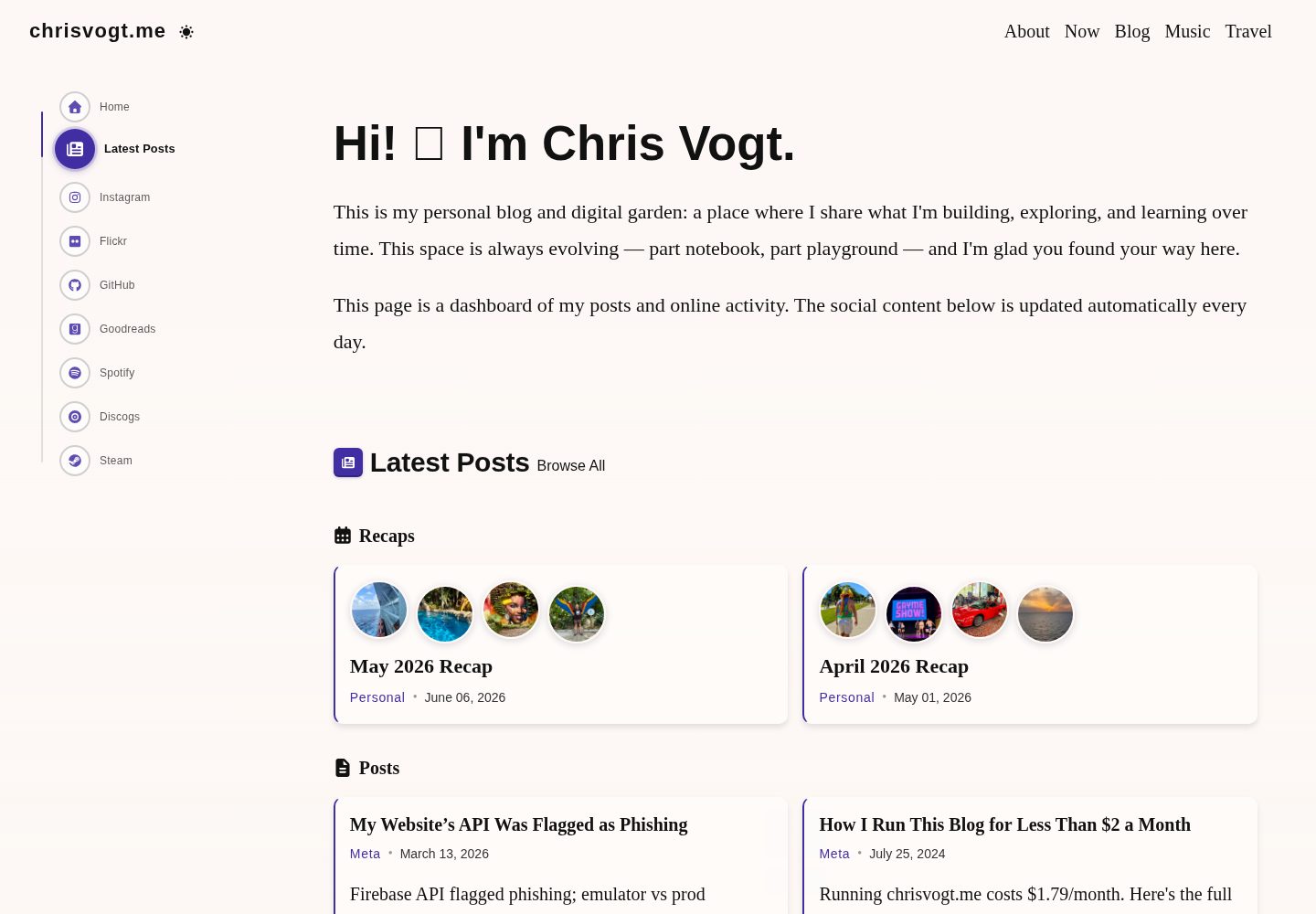
首页为社交动态仪表盘,聚合展示多个社交平台的最新活动
GatsbyReact作品集博客
gatsby-theme-chronogrove — Gatsby 作品集模板
作者 chrisvogt
一个用于个人网站与博客的 Gatsby 主题,首页以社交动态仪表盘呈现,内置 GitHub、Instagram、Spotify、Goodreads、Steam 等小组件,并支持 MDX 博客。
看看你的网站会是什么样
浏览真实页面截图,比较内容排版与手机效果。点击下方缩略图切换,放大查看整页细节。
全部页面与视图 3
截图用于了解视觉与布局,交互效果请以实际项目为准。
采集于 2026-10-02查看来源
值得关注的模板亮点
从已有项目资料中,快速了解它的特点。
内置 GitHub、Instagram、Spotify、Goodreads、Steam 等可配置小组件
博客基于 MDX,提供 Note、ColorModeImage 等短代码与嵌入支持
移动优先的响应式设计,支持深色与浅色模式
使用 pnpm workspaces 与 Turborepo 的 monorepo 结构,含演示站点与内容示例
包含 Jest 与 React Testing Library 的单元测试、快照测试与覆盖率报告
模板详细介绍
gatsby-theme-chronogrove 是作者为个人站点 www.chrisvogt.me 开发并开源的 Gatsby 主题,仓库同时包含可复用的主题包、演示站点和内容示例。主题面向个人网站与博客场景,首页采用社交动态仪表盘的形式,聚合展示来自多个社交平台的最新活动;博客部分基于 MDX,内置 Note、ColorModeImage 等短代码与嵌入能力。
主题提供 GitHub、Instagram、Spotify、Goodreads、Steam 等预置小组件,小组件需要自行配置数据源,仓库的 __mocks__ 目录给出了预期的 API 响应格式示例。导航通过 GraphQL 集成进行配置,界面为移动优先并支持深色/浅色模式。
项目采用 pnpm workspaces 与 Turborepo 组织为 monorepo,包含 packages/ui(共享 Theme UI 层)、packages/theme(Gatsby 主题包)、websites 下的演示站点与个人站点,以及一个可选的 Next.js App Router 参考示例。开发环境要求 Node.js 与 pnpm,并说明本地 HTTPS 需要 mkcert 生成证书;若不需要 Google Analytics,需在 gatsby-config.js 中移除或注释对应插件。仓库处于向 TypeScript 渐进迁移的过程中,新增或明显改动的 React 组件目前要求补充 prop-types。
Gatsby作品集博客
适合你的项目吗?
适用场景
- 搭建以社交动态聚合为首页的个人网站
- 建立支持 MDX 与短代码的个人博客
- 在站点中嵌入 GitHub、Instagram、Spotify、Goodreads 或 Steam 的动态小组件
- 参考 monorepo 结构维护主题包与多个站点实例
- 通过 Next.js App Router 示例复用 @chronogrove/ui 的界面基础组件
适合人群
- 需要个人网站与博客一体化方案的开发者
- 熟悉 Gatsby 与 MDX 内容工作流的使用者
- 希望以小组件形式展示社交平台动态的个人站点作者
- 需要同时维护主题包与演示站点的 monorepo 项目
上手与定制指南
结合仓库当前版本的说明,按下面的资料检查内容、配置与运行要求。
- 1
环境要求 Node.js >= 24.0.0、pnpm >= 10.0.0 与 Git;从 Yarn 迁移需删除 node_modules 与 yarn.lock 后执行 pnpm install
- 2
本地 HTTPS 开发需用 mkcert 生成证书,并放入 websites/www.chrisvogt.me/certs 目录
- 3
若不使用 Google Analytics,需在 websites/www.chrisvogt.me/gatsby-config.js 中移除或注释 gatsby-plugin-google-gtag 配置块
- 4
小组件需在 gatsby-config.js 中配置各自的数据源,API 响应格式可参考 packages/theme/__mocks__
- 5
生产构建输出位于 websites/<站点>/public;Netlify 等静态托管需据此设置发布目录
授权与来源资料
使用条件与限制
免费使用 · 保留许可声明本次收录的是公开仓库中采用 MIT 许可的免费版本;免费范围为该版本代码,不代表外部服务或第三方素材免费。
使用时需要遵守
- 允许免费使用、修改、商用和分发该版本代码。
- 分发代码副本或实质性部分时,保留原作者版权声明和完整 MIT 许可声明。
- 代码按现状提供;担保与责任限制以原许可证及适用法律为准。
额外费用与待核对事项
- 小组件必须自行配置数据源(如 GitHub、Instagram、Spotify、Goodreads、Steam 的 API 端点),否则无法显示动态内容。
- 默认配置包含 Google Analytics 插件;若不使用需手动移除或注释该配置块,否则会加载分析服务。
- 本地 HTTPS 开发需自行用 mkcert 生成 SSL 证书并放入指定目录,否则无法按文档方式启动开发服务器。
- 运行环境要求 Node.js 24.0.0 及以上版本,低于该版本无法使用。
- 包管理器要求 pnpm 10.0.0 及以上版本,且仓库使用 pnpm workspaces 与 Turborepo。
- 演示图片、字体、图标及其他第三方素材需按各自许可核对,不能仅凭代码的 MIT 许可判断。
- 域名、托管、数据库、支付或 AI 等外部服务可能另外收费。
查看原文依据
Permission is hereby granted, free of charge
许可证原文
Widgets require data sources. Configure them in your `gatsby-config.js`:
README 原文
If you do not plan to use Google Analytics, remove or comment out the analytics plugin block
README 原文
For local HTTPS development, you'll need SSL certificates:
README 原文
Node.js**: >= 24.0.0
README 原文
https://github.com/chrisvogt/gatsby-theme-chronogrove/blob/main/LICENSEhttps://github.com/chrisvogt/gatsby-theme-chronogrove/blob/main/README.mdpnpm**: >= 10.0.0
README 原文
DeepSeek 根据仓库许可证和 README 整理 ·2026-10-02。结果仅覆盖已读取资料,依赖、图片、字体及后续条款变更以各自原文为准。
项目核对记录与介绍依据
模板资料
- 来源平台
- GitHub
- 资料与维护参考分
- 资料较完整 · 92 / 100
- 技术栈
- Gatsby · React
- 网站类型
- 作品集 · 博客
这个分数如何计算
本站按许可资料(最高30分)、演示链接(12分)、预览图(10分)、Star数(15分)、记录的维护时间(15分)、描述完整度(8分)、功能记录(5分)和分类资料(5分)计算。它不是代码、安全或性能测试,也不是 Google 评分;有链接不代表已实测可用。
这个项目需要核对什么
- 记录的仓库更新时间
- 2026-08-18
- 截图检查日期
- 2026-10-02
已收录演示链接。请用你的内容与屏幕尺寸检查;有演示不代表表单、认证或支付已经可用。
目录记录的主要技术栈是 Gatsby。请通过依赖清单和锁文件核对实际版本与托管要求。这些说明基于收录资料,不代表代码审计或部署实测。
查看具体选型方法 →介绍的制作与核对状态
介绍由 AI 辅助整理目录与仓库资料。仓库作者不等于这篇介绍的审核者。
已完成服务器许可规则与 AI 来源核对;未经过人工编辑审核。
查看当时使用的来源资料
SHA-256: a38283699bcfb9d3f9d91ba82226d5e7aaf70f9aec8be2f82d70c337d3d006d8
2026-10-02T20:02:49.722Z
来源文件 / 仓库# Gatsby Theme Chronogrove [](https://app.netlify.com/sites/chrisvogt/deploys) [](https://github.com/chrisvogt/gatsby-theme-chronogrove/actions/workflows/ci.yml) [](https://github.com/chrisvogt/gatsby-theme-chronogrove/actions/workflows/codeql-analysis.yml) [](https://codecov.io/gh/chrisvogt/gatsby-theme-chronogrove) [](https://github.com/chrisvogt/gatsby-theme-chronogrove/blob/main/LICENSE) [](https://bsky.app/profile/chrisvogt.me) A modern Gatsby theme for personal websites and blogs with social media integration. It powers [www.chrisvogt.me](https://www.chrisvogt.me) and includes a demo site, reusable theme package, and content examples. > **TypeScript roadmap:** The monorepo is heading toward **incremental TypeScript adoption** (a full package rewrite in one step has been painful here, so we are not doing that again in one leap). Until files are ported, please **add or update [`prop-types`](https://github.com/facebook/prop-types)** on React components you **create** or **meaningfully change**—especially under **`packages/theme/src`**, where `react/prop-types` is enabled (see root **`eslint.config.js`**). Documenting props now makes it much easier to replace `propTypes` with TypeScript types **file by file** later. ## 🚀 Features - **Social Dashboard Homepage**: Display recent activity from multiple social platforms - **Blog System**: Full-featured blog with MDX support (built-in shortcodes such as `Note`, `ColorModeImage`, and embeds—see theme README) - **Widget System**: Pre-built widgets for GitHub, Instagram, Spotify, Goodreads, and Steam - **Responsive Design**: Mobile-first design with dark/light mode support - **Performance Optimized**: Built with Gatsby for fast loading and SEO - **Testing**: Comprehensive unit tests and coverage reporting - **Navigation System**: Configurable navigation with proper GraphQL integration - **Error Handling**: Robust error handling and fallbacks throughout the theme ## 📋 Prerequisites - **Node.js**: >= 24.0.0 - **pnpm**: >= 10.0.0 - **Git**: For version control > **Migrating from Yarn?** Remove `node_modules` and `yarn.lock`, then run `pnpm install`. The repo uses pnpm workspaces and Turborepo; all `yarn` commands are now `pnpm` (e.g. `pnpm develop`, `pnpm test`). ## 🏗️ Project Structure This is a monorepo using pnpm workspaces and Turborepo: ``` gatsby-theme-chronogrove/ ├── packages/ │ ├── ui/ # @chronogrove/ui — Theme UI theme, color-mode, shared primitives │ │ ├── src/ │ │ └── package.json │ └── theme/ # gatsby-theme-chronogrove (Gatsby theme package) │ ├── src/ │ │ ├── components/ # React components │ │ ├── widgets/ # Social media widgets │ │ ├── templates/ # Page templates │ │ └── ... │ ├── scripts/ # Theme-local tooling (e.g. postinstall banner) │ └── package.json ├── websites/ │ ├── www.chronogrove.com/ # Official demo site │ │ ├── content/ # Demo blog posts and content │ │ ├── gatsby-config.js │ │ └── package.json │ └── www.chrisvogt.me/ # Personal website implementation │ ├── content/ # Blog posts and content │ ├── src/pages/ # Custom pages │ ├── gatsby-config.js │ └── package.json ├── examples/ │ └── chronogrove-next/ # Next.js 16 App Router reference (optional; not the main Gatsby site) │ ├── app/ │ └── package.json └── package.json # Root workspace config ``` > **Dependency overrides**: The root `package.json` uses pnpm overrides for security patches. See [docs/dependency-overrides.md](docs/dependency-overrides.md) for rationale. ## ⚡ Quick Start 1. **Clone the repository** ```bash git clone https://github.com/chrisvogt/gatsby-theme-chronogrove.git cd gatsby-theme-chronogrove ``` 2. **Install dependencies** ```bash pnpm install ``` 3. **HTTPS Development Setup** **For local HTTPS development, you'll need SSL certificates:** - Install mkcert (if not already installed): ```bash # macOS brew install mkcert # Linux sudo apt install mkcert ``` - Generate certificates: ```bash mkcert www.dev-chrisvogt.me ``` - Move certificates to the certs directory: ```bash mkdir -p websites/www.chrisvogt.me/certs mv www.dev-chrisvogt.me-key.pem websites/www.chrisvogt.me/certs/ mv www.dev-chrisvogt.me.pem websites/www.chrisvogt.me/certs/ ``` 4. **If you do not plan to use Google Analytics, remove or comment out the analytics plugin block in `websites/www.chrisvogt.me/gatsby-config.js`:** ``` { resolve: 'gatsby-plugin-google-gtag', options: { trackingIds: [process.env.GA_MEASUREMENT_ID], gtagConfig: {}, pluginConfig: { respectDNT: true } } }, ``` 5. **Start development server** ```bash pnpm develop ``` 6. **Open your browser** Navigate to [https://www.dev-chrisvogt.me:8000](https://www.dev-chrisvogt.me:8000) ## 🛠️ Development ### Available Scripts | Command | Description | | -------------------- | --------------------------------------------------------- | | `pnpm develop` | Start personal site (www.chrisvogt.me) | | `pnpm develop:theme` | Start demo site (www.chronogrove.com) | | `pnpm develop:next` | Start Next.js reference app (`examples/chronogrove-next`) | | `pnpm test` | Run test suite | | `pnpm test:watch` | Run tests in watch mode | | `pnpm test:coverage` | Generate coverage report | | `pnpm build` | Build for production | | `pnpm format` | Format code with Prettier | | `pnpm lint` | Run ESLint | ### Development Workflow #### Working on the Theme The theme code lives in **`packages/theme`** (`gatsby-theme-chronogrove`). Shared **Theme UI** surface (theme object, color-mode helpers, `ChronogroveThemeProvider`, Button, skip-nav, color toggle) lives in **`packages/ui`** (`@chronogrove/ui`). To work on theme components: 1. Start the demo site: `pnpm develop:theme` 2. Make your changes in `packages/theme/src/components/` and/or `packages/ui/src/` as appropriate 3. The changes will be reflected in the demo site at `http://localhost:8000` Run UI package tests only: `pnpm --filter @chronogrove/ui test` #### Working on Content **Demo Site Content** (`websites/www.chronogrove.com/`): - **Blog posts**: `websites/www.chronogrove.com/content/blog/` - **Music posts**: `websites/www.chronogrove.com/content/music/` - **Site configuration**: `websites/www.chronogrove.com/gatsby-config.js` **Personal Site Content** (`websites/www.chrisvogt.me/`): - **Blog posts**: `websites/www.chrisvogt.me/content/blog/` - **Custom pages**: `websites/www.chrisvogt.me/src/pages/` - **Site configuration**: `websites/www.chrisvogt.me/gatsby-config.js` 4. **Start HTTPS development**: ```bash pnpm develop ``` ### Demo Site Development For theme development and testing, use the demo site: ```bash # Start the demo site pnpm develop:theme # Open your browser to http://localhost:8000 ``` ## 🎨 Widgets The theme includes several pre-built widgets for social media integration: ### Available Widgets - **📝 Recent Posts**: Display latest blog posts - **🐙 GitHub**: Show profile stats, pinned repos, and recent PRs - **📸 Instagram**: Display recent photos with lightbox gallery - **📚 Goodreads**: Show reading progress and recent books - **🎵 Spotify**: Display playlists and top tracks - **🎮 Steam**: Show gaming activity and owned games ### Widget Configuration Widgets require data sources. Configure them in your `gatsby-config.js`: ```javascript module.exports = { plugins: [ { resolve: 'gatsby-theme-chronogrove', options: { widgets: { github: { widgetDataSource: 'https://your-github-api.com' }, instagram: { widgetDataSource: 'https://your-instagram-api.com' } // ... other widgets } } } ] } ``` See the [mock data examples](packages/theme/__mocks__/) for expected API response formats. ## 🧪 Testing The project includes comprehensive testing for theme components, widgets, selectors, and build-critical behavior: - **Unit Tests**: Jest + React Testing Library - **Snapshot Tests**: Component regression coverage - **Coverage Reports**: Code coverage tracking - **GraphQL Mocking**: Proper mocking for Gatsby's `useStaticQuery` and `graphql` - **Navigation Testing**: Comprehensive tests for navigation components and hooks ### Running Tests ```bash # Run all tests pnpm test # Run tests in watch mode pnpm test:watch # Generate coverage report pnpm test:coverage ``` ## 🚀 Production Build ### Building for Production **Personal Site:** ```bash pnpm --filter www.chrisvogt.me build ``` **Demo Site:** ```bash pnpm --filter www.chronogrove.com build ``` **Next.js reference app** (optional): ```bash pnpm --filter chronogrove-next build ``` The Gatsby build outputs are `websites/www.chrisvogt.me/public` and `websites/www.chronogrove.com/public` (relative to the repo root). The Next example writes to `examples/chronogrove-next/.next` (gitignored). **Netlify / static hosts:** If the site root is the monorepo, set **publish directory** to `websites/www.chrisvogt.me/public` (or `public` when **base directory** is `websites/www.chrisvogt.me`). ### Testing Production Build To test the production build locally: ```bash # Install http-server globally npm install -g http-server # Serve the build with HTTPS (use the same cert/key filenames as in develop:https) http-server -o -S -C websites/www.chrisvogt.me/certs/www.dev-chrisvogt.me.pem -K websites/www.chrisvogt.me/certs/www.dev-chrisvogt.me-key.pem -a www.dev-chrisvogt.me -p 443 ``` ## 🤝 Contributing We welcome contributions! Please see our [Contributing Guidelines](CONTRIBUTING.md) for details. See [`CONTRIBUTING.md`](CONTRIBUTING.md) for the pull request process, PR title format, and CI expectations. ## 📚 Documentation - **[`@chronogrove/ui`](packages/ui/README.md)**: Shared Theme UI layer, color-mode helpers, Gatsby helpers (`@chronogrove/ui/gatsby`), and **Next.js App Router** helpers (`@chronogrove/ui/next`) - **[Next.js example](examples/chronogrove-next/README.md)**: App Router reference (`chronogrove-next`): `@chronogrove/ui/next` shell plus [`home-showcase.jsx`](examples/chronogrove-next/app/home-showcase.jsx) demonstrating the same `@chronogrove/ui` primitives as the Gatsby theme (widgets, layout, controls) - **[Theme Documentation](packages/theme/README.md)**: Detailed theme configuration and customization - **[Demo Site Documentation](websites/www.chronogrove.com/README.md)**: Demo site setup and usage - **[Widget Documentation](packages/theme/src/components/widgets/)**: Individual widget documentation - **[API Examples](packages/theme/__mocks__/)**: Mock data examples for widget APIs ## 🐛 Troubleshooting ### Common Issues **Port 8000 already in use** ```bash # Kill the process using port 8000 lsof -ti:8000 | xargs kill ``` **Demo site not loading** - Ensure you're using `pnpm develop:theme` for the demo site - Check that the workspace is properly configured - Verify all dependencies are installed: `pnpm install` **SSL certificate errors** - Ensure certificates are in the correct location: `websites/www.chrisvogt.me/certs/` - Verify certificate names match expected format - Check that mkcert is properly installed **Widget data not loading** - Verify API endpoints are accessible - Check network requests in browser dev tools - Review mock data examples for correct format ## 📄 License Copyright © 2019 [Chris Vogt](https://www.chrisvogt.me). Released under the [MIT License](LICENSE). ## 🙏 Acknowledgments - Built with [Gatsby](https://www.gatsbyjs.com/) - Styled with [Theme UI](https://theme-ui.com/) - Icons from [Font Awesome](https://fontawesome.com/) - Testing with [Jest](https://jestjs.io/) and [React Testing Library](https://testing-library.com/) --- **Questions?** Open an [issue](https://github.com/chrisvogt/gatsby-theme-chronogrove/issues) or reach out on [Bluesky](https://bsky.app/profile/chrisvogt.me).
看看同类模板
对比同技术栈与用途的模板,找到更适合的视觉与内容结构。

gatsby-starter-gcn
gatsby-starter-gcn 是一个面向静态网站构建的 Gatsby 启动器,将内容管理、部署和前端开发串联起来。
Gatsby · 博客
yashitanamdeo.github.io
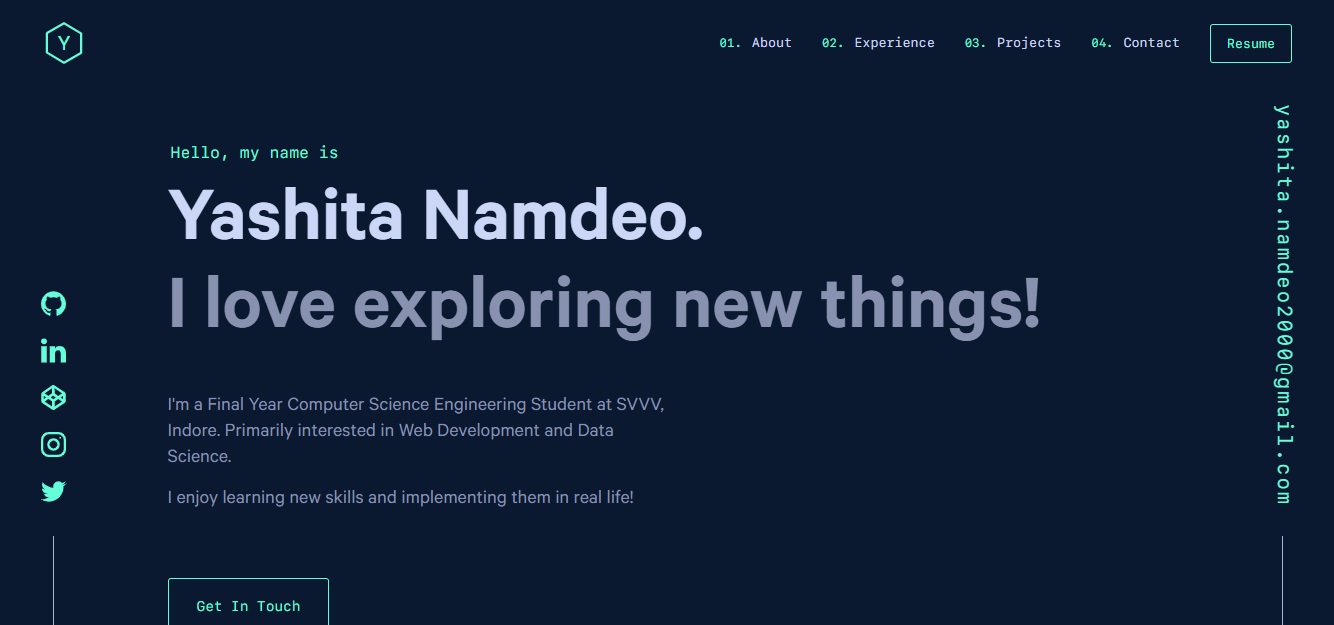
yashitanamdeo.github.io 是一个基于 Gatsby 和 React 构建的个人作品集网站模板,源自开发者 Yashita Namdeo 的第一版个人主页。
Gatsby · 作品集
devblog
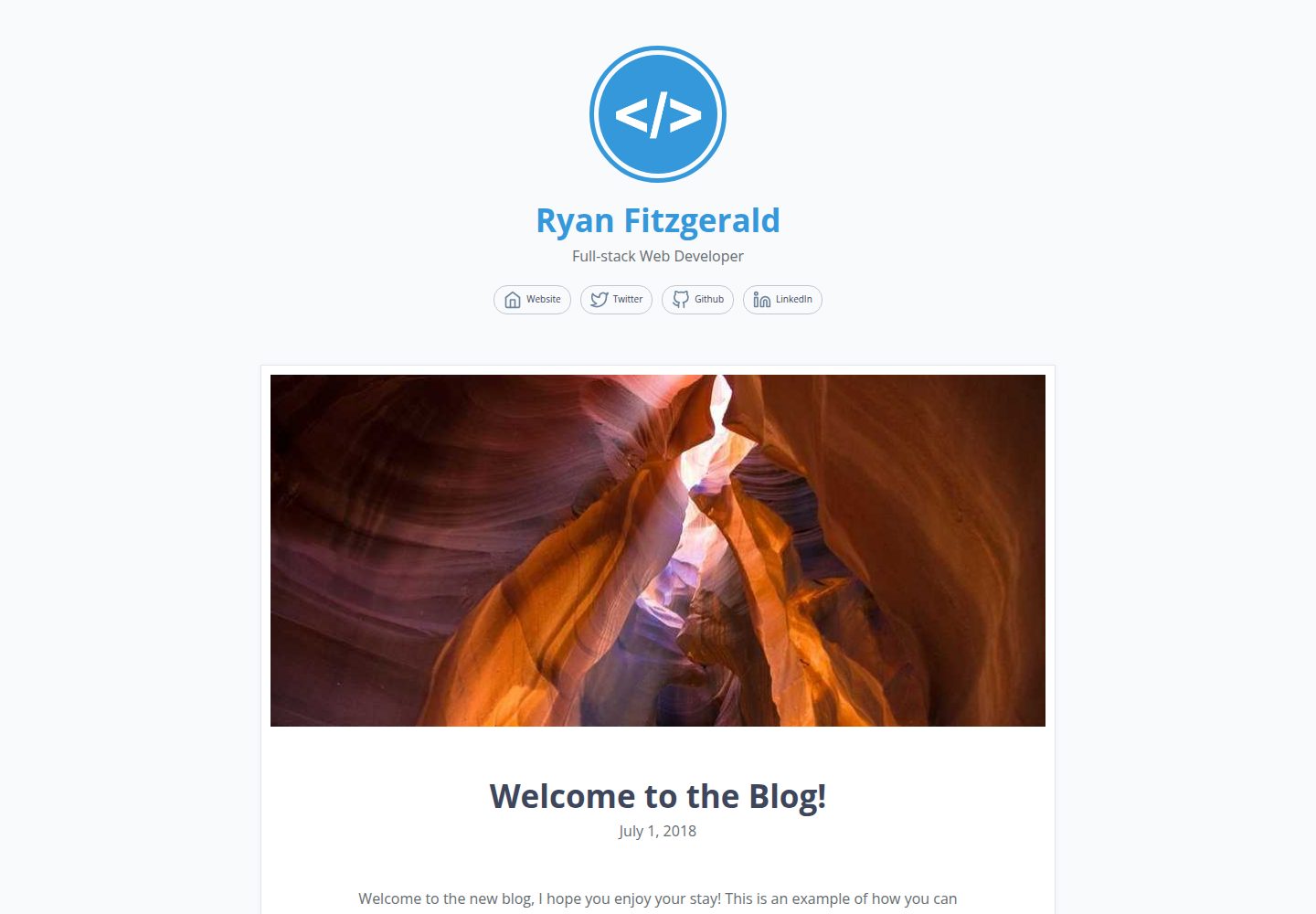
A lightweight, customizable personal blog template built with GatsbyJS and React
Gatsby · 博客

gatsby-starter-morning-dew
:rocket: A Gatsby theme/starter to build lightning-fast blog/websites
Gatsby · 博客

starter-gatsby-blog
这是一个由 Contentful 社区维护的 Gatsby 博客启动器,目标是把静态站点的低维护成本与 Contentful 的友好编辑界面结合起来。
Gatsby · 社区

blog-template
Scientific blog template based on theaisummer.com
Gatsby · 博客