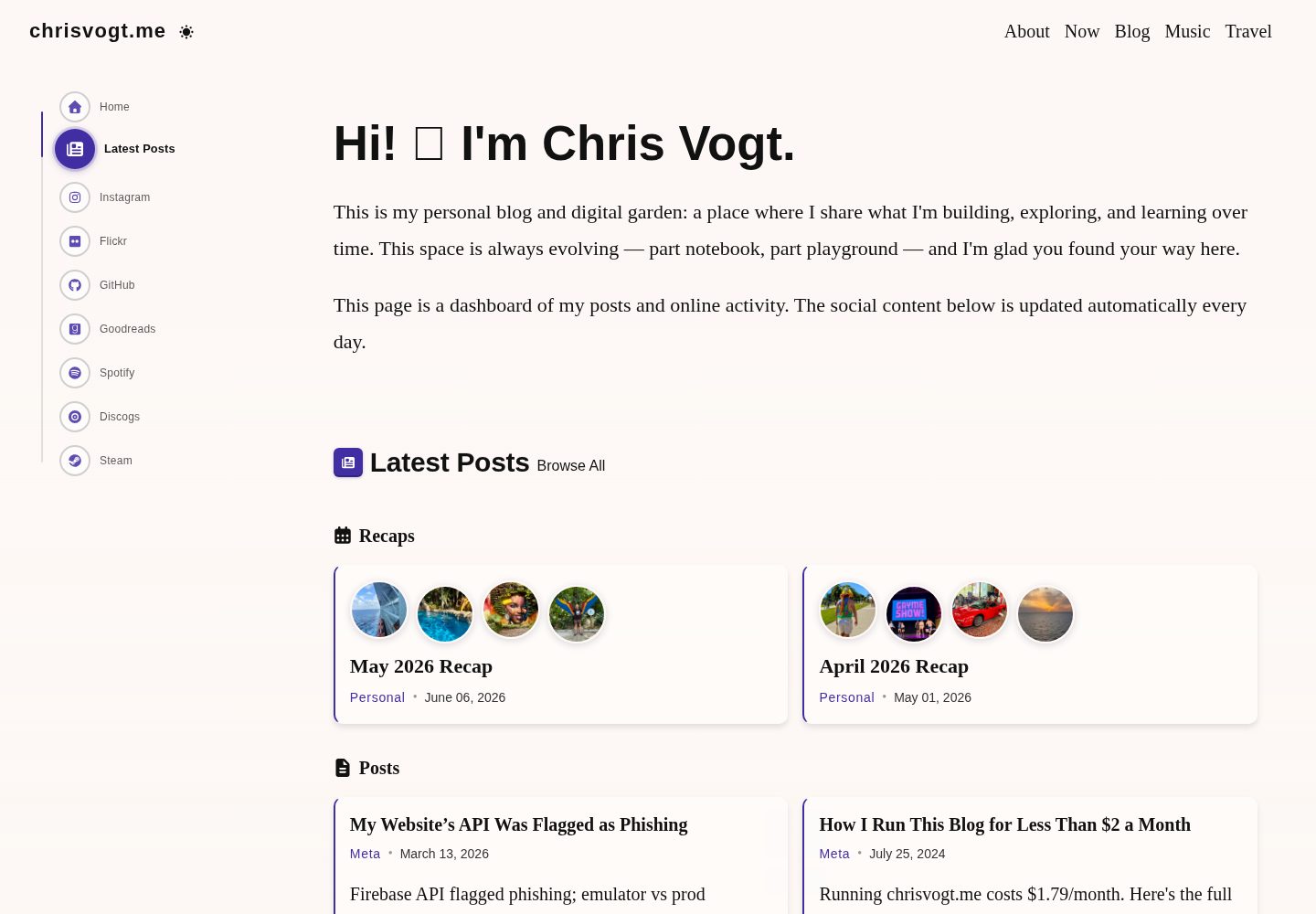
The homepage is a social activity dashboard that aggregates and displays the latest activity from multiple social platforms
GatsbyReactPortfolioBlog
gatsby-theme-chronogrove — Gatsby Portfolio Template
By chrisvogt
A Gatsby theme for personal websites and blogs, with a social activity dashboard homepage, built-in widgets for GitHub, Instagram, Spotify, Goodreads, Steam, and MDX blog support.
Explore the design
Compare the page layouts and mobile experience. Open any screenshot for a closer look.
Desktop homepage1 / 3
Desktop captureTop of page
Actual screenshot captured by the server browser.
All pages & views 3
Screenshots show visual appearance; interactive behavior may differ.
Recorded 2026-10-02View source
What stands out
A quick read of the recorded project description.
Built-in configurable widgets for GitHub, Instagram, Spotify, Goodreads, Steam, and others
The blog is based on MDX and provides shortcodes and embedding support such as Note and ColorModeImage
Mobile-first responsive design with dark and light mode support
A monorepo structure using pnpm workspaces and Turborepo, including a demo site and content examples
Unit tests, snapshot tests, and coverage reports with Jest and React Testing Library
Template Details
gatsby-theme-chronogrove is a Gatsby theme developed and open-sourced by the author for the personal site www.chrisvogt.me. The repository contains a reusable theme package, a demo site, and content examples. The theme targets personal websites and blogs. The homepage takes the form of a social activity dashboard that aggregates and displays the latest activity from multiple social platforms; the blog is based on MDX and includes built-in shortcodes and embedding capabilities such as Note and ColorModeImage.
The theme provides preset widgets for GitHub, Instagram, Spotify, Goodreads, Steam, and others. The widgets require you to configure their data sources yourself; the repository's __mocks__ directory gives examples of the expected API response formats. Navigation is configured through GraphQL integration, and the interface is mobile-first and supports dark/light mode.
The project is organized as a monorepo using pnpm workspaces and Turborepo. It includes packages/ui (a shared Theme UI layer), packages/theme (the Gatsby theme package), a demo site and a personal site under websites, and an optional Next.js App Router reference example. The development environment requires Node.js and pnpm, and the documentation notes that local HTTPS requires certificates generated with mkcert; if Google Analytics is not needed, the corresponding plugin must be removed or commented out in gatsby-config.js. The repository is in the process of a gradual migration to TypeScript, and newly added or significantly changed React components are currently required to include prop-types.
GatsbyPortfolioBlog
Is it right for your project?
Use Cases
- Building a personal website with a social activity aggregation homepage
- Creating a personal blog that supports MDX and shortcodes
- Embedding dynamic widgets for GitHub, Instagram, Spotify, Goodreads, or Steam in a site
- Maintaining a theme package and multiple site instances with reference to the monorepo structure
- Reusing the @chronogrove/ui interface base components through the Next.js App Router example
Suitable For
- Developers who need an integrated personal website and blog solution
- Users familiar with Gatsby and MDX content workflows
- Personal site authors who want to display social platform activity as widgets
- Monorepo projects that need to maintain both a theme package and a demo site
Getting started & customization
Use these recorded setup notes alongside the repository instructions for your chosen version.
- 1
Environment requirements: Node.js >= 24.0.0, pnpm >= 10.0.0, and Git; when migrating from Yarn, delete node_modules and yarn.lock, then run pnpm install
- 2
Local HTTPS development requires certificates generated with mkcert, placed in the websites/www.chrisvogt.me/certs directory
- 3
If Google Analytics is not used, remove or comment out the gatsby-plugin-google-gtag configuration block in websites/www.chrisvogt.me/gatsby-config.js
- 4
Widgets require their respective data sources to be configured in gatsby-config.js; API response formats can be found in packages/theme/__mocks__
- 5
Production build output is located in websites/<site>/public; static hosting such as Netlify must set the publish directory accordingly
License & source material
Usage conditions & limitations
Free to use · keep license noticeThis entry covers the free version under the MIT license in the public repository; the free scope is the code of that version and does not mean that external services or third-party assets are free.
Must comply with when using
- You may use, modify, commercialize, and distribute the code of this version for free.
- When distributing copies or substantial portions of the code, retain the original author's copyright notice and the full MIT license notice.
- The code is provided as is; warranties and limitations of liability are governed by the original license and applicable law.
Additional costs & items to verify
- Widgets must have their data sources configured yourself (such as API endpoints for GitHub, Instagram, Spotify, Goodreads, Steam); otherwise dynamic content cannot be displayed.
- The default configuration includes the Google Analytics plugin; if you do not use it, you must manually remove or comment out that configuration block, otherwise the analytics service will be loaded.
- Local HTTPS development requires you to generate SSL certificates with mkcert and place them in the specified directory; otherwise the development server cannot be started as documented.
- The runtime environment requires Node.js 24.0.0 or later; lower versions cannot be used.
- The package manager requires pnpm 10.0.0 or later, and the repository uses pnpm workspaces and Turborepo.
- Demo images, fonts, icons, and other third-party assets must be checked against their respective licenses; the MIT license of the code alone is not sufficient to determine this.
- External services such as domains, hosting, databases, payments, or AI may incur additional charges.
View Original Text Basis
Permission is hereby granted, free of charge
Original License Text
Widgets require data sources. Configure them in your `gatsby-config.js`:
Original README
If you do not plan to use Google Analytics, remove or comment out the analytics plugin block
Original README
For local HTTPS development, you'll need SSL certificates:
Original README
Node.js**: >= 24.0.0
Original README
https://github.com/chrisvogt/gatsby-theme-chronogrove/blob/main/LICENSEhttps://github.com/chrisvogt/gatsby-theme-chronogrove/blob/main/README.mdpnpm**: >= 10.0.0
Original README
Compiled by DeepSeek based on repository license and README ·2026-10-02. Results only cover the materials read; dependencies, images, fonts, and subsequent term changes are subject to their respective original texts.
Project checks & description sources
Template Information
- Source platforms
- GitHub
- Documentation and maintenance reference score
- More documented · 92 / 100
- Technologies
- Gatsby · React
- Website type
- Portfolio · Blog
How this score is calculated
Our heuristic uses license records (up to 30), a demo link (12), a preview (10), stars (15), recorded maintenance (15), description completeness (8), feature records (5) and classification data (5). It is not a code, security or performance test, or a Google score. A link does not establish tested functionality.
What to verify for this project
- Repository update recorded
- 2026-08-18
- Screenshot last checked
- 2026-10-02
A demo link is listed. Check it with your own content and viewport sizes; its presence does not confirm that forms, authentication or payments work.
The catalog identifies Gatsby as the primary stack. Check the actual dependency manifest and lockfile for versions and hosting requirements. These notes use recorded metadata, not a code audit or a deployment test.
Use a selection guide →How this description was prepared
AI-assisted description based on catalog records and repository material. Repository authors are not automatically the reviewers of this description.
Automatically checked against source and license rules; no manual editorial review.
Inspect the recorded source material
SHA-256: a38283699bcfb9d3f9d91ba82226d5e7aaf70f9aec8be2f82d70c337d3d006d8
2026-10-02T20:02:49.722Z
Source file / repository# Gatsby Theme Chronogrove [](https://app.netlify.com/sites/chrisvogt/deploys) [](https://github.com/chrisvogt/gatsby-theme-chronogrove/actions/workflows/ci.yml) [](https://github.com/chrisvogt/gatsby-theme-chronogrove/actions/workflows/codeql-analysis.yml) [](https://codecov.io/gh/chrisvogt/gatsby-theme-chronogrove) [](https://github.com/chrisvogt/gatsby-theme-chronogrove/blob/main/LICENSE) [](https://bsky.app/profile/chrisvogt.me) A modern Gatsby theme for personal websites and blogs with social media integration. It powers [www.chrisvogt.me](https://www.chrisvogt.me) and includes a demo site, reusable theme package, and content examples. > **TypeScript roadmap:** The monorepo is heading toward **incremental TypeScript adoption** (a full package rewrite in one step has been painful here, so we are not doing that again in one leap). Until files are ported, please **add or update [`prop-types`](https://github.com/facebook/prop-types)** on React components you **create** or **meaningfully change**—especially under **`packages/theme/src`**, where `react/prop-types` is enabled (see root **`eslint.config.js`**). Documenting props now makes it much easier to replace `propTypes` with TypeScript types **file by file** later. ## 🚀 Features - **Social Dashboard Homepage**: Display recent activity from multiple social platforms - **Blog System**: Full-featured blog with MDX support (built-in shortcodes such as `Note`, `ColorModeImage`, and embeds—see theme README) - **Widget System**: Pre-built widgets for GitHub, Instagram, Spotify, Goodreads, and Steam - **Responsive Design**: Mobile-first design with dark/light mode support - **Performance Optimized**: Built with Gatsby for fast loading and SEO - **Testing**: Comprehensive unit tests and coverage reporting - **Navigation System**: Configurable navigation with proper GraphQL integration - **Error Handling**: Robust error handling and fallbacks throughout the theme ## 📋 Prerequisites - **Node.js**: >= 24.0.0 - **pnpm**: >= 10.0.0 - **Git**: For version control > **Migrating from Yarn?** Remove `node_modules` and `yarn.lock`, then run `pnpm install`. The repo uses pnpm workspaces and Turborepo; all `yarn` commands are now `pnpm` (e.g. `pnpm develop`, `pnpm test`). ## 🏗️ Project Structure This is a monorepo using pnpm workspaces and Turborepo: ``` gatsby-theme-chronogrove/ ├── packages/ │ ├── ui/ # @chronogrove/ui — Theme UI theme, color-mode, shared primitives │ │ ├── src/ │ │ └── package.json │ └── theme/ # gatsby-theme-chronogrove (Gatsby theme package) │ ├── src/ │ │ ├── components/ # React components │ │ ├── widgets/ # Social media widgets │ │ ├── templates/ # Page templates │ │ └── ... │ ├── scripts/ # Theme-local tooling (e.g. postinstall banner) │ └── package.json ├── websites/ │ ├── www.chronogrove.com/ # Official demo site │ │ ├── content/ # Demo blog posts and content │ │ ├── gatsby-config.js │ │ └── package.json │ └── www.chrisvogt.me/ # Personal website implementation │ ├── content/ # Blog posts and content │ ├── src/pages/ # Custom pages │ ├── gatsby-config.js │ └── package.json ├── examples/ │ └── chronogrove-next/ # Next.js 16 App Router reference (optional; not the main Gatsby site) │ ├── app/ │ └── package.json └── package.json # Root workspace config ``` > **Dependency overrides**: The root `package.json` uses pnpm overrides for security patches. See [docs/dependency-overrides.md](docs/dependency-overrides.md) for rationale. ## ⚡ Quick Start 1. **Clone the repository** ```bash git clone https://github.com/chrisvogt/gatsby-theme-chronogrove.git cd gatsby-theme-chronogrove ``` 2. **Install dependencies** ```bash pnpm install ``` 3. **HTTPS Development Setup** **For local HTTPS development, you'll need SSL certificates:** - Install mkcert (if not already installed): ```bash # macOS brew install mkcert # Linux sudo apt install mkcert ``` - Generate certificates: ```bash mkcert www.dev-chrisvogt.me ``` - Move certificates to the certs directory: ```bash mkdir -p websites/www.chrisvogt.me/certs mv www.dev-chrisvogt.me-key.pem websites/www.chrisvogt.me/certs/ mv www.dev-chrisvogt.me.pem websites/www.chrisvogt.me/certs/ ``` 4. **If you do not plan to use Google Analytics, remove or comment out the analytics plugin block in `websites/www.chrisvogt.me/gatsby-config.js`:** ``` { resolve: 'gatsby-plugin-google-gtag', options: { trackingIds: [process.env.GA_MEASUREMENT_ID], gtagConfig: {}, pluginConfig: { respectDNT: true } } }, ``` 5. **Start development server** ```bash pnpm develop ``` 6. **Open your browser** Navigate to [https://www.dev-chrisvogt.me:8000](https://www.dev-chrisvogt.me:8000) ## 🛠️ Development ### Available Scripts | Command | Description | | -------------------- | --------------------------------------------------------- | | `pnpm develop` | Start personal site (www.chrisvogt.me) | | `pnpm develop:theme` | Start demo site (www.chronogrove.com) | | `pnpm develop:next` | Start Next.js reference app (`examples/chronogrove-next`) | | `pnpm test` | Run test suite | | `pnpm test:watch` | Run tests in watch mode | | `pnpm test:coverage` | Generate coverage report | | `pnpm build` | Build for production | | `pnpm format` | Format code with Prettier | | `pnpm lint` | Run ESLint | ### Development Workflow #### Working on the Theme The theme code lives in **`packages/theme`** (`gatsby-theme-chronogrove`). Shared **Theme UI** surface (theme object, color-mode helpers, `ChronogroveThemeProvider`, Button, skip-nav, color toggle) lives in **`packages/ui`** (`@chronogrove/ui`). To work on theme components: 1. Start the demo site: `pnpm develop:theme` 2. Make your changes in `packages/theme/src/components/` and/or `packages/ui/src/` as appropriate 3. The changes will be reflected in the demo site at `http://localhost:8000` Run UI package tests only: `pnpm --filter @chronogrove/ui test` #### Working on Content **Demo Site Content** (`websites/www.chronogrove.com/`): - **Blog posts**: `websites/www.chronogrove.com/content/blog/` - **Music posts**: `websites/www.chronogrove.com/content/music/` - **Site configuration**: `websites/www.chronogrove.com/gatsby-config.js` **Personal Site Content** (`websites/www.chrisvogt.me/`): - **Blog posts**: `websites/www.chrisvogt.me/content/blog/` - **Custom pages**: `websites/www.chrisvogt.me/src/pages/` - **Site configuration**: `websites/www.chrisvogt.me/gatsby-config.js` 4. **Start HTTPS development**: ```bash pnpm develop ``` ### Demo Site Development For theme development and testing, use the demo site: ```bash # Start the demo site pnpm develop:theme # Open your browser to http://localhost:8000 ``` ## 🎨 Widgets The theme includes several pre-built widgets for social media integration: ### Available Widgets - **📝 Recent Posts**: Display latest blog posts - **🐙 GitHub**: Show profile stats, pinned repos, and recent PRs - **📸 Instagram**: Display recent photos with lightbox gallery - **📚 Goodreads**: Show reading progress and recent books - **🎵 Spotify**: Display playlists and top tracks - **🎮 Steam**: Show gaming activity and owned games ### Widget Configuration Widgets require data sources. Configure them in your `gatsby-config.js`: ```javascript module.exports = { plugins: [ { resolve: 'gatsby-theme-chronogrove', options: { widgets: { github: { widgetDataSource: 'https://your-github-api.com' }, instagram: { widgetDataSource: 'https://your-instagram-api.com' } // ... other widgets } } } ] } ``` See the [mock data examples](packages/theme/__mocks__/) for expected API response formats. ## 🧪 Testing The project includes comprehensive testing for theme components, widgets, selectors, and build-critical behavior: - **Unit Tests**: Jest + React Testing Library - **Snapshot Tests**: Component regression coverage - **Coverage Reports**: Code coverage tracking - **GraphQL Mocking**: Proper mocking for Gatsby's `useStaticQuery` and `graphql` - **Navigation Testing**: Comprehensive tests for navigation components and hooks ### Running Tests ```bash # Run all tests pnpm test # Run tests in watch mode pnpm test:watch # Generate coverage report pnpm test:coverage ``` ## 🚀 Production Build ### Building for Production **Personal Site:** ```bash pnpm --filter www.chrisvogt.me build ``` **Demo Site:** ```bash pnpm --filter www.chronogrove.com build ``` **Next.js reference app** (optional): ```bash pnpm --filter chronogrove-next build ``` The Gatsby build outputs are `websites/www.chrisvogt.me/public` and `websites/www.chronogrove.com/public` (relative to the repo root). The Next example writes to `examples/chronogrove-next/.next` (gitignored). **Netlify / static hosts:** If the site root is the monorepo, set **publish directory** to `websites/www.chrisvogt.me/public` (or `public` when **base directory** is `websites/www.chrisvogt.me`). ### Testing Production Build To test the production build locally: ```bash # Install http-server globally npm install -g http-server # Serve the build with HTTPS (use the same cert/key filenames as in develop:https) http-server -o -S -C websites/www.chrisvogt.me/certs/www.dev-chrisvogt.me.pem -K websites/www.chrisvogt.me/certs/www.dev-chrisvogt.me-key.pem -a www.dev-chrisvogt.me -p 443 ``` ## 🤝 Contributing We welcome contributions! Please see our [Contributing Guidelines](CONTRIBUTING.md) for details. See [`CONTRIBUTING.md`](CONTRIBUTING.md) for the pull request process, PR title format, and CI expectations. ## 📚 Documentation - **[`@chronogrove/ui`](packages/ui/README.md)**: Shared Theme UI layer, color-mode helpers, Gatsby helpers (`@chronogrove/ui/gatsby`), and **Next.js App Router** helpers (`@chronogrove/ui/next`) - **[Next.js example](examples/chronogrove-next/README.md)**: App Router reference (`chronogrove-next`): `@chronogrove/ui/next` shell plus [`home-showcase.jsx`](examples/chronogrove-next/app/home-showcase.jsx) demonstrating the same `@chronogrove/ui` primitives as the Gatsby theme (widgets, layout, controls) - **[Theme Documentation](packages/theme/README.md)**: Detailed theme configuration and customization - **[Demo Site Documentation](websites/www.chronogrove.com/README.md)**: Demo site setup and usage - **[Widget Documentation](packages/theme/src/components/widgets/)**: Individual widget documentation - **[API Examples](packages/theme/__mocks__/)**: Mock data examples for widget APIs ## 🐛 Troubleshooting ### Common Issues **Port 8000 already in use** ```bash # Kill the process using port 8000 lsof -ti:8000 | xargs kill ``` **Demo site not loading** - Ensure you're using `pnpm develop:theme` for the demo site - Check that the workspace is properly configured - Verify all dependencies are installed: `pnpm install` **SSL certificate errors** - Ensure certificates are in the correct location: `websites/www.chrisvogt.me/certs/` - Verify certificate names match expected format - Check that mkcert is properly installed **Widget data not loading** - Verify API endpoints are accessible - Check network requests in browser dev tools - Review mock data examples for correct format ## 📄 License Copyright © 2019 [Chris Vogt](https://www.chrisvogt.me). Released under the [MIT License](LICENSE). ## 🙏 Acknowledgments - Built with [Gatsby](https://www.gatsbyjs.com/) - Styled with [Theme UI](https://theme-ui.com/) - Icons from [Font Awesome](https://fontawesome.com/) - Testing with [Jest](https://jestjs.io/) and [React Testing Library](https://testing-library.com/) --- **Questions?** Open an [issue](https://github.com/chrisvogt/gatsby-theme-chronogrove/issues) or reach out on [Bluesky](https://bsky.app/profile/chrisvogt.me).
Explore similar templates
Compare previews and descriptions within the same stack and category.

gatsby-starter-gcn
A Gatsby starter for building static blogs with Contentful and Netlify.
Gatsby · Blog

yashitanamdeo.github.io
A Gatsby and React personal portfolio template with a dark theme and navy blue and green accents, based on Yashita Namdeo's first personal homepage.
Gatsby · Portfolio
devblog
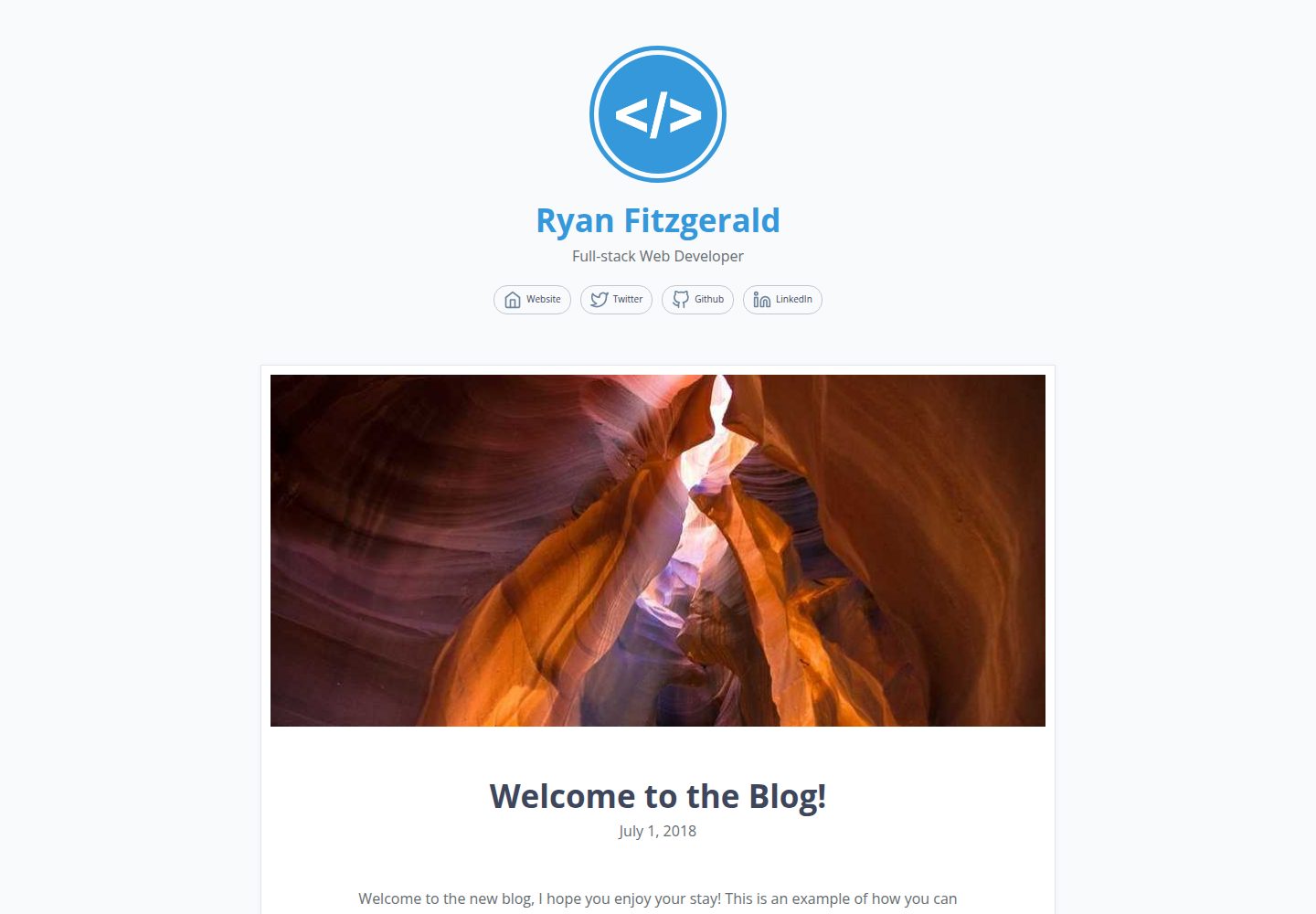
DevBlog is a lightweight, customizable personal blog template built with GatsbyJS and React. Posts are Markdown files in /src/pages, with URLs generated from folder names and frontmatter for title, date, and optional featured image.
Gatsby · Blog

gatsby-starter-morning-dew
A Gatsby and React blog starter/theme that uses Markdown or MDX for posts, supports multilingual content, dark mode, tag grouping, PWA, and Disqus comments, and is MIT licensed.
Gatsby · Blog

starter-gatsby-blog
A community-maintained Gatsby blog starter for Contentful, with a simple content model, npm run setup import, Sync API support, and gatsby-plugin-image. Suitable for quickly building a CMS-driven static blog or learning Gatsby and Headless CMS integration.
Gatsby · 社区

blog-template
A Gatsby scientific blog template streamlined from theaisummer.com, written in MDX with React components, TypeScript/TSX, and Sass.
Gatsby · Blog