预置 Stripe 支付与订阅接入代码
NuxtVue启动器
nuxt-template-stripe-supabase-google-i18n-kofi — Nuxt 启动器模板
作者 cl-victor1
一个 Nuxt 启动器模板,预置 Stripe 订阅支付、Supabase 后端、Google OAuth 登录、Vue I18n 多语言、Ko-fi 捐赠以及 Google Analytics 与 Vercel Analytics 的接入配置。
看看你的网站会是什么样
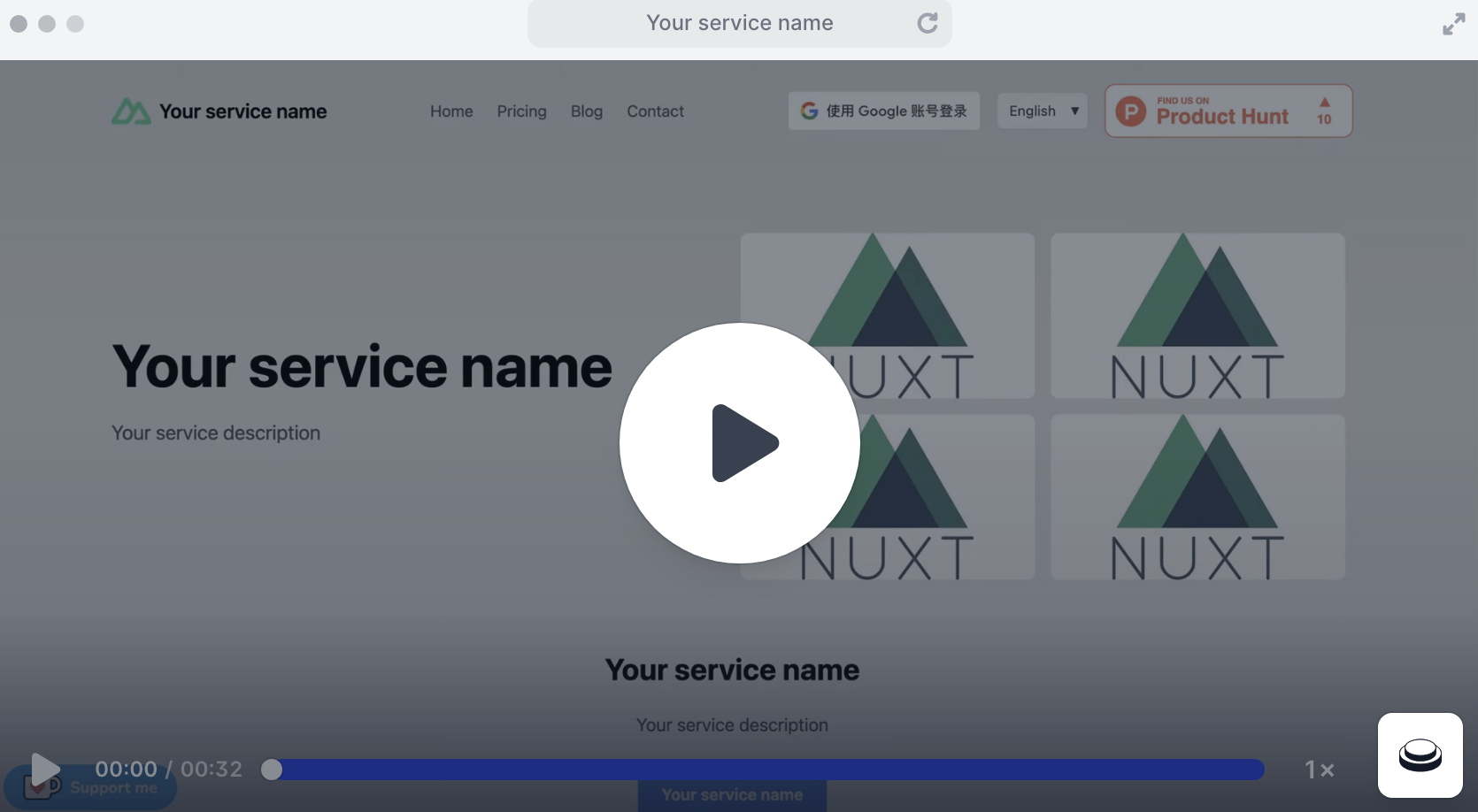
浏览真实页面截图,比较内容排版与手机效果。点击下方缩略图切换,放大查看整页细节。
目前有 1 张原始预览,可打开完整图片查看设计细节。
截图用于了解视觉与布局,交互效果请以实际项目为准。
采集于 2026-10-02查看来源
值得关注的模板亮点
从已有项目资料中,快速了解它的特点。
集成 Supabase 后端与认证服务
支持 Google OAuth 登录
通过 Vue I18n 提供多语言支持
内置 Ko-fi 捐赠悬浮组件配置
附带 Google Analytics、Vercel Analytics 与 Product Hunt 徽章
模板详细介绍
该模板面向需要订阅管理、国际化、身份认证与捐赠功能的 Nuxt 应用,把多个第三方服务的接入代码预先写好,减少从零配置的工作量。README 中列出的集成包括:Stripe 用于支付与订阅,Supabase 提供后端服务与认证,Google OAuth 用于登录,Vue I18n 提供多语言支持,Ko-fi 用于接收捐赠,此外还内置 Google Analytics、Vercel Analytics 和 Product Hunt 徽章,并在根目录提供 .cursorrules 文件以配合 Cursor AI 编写代码。
使用前需要自行准备多项外部账号与密钥:Stripe 账号、Supabase 账号、Google Cloud Console 中带 OAuth 2.0 凭据的项目,Ko-fi 账号为可选项。环境变量需在根目录 .env 中填写 SUPABASE_URL、SUPABASE_SERVICE_ROLE_KEY、STRIPE_SERVER_KEY、STRIPE_CLIENT_KEY、GOOGLE_CLIENT_ID 和 PUBLIC_URL。模板中的 Google Analytics ID、Ko-fi 链接、Stripe 价格 ID、i18n 翻译文本、logo 与 favicon 等占位内容都需要替换成自己的信息。
README 提到该模板被用于多个线上产品,并提供了一个交互式演示链接,但演示中未包含弹出的 Google 登录窗口。模板的代码采用 MIT 许可,可免费使用、修改、商用和分发,分发时需保留版权声明与许可声明;演示图片、字体、图标等第三方素材以及域名、托管、数据库、支付等外部服务需另行核对许可或付费。
Nuxt启动器
适合你的项目吗?
适用场景
- 需要订阅付费与用户账户体系的 Nuxt 应用起步
- 面向多语言用户的产品快速搭建
- 希望接入捐赠入口的开源或独立项目
- 需要同时使用 Stripe、Supabase 与 Google 登录的 SaaS 原型
适合人群
- 熟悉 Nuxt 并希望减少第三方服务配置工作量的开发者
- 已有 Stripe、Supabase 与 Google Cloud 账号的团队
- 需要订阅、登录、多语言与捐赠组合功能的项目
上手与定制指南
结合仓库当前版本的说明,按下面的资料检查内容、配置与运行要求。
- 1
需在根目录创建 .env 并填写 Supabase、Stripe、Google 及 PUBLIC_URL 等环境变量
- 2
需替换 app.vue 中的 Google Analytics ID 与 Ko-fi 链接
- 3
需在 pages/price.vue 中替换 Stripe 价格 ID
- 4
需更新 i18n.config.ts 中的翻译文本,并替换 public 目录下的 logo 与 favicon
- 5
需在 Google Cloud Console 配置 OAuth 2.0 的授权来源与重定向 URI
授权与来源资料
使用条件与限制
免费使用 · 保留许可声明本次收录的是公开仓库中采用 MIT 许可的免费版本;免费范围为该版本代码,不代表外部服务或第三方素材免费。
使用时需要遵守
- 允许免费使用、修改、商用和分发该版本代码。
- 分发代码副本或实质性部分时,保留原作者版权声明和完整 MIT 许可声明。
- 代码按现状提供;担保与责任限制以原许可证及适用法律为准。
额外费用与待核对事项
- 使用该模板需自行注册并配置 Stripe、Supabase 与 Google Cloud Console(OAuth 2.0 凭据)账号,Ko-fi 账号为可选项;这些外部服务可能产生费用或受各自条款约束。
- 必须在根目录 .env 中填写 Supabase、Stripe 与 Google 的密钥和 URL 等环境变量,模板本身不包含这些凭据。
- 需自行在 Stripe 后台创建产品与价格,并把 pages/price.vue 中的价格 ID 占位符替换为自己的 ID,否则支付功能无法使用。
- 需将 app.vue 中的 Google Analytics ID 占位符替换为自己的 ID,否则统计功能不可用。
- Ko-fi 悬浮组件默认使用作者账号 'buy_victor_a_coffee',需替换为自己的 Ko-fi 链接,否则捐赠会指向原作者。
- 需在 Google Cloud Console 自行创建 OAuth 2.0 凭据并正确配置授权来源与重定向 URI,否则 Google 登录无法工作。
- 演示图片、字体、图标及其他第三方素材需按各自许可核对,不能仅凭代码的 MIT 许可判断。
- 域名、托管、数据库、支付或 AI 等外部服务可能另外收费。
查看原文依据
Permission is hereby granted, free of charge
许可证原文
Stripe account - Supabase account - Google Cloud Console project with OAuth 2.0 credentials - Ko-fi account (optional)
README 原文
SUPABASE_URL=your_supabase_url SUPABASE_SERVICE_ROLE_KEY=your_supabase_service_role_key STRIPE_SERVER_KEY=your_stripe_server_key STRIPE_CLIENT_KEY=your_stripe_client_key GOOGLE_CLIENT_ID=your_google_client_id
README 原文
Set up your Stripe products and prices, then update the price IDs in `pages/price.vue`
README 原文
const gaScript = document.createElement('script') gaScript.async = true gaScript.src = 'https://www.googletagmanager.com/gtag/js?id=G-XXXXXXXXXXXXX' // Change to your own Google Analytics ID
README 原文
window.kofiWidgetOverlay.draw('buy_victor_a_coffee', {
README 原文
https://github.com/cl-victor1/nuxt-template-stripe-supabase-google-i18n-kofi/blob/main/LICENSEhttps://github.com/cl-victor1/nuxt-template-stripe-supabase-google-i18n-kofi/blob/main/README.mdSet up Google OAuth 2.0 credentials in the Google Cloud Console and ensure the authorized JavaScript origins and redirect URIs are correctly set.
README 原文
DeepSeek 根据仓库许可证和 README 整理 ·2026-10-02。结果仅覆盖已读取资料,依赖、图片、字体及后续条款变更以各自原文为准。
项目核对记录与介绍依据
模板资料
- 来源平台
- GitHub
- 资料与维护参考分
- 资料较完整 · 75 / 100
- 技术栈
- Nuxt · Vue
- 网站类型
- 启动器
这个分数如何计算
本站按许可资料(最高30分)、演示链接(12分)、预览图(10分)、Star数(15分)、记录的维护时间(15分)、描述完整度(8分)、功能记录(5分)和分类资料(5分)计算。它不是代码、安全或性能测试,也不是 Google 评分;有链接不代表已实测可用。
这个项目需要核对什么
- 记录的仓库更新时间
- 2025-11-20
- 截图检查日期
- 2026-10-02
目前没有记录演示链接。请依据仓库说明在本地评估;仅凭截图无法确认交互行为。
目录记录的主要技术栈是 Nuxt。请通过依赖清单和锁文件核对实际版本与托管要求。这些说明基于收录资料,不代表代码审计或部署实测。
查看具体选型方法 →介绍的制作与核对状态
介绍由 AI 辅助整理目录与仓库资料。仓库作者不等于这篇介绍的审核者。
已完成服务器许可规则与 AI 来源核对;未经过人工编辑审核。
查看当时使用的来源资料
SHA-256: 402e06922a98699f2fdf657360815b24f80186298aa0816763c59859f7ac1451
2026-10-02T10:26:20.397Z
来源文件 / 仓库# Nuxt Template with Stripe, Supabase, Google Auth, i18n, and Ko-fi Integration
<div align="center">
<a href="README.md">English</a> | <a href="README_zh.md">中文</a>
</div>
## Introduction
This template provides a ready-to-use starter kit for building Nuxt.js applications with essential third-party integrations. It's designed to streamline the setup process for projects that need subscription management, internationalization, authentication, and donation functionality.
## Demo
Website made with this template: https://headshotgenerator.net
Experience the template in action with our interactive demo:
<div align="center">
<a href="https://app.arcade.software/flows/xxq5LCtDW68nRlHCeNLW" target="_blank">
<img src="assets/demo.png" alt="Demo Thumbnail" width="800" height="600">
</a>
</div>
Click the image above or [this link](https://app.arcade.software/flows/xxq5LCtDW68nRlHCeNLW) to view the interactive demo in a new tab. Please note that the popped out Google login window was not captured in the demo.
## Products Built with This Template
Here are some real-world applications built using this Nuxt template:
### AI & Technology
- **[AI Flux](https://ai-flux.io/)** - Professional AI image editing platform with context-aware editing capabilities
- **[AIdeaFlow Podcast](https://aideaflowpodcast.com/en)** - AI-powered podcast generator with natural voice synthesis
- **[AI is All You Need](https://aiisallyouneed.ai/en)** - Comprehensive AI tools and resources platform
- **[Painly](https://painly.ai)** - AI Reddit Account Builder
- **[Veo 4](https://veo4.dev/)** - The Future of AI Video Generation
- **[Veo 5](https://veo5.io)** - The Future of AI Video Generation
- **[Sora 3](https://sora3.dev)** - The Future of AI Video Generation
- **[Sora 4](https://sora4.art)** - The Future of AI Video Generation
### Lifestyle & Services
- **[KFC Menu](https://kfcmenu.net/)** - Complete KFC menu with prices and nutritional information
- **[Interpret Dreams](https://interpretdreams.online/)** - AI-powered dream interpretation service
- **[Send the Prayer](https://sendtheprayer.net/)** - Digital prayer request and sharing platform
These products demonstrate the versatility of this template across different industries and use cases, from AI-powered services to lifestyle applications.
## Features
- **Stripe Integration**: Easily manage payments and subscriptions with Stripe.
- **Supabase Integration**: Leverage Supabase for scalable backend services, including real-time databases and authentication.
- **Google Auth**: Enable secure and fast authentication via Google OAuth.
- **i18n (Internationalization)**: Provide multilingual support with Vue I18n, making your app accessible globally.
- **Ko-fi Donations**: Seamlessly integrate Ko-fi for community-supported contributions and donations.
- **Google Analytics**: Built-in Google Analytics integration for tracking user behavior and site performance.
- **Product Hunt Badge**: Showcase your product with an embedded Product Hunt badge for increased visibility and credibility.
- **Vercel Analytics**: Integrated Vercel Analytics plugin for advanced performance monitoring and insights.
- **Cursor AI Support**: Includes a `.cursorrules` file in the root directory to enhance code writing with Cursor AI.
## Prerequisites
- Node.js (v14 or later)
- npm or pnpm
- Stripe account
- Supabase account
- Google Cloud Console project with OAuth 2.0 credentials
- Ko-fi account (optional)
## Getting Started
1. Clone the repository:
```
git clone https://github.com/cl-victor1/nuxt-template-stripe-supabase-google-i18n-kofi.git
cd nuxt-template-stripe-supabase-google-i18n-kofi
```
2. Install dependencies:
```
npm install
```
or if you're using pnpm:
```
pnpm install
```
3. Create a `.env` file in the root directory and add the following environment variables:
```
SUPABASE_URL=your_supabase_url
SUPABASE_SERVICE_ROLE_KEY=your_supabase_service_role_key
STRIPE_SERVER_KEY=your_stripe_server_key
STRIPE_CLIENT_KEY=your_stripe_client_key
GOOGLE_CLIENT_ID=your_google_client_id
PUBLIC_URL=your_public_url # local: http://localhost:3000, production: https://yourdomain.com
```
Replace `your_*` with your actual credentials and URLs.
4. Update the configuration files:
- In `app.vue`, replace the Google Analytics ID:
```typescript
const gaScript = document.createElement('script')
gaScript.async = true
gaScript.src = 'https://www.googletagmanager.com/gtag/js?id=G-XXXXXXXXXXXXX' // Change to your own Google Analytics ID
document.body.appendChild(gaScript)
gaScript.onload = () => {
window.dataLayer = window.dataLayer || []
function gtag(){dataLayer.push(arguments)}
gtag('js', new Date())
gtag('config', 'G-XXXXXXXXXXXXX') // Change to your own Google Analytics ID
}
```
- In `app.vue`, update the Ko-fi widget configuration:
```typescript
// Change to your own Ko-fi link
const kofiScript = document.createElement('script');
kofiScript.src = 'https://storage.ko-fi.com/cdn/scripts/overlay-widget.js';
kofiScript.onload = () => {
// Initialize Ko-fi widget after script is loaded
window.kofiWidgetOverlay.draw('buy_victor_a_coffee', {
'type': 'floating-chat',
'floating-chat.donateButton.text': 'Support me',
'floating-chat.donateButton.background-color': '#00b9fe',
'floating-chat.donateButton.text-color': '#fff'
});
};
```
5. Customize the content:
- Update the service name, description, and other text throughout the application. Look for comments like "Change to your own ..." and replace the placeholder text with your own information.
- Replace the logo and favicon in the `public` directory with your own assets.
6. Update the i18n translations in `i18n.config.ts` to match your service's content.
7. Set up your Stripe products and prices, then update the price IDs in `pages/price.vue`:
```vue
<button @click="() => handleCheckout('price_xxxx')" id="checkout-button-basic" class="h-10 text-sm font-medium rounded text-blue-900 text-center w-full bg-white active:scale-95 transition-transform">Choose this plan</button>
```
```vue
<button @click="() => handleCheckout('price_xxxx')" id="checkout-button-pro" class="h-10 text-sm font-medium rounded text-blue-900 text-center w-full bg-white active:scale-95 transition-transform">Choose this plan</button>
```
8. Configure your Supabase database and update any related API calls in the server directory.
9. Set up Google OAuth 2.0 credentials in the Google Cloud Console and ensure the authorized JavaScript origins and redirect URIs are correctly set.
## Running the Application
To run the application in development mode:
看看同类模板
对比同技术栈与用途的模板,找到更适合的视觉与内容结构。

laravel-nuxt
A Laravel-Nuxt starter kit.
Nuxt · 启动器

canvas
Portfolio template made with Nuxt 3, Nuxt Content v3, NuxtUI v3 and TailwindCSS v4
Nuxt · 作品集

nuxt3-starter
💚 A Better Nuxt 3 Starter Template,generate by nuxi.
Nuxt · 启动器

starter
Nuxt Starter Template for Nuxt UI.
Nuxt · 启动器

bloggrify
Run a blog from Markdown files. Themes, SEO, analytics, newsletter and comments preconfigured. Like Docus, but…
Nuxt · 博客
vitify-nuxt
🔽🏔 Vuetify + Nuxt Starter Template
Nuxt · 后台