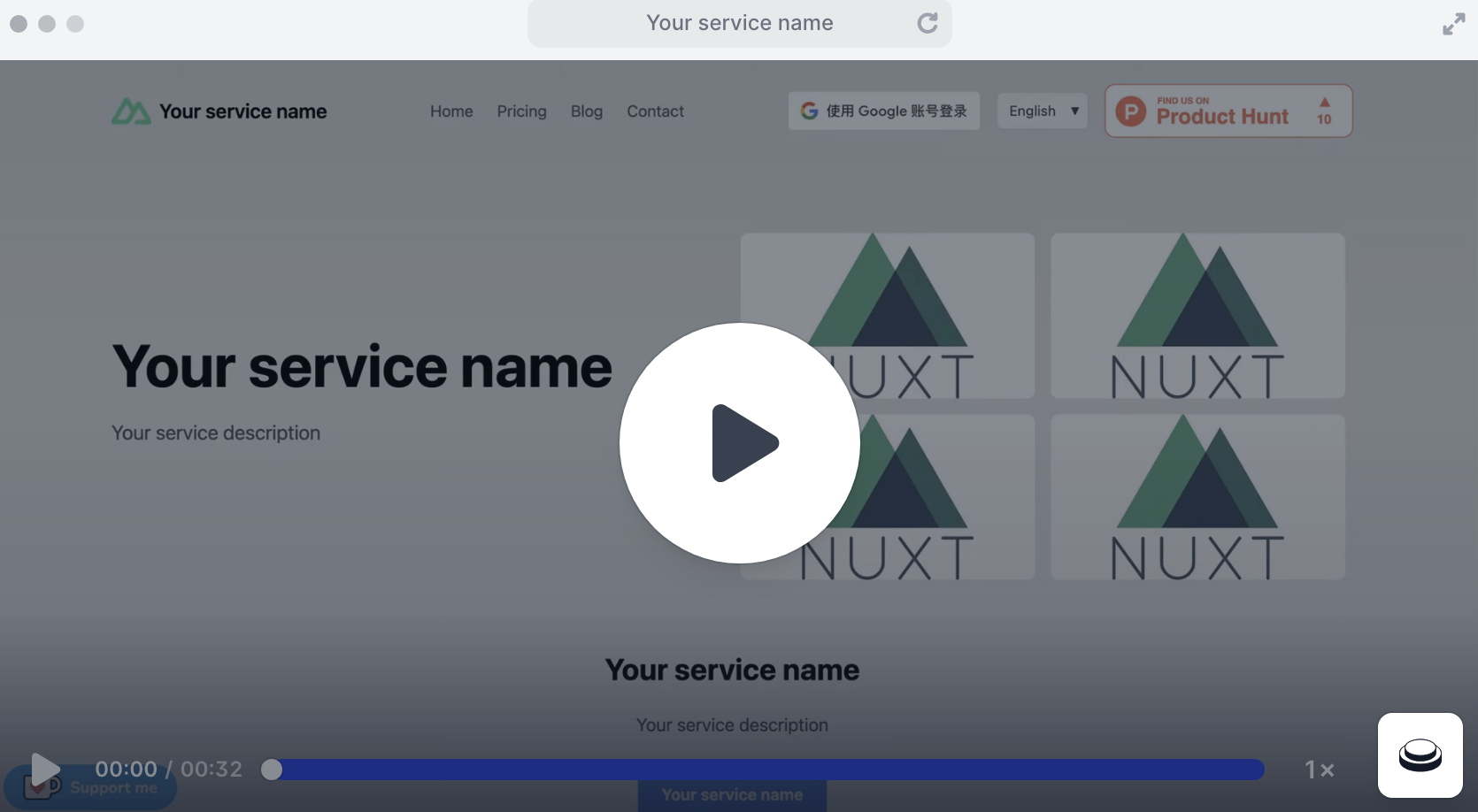
Preconfigured Stripe payment and subscription integration code
NuxtVueStarter
nuxt-template-stripe-supabase-google-i18n-kofi — Nuxt Starter Template
By cl-victor1
A Nuxt starter template preconfigured with Stripe subscription payments, Supabase backend, Google OAuth login, Vue I18n multilingual support, Ko-fi donations, and integration setup for Google Analytics and Vercel Analytics.
Explore the design
Compare the page layouts and mobile experience. Open any screenshot for a closer look.
Author preview
Author-provided preview
Preview provided in the project README.
One original preview is available. Open the full image to inspect the design.
Screenshots show visual appearance; interactive behavior may differ.
Recorded 2026-10-02View source
What stands out
A quick read of the recorded project description.
Integrated Supabase backend and authentication services
Supports Google OAuth login
Provides multilingual support via Vue I18n
Built-in Ko-fi donation floating component configuration
Includes Google Analytics, Vercel Analytics, and Product Hunt badge
Template Details
This template targets Nuxt applications that need subscription management, internationalization, authentication, and donation functionality. It pre-writes integration code for multiple third-party services to reduce the work of configuring from scratch. The integrations listed in the README include: Stripe for payments and subscriptions, Supabase for backend services and authentication, Google OAuth for login, Vue I18n for multilingual support, and Ko-fi for receiving donations. It also includes built-in Google Analytics, Vercel Analytics, and a Product Hunt badge, and provides a .cursorrules file in the root directory for use with Cursor AI when writing code.
Before use, you need to prepare several external accounts and keys yourself: a Stripe account, a Supabase account, a project in Google Cloud Console with OAuth 2.0 credentials, and optionally a Ko-fi account. Environment variables must be filled in the root .env file: SUPABASE_URL, SUPABASE_SERVICE_ROLE_KEY, STRIPE_SERVER_KEY, STRIPE_CLIENT_KEY, GOOGLE_CLIENT_ID, and PUBLIC_URL. Placeholder content in the template, such as the Google Analytics ID, Ko-fi link, Stripe price ID, i18n translation text, logo, and favicon, all need to be replaced with your own information.
The README mentions that this template has been used in multiple live products and provides an interactive demo link, but the demo does not include the pop-up Google login window. The template code is under the MIT license, allowing free use, modification, commercial use, and distribution; when distributing, you must retain the copyright notice and license notice. Third-party assets such as demo images, fonts, and icons, as well as external services such as domains, hosting, databases, and payments, require separate license verification or payment.
NuxtStarter
Is it right for your project?
Use Cases
- Starting a Nuxt application that needs subscription payments and a user account system
- Rapidly building a product for multilingual users
- Open-source or independent projects that want to add a donation entry point
- SaaS prototypes that need to use Stripe, Supabase, and Google login together
Suitable For
- Developers familiar with Nuxt who want to reduce the work of configuring third-party services
- Teams that already have Stripe, Supabase, and Google Cloud accounts
- Projects that need a combination of subscription, login, multilingual, and donation features
Getting started & customization
Use these recorded setup notes alongside the repository instructions for your chosen version.
- 1
Create a .env in the root directory and fill in environment variables such as Supabase, Stripe, Google, and PUBLIC_URL
- 2
Replace the Google Analytics ID and Ko-fi link in app.vue
- 3
Replace the Stripe price ID in pages/price.vue
- 4
Update the translation text in i18n.config.ts and replace the logo and favicon in the public directory
- 5
Configure the authorized origins and redirect URIs for OAuth 2.0 in Google Cloud Console
License & source material
Usage conditions & limitations
Free to use · keep license noticeThis entry covers the free version under the MIT license in the public repository; the free scope applies to that version's code and does not mean external services or third-party assets are free.
Must comply with when using
- You may freely use, modify, use commercially, and distribute the code of this version.
- When distributing copies or substantial portions of the code, retain the original author's copyright notice and the complete MIT license notice.
- The code is provided as is; warranties and limitations of liability are governed by the original license and applicable law.
Additional costs & items to verify
- Using this template requires you to register and configure Stripe, Supabase, and Google Cloud Console (OAuth 2.0 credentials) accounts yourself; a Ko-fi account is optional. These external services may incur fees or be subject to their own terms.
- You must fill in environment variables such as Supabase, Stripe, and Google keys and URLs in the root .env file; the template itself does not include these credentials.
- You need to create products and prices in the Stripe dashboard yourself and replace the price ID placeholder in pages/price.vue with your own ID; otherwise, payment functionality will not work.
- You need to replace the Google Analytics ID placeholder in app.vue with your own ID; otherwise, analytics functionality will not work.
- The Ko-fi floating component defaults to the author's account 'buy_victor_a_coffee'; you need to replace it with your own Ko-fi link, otherwise donations will go to the original author.
- You need to create OAuth 2.0 credentials in Google Cloud Console yourself and correctly configure the authorized origins and redirect URIs; otherwise, Google login will not work.
- Demo images, fonts, icons, and other third-party assets must be checked against their respective licenses; you cannot judge based solely on the code's MIT license.
- External services such as domains, hosting, databases, payments, or AI may incur additional charges.
View Original Text Basis
Permission is hereby granted, free of charge
Original License Text
Stripe account - Supabase account - Google Cloud Console project with OAuth 2.0 credentials - Ko-fi account (optional)
Original README
SUPABASE_URL=your_supabase_url SUPABASE_SERVICE_ROLE_KEY=your_supabase_service_role_key STRIPE_SERVER_KEY=your_stripe_server_key STRIPE_CLIENT_KEY=your_stripe_client_key GOOGLE_CLIENT_ID=your_google_client_id
Original README
Set up your Stripe products and prices, then update the price IDs in `pages/price.vue`
Original README
const gaScript = document.createElement('script') gaScript.async = true gaScript.src = 'https://www.googletagmanager.com/gtag/js?id=G-XXXXXXXXXXXXX' // Change to your own Google Analytics ID
Original README
window.kofiWidgetOverlay.draw('buy_victor_a_coffee', {
Original README
https://github.com/cl-victor1/nuxt-template-stripe-supabase-google-i18n-kofi/blob/main/LICENSEhttps://github.com/cl-victor1/nuxt-template-stripe-supabase-google-i18n-kofi/blob/main/README.mdSet up Google OAuth 2.0 credentials in the Google Cloud Console and ensure the authorized JavaScript origins and redirect URIs are correctly set.
Original README
Compiled by DeepSeek based on repository license and README ·2026-10-02. Results only cover the materials read; dependencies, images, fonts, and subsequent term changes are subject to their respective original texts.
Project checks & description sources
Template Information
- Source platforms
- GitHub
- Documentation and maintenance reference score
- More documented · 75 / 100
- Technologies
- Nuxt · Vue
- Website type
- Starter
How this score is calculated
Our heuristic uses license records (up to 30), a demo link (12), a preview (10), stars (15), recorded maintenance (15), description completeness (8), feature records (5) and classification data (5). It is not a code, security or performance test, or a Google score. A link does not establish tested functionality.
What to verify for this project
- Repository update recorded
- 2025-11-20
- Screenshot last checked
- 2026-10-02
No demo link is recorded. Use the repository instructions to evaluate the project locally; the screenshot alone cannot establish interactive behavior.
The catalog identifies Nuxt as the primary stack. Check the actual dependency manifest and lockfile for versions and hosting requirements. These notes use recorded metadata, not a code audit or a deployment test.
Use a selection guide →How this description was prepared
AI-assisted description based on catalog records and repository material. Repository authors are not automatically the reviewers of this description.
Automatically checked against source and license rules; no manual editorial review.
Inspect the recorded source material
SHA-256: 402e06922a98699f2fdf657360815b24f80186298aa0816763c59859f7ac1451
2026-10-02T10:26:20.397Z
Source file / repository# Nuxt Template with Stripe, Supabase, Google Auth, i18n, and Ko-fi Integration
<div align="center">
<a href="README.md">English</a> | <a href="README_zh.md">中文</a>
</div>
## Introduction
This template provides a ready-to-use starter kit for building Nuxt.js applications with essential third-party integrations. It's designed to streamline the setup process for projects that need subscription management, internationalization, authentication, and donation functionality.
## Demo
Website made with this template: https://headshotgenerator.net
Experience the template in action with our interactive demo:
<div align="center">
<a href="https://app.arcade.software/flows/xxq5LCtDW68nRlHCeNLW" target="_blank">
<img src="assets/demo.png" alt="Demo Thumbnail" width="800" height="600">
</a>
</div>
Click the image above or [this link](https://app.arcade.software/flows/xxq5LCtDW68nRlHCeNLW) to view the interactive demo in a new tab. Please note that the popped out Google login window was not captured in the demo.
## Products Built with This Template
Here are some real-world applications built using this Nuxt template:
### AI & Technology
- **[AI Flux](https://ai-flux.io/)** - Professional AI image editing platform with context-aware editing capabilities
- **[AIdeaFlow Podcast](https://aideaflowpodcast.com/en)** - AI-powered podcast generator with natural voice synthesis
- **[AI is All You Need](https://aiisallyouneed.ai/en)** - Comprehensive AI tools and resources platform
- **[Painly](https://painly.ai)** - AI Reddit Account Builder
- **[Veo 4](https://veo4.dev/)** - The Future of AI Video Generation
- **[Veo 5](https://veo5.io)** - The Future of AI Video Generation
- **[Sora 3](https://sora3.dev)** - The Future of AI Video Generation
- **[Sora 4](https://sora4.art)** - The Future of AI Video Generation
### Lifestyle & Services
- **[KFC Menu](https://kfcmenu.net/)** - Complete KFC menu with prices and nutritional information
- **[Interpret Dreams](https://interpretdreams.online/)** - AI-powered dream interpretation service
- **[Send the Prayer](https://sendtheprayer.net/)** - Digital prayer request and sharing platform
These products demonstrate the versatility of this template across different industries and use cases, from AI-powered services to lifestyle applications.
## Features
- **Stripe Integration**: Easily manage payments and subscriptions with Stripe.
- **Supabase Integration**: Leverage Supabase for scalable backend services, including real-time databases and authentication.
- **Google Auth**: Enable secure and fast authentication via Google OAuth.
- **i18n (Internationalization)**: Provide multilingual support with Vue I18n, making your app accessible globally.
- **Ko-fi Donations**: Seamlessly integrate Ko-fi for community-supported contributions and donations.
- **Google Analytics**: Built-in Google Analytics integration for tracking user behavior and site performance.
- **Product Hunt Badge**: Showcase your product with an embedded Product Hunt badge for increased visibility and credibility.
- **Vercel Analytics**: Integrated Vercel Analytics plugin for advanced performance monitoring and insights.
- **Cursor AI Support**: Includes a `.cursorrules` file in the root directory to enhance code writing with Cursor AI.
## Prerequisites
- Node.js (v14 or later)
- npm or pnpm
- Stripe account
- Supabase account
- Google Cloud Console project with OAuth 2.0 credentials
- Ko-fi account (optional)
## Getting Started
1. Clone the repository:
```
git clone https://github.com/cl-victor1/nuxt-template-stripe-supabase-google-i18n-kofi.git
cd nuxt-template-stripe-supabase-google-i18n-kofi
```
2. Install dependencies:
```
npm install
```
or if you're using pnpm:
```
pnpm install
```
3. Create a `.env` file in the root directory and add the following environment variables:
```
SUPABASE_URL=your_supabase_url
SUPABASE_SERVICE_ROLE_KEY=your_supabase_service_role_key
STRIPE_SERVER_KEY=your_stripe_server_key
STRIPE_CLIENT_KEY=your_stripe_client_key
GOOGLE_CLIENT_ID=your_google_client_id
PUBLIC_URL=your_public_url # local: http://localhost:3000, production: https://yourdomain.com
```
Replace `your_*` with your actual credentials and URLs.
4. Update the configuration files:
- In `app.vue`, replace the Google Analytics ID:
```typescript
const gaScript = document.createElement('script')
gaScript.async = true
gaScript.src = 'https://www.googletagmanager.com/gtag/js?id=G-XXXXXXXXXXXXX' // Change to your own Google Analytics ID
document.body.appendChild(gaScript)
gaScript.onload = () => {
window.dataLayer = window.dataLayer || []
function gtag(){dataLayer.push(arguments)}
gtag('js', new Date())
gtag('config', 'G-XXXXXXXXXXXXX') // Change to your own Google Analytics ID
}
```
- In `app.vue`, update the Ko-fi widget configuration:
```typescript
// Change to your own Ko-fi link
const kofiScript = document.createElement('script');
kofiScript.src = 'https://storage.ko-fi.com/cdn/scripts/overlay-widget.js';
kofiScript.onload = () => {
// Initialize Ko-fi widget after script is loaded
window.kofiWidgetOverlay.draw('buy_victor_a_coffee', {
'type': 'floating-chat',
'floating-chat.donateButton.text': 'Support me',
'floating-chat.donateButton.background-color': '#00b9fe',
'floating-chat.donateButton.text-color': '#fff'
});
};
```
5. Customize the content:
- Update the service name, description, and other text throughout the application. Look for comments like "Change to your own ..." and replace the placeholder text with your own information.
- Replace the logo and favicon in the `public` directory with your own assets.
6. Update the i18n translations in `i18n.config.ts` to match your service's content.
7. Set up your Stripe products and prices, then update the price IDs in `pages/price.vue`:
```vue
<button @click="() => handleCheckout('price_xxxx')" id="checkout-button-basic" class="h-10 text-sm font-medium rounded text-blue-900 text-center w-full bg-white active:scale-95 transition-transform">Choose this plan</button>
```
```vue
<button @click="() => handleCheckout('price_xxxx')" id="checkout-button-pro" class="h-10 text-sm font-medium rounded text-blue-900 text-center w-full bg-white active:scale-95 transition-transform">Choose this plan</button>
```
8. Configure your Supabase database and update any related API calls in the server directory.
9. Set up Google OAuth 2.0 credentials in the Google Cloud Console and ensure the authorized JavaScript origins and redirect URIs are correctly set.
## Running the Application
To run the application in development mode:
Explore similar templates
Compare previews and descriptions within the same stack and category.

laravel-nuxt
A Laravel + Nuxt decoupled starter kit with built-in login, registration, email verification, password reset, and Socialite third-party login (GitHub example), switchable between SPA and SSR.
Nuxt · Starter

canvas
Canvas is a Nuxt-based portfolio template that uses Nuxt Content for content management and Nuxt UI with Tailwind CSS for pages.
Nuxt · Portfolio

nuxt3-starter
A Nuxt 3 starter template generated by nuxi, preconfigured with UnoCSS, unplugin-icons, Pinia, and VueUse. It suits developers who need a quick Nuxt 3 project skeleton with atomic CSS and auto-import workflows, and is available under the MIT license.
Nuxt · Starter

starter
The official Nuxt starter template for Nuxt UI, based on Nuxt and Vue. It provides a runnable project skeleton, an online demo, and Nuxt UI installation documentation, with README commands for creating, installing, developing, building, and previewing.
Nuxt · Starter

bloggrify
Bloggrify is a Nuxt layer that turns Markdown files into a blog site, built on Nuxt Content with preconfigured analytics, newsletter, comments, SEO, RSS, and content components.
Nuxt · Blog
vitify-nuxt
Vitify Nuxt is an admin dashboard starter template built on Nuxt and Vuetify, featuring a drawer layout, automatic navigation and breadcrumbs, notification state, ECharts charts, theming and dark mode, and authentication via nuxt-auth-utils.
Nuxt · Admin dashboard