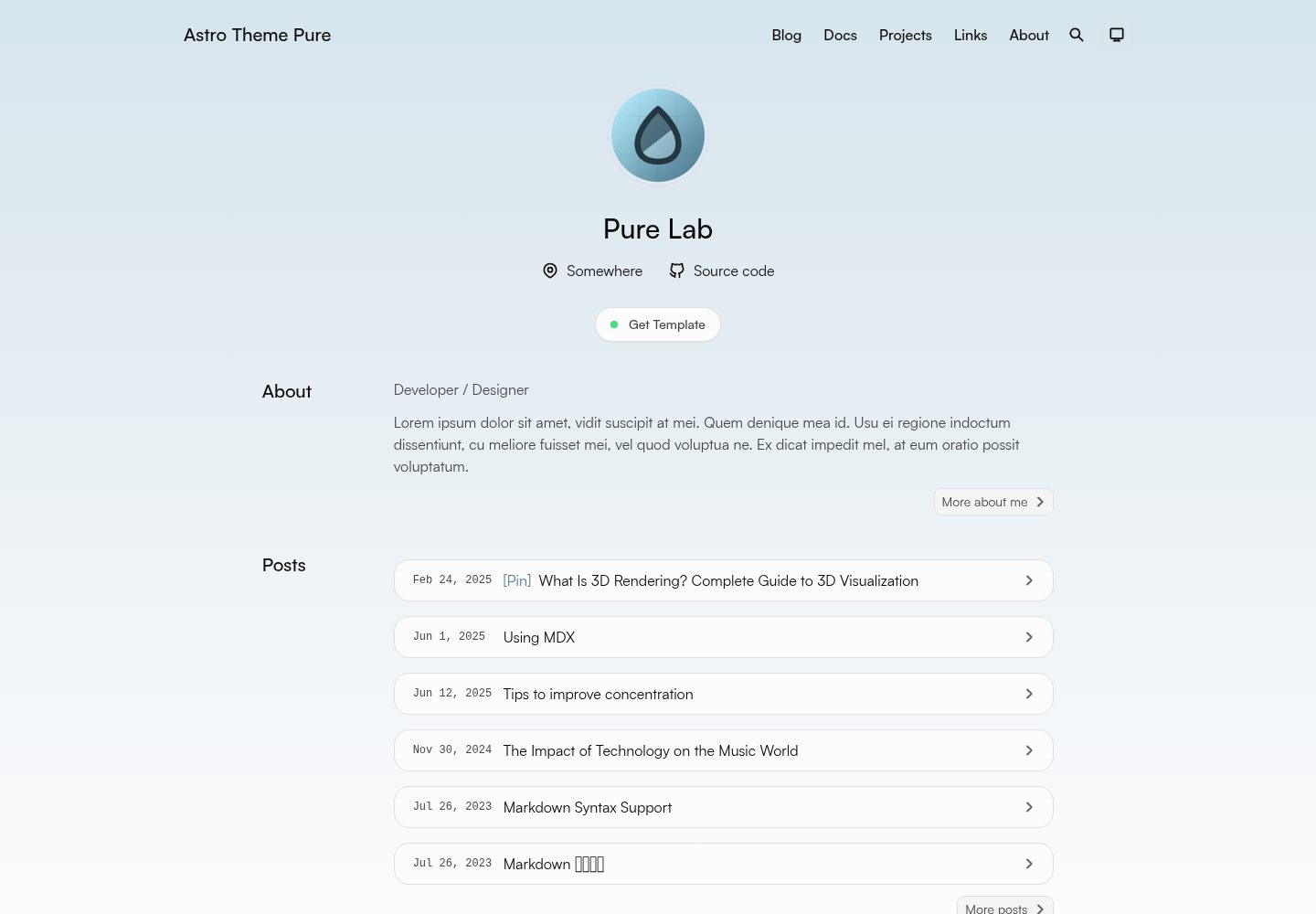
基于 Astro 构建,输出静态站点,可部署到任意静态托管平台
Astro博客
astro-theme-pure — Astro 博客模板
作者 cworld1
Astro Theme Pure 是一个基于 Astro 的博客与文档主题,采用 Apache-2.0 许可,内置全站搜索、目录、RSS 与动态 OG 图生成等能力。
看看你的网站会是什么样
浏览真实页面截图,比较内容排版与手机效果。点击下方缩略图切换,放大查看整页细节。
全部页面与视图 3
截图用于了解视觉与布局,交互效果请以实际项目为准。
采集于 2026-09-30查看来源
值得关注的模板亮点
从已有项目资料中,快速了解它的特点。
内置基于 pagefind 的全站搜索,以及站点地图与 RSS 输出
提供文章目录、动态 Open Graph 图生成与 Mediumzoom 图片灯箱
附带 Aside、Tabs、Timeline、Steps、Spoiler、GithubCard、LinkPreview、Quote、QRCode 等组件
使用 Apache-2.0 许可,允许修改、商用与分发
同时覆盖博客与文档两类内容场景
模板详细介绍
Astro Theme Pure 由 cworld1 维护,是一个面向博客与文档场景的 Astro 主题,仓库采用 Apache-2.0 许可,演示站点为 astro-pure.js.org。主题提供响应式布局、全站搜索(基于 pagefind)、站点地图与 RSS、文章目录、动态 Open Graph 图生成以及 Mediumzoom 图片灯箱等能力,并附带 Aside、Tabs、Timeline、Steps、Spoiler、GithubCard、LinkPreview、Quote、QRCode 等可复用组件。
使用方式上,项目要求 Node.js 22.12.0 或更新版本(Astro 不支持奇数版本 Node.js),依赖安装与开发服务器可通过 Bun、pnpm、yarn 或 npm 运行,默认开发端口为 4321。站点配置集中在 src/site.config.ts,新增文章可使用 bun pure new 命令,构建产物输出到 ./dist 目录,可部署到任意静态托管平台,也提供 Vercel 与 Netlify 的部署入口,并支持 Docker 与 Docker Compose 方式。
需要留意的是,README 明确说明 Header 与自定义选项仍处于开发中(模板仍暴露相关配置),因此这部分能力可能尚未稳定。演示图片、字体、图标等第三方素材需按各自许可单独核对,代码的 Apache-2.0 许可不覆盖这些素材;域名、托管等外部服务也可能产生费用。
Astro博客
适合你的项目吗?
适用场景
- 搭建个人博客并发布图文文章
- 建立项目文档站点,配合目录与全站搜索浏览内容
- 在文章中使用 Aside、Tabs、Timeline 等组件组织说明性内容
- 通过 RSS 与站点地图分发内容,并借助动态 OG 图优化分享展示
- 将构建产物部署到 Vercel、Netlify 或其他静态托管平台
适合人群
- 使用 Astro 并希望直接获得博客与文档基础结构的开发者
- 需要静态输出、可自行选择托管平台的个人站点维护者
- 接受在 src/site.config.ts 中集中配置站点信息的用户
- 能够使用 Bun、pnpm、yarn 或 npm 进行本地开发的用户
上手与定制指南
结合仓库当前版本的说明,按下面的资料检查内容、配置与运行要求。
- 1
需要 Node.js 22.12.0 或更新版本,Astro 不支持 23 等奇数版本 Node.js
- 2
克隆仓库后编辑 src/site.config.ts 完成站点自定义,再安装依赖并启动开发服务器
- 3
开发服务器默认运行在 http://localhost:4321
- 4
使用 bun pure new 创建新博客文章,使用 bun run build 生成 ./dist 静态产物
- 5
README 说明 Header 与自定义选项仍在开发中,相关配置可能尚未稳定
授权与来源资料
使用条件与限制
免费使用 · 保留许可声明本次收录的是公开仓库中采用 Apache-2.0 许可的免费版本;免费范围为该版本代码,不代表外部服务或第三方素材免费。
使用时需要遵守
- 允许免费使用、修改、商用和分发;分发时需随附 Apache-2.0 许可证。
- 修改过的文件需显著标明改动,并保留相关版权、专利、商标及归属声明。
- 若原项目附有 NOTICE 文件,分发衍生作品时需保留其中适用的归属声明。
- 许可包含适用的贡献者专利授权;发起许可所述专利诉讼会终止该专利授权,且不授予商标使用权。
- 代码按现状提供;担保与责任限制以原许可证及适用法律为准。
额外费用与待核对事项
- 使用该主题需 Node.js 22.12.0 或更新版本,且 Astro 不支持 23 等奇数版本 Node.js,环境不满足时无法正常开发与构建。
- README 明确 Header 与自定义选项仍在开发中,相关配置可能不稳定,属于已知未完成功能,不应视为已就绪能力。
- 若要在其他 Astro 项目中复用主题组件,必须额外引入 UnoCSS,否则组件无法按预期工作。
- 部署到不同静态托管平台时可能需要修改 astro.config.ts 配置,并非开箱即用。
- 演示图片、字体、图标及其他第三方素材需按各自许可核对,不能仅凭代码的 Apache-2.0 许可判断。
- 域名、托管、数据库、支付或 AI 等外部服务可能另外收费。
查看原文依据
no-charge, royalty-free, irrevocable copyright license
许可证原文
Astro 6.0+ requires Node.js 22.12.0 or newer. Odd-numbered Node.js versions such as 23 are not supported by Astro.
README 原文
Known issues: Header & customize options is still under development (template exposed still).
README 原文
For other astro projects, UnoCSS is required.
README 原文
https://github.com/cworld1/astro-theme-pure/blob/main/LICENSEhttps://github.com/cworld1/astro-theme-pure/blob/main/README.mdDepending on the deployment platform you choose, you may need to modify the `astro.config.ts` configuration file in the project.
README 原文
DeepSeek 根据仓库许可证和 README 整理 ·2026-10-01。结果仅覆盖已读取资料,依赖、图片、字体及后续条款变更以各自原文为准。
项目核对记录与介绍依据
模板资料
- 来源平台
- GitHub
- 资料与维护参考分
- 资料较完整 · 95 / 100
- 技术栈
- Astro
- 网站类型
- 博客
这个分数如何计算
本站按许可资料(最高30分)、演示链接(12分)、预览图(10分)、Star数(15分)、记录的维护时间(15分)、描述完整度(8分)、功能记录(5分)和分类资料(5分)计算。它不是代码、安全或性能测试,也不是 Google 评分;有链接不代表已实测可用。
这个项目需要核对什么
- 记录的仓库更新时间
- 2026-09-26
- 截图检查日期
- 2026-10-01
已收录演示链接。请用你的内容与屏幕尺寸检查;有演示不代表表单、认证或支付已经可用。
目录记录的主要技术栈是 Astro。请通过依赖清单和锁文件核对实际版本与托管要求。这些说明基于收录资料,不代表代码审计或部署实测。
查看具体选型方法 →介绍的制作与核对状态
介绍由 AI 辅助整理目录与仓库资料。仓库作者不等于这篇介绍的审核者。
已完成服务器许可规则与 AI 来源核对;未经过人工编辑审核。
查看当时使用的来源资料
SHA-256: d24aa04abaee6f1abd1224d339d7fd5bd934893ed9daff037e8b57e15ddb1f45
2026-10-01T13:32:29.381Z
来源文件 / 仓库# Astro Theme Pure English | [简体中文](./README-zh-CN.md) A simple, fast and powerful blog & document theme built by Astro. [](https://astro-pure.js.org/) [](https://www.npmjs.com/package/astro-pure) [](https://github.com/cworld1/astro-theme-pure/releases) [](https://github.com/cworld1/astro-theme-pure/blob/main/LICENSE)   > [!NOTE] > Known issues: Header & customize options is still under development (template exposed still). ## Introduction Checkout [Demo Site →](https://astro-pure.js.org/) ### :fire: Features - [x] :rocket: Fast & high performance - [x] :star: Simple & clean design - [x] :iphone: Responsive design - [x] :mag: Full-site search built with [pagefind](https://pagefind.app/) - [x] :world_map: Sitemap & RSS feed - [x] :spider_web: SEO-friendly - [x] :book: TOC (table of contents) - [x] :framed_picture: Dynamic open graph generation for posts - [x] :framed_picture: Mediumzoom lightbox for images ### :package: Components Theme includes a lot of components, which can not only be used in the theme, but also in other astro projects. > For other astro projects, UnoCSS is required. See [Package README](https://github.com/cworld1/astro-theme-pure/blob/main/packages/pure/README.md#use-with-common-astro-project) for more details. - Basic components: `Aside`, `Tabs`, `Timeline`, `Steps`, `Spoiler`... - Advanced components: `GithubCard`, `LinkPreview`, `Quote`, `QRCode`... ### :white_check_mark: Lighthouse score [](https://pagespeed.web.dev/analysis/https-cworld-top/o229zrt5o4?form_factor=mobile&hl=en) ## Documentation [Docs](https://astro-pure.js.org/docs) | [Showcase](https://github.com/cworld1/astro-theme-pure/issues/10) ## Package See [astro-theme-pure](https://www.npmjs.com/package/astro-pure) on npm. ## Local development ### Environment requirements > [!WARNING] > Astro 6.0+ requires Node.js 22.12.0 or newer. Odd-numbered Node.js versions such as 23 are not supported by Astro. You can choose one of the following methods for project development: - [Bun](https://bun.com/get) - [Node.js](https://nodejs.org/) For deployment methods using container like [Docker](https://docs.docker.com/get-started/get-docker) & [Docker Compose](https://docs.docker.com/compose/install), please refer the documention [Using Docker Compose](https://astro-pure.js.org/docs/setup/using-docker-compose). ### Getting started 1. Clone the repository and enter the directory: ```shell git clone https://github.com/cworld1/astro-theme-pure.git cd astro-theme-pure ``` Edit `src/site.config.ts` to customize the site. 2. Install dependencies: ```shell bun install ``` 3. Start the development server: ```shell bun dev # or pnpm dev # or yarn run dev # or npm run dev ``` The development server runs at <http://localhost:4321> by default. ### Creating a new blog article After setting up either development environment, you can create a new blog article: ```shell bun pure new ``` ## Deployment ### Manual deployment Build the production site into the `./dist` directory: ```shell bun run build ``` Once the build is complete, the generated static files will be located in the `./dist` directory. You can deploy this directory to any platform that supports static site hosting. Preview the production build locally: ```shell bun preview ``` ### Static hosting platforms You can deploy your blog to any static site hosting platform. - Refer to the official [Astro Deployment Guide](https://docs.astro.build/en/guides/deploy/) for specific deployment methods. - Depending on the deployment platform you choose, you may need to modify the `astro.config.ts` configuration file in the project. | Vercel | Netlify | | :---------------------------------------------------------------------------------------------------------------------------------------------------: | :----------------------------------------------------------------------------------------------------------------------------------------------------------------: | | [](https://vercel.com/new/clone?repository-url=https%3A%2F%2Fgithub.com%2Fcworld1%2Fastro-theme-pure) | [](https://app.netlify.com/start/deploy?repository=https://github.com/cworld1/astro-theme-pure) | ## Contributions To spend more time coding and less time fiddling with whitespace, this project uses code conventions and styles to encourage consistency. Code with a consistent style is easier (and less error-prone!) to review, maintain, and understand. ## Thanks - [Astro Cactus](https://github.com/chrismwilliams/astro-theme-cactus) - [Astro Resume](https://github.com/srleom/astro-theme-resume) - [Starlight](https://github.com/withastro/starlight) Other third party references are on [Docs#Contributions](https://astro-pure.js.org/docs/advanced/about). Appreciate for all open source libraries. ## License This project is licensed under the Apache 2.0 License. [](https://star-history.dera.page/#cworld1/astro-theme-pure&Date)
看看同类模板
对比同技术栈与用途的模板,找到更适合的视觉与内容结构。

astrowind
⭕️ AstroWind: A free template using Astro v7 and Tailwind CSS v4. Astro starter theme.
Astro · 博客

astro-paper
A minimal, accessible and SEO-friendly Astro blog theme.
Astro · 博客

fuwari
✨A static blog template built with Astro.
Astro · 博客

Firefly
Firefly 是一款基于 Astro 的静态博客主题,由 CuteLeaf 在 saicaca 的 Fuwari 模板基础上二次开发,主打清新美观的视觉风格。
Astro · 博客

astro-theme-cactus
A simple Astro theme. Use it to create your blog or website.
Astro · 作品集

astrofy
Astrofy is a free and open-source template for your Personal Portfolio Website built with Astro and TailwindCS…
Astro · 作品集