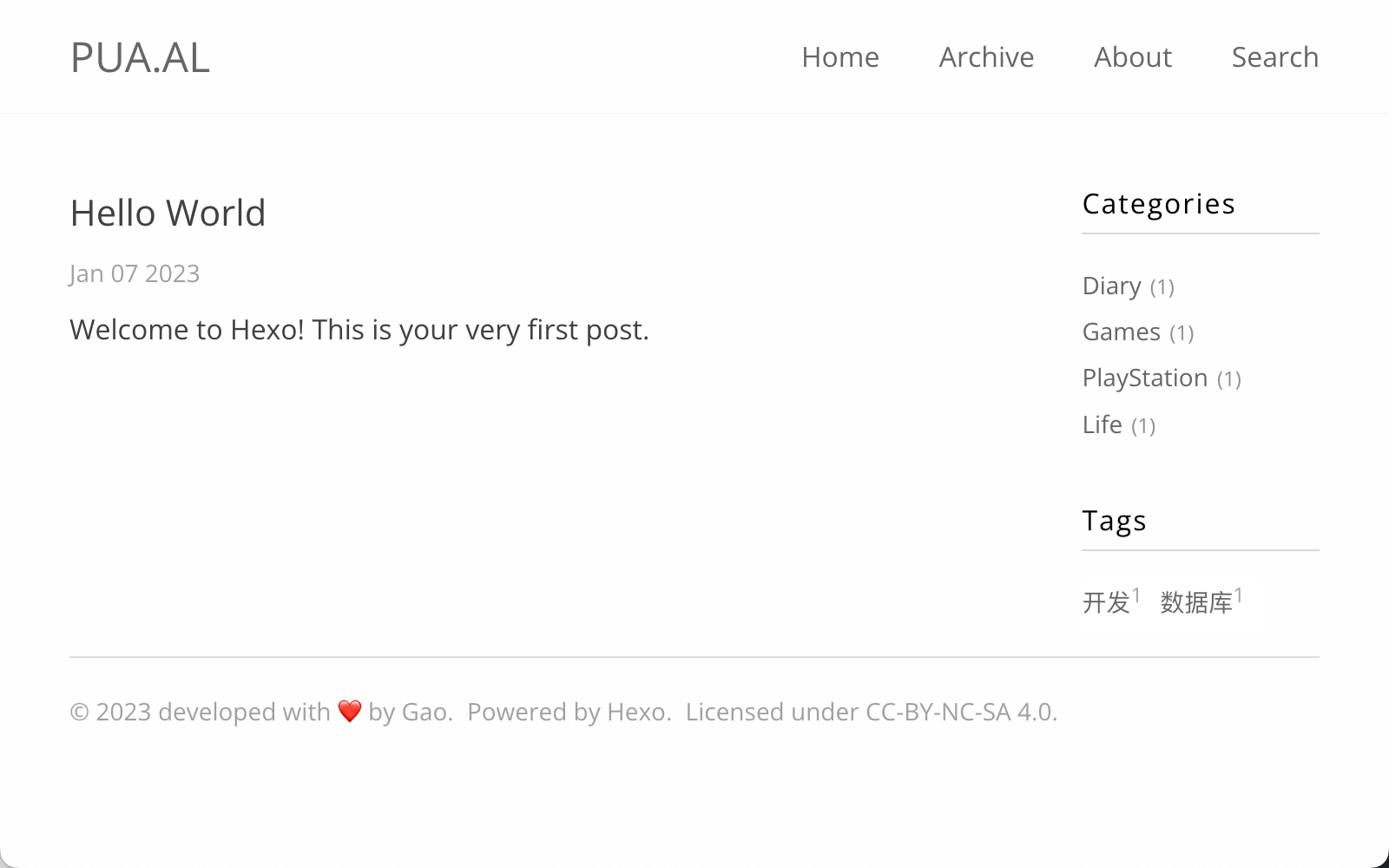
基于 hexo-theme-polarbearsimple 二次开发的 Hexo 博客主题,仓库附中文文档与在线演示
Hexo博客
hexo-theme-mnh — Hexo 博客模板
作者 czgaotian
hexo-theme-mnh 是一个基于 hexo-theme-polarbearsimple 二次开发的 Hexo 博客主题,代码采用 MIT 许可,附带中文文档与在线演示。
看看你的网站会是什么样
浏览真实页面截图,比较内容排版与手机效果。点击下方缩略图切换,放大查看整页细节。
目前有 1 张原始预览,可打开完整图片查看设计细节。
截图用于了解视觉与布局,交互效果请以实际项目为准。
采集于 2026-10-02查看来源
值得关注的模板亮点
从已有项目资料中,快速了解它的特点。
侧栏小部件可分别开关标签、分类,并支持填入自定义 HTML 内容
统计配置覆盖百度统计与 Google Analytics 4(gtag)
评论系统可选多说、Disqus 或基于 GitHub 仓库的 utterances
归档页支持通过 hexo-generator-archive 的 per_page: 0 一次展示全部文章
版权声明可在主题配置中指定名称与许可链接
模板详细介绍
hexo-theme-mnh 是作者为个人博客编写的 Hexo 主题,仓库自述为“A simple theme for Hexo”,并说明其基于 hexo-theme-polarbearsimple 修改而来。主题提供中文文档(README_zh.md)和在线演示站点,仓库内附首页截图。
功能层面,README 记录了主题配置项:侧栏小部件可开关标签、分类与自定义 HTML 内容;站点统计支持百度统计和 Google Analytics 4(gtag);评论支持多说、Disqus 与 utterances;版权声明可配置名称与链接。归档页可通过 hexo-generator-archive 的 per_page: 0 展示全部文章,站内搜索依赖 hexo-algoliasearch 与 Algolia 服务。README 的 TODO 中列有“搜索组件样式更新”一项,说明该部分仍在调整。
使用限制方面,安装需额外引入 hexo-renderer-sass、hexo-renderer-swig、hexo-generator-archive 和 hexo-algoliasearch 等插件;README 提示 Node.js 版本大于 12 时 hexo-renderer-sass 可能安装异常,并给出从 @kmuncie 仓库安装的替代命令。搜索功能需要自行准备 Algolia 的 applicationID、apiKey、adminApiKey 与索引名。仓库未提供依赖清单,因此不在此列出具体版本号。
Hexo博客
适合你的项目吗?
适用场景
- 使用 Hexo 搭建个人博客并希望更换现成主题
- 需要侧栏标签、分类或自定义 HTML 小部件的博客
- 希望接入 Algolia 站内搜索、百度统计或 Google Analytics 4 的站点
- 使用 utterances、Disqus 或多说作为文章评论区的博客
- 需要归档页集中展示全部文章的博客
适合人群
- 熟悉 Hexo 配置与主题目录结构的用户
- 愿意自行申请并配置 Algolia 搜索服务的站长
- 能处理 Node.js 环境下 hexo-renderer-sass 安装问题的开发者
- 偏好简洁博客主题、接受基于 polarbearsimple 二次开发成果的用户
上手与定制指南
结合仓库当前版本的说明,按下面的资料检查内容、配置与运行要求。
- 1
先安装 hexo-renderer-sass、hexo-renderer-swig、hexo-generator-archive 与 hexo-algoliasearch 插件
- 2
Node.js 版本大于 12 时 hexo-renderer-sass 可能安装异常,README 建议改用 @kmuncie 提供的仓库安装
- 3
将主题克隆到 Hexo 站点的 themes/mnh 目录,并在站点 _config.yml 中设置 theme: mnh
- 4
归档页展示全部文章需配置 archive_generator 的 per_page: 0、yearly/monthly/daily 均为 false
- 5
站内搜索需在站点 _config.yml 中填写 Algolia 的 applicationID、apiKey、adminApiKey 与 indexName
授权与来源资料
使用条件与限制
免费使用 · 保留许可声明本次收录的是公开仓库中采用 MIT 许可的免费版本;免费范围为该版本代码,不代表外部服务或第三方素材免费。
使用时需要遵守
- 允许免费使用、修改、商用和分发该版本代码。
- 分发代码副本或实质性部分时,保留原作者版权声明和完整 MIT 许可声明。
- 代码按现状提供;担保与责任限制以原许可证及适用法律为准。
额外费用与待核对事项
- 站内搜索依赖第三方 Algolia 服务,需自行注册账号并提供 applicationID、apiKey、adminApiKey 与索引名,属于外部服务要求。
- 百度统计需自行申请并填入统计 key,属于外部服务账号要求。
- Google Analytics 4 需自行申请并填入 gtag 标识,属于外部服务账号要求。
- utterances 评论需提供 GitHub 仓库地址,依赖 GitHub 账号与仓库。
- Node.js 版本大于 12 时 hexo-renderer-sass 可能安装异常,需改用替代仓库安装,存在环境兼容限制。
- 演示图片、字体、图标及其他第三方素材需按各自许可核对,不能仅凭代码的 MIT 许可判断。
- 域名、托管、数据库、支付或 AI 等外部服务可能另外收费。
查看原文依据
Permission is hereby granted, free of charge
许可证原文
Global search based on Algolia https://www.algolia.com/
README 原文
# Baidu Analytics baidu_analytics: enable: true key: "[BAIDU ANALYTICS KEY]"
README 原文
google_analytics: enable: true gtag: "[GOOGLE ANALYTICS GTAG]"
README 原文
utterances: enable: true repo: "[ENTER REPO HERE]"
README 原文
https://github.com/czgaotian/hexo-theme-mnh/blob/master/LICENSEhttps://github.com/czgaotian/hexo-theme-mnh/blob/master/README.mdif use `nodejs` version > 12, `hexo-renderer-sass` may installed incorrect
README 原文
DeepSeek 根据仓库许可证和 README 整理 ·2026-10-02。结果仅覆盖已读取资料,依赖、图片、字体及后续条款变更以各自原文为准。
项目核对记录与介绍依据
模板资料
- 来源平台
- GitHub
- 资料与维护参考分
- 资料一般 · 60 / 100
- 技术栈
- Hexo
- 网站类型
- 博客
这个分数如何计算
本站按许可资料(最高30分)、演示链接(12分)、预览图(10分)、Star数(15分)、记录的维护时间(15分)、描述完整度(8分)、功能记录(5分)和分类资料(5分)计算。它不是代码、安全或性能测试,也不是 Google 评分;有链接不代表已实测可用。
这个项目需要核对什么
- 记录的仓库更新时间
- 2023-07-31
- 截图检查日期
- 2026-10-02
已收录演示链接。请用你的内容与屏幕尺寸检查;有演示不代表表单、认证或支付已经可用。
目录记录的主要技术栈是 Hexo。请通过依赖清单和锁文件核对实际版本与托管要求。这些说明基于收录资料,不代表代码审计或部署实测。
查看具体选型方法 →介绍的制作与核对状态
介绍由 AI 辅助整理目录与仓库资料。仓库作者不等于这篇介绍的审核者。
已完成服务器许可规则与 AI 来源核对;未经过人工编辑审核。
查看当时使用的来源资料
SHA-256: 734edbfcae384b39a2f1aeb42bc09d3a1d703a5c0c69454e29df1052b8497379
2026-10-02T15:01:59.996Z
来源文件 / 仓库# hexo-theme-mnh
[中文文档](README_zh.md)
A simple theme for Hexo. Based on [hexo-theme-polarbearsimple](https://github.com/henryhuang/hexo-theme-polarbearsimple)

[Online Demo](https://mnh.gao.tn)
## TODO
1. Search component style update
## Installation
1.Install Hexo plugin `hexo-renderer-sass` `hexo-renderer-swig` `hexo-generator-archive` and `hexo-algoliasearch`
```bash
npm install hexo-renderer-scss@github:meannoharm/hexo-renderer-sass hexo-renderer-swig hexo-generator-archive hexo-algoliasearch --save
```
if use `nodejs` version > 12, `hexo-renderer-sass` may installed incorrect, see [Issue](https://github.com/knksmith57/hexo-renderer-sass/issues/43) and [Pull request](https://github.com/knksmith57/hexo-renderer-sass/pull/46).
You can run this command to install `hexo-renderer-sass` from [@kmuncie](https://github.com/kmuncie)
```bash
npm install --save https://github.com/kmuncie/hexo-renderer-sass
```
2.Download the theme to your Hexo theme folder
```bash
git clone https://github.com/meannoharm/hexo-theme-mnh themes/mnh
```
3.Modify `your_site/_config.yml`
```yaml
# Extensions
## Plugins: http://hexo.io/plugins/
## Themes: http://hexo.io/themes/
theme: mnh
# Show all articles at archive page.
# Need to install hexo-generator-archive
archive_generator:
per_page: 0
yearly: false
monthly: false
daily: false
# Global search based on Algolia https://www.algolia.com/
# Need to install and config hexo-algoliasearch
algolia:
applicationID: "<APP_ID>"
apiKey: "<API_KEY>"
adminApiKey: "<ADMIN_API_KEY>"
chunkSize: 5000
indexName: "<INDEX_NAME>"
fields:
- content:strip:truncate,0,500
- excerpt:strip
- permalink
- cover
- slug
- tags
- categories
- title
```
## Theme Config
Modify `your_site/themes/mnh/_config.yml`
### Widget Function
```yaml
# widget function
# false: disable
# widget_custom: custom your widget
# title: your widget title
# content: Add your html code in here. Example: <p>testing...</p>
widget:
Tags: true
Categories: false
Custom: false
widget_custom:
title: Test
content: <p>testing...</p>
```
### Site Analytics
```yaml
# Baidu Analytics
baidu_analytics:
enable: true
key: "[BAIDU ANALYTICS KEY]"
# Google Analytics
# use google analytics 4
google_analytics:
enable: true
gtag: "[GOOGLE ANALYTICS GTAG]"
```
### Comment Function
```yaml
# Duoshuo
duoshuo_shortname:
# Disqus
disqus_shortname:
# utterances
utterances:
enable: true
repo: "[ENTER REPO HERE]"
issueTerm: pathname
theme: github-light
```
### License Config
```yaml
license:
name: CC-BY-NC-SA 4.0
link: https://creativecommons.org/licenses/by-nc-sa/4.0/
```
看看同类模板
对比同技术栈与用途的模板,找到更适合的视觉与内容结构。

hexo-theme-matery
A beautiful hexo blog theme with material design and responsive design.一个基于材料设计和响应式设计而成的全面、美观的Hexo主题。
Hexo · 博客

hexo-theme-cactus
:cactus: A responsive, clean and simple theme for Hexo.
Hexo · 博客

hexo-theme-volantis
A Wonderful Theme for Hexo.
Hexo · 博客

hexo-theme-aurora
Hexo Theme Aurora 是一款以极光色彩和渐变 UI 为核心的 Hexo 博客主题,整体走未来感路线。 它的首页采用杂志式网格布局,文章列表与精选区域层次分明,视觉上更接近个人媒体站点而非传统博客。
Hexo · 博客

hexo-theme-Claudia
Claudia 是一款为 Hexo 设计的博客主题,主打简洁外观与易配置。 它支持自动跟随设备深色模式,并在 README 中宣称拥有 90+ 的 Lighthouse 评分,适合追求轻量与性能的博客作者。
Hexo · 博客

hexo-theme-A4
A hexo theme that looks like an A4 paper.(一个类A4纸张质感的hexo博客主题。 )
Hexo · 博客