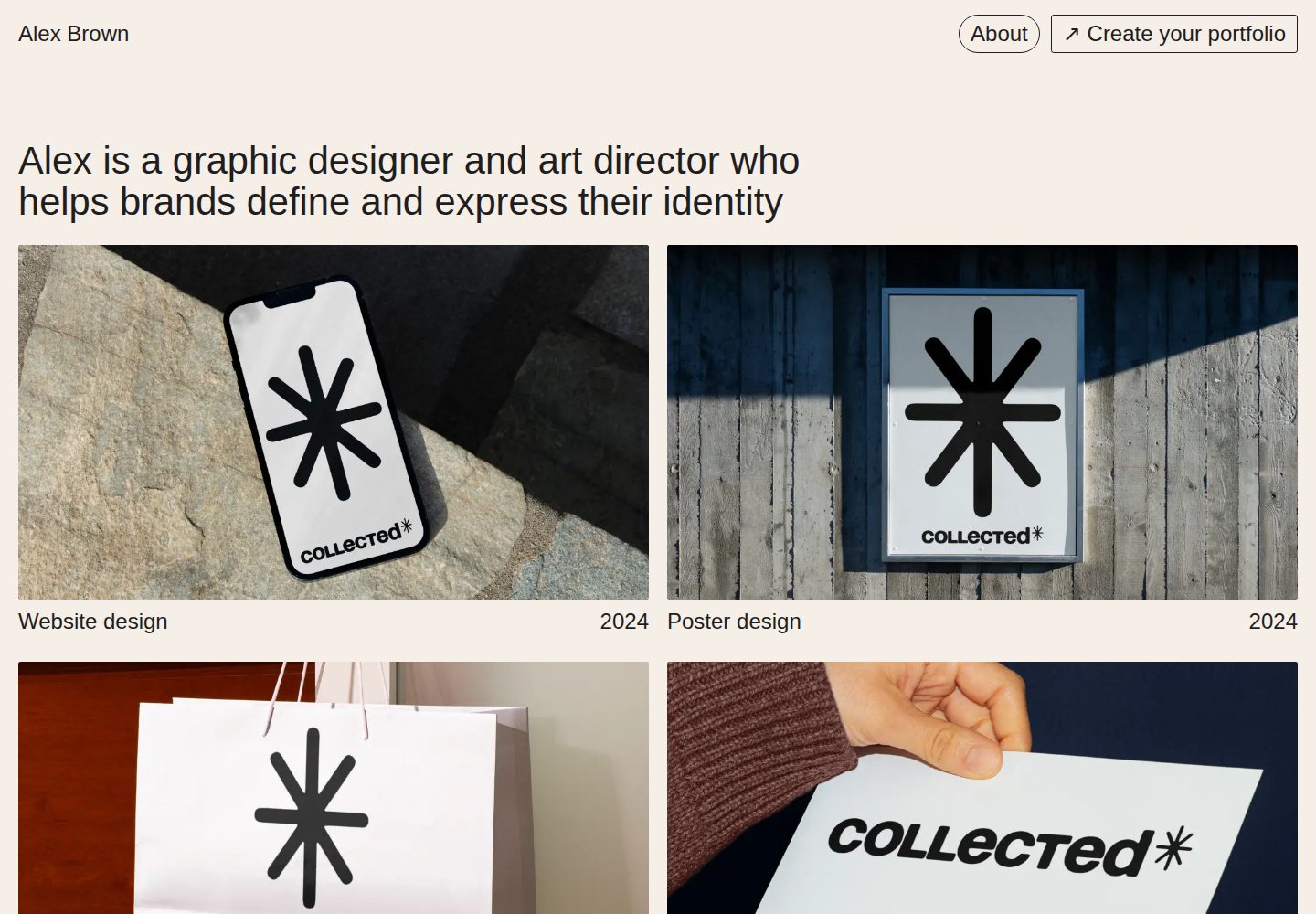
前端使用 Next.js,内容由 Sanity.io 无头 CMS 管理,Studio 可访问于 /studio
Next.jsReact作品集
collected-nextjs-portfolio-template — Next.js 作品集模板
作者 danil-vladimirov
基于 Next.js 与 Sanity.io 的作品集网站模板,面向视觉创作者展示作品,内容通过 Sanity Studio 管理,支持静态生成与即时预览。
看看你的网站会是什么样
浏览真实页面截图,比较内容排版与手机效果。点击下方缩略图切换,放大查看整页细节。
全部页面与视图 3
截图用于了解视觉与布局,交互效果请以实际项目为准。
采集于 2026-10-02查看来源
值得关注的模板亮点
从已有项目资料中,快速了解它的特点。
首页、项目页与可选关于页均可编辑,项目页支持模块化内容构建
首页展示的项目可自行选择并排序,导航栏支持自定义 logo 与外部链接
通过 Webhook 触发增量静态再生成,并提供全站并排即时内容预览
样式使用 Tailwind CSS,动画使用 Framer Motion,自动生成 sitemap.xml 与 robots.txt
模板详细介绍
Collected 是一个作品集网站模板,前端使用 Next.js,内容由 Sanity.io 这个无头 CMS 管理。它面向视觉创作者,用于展示作品:首页、项目页和可选的关于页都可以在 Sanity Studio 中编辑,Studio 挂载在网站的 /studio 路径下。项目页采用模块化的内容构建方式,首页展示的项目可以自行挑选并排序。
模板提供了一些外观与配置项:可设置整站的背景色和文字颜色,上传自定义 logo 替换导航栏中的网站标题,上传 favicon 和 OG 图片,并在导航栏中展示外部链接。样式使用 Tailwind CSS,动画使用 Framer Motion,同时会自动生成 sitemap.xml 与 robots.txt。
内容发布方面,模板通过 Webhook 触发增量静态再生成(ISR),无需等待整站重建即可发布新内容,并提供覆盖全站的并排即时预览。部署路径以 Vercel 为主,README 提供了 Vercel 部署按钮以及连接 Sanity Content Lake 的集成方式。
需要注意的限制:模板依赖 Sanity 作为内容后端,本地开发需要先通过 vercel link 与 vercel env pull 获取环境变量;代码采用 MIT 许可,但演示图片、字体、图标等第三方素材需按各自许可单独核对。
Next.js作品集
适合你的项目吗?
适用场景
- 视觉创作者搭建用于展示作品的项目集合网站
- 需要非技术编辑在可视化后台维护首页与项目内容的场景
- 希望以静态生成方式发布作品集并支持内容更新后即时生效的站点
- 以 Vercel 为主要部署平台、使用 Sanity 作为内容后端的项目
适合人群
- 摄影师、设计师、插画师等视觉创作者的个人作品集
- 接受使用 Sanity 作为内容管理后台的开发者或团队
- 需要可自定义配色、logo 与导航链接的作品集站点
- 以 Vercel 部署、希望快速起步的 Next.js 项目
上手与定制指南
结合仓库当前版本的说明,按下面的资料检查内容、配置与运行要求。
- 1
推荐先使用 README 中的 Vercel 部署按钮部署,并通过 Sanity Vercel 集成连接 Sanity Content Lake
- 2
本地开发需克隆仓库后运行 npx vercel link 与 npx vercel env pull 获取环境变量
- 3
安装依赖并启动开发服务器:npm install && npm run dev,站点默认运行在 localhost:3000,Studio 位于 /studio
- 4
发布到生产环境可通过 git push 或使用 npx vercel --prod
- 5
代码为 MIT 许可,但演示图片、字体、图标等第三方素材需按各自许可核对
授权与来源资料
使用条件与限制
免费使用 · 保留许可声明本次收录的是公开仓库中采用 MIT 许可的免费版本;免费范围为该版本代码,不代表外部服务或第三方素材免费。
使用时需要遵守
- 允许免费使用、修改、商用和分发该版本代码。
- 分发代码副本或实质性部分时,保留原作者版权声明和完整 MIT 许可声明。
- 代码按现状提供;担保与责任限制以原许可证及适用法律为准。
额外费用与待核对事项
- 模板依赖 Sanity 作为内容后端,需通过 Sanity Vercel 集成连接 Sanity Content Lake 才能正常使用内容管理功能。
- 本地开发前需运行 npx vercel link 关联 Vercel 项目,并执行 npx vercel env pull 拉取连接 Sanity 所需的环境变量。
- 必须通过 Vercel 拉取环境变量才能本地连接 Sanity 项目,未配置环境变量时无法正常启动内容后端。
- 官方部署路径以 Vercel 为主,使用其他托管平台需自行调整部署与集成配置。
- 演示图片、字体、图标及其他第三方素材需按各自许可核对,不能仅凭代码的 MIT 许可判断。
- 域名、托管、数据库、支付或 AI 等外部服务可能另外收费。
查看原文依据
Permission is hereby granted, free of charge
许可证原文
connect it to your Sanity Content Lake using [the Sanity Vercel Integration][integration]
README 原文
npx vercel link
README 原文
npx vercel env pull
README 原文
https://github.com/danil-vladimirov/collected-nextjs-portfolio-template/blob/main/LICENSEhttps://github.com/danil-vladimirov/collected-nextjs-portfolio-template/blob/main/README.mdDeploy this template with [Vercel](https://vercel.com) and start building your portfolio website right away
README 原文
DeepSeek 根据仓库许可证和 README 整理 ·2026-10-02。结果仅覆盖已读取资料,依赖、图片、字体及后续条款变更以各自原文为准。
项目核对记录与介绍依据
模板资料
- 来源平台
- GitHub
- 资料与维护参考分
- 资料较完整 · 81 / 100
- 技术栈
- Next.js · React
- 网站类型
- 作品集
这个分数如何计算
本站按许可资料(最高30分)、演示链接(12分)、预览图(10分)、Star数(15分)、记录的维护时间(15分)、描述完整度(8分)、功能记录(5分)和分类资料(5分)计算。它不是代码、安全或性能测试,也不是 Google 评分;有链接不代表已实测可用。
这个项目需要核对什么
- 记录的仓库更新时间
- 2025-06-25
- 截图检查日期
- 2026-10-02
已收录演示链接。请用你的内容与屏幕尺寸检查;有演示不代表表单、认证或支付已经可用。
目录记录的主要技术栈是 Next.js。请通过依赖清单和锁文件核对实际版本与托管要求。这些说明基于收录资料,不代表代码审计或部署实测。
查看具体选型方法 →介绍的制作与核对状态
介绍由 AI 辅助整理目录与仓库资料。仓库作者不等于这篇介绍的审核者。
已完成服务器许可规则与 AI 来源核对;未经过人工编辑审核。
查看当时使用的来源资料
SHA-256: a3be8be33adb2f9a014c7c272a49bf2719336940b77a1ef74b240653945ba128
2026-10-02T19:51:20.769Z
来源文件 / 仓库<p align="center">
<img src="sanity/plugins/collected-logo-black.svg" align="center" height="70" alt="Collected" />
</p>
<p align="center">
<strong>Portfolio website template built on <a href="https://nextjs.org">Next.js</a></strong><br />
<strong>Headless CMS powered by <a href="https://sanity.io">Sanity.io</a></strong><br />
</p>
<p align="center">
<a href="https://collected-nextjs-portfolio-template.vercel.app/">
<img src="https://img.shields.io/static/v1?label=&logo=vercel&message=View%20Demo&style=for-the-badge&color=black" />
</a>
<a href="https://collected.to">
<img src="https://img.shields.io/static/v1?label=&message=collected.to&style=for-the-badge&color=351BD3" />
</a>
</p>
<p align="center">
<a href="#features">Features</a> •
<a href="#overview">Overview</a> •
<a href="#-automatic-set-up">Set Up</a> •
<a href="#local-configuration">Local configuration</a>
</p>
<br />
Collected is a clean and easy-to-use portfolio website that helps visual creators showcase their work. Built with customisation in mind: set `custom colors` for your website, upload a `custom logo`, create projects with a modular `content builder`, and select and order the projects displayed on your Home page. This template is a statically generated portfolio website that uses [Next.js][nextjs] for the frontend and [Sanity][sanity-homepage] to handle its content.
Deploy this template with [Vercel](https://vercel.com) and start building your portfolio website right away:
[][vercel-deploy]
# Features
- A performant, static portfolio website with editable `Home page`, `Projects` and optional `About page`
- A clean and user-friendly content management environment by [Sanity][sanity-homepage], accessible on `yourwebsite.com/studio`
- Webhook-triggered Incremental Static Revalidation; no need to wait for a rebuild to publish new content
- Side-by-side instant content preview that works across your whole site
- CSS powered by [Tailwind CSS](https://tailwindcss.com)
- Animation powered by [Framer Motion](https://www.framer.com/motion/)
- Automatic `sitemap.xml` and `robots.txt` generation
- Built-in customisation features:
- Set your background and text colors for the entire website
- Upload your favicon and OG-image
- Select and order projects displayed on the Home page
- Modular page content builder for the Project page
- Dynamic external links display in the `Navbar`
- Upload a custom logo to replace the website title in the `Navbar`
<br />
# Overview
| [Portfolio Website](https://collected-nextjs-portfolio-template.vercel.app/) | [Sanity Studio](https://collected-nextjs-portfolio-template.vercel.app/studio) |
| ----------------------------------------------------------------------------------------------------- | ------------------------------------------------------------------------------------------------- |
|  |  |
<br />
# ⚡ Automatic Set Up
Quickly deploy as a Sanity Starter on [Vercel](https://vercel.com) a clean version of a portfolio wesite! All you have to do is start filling it with your content
[][vercel-deploy]
<br />
**[⚡ 14-Minute Setup Walkthrough](https://youtu.be/-vbhcc7pzwg)** <br />
From deploy to launch, watch me building up a fresh portfolio website in under 14 minutes!
<br />
# Local configuration
### Step 1. Set up the environment
Use the Deploy Button below. It will let you deploy the starter using [Vercel](https://vercel.com) as well as connect it to your Sanity Content Lake using [the Sanity Vercel Integration][integration].
[][vercel-deploy]
### Step 2. Set up the project locally
[Clone the repository](https://docs.github.com/en/repositories/creating-and-managing-repositories/cloning-a-repository) that was created for you on your GitHub account. Once cloned, run the following command from the project's root directory:
```bash
npx vercel link
```
Download the environment variables needed to connect Next.js and the Studio to your Sanity project:
```bash
npx vercel env pull
```
### Step 3. Run Next.js locally in development mode
```bash
npm install && npm run dev
```
When you run this development server, the changes you make in your frontend and studio configuration will be applied live using hot reloading.
Your portfolio website should be up and running on [http://localhost:3000][localhost-3000]! You can create and edit content on [http://localhost:3000/studio][localhost-3000-studio].
### Step 4. Deploy to production
To deploy your changes to production you use `git`:
```bash
git add .
git commit
git push
```
Alternatively, you can deploy without a `git` hosting provider using the Vercel CLI:
```bash
npx vercel --prod
```
<br />
### Important files and folders
| File(s) | Description |
| ---------------------------------------------------------- | ------------------------------------------------------- |
| `sanity.config.ts` | Config file for Sanity Studio |
| `sanity.cli.ts` | Config file for Sanity CLI |
| `/app/studio/[[...tool]]/Studio.tsx` | Where Sanity Studio is mounted |
| `/app/api/revalidate/route.ts` | Serverless route for triggering ISR |
| `/app/api/draft/route.ts` | Serverless route for triggering Draft mode |
| `/sanity/schemas` | Where Sanity Studio gets its content types from |
| `/sanity/plugins` | Where the advanced Sanity Studio customization is setup |
| `/sanity/loader/loadQuery.ts`,`/sanity/loader/useQuery.ts` | Configuration for the Sanity Content Lake client |
<br />
# Shoutouts
Base structure and Sanity fetching logic is based on [template-nextjs-personal-website](https://github.com/sanity-io/template-nextjs-personal-website). This is a great starter template by Sanity which is highly influenced this template.
### Designed and developed
- [@danil-vladimirov](https://github.com/danil-vladimirov)
<br />
# License
### [MIT](LICENSE)
> [danilvladimirov.co.uk](https://danilvladimirov.co.uk) ·
> Github [@danil-vladimirov](https://github.com/danil-vladimirov) ·
> Instagram [@danilvladimirov](https://instagram.com/danilvladimirov)
[vercel-deploy]: https://vercel.com/new/clone?repository-url=https%3A%2F%2Fgithub.com%2Fdanil-vladimirov%2Fcollected-nextjs-portfolio-template&project-name=collected-nextjs-portfolio-template&repository-name=collected-nextjs-portfolio-template&demo-title=Collected+Portfolio+Template&demo-description=A+Sanity-powered+Nextjs+portfolio+website+with+built-in+content+editing.&demo-url=https%3A%2F%2Fcollected-nextjs-portfolio-template.vercel.app%2F&demo-image=https%3A%2F%2Fcdn.sanity.io%2Fimages%2Fkpvqqfux%2Fproduction%2Fda082b62d1828efe642c617ddc4771a4d267fc5e-3092x1790.png&integration-ids=oac_hb2LITYajhRQ0i4QznmKH7gx&external-id=nextjs%3Btemplate%3Dtemplate-nextjs-personal-website
[integration]: https://www.sanity.io/docs/vercel-integration
[nextjs]: https://github.com/vercel/next.js
[sanity-homepage]: https://www.sanity.io
[localhost-3000]: http://localhost:3000
[localhost-3000-studio]: http://localhost:3000/studio
看看同类模板
对比同技术栈与用途的模板,找到更适合的视觉与内容结构。

react-resume-template
A personal resume website template built with React.js, Typescript, Next.js, and styled with Tailwind css
Next.js · 作品集

nxt-lnk
Custom bio links for creatives who love coding. A perfect custom alternative for linktree, bio and other short…
Next.js · 作品集

sylph
A minimal portfolio template.
Next.js · 作品集

sleek-portfolio
sleek-portfolio 是一个面向开发者个人品牌展示的现代作品集模板,基于 Next.js 15、TypeScript、Tailwind CSS 和 Shadcn UI 构建。
Next.js · 作品集

research-website-template
React + Next.js template for research websites (for PhD students, researchers, etc)
Next.js · 作品集

shadcn-portfolio
shadcn-portfolio 是一个面向开发者的作品集模板,技术栈为 Next.js 15、shadcn/ui、Tailwind CSS 和 Framer Motion。
Next.js · 作品集