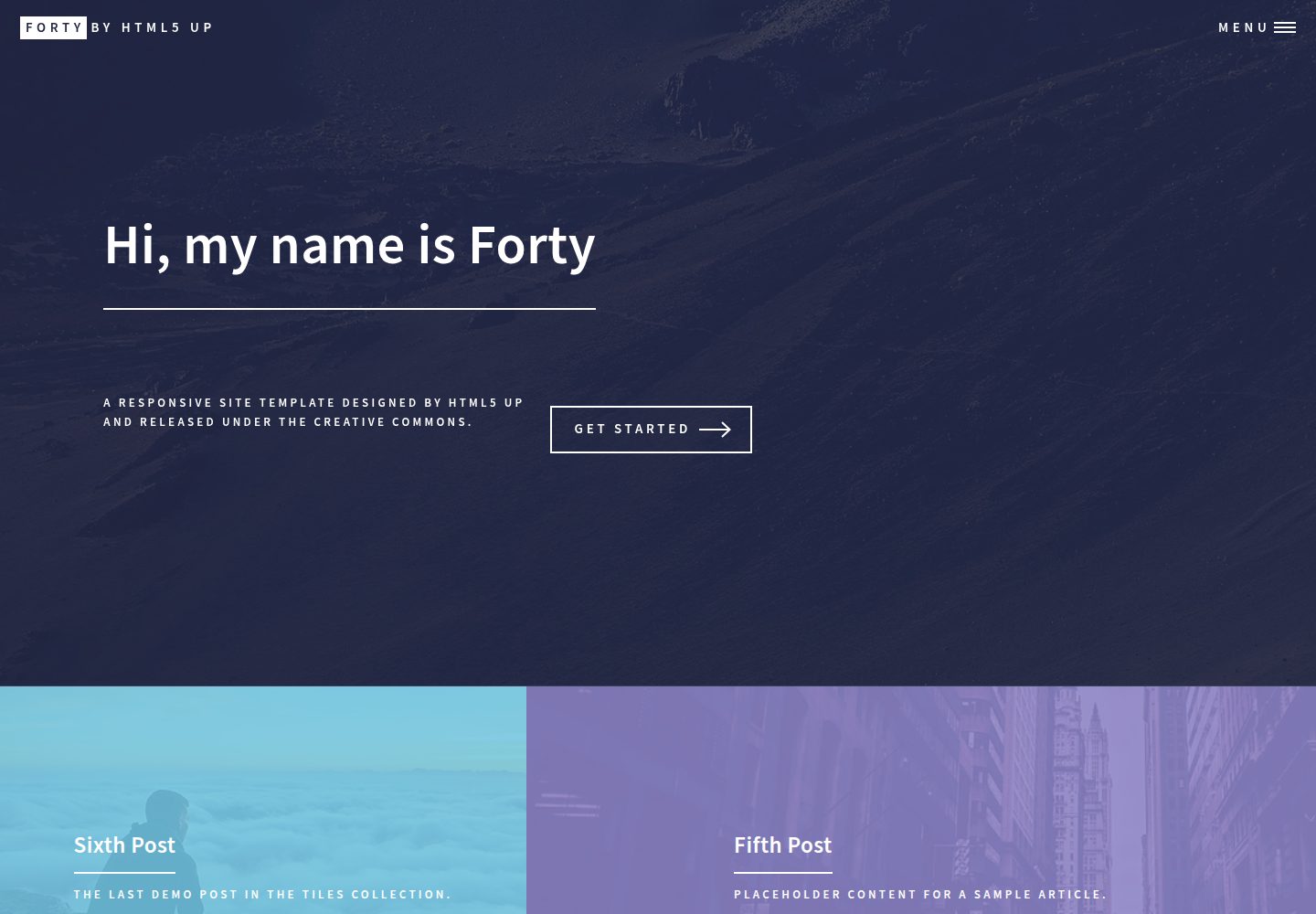
基于 Astro 重建 HTML5 UP Forty 模板,保留原有磁贴式作品集布局
AstroHTML作品集博客
forty-astro-theme — Astro 作品集模板
作者 DarekRepos
基于 Astro 重建的 HTML5 UP Forty 模板,使用 Markdown 内容集合管理作品集与博客,适合搭建个人作品展示站点。
看看你的网站会是什么样
浏览真实页面截图,比较内容排版与手机效果。点击下方缩略图切换,放大查看整页细节。
全部页面与视图 3
截图用于了解视觉与布局,交互效果请以实际项目为准。
采集于 2026-10-12查看来源
值得关注的模板亮点
从已有项目资料中,快速了解它的特点。
使用 Markdown 内容集合管理作品与博客文章,每条内容一个 .md 文件
站点名称、联系信息与社交链接集中在 site.md 的 YAML frontmatter 中配置
样式采用 Dart Sass 的 @use 模块与 CSS Grid 重写
图标通过 Astro Icon 集成 Iconify 提供 SVG 图标
使用 TypeScript,仓库以 MIT 许可发布
模板详细介绍
该项目是经典 HTML5 UP Forty 模板的 Astro 重写版本,使用 Astro、Dart Sass 与 Astro Icon 构建,定位为作品集与博客类站点模板。首页以 Markdown 文件驱动磁贴式内容展示,站点名称、联系方式和社交链接等配置集中在 src/content/config/site.md 的 YAML frontmatter 中修改,无需改动代码。内容方面,作品与文章存放在 src/content/posts/ 目录,每条内容对应一个 .md 文件,在 frontmatter 中填写标题、描述和图片路径。样式使用 SCSS 的 @use 模块与 CSS Grid 组织,图标通过 Astro Icon 集成 Iconify 提供。项目采用 TypeScript,仓库以 MIT 许可发布,演示站点为 portfolio.darekduda.pl/forty-astro-theme。
AstroHTML作品集博客
适合你的项目吗?
适用场景
- 搭建个人作品集网站,用磁贴展示项目
- 同时维护作品展示与博客文章的个人站点
- 希望用 Markdown 管理内容、避免手动编辑 HTML 的开发者
- 需要从 HTML5 UP Forty 模板迁移到 Astro 的项目
适合人群
- 个人开发者或设计师展示作品
- 需要作品集与博客合一站点的用户
- 熟悉 Markdown 与 Astro 的开发者
- 接受 MIT 许可条款并自行核对第三方素材的使用者
上手与定制指南
结合仓库当前版本的说明,按下面的资料检查内容、配置与运行要求。
- 1
在仓库页面点击 Use this template 创建自己的副本,然后执行 npm install 安装依赖
- 2
运行 npm run dev 启动开发服务器,默认地址为 http://localhost:4321
- 3
修改站点名称、联系信息与社交链接:编辑 src/content/config/site.md 的 YAML frontmatter
- 4
新增作品或文章:在 src/content/posts/ 下创建 .md 文件,填写 title、description、image 等 frontmatter 字段
- 5
演示图片、字体、图标等第三方素材需按各自许可单独核对,不能仅凭代码的 MIT 许可判断
授权与来源资料
使用条件与限制
免费使用 · 保留许可声明本次收录的是公开仓库中采用 MIT 许可的免费版本;免费范围为该版本代码,不代表外部服务或第三方素材免费。
使用时需要遵守
- 允许免费使用、修改、商用和分发该版本代码。
- 分发代码副本或实质性部分时,保留原作者版权声明和完整 MIT 许可声明。
- 代码按现状提供;担保与责任限制以原许可证及适用法律为准。
额外费用与待核对事项
- 演示图片、字体、图标及其他第三方素材需按各自许可核对,不能仅凭代码的 MIT 许可判断。
- 域名、托管、数据库、支付或 AI 等外部服务可能另外收费。
查看原文依据
https://github.com/DarekRepos/forty-astro-theme/blob/main/LICENSEhttps://github.com/DarekRepos/forty-astro-theme/blob/main/README.mdPermission is hereby granted, free of charge
许可证原文
DeepSeek 根据仓库许可证和 README 整理 ·2026-10-12。结果仅覆盖已读取资料,依赖、图片、字体及后续条款变更以各自原文为准。
项目核对记录与介绍依据
模板资料
- 来源平台
- GitHub
- 资料与维护参考分
- 资料较完整 · 85 / 100
- 技术栈
- Astro · HTML
- 网站类型
- 作品集 · 博客
这个分数如何计算
本站按许可资料(最高30分)、演示链接(12分)、预览图(10分)、Star数(15分)、记录的维护时间(15分)、描述完整度(8分)、功能记录(5分)和分类资料(5分)计算。它不是代码、安全或性能测试,也不是 Google 评分;有链接不代表已实测可用。
这个项目需要核对什么
- 记录的仓库更新时间
- 2026-02-13
- 截图检查日期
- 2026-10-12
已收录演示链接。请用你的内容与屏幕尺寸检查;有演示不代表表单、认证或支付已经可用。
目录记录的主要技术栈是 Astro。请通过依赖清单和锁文件核对实际版本与托管要求。这些说明基于收录资料,不代表代码审计或部署实测。
查看具体选型方法 →介绍的制作与核对状态
介绍由 AI 辅助整理目录与仓库资料。仓库作者不等于这篇介绍的审核者。
审核声明: [email protected] · 2026-10-13
查看当时使用的来源资料
SHA-256: 6492565401a0464fbd04283e973a8f03b2211b8c7e68ab0fd962e77442a27b3d
2026-10-12T18:57:51.955Z
来源文件 / 仓库# Astro Forty Theme 🚀 A modern, high-performance port of the classic **Forty** template by [HTML5 UP](https://html5up.net), rebuilt from the ground up using **Astro 5.0**, **Dart Sass**, and **Astro Icon**. ## ✨ Key Features * **Astro 5.0 Framework**: Ultra-fast performance with zero-JavaScript by default. * **Content Collections**: Manage your portfolio and blog posts easily using Markdown (`.md`). * **Modern SCSS**: Rebuilt styling logic using `@use` modules and CSS Grid for better maintainability. * **Astro Icon**: High-performance SVG icon system (integrated with Iconify). * **Responsive Design**: Fully optimized for mobile, tablet, and desktop views. * **Type Safe**: Built with TypeScript for a better developer experience. ## 🛠️ Tech Stack * **Framework:** [Astro](https://astro.build/) * **Styling:** [Sass (SCSS)](https://sass-lang.com/) * **Icons:** [Astro Icon](https://github.com/natemoo-re/astro-icon) * **Content:** Markdown / Content Collections ## 🚀 Getting Started ### 1. Use as Template Click the green **"Use this template"** button at the top of this repository to create your own copy. ### 2. Install Dependencies Clone your new repository and run: ```bash npm install ``` ### 3. Start Developing ```bash npm run dev ``` Open http://localhost:4321 in your browser to see the magic. ## ⚙️ Configuration No coding required! To change the site name, contact info, or social links: 1. Open `src/content/config/site.md`. 2. Update the values in the top section (the YAML frontmatter). 3. Save, and the site updates automatically. ## 📝 Adding Content (Tiles) Your homepage tiles are driven by Markdown files: 1. Go to `src/content/posts/`. 2. Create a new file (e.g., `my-project.md`). 3. Fill in the title and image path in the frontmatter: ```markdown --- title: "Blueberry Project" description: "A fresh look at design" image: "/src/assets/pic01.jpg" --- Your post content goes here!
看看同类模板
对比同技术栈与用途的模板,找到更适合的视觉与内容结构。

astrowind
⭕️ AstroWind: A free template using Astro v7 and Tailwind CSS v4. Astro starter theme.
Astro · 博客

astro-paper
A minimal, accessible and SEO-friendly Astro blog theme.
Astro · 博客

fuwari
✨A static blog template built with Astro.
Astro · 博客

Firefly
Firefly 是一款基于 Astro 的静态博客主题,由 CuteLeaf 在 saicaca 的 Fuwari 模板基础上二次开发,主打清新美观的视觉风格。
Astro · 博客

astro-theme-cactus
A simple Astro theme. Use it to create your blog or website.
Astro · 作品集

astrofy
Astrofy is a free and open-source template for your Personal Portfolio Website built with Astro and TailwindCS…
Astro · 作品集