使用 Vite 作为构建工具,集成 React 与 TypeScript
ViteReact启动器
react-template — Vite 启动器模板
作者 deepumandal
基于 Vite 与 React 的启动器模板,预置 TypeScript、TailwindCSS、Redux 及一套可复用 UI 组件,用于减少新项目初始化时的重复配置。
看看你的网站会是什么样
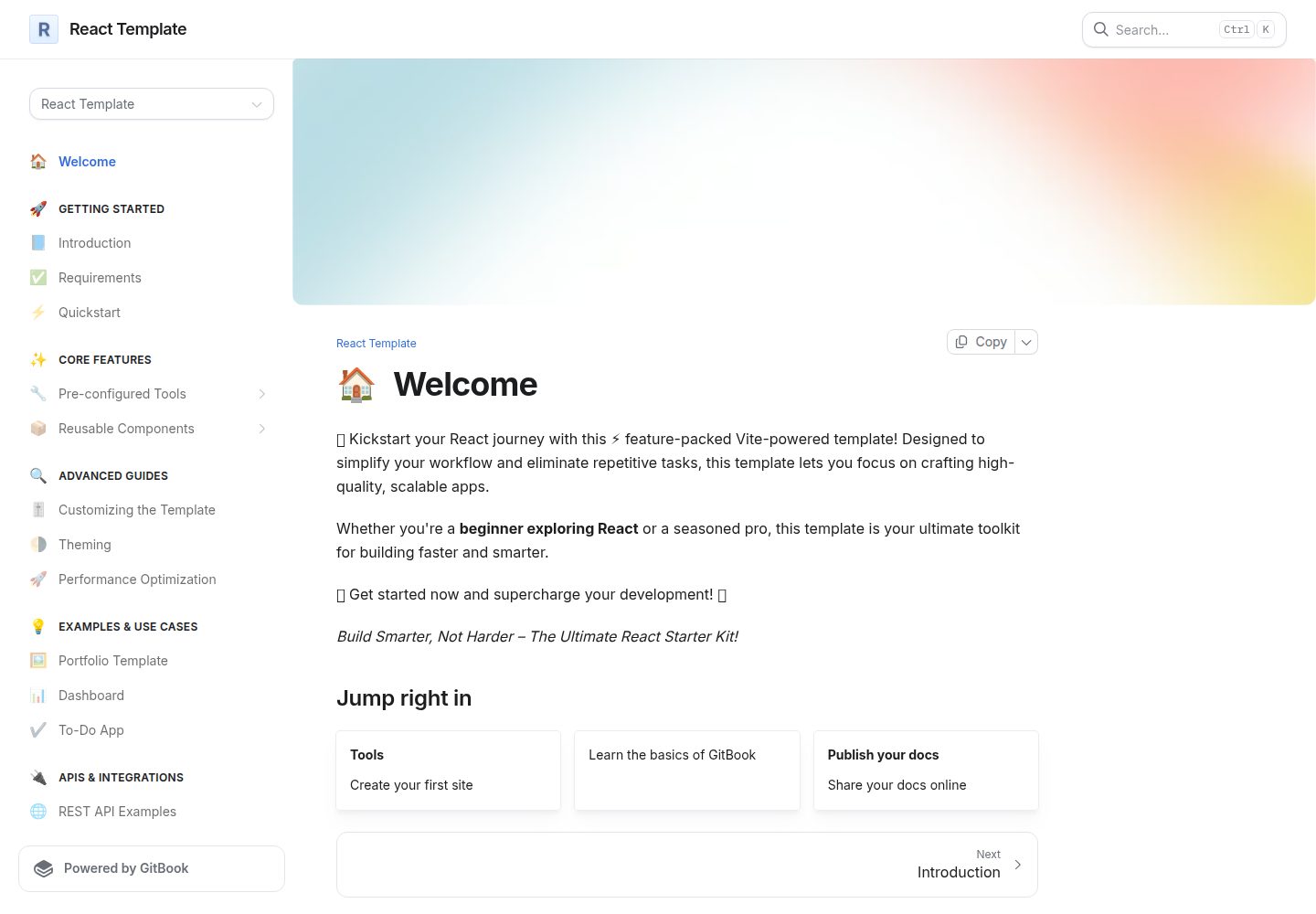
浏览真实页面截图,比较内容排版与手机效果。点击下方缩略图切换,放大查看整页细节。
全部页面与视图 3
截图用于了解视觉与布局,交互效果请以实际项目为准。
采集于 2026-10-03查看来源
值得关注的模板亮点
从已有项目资料中,快速了解它的特点。
预置 TailwindCSS,并提供可复用的 UI 组件目录
内置 ESLint、Prettier、Husky 与 GitHub Actions 工作流配置
包含 Redux 状态管理的基础集成
提供开发、构建、lint、格式化、类型检查与拼写检查等 npm 脚本
模板详细介绍
该模板是一个面向 React 项目的启动器,使用 Vite 作为构建工具,并集成 TypeScript、TailwindCSS 与 Redux。仓库资料显示其目标是把 ESLint、Prettier、Husky、GitHub Actions 工作流以及一套预定义 UI 组件提前配置好,让开发者在新项目开始时不必重复搭建这些基础环节。
模板提供了较完整的目录结构说明,src 下按 @types、assets、components、utils 等分类,components 中又细分为 HOC、config、hooks、shared 与 ui,ui 目录包含 Accordion、Avatar、Badge、Button、CheckBox、Dialog、Grid、Skeleton、ToolTip 等组件。README 还列出了开发、构建、lint、格式化、类型检查与拼写检查等命令,并建议使用 pnpm。
需要注意的是,README 中出现的部分链接指向另一个仓库(vite-template),且徽章中的版本号与当前仓库信息不完全一致,使用前应自行核对实际依赖。模板的免费范围仅限该 MIT 许可版本代码,演示图片、字体、图标等第三方素材以及域名、托管等外部服务需另行确认许可与费用。
ViteReact启动器
适合你的项目吗?
适用场景
- 快速启动一个使用 Vite、React 与 TypeScript 的前端项目
- 需要 TailwindCSS 与一套基础 UI 组件作为起点的界面开发
- 希望项目初始就带有 ESLint、Prettier 与 Husky 提交钩子的团队协作
- 需要在 React 项目中引入 Redux 状态管理的场景
适合人群
- 熟悉 React 与 TypeScript,希望减少初始化配置的开发者
- 需要统一代码风格与提交前检查的前端团队
- 以 Vite 为构建工具、TailwindCSS 为样式方案的新项目
上手与定制指南
结合仓库当前版本的说明,按下面的资料检查内容、配置与运行要求。
- 1
需要 Node.js 14.0.0 或更高版本,以及 npm、yarn 或 pnpm,README 建议优先使用 pnpm
- 2
可通过 GitHub 的 Use this template 或克隆仓库后安装依赖并启动开发服务器
- 3
README 中部分链接指向 vite-template 仓库,使用前请核对实际仓库与依赖版本
- 4
第三方素材与外部服务不包含在 MIT 许可范围内,需单独确认许可与费用
授权与来源资料
使用条件与限制
免费使用 · 保留许可声明本次收录的是公开仓库中采用 MIT 许可的免费版本;免费范围为该版本代码,不代表外部服务或第三方素材免费。
使用时需要遵守
- 允许免费使用、修改、商用和分发该版本代码。
- 分发代码副本或实质性部分时,保留原作者版权声明和完整 MIT 许可声明。
- 代码按现状提供;担保与责任限制以原许可证及适用法律为准。
额外费用与待核对事项
- README 建议优先使用 pnpm 而非 npm 或 yarn,但并非强制要求,使用其他包管理器仍可运行。
- 运行该模板需要本地安装 Node.js 14.0.0 或更高版本,并需自行准备 npm、yarn 或 pnpm 等包管理器。
- MIT 许可仅覆盖本仓库代码;README 中引用的演示图片、字体、图标等第三方素材及域名、托管等外部服务不在该许可范围内,需另行确认其许可与费用。
- 演示图片、字体、图标及其他第三方素材需按各自许可核对,不能仅凭代码的 MIT 许可判断。
- 域名、托管、数据库、支付或 AI 等外部服务可能另外收费。
查看原文依据
Permission is hereby granted, free of charge
许可证原文
This is suggested use pnpm over npm and yarn.
README 原文
Node.js (version 14.0.0 or higher)
README 原文
https://github.com/deepumandal/react-template/blob/master/LICENCE.mdhttps://github.com/deepumandal/react-template/blob/master/README.mdThis project is licensed under the MIT License. See the [LICENSE](./LICENSE.md) file for more details.
README 原文
DeepSeek 根据仓库许可证和 README 整理 ·2026-10-03。结果仅覆盖已读取资料,依赖、图片、字体及后续条款变更以各自原文为准。
项目核对记录与介绍依据
模板资料
- 来源平台
- GitHub
- 资料与维护参考分
- 资料较完整 · 86 / 100
- 技术栈
- Vite · React
- 网站类型
- 启动器
这个分数如何计算
本站按许可资料(最高30分)、演示链接(12分)、预览图(10分)、Star数(15分)、记录的维护时间(15分)、描述完整度(8分)、功能记录(5分)和分类资料(5分)计算。它不是代码、安全或性能测试,也不是 Google 评分;有链接不代表已实测可用。
这个项目需要核对什么
- 记录的仓库更新时间
- 2025-02-18
- 截图检查日期
- 2026-10-03
已收录演示链接。请用你的内容与屏幕尺寸检查;有演示不代表表单、认证或支付已经可用。
目录记录的主要技术栈是 Vite。请通过依赖清单和锁文件核对实际版本与托管要求。这些说明基于收录资料,不代表代码审计或部署实测。
查看具体选型方法 →介绍的制作与核对状态
介绍由 AI 辅助整理目录与仓库资料。仓库作者不等于这篇介绍的审核者。
已完成服务器许可规则与 AI 来源核对;未经过人工编辑审核。
查看当时使用的来源资料
SHA-256: ddea675768faea7ba12bfe91627293296fabe2ad81fc1d7f9b9945f30ca576d5
2026-10-03T07:12:19.408Z
来源文件 / 仓库<p align="center">
<img src="https://media3.giphy.com/media/eNAsjO55tPbgaor7ma/giphy.gif?cid=6c09b952f26cn8gocpfbyhkfit4z4ktpt4nwi7ba49rl0jam&ep=v1_internal_gif_by_id&rid=giphy.gif&ct=s" alt="React Logo" height="120"/>
<img src="./docs/_images/vite.png" alt="Vite Logo" height="120"/>
<img src="https://cdn3d.iconscout.com/3d/free/thumb/free-typescript-11492969-9325304.png?f=webp" alt="TypeScript Logo" height="120"/>
</p>
<h1 align="center">React Vite Template</h1>
<p align="center">
🚀 Modern React Template: 2024-Ready and Pre-Configured! 🚀
</p>
<br>
<p align="center">
<a href="https://deepak-mandal.gitbook.io/react-template"><b>Live!</b></a>
</p>
<p align="center">
<a href="https://https://github.com/deepumandal/vite-template/blob/master/README.md">📖 Documentation </a> |
<a href="https://github.com/deepumandal/vite-template?tab=readme-ov-file#get-started">🚀 Getting Started</a> |
<a href="https://discord.gg/deepumandal" title="Discord invite">🙌 Join Us</a>
</p>
<div align="center">
<img src="https://img.shields.io/github/actions/workflow/status/deepumandal/vite-template/build.yml" alt="Build" />
<img src="https://img.shields.io/github/license/deepumandal/vite-template" alt="License" />
<img src="https://img.shields.io/badge/code_style-prettier-ff69b4" alt="Prettier" />
<img src="https://img.shields.io/badge/vite-^4.0.0-blue" alt="Vite" />
<img src="https://img.shields.io/badge/typescript-4.0+-blue" alt="TypeScript" />
<img src="https://img.shields.io/badge/react-^18.0.0-blue" alt="React" />
<img src="https://img.shields.io/badge/redux-^4.0.0-blue" alt="Redux" />
<img src="https://img.shields.io/badge/tailwindcss-^3.0.0-blue" alt="TailwindCSS" />
<img src="https://img.shields.io/badge/contributions-welcome-brightgreen" alt="Contributions" />
<img src="https://img.shields.io/github/issues-raw/deepumandal/vite-template" alt="Open Issues" />
</div>
# Objective
This template is designed to supercharge your frontend development experience by providing a pre-configured setup that reduces the repetitive tasks you often face when starting a new project. Whether you're a seasoned developer or just getting started, this template has everything you need to kickstart your next project with minimal hassle.
# Table of Contents
1. [Introduction](#introduction)
2. [Key Features](#key-features)
3. [Why Vite Template?](#why-vite-template)
4. [Getting Started](#getting-started)
5. [Project Structure](#project-structure)
6. [Development Workflow](#development-workflow)
7. [Built-in Tools](#built-in-tools)
8. [Configuration](#configuration)
9. [Pros and Cons](#pros-and-cons)
10. [Contribution Guidelines](#contribution-guidelines)
11. [Flowcharts](#flowcharts)
12. [FAQ](#faq)
13. [License](#license)
## Introduction
Welcome to the **Vite Template** project! 🚀
This Vite template aims to streamline the process of setting up a new frontend project. With modern tools and best practices built-in, you can focus more on developing your application and less on configuring your environment.
## Key Features
### ⚡ Vite + React + TypeScript
- **Fast Build System:** Leverage the speed of Vite with the flexibility of React and TypeScript.
- **Hot Module Replacement (HMR):** Instant updates during development for a seamless experience.
### 🎨 Pre-Built UI Components
- **TailwindCSS Integration:** Responsive, utility-first CSS framework for rapid UI development.
- **Pre-Configured Components:** A set of reusable UI components to get you started quickly.
- **Custom Color Palette:** Easily adjustable to match your brand or project theme.
### 🛠️ Developer Tools
- **Husky:** Pre-commit hooks to ensure code quality.
- **Prettier + ESLint:** Automated code formatting and linting for a consistent codebase.
- **YAML Workflows:** Pre-configured GitHub Actions for CI/CD pipelines.
- **Redux Integration:** State management with minimal setup.
### 📚 Documentation
- **Comprehensive Docs:** In-depth documentation to guide you through the setup and usage.
- **Modern Design:** User-friendly and easy-to-navigate documentation structure.
## Why Vite Template?
### Problem
Starting a new React application often involves repetitive tasks such as setting up Vite, configuring linting rules, integrating Tailwind CSS, building UI components, setting up lint-staged, and more. These steps can be time-consuming and prone to errors, slowing down your development process.
### Solution
This Vite template is designed to supercharge your frontend development experience by providing a pre-configured setup that reduces these repetitive tasks. It includes the latest tech stacks and configurations, ensuring you have everything you need to kickstart your next project with minimal hassle:
- **ESLint**: Pre-configured linting rules to maintain code quality.
- **Prettier**: Code formatting setup to ensure consistency across your codebase.
- **Husky**: Pre-commit hooks to run tasks such as linting and tests before committing code.
- **Predefined UI Components**: A set of reusable UI components to accelerate your development.
### Impact
Adopting this Vite template brings several significant benefits
- **Enhanced Developer Experience:** Spend less time on setup and more time on building features, thanks to the pre-configured setup.
- **Improved Productivity:** With essential tools and configurations already in place, you can quickly start coding without worrying about the boilerplate setup.
- **Consistency and Quality:** Pre-configured linting and formatting tools ensure a consistent and high-quality codebase.
- **Future-Proof:** The template includes the latest best practices and technologies, keeping your project up-to-date with minimal effort.
Whether you're a seasoned developer or just getting started, this Vite template provides a robust foundation for your project, allowing you to focus on what matters most: building amazing applications
## Getting Started
### Prerequisites
- Node.js (version 14.0.0 or higher)
- npm or yarn or pnpm
> **Note:** This is suggested use pnpm over npm and yarn.
### Installation
1. **Use this Template:**
- click on use this template
1. **Clone the repository:**
```sh
git clone https://github.com/your-username/vite-template.git
cd vite-template
```
1. **Install dependencies:**
```sh
npm install
# or
yarn install
# or
pnpm install
```
1. **Start the development server:**
```sh
npm run dev
# or
yarn dev
# or
pnpm install
```
## Project Structure
```plaintext
📂 .github # GitHub actions and CI/CD pipelines
└── 📂 workflows
└── 📄 codeql.yml # Configuration for GitHub CodeQL analysis
📂 .husky
└── 📄 pre-commit # Husky pre-commit hook script
📂 docs # Documentation files for the template
📂 public # Publicly accessible static files
📂 src # Source folder
├── 📂 @types # TypeScript type definitions
├── 📂 assets # Static assets
│ ├── 📂 fonts # Custom font files
│ ├── 📂 styles # All CSS files for components
│ └── 📂 svg # SVG media files
├── 📂 components # components
│ ├── 📂 HOC # Higher-Order Components
│ ├── 📂 config # Configuration for components
│ │ ├── 📂 ui # UI component configurations
│ │ └── 📄 index.ts # Entry point for config
│ ├── 📂 hooks # Custom React hooks
│ │ ├── 📂 useTheme # Hook for theme management
│ │ └── 📄 index.ts # Entry point for hooks
│ ├── 📂 shared # Shared components and utilities
│ │ ├── 📂 Form # Form component files
│ │ ├── 📂 Label # Label component files
│ │ └── 📄 index.ts # Entry point for shared components
│ ├── 📂 ui # UI components
│ │ ├── 📂 Accordion # Accordion component files
│ │ ├── 📂 Avatar # Avatar component files
│ │ ├── 📂 Badge # Badge component files
│ │ ├── 📂 Block # Block component files
│ │ ├── 📂 Breadcrumb # Breadcrumb component files
│ │ ├── 📂 Button # Button component files
│ │ ├── 📂 CheckBox # CheckBox component files
│ │ ├── 📂 Common # Common UI components
│ │ ├── 📂 ConfirmationDialog # Confirmation Dialog component files
│ │ ├── 📂 Container # Container component files
│ │ ├── 📂 ContextMenu # Context Menu component files
│ │ ├── 📂 DropDownMenu # DropDown Menu component files
│ │ ├── 📂 Flex # Flex component files
│ │ ├── 📂 Grid # Grid component files
│ │ ├── 📂 HoverCard # HoverCard component files
│ │ ├── 📂 Model # Model component files
│ │ ├── 📂 Separator # Separator component files
│ │ ├── 📂 Skeleton # Skeleton component files
│ │ ├── 📂 ToolTip # ToolTip component files
│ │ ├── 📂 Typography # Typography component files
│ │ └── 📄 index.ts # Entry point for UI components
├── 📂 utils # Utility functions and helpers
│ └── 📂 className # Utility functions for class names
├── 📄 App.tsx # Main application component
├── 📄 main.tsx # Entry point of the application
├── 📄 tailwind.css # Tailwind CSS configuration
└── 📄 vite-env.d.ts # TypeScript environment definitions for Vite
📄 .eslintignore # List of files and directories ignored by ESLint
📄 .eslintrc.cjs # ESLint configuration file
📄 .gitignore # List of files and directories ignored by Git
📄 LICENCE.md # License information
📄 README.md # Main README file with project overview
📄 SECURITY.md # Security policies and guidelines
📄 cspell.json # Configuration for cspell (spell checker)
📄 index.html # Main HTML file for the application
📄 package.json # Project dependencies and scripts
📄 pnpm-lock.yaml # Lockfile for pnpm package manager
📄 postcss.config.js # PostCSS configuration
📄 tailwind.config.js # Tailwind CSS configuration
📄 tsconfig.json # TypeScript configuration
📄 tsconfig.node.json # TypeScript configuration for Node.js
📄 vite.config.ts # Vite configuration file
```
> Here is the basic overview of folder structure.
## Development Workflow
### Commands
- **Start Development Server**:
- `npm run start`
- `yarn start`
- `pnpm start`
- **Build for Production**:
- `npm run build`
- `yarn build`
- `pnpm build`
- **Lint Code**:
- `npm run lint`
- `yarn lint`
- `pnpm lint`
- **Format Code**:
- `npm run prettier:write`
- `yarn prettier:write`
- `pnpm prettier:write`
- **Check Types**:
- `npm run check-types`
- `yarn check-types`
- `pnpm check-types`
- **Spell Check**:
- `npm run spellcheck`
- `yarn spellcheck`
- `pnpm spellcheck`
### Recommended Extensions
#### VSCode Extensions:
- **ESLint**
- **Prettier - Code formatter**
- **TailwindCSS**
## Built with Tools
| TypeScript | React | React Hook Form | Radix UI | clsx |
|------------|-------|-----------------|----------|------|
| <img src="https://cdn3d.iconscout.com/3d/free/thumb/free-typescript-3d-icon-download-in-png-blend-fbx-gltf-file-formats--ts-programming-code-logos-and-brands-pack-icons-9325304.png" width="40" height="40"> | <img src="https://cdn3d.iconscout.com/3d/free/thumb/free-react-3d-icon-download-in-png-blend-fbx-gltf-file-formats--facebook-logo-native-javascript-library-user-interfaces-coding-lang-pack-logos-icons-7578010.png?f=webp" width="40" height="40"> | <img src="https://miro.medium.com/v2/resize:fit:747/1*kOXZ2OTFrdmw28ZWzwT8ZQ.png" width="40" height="40"> | <img src="https://avatars.githubusercontent.com/u/75042455?s=280&v=4" width="40" height="40"> | <img src="https://encrypted-tbn0.gstatic.com/images?q=tbn:ANd9GcQ5mRF1CHVQWQ2-GO75PM3f0-YVqS3bjfz-WQ&s" width="40" height="40"> |
| Lucide React | Prettier | Tailwind CSS | React DOM | Zod |
|--------------|----------|--------------|-----------|-----|
| <img src="https://lucide.dev/icons/logo/lucide.svg" width="40" height="40"> | <img src="https://cdn.jsdelivr.net/gh/devicons/devicon/icons/prettier/prettier-original.svg" width="40" height="40"> | <img src="https://cdn.jsdelivr.net/gh/devicons/devicon/icons/tailwindcss/tailwindcss-plain.svg" width="40" height="40"> | <img src="https://cdn.jsdelivr.net/gh/devicons/devicon/icons/react/react-original.svg" width="40" height="40"> | <img src="https://pbs.twimg.com/profile_images/1508824447731433476/TplYb09L_400x400.png" width="40" height="40"> |
| cspell | Vite | ESLint | Husky | ts-node |
|--------|------|--------|-------|---------|
| <img src="https://github.com/streetsidesoftware/cspell/raw/main/packages/cspell/assets/cspell-logo.png" width="40" height="40"> | <img src="https://cdn.jsdelivr.net/gh/devicons/devicon/icons/vitejs/vitejs-original.svg" width="40" height="40"> | <img src="https://cdn.jsdelivr.net/gh/devicons/devicon/icons/eslint/eslint-original.svg" width="40" height="40"> | <img src="https://typicode.github.io/husky/assets/img/icon.svg" width="40" height="40"> | <img src="https://github.com/TypeStrong/ts-node/raw/main/logo.svg" width="40" height="40"> |
## Contribution Guidelines
We welcome contributions from the community. Please follow these steps to contribute:
1. Fork the repository and clone your fork.
2. Create a new branch: `git checkout -b my-feature`
3. Make your changes and commit them: `git commit -m 'Add some feature`
4. Push to the branch:`git push origin my-feature`
5. Open a pull request.
## Flowcharts
### Development Workflow
```mermaid
graph TD
A[Clone Repository]
A --> B[Install Dependencies]
B --> C[Start Dev Server]
C --> D[Develop & Test]
D --> E[Build for Production]
```
### Contribution Process
```mermaid
graph TD
A[Fork Repository]
A --> B[Create Branch]
B --> C[Make Changes]
C --> D[Commit Changes]
D --> E[Push to Branch]
E --> F[Open Pull Request]
```
## FAQ
### Why use Vite over traditional build tools like Webpack?
Vite offers a faster development experience due to its instant server start and fast HMR, leveraging native ES modules.
### Can I use this template with TypeScript?
Yes, TypeScript support is built-in. You can easily switch to TypeScript by renaming your files to `.ts` and `.tsx`.
### How do I add a new dependency?
You can add a new dependency using npm or yarn:
```sh
npm install <dependency-name>
# or
yarn add <dependency-name>
```
### How do I customize the ESLint or Prettier configuration?
You can modify the configuration files `.eslintrc.js` to fit your preferences.
## License
This project is licensed under the MIT License. See the [LICENSE](./LICENSE.md) file for more details.
Thank you for using our Vite template! If you have any questions or feedback, feel free to open an issue or contribute to the project. Happy coding! 🚀
看看同类模板
对比同技术栈与用途的模板,找到更适合的视觉与内容结构。

react-starter-kit
Modern React starter kit with Bun, TypeScript, Tailwind CSS, tRPC, Stripe, and Cloudflare Workers. Production-…
Vite · SaaS

cove
The Cove Stack: 🏝️ minimal TanStack Start template with Vite+, Better Auth, Drizzle ORM, shadcn/ui
Vite · SaaS

vite-react-boilerplate
A production ready, scalable starter template for Vite + React
Vite · 启动器

react-vite-admin
This Starter utilizes React, Recoil, React Query, React Hooks, Typescript, Axios And Vite. 全新技术栈的后台管理系统
Vite · 后台

typescript-react_best_practices-vite_template
<⚡⚛️> Start your React project with Vite following code best practices (TypeScript, Linting, testing, CI/CD…)
Vite · 启动器

cloudflare-starter-kit
Template (boilerplate) repository for scaffolding Cloudflare Workers projects
Vite · 启动器