Uses Vite as the build tool, integrating React and TypeScript
ViteReactStarter
react-template — Vite Starter Template
By deepumandal
A starter template based on Vite and React, preconfigured with TypeScript, TailwindCSS, Redux, and a set of reusable UI components to reduce repetitive setup when initializing new projects.
Explore the design
Compare the page layouts and mobile experience. Open any screenshot for a closer look.
Desktop homepage1 / 3
Desktop captureTop of page
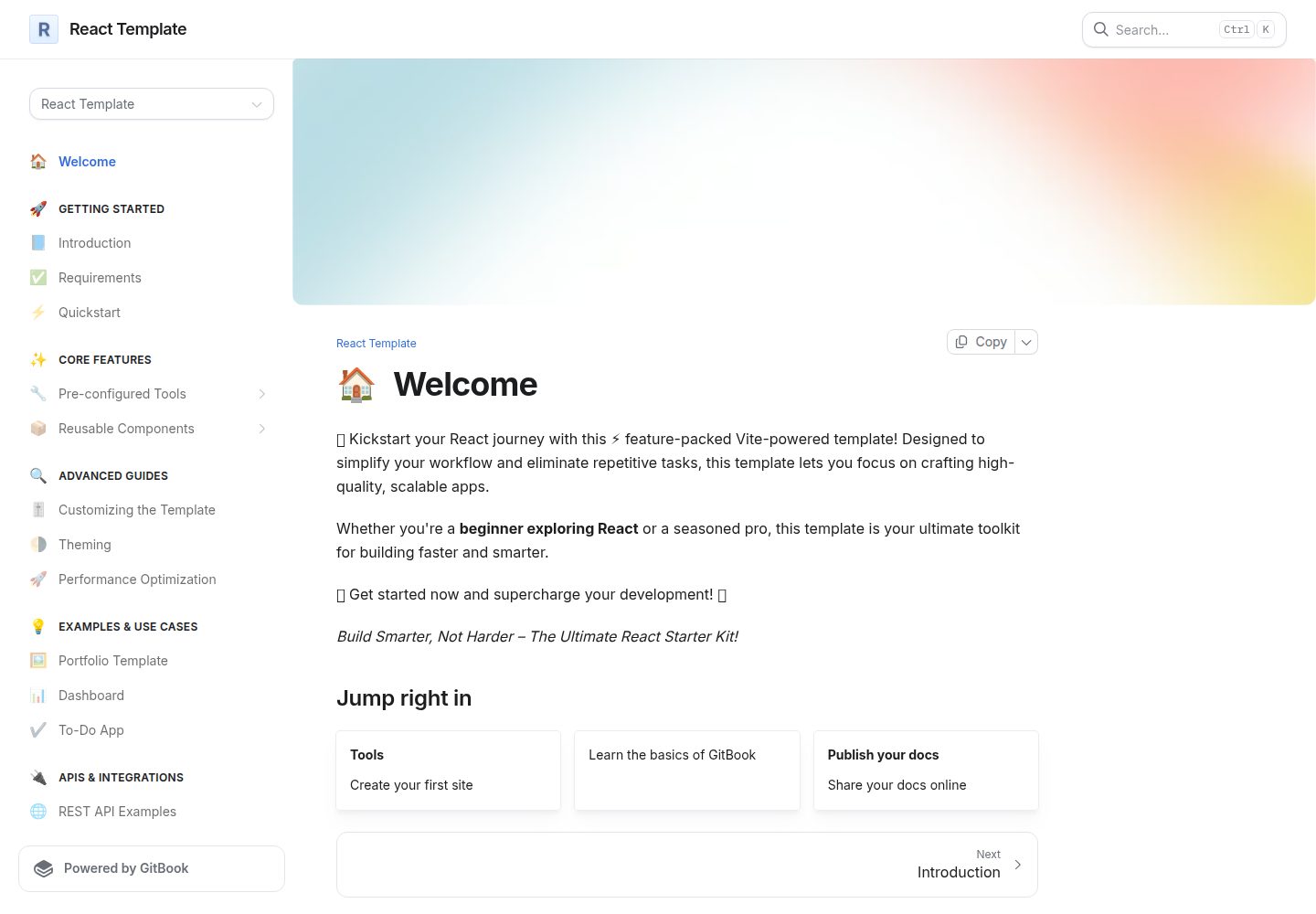
Actual screenshot captured by the server browser.
All pages & views 3
Screenshots show visual appearance; interactive behavior may differ.
Recorded 2026-10-03View source
What stands out
A quick read of the recorded project description.
Preconfigures TailwindCSS and provides a reusable UI component directory
Includes built-in ESLint, Prettier, Husky, and GitHub Actions workflow configurations
Includes basic integration for Redux state management
Provides npm scripts for development, build, lint, formatting, type checking, and spell checking
Template Details
This template is a starter for React projects that uses Vite as the build tool and integrates TypeScript, TailwindCSS, and Redux. Repository materials indicate its goal is to preconfigure ESLint, Prettier, Husky, GitHub Actions workflows, and a set of predefined UI components so developers do not have to rebuild these foundational pieces when starting a new project.
The template provides a fairly complete directory structure description: under src, folders are organized into @types, assets, components, utils, and more; within components, there are further subdivisions into HOC, config, hooks, shared, and ui, with the ui directory containing components such as Accordion, Avatar, Badge, Button, CheckBox, Dialog, Grid, Skeleton, and ToolTip. The README also lists commands for development, build, lint, formatting, type checking, and spell checking, and recommends using pnpm.
Note that some links in the README point to another repository (vite-template), and the version numbers in the badges do not fully match the current repository information, so actual dependencies should be verified before use. The free scope of the template is limited to this MIT-licensed version of the code; third-party assets such as demo images, fonts, and icons, as well as external services such as domains and hosting, require separate confirmation of licensing and fees.
ViteReactStarter
Is it right for your project?
Use Cases
- Quickly starting a front-end project using Vite, React, and TypeScript
- UI development that needs TailwindCSS and a set of basic UI components as a starting point
- Team collaboration where the project should include ESLint, Prettier, and Husky commit hooks from the start
- Scenarios that require introducing Redux state management into a React project
Suitable For
- Developers familiar with React and TypeScript who want to reduce initial configuration
- Front-end teams that need consistent code style and pre-commit checks
- New projects using Vite as the build tool and TailwindCSS as the styling solution
Getting started & customization
Use these recorded setup notes alongside the repository instructions for your chosen version.
- 1
Requires Node.js 14.0.0 or higher, along with npm, yarn, or pnpm; the README recommends pnpm first
- 2
You can use GitHub's Use this template or clone the repository, then install dependencies and start the development server
- 3
Some links in the README point to the vite-template repository; verify the actual repository and dependency versions before use
- 4
Third-party assets and external services are not covered by the MIT license and require separate confirmation of licensing and fees
License & source material
Usage conditions & limitations
Free to use · keep license noticeThis entry covers the free version under the MIT license in a public repository; the free scope is the code of this version and does not mean external services or third-party assets are free.
Must comply with when using
- You are allowed to use, modify, commercialize, and distribute the code of this version for free.
- When distributing copies or substantial portions of the code, retain the original author's copyright notice and the complete MIT license notice.
- The code is provided as is; warranties and limitations of liability are governed by the original license and applicable law.
Additional costs & items to verify
- The README recommends pnpm over npm or yarn, but this is not mandatory; other package managers can still run it.
- Running this template requires Node.js 14.0.0 or higher installed locally, and you must provide a package manager such as npm, yarn, or pnpm.
- The MIT license covers only this repository's code; third-party assets such as demo images, fonts, and icons referenced in the README, as well as external services such as domains and hosting, are not covered and require separate confirmation of licensing and fees.
- Demo images, fonts, icons, and other third-party assets must be checked against their respective licenses and cannot be judged solely by the code's MIT license.
- External services such as domains, hosting, databases, payments, or AI may incur additional charges.
View Original Text Basis
Permission is hereby granted, free of charge
Original License Text
This is suggested use pnpm over npm and yarn.
Original README
Node.js (version 14.0.0 or higher)
Original README
https://github.com/deepumandal/react-template/blob/master/LICENCE.mdhttps://github.com/deepumandal/react-template/blob/master/README.mdThis project is licensed under the MIT License. See the [LICENSE](./LICENSE.md) file for more details.
Original README
Compiled by DeepSeek based on repository license and README ·2026-10-03. Results only cover the materials read; dependencies, images, fonts, and subsequent term changes are subject to their respective original texts.
Project checks & description sources
Template Information
- Source platforms
- GitHub
- Documentation and maintenance reference score
- More documented · 86 / 100
- Technologies
- Vite · React
- Website type
- Starter
How this score is calculated
Our heuristic uses license records (up to 30), a demo link (12), a preview (10), stars (15), recorded maintenance (15), description completeness (8), feature records (5) and classification data (5). It is not a code, security or performance test, or a Google score. A link does not establish tested functionality.
What to verify for this project
- Repository update recorded
- 2025-02-18
- Screenshot last checked
- 2026-10-03
A demo link is listed. Check it with your own content and viewport sizes; its presence does not confirm that forms, authentication or payments work.
The catalog identifies Vite as the primary stack. Check the actual dependency manifest and lockfile for versions and hosting requirements. These notes use recorded metadata, not a code audit or a deployment test.
Use a selection guide →How this description was prepared
AI-assisted description based on catalog records and repository material. Repository authors are not automatically the reviewers of this description.
Automatically checked against source and license rules; no manual editorial review.
Inspect the recorded source material
SHA-256: ddea675768faea7ba12bfe91627293296fabe2ad81fc1d7f9b9945f30ca576d5
2026-10-03T07:12:19.408Z
Source file / repository<p align="center">
<img src="https://media3.giphy.com/media/eNAsjO55tPbgaor7ma/giphy.gif?cid=6c09b952f26cn8gocpfbyhkfit4z4ktpt4nwi7ba49rl0jam&ep=v1_internal_gif_by_id&rid=giphy.gif&ct=s" alt="React Logo" height="120"/>
<img src="./docs/_images/vite.png" alt="Vite Logo" height="120"/>
<img src="https://cdn3d.iconscout.com/3d/free/thumb/free-typescript-11492969-9325304.png?f=webp" alt="TypeScript Logo" height="120"/>
</p>
<h1 align="center">React Vite Template</h1>
<p align="center">
🚀 Modern React Template: 2024-Ready and Pre-Configured! 🚀
</p>
<br>
<p align="center">
<a href="https://deepak-mandal.gitbook.io/react-template"><b>Live!</b></a>
</p>
<p align="center">
<a href="https://https://github.com/deepumandal/vite-template/blob/master/README.md">📖 Documentation </a> |
<a href="https://github.com/deepumandal/vite-template?tab=readme-ov-file#get-started">🚀 Getting Started</a> |
<a href="https://discord.gg/deepumandal" title="Discord invite">🙌 Join Us</a>
</p>
<div align="center">
<img src="https://img.shields.io/github/actions/workflow/status/deepumandal/vite-template/build.yml" alt="Build" />
<img src="https://img.shields.io/github/license/deepumandal/vite-template" alt="License" />
<img src="https://img.shields.io/badge/code_style-prettier-ff69b4" alt="Prettier" />
<img src="https://img.shields.io/badge/vite-^4.0.0-blue" alt="Vite" />
<img src="https://img.shields.io/badge/typescript-4.0+-blue" alt="TypeScript" />
<img src="https://img.shields.io/badge/react-^18.0.0-blue" alt="React" />
<img src="https://img.shields.io/badge/redux-^4.0.0-blue" alt="Redux" />
<img src="https://img.shields.io/badge/tailwindcss-^3.0.0-blue" alt="TailwindCSS" />
<img src="https://img.shields.io/badge/contributions-welcome-brightgreen" alt="Contributions" />
<img src="https://img.shields.io/github/issues-raw/deepumandal/vite-template" alt="Open Issues" />
</div>
# Objective
This template is designed to supercharge your frontend development experience by providing a pre-configured setup that reduces the repetitive tasks you often face when starting a new project. Whether you're a seasoned developer or just getting started, this template has everything you need to kickstart your next project with minimal hassle.
# Table of Contents
1. [Introduction](#introduction)
2. [Key Features](#key-features)
3. [Why Vite Template?](#why-vite-template)
4. [Getting Started](#getting-started)
5. [Project Structure](#project-structure)
6. [Development Workflow](#development-workflow)
7. [Built-in Tools](#built-in-tools)
8. [Configuration](#configuration)
9. [Pros and Cons](#pros-and-cons)
10. [Contribution Guidelines](#contribution-guidelines)
11. [Flowcharts](#flowcharts)
12. [FAQ](#faq)
13. [License](#license)
## Introduction
Welcome to the **Vite Template** project! 🚀
This Vite template aims to streamline the process of setting up a new frontend project. With modern tools and best practices built-in, you can focus more on developing your application and less on configuring your environment.
## Key Features
### ⚡ Vite + React + TypeScript
- **Fast Build System:** Leverage the speed of Vite with the flexibility of React and TypeScript.
- **Hot Module Replacement (HMR):** Instant updates during development for a seamless experience.
### 🎨 Pre-Built UI Components
- **TailwindCSS Integration:** Responsive, utility-first CSS framework for rapid UI development.
- **Pre-Configured Components:** A set of reusable UI components to get you started quickly.
- **Custom Color Palette:** Easily adjustable to match your brand or project theme.
### 🛠️ Developer Tools
- **Husky:** Pre-commit hooks to ensure code quality.
- **Prettier + ESLint:** Automated code formatting and linting for a consistent codebase.
- **YAML Workflows:** Pre-configured GitHub Actions for CI/CD pipelines.
- **Redux Integration:** State management with minimal setup.
### 📚 Documentation
- **Comprehensive Docs:** In-depth documentation to guide you through the setup and usage.
- **Modern Design:** User-friendly and easy-to-navigate documentation structure.
## Why Vite Template?
### Problem
Starting a new React application often involves repetitive tasks such as setting up Vite, configuring linting rules, integrating Tailwind CSS, building UI components, setting up lint-staged, and more. These steps can be time-consuming and prone to errors, slowing down your development process.
### Solution
This Vite template is designed to supercharge your frontend development experience by providing a pre-configured setup that reduces these repetitive tasks. It includes the latest tech stacks and configurations, ensuring you have everything you need to kickstart your next project with minimal hassle:
- **ESLint**: Pre-configured linting rules to maintain code quality.
- **Prettier**: Code formatting setup to ensure consistency across your codebase.
- **Husky**: Pre-commit hooks to run tasks such as linting and tests before committing code.
- **Predefined UI Components**: A set of reusable UI components to accelerate your development.
### Impact
Adopting this Vite template brings several significant benefits
- **Enhanced Developer Experience:** Spend less time on setup and more time on building features, thanks to the pre-configured setup.
- **Improved Productivity:** With essential tools and configurations already in place, you can quickly start coding without worrying about the boilerplate setup.
- **Consistency and Quality:** Pre-configured linting and formatting tools ensure a consistent and high-quality codebase.
- **Future-Proof:** The template includes the latest best practices and technologies, keeping your project up-to-date with minimal effort.
Whether you're a seasoned developer or just getting started, this Vite template provides a robust foundation for your project, allowing you to focus on what matters most: building amazing applications
## Getting Started
### Prerequisites
- Node.js (version 14.0.0 or higher)
- npm or yarn or pnpm
> **Note:** This is suggested use pnpm over npm and yarn.
### Installation
1. **Use this Template:**
- click on use this template
1. **Clone the repository:**
```sh
git clone https://github.com/your-username/vite-template.git
cd vite-template
```
1. **Install dependencies:**
```sh
npm install
# or
yarn install
# or
pnpm install
```
1. **Start the development server:**
```sh
npm run dev
# or
yarn dev
# or
pnpm install
```
## Project Structure
```plaintext
📂 .github # GitHub actions and CI/CD pipelines
└── 📂 workflows
└── 📄 codeql.yml # Configuration for GitHub CodeQL analysis
📂 .husky
└── 📄 pre-commit # Husky pre-commit hook script
📂 docs # Documentation files for the template
📂 public # Publicly accessible static files
📂 src # Source folder
├── 📂 @types # TypeScript type definitions
├── 📂 assets # Static assets
│ ├── 📂 fonts # Custom font files
│ ├── 📂 styles # All CSS files for components
│ └── 📂 svg # SVG media files
├── 📂 components # components
│ ├── 📂 HOC # Higher-Order Components
│ ├── 📂 config # Configuration for components
│ │ ├── 📂 ui # UI component configurations
│ │ └── 📄 index.ts # Entry point for config
│ ├── 📂 hooks # Custom React hooks
│ │ ├── 📂 useTheme # Hook for theme management
│ │ └── 📄 index.ts # Entry point for hooks
│ ├── 📂 shared # Shared components and utilities
│ │ ├── 📂 Form # Form component files
│ │ ├── 📂 Label # Label component files
│ │ └── 📄 index.ts # Entry point for shared components
│ ├── 📂 ui # UI components
│ │ ├── 📂 Accordion # Accordion component files
│ │ ├── 📂 Avatar # Avatar component files
│ │ ├── 📂 Badge # Badge component files
│ │ ├── 📂 Block # Block component files
│ │ ├── 📂 Breadcrumb # Breadcrumb component files
│ │ ├── 📂 Button # Button component files
│ │ ├── 📂 CheckBox # CheckBox component files
│ │ ├── 📂 Common # Common UI components
│ │ ├── 📂 ConfirmationDialog # Confirmation Dialog component files
│ │ ├── 📂 Container # Container component files
│ │ ├── 📂 ContextMenu # Context Menu component files
│ │ ├── 📂 DropDownMenu # DropDown Menu component files
│ │ ├── 📂 Flex # Flex component files
│ │ ├── 📂 Grid # Grid component files
│ │ ├── 📂 HoverCard # HoverCard component files
│ │ ├── 📂 Model # Model component files
│ │ ├── 📂 Separator # Separator component files
│ │ ├── 📂 Skeleton # Skeleton component files
│ │ ├── 📂 ToolTip # ToolTip component files
│ │ ├── 📂 Typography # Typography component files
│ │ └── 📄 index.ts # Entry point for UI components
├── 📂 utils # Utility functions and helpers
│ └── 📂 className # Utility functions for class names
├── 📄 App.tsx # Main application component
├── 📄 main.tsx # Entry point of the application
├── 📄 tailwind.css # Tailwind CSS configuration
└── 📄 vite-env.d.ts # TypeScript environment definitions for Vite
📄 .eslintignore # List of files and directories ignored by ESLint
📄 .eslintrc.cjs # ESLint configuration file
📄 .gitignore # List of files and directories ignored by Git
📄 LICENCE.md # License information
📄 README.md # Main README file with project overview
📄 SECURITY.md # Security policies and guidelines
📄 cspell.json # Configuration for cspell (spell checker)
📄 index.html # Main HTML file for the application
📄 package.json # Project dependencies and scripts
📄 pnpm-lock.yaml # Lockfile for pnpm package manager
📄 postcss.config.js # PostCSS configuration
📄 tailwind.config.js # Tailwind CSS configuration
📄 tsconfig.json # TypeScript configuration
📄 tsconfig.node.json # TypeScript configuration for Node.js
📄 vite.config.ts # Vite configuration file
```
> Here is the basic overview of folder structure.
## Development Workflow
### Commands
- **Start Development Server**:
- `npm run start`
- `yarn start`
- `pnpm start`
- **Build for Production**:
- `npm run build`
- `yarn build`
- `pnpm build`
- **Lint Code**:
- `npm run lint`
- `yarn lint`
- `pnpm lint`
- **Format Code**:
- `npm run prettier:write`
- `yarn prettier:write`
- `pnpm prettier:write`
- **Check Types**:
- `npm run check-types`
- `yarn check-types`
- `pnpm check-types`
- **Spell Check**:
- `npm run spellcheck`
- `yarn spellcheck`
- `pnpm spellcheck`
### Recommended Extensions
#### VSCode Extensions:
- **ESLint**
- **Prettier - Code formatter**
- **TailwindCSS**
## Built with Tools
| TypeScript | React | React Hook Form | Radix UI | clsx |
|------------|-------|-----------------|----------|------|
| <img src="https://cdn3d.iconscout.com/3d/free/thumb/free-typescript-3d-icon-download-in-png-blend-fbx-gltf-file-formats--ts-programming-code-logos-and-brands-pack-icons-9325304.png" width="40" height="40"> | <img src="https://cdn3d.iconscout.com/3d/free/thumb/free-react-3d-icon-download-in-png-blend-fbx-gltf-file-formats--facebook-logo-native-javascript-library-user-interfaces-coding-lang-pack-logos-icons-7578010.png?f=webp" width="40" height="40"> | <img src="https://miro.medium.com/v2/resize:fit:747/1*kOXZ2OTFrdmw28ZWzwT8ZQ.png" width="40" height="40"> | <img src="https://avatars.githubusercontent.com/u/75042455?s=280&v=4" width="40" height="40"> | <img src="https://encrypted-tbn0.gstatic.com/images?q=tbn:ANd9GcQ5mRF1CHVQWQ2-GO75PM3f0-YVqS3bjfz-WQ&s" width="40" height="40"> |
| Lucide React | Prettier | Tailwind CSS | React DOM | Zod |
|--------------|----------|--------------|-----------|-----|
| <img src="https://lucide.dev/icons/logo/lucide.svg" width="40" height="40"> | <img src="https://cdn.jsdelivr.net/gh/devicons/devicon/icons/prettier/prettier-original.svg" width="40" height="40"> | <img src="https://cdn.jsdelivr.net/gh/devicons/devicon/icons/tailwindcss/tailwindcss-plain.svg" width="40" height="40"> | <img src="https://cdn.jsdelivr.net/gh/devicons/devicon/icons/react/react-original.svg" width="40" height="40"> | <img src="https://pbs.twimg.com/profile_images/1508824447731433476/TplYb09L_400x400.png" width="40" height="40"> |
| cspell | Vite | ESLint | Husky | ts-node |
|--------|------|--------|-------|---------|
| <img src="https://github.com/streetsidesoftware/cspell/raw/main/packages/cspell/assets/cspell-logo.png" width="40" height="40"> | <img src="https://cdn.jsdelivr.net/gh/devicons/devicon/icons/vitejs/vitejs-original.svg" width="40" height="40"> | <img src="https://cdn.jsdelivr.net/gh/devicons/devicon/icons/eslint/eslint-original.svg" width="40" height="40"> | <img src="https://typicode.github.io/husky/assets/img/icon.svg" width="40" height="40"> | <img src="https://github.com/TypeStrong/ts-node/raw/main/logo.svg" width="40" height="40"> |
## Contribution Guidelines
We welcome contributions from the community. Please follow these steps to contribute:
1. Fork the repository and clone your fork.
2. Create a new branch: `git checkout -b my-feature`
3. Make your changes and commit them: `git commit -m 'Add some feature`
4. Push to the branch:`git push origin my-feature`
5. Open a pull request.
## Flowcharts
### Development Workflow
```mermaid
graph TD
A[Clone Repository]
A --> B[Install Dependencies]
B --> C[Start Dev Server]
C --> D[Develop & Test]
D --> E[Build for Production]
```
### Contribution Process
```mermaid
graph TD
A[Fork Repository]
A --> B[Create Branch]
B --> C[Make Changes]
C --> D[Commit Changes]
D --> E[Push to Branch]
E --> F[Open Pull Request]
```
## FAQ
### Why use Vite over traditional build tools like Webpack?
Vite offers a faster development experience due to its instant server start and fast HMR, leveraging native ES modules.
### Can I use this template with TypeScript?
Yes, TypeScript support is built-in. You can easily switch to TypeScript by renaming your files to `.ts` and `.tsx`.
### How do I add a new dependency?
You can add a new dependency using npm or yarn:
```sh
npm install <dependency-name>
# or
yarn add <dependency-name>
```
### How do I customize the ESLint or Prettier configuration?
You can modify the configuration files `.eslintrc.js` to fit your preferences.
## License
This project is licensed under the MIT License. See the [LICENSE](./LICENSE.md) file for more details.
Thank you for using our Vite template! If you have any questions or feedback, feel free to open an issue or contribute to the project. Happy coding! 🚀
Explore similar templates
Compare previews and descriptions within the same stack and category.

react-starter-kit
A full-stack SaaS monorepo starter built on Vite and React, with Bun, TypeScript, tRPC, Drizzle ORM, Better Auth, Stripe, and Cloudflare Workers. It includes email OTP, passkey, Google OAuth, organizations, subscription billing, Drizzle migrations, seed scripts, and Terraform infrastructure.
Vite · SaaS

cove
Cove is a minimal TanStack Start starter template maintained by mugnavo, integrating React, TanStack Router/Query, Tailwind CSS, shadcn/ui, Drizzle ORM with PostgreSQL, Better Auth, Vite Plus, and Nitro.
Vite · SaaS

vite-react-boilerplate
A production-ready Vite + React starter template with TypeScript, Tailwind CSS, TanStack Router/Query/Table, Storybook, React Hook Form + Zod, Vitest and Playwright testing, plus Husky/Commitizen/Commitlint commit conventions.
Vite · Starter

react-vite-admin
A backend management starter built on Vite and React, integrating Recoil, React Query, TypeScript, and Axios, with Ant Design-style interface screenshots. Suitable as a starting point for management-side projects, licensed under MIT, with Chinese documentation and common scripts.
Vite · Admin dashboard

typescript-react_best_practices-vite_template
A Vite + React + TypeScript starter template by CodelyTV, preconfigured with Jest and React Testing Library unit tests, Cypress end-to-end tests, ESLint and Prettier using Codely's shared configuration, GitHub Actions workflows, a Makefile, and Sass.
Vite · Starter

cloudflare-starter-kit
A Cloudflare Workers project scaffolding template maintained by kriasoft, using Vite and TypeScript, with three built-in workspaces: api, app, and edge, and preconfigured local testing, multiple environments, and a GitHub Actions deployment workflow.
Vite · Starter