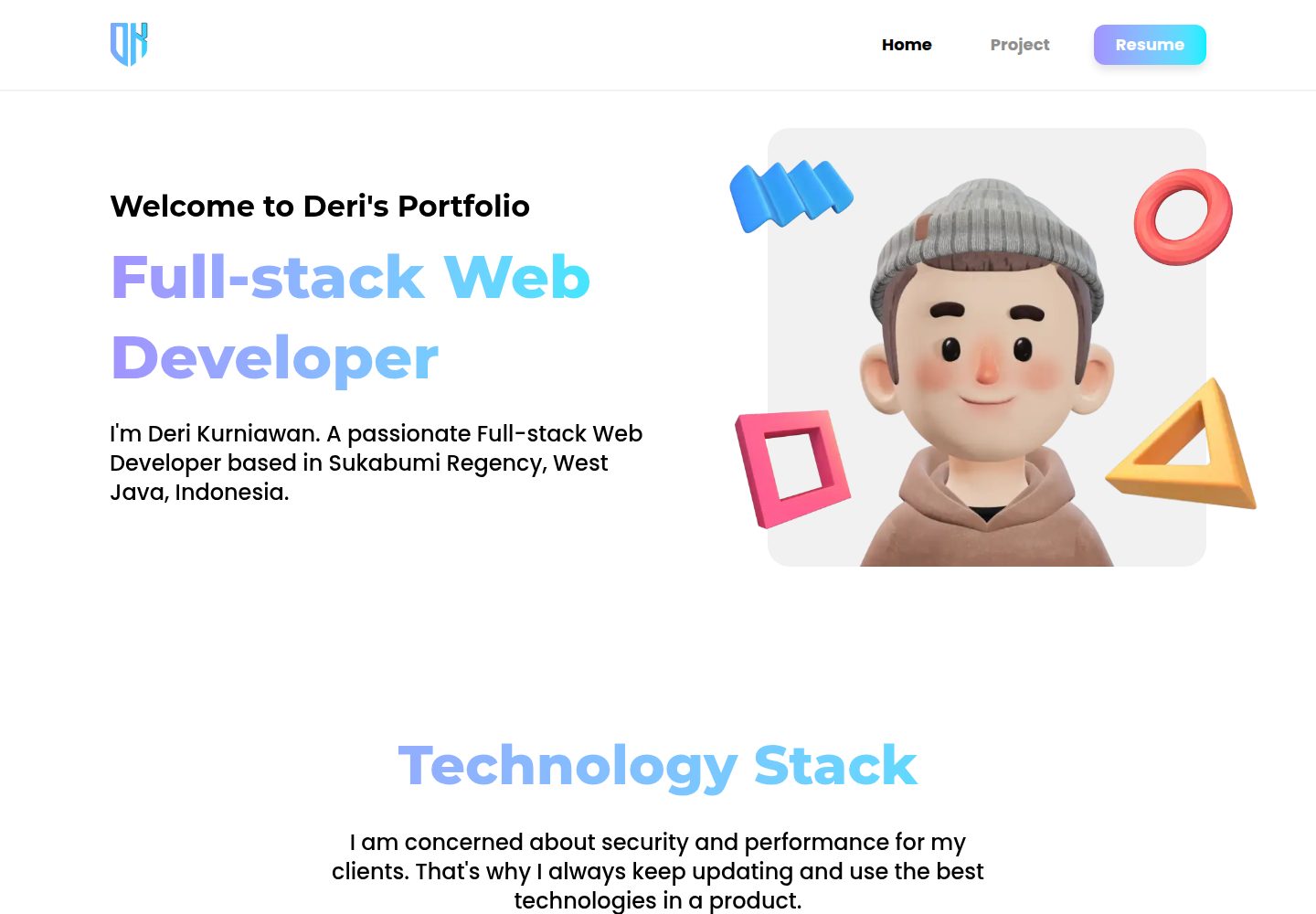
3D 主题视觉,含渐变与 Framer Motion 动画
Next.jsReact作品集
3d-portfolio — Next.js 作品集模板
作者 Deri-Kurniawan
基于 Next.js 的 3D 主题个人作品集模板,使用 Tailwind CSS 与 Framer Motion,通过单一配置文件集中管理姓名、项目、技术栈与社交链接。
看看你的网站会是什么样
浏览真实页面截图,比较内容排版与手机效果。点击下方缩略图切换,放大查看整页细节。
全部页面与视图 3
截图用于了解视觉与布局,交互效果请以实际项目为准。
采集于 2026-10-02查看来源
值得关注的模板亮点
从已有项目资料中,快速了解它的特点。
响应式布局,覆盖手机、平板与桌面
姓名、项目、技术栈、社交链接集中在 src/config/index.ts 一处配置
技术栈图标可在 src/constant/tech-stack.tsx 中复用内置项或从 react-icons 扩展
Let's Connect 提供五个固定位置,可配置图标与链接或置空隐藏
MIT 许可,允许免费使用、修改、商用与分发
模板详细介绍
这是一个 3D 主题的个人作品集网站模板,作者 Deri Kurniawan,采用 Next.js App Router 构建,样式使用 Tailwind CSS,动画由 Framer Motion 提供,图标来自 React Icons,代码检查使用 Biome,环境变量通过 @t3-oss/env-nextjs 管理。仓库采用 MIT 许可,可免费使用、修改、商用和分发,但演示图片、字体、图标等第三方素材需单独核对许可。
内容配置集中在 src/config/index.ts:姓名、邮箱、职业角色、所在地、社交链接、引用语、简历下载地址、项目列表与展示的技术栈都在此文件维护。项目条目包含标题、简介、图片、技术栈、可选的 demo/GitHub/Figma 链接和分类;技术栈图标在 src/constant/tech-stack.tsx 中定义,可复用内置项或从 react-icons 新增。
视觉与资源方面,主题色在 src/app/globals.css 的 @theme inline 中定义(主色、辅色、文字色、背景灰等);3D 头像需替换 src/assets/images/home/hero/avatar-smile.webp 与 src/assets/images/home/letsConnect/avatar-big-smile.webp 两个文件;Let's Connect 区块有 topLeft、topRight、bottomRight、bottomLeft、bottomCenter 五个固定位置,可配置图标、链接与标签,设为 null 或注释掉即可隐藏;社交预览图替换 public/og-image.webp。导航链接在 src/constant/navigation.ts 中增删。
运行前需复制 example.env 为 .env 并设置 NEXT_PUBLIC_APP_URL,开发命令为 npm run dev,构建与启动为 npm run build 与 npm run start。README 提供 Vercel 一键部署按钮,也可手动部署。模板未包含后端、数据库或内容管理系统的说明,项目与个人信息均以静态配置形式写入代码,更新内容需要修改源码并重新构建。
Next.js作品集
适合你的项目吗?
适用场景
- 为开发者或设计师搭建个人作品集网站
- 展示项目列表、技术栈与简历下载入口
- 作为 Next.js + Tailwind CSS 的学习与二次开发起点
- 部署到 Vercel 或自建 Node 环境作为静态展示站点
适合人群
- 熟悉 Next.js 与 TypeScript、能直接编辑配置文件的开发者
- 需要快速上线个人作品集并接受内容写在代码里的个人
- 希望以 MIT 许可自由修改和分发模板的团队或个人
上手与定制指南
结合仓库当前版本的说明,按下面的资料检查内容、配置与运行要求。
- 1
克隆仓库后执行 npm install,并复制 example.env 为 .env,设置 NEXT_PUBLIC_APP_URL
- 2
编辑 src/config/index.ts 填写姓名、邮箱、角色、所在地、社交链接、引用语、简历与项目
- 3
替换 public/files/ 下的简历 PDF、public/projects/ 下的项目图片(建议 webp,约 800x400)以及两个 3D 头像图片
- 4
在 src/app/globals.css 的 @theme inline 中调整主题色,并替换 public/og-image.webp 社交预览图
- 5
开发用 npm run dev,生产用 npm run build 与 npm run start;第三方素材需自行核对许可
授权与来源资料
使用条件与限制
免费使用 · 保留许可声明本次收录的是公开仓库中采用 MIT 许可的免费版本;免费范围为该版本代码,不代表外部服务或第三方素材免费。
使用时需要遵守
- 允许免费使用、修改、商用和分发该版本代码。
- 分发代码副本或实质性部分时,保留原作者版权声明和完整 MIT 许可声明。
- 代码按现状提供;担保与责任限制以原许可证及适用法律为准。
额外费用与待核对事项
- 模板自带的 3D 头像图片来自外部站点 peeps.ui8.net,README 建议用户自行前往该站点创建并替换头像;这些演示素材的许可需单独核对,MIT 许可仅覆盖代码。
- 新增技术栈图标依赖第三方 react-icons 库,需自行确认其图标许可;模板内置图标同样属于第三方素材。
- 部署前必须配置环境变量 NEXT_PUBLIC_APP_URL(本地与生产均需),否则站点 URL 相关功能可能不正确。
- 一键部署依赖 Vercel 外部托管服务,使用该方式需注册 Vercel 账号并接受其服务条款与可能的费用。
- 演示图片、字体、图标及其他第三方素材需按各自许可核对,不能仅凭代码的 MIT 许可判断。
- 域名、托管、数据库、支付或 AI 等外部服务可能另外收费。
查看原文依据
Permission is hereby granted, free of charge
许可证原文
Create your own 3D character at [peeps.ui8.net](https://peeps.ui8.net/)
README 原文
Find icons at [react-icons.github.io/react-icons](https://react-icons.github.io/react-icons/)
README 原文
Set `NEXT_PUBLIC_APP_URL` to your domain
README 原文
https://github.com/Deri-Kurniawan/3d-portfolio/blob/main/LICENSEhttps://github.com/Deri-Kurniawan/3d-portfolio/blob/main/README.md[](https://vercel.com/new/clone?repository-url=
README 原文
DeepSeek 根据仓库许可证和 README 整理 ·2026-10-02。结果仅覆盖已读取资料,依赖、图片、字体及后续条款变更以各自原文为准。
项目核对记录与介绍依据
模板资料
- 来源平台
- GitHub
- 资料与维护参考分
- 资料较完整 · 87 / 100
- 技术栈
- Next.js · React
- 网站类型
- 作品集
这个分数如何计算
本站按许可资料(最高30分)、演示链接(12分)、预览图(10分)、Star数(15分)、记录的维护时间(15分)、描述完整度(8分)、功能记录(5分)和分类资料(5分)计算。它不是代码、安全或性能测试,也不是 Google 评分;有链接不代表已实测可用。
这个项目需要核对什么
- 记录的仓库更新时间
- 2026-09-06
- 截图检查日期
- 2026-10-02
已收录演示链接。请用你的内容与屏幕尺寸检查;有演示不代表表单、认证或支付已经可用。
目录记录的主要技术栈是 Next.js。请通过依赖清单和锁文件核对实际版本与托管要求。这些说明基于收录资料,不代表代码审计或部署实测。
查看具体选型方法 →介绍的制作与核对状态
介绍由 AI 辅助整理目录与仓库资料。仓库作者不等于这篇介绍的审核者。
已完成服务器许可规则与 AI 来源核对;未经过人工编辑审核。
查看当时使用的来源资料
SHA-256: f77989ebc70a2b0cd000220b205356ebd42d3b94de0d3f778350c0750385c969
2026-10-02T16:16:34.835Z
来源文件 / 仓库# Deri Kurniawan's 3D Portfolio
[](https://github.com/Deri-Kurniawan/3d-portfolio "Go to GitHub repo") [](#license) [](https://github.com/Deri-Kurniawan/3d-portfolio)
[](https://github.com/Deri-Kurniawan/3d-portfolio)
A beautiful 3D-themed portfolio website built with Next.js 15, Tailwind CSS 4, and Framer Motion. This portfolio is based on my designs in [Dribbble - Deri Kurniawan](https://dribbble.com/shots/21642242-3D-Theme-Portfolio-Website).
## ✨ Features
- 🎨 Modern 3D-themed design with gradient animations
- 📱 Fully responsive (mobile, tablet, desktop)
- ⚡ Built with Next.js 15 + Turbopack for fast development
- 🎭 Smooth animations powered by Framer Motion
- 🔧 Easy configuration - just edit one file!
- 🚀 One-click deploy to Vercel
## 🚀 Quick Start
### 1. Clone & Install
```bash
git clone https://github.com/Deri-Kurniawan/3d-portfolio.git
cd 3d-portfolio
npm install
```
### 2. Set Up Environment
```bash
cp example.env .env
```
Edit `.env` and set your app URL:
```env
NEXT_PUBLIC_APP_URL=http://localhost:3000
```
### 3. Run Development Server
```bash
npm run dev
```
Open [http://localhost:3000](http://localhost:3000) to see your portfolio.
---
## 🎨 Customization Guide
### Quick Customization (5 minutes)
The main configuration file is `src/config/index.ts`. Edit this file to personalize your portfolio:
```typescript
export const CONFIG = {
// Your name
name: {
first: "Your",
last: "Name",
},
// Contact email
email: "[email protected]",
// Your professional role
role: "Full-stack Web Developer",
// Your location
location: "City, Country",
// Social media links
socials: {
github: "https://github.com/yourusername",
linkedin: "https://www.linkedin.com/in/yourusername",
instagram: "https://www.instagram.com/yourusername",
dribbble: "https://dribbble.com/yourusername",
},
// Quote section
quotes: {
text: "Your inspiring quote here...",
author: "Your Name",
},
// Resume download
resume: {
fileName: "YourName-Resume.pdf",
downloadUrl: "/files/your-resume.pdf",
},
// ... projects and tech stacks
};
```
### Adding Your Resume
1. Place your PDF file in `public/files/`
2. Update the config:
```typescript
resume: {
fileName: "John-Doe-Resume.pdf",
downloadUrl: "/files/John-Doe-Resume.pdf",
}
```
### Adding Projects
Add projects to the `projects` array in `src/config/index.ts`:
```typescript
projects: [
{
title: "My Awesome Project",
summary: "A brief description of what this project does and the problem it solves.",
image: "/projects/my-project.webp", // Place image in public/projects/
techStack: [
TECH_STACK.reactjs,
TECH_STACK.nextjs,
TECH_STACK.tailwindcss,
],
urls: {
demo: "https://my-project.com", // Optional
github: "https://github.com/...", // Optional
figma: "https://figma.com/...", // Optional
},
category: "Web App",
},
]
```
**Project Image Guidelines:**
- Place images in `public/projects/`
- Recommended format: `.webp` for best performance
- Recommended size: 800x400px or similar aspect ratio
### Customizing Tech Stack
#### Using Existing Tech Icons
The portfolio includes pre-configured tech stacks in `src/constant/tech-stack.tsx`:
- `TECH_STACK.nextjs`
- `TECH_STACK.reactjs`
- `TECH_STACK.typescript`
- `TECH_STACK.javascript`
- `TECH_STACK.tailwindcss`
- `TECH_STACK.laravel`
- `TECH_STACK.expressjs`
- `TECH_STACK.prisma`
- `TECH_STACK.expo`
- `TECH_STACK.reactnative`
#### Adding New Tech Stack
Edit `src/constant/tech-stack.tsx`:
```typescript
import { SiVuedotjs } from "react-icons/si"; // Import icon from react-icons
export const TECH_STACK = {
// ... existing stacks
vuejs: {
name: "Vue.js",
icon: <SiVuedotjs />,
color: "text-green-500", // Tailwind color class
siteUrl: "https://vuejs.org/",
},
};
```
Find icons at [react-icons.github.io/react-icons](https://react-icons.github.io/react-icons/) (search for `Si` prefix for brand icons).
#### Selecting Which Tech Stacks to Display
In `src/config/index.ts`, you can either show all or select specific ones:
```typescript
// Show ALL registered tech stacks
techStacks: [...Object.values(TECH_STACK)],
// OR select specific ones
techStacks: [
TECH_STACK.nextjs,
TECH_STACK.reactjs,
TECH_STACK.typescript,
TECH_STACK.tailwindcss,
],
```
### Replacing Avatar Images
Your 3D avatar appears in two places. Replace these files:
| Location | File Path | Recommended Size |
| ------------- | ---------------------------------------------------------- | ---------------- |
| Hero Section | `src/assets/images/home/hero/avatar-smile.webp` | 480x480px |
| Let's Connect | `src/assets/images/home/letsConnect/avatar-big-smile.webp` | 530x530px |
**Create your own 3D character at [peeps.ui8.net](https://peeps.ui8.net/)**
### Customizing Let's Connect Icons
The Let's Connect section has 5 fixed positions. Configure them in `src/config/index.ts`:
```typescript
import { ASSETS } from "@/constant/assets";
letsConnect: {
topLeft: {
icon: ASSETS.home.letsConnect.linkedin,
href: "https://www.linkedin.com/in/yourname",
label: "LinkedIn",
},
topRight: {
icon: ASSETS.home.letsConnect.instagram,
href: "https://www.instagram.com/yourname",
label: "Instagram",
},
bottomRight: {
icon: ASSETS.home.letsConnect.github,
href: "https://github.com/yourname",
label: "GitHub",
},
bottomLeft: {
icon: ASSETS.home.letsConnect.dribbble,
href: "https://dribbble.com/yourname",
label: "Dribbble",
},
bottomCenter: {
icon: ASSETS.home.letsConnect.gmail,
href: "mailto:[email protected]",
label: "Email",
},
}
```
- `icon` must be an `ASSETS` reference (e.g. `ASSETS.home.letsConnect.youtube`).
- Available icons: `behance`, `discord`, `dribbble`, `facebook`, `github`, `gmail`, `instagram`, `linkedin`, `pinterest`, `slack`, `tiktok`, `twitter`, `youtube` (files in `src/assets/images/home/letsConnect/`).
- `href` supports `https://` and `mailto:`.
- To hide a position, comment it out or set to `null`:
```typescript
// topLeft: {
// icon: ASSETS.home.letsConnect.linkedin,
// href: "https://...",
// label: "LinkedIn",
// },
// or
topLeft: null,
```
To add a new icon, place a `.webp` file in `src/assets/images/home/letsConnect/`, register it in `src/constant/assets.ts` (`ASSETS.home.letsConnect`), then use it in the config.
### Customizing Colors
Edit the theme colors in `src/app/globals.css`:
```css
@theme inline {
--color-primary: #a293ff; /* Purple - gradient start */
--color-secondary: #00f0ff; /* Cyan - gradient end */
--color-accent: #000000; /* Text color */
--color-accent2: #8e8e8e; /* Secondary text */
--color-gray: #f1f1f1; /* Background gray */
}
```
### Updating Open Graph Image
Replace `public/og-image.webp` with your own image (recommended: 1200x630px) for social media previews.
### Adding Navigation Links
Edit `src/constant/navigation.ts`:
```typescript
export const NAVIGATION_LINKS: NavigationLink[] = [
{ name: "Home", href: "/" },
{ name: "Project", href: "/project" },
{ name: "Blog", href: "/blog" }, // Add new pages
];
```
---
## 📁 Project Structure
```
src/
├── app/ # Next.js App Router pages
│ ├── _components/ # Page-specific components
│ ├── project/ # Project listing page
│ ├── globals.css # Global styles & theme
│ └── layout.tsx # Root layout
├── assets/
│ ├── fonts/ # Custom fonts
│ └── images/ # Static images (avatars, decoratives)
├── components/ # Shared components
├── config/
│ └── index.ts # ⭐ MAIN CONFIGURATION FILE
├── constant/
│ ├── assets.ts # Asset path mappings
│ ├── font.ts # Font configurations
│ ├── navigation.ts # Navigation links
│ └── tech-stack.tsx # Tech stack definitions
└── types/
└── globals.d.ts # TypeScript type definitions
```
---
## 🚀 Deployment
### Deploy to Vercel
[](https://vercel.com/new/clone?repository-url=https%3A%2F%2Fgithub.com%2FDeri-Kurniawan%2F3d-portfolio&env=NEXT_PUBLIC_APP_URL)
1. Click the button above
2. Set `NEXT_PUBLIC_APP_URL` to your domain (e.g., `https://yourname.vercel.app`)
3. Deploy!
### Manual Deployment
```bash
npm run build
npm run start
```
### Environment Variables for Production
```env
NEXT_PUBLIC_APP_URL=https://yourdomain.com
```
---
## 📜 Available Scripts
| Command | Description |
| ---------------------- | --------------------------------------- |
| `npm run dev` | Start development server with Turbopack |
| `npm run build` | Build for production |
| `npm run start` | Start production server |
| `npm run lint` | Run Biome linter |
| `npm run lint:fix` | Fix linting issues |
| `npm run format:check` | Check code formatting |
| `npm run format:fix` | Fix code formatting |
---
## 🛠️ Tech Stack
- **Framework:** [Next.js 15](https://nextjs.org/) with App Router
- **Styling:** [Tailwind CSS 4](https://tailwindcss.com/)
- **Animations:** [Framer Motion](https://www.framer.com/motion/)
- **Icons:** [React Icons](https://react-icons.github.io/react-icons/)
- **Linting:** [Biome](https://biomejs.dev/)
- **Type Safety:** [TypeScript](https://www.typescriptlang.org/)
- **Environment:** [@t3-oss/env-nextjs](https://env.t3.gg/)
---
## 📄 License
Released under [MIT](/LICENSE) by [@Deri-Kurniawan](https://github.com/Deri-Kurniawan).
Feel free to use this template for your own portfolio.看看同类模板
对比同技术栈与用途的模板,找到更适合的视觉与内容结构。

react-resume-template
A personal resume website template built with React.js, Typescript, Next.js, and styled with Tailwind css
Next.js · 作品集

nxt-lnk
Custom bio links for creatives who love coding. A perfect custom alternative for linktree, bio and other short…
Next.js · 作品集

sylph
A minimal portfolio template.
Next.js · 作品集

sleek-portfolio
sleek-portfolio 是一个面向开发者个人品牌展示的现代作品集模板,基于 Next.js 15、TypeScript、Tailwind CSS 和 Shadcn UI 构建。
Next.js · 作品集

research-website-template
React + Next.js template for research websites (for PhD students, researchers, etc)
Next.js · 作品集

shadcn-portfolio
shadcn-portfolio 是一个面向开发者的作品集模板,技术栈为 Next.js 15、shadcn/ui、Tailwind CSS 和 Framer Motion。
Next.js · 作品集