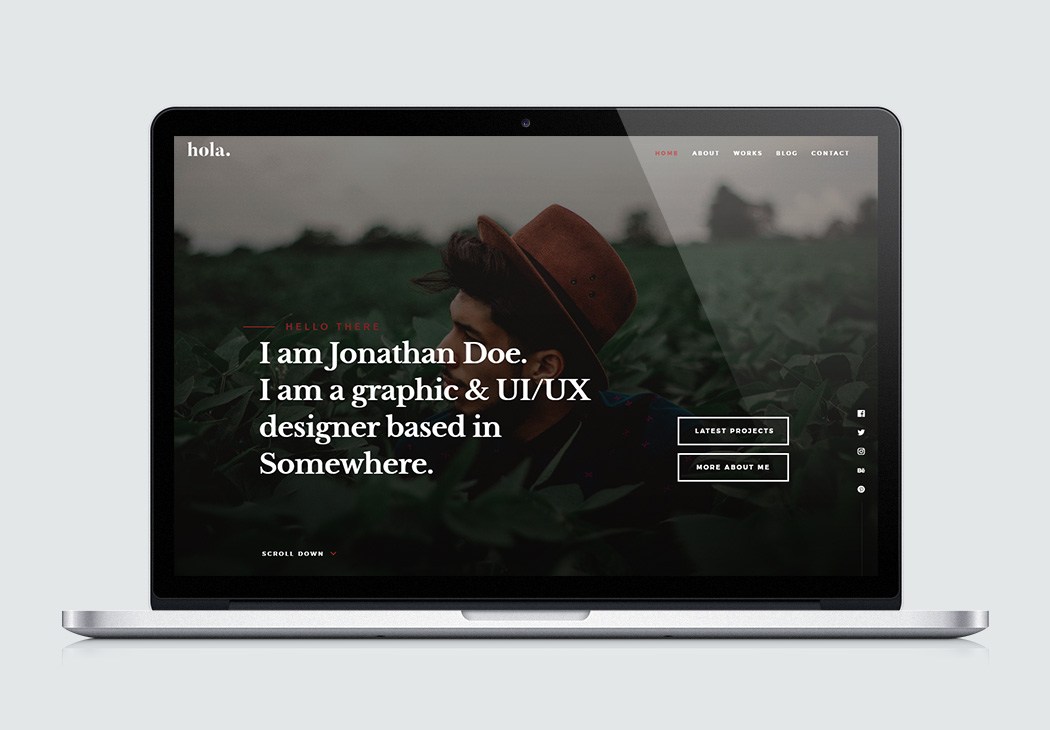
面向 Grav CMS 的 vCard 风格主题,可用于简历、作品集与博客
HTML作品集博客
grav-theme-hola — HTML 作品集模板
作者 devlom
Hola 是移植到 Grav CMS 的 vCard 风格主题,适合简历、作品集与博客站点,采用 MIT 许可。
看看你的网站会是什么样
浏览真实页面截图,比较内容排版与手机效果。点击下方缩略图切换,放大查看整页细节。
目前有 1 张原始预览,可打开完整图片查看设计细节。
截图用于了解视觉与布局,交互效果请以实际项目为准。
采集于 2026-10-02查看来源
值得关注的模板亮点
从已有项目资料中,快速了解它的特点。
提供默认、错误、博客列表、博客条目及多种模块化页面模板
模块化模板覆盖首页横幅、关于、经历、作品集、服务、推荐语、简历、行动号召与数据统计等区块
支持单页与常规页面菜单、多语言元数据、自定义 Logo 与联系表单
README 说明包含 Retina 适配、视差区块、动画统计与 @font-face 自定义字体
代码采用 MIT 许可,可免费使用、修改、商用与分发
模板详细介绍
Hola 是一个面向 Grav CMS 的 vCard 风格网站主题,原始设计来自 styleshout,由 Devlom 团队移植到 Grav。主题定位为简历、vCard 与作品集用途,目标用户包括创意设计师、开发者、自由职业者和摄影师等。
主题提供多种页面模板:默认页、错误页、博客列表与博客条目,以及一组模块化模板,涵盖首页横幅、关于、经历、作品集、服务、推荐语、简历、博客、行动号召、数据统计和基础文本等区块。README 还提到支持单页与常规页面菜单、多语言元数据、自定义 Logo、联系表单、作品集区块、动画统计、视差区块、@font-face 自定义字体以及 Retina 适配。
使用上,主题可通过 Grav 包管理器安装,也可手动解压到 user/themes 目录;官方另提供包含示例内容、配置、主题与插件的 Hola Skeleton 骨架包。主题配置建议复制 hola.yaml 到 user/config/themes 后修改,避免直接改动主题目录内文件。演示图片、字体、图标等第三方素材需按各自许可单独核对。
HTML作品集博客
适合你的项目吗?
适用场景
- 为设计师、开发者、自由职业者或摄影师搭建个人简历与 vCard 页面
- 用模块化模板组合出包含作品集、服务、经历与推荐语的作品集站点
- 在 Grav 中同时维护博客列表与博客条目页面
- 通过 Hola Skeleton 骨架包快速获得带示例内容与配置的完整站点
适合人群
- 使用 Grav CMS 并需要 vCard 或作品集主题的个人用户
- 希望用模块化区块搭建单页简历或作品集页面的创作者
- 需要博客与作品集并存的个人站点
- 接受按 MIT 许可使用代码、并愿意自行核对第三方素材许可的开发者
上手与定制指南
结合仓库当前版本的说明,按下面的资料检查内容、配置与运行要求。
- 1
推荐通过 Grav 包管理器安装:在 Grav 根目录执行 bin/gpm install hola
- 2
手动安装时,将仓库解压到 user/themes 目录并重命名为 hola
- 3
如需完整站点示例,可安装 Hola Skeleton 骨架包,其中包含示例内容、配置、主题与插件
- 4
修改配置时,将 user/themes/hola/hola.yaml 复制到 user/config/themes 后再编辑,避免更新时丢失改动
- 5
自定义 Logo 可放入 user/themes/hola/images/logo 目录,并通过 YAML 或主题选项中的 Custom Logo 字段引用
授权与来源资料
使用条件与限制
免费使用 · 保留许可声明本次收录的是公开仓库中采用 MIT 许可的免费版本;免费范围为该版本代码,不代表外部服务或第三方素材免费。
使用时需要遵守
- 允许免费使用、修改、商用和分发该版本代码。
- 分发代码副本或实质性部分时,保留原作者版权声明和完整 MIT 许可声明。
- 代码按现状提供;担保与责任限制以原许可证及适用法律为准。
额外费用与待核对事项
- 移除模板中的署名/致谢信息前,须先查阅并遵守 Styleshout 的许可政策,可能对去除版权署名有额外限制。
- 主题原始设计来自第三方 styleshout,其素材与设计可能受独立许可约束,使用前需自行核对。
- 演示用图片来自 Unsplash 与 gratisography,需按各自许可单独核对,不随 MIT 代码许可一并授权。
- 所用字体为第三方资源,需按其各自许可使用。
- 图标字体来自 iconmonstr,需按其许可使用。
- 内置多个第三方 JavaScript 库,各自许可独立,使用与再分发前需逐一核对。
- 完整站点示例需额外安装 Hola Skeleton 骨架包,该包包含示例内容、配置与插件,属独立仓库。
- 演示图片、字体、图标及其他第三方素材需按各自许可核对,不能仅凭代码的 MIT 许可判断。
- 域名、托管、数据库、支付或 AI 等外部服务可能另外收费。
查看原文依据
Permission is hereby granted, free of charge
许可证原文
Please take particular note of Styleshout's [licensing policy](http://www.styleshout.com/about-us/#remove-link) before removing any credits from the template.
README 原文
Hola theme was originally designed by [styleshout](https://www.styleshout.com/) using the following resources as listed:
README 原文
Stock Photos and Graphics: - Unsplash.com (https://unsplash.com/) - gratisography (https://gratisography.com/)
README 原文
Fonts: - Montserrat Font (https://www.google.com/fonts/specimen/Montserrat) - Libre Baskerville Font (https://fonts.google.com/specimen/Libre+Baskerville)
README 原文
Icons: - Iconic font (https://iconmonstr.com/iconicfont/)
README 原文
Javascript Files: - JQuery (http://jquery.com/) - Modernizr (http://modernizr.com/) - Waypoints (http://imakewebthings.com/jquery-waypoints/) - jQuery Placeholder (https://github.com/mathiasbynens/jquery-placeholder) - jQuery Validation Plugin (https://jqueryvalidation.org/) - pace js (http://github.hubspot.com/pace/) - Masonry (http://masonry.desandro.com/) - Imagesloaded (https://imagesloaded.desandro.com/) - Parallax.js (http://pixelcog.github.io/parallax.js/) - Slick Slider (http://kenwheeler.github.io/slick/)
README 原文
https://github.com/devlom/grav-theme-hola/blob/master/LICENSEhttps://github.com/devlom/grav-theme-hola/blob/master/README.mdThe theme by itself is useful, but you may have an easier time getting up and running by installing a skeleton.
README 原文
DeepSeek 根据仓库许可证和 README 整理 ·2026-10-02。结果仅覆盖已读取资料,依赖、图片、字体及后续条款变更以各自原文为准。
项目核对记录与介绍依据
模板资料
- 来源平台
- GitHub
- 资料与维护参考分
- 资料一般 · 74 / 100
- 技术栈
- HTML
- 网站类型
- 作品集 · 博客
这个分数如何计算
本站按许可资料(最高30分)、演示链接(12分)、预览图(10分)、Star数(15分)、记录的维护时间(15分)、描述完整度(8分)、功能记录(5分)和分类资料(5分)计算。它不是代码、安全或性能测试,也不是 Google 评分;有链接不代表已实测可用。
这个项目需要核对什么
- 记录的仓库更新时间
- 2025-06-26
- 截图检查日期
- 2026-10-02
目前没有记录演示链接。请依据仓库说明在本地评估;仅凭截图无法确认交互行为。
目录记录的主要技术栈是 HTML。请通过依赖清单和锁文件核对实际版本与托管要求。这些说明基于收录资料,不代表代码审计或部署实测。
查看具体选型方法 →介绍的制作与核对状态
介绍由 AI 辅助整理目录与仓库资料。仓库作者不等于这篇介绍的审核者。
已完成服务器许可规则与 AI 来源核对;未经过人工编辑审核。
查看当时使用的来源资料
SHA-256: e1921e5a45a74bbf21401da779a9dcac066478a133f4d070fca973b6bfb6644c
2026-10-02T16:24:13.371Z
来源文件 / 仓库# Hola Theme

**Hola** modern and stylish vCard website template for [Grav CMS](http://github.com/getgrav/grav), originally made by [styleshout](https://www.styleshout.com/). Designed to be a resume, vCard, portfolio template, it’s the perfect template for creative designers, developers, freelancers, photographer or any creative profession. It is fully responsive and retina/hi-dpi ready. It will look great on any devices from desktop to mobile phones. It has blog page templates, working contact form, stylish portfolio section and other features you will only find on premium templates. Built with clean and organized code, this template is also very easy to customize.
## Features
* HTML5 and CSS3
* Fully responsive layout
* Modern, stylish design
* Easy to customize
* Hundreds of icons avaliable
* Multiple page template types
* Retina ready
* Smooth scrolling home page nav
* Stylish portfolio section
* Animated stats section
* @font-face custom web fonts
* Parallax type sections included
* Compatible with all major browsers
* Blueprints included for **EVERY** section
* Hundreds of customization options
* Robust menu with both onepage and regular pages support
* Complete blog layout
* Multi-lingual metadata

### Supported Page Templates
* Default view template `default.md`
* Error view template `error.md`
* Blog view template `blog.md`
* Blog item view template `item.md`
* Modular view templates: `modular.md`
* Home Banner Modular view template - `home.md`
* About Modular view template - `about.md`
* Experience Modular view template - `experience.md`
* Portfolio Modular view template - `works.md`
* Services Modular view template - `services.md`
* Testimonials Modular view template - `testimonials.md`
* Resume Modular view template - `resume.md`
* Blog Modular view template - `blog.md`
* Call To Action Modular view template - `cta.md`
* Stats Modular view template - `stats.md`
* Basic One or Two Column Text Modular view template - `basic.md`
# Installation
Installing the Hola theme can be done in one of two ways. Our GPM (Grav Package Manager) installation method enables you to quickly and easily install the theme with a simple terminal command, while the manual method enables you to do so via a zip file.
The theme by itself is useful, but you may have an easier time getting up and running by installing a skeleton. The skeleton can be found in [Hola Skeleton](https://github.com/devlom/grav-skeleton-hola) package which are self-contained repositories for a complete sites which include: sample content, configuration, theme, and plugins.
## GPM Installation (Preferred)
The simplest way to install this theme is via the [Grav Package Manager (GPM)](http://learn.getgrav.org/advanced/grav-gpm) through your system's Terminal (also called the command line). From the root of your Grav install type:
bin/gpm install hola
This will install the Hola theme into your `/user/themes` directory within Grav. Its files can be found under `/your/site/grav/user/themes/hola`.
## Manual Installation
To install this theme, just download the zip version of this repository and unzip it under `/your/site/grav/user/themes`. Then, rename the folder to `hola`. You can find these files either on [GitHub](https://github.com/devlom/grav-theme-hola) or via [GetGrav.org](http://getgrav.org/downloads/themes).
You should now have all the theme files under
/your/site/grav/user/themes/hola
To make modifications, you can copy the `user/themes/hola/hola.yaml` file to `user/config/themes/` folder and modify, or you can use the admin plugin.
> NOTE: Do not modify the `user/themes/hola/hola.yaml` file directly or your changes will be lost with any updates
## Custom Logos
To add a custom logo, you should put the log into the `user/themes/hola/images/logo` folder. Standard image formats are support (`.png`,`.jpg`, `.gif`, `.svg`, etc.). Then reference the logo via the YAML like so:
```yaml
custom_logo:
- name: 'my-logo.png'
custom_logo_mobile:
- name: 'my-mobile-logo.png'
```
Alternatively, you can you use the drag-n-drop "Custom Logo" field in the Hola theme options.
## Multi-lingual metadata
Hola theme supports metadata for different languages
Copy the metadata you need from [Metadata - Grav Documentation](https://learn.getgrav.org/hints-tips/blogging/metadata) and paste it to your `user/pages/01._home/modular.lang.md`after `onpage_menu: false` for example.
## Sources and Credits
Hola theme was originally designed by [styleshout](https://www.styleshout.com/) using the following resources as listed:
Fonts:
- Montserrat Font (https://www.google.com/fonts/specimen/Montserrat)
- Libre Baskerville Font (https://fonts.google.com/specimen/Libre+Baskerville)
Icons:
- Iconic font (https://iconmonstr.com/iconicfont/)
Stock Photos and Graphics:
- Unsplash.com (https://unsplash.com/)
- gratisography (https://gratisography.com/)
Javascript Files:
- JQuery (http://jquery.com/)
- Modernizr (http://modernizr.com/)
- Waypoints (http://imakewebthings.com/jquery-waypoints/)
- jQuery Placeholder (https://github.com/mathiasbynens/jquery-placeholder)
- jQuery Validation Plugin (https://jqueryvalidation.org/)
- pace js (http://github.hubspot.com/pace/)
- Masonry (http://masonry.desandro.com/)
- Imagesloaded (https://imagesloaded.desandro.com/)
- Parallax.js (http://pixelcog.github.io/parallax.js/)
- Slick Slider (http://kenwheeler.github.io/slick/)
Other:
- Porting this template to GRAV was made possible with support of [davidhagenauer.com](http://davidhagenauer.com). Make sure to send cake!
- Conversion to Grav was handled by [Devlom](https://devlom.com) team.
Please take particular note of Styleshout's [licensing policy](http://www.styleshout.com/about-us/#remove-link) before removing any credits from the template.
看看同类模板
对比同技术栈与用途的模板,找到更适合的视觉与内容结构。

simplefolio
⚡️ A minimal portfolio template for Developers
HTML · 作品集

Freelancer
Freelancer 是 Start Bootstrap 出品的单页作品集模板,专为自由职业者、设计师和小型工作室设计。 页面结构清晰,包含多个内容区块、响应式作品集网格,每个作品项目配有模态窗口展示详情。
HTML · 作品集

Casper
Casper 是 Ghost 官方出品的经典主题,曾长期作为默认主题,现在仍持续维护。 它的定位很纯粹:一套结构清晰、注释详尽的博客主题,适合直接使用,也适合作为学习 Ghost 主题开发的入门范本。
HTML · 杂志资讯

Resume
Resume 是 Start Bootstrap 推出的简历与 CV 主题,基于 Bootstrap 构建,采用固定侧边栏加内容区块的结构。
HTML · 作品集

Creative
Creative 是 Start Bootstrap 团队维护的一款单页营销模板,定位明确:为创意机构或产品服务提供一个以作品展示和行动号召为核心的落地页。
HTML · 企业官网
startbootstrap-clean-blog
A clean Bootstrap blog theme created by Start Bootstrap
HTML · 博客