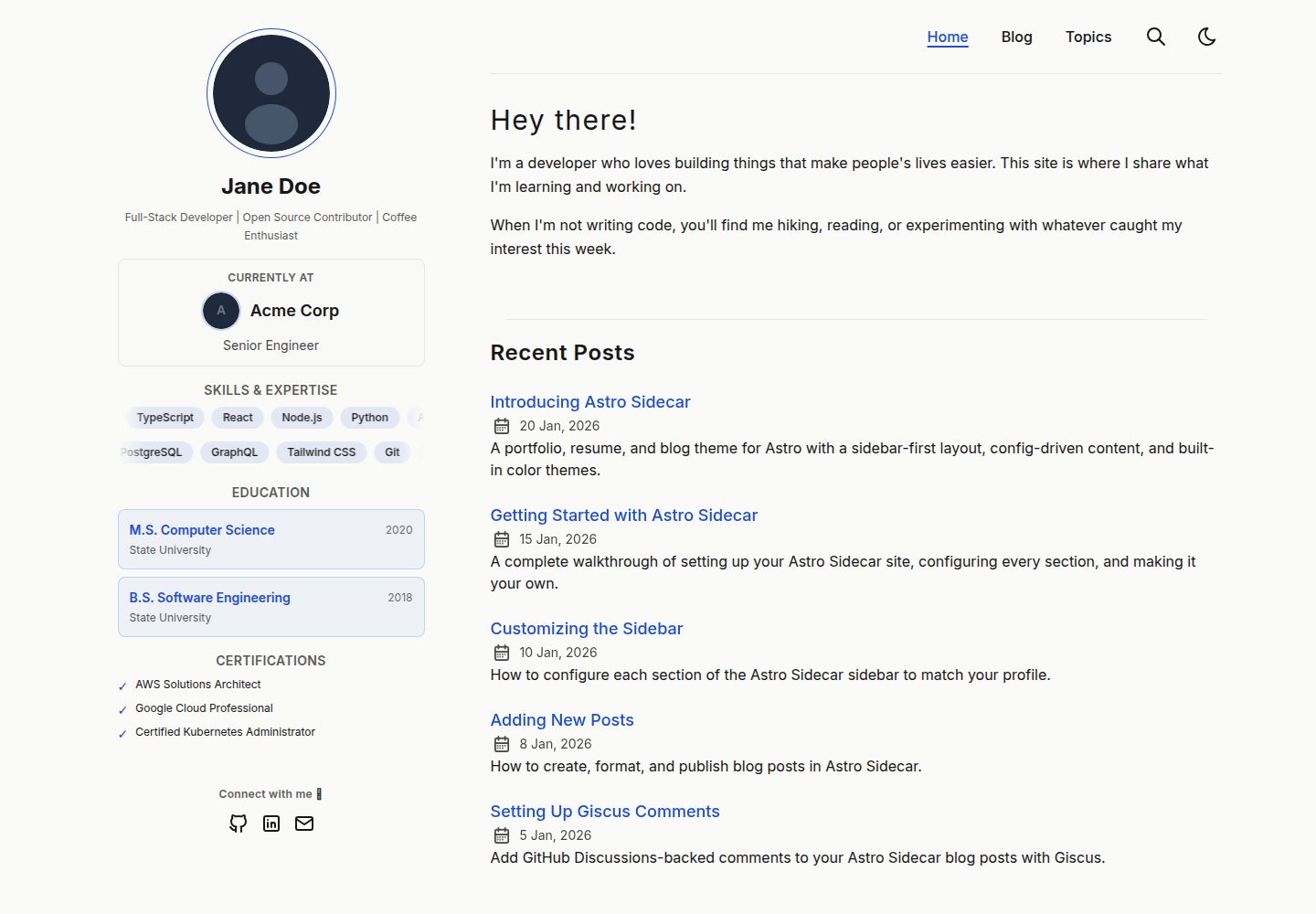
侧边栏集中展示个人资料、技能、教育、认证与社交链接,各区块可独立开关
Astro作品集博客
astro-sidecar — Astro 作品集模板
作者 dmcphearson
面向 Astro 的作品集、简历与博客主题,采用侧边栏布局,站点内容集中在 src/config.ts 中配置。
看看你的网站会是什么样
浏览真实页面截图,比较内容排版与手机效果。点击下方缩略图切换,放大查看整页细节。
全部页面与视图 3
截图用于了解视觉与布局,交互效果请以实际项目为准。
采集于 2026-10-13查看来源
值得关注的模板亮点
从已有项目资料中,快速了解它的特点。
站点内容集中在 src/config.ts 配置,并使用 TypeScript 类型提供自动补全
博客支持标签、搜索、归档、RSS 与分页,以及草稿和定时发布
提供 light、dark、auto 三种主题模式,并支持自定义浅色与深色配色
可选 Giscus 评论与 Pagefind 全文搜索,页面切换带有视图过渡
模板详细介绍
Astro Sidecar 是一个用于 Astro 的作品集、简历与博客主题,核心特点是侧边栏布局。侧边栏包含个人资料、技能、教育经历、认证与社交链接,每个区块都可以独立开关;移动端侧边栏会折叠,并提供“View my background”切换入口。
站点内容集中在 src/config.ts 中配置,涵盖站点信息、个人资料、首页问候语、技能、教育、认证、项目、导航、评论与社交链接等部分,并使用 TypeScript 类型提供自动补全。首页提供项目网格,博客支持标签、搜索、归档、RSS 与分页,并支持草稿与定时发布。
主题提供 light、dark、auto 三种模式,auto 模式跟随系统偏好并在导航中显示切换按钮;也可以自定义浅色与深色下的背景、前景、强调色、弱化色与边框色。评论通过 Giscus 接入 GitHub Discussions,搜索使用 Pagefind,页面切换带有视图过渡。
该仓库采用 MIT 许可,可免费使用、修改、商用和分发该版本代码;分发代码副本或实质性部分时需保留版权声明与完整 MIT 许可声明。演示图片、字体、图标等第三方素材需按各自许可核对,域名、托管等外部服务可能另外收费。
Astro作品集博客
适合你的项目吗?
适用场景
- 搭建同时承载作品集、在线简历与博客的个人站点
- 用配置文件集中管理个人资料、技能、教育、认证与项目信息
- 为博客添加标签、搜索、归档、RSS 与分页等阅读功能
- 通过 Giscus 接入 GitHub Discussions 作为文章评论区
适合人群
- 希望用 Astro 构建个人作品集与简历页面的开发者
- 需要博客与个人介绍合并为一个站点的内容创作者
- 偏好通过单一配置文件维护站点内容的用户
- 需要浅色、深色或跟随系统主题切换的站点
上手与定制指南
结合仓库当前版本的说明,按下面的资料检查内容、配置与运行要求。
- 1
克隆仓库后执行 npm install,再运行 npm run dev 启动开发服务器
- 2
打开 src/config.ts,将演示内容替换为自己的资料、项目与社交链接
- 3
博客文章以 Markdown 文件放在 src/content/blog/ 目录下
- 4
使用 Giscus 评论需在配置中填写对应的 GitHub Discussions 参数
- 5
自定义配色需将 colorPreset 设为 custom 并提供浅色与深色值
授权与来源资料
使用条件与限制
免费使用 · 保留许可声明本次收录的是公开仓库中采用 MIT 许可的免费版本;免费范围为该版本代码,不代表外部服务或第三方素材免费。
使用时需要遵守
- 允许免费使用、修改、商用和分发该版本代码。
- 分发代码副本或实质性部分时,保留原作者版权声明和完整 MIT 许可声明。
- 代码按现状提供;担保与责任限制以原许可证及适用法律为准。
额外费用与待核对事项
- 演示图片、字体、图标及其他第三方素材需按各自许可核对,不能仅凭代码的 MIT 许可判断。
- 域名、托管、数据库、支付或 AI 等外部服务可能另外收费。
- Giscus 评论为可选功能,需依托 GitHub Discussions 提供,使用前需在配置中填写对应参数并依赖 GitHub 服务。
- README 将 Cloudflare Pages 列为部署方式,实际部署需使用该外部托管服务,可能产生额外费用或需注册账号。
查看原文依据
Permission is hereby granted, free of charge
许可证原文
Optional Giscus comments backed by GitHub Discussions
README 原文
https://github.com/dmcphearson/astro-sidecar/blob/main/LICENSEhttps://github.com/dmcphearson/astro-sidecar/blob/main/README.mdDeployment** - [Cloudflare Pages](https://pages.cloudflare.com/)
README 原文
DeepSeek 根据仓库许可证和 README 整理 ·2026-10-13。结果仅覆盖已读取资料,依赖、图片、字体及后续条款变更以各自原文为准。
项目核对记录与介绍依据
模板资料
- 来源平台
- GitHub
- 资料与维护参考分
- 资料较完整 · 85 / 100
- 技术栈
- Astro
- 网站类型
- 作品集 · 博客
这个分数如何计算
本站按许可资料(最高30分)、演示链接(12分)、预览图(10分)、Star数(15分)、记录的维护时间(15分)、描述完整度(8分)、功能记录(5分)和分类资料(5分)计算。它不是代码、安全或性能测试,也不是 Google 评分;有链接不代表已实测可用。
这个项目需要核对什么
- 记录的仓库更新时间
- 2026-05-20
- 截图检查日期
- 2026-10-13
已收录演示链接。请用你的内容与屏幕尺寸检查;有演示不代表表单、认证或支付已经可用。
目录记录的主要技术栈是 Astro。请通过依赖清单和锁文件核对实际版本与托管要求。这些说明基于收录资料,不代表代码审计或部署实测。
查看具体选型方法 →介绍的制作与核对状态
介绍由 AI 辅助整理目录与仓库资料。仓库作者不等于这篇介绍的审核者。
审核声明: [email protected] · 2026-10-13
查看当时使用的来源资料
SHA-256: ceea28e4bd96a252100428eebcb9252198d467ebf2fc810a80d7723d5569dfae
2026-10-13T00:16:40.617Z
来源文件 / 仓库# Astro Sidecar




A portfolio, resume, and blog theme for [Astro](https://astro.build) with a distinctive sidebar layout. Built for professionals who want a personal site that doubles as an online resume.
Configure everything from a single file -- your profile, skills, education, certifications, projects, and blog are all driven by `src/config.ts`.
[Live Demo](https://astro-sidecar.pages.dev/) | [Getting Started](https://astro-sidecar.pages.dev/posts/getting-started-with-astro-sidecar/)
## Features
- [x] Config-driven sidebar with profile, skills, education, certifications, and social links
- [x] Every sidebar section independently toggleable
- [x] Projects grid on the homepage
- [x] Blog with tags, search, archives, RSS, and pagination
- [x] Custom color themes (define your own light/dark accent colors)
- [x] Theme mode: `light`, `dark`, or `auto` (toggle + system preference)
- [x] Optional Giscus comments backed by GitHub Discussions
- [x] Full-text search via Pagefind
- [x] View transitions for smooth page navigation
- [x] Responsive design (sidebar collapses on mobile with "View my background" toggle)
- [x] Social sharing (WhatsApp, Facebook, Bluesky, Mastodon, X, Email)
- [x] Collapsible table of contents
- [x] SEO-friendly with Open Graph metadata
- [x] Accessible (keyboard navigation, screen readers, sufficient contrast)
- [x] Sitemap and RSS feed
- [x] Draft posts and scheduled publishing
## Lighthouse Score
<p align="center">
<a href="https://pagespeed.web.dev/analysis/https-astro-sidecar-pages-dev/27rfvq88oc?form_factor=desktop">
<img width="710" alt="Astro Sidecar Lighthouse Score" src="lighthouse-score.svg">
</a>
</p>
## Project Structure
```
/
├── public/
│ ├── assets/ # Profile photo, company logo, post images
│ ├── fonts/ # Self-hosted Inter font files
│ └── favicon.ico
├── src/
│ ├── assets/
│ │ └── icons/ # SVG icons (social, UI)
│ ├── components/ # Astro components (Sidebar, Header, Card, etc.)
│ ├── content/
│ │ └── blog/ # Markdown blog posts
│ ├── layouts/ # Page layouts (SidebarLayout, PostDetails, etc.)
│ ├── pages/ # File-based routing
│ ├── scripts/ # Client-side scripts (theme toggle)
│ ├── styles/ # Global CSS and typography
│ ├── utils/ # Post filtering, sorting, slugification
│ ├── config.ts # All site configuration lives here
│ ├── constants.ts # Share link definitions
│ ├── content.config.ts
│ └── types.ts # TypeScript types for all config sections
└── astro.config.ts
```
## Quick Start
```bash
git clone https://github.com/dmcphearson/astro-sidecar.git my-site
cd my-site
npm install
npm run dev
```
Open `src/config.ts` and replace the demo content with your own.
## Configuration
All site content is configured in `src/config.ts`. Each section is typed with TypeScript for autocompletion.
| Section | Description |
|---------|-------------|
| `SITE` | URL, title, description, theme mode, custom colors, posts per page |
| `PROFILE` | Photo, name, tagline, current company (optional) |
| `HERO` | Homepage greeting and intro paragraphs |
| `SKILLS` | Scrolling skill tags in the sidebar (toggleable) |
| `EDUCATION` | Degree, year, and school entries (toggleable) |
| `CERTIFICATIONS` | Certification name strings (toggleable) |
| `PROJECTS` | Homepage project grid with name, description, status, optional URL |
| `NAV_ITEMS` | Navigation menu links |
| `COMMENTS` | Giscus comment integration |
| `SOCIALS` | Social links (GitHub, LinkedIn, Mail, Substack, etc.) |
### Custom Colors
The default theme uses a blue accent in light mode and green in dark mode. To define your own colors, set `colorPreset: "custom"` and provide light and dark values:
```ts
colorPreset: "custom",
customColors: {
light: { background: "#fafaf8", foreground: "#171717", accent: "#9333ea", muted: "#f3f4f6", border: "#e5e7eb" },
dark: { background: "#101012", foreground: "#f5f5f7", accent: "#c084fc", muted: "#262628", border: "#373738" },
},
```
### Theme Modes
- `"dark"` -- dark mode only, no toggle
- `"light"` -- light mode only, no toggle
- `"auto"` -- respects system preference, shows a toggle in the nav
## Blog Posts
Create markdown files in `src/content/blog/`:
```yaml
---
title: Your Post Title
author: Your Name
pubDatetime: 2026-01-15T10:00:00Z
slug: your-post-slug
featured: true
draft: false
tags:
- tag1
- tag2
description: A short description for previews and SEO.
---
```
## Tech Stack
**Framework** - [Astro](https://astro.build/) v6
**Type Checking** - [TypeScript](https://www.typescriptlang.org/)
**Styling** - [Tailwind CSS](https://tailwindcss.com/) v4
**Static Search** - [Pagefind](https://pagefind.app/)
**Icons** - [Tabler Icons](https://tabler-icons.io/)
**Code Formatting** - [Prettier](https://prettier.io/)
**Linting** - [ESLint](https://eslint.org)
**Deployment** - [Cloudflare Pages](https://pages.cloudflare.com/)
## Commands
| Command | Action |
|---------|--------|
| `npm run dev` | Start dev server at `localhost:4321` |
| `npm run build` | Build production site to `./dist/` |
| `npm run preview` | Preview production build locally |
| `npm run format` | Format code with Prettier |
| `npm run lint` | Lint with ESLint |
## Acknowledgments
Inspired by [AstroPaper](https://github.com/satnaing/astro-paper) by Sat Naing.
## License
MIT
看看同类模板
对比同技术栈与用途的模板,找到更适合的视觉与内容结构。

astrowind
⭕️ AstroWind: A free template using Astro v7 and Tailwind CSS v4. Astro starter theme.
Astro · 博客

astro-paper
基于 Astro 的博客主题,使用 Markdown/MDX 内容、Tailwind 样式和 Pagefind 搜索。搜索属于博客功能,不代表独立工具站产品。
Astro · 博客

fuwari
✨A static blog template built with Astro.
Astro · 博客

Firefly
Firefly 是一款基于 Astro 的静态博客主题,由 CuteLeaf 在 saicaca 的 Fuwari 模板基础上二次开发,主打清新美观的视觉风格。
Astro · 博客

astro-theme-cactus
面向博客与笔记发布的 Astro 启动模板,支持 Markdown/MDX 内容、Tailwind 样式与 Pagefind 搜索,主要用途是发布文章和笔记。
Astro · 博客

astrofy
Astrofy is a free and open-source template for your Personal Portfolio Website built with Astro and TailwindCS…
Astro · 作品集