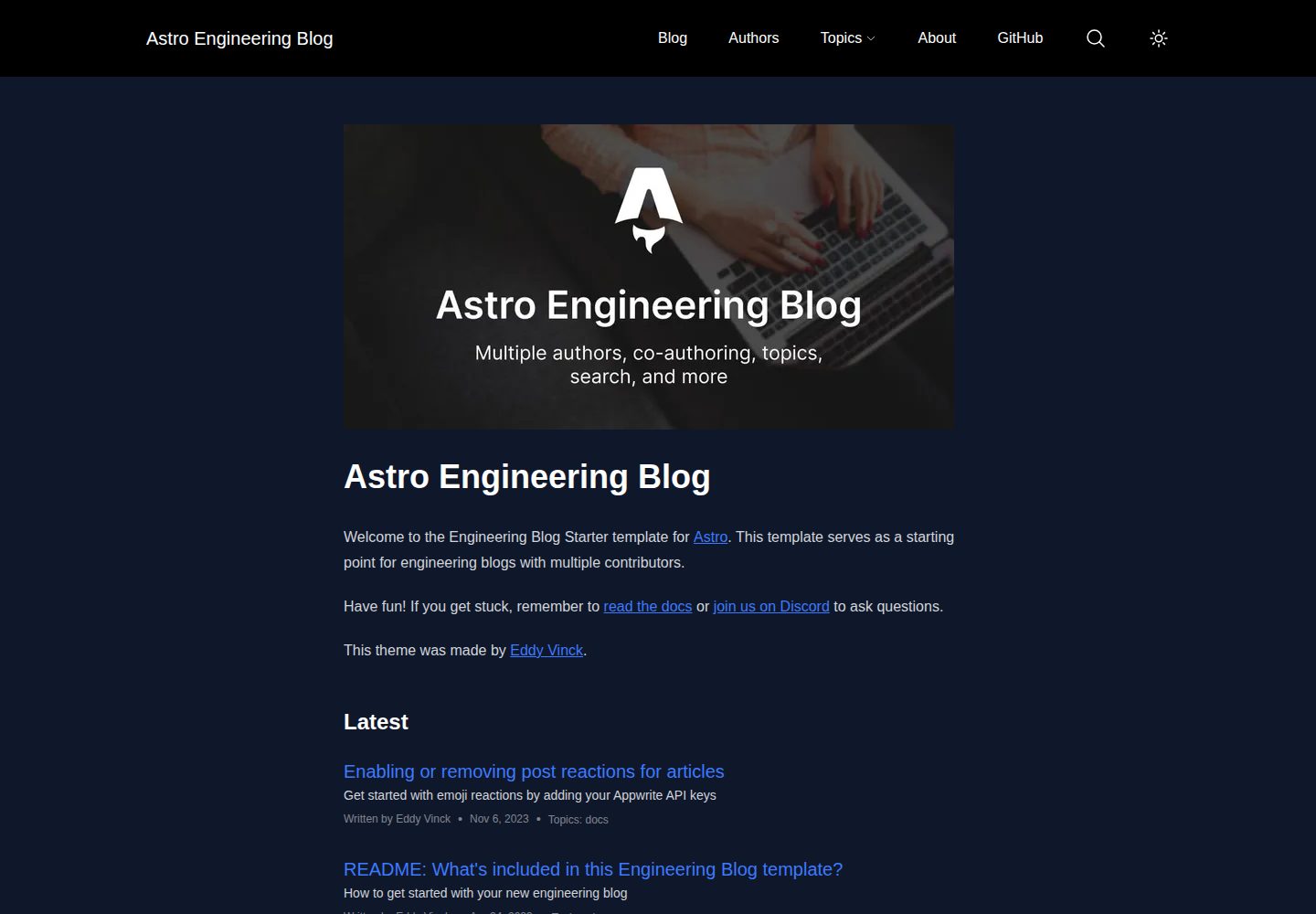
多作者系统,支持一篇文章由多位作者共同署名
AstroSolidJS博客
astro-engineering-blog — Astro 博客模板
作者 EddyVinck
基于 Astro 与 SolidJS 的工程博客模板,支持多作者、共同署名、主题分类、搜索、分页、草稿与暗色模式,可选接入 Appwrite 实现文章表情回应与排行。
看看你的网站会是什么样
浏览真实页面截图,比较内容排版与手机效果。点击下方缩略图切换,放大查看整页细节。
全部页面与视图 3
截图用于了解视觉与布局,交互效果请以实际项目为准。
采集于 2026-10-07查看来源
值得关注的模板亮点
从已有项目资料中,快速了解它的特点。
内置主题分类、博客分页、草稿、站点地图与 RSS 订阅
SolidJS 实现的站内搜索,搜索逻辑使用 Fuse.js
暗色模式同时支持系统偏好与手动切换按钮
可选 Appwrite 后端,用于文章表情回应与文章排行页面
使用 astro:assets 处理图片,并提供 canonical URL 与 OpenGraph 元数据
模板详细介绍
这是一个面向工程团队或个人技术写作者的博客模板,以 Astro 作为主框架,用 SolidJS 处理搜索等需要 JavaScript 的交互功能,样式基于 Tailwind CSS,搜索逻辑使用 Fuse.js,代码以 TypeScript 编写。内容以 Markdown 与 MDX 形式存放在 src/content/blog/ 中,通过 Astro 内容集合与 getCollection() 读取,可用 schema 校验 frontmatter。
模板内置作者系统,支持一篇文章多位作者共同署名,并提供主题(Topics)分类、博客分页、草稿、站点地图、RSS 订阅、canonical URL 与 OpenGraph 元数据。图片通过 astro:assets 处理。暗色模式同时跟随系统偏好并提供切换按钮。搜索功能由 SolidJS 组件实现。
可选的 Appwrite 后端用于文章表情回应和博客文章排行页面,需要在 .env 中配置 API key、endpoint、project ID、database ID 与 reactions collection ID;不配置时该部分功能不可用。品牌名称、站点标题、站点 URL、描述和每页文章数在 src/consts.ts 中修改,favicon 等 head 内容在 src/components/BaseHead.astro 中调整,颜色在 tailwind 配置中定义。
仓库采用 MIT 许可,可免费使用、修改、商用和分发该版本代码,分发时需保留版权声明与完整 MIT 许可声明。演示图片、字体、图标等第三方素材需单独核对许可,域名、托管及 Appwrite 等外部服务可能产生费用。
AstroSolidJS博客
适合你的项目吗?
适用场景
- 工程团队搭建对外技术博客,需要多位工程师共同发文
- 个人开发者建立带主题分类与站内搜索的技术写作站点
- 希望以 Markdown/MDX 管理内容并保留 RSS 与站点地图的博客
- 需要暗色模式与文章表情互动、排行等可选功能的博客项目
适合人群
- 熟悉 Astro 或愿意按文档配置内容集合的开发者
- 需要多作者与共同署名机制的工程博客维护者
- 接受以 TypeScript 与 Tailwind CSS 进行样式和逻辑定制的团队
上手与定制指南
结合仓库当前版本的说明,按下面的资料检查内容、配置与运行要求。
- 1
使用 npm create astro@latest -- --template eddyvinck/astro-engineering-blog 创建项目,然后 npm install 安装依赖
- 2
在 src/consts.ts 中修改 BRAND、SITE_TITLE、SITE_URL、SITE_DESCRIPTION 与 PAGINATION_POSTS_PER_PAGE
- 3
favicon 等 head 内容在 src/components/BaseHead.astro 中调整,颜色在 Tailwind 配置中修改
- 4
如需表情回应与文章排行,在 .env 中配置 Appwrite 的 API key、endpoint、project ID、database ID 与 reactions collection ID
- 5
常用命令:npm run dev 启动本地开发,npm run build 构建到 ./dist/,npm run preview 本地预览构建结果
授权与来源资料
使用条件与限制
免费使用 · 保留许可声明本次收录的是公开仓库中采用 MIT 许可的免费版本;免费范围为该版本代码,不代表外部服务或第三方素材免费。
使用时需要遵守
- 允许免费使用、修改、商用和分发该版本代码。
- 分发代码副本或实质性部分时,保留原作者版权声明和完整 MIT 许可声明。
- 代码按现状提供;担保与责任限制以原许可证及适用法律为准。
额外费用与待核对事项
- 演示图片、字体、图标及其他第三方素材需按各自许可核对,不能仅凭代码的 MIT 许可判断。
- 域名、托管、数据库、支付或 AI 等外部服务可能另外收费。
- 文章表情回应与博客文章排行页面为可选功能,依赖 Appwrite 服务(README 称使用其免费额度);不接入 Appwrite 时该功能不可用。
- 启用后端服务需要自行提供 Appwrite API key,并在 .env 中配置 endpoint、project ID、database ID 与 reactions collection ID。
- 使用可选后端功能需在 /.env 中填入自己的 Appwrite API key,属于外部服务凭据要求。
查看原文依据
Permission is hereby granted, free of charge
许可证原文
✅ [Post reactions & blog post ranking page](./src/content/blog/enabling-emoji-reactions.md) (optional, uses Appwrite's free tier)
README 原文
You can enable backend services to your project by adding an [Appwrite](https://appwrite.io/) API key:
README 原文
https://github.com/EddyVinck/astro-engineering-blog/blob/main/LICENSEhttps://github.com/EddyVinck/astro-engineering-blog/blob/main/README.mdSECRET_APPWRITE_API_KEY=YOUR_APPWRITE_API_KEY
README 原文
DeepSeek 根据仓库许可证和 README 整理 ·2026-10-07。结果仅覆盖已读取资料,依赖、图片、字体及后续条款变更以各自原文为准。
项目核对记录与介绍依据
模板资料
- 来源平台
- GitHub
- 资料与维护参考分
- 资料较完整 · 77 / 100
- 技术栈
- Astro · SolidJS
- 网站类型
- 博客
这个分数如何计算
本站按许可资料(最高30分)、演示链接(12分)、预览图(10分)、Star数(15分)、记录的维护时间(15分)、描述完整度(8分)、功能记录(5分)和分类资料(5分)计算。它不是代码、安全或性能测试,也不是 Google 评分;有链接不代表已实测可用。
这个项目需要核对什么
- 记录的仓库更新时间
- 2024-10-04
- 截图检查日期
- 2026-10-07
已收录演示链接。请用你的内容与屏幕尺寸检查;有演示不代表表单、认证或支付已经可用。
目录记录的主要技术栈是 Astro。请通过依赖清单和锁文件核对实际版本与托管要求。这些说明基于收录资料,不代表代码审计或部署实测。
查看具体选型方法 →介绍的制作与核对状态
介绍由 AI 辅助整理目录与仓库资料。仓库作者不等于这篇介绍的审核者。
审核声明: [email protected] · 2026-10-08
查看当时使用的来源资料
SHA-256: 131ccd02a6d4482a6585048c879d4236d1186b7d9d311525e4ee9a232be773ac
2026-10-07T22:25:32.423Z
来源文件 / 仓库
# Astro Starter Kit: Engineering Blog
This template was built to easily create an engineering blog for one or multiple authors.
Demo: <https://astro-engineering-blog.netlify.app/>
## Features
- ✅ Easy configuration
- ✅ Minimal styling (make it your own!)
- ✅ 100/100 Lighthouse performance
- ✅ SEO-friendly with canonical URLs and OpenGraph data
- ✅ Uses [`astro:assets`](https://docs.astro.build/en/guides/assets/) for optimized images
- ✅ Sitemap support
- ✅ RSS Feed support
- ✅ Markdown & MDX support
- ✅ Search functionality
- ✅ Author system
- ✅ Multiple authors per post (co-authoring)
- ✅ Topics
- ✅ Blog pagination
- ✅ Blog drafts
- ✅ Dark mode (system preference + toggle button)
- ✅ [Post reactions & blog post ranking page](./src/content/blog/enabling-emoji-reactions.md) (optional, uses Appwrite's free tier)
## Technologies used
- Astro as the framework tying everything together
- Solid.js for search (all `.tsx` files) and any other features that require JavaScript
- Tailwind CSS for styling
- Fuse.js for search logic
- Everything is written in TypeScript 💙
## Getting started
```
npm create astro@latest -- --template eddyvinck/astro-engineering-blog
```
### Configuration
Edit the values in `src/consts.ts` to match your brand or company:
```ts
export const BRAND = "Acme";
export const SITE_TITLE = "Acme Engineering";
export const SITE_URL = "https://astro-engineering-blog.netlify.app";
export const SITE_DESCRIPTION = "Welcome to the Acme Engineering blog!";
export const PAGINATION_POSTS_PER_PAGE = 5;
```
Change any lines or add more in the `<head>` tags in `src/components/BaseHead.astro`, like the favicon:
```html
<link rel="icon" type="image/svg+xml" href="/favicon.svg" />
```
You can also update the colors in `tailwind.config.css`:
```js
/** @type {import('tailwindcss').Config} */
module.exports = {
content: ["./src/**/*.{astro,html,js,jsx,md,mdx,svelte,ts,tsx,vue}"],
theme: {
extend: {
colors: {
header: "#000",
"header-foreground": "#fff",
"header-dropdown": "#1e293b",
"header-dropdown-foreground": "#fff",
link: "#2563EB",
"link-dark": "#3e7afe",
primary: {
500: "#2563EB",
600: "#1D4ED8",
},
"primary-foreground": "#fff",
},
```
#### Optional: enable backend services
You can enable backend services to your project by adding an [Appwrite](https://appwrite.io/) API key:
```
# in /.env
SECRET_APPWRITE_API_KEY=YOUR_APPWRITE_API_KEY
PUBLIC_APPWRITE_ENDPOINT=https://cloud.appwrite.io/v1
PUBLIC_APPWRITE_PROJECT_ID=PUBLIC_APPWRITE_PROJECT_ID
PUBLIC_APPWRITE_DATABASE_ID=PUBLIC_APPWRITE_DATABASE_ID
PUBLIC_APPWRITE_EMOJI_REACTIONS_COLLECTION_ID=post-reactions
```
## Thank you ❤️
- Astro team & all the other library authors
- The maintainers of the [Astro blog template](https://github.com/withastro/astro/tree/latest/examples/blog?on=github) which was used as a base for this template
- [FrontValue](https://frontvalue.nl/), for letting me work on this template during work hours
## 🚀 Project Structure
Inside of your Astro project, you'll see the following folders and files:
```
├── public/
├── src/
│ ├── components/
│ ├── content/
│ ├── layouts/
│ └── pages/
├── astro.config.mjs
├── README.md
├── package.json
└── tsconfig.json
```
Astro looks for `.astro` or `.md` files in the `src/pages/` directory. Each page is exposed as a route based on its file name.
There's nothing special about `src/components/`, but that's where we like to put any Astro/React/Vue/Svelte/Preact components.
The `src/content/` directory contains "collections" of related Markdown and MDX documents. Use `getCollection()` to retrieve posts from `src/content/blog/`, and type-check your frontmatter using an optional schema. See [Astro's Content Collections docs](https://docs.astro.build/en/guides/content-collections/) to learn more.
Any static assets, like images, can be placed in the `public/` directory.
## CLI Commands
All commands are run from the root of the project, from a terminal:
| Command | Action |
| :--------------------- | :----------------------------------------------- |
| `npm install` | Installs dependencies |
| `npm run dev` | Starts local dev server at `localhost:3000` |
| `npm run build` | Build your production site to `./dist/` |
| `npm run preview` | Preview your build locally, before deploying |
| `npm run astro ...` | Run CLI commands like `astro add`, `astro check` |
| `npm run astro --help` | Get help using the Astro CLI |
### Learn more about Astro
Check out [the documentation](https://docs.astro.build) or jump into the [Discord server](https://astro.build/chat).
看看同类模板
对比同技术栈与用途的模板,找到更适合的视觉与内容结构。

astrowind
⭕️ AstroWind: A free template using Astro v7 and Tailwind CSS v4. Astro starter theme.
Astro · 博客

astro-paper
A minimal, accessible and SEO-friendly Astro blog theme.
Astro · 博客

fuwari
✨A static blog template built with Astro.
Astro · 博客

Firefly
Firefly 是一款基于 Astro 的静态博客主题,由 CuteLeaf 在 saicaca 的 Fuwari 模板基础上二次开发,主打清新美观的视觉风格。
Astro · 博客

astro-theme-cactus
A simple Astro theme. Use it to create your blog or website.
Astro · 作品集

astrofy
Astrofy is a free and open-source template for your Personal Portfolio Website built with Astro and TailwindCS…
Astro · 作品集