基于 Astro 静态生成,配合 React 处理交互组件
AstroReact作品集
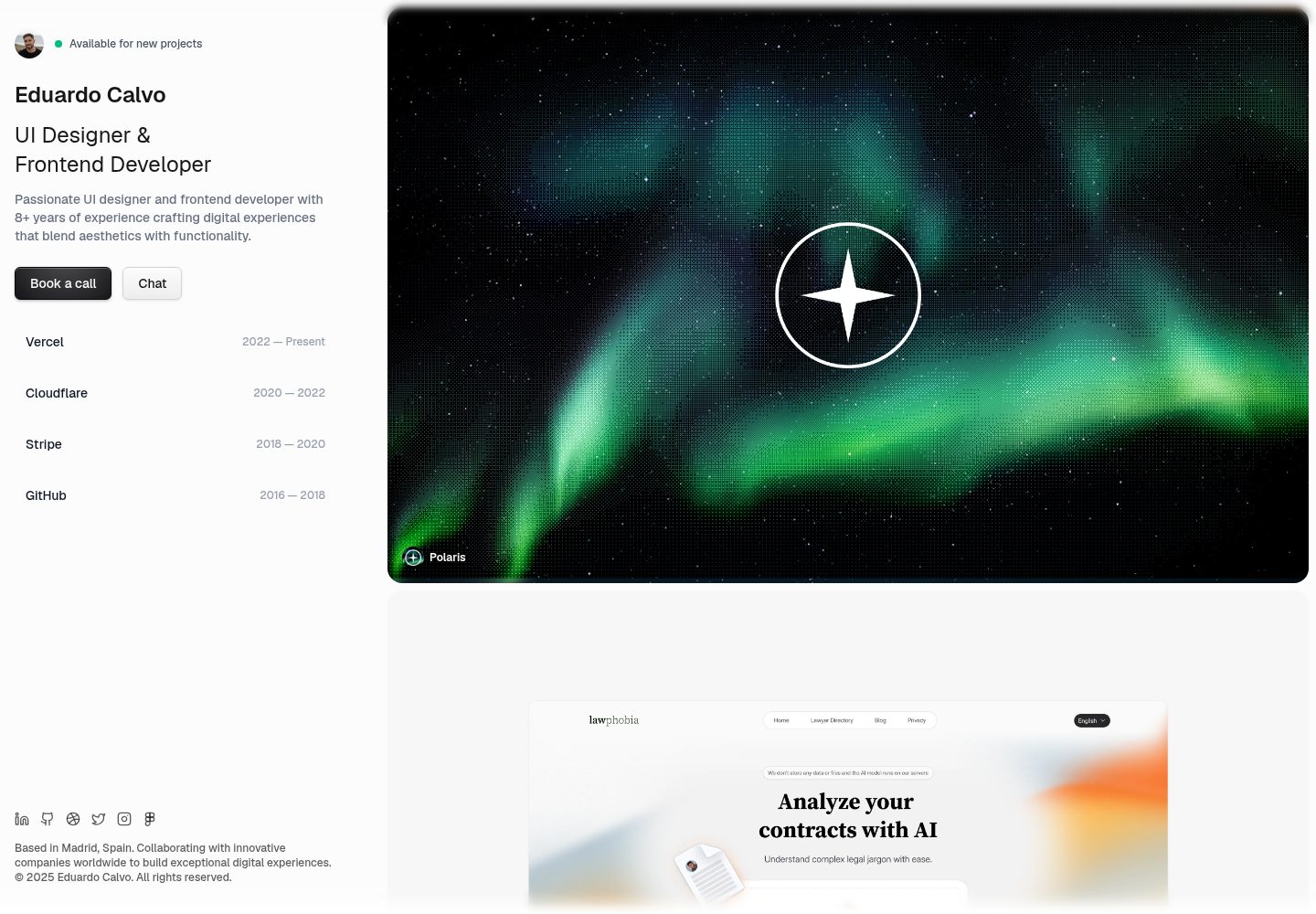
Polaris — Astro 作品集模板
作者 educlopez
Polaris 是一个基于 Astro 与 React 的个人作品集模板,用 Markdown/MDX 管理项目内容,适合设计师与开发者搭建静态作品展示站点。
看看你的网站会是什么样
浏览真实页面截图,比较内容排版与手机效果。点击下方缩略图切换,放大查看整页细节。
全部页面与视图 3
截图用于了解视觉与布局,交互效果请以实际项目为准。
采集于 2026-10-03查看来源
值得关注的模板亮点
从已有项目资料中,快速了解它的特点。
项目内容以 Markdown/MDX 文件管理,位于 src/content/projects/
站点信息集中在 src/config/site.json,便于统一修改个人资料与社交链接
使用 Tailwind CSS、Radix UI、Lucide 等构建界面与图标
包含 CI 工作流与 Vercel 部署配置,构建产物可部署到任意静态托管
仓库采用 MIT 许可,允许免费使用、修改、商用和分发
模板详细介绍
Polaris 是作者 Eduardo Calvo 发布在 GitHub 上的个人作品集模板,采用 Astro 作为静态站点生成器,并引入 React 处理交互组件。模板定位明确:为设计师、开发者等创意工作者提供展示项目的起点,页面结构包含首页与动态项目详情页,项目内容以 Markdown/MDX 文件形式存放在 src/content/projects/ 目录中,站点级信息(个人简介、联系方式、社交链接、经历时间线、项目网格布局等)集中在 src/config/site.json 中维护。
技术组成上,模板使用 Tailwind CSS 做样式,Lucide 提供图标,Radix UI 提供可访问的组件基础,Class Variance Authority 管理组件变体,Sharp 处理图片优化,Biome 负责代码检查与格式化,TypeScript 提供类型支持。仓库包含 CI 工作流与 Vercel 部署配置,构建产物为静态文件,可部署到 Vercel、Netlify、GitHub Pages 或其他静态托管服务。
使用限制方面,模板需要 Node.js 22.12 或更高版本,推荐使用 pnpm 安装依赖;开发服务器默认运行在 localhost:4321。仓库采用 MIT 许可,可免费使用、修改、商用和分发该版本代码,但演示图片、字体、图标等第三方素材需单独核对许可,域名、托管等外部服务可能产生费用。README 中提到的框架版本号未在依赖清单中逐项核对,此处不展开。
AstroReact作品集
适合你的项目吗?
适用场景
- 设计师或开发者搭建个人作品集网站,展示项目案例与个人经历
- 用 Markdown/MDX 维护项目详情页,减少重复的页面编写工作
- 作为 Astro + React + Tailwind 组合的起步项目,在此基础上调整样式与内容
- 部署到 Vercel、Netlify 或 GitHub Pages 等静态托管服务
适合人群
- 需要快速搭建个人作品集的设计师、开发者或创意工作者
- 熟悉 Markdown 与前端构建工具,愿意自行修改配置和样式的用户
- 希望使用静态站点方案、自行控制托管与部署的开发者
上手与定制指南
结合仓库当前版本的说明,按下面的资料检查内容、配置与运行要求。
- 1
需要 Node.js 22.12 或更高版本,推荐使用 pnpm 安装依赖
- 2
克隆仓库后执行 pnpm install,再用 pnpm dev 启动本地开发服务器(默认 localhost:4321)
- 3
站点信息在 src/config/site.json 中修改,项目内容添加到 src/content/projects/ 目录
- 4
构建命令为 pnpm build,产物输出到 ./dist/,可部署到任意静态托管服务
- 5
代码采用 MIT 许可,但演示图片、字体、图标等第三方素材需单独核对许可
授权与来源资料
使用条件与限制
免费使用 · 保留许可声明本次收录的是公开仓库中采用 MIT 许可的免费版本;免费范围为该版本代码,不代表外部服务或第三方素材免费。
使用时需要遵守
- 允许免费使用、修改、商用和分发该版本代码。
- 分发代码副本或实质性部分时,保留原作者版权声明和完整 MIT 许可声明。
- 代码按现状提供;担保与责任限制以原许可证及适用法律为准。
额外费用与待核对事项
- 使用该模板需要本地安装 Node.js 22.12 或更高版本,低于此版本无法运行 Astro 7 构建流程。
- README 推荐使用 pnpm 作为包管理器,若改用 npm 或 yarn 需自行调整依赖安装与脚本命令。
- 本地开发服务器默认占用 4321 端口,若该端口被占用需自行修改配置。
- 模板构建产物为静态文件,部署需自行准备静态托管服务,域名与托管可能产生外部费用。
- 演示图片、字体、图标及其他第三方素材需按各自许可核对,不能仅凭代码的 MIT 许可判断。
- 域名、托管、数据库、支付或 AI 等外部服务可能另外收费。
查看原文依据
Permission is hereby granted, free of charge
许可证原文
Node.js (version 22.12 or higher — required by Astro 7)
README 原文
pnpm (recommended)
README 原文
Open your browser and navigate to `http://localhost:4321`
README 原文
https://github.com/educlopez/Polaris/blob/main/LICENSE.mdhttps://github.com/educlopez/Polaris/blob/main/README.mdThis project can be deployed to any static hosting service:
README 原文
DeepSeek 根据仓库许可证和 README 整理 ·2026-10-03。结果仅覆盖已读取资料,依赖、图片、字体及后续条款变更以各自原文为准。
项目核对记录与介绍依据
模板资料
- 来源平台
- Astro Themes
- 资料与维护参考分
- 资料较完整 · 92 / 100
- 技术栈
- Astro · React
- 网站类型
- 作品集
这个分数如何计算
本站按许可资料(最高30分)、演示链接(12分)、预览图(10分)、Star数(15分)、记录的维护时间(15分)、描述完整度(8分)、功能记录(5分)和分类资料(5分)计算。它不是代码、安全或性能测试,也不是 Google 评分;有链接不代表已实测可用。
这个项目需要核对什么
- 记录的仓库更新时间
- 2026-07-31
- 截图检查日期
- 2026-10-03
已收录演示链接。请用你的内容与屏幕尺寸检查;有演示不代表表单、认证或支付已经可用。
目录记录的主要技术栈是 Astro。请通过依赖清单和锁文件核对实际版本与托管要求。这些说明基于收录资料,不代表代码审计或部署实测。
查看具体选型方法 →介绍的制作与核对状态
介绍由 AI 辅助整理目录与仓库资料。仓库作者不等于这篇介绍的审核者。
审核声明: [email protected] · 2026-10-04
查看当时使用的来源资料
SHA-256: 820159815691ece80a6e5af870d52ee07c8c7ed19e6c842c873cb1296c0e0476
2026-10-03T15:58:22.559Z
来源文件 / 仓库
<p align="center">
<h1 align="center"><b>Polaris</b></h1>
<p align="center">
A modern, responsive personal portfolio template built with <a href="https://astro.build">Astro 7</a>.
<br />
<br />
<a href="https://github.com/educlopez/Polaris/actions/workflows/ci.yml"><img src="https://github.com/educlopez/Polaris/actions/workflows/ci.yml/badge.svg" alt="CI" /></a>
<br />
<br />
<a href="#whats-included"><strong>What's included</strong></a> ·
<a href="#prerequisites"><strong>Prerequisites</strong></a> ·
<a href="#getting-started"><strong>Getting Started</strong></a> ·
<a href="#how-to-use"><strong>How to use</strong></a> ·
<a href="#customization"><strong>Customization</strong></a>
</p>
</p>
Everything you need to build a stunning personal portfolio website. Polaris is an opinionated Astro template designed for designers and developers who want to showcase their work with a clean, modern aesthetic. Built with performance and user experience in mind, it provides a solid foundation that grows with your career.
## What's included
[Astro 7](https://astro.build/) - Static site generator (Vite 8 / Rolldown, Rust compiler, Sätteri markdown)<br>
[React](https://reactjs.org/) - Interactive components<br>
[Tailwind CSS](https://tailwindcss.com/) - Utility-first styling<br>
[Lucide](https://lucide.dev/) - Beautiful icon library<br>
[TypeScript](https://www.typescriptlang.org/) - Type safety<br>
[MDX](https://mdxjs.com/) - Enhanced markdown for content<br>
[Sharp](https://sharp.pixelplumbing.com/) - Image optimization<br>
[Class Variance Authority](https://cva.style/) - Component variant management<br>
[Radix UI](https://www.radix-ui.com/) - Accessible component primitives<br>
[Biome](https://biomejs.dev/) - Fast linter & formatter<br>
## Directory Structure
```
.
├── public/ # Static assets
│ ├── favicon.svg # Site favicon
│ └── image.png # Hero image
├── src/
│ ├── components/ # Reusable components
│ │ ├── ui/ # UI components (buttons, dropdowns, etc.)
│ │ ├── fade.astro # Fade animation component
│ │ └── listProjects.astro # Project listing component
│ ├── config/
│ │ └── site.json # Site configuration and content
│ ├── content/
│ │ └── projects/ # Project markdown files and images
│ ├── layouts/
│ │ └── Layout.astro # Main layout component
│ ├── lib/
│ │ └── utils.ts # Utility functions
│ ├── pages/
│ │ ├── index.astro # Homepage
│ │ └── projects/ # Dynamic project pages
│ └── styles/
│ └── global.css # Global styles
├── astro.config.mjs # Astro configuration
├── components.json # UI components configuration
├── package.json # Dependencies and scripts
├── tsconfig.json # TypeScript configuration
└── vercel.json # Vercel deployment configuration
```
## Prerequisites
Node.js (version 22.12 or higher — required by Astro 7)<br>
pnpm (recommended)<br>
Git<br>
## Getting Started
Clone this repo locally with the following command:
```bash
git clone <repository-url>
cd polaris
```
1. Install dependencies using pnpm:
```sh
pnpm install
```
2. Start the development server:
```sh
pnpm dev
```
3. Open your browser and navigate to `http://localhost:4321`
## How to use
This template is designed to be a starting point for your personal portfolio. It includes everything you need to showcase your work professionally while maintaining excellent performance and user experience.
### Key Features
- **Modern Tech Stack**: Built with Astro for optimal performance and React for interactive components
- **Responsive Design**: Fully responsive layout that looks great on all devices
- **Project Showcase**: Dynamic project pages with detailed case studies using MDX
- **Clean Design**: Minimalist aesthetic with smooth transitions and interactions
- **Content Management**: Markdown-based content for easy updates and maintenance
- **Performance Optimized**: Static site generation with optimized images and assets
- **Accessible**: Built with accessibility in mind using Radix UI primitives
### Available Scripts
| Command | Action |
| :--------------- | :----------------------------------------------- |
| `pnpm dev` | Starts local dev server at `localhost:4321` |
| `pnpm build` | Build your production site to `./dist/` |
| `pnpm preview` | Preview your build locally, before deploying |
| `pnpm check` | Type-check the project with `astro check` |
| `pnpm lint` | Lint & format check with Biome |
| `pnpm lint:fix` | Apply safe Biome lint/format fixes |
| `pnpm format` | Format the codebase with Biome |
| `pnpm astro ...` | Run CLI commands like `astro add`, `astro check` |
## Customization
### Site Configuration
Update `src/config/site.json` to modify:
- Personal information and bio
- Contact details and social links
- Professional experience timeline
- Project grid layout preferences
- Company information and specialties
### Adding Projects
1. Create a new markdown file in `src/content/projects/`
2. Add project images to `src/content/projects/images/`
3. Use the existing project structure as a template with frontmatter for metadata
### Styling
- Global styles are in `src/styles/global.css`
- Component-specific styles use Tailwind CSS classes
- Smooth transitions and interactions built with CSS
- UI components follow a consistent design system
### Deployment
This project can be deployed to any static hosting service:
- **Vercel**: Connect your repository for automatic deployments
- **Netlify**: Drag and drop the `dist` folder or connect your repository
- **GitHub Pages**: Use GitHub Actions for automated deployment
- **Any static hosting**: Upload the contents of the `dist` folder
## Recognition
Built with ❤️ by [Eduardo Calvo](https://github.com/educlopez) - UI Designer & Frontend Developer based in Madrid, Spain.
看看同类模板
对比同技术栈与用途的模板,找到更适合的视觉与内容结构。

astro-theme-cactus
A simple Astro theme. Use it to create your blog or website.
Astro · 作品集

astrofy
Astrofy is a free and open-source template for your Personal Portfolio Website built with Astro and TailwindCS…
Astro · 作品集

astro-nano
Astro Nano is a static, minimalist, lightweight, lightning fast portfolio and blog.
Astro · 作品集

astro-erudite
An opinionated, unstyled static blogging template built with Astro and native CSS.
Astro · 作品集

astro-sphere
Astro Sphere is a static, minimalist, lightweight, lightning fast portfolio and blog.
Astro · 作品集

astro-micro
Blog theme for Astro with search and comments built-in. Zero frameworks.
Astro · 作品集