使用 Eleventy 静态站点生成器与 Tailwind CSS 构建
Eleventy工具站启动器
eleventy-starter-tailwindcss — Eleventy 工具站模板
作者 enrichdev-en
基于 Eleventy 静态站点生成器与 Tailwind CSS 的启动模板,内置 PurgeCSS、PostCSS、HTMLMinifier、Cssnano 等构建工具,附带博客、关于、联系等示例页面,可用于快速搭建静态站点。
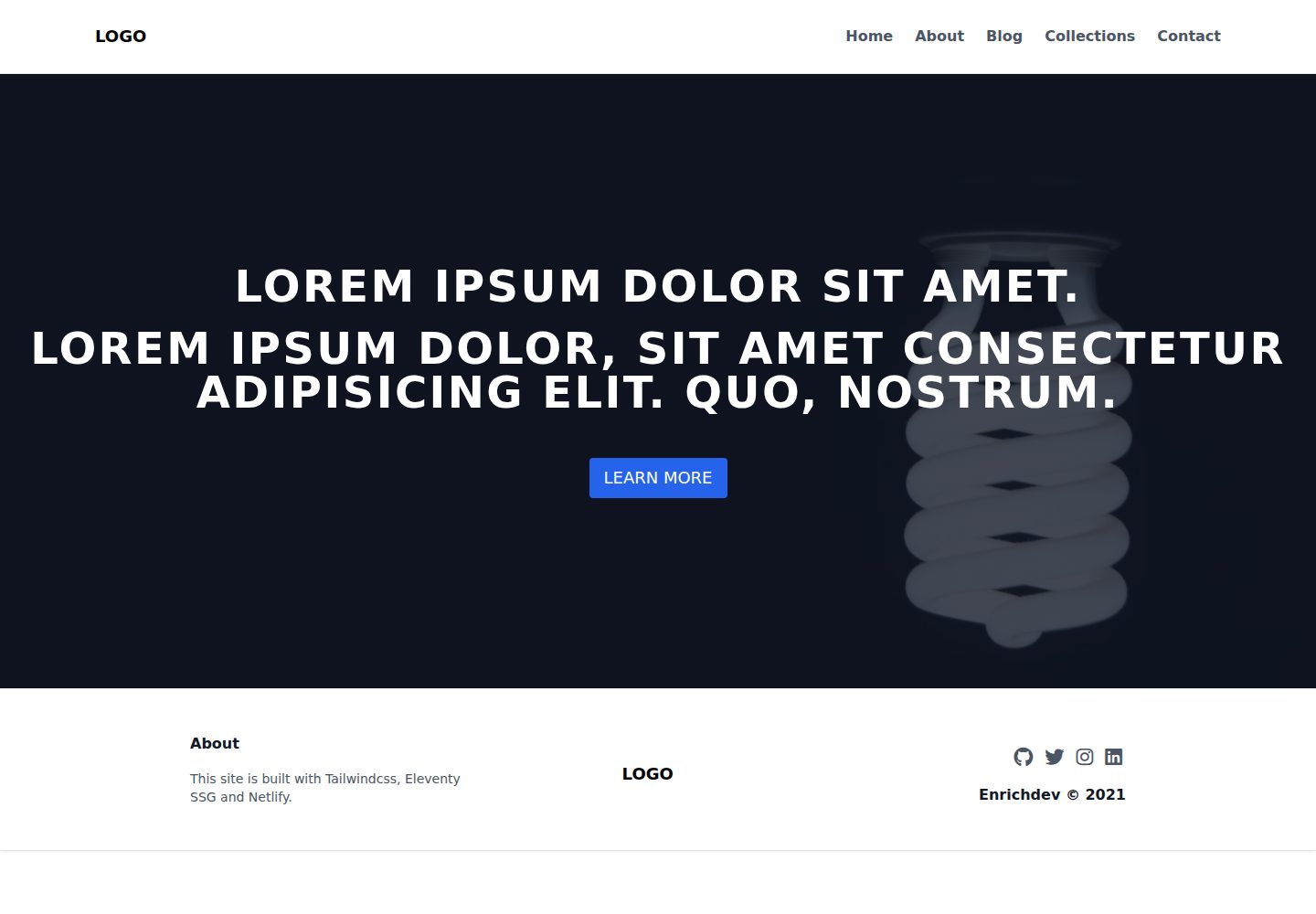
看看你的网站会是什么样
浏览真实页面截图,比较内容排版与手机效果。点击下方缩略图切换,放大查看整页细节。
全部页面与视图 3
截图用于了解视觉与布局,交互效果请以实际项目为准。
采集于 2026-10-03查看来源
值得关注的模板亮点
从已有项目资料中,快速了解它的特点。
集成 PurgeCSS、PostCSS、HTMLMinifier、Cssnano 等构建优化工具
提供博客、关于、联系、集合等示例页面与 Nunjucks 布局
附带 Netlify 一键部署按钮及构建配置说明
采用 MIT 许可,允许使用、修改、商用与分发
模板详细介绍
该模板由 Eleventy 静态站点生成器与 Tailwind CSS 工具类框架搭建,仓库采用 MIT 许可。构建流程中集成了 PurgeCSS 去除未使用 CSS、PostCSS 转换样式、HTMLMinifier 压缩 HTML、Cssnano 优化 CSS,并提供 Netlify 一键部署配置。
模板内容集中在 src 目录:_includes 存放 Nunjucks 布局与页头、页脚等局部模板;css/tailwind.css 用于注入 Tailwind 指令;posts 目录包含示例博客文章及 posts.json 数据文件;根级提供 index、about、blog、collections、contact 等示例页面。配置文件包括 eleventy.js、postcss.config.js、tailwind.config.js 与 _data/projEnv.js。
使用前需安装 Node.js 与 npm,Netlify 为可选项。开发模式执行 npm run dev,站点默认运行在 localhost:8080,中间文件输出到 _temp 目录;生产构建执行 npm run prod,优化后的文件输出到 _site 目录。Netlify 构建命令为 npm run build,发布目录为 _site。
模板附带 AOS 滚动动画库(通过 CDN 引入)、rimraf 与 npm-run-all 等辅助依赖。演示图片、字体、图标等第三方素材需按各自许可单独核对,不能仅凭代码的 MIT 许可判断。
Eleventy工具站启动器
适合你的项目吗?
适用场景
- 需要以 Eleventy 与 Tailwind CSS 快速起步的静态站点项目
- 搭建带博客文章列表与详情页的个人或文档站点
- 通过 Netlify 部署并希望预置构建命令与发布目录的站点
- 在构建流程中需要 CSS 清理与 HTML/CSS 压缩的静态项目
适合人群
- 熟悉 Node.js 与 npm 的前端开发者
- 使用 Eleventy 或 Nunjucks 模板的静态站点项目
- 计划部署到 Netlify 的静态站点
- 需要 Tailwind CSS 工具类工作流的项目
上手与定制指南
结合仓库当前版本的说明,按下面的资料检查内容、配置与运行要求。
- 1
需先安装 Node.js 与 npm,Netlify 为可选项
- 2
克隆仓库后执行 npm install 安装依赖
- 3
开发模式运行 npm run dev,站点默认在 http://localhost:8080,中间文件输出到 _temp 目录
- 4
生产构建运行 npm run prod,优化文件输出到 _site 目录
- 5
Netlify 构建命令为 npm run build,发布目录为 _site
授权与来源资料
使用条件与限制
免费使用 · 保留许可声明本次收录的是公开仓库中采用 MIT 许可的免费版本;免费范围为该版本代码,不代表外部服务或第三方素材免费。
使用时需要遵守
- 允许免费使用、修改、商用和分发该版本代码。
- 分发代码副本或实质性部分时,保留原作者版权声明和完整 MIT 许可声明。
- 代码按现状提供;担保与责任限制以原许可证及适用法律为准。
额外费用与待核对事项
- Netlify 为可选部署平台,非必需;若选择使用 Netlify 部署,则需注册 Netlify 账号并授权其访问 GitHub 仓库,属于外部服务依赖。
- 使用 Netlify 一键部署时会在你的 GitHub 账户下创建仓库,并自动上传后续推送的更改,需要 GitHub 与 Netlify 账户授权。
- AOS 滚动动画库通过 CDN 引入,属于第三方外部资源,其许可与可用性需单独核对,不随本仓库 MIT 许可一并授予。
- 演示图片、字体、图标及其他第三方素材需按各自许可核对,不能仅凭代码的 MIT 许可判断。
- 域名、托管、数据库、支付或 AI 等外部服务可能另外收费。
查看原文依据
Permission is hereby granted, free of charge
许可证原文
Netlify (optional)
README 原文
A repo will be created in your GitHub, any subsequent changes pushed to the repo will be automatically uploaded.
README 原文
https://github.com/enrichdev-en/eleventy-starter-tailwindcss/blob/main/LICENSEhttps://github.com/enrichdev-en/eleventy-starter-tailwindcss/blob/main/README.md[AOS](https://michalsnik.github.io/aos/) - Animate on scroll library (CDN)
README 原文
DeepSeek 根据仓库许可证和 README 整理 ·2026-10-03。结果仅覆盖已读取资料,依赖、图片、字体及后续条款变更以各自原文为准。
项目核对记录与介绍依据
模板资料
- 来源平台
- GitHub
- 资料与维护参考分
- 资料一般 · 70 / 100
- 技术栈
- Eleventy
- 网站类型
- 工具站 · 启动器
这个分数如何计算
本站按许可资料(最高30分)、演示链接(12分)、预览图(10分)、Star数(15分)、记录的维护时间(15分)、描述完整度(8分)、功能记录(5分)和分类资料(5分)计算。它不是代码、安全或性能测试,也不是 Google 评分;有链接不代表已实测可用。
这个项目需要核对什么
- 记录的仓库更新时间
- 2021-04-15
- 截图检查日期
- 2026-10-03
已收录演示链接。请用你的内容与屏幕尺寸检查;有演示不代表表单、认证或支付已经可用。
目录记录的主要技术栈是 Eleventy。请通过依赖清单和锁文件核对实际版本与托管要求。这些说明基于收录资料,不代表代码审计或部署实测。
查看具体选型方法 →介绍的制作与核对状态
介绍由 AI 辅助整理目录与仓库资料。仓库作者不等于这篇介绍的审核者。
审核声明: [email protected] · 2026-10-04
查看当时使用的来源资料
SHA-256: 5a68cdb38555636086343e3c509e0f9f4561a6a38b991a591766114bfa3a3d80
2026-10-03T21:54:24.916Z
来源文件 / 仓库# Eleventy Starter Template
Site Demo: <https://eleventy-starter-template.netlify.app>
[](https://app.netlify.com/sites/eleventy-starter-template/deploys)
This Eleventy starter template is build with the following:
- [Eleventy](https://www.11ty.dev/) - Static site generator and templating
- [Tailwindcss](https://tailwindcss.com/) - A utility-first CSS framework
- [PurgeCss](https://purgecss.com/) - A tool to remove unused CSS
- [PostCSS](https://postcss.org/) - For transforming CSS with Javascript
- [HTMLMinifier](https://github.com/kangax/html-minifier) - Javascript-based HTML minifier
- [Cssnano](https://cssnano.co/) - CSS optimisation
- [Netlify](https://www.netlify.com/) - Serverless platform to deploy websites and apps
---
### Requirements
- NodeJS
- Npm
- Netlify (optional)
---
## Getting started
Clone the project to your local environment
```
git clone https://github.com/enrichdev-en/eleventy-starter-tailwindcss.git my-site
```
Install dependencies (development)
```
cd my-site
npm install
```
---
## Development (Local)
To run the template locally in development mode:
```
npm run dev
```
See your site at: <http://localhost:8080>
`_temp` directory will be rendered with your development files.
---
## Production
To build production files:
```
npm run prod
```
`_site` directory will contain all the optimised files.
---
## Deployment
You can choose any methods to deploy this template.
A simple way is to deploy via Netlify with just one click. A repo will be created in your GitHub, any subsequent changes pushed to the repo will be automatically uploaded.
[](https://app.netlify.com/start/deploy?repository=https://github.com/enrichdev-en/eleventy-starter-tailwindcss)
### Basic build settings on Netlify:
Build Command: `npm run build`
Publish Directory: `_site`
---
## Structure and Customisation
Content, assets, templates and layouts are stored in the `src` directory.
These can be customised to your needs.
```
.
└── src
├── _includes
│ ├── layout.njk # Templates
│ ├── post-layout.njk
│ └── partials # Template partials
│ ├── _footer.html
│ ├── _head.njk
│ └── _header.html
├── assets
├── css
│ └── tailwind.css # Tailwind directive injection
├── posts
│ ├── blog-1 # Individual post
│ ├── blog-2
│ ...
│ └── posts.json # posts directory data file
├── index.html # Main pages
├── about.html
├── blog.html
├── collections.html
└── contact.html
```
Configuration files:
- `eleventy.js`
- `postcss.config.js`
- `tailwind.config.js`
- `_data/projEnv.js`
---
### Other libraries
- [AOS](https://michalsnik.github.io/aos/) - Animate on scroll library (CDN)
- [rimraf](https://github.com/isaacs/rimraf#readme) - The UNIX command `rm -rf` for node
- [npm-run-all](https://github.com/mysticatea/npm-run-all) - A CLI tool to run multiple npm-scripts in parallel or sequential
---
Made by Eric @ Enrichdev
看看同类模板
对比同技术栈与用途的模板,找到更适合的视觉与内容结构。

eleventy-base-blog
A starter repository for a blog web site using the Eleventy static site generator.
Eleventy · 博客

eleventy-garden
:seedling: A starter site for building a mind garden with eleventy
Eleventy · 启动器

eleventastic
An Eleventy Starter Kit
Eleventy · 启动器

neat-starter
Starter Template for Netlify CMS, Eleventy, Alpine JS & Tailwind CSS
Eleventy · 启动器

Eleventy-Starter-Boilerplate
🚀 Eleventy Starter is production-ready with SEO-friendly for quickly starting a blog. ⚡ Built with Eleventy, …
Eleventy · 博客

eleventy-plus-vite
A clean and fast Eleventy Starter Project with Vite
Eleventy · 启动器