Astro 静态输出,配合 Tailwind CSS 组织样式
Astro博客SaaS
zenix — Astro 博客模板
作者 farrosfr
Zenix 是 Farros FR 基于 Astro 的 SaaS 主题模板,包含响应式落地页区块、定价与 FAQ、MDX 博客、更新日志、明暗模式与命令面板搜索。
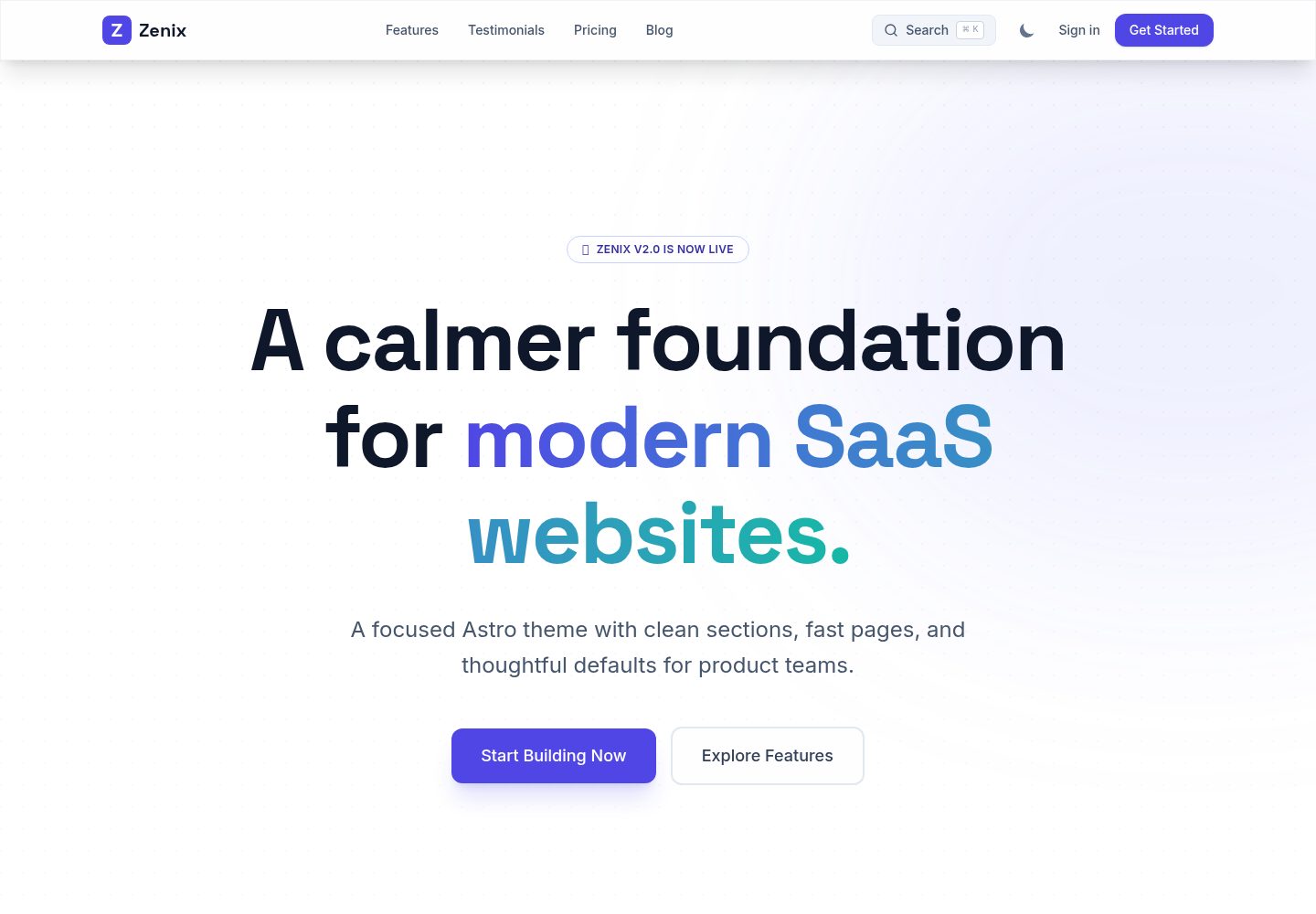
看看你的网站会是什么样
浏览真实页面截图,比较内容排版与手机效果。点击下方缩略图切换,放大查看整页细节。
全部页面与视图 3
截图用于了解视觉与布局,交互效果请以实际项目为准。
采集于 2026-10-02查看来源
值得关注的模板亮点
从已有项目资料中,快速了解它的特点。
包含响应式 SaaS 落地页区块,以及定价、FAQ、用户评价页面
博客与更新日志由 Astro 内容集合驱动,博客支持 MDX 与可复用 Callout 组件
内置明暗模式并持久化用户偏好,提供命令面板搜索与 Astro 视图过渡
附带 Playwright UI 回归测试,可执行 npm run test:e2e
站点标题、描述、URL 与社交链接集中在 src/config.ts 配置
模板详细介绍
Zenix 是一个面向 Micro-SaaS 产品展示的 Astro 主题模板,作者为 Farros FR,采用 MIT 许可发布。模板以静态输出方式构建,使用 Tailwind CSS 进行样式组织,提供响应式 SaaS 落地页区块,并附带定价、FAQ、用户评价、博客和更新日志页面。内容层基于 Astro 内容集合,博客与更新日志条目分别放在 src/content/blog/ 和 src/content/changelog/,作者信息放在 src/content/authors/;博客支持 MDX,可在正文中直接使用可复用的 Callout 等组件。站点级配置集中在 src/config.ts,包括站点标题、描述、URL 与社交链接,发布前需替换为自有信息。模板内置明暗模式并持久化用户偏好,提供命令面板搜索,并使用 Astro 视图过渡。项目包含 Playwright UI 回归测试,可通过 npm run test:e2e 运行。构建产物为静态站点,可部署到 Vercel、Netlify、Cloudflare Pages、GitHub Pages 等静态托管平台;仓库提供 wrangler.toml,Cloudflare Pages 场景下构建命令为 npm run build、输出目录为 dist。README 中提到的 Lighthouse 满分、转化率等表述属于作者自述,未在本资料中独立验证;演示图片、字体、图标等第三方素材的许可需单独核对,域名、托管等外部服务也可能产生费用。
Astro博客SaaS
适合你的项目吗?
适用场景
- 为 Micro-SaaS 产品搭建包含落地页、定价与 FAQ 的展示站点
- 用 MDX 撰写产品博客,并用更新日志页面发布版本变更记录
- 部署到 Vercel、Netlify、Cloudflare Pages 或 GitHub Pages 等静态托管平台
- 在模板基础上运行 Playwright 测试,检查页面 UI 回归
适合人群
- 需要 Astro 静态站点与 SaaS 落地页结构的开发者
- 希望用 MDX 维护博客和更新日志内容的团队
- 需要明暗模式与命令面板搜索等基础交互的站点
- 计划部署到静态托管平台并自行配置域名与构建流程的项目
上手与定制指南
结合仓库当前版本的说明,按下面的资料检查内容、配置与运行要求。
- 1
可通过 npm create astro@latest -- --template farrosfr/zenix 创建项目,或克隆仓库后执行 npm install 与 npm run dev
- 2
本地开发服务器默认地址为 http://localhost:4321/
- 3
发布前修改 src/config.ts 中的 SITE_TITLE、SITE_DESCRIPTION、SITE_URL 与 SOCIAL_LINKS
- 4
生产环境需将 astro.config.mjs 中的 site 更新为自有域名
- 5
Cloudflare Pages 使用 Astro 预设、构建命令 npm run build、输出目录 dist,Node.js 版本 22.12.0 或更新
授权与来源资料
使用条件与限制
免费使用 · 保留许可声明本次收录的是公开仓库中采用 MIT 许可的免费版本;免费范围为该版本代码,不代表外部服务或第三方素材免费。
使用时需要遵守
- 允许免费使用、修改、商用和分发该版本代码。
- 分发代码副本或实质性部分时,保留原作者版权声明和完整 MIT 许可声明。
- 代码按现状提供;担保与责任限制以原许可证及适用法律为准。
额外费用与待核对事项
- 演示图片、字体、图标及其他第三方素材需按各自许可核对,不能仅凭代码的 MIT 许可判断。
- 域名、托管、数据库、支付或 AI 等外部服务可能另外收费。
查看原文依据
https://github.com/farrosfr/zenix/blob/master/LICENSEhttps://github.com/farrosfr/zenix/blob/master/README.mdPermission is hereby granted, free of charge
许可证原文
DeepSeek 根据仓库许可证和 README 整理 ·2026-10-02。结果仅覆盖已读取资料,依赖、图片、字体及后续条款变更以各自原文为准。
项目核对记录与介绍依据
模板资料
- 来源平台
- GitHub
- 资料与维护参考分
- 资料较完整 · 92 / 100
- 技术栈
- Astro
- 网站类型
- 博客 · SaaS
这个分数如何计算
本站按许可资料(最高30分)、演示链接(12分)、预览图(10分)、Star数(15分)、记录的维护时间(15分)、描述完整度(8分)、功能记录(5分)和分类资料(5分)计算。它不是代码、安全或性能测试,也不是 Google 评分;有链接不代表已实测可用。
这个项目需要核对什么
- 记录的仓库更新时间
- 2026-09-13
- 截图检查日期
- 2026-10-02
已收录演示链接。请用你的内容与屏幕尺寸检查;有演示不代表表单、认证或支付已经可用。
目录记录的主要技术栈是 Astro。请通过依赖清单和锁文件核对实际版本与托管要求。这些说明基于收录资料,不代表代码审计或部署实测。
查看具体选型方法 →介绍的制作与核对状态
介绍由 AI 辅助整理目录与仓库资料。仓库作者不等于这篇介绍的审核者。
已完成服务器许可规则与 AI 来源核对;未经过人工编辑审核。
查看当时使用的来源资料
SHA-256: ecec31025fe7593b520b7bd440967ceebafcfae1115b1c4d83ed6413f2ff1768
2026-10-02T16:53:38.927Z
来源文件 / 仓库# Zenix
Zenix is a polished Astro SaaS theme by [Farros FR](https://farrosfr.com) with responsive landing sections, pricing, blog, changelog, dark mode, search, and MDX content support.
[Live demo](https://zenix.farrosfr.com/) · [Repository](https://github.com/farrosfr/zenix)


## Features
- Astro 6 with static output
- Tailwind CSS 4 styling
- Responsive SaaS landing page sections
- Pricing, FAQ, testimonials, blog, and changelog pages
- MDX content with reusable callout components
- Dark and light mode with persisted user preference
- Command palette search
- Astro view transitions
- Playwright UI regression tests
## Quick Start
Create a new Astro project from the GitHub template:
```bash
npm create astro@latest -- --template farrosfr/zenix
```
Or clone the repository directly:
```bash
git clone https://github.com/farrosfr/zenix.git my-saas-site
cd my-saas-site
npm install
npm run dev
```
Open `http://localhost:4321/` in your browser.
## Commands
```bash
npm run dev # Start the local dev server
npm run build # Build the production site
npm run preview # Preview the production build
npm run test:e2e # Run Playwright regression tests
```
## Configuration
Most site-level settings live in `src/config.ts`:
```ts
export const SITE_TITLE = 'Zenix';
export const SITE_DESCRIPTION = 'High-converting, performance-focused Astro theme for Micro-SaaS products.';
export const SITE_URL = 'https://zenix.farrosfr.com';
export const SOCIAL_LINKS = {
twitter: 'https://twitter.com/farrosfr_',
github: 'https://github.com/farrosfr',
linkedin: 'https://linkedin.com/in/yourhandle',
};
```
Update these values before publishing your own site.
## Content
Blog posts and changelog entries are powered by Astro content collections.
- Blog posts: `src/content/blog/`
- Changelog entries: `src/content/changelog/`
- Authors: `src/content/authors/`
Example blog post:
```mdx
---
title: "My First Post"
description: "A short summary."
pubDate: 2026-06-01
author: farros
tags: ["update", "feature"]
---
# Hello World
<Callout type="success" title="Ready">
MDX components can be used directly inside content.
</Callout>
```
## Deployment
Zenix builds to a static site and can be deployed to Vercel, Netlify, Cloudflare Pages, GitHub Pages, or any static hosting provider.
For production, update `site` in `astro.config.mjs` to match your domain.
### Cloudflare Pages
When importing this GitHub repository into Cloudflare Pages, use:
```text
Framework preset: Astro
Build command: npm run build
Build output directory: dist
Root directory: /
Node.js version: 22.12.0 or newer
```
The repository includes `wrangler.toml` with `pages_build_output_dir = "dist"` for Cloudflare Pages compatibility.
## Theme Submission Notes
This repository is public, uses public npm dependencies, and includes setup documentation for new users. Preview images for the Astro theme directory should be 16:9, at least 1280px wide, and less than 5MB combined.
## Contributing and Collaboration
We welcome contributions and collaboration! Whether you want to fix a bug, add a new feature, or improve documentation, your help is greatly appreciated.
To contribute:
1. Fork the repository.
2. Create a new branch (`git checkout -b feature/amazing-feature`).
3. Commit your changes (`git commit -m 'feat: add amazing feature'`).
4. Push to the branch (`git push origin feature/amazing-feature`).
5. Open a Pull Request.
If you have an idea for a major change or a new feature, please open an issue first to discuss it with the maintainers. We are also open to collaborations on expanding Zenix for different use cases! Let's build something awesome together.
## License
MIT
看看同类模板
对比同技术栈与用途的模板,找到更适合的视觉与内容结构。

astrowind
⭕️ AstroWind: A free template using Astro v7 and Tailwind CSS v4. Astro starter theme.
Astro · 博客

astro-paper
A minimal, accessible and SEO-friendly Astro blog theme.
Astro · 博客

fuwari
✨A static blog template built with Astro.
Astro · 博客

Firefly
Firefly 是一款基于 Astro 的静态博客主题,由 CuteLeaf 在 saicaca 的 Fuwari 模板基础上二次开发,主打清新美观的视觉风格。
Astro · 博客

astro-theme-cactus
A simple Astro theme. Use it to create your blog or website.
Astro · 作品集

astrofy
Astrofy is a free and open-source template for your Personal Portfolio Website built with Astro and TailwindCS…
Astro · 作品集