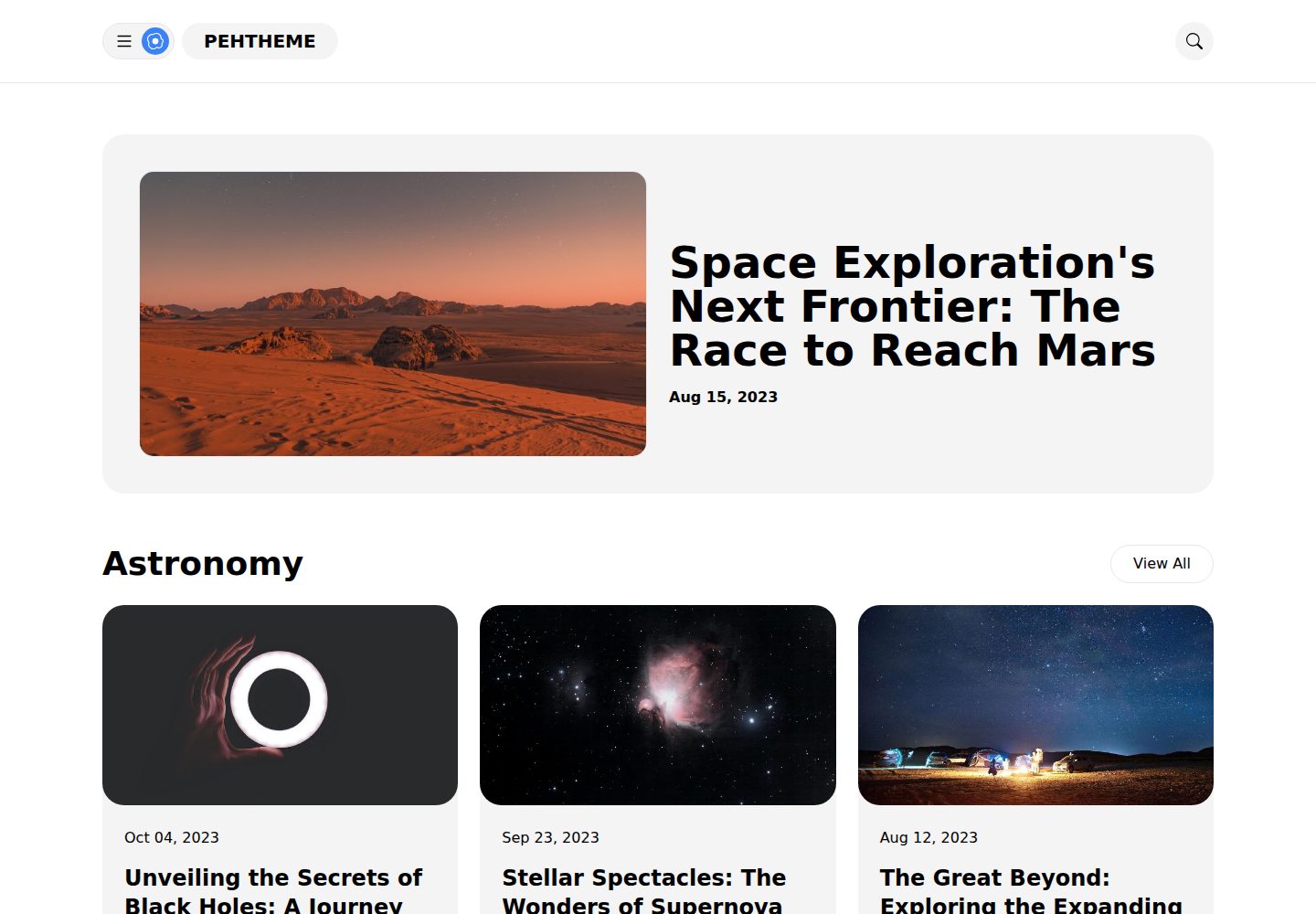
受 Material Design v3 启发的视觉风格,使用 Tailwind CSS 构建
Hugo启动器
pehtheme-hugo — Hugo 启动器模板
作者 fauzanmy
Pehtheme Hugo 是一个受 Material Design v3 启发、使用 Tailwind CSS 构建的 Hugo 主题,采用 MIT 许可,提供首页特色文章、双栏博客布局与侧边栏等结构。
看看你的网站会是什么样
浏览真实页面截图,比较内容排版与手机效果。点击下方缩略图切换,放大查看整页细节。
全部页面与视图 3
截图用于了解视觉与布局,交互效果请以实际项目为准。
采集于 2026-10-02查看来源
值得关注的模板亮点
从已有项目资料中,快速了解它的特点。
首页可展示带 feature 标签的特色文章
博客采用双栏布局,侧边栏含最近文章列表与广告位
无 JavaScript 框架依赖,仅用原生 JS 实现切换按钮
使用语义化 HTML,提供水平菜单与内容标签列表
MIT 许可,允许免费使用、修改、商用和分发
模板详细介绍
Pehtheme Hugo 是面向 Hugo 静态站点生成器的开源主题,视觉风格参考 Material Design v3,样式层使用 Tailwind CSS 编写。仓库以 MIT 许可发布,代码可免费使用、修改、商用和分发,分发时需保留版权与许可声明。
主题在功能上偏向博客场景:首页可展示带 feature 标签的特色文章,提供水平菜单与内容标签列表,博客正文采用双栏布局,侧边栏包含最近文章列表和广告位。主题不依赖 JavaScript 框架,仅使用原生 JS 实现切换按钮,并强调语义化 HTML。
使用方式上,主题通过克隆仓库并将 exampleSite 中的 assets、content 与 hugo.toml 复制到项目根目录来接入;如需自定义 Tailwind 样式,还需复制 Node.js 相关配置文件并安装依赖。配置项涵盖摘要长度、Google Analytics、Disqus 评论与分页数量。
需要注意的限制:演示中的图片来自 Unsplash 与 Pixabay,图标来自 Bootstrap Icons,这些第三方素材需按其各自许可核对,不能仅凭代码的 MIT 许可判断;域名、托管等外部服务可能另行收费。
Hugo启动器
适合你的项目吗?
适用场景
- 搭建以文章列表和正文阅读为主的个人博客
- 需要一个带侧边栏最近文章与广告位的 Hugo 站点
- 希望用 Tailwind CSS 自定义主题样式的项目
- 需要接入 Google Analytics 或 Disqus 评论的博客
适合人群
- 使用 Hugo 构建静态博客的开发者
- 希望基于 Tailwind CSS 调整主题样式的前端使用者
- 需要 MIT 许可下可自由修改和商用的主题的团队
上手与定制指南
结合仓库当前版本的说明,按下面的资料检查内容、配置与运行要求。
- 1
先安装 Hugo 并创建新站点,再克隆 pehtheme-hugo 仓库
- 2
将 exampleSite 下的 assets、content 和 hugo.toml 复制到项目根目录后运行 hugo server
- 3
自定义样式需复制 package.json、postcss.config.js、tailwind.config.js 与 input.css,并执行 npm install
- 4
在 hugo.toml 中配置 summaryLength、Google Analytics、Disqus 与分页数量
- 5
演示图片与图标为第三方素材,使用前需核对各自许可
授权与来源资料
使用条件与限制
免费使用 · 保留许可声明本次收录的是公开仓库中采用 MIT 许可的免费版本;免费范围为该版本代码,不代表外部服务或第三方素材免费。
使用时需要遵守
- 允许免费使用、修改、商用和分发该版本代码。
- 分发代码副本或实质性部分时,保留原作者版权声明和完整 MIT 许可声明。
- 代码按现状提供;担保与责任限制以原许可证及适用法律为准。
额外费用与待核对事项
- 启用 Google Analytics 需自行提供 GA-4 衡量 ID,属于外部服务,可能涉及账号与费用。
- 启用 Disqus 评论需自行提供 shortname,属于第三方外部服务,可能涉及账号与费用。
- 演示中的图片来自 Unsplash 与 Pixabay、图标来自 Bootstrap Icons,这些第三方素材需按其各自许可核对,不能仅凭代码的 MIT 许可判断。
- 演示图片、字体、图标及其他第三方素材需按各自许可核对,不能仅凭代码的 MIT 许可判断。
- 域名、托管、数据库、支付或 AI 等外部服务可能另外收费。
查看原文依据
Permission is hereby granted, free of charge
许可证原文
[services.googleAnalytics] id = 'G-MEASUREMENT_ID' # (Your GA-4 analytics code)
README 原文
[services.disqus] shortname = 'shortname' # (Your Disqus shortname)
README 原文
https://github.com/fauzanmy/pehtheme-hugo/blob/main/LICENSEhttps://github.com/fauzanmy/pehtheme-hugo/blob/main/README.mdImage credits used in the live preview:
README 原文
DeepSeek 根据仓库许可证和 README 整理 ·2026-10-02。结果仅覆盖已读取资料,依赖、图片、字体及后续条款变更以各自原文为准。
项目核对记录与介绍依据
模板资料
- 来源平台
- Hugo Themes
- 资料与维护参考分
- 资料较完整 · 85 / 100
- 技术栈
- Hugo
- 网站类型
- 启动器
这个分数如何计算
本站按许可资料(最高30分)、演示链接(12分)、预览图(10分)、Star数(15分)、记录的维护时间(15分)、描述完整度(8分)、功能记录(5分)和分类资料(5分)计算。它不是代码、安全或性能测试,也不是 Google 评分;有链接不代表已实测可用。
这个项目需要核对什么
- 记录的仓库更新时间
- 2025-06-28
- 截图检查日期
- 2026-10-02
已收录演示链接。请用你的内容与屏幕尺寸检查;有演示不代表表单、认证或支付已经可用。
目录记录的主要技术栈是 Hugo。请通过依赖清单和锁文件核对实际版本与托管要求。这些说明基于收录资料,不代表代码审计或部署实测。
查看具体选型方法 →介绍的制作与核对状态
介绍由 AI 辅助整理目录与仓库资料。仓库作者不等于这篇介绍的审核者。
已完成服务器许可规则与 AI 来源核对;未经过人工编辑审核。
查看当时使用的来源资料
SHA-256: f4e992acd3b2f07a451b18646a0e29f0b95ddb80306be63b851bc509b166c90b
2026-10-02T22:54:46.673Z
来源文件 / 仓库# Pehtheme Hugo
Pehtheme Hugo is an open-source Hugo theme inspired by [Material Design v3](https://m3.material.io/), lovingly crafted using Tailwind CSS.
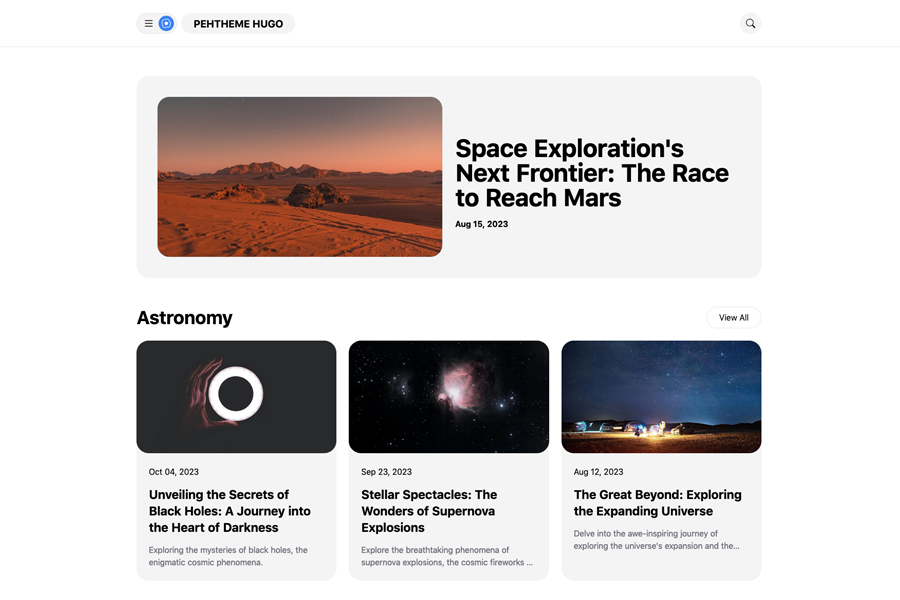
## Live Demo
Check out the live demo: [Pehtheme Hugo Live Demo](https://pehtheme-hugo.netlify.app/)
## Performance Testing
To assess the performance of your website using Pehtheme Hugo, utilize the PageSpeed Insights tool. Click the button below to run a PageSpeed Insights test:
[PageSpeed Insights Test](https://pagespeed.web.dev/analysis/https-pehtheme-hugo-netlify-app/7gv9zedw83?form_factor=mobile)
## Features
- Built with Tailwind CSS
- Featured posts displayed on the homepage (To showcase featured posts on the homepage, the Hugo theme uses `feature` tags data)
- Horizontal menus, content tags list
- No JavaScript dependencies
- Vanilla JS toggle button
- Two-column blog layout
- Sidebar with a list of recent posts
- Semantic HTML
- Sidebar Ads box
## Installation
To get started with Pehtheme Hugo, follow these steps:
1. Install Hugo and create a new site. For detailed instructions, refer to [Hugo's Quick Start Guide](https://gohugo.io/getting-started/quick-start/).
2. Add Pehtheme Hugo to your project:
```bash
$ git clone https://github.com/fauzanmy/pehtheme-hugo.git
```
3. Simply copy the following 2 folders and 1 content from the `exampleSite` directory to the root of your project:
```bash
exampleSite/
├── assets/
├── content/
└── hugo.toml
```
4. Start Hugo:
```bash
hugo server
```
## Configuration
You can configure the following settings for your Hugo project
by adding or modifying these lines in your config file `hugo.toml`:
summaryLength = 20 # (approximately 160 characters for 20 words)
[services]
[services.googleAnalytics]
id = 'G-MEASUREMENT_ID' # (Your GA-4 analytics code)
[services.disqus]
shortname = 'shortname' # (Your Disqus shortname)
[pagination]
pagerSize = 10 # (Set the desired number of home posts per page)
## Custom Theme
1. Ensure you have NodeJS installed on your desktop.
2. Copy the Node.js configuration files from the `exampleSite` directory to the root of your Hugo project:
```bash
exampleSite/
├── package.json
├── postcss.config.js
└── tailwind.config.js
```
3. Additionally, copy the `exampleSite/input.css` file to the `assets/input.css` directory of your Hugo project.
4. Run the following command to install necessary dependencies:
```bash
npm install
```
5. Customize the theme with Tailwind CSS using the following command:
```bash
npm run dev
```
6. To build the website, execute the command:
```bash
npm run build
```
## License
Pehtheme Hugo is MIT Licensed. For more details, see the [LICENSE](https://github.com/fauzanmy/pehtheme-hugo/blob/main/LICENSE) file.
## Logo Icon
Egg fried icon source: [Bootstrap Icons - Egg Fried](https://icons.getbootstrap.com/icons/egg-fried/)
## Photo Credits
Image credits used in the live preview:
```
Images resource:
- https://unsplash.com/photos/Smeer5L0tXM
- https://unsplash.com/photos/2q6C5zDJOsg
- https://unsplash.com/photos/UNd3lRKhwSw
- https://unsplash.com/photos/Ed2AELHKYBw
- https://unsplash.com/photos/rTZW4f02zY8
- https://unsplash.com/photos/OtXJhYjbKeg
- https://unsplash.com/photos/ZPP-zP8HYG0
- https://unsplash.com/photos/ydGRmobx5jA
- https://pixabay.com/vectors/email-newsletter-email-marketing-3249062/
```看看同类模板
对比同技术栈与用途的模板,找到更适合的视觉与内容结构。

hugo-xmin
eXtremely Minimal Hugo theme: about 140 lines of code in total, including HTML and CSS (with no dependencies)
Hugo · 启动器

hugo-theme-gallery
Gallery Theme for Hugo
Hugo · 启动器

reveal-hugo
📽️ Create rich HTML-based presentations with Hugo and Reveal.js
Hugo · 启动器

anatole
Anatole is a minimalistic two-column theme for Hugo.
Hugo · 启动器

hugo-theme-diary
Moments piled up. A Hugo theme ported from SumiMakito/hexo-theme-Journal.
Hugo · 启动器

risotto
A minimalist, responsive hugo theme inspired by terminal ricing aesthetics.
Hugo · 启动器