整合 Tauri、FastAPI 与 React 三端,提供三进程桌面应用骨架
ViteReact启动器
tauri-fastapi-full-stack-template — Vite 启动器模板
作者 fudanglp
基于 Tauri、FastAPI 与 React 的跨平台桌面应用启动模板,采用 sidecar 架构将 Python 后端打包为独立二进制,默认关闭认证,适合作为本地桌面全栈项目的起点。
看看你的网站会是什么样
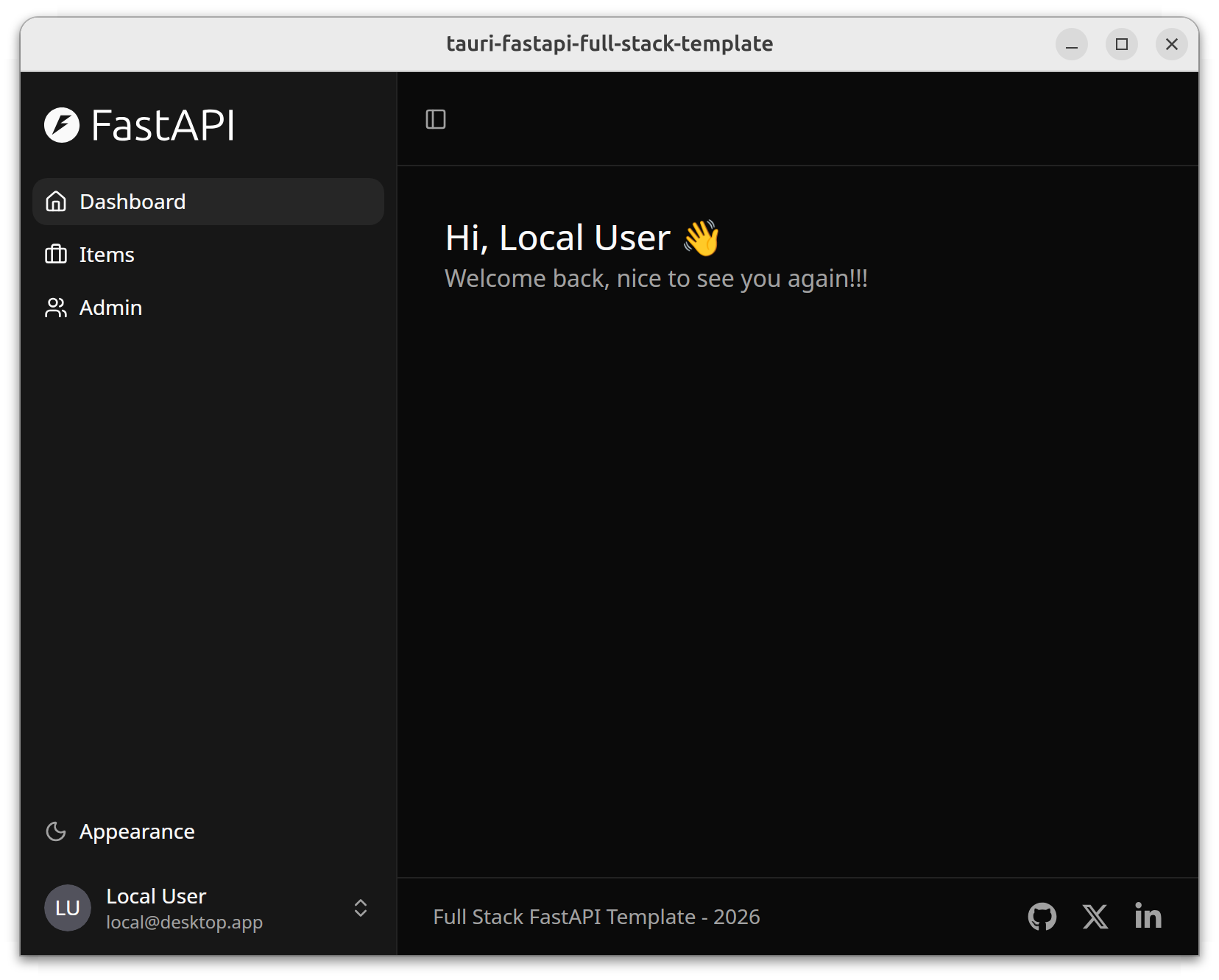
浏览真实页面截图,比较内容排版与手机效果。点击下方缩略图切换,放大查看整页细节。
目前有 1 张原始预览,可打开完整图片查看设计细节。
截图用于了解视觉与布局,交互效果请以实际项目为准。
采集于 2026-10-03查看来源
值得关注的模板亮点
从已有项目资料中,快速了解它的特点。
FastAPI 以 sidecar 方式随应用打包,PyInstaller 生成单一后端二进制
通过 OpenAPI schema 自动生成 TypeScript 与 Rust 类型及 API 客户端
使用 SQLite 与 SQLModel,配合 Alembic 管理数据库迁移
认证默认关闭,面向本地桌面使用,可按需在配置中开启
提供 Makefile 目标与 IPC、数据管理等文档,覆盖开发到打包流程
模板详细介绍
这是一个用于构建跨平台桌面应用的全栈启动模板,将 Tauri(Rust)、FastAPI(Python)与 React(TypeScript)组合在一起。项目基于 Tauri 和 FastAPI Full Stack Template 两个上游模板整合而来,定位是供开发者二次定制的起始骨架,而非可直接发布的产品。
架构上采用三进程模型:React 前端运行在 WebView 中,通过 IPC 命令调用 Rust 侧的 Tauri 能力(窗口、文件对话框等原生操作),通过 HTTP REST 访问 FastAPI 后端(数据库查询与业务逻辑),Tauri 在启动时通过 HTTP 对 FastAPI 做健康检查,FastAPI 则可通过 Unix socket 反向调用桌面功能。开发模式下后端独立运行以便热重载与调试,Tauri 不会拉起 sidecar 二进制。
技术栈方面,前端使用 React + TypeScript、Vite、TanStack Router(基于文件的路由)、TanStack Query、Tailwind CSS 与 shadcn/ui;后端使用 FastAPI、SQLite、SQLModel、Alembic 迁移与 Pydantic 配置;桌面层为 Rust 与 Tauri 2。数据模型通过 OpenAPI schema 自动生成 TypeScript 与 Rust 类型,API 客户端由脚本生成。数据库在开发环境位于项目根目录的 .data/app.db,生产环境按各操作系统标准应用数据目录存放。认证功能默认关闭,面向本地桌面使用场景。
构建流程上,PyInstaller 将 Python 后端打包为单个二进制,Tauri 负责生成各平台原生安装包。项目提供 Makefile 目标覆盖依赖安装、开发运行、数据库初始化、客户端生成与打包等环节。使用前需要自行安装 Rust、bun 与 uv 等系统工具。
ViteReact启动器
适合你的项目吗?
适用场景
- 需要以 Python 作为业务后端、同时交付桌面客户端的项目
- 希望前端使用 React 与 TypeScript、并复用 shadcn/ui 组件体系的桌面应用
- 需要本地 SQLite 存储与数据库迁移能力的离线或单机工具
- 想以现成全栈骨架起步、再替换为自身业务模型的开发团队
适合人群
- 熟悉 React、Python 与 Rust 基本开发流程的开发者
- 需要跨平台(Linux、macOS、Windows)桌面交付的项目
- 接受以模板为起点进行二次定制、而非直接发布成品的场景
上手与定制指南
结合仓库当前版本的说明,按下面的资料检查内容、配置与运行要求。
- 1
需先单独安装 Rust(rustup)、bun 与 uv 三项系统工具
- 2
首次运行 make setup 安装 Tauri CLI、前端依赖与 Python 包
- 3
开发时需两个终端分别执行 make fastapi 与 make dev
- 4
前端默认在 localhost:1420,后端 API 在 localhost:1430
- 5
修改模型后需执行 Alembic 迁移并运行 make generate-client 重新生成客户端
授权与来源资料
使用条件与限制
免费使用 · 保留许可声明本次收录的是公开仓库中采用 MIT 许可的免费版本;免费范围为该版本代码,不代表外部服务或第三方素材免费。
使用时需要遵守
- 允许免费使用、修改、商用和分发该版本代码。
- 分发代码副本或实质性部分时,保留原作者版权声明和完整 MIT 许可声明。
- 代码按现状提供;担保与责任限制以原许可证及适用法律为准。
额外费用与待核对事项
- 该项目为需二次定制的起始模板,并非可直接发布的产品;使用者需自行替换品牌、模型与业务逻辑后才能用于实际应用。
- 使用前必须自行安装 Rust(rustup)、bun 与 uv 等系统工具,模板本身不包含这些运行时环境。
- 开发模式下需分别启动后端与桌面端两个终端进程,Tauri 不会自动拉起 sidecar 二进制,调试流程依赖手动管理进程。
- 认证功能默认关闭,面向本地桌面场景;若需多用户或联网使用,须自行在配置中开启并实现相应安全措施。
- 演示图片、字体、图标及其他第三方素材需按各自许可核对,不能仅凭代码的 MIT 许可判断。
- 域名、托管、数据库、支付或 AI 等外部服务可能另外收费。
查看原文依据
Permission is hereby granted, free of charge
许可证原文
This is a **starter template** designed to be customized for your own application.
README 原文
**System tools** (install separately first):
README 原文
**Why two terminals?** In development mode, the backend runs separately so you get hot-reload and easier debugging. Tauri doesn't spawn the sidecar binary in dev mode.
README 原文
https://github.com/fudanglp/tauri-fastapi-full-stack-template/blob/master/LICENSEhttps://github.com/fudanglp/tauri-fastapi-full-stack-template/blob/master/README.md**Auth**: Optional - disabled by default for local desktop use
README 原文
DeepSeek 根据仓库许可证和 README 整理 ·2026-10-03。结果仅覆盖已读取资料,依赖、图片、字体及后续条款变更以各自原文为准。
项目核对记录与介绍依据
模板资料
- 来源平台
- GitHub
- 资料与维护参考分
- 资料较完整 · 80 / 100
- 技术栈
- Vite · React
- 网站类型
- 启动器
这个分数如何计算
本站按许可资料(最高30分)、演示链接(12分)、预览图(10分)、Star数(15分)、记录的维护时间(15分)、描述完整度(8分)、功能记录(5分)和分类资料(5分)计算。它不是代码、安全或性能测试,也不是 Google 评分;有链接不代表已实测可用。
这个项目需要核对什么
- 记录的仓库更新时间
- 2026-02-08
- 截图检查日期
- 2026-10-03
目前没有记录演示链接。请依据仓库说明在本地评估;仅凭截图无法确认交互行为。
目录记录的主要技术栈是 Vite。请通过依赖清单和锁文件核对实际版本与托管要求。这些说明基于收录资料,不代表代码审计或部署实测。
查看具体选型方法 →介绍的制作与核对状态
介绍由 AI 辅助整理目录与仓库资料。仓库作者不等于这篇介绍的审核者。
已完成服务器许可规则与 AI 来源核对;未经过人工编辑审核。
查看当时使用的来源资料
SHA-256: b06d420f486f197b4fb0df15fd57cad2815d0c5d9fea1c633376921919c1277c
2026-10-03T02:48:13.913Z
来源文件 / 仓库# Tauri + FastAPI Full Stack Template
> A **template** for building desktop applications with Tauri (Rust), FastAPI (Python), and React (TypeScript).
This project combines two excellent templates:
- **[Tauri](https://tauri.app)** - Cross-platform desktop apps with Rust
- **[FastAPI Full Stack Template](https://github.com/fastapi/full-stack-fastapi-template)** - Production-ready backend/frontend stack (forked from commit [`1c6d656`](https://github.com/fastapi/full-stack-fastapi-template/commit/1c6d6564))
This is a **starter template** designed to be customized for your own application. It provides a complete full-stack desktop app foundation with optional authentication.

## Architecture & Tech Stack
### Technology Stack
- **Frontend**: React + TypeScript with Vite, TanStack Router, TanStack Query, Tailwind CSS, shadcn/ui
- **Backend**: FastAPI with SQLite, SQLModel, Alembic migrations, Pydantic settings
- **Desktop**: Tauri 2 with sidecar architecture (FastAPI runs as bundled binary)
- **Auth**: Optional - disabled by default for local desktop use
- **Build**: PyInstaller bundles Python backend into single binary, Tauri creates native installers
### Architecture Overview
This is a **three-process desktop application**:
```mermaid
graph TB
subgraph "Tauri Desktop App"
Frontend[React Frontend<br/>WebView]
Rust[Rust Backend<br/>Tauri]
Frontend <-->|IPC Commands| Rust
end
Frontend -->|HTTP REST<br/>localhost:1420→1430| FastAPI
FastAPI -->|Unix Socket| Rust
subgraph "FastAPI Sidecar"
FastAPI[FastAPI<br/>Python]
DB[(SQLite DB)]
FastAPI --> DB
end
```
**How the processes communicate**:
- **Frontend → Tauri**: IPC commands (native operations like windows, file dialogs)
- **Frontend → FastAPI**: HTTP REST (database queries, business logic)
- **Tauri → FastAPI**: HTTP (health checks during startup)
- **FastAPI → Tauri**: Unix socket (desktop features like window control)
📖 **See [docs/IPC.md](docs/IPC.md)** for complete documentation on communication patterns.
### Project Structure
```
├── frontend/ # React + TypeScript + Vite
│ ├── src/
│ │ ├── routes/ # TanStack Router file-based routing
│ │ ├── components/
│ │ ├── client/ # API client (auto-generated)
│ │ └── hooks/ # React hooks (useAuth, etc.)
│ └── openapi.json # OpenAPI schema (auto-generated)
├── fastapi/ # Python FastAPI backend
│ ├── app/
│ │ ├── api/ # API routes
│ │ ├── core/ # Config, DB, logging
│ │ ├── models.py # SQLModel database models
│ │ └── crud/ # Database operations
│ └── alembic/ # Database migrations
├── tauri/ # Rust desktop app
│ ├── src/
│ │ ├── lib.rs # Main app, sidecar management
│ │ └── config.rs # Rust config from env vars
│ └── binaries/ # Bundled sidecar binary (generated)
└── scripts/ # Utility scripts (generate-client, etc.)
```
### Data Management
**Database**: SQLite (included with Python standard library, no external server needed)
**Location**:
- **Dev**: `.data/app.db` (project root)
- **Production (Linux)**: `~/.local/share/com.example.tauri-fastapi-full-stack-template/app.db`
- **Production (macOS)**: `~/Library/Application Support/com.example.tauri-fastapi-full-stack-template/app.db`
- **Production (Windows)**: `%APPDATA%\com.example.tauri-fastapi-full-stack-template\app.db`
**Models**: SQLModel with automatic TypeScript/Rust type generation via OpenAPI
```mermaid
flowchart LR
A[FastAPI Models<br/>SQLModel] --> B[OpenAPI Schema<br/>openapi.json]
B --> C[TypeScript Types<br/>auto-gen]
B --> D[Rust Types<br/>auto-gen]
```
**Migrations**: Alembic for schema version control
📖 **See [docs/data-management.md](docs/data-management.md)** for complete documentation on data storage, migrations, and models.
## Development
### Quick Start
Get the app running in 3 steps:
**1. Install system tools** (first time only):
- [Rust](https://www.rust-lang.org/tools/install) (via rustup)
- [bun](https://bun.sh/docs/installation/) (includes Node.js)
- [uv](https://docs.astral.sh/uv/getting-started/installation/) (includes Python)
**2. Install project dependencies** (first time only):
```bash
make setup
```
This installs:
- Tauri CLI (via cargo)
- Frontend dependencies (via bun)
- Backend Python packages (via uv)
**3. Run the app**:
```bash
# Terminal 1: Start the FastAPI backend
make fastapi
# Terminal 2: Start the Tauri desktop app
make dev
```
The app opens at http://localhost:1420 with the backend API at http://localhost:1430.
**Why two terminals?** In development mode, the backend runs separately so you get hot-reload and easier debugging. Tauri doesn't spawn the sidecar binary in dev mode.
### Requirements
**System tools** (install separately first):
1. **[Rust](https://www.rust-lang.org/tools/install)** (via rustup)
- Required by Tauri
- After installing Rust, `make setup` will install [Tauri CLI](https://tauri.app/v2/guides/getting-started/prerequisites)
2. **[bun](https://bun.sh/docs/installation/)**
- Includes [Node.js](https://nodejs.org/) runtime
- Frontend package manager
3. **[uv](https://docs.astral.sh/uv/getting-started/installation/)**
- Includes [Python 3.11+](https://www.python.org/downloads/) runtime
- Backend package manager
4. **System**: Linux, macOS, or Windows
### Frontend Development
**Stack**: React + TypeScript, Vite, TanStack Router (file-based), TanStack Query, Tailwind CSS, shadcn/ui
**File structure**:
```
frontend/src/
├── routes/ # File-based routing (TanStack Router)
├── components/ # Reusable UI components
├── client/ # Auto-generated API client
└── hooks/ # Custom React hooks
```
**Typical tasks**:
1. **Add a new page/route**:
```bash
# Create route file
touch frontend/src/routes/about.tsx
```
```typescript
// frontend/src/routes/about.tsx
import { createFileRoute } from '@tanstack/react-router'
export const Route = createFileRoute('/about')({
component: About,
})
function About() {
return <div>About Page</div>
}
```
2. **Add a widget/component**:
```bash
# Create component
touch frontend/src/components/StatsCard.tsx
```
```typescript
// frontend/src/components/StatsCard.tsx
export function StatsCard({ title, value }: { title: string; value: number }) {
return (
<div className="p-4 border rounded-lg">
<h3 className="text-lg font-semibold">{title}</h3>
<p className="text-2xl">{value}</p>
</div>
)
}
```
3. **Call API endpoints**:
```typescript
import { client } from '@/client/client'
import { useQuery, useMutation } from '@tanstack/react-query'
// GET request
const { data: users } = useQuery({
queryKey: ['users'],
queryFn: () => client.GET('/api/v1/users/'),
})
// POST request
const createUser = useMutation({
mutationFn: (data: UserCreate) =>
client.POST('/api/v1/users/', { body: data }),
})
```
4. **Styling with Tailwind**:
```typescript
// Utility classes for styling
<div className="flex items-center gap-4 p-4 bg-white rounded-lg shadow">
{/* Content */}
</div>
```
**Hot reload**: Vite automatically reloads the frontend when you save changes.
### FastAPI Backend Development
**Stack**: FastAPI, SQLModel, Alembic (migrations), Pydantic (validation)
**File structure**:
```
fastapi/app/
├── api/ # API routes
├── core/ # Config, database, logging
├── models.py # SQLModel database models
└── crud.py # Database operations
```
**Data models** (detailed docs: [docs/data-management.md](docs/data-management.md)):
1. **Add a new model**:
```python
# fastapi/app/models.py
from sqlmodel import SQLModel, Field
from datetime import datetime
from uuid import UUID, uuid4
class ProductBase(SQLModel):
name: str = Field(max_length=255)
price: float = Field(gt=0)
class Product(ProductBase, table=True):
id: UUID = Field(default_factory=uuid4, primary_key=True)
created_at: datetime = Field(default_factory=datetime.utcnow)
```
2. **Create database migration**:
```bash
cd fastapi
uv run alembic revision --autogenerate -m "add products"
uv run alembic upgrade head
```
3. **Regenerate API clients**:
```bash
make generate-client
```
4. **Add API endpoint**:
```python
# fastapi/app/api/routes/products.py
from fastapi import APIRouter, Depends
from app.models import Product, ProductCreate
from app.crud import create_product
router = APIRouter()
@router.post("/", response_model=Product)
def create_new_product(
product: ProductCreate,
session: Session = Depends(get_session),
):
return create_product(session, product)
```
5. **Update model (add/remove fields)**:
```python
# Edit model in models.py
class ProductBase(SQLModel):
name: str = Field(max_length=255)
price: float = Field(gt=0)
description: str | None = Field(default=None) # New field
# Create migration
cd fastapi
uv run alembic revision --autogenerate -m "add product description"
uv run alembic upgrade head
# Regenerate API clients
make generate-client
```
**Test API**:
- Swagger UI: http://localhost:1430/docs (interactive API docs)
- ReDoc: http://localhost:1430/redoc (alternative docs)
### Tauri (Rust) Development
**Stack**: Rust, Tauri 2
**File structure**:
```
tauri/src/
├── lib.rs # Main app, Tauri commands
├── config.rs # Rust config from environment variables
└── socket_server.rs # Unix socket server for FastAPI → Rust communication
```
**Typical tasks**:
1. **Add a Rust dependency**:
```toml
# tauri/Cargo.toml
[dependencies]
serde_json = "1.0"
```
2. **Add a Tauri command (IPC)**:
```rust
// tauri/src/lib.rs
#[tauri::command]
fn greet(name: &str) -> String {
format!("Hello, {}!", name)
}
// Register in main()
fn main() {
tauri::Builder::default()
.invoke_handler(tauri::generate_handler![greet])
.run(tauri::generate_context!())
.expect("error while running tauri application");
}
```
3. **Call Tauri command from frontend**:
```typescript
import { invoke } from '@tauri-apps/api/core'
const greeting = await invoke('greet', { name: 'World' })
```
4. **Test Tauri commands**:
```bash
# Run Tauri dev (requires backend running separately)
make dev
```
5. **Build Rust backend**:
```bash
# Build only the Rust part
cd tauri
cargo build
```
**Communication with FastAPI**: See [docs/IPC.md](docs/IPC.md) for Unix socket communication patterns.
### Make Targets
```bash
make setup # Install all dependencies
make dev # Run development mode (requires backend running)
make dev-frontend # Frontend only (if backend is already running)
make fastapi # Backend only (for debugging)
make init-db # Initialize/reset database
make generate-client # Generate API clients from OpenAPI schema
make package-backend # Package FastAPI backend binary
make package # Package production bundles
make clean # Clean all build artifacts
make help # Show all targets
```
### Customization
This is a **template** - customize these project-specific settings for your application:
**1. Rename the app** - Edit `tauri/tauri.conf.json`:
```json
{
"productName": "your-app-name",
"identifier": "com.yourcompany.your-app-name",
"title": "Your App Name"
}
```
**2. Update backend config** - Edit `fastapi/app/core/config.py`:
```python
PROJECT_NAME: str = "Your App Name"
AUTH_REQUIRED: bool = False # Set to True to enable authentication
```
**3. Update frontend branding** - Edit `frontend/src/routes/_layout.tsx`:
```typescript
// Change page title, branding, etc.
```
For adding features (routes, models, API endpoints), see the [Development](#development) sections above.
### Building for Production
Package the distributable application:
```bash
# Package everything (frontend + backend binary + Tauri app)
make package
# Or package step by step:
make package-backend # PyInstaller: tauri/binaries/fastapi-server-{arch}-{os}
cargo tauri build # Creates .deb, .rpm, .AppImage (Linux)
```
Output: `tauri/target/release/bundle/`
**What happens during build**:
1. Frontend builds to static files
2. Python backend bundles into PyInstaller binary
3. Tauri creates platform-specific installers
4. In production, Tauri automatically spawns the FastAPI sidecar with proper data directory
## License
MIT - use this template for anything you want.
看看同类模板
对比同技术栈与用途的模板,找到更适合的视觉与内容结构。

react-starter-kit
Modern React starter kit with Bun, TypeScript, Tailwind CSS, tRPC, Stripe, and Cloudflare Workers. Production-…
Vite · SaaS

cove
The Cove Stack: 🏝️ minimal TanStack Start template with Vite+, Better Auth, Drizzle ORM, shadcn/ui
Vite · SaaS

vite-react-boilerplate
A production ready, scalable starter template for Vite + React
Vite · 启动器

react-vite-admin
This Starter utilizes React, Recoil, React Query, React Hooks, Typescript, Axios And Vite. 全新技术栈的后台管理系统
Vite · 后台

typescript-react_best_practices-vite_template
<⚡⚛️> Start your React project with Vite following code best practices (TypeScript, Linting, testing, CI/CD…)
Vite · 启动器

cloudflare-starter-kit
Template (boilerplate) repository for scaffolding Cloudflare Workers projects
Vite · 启动器