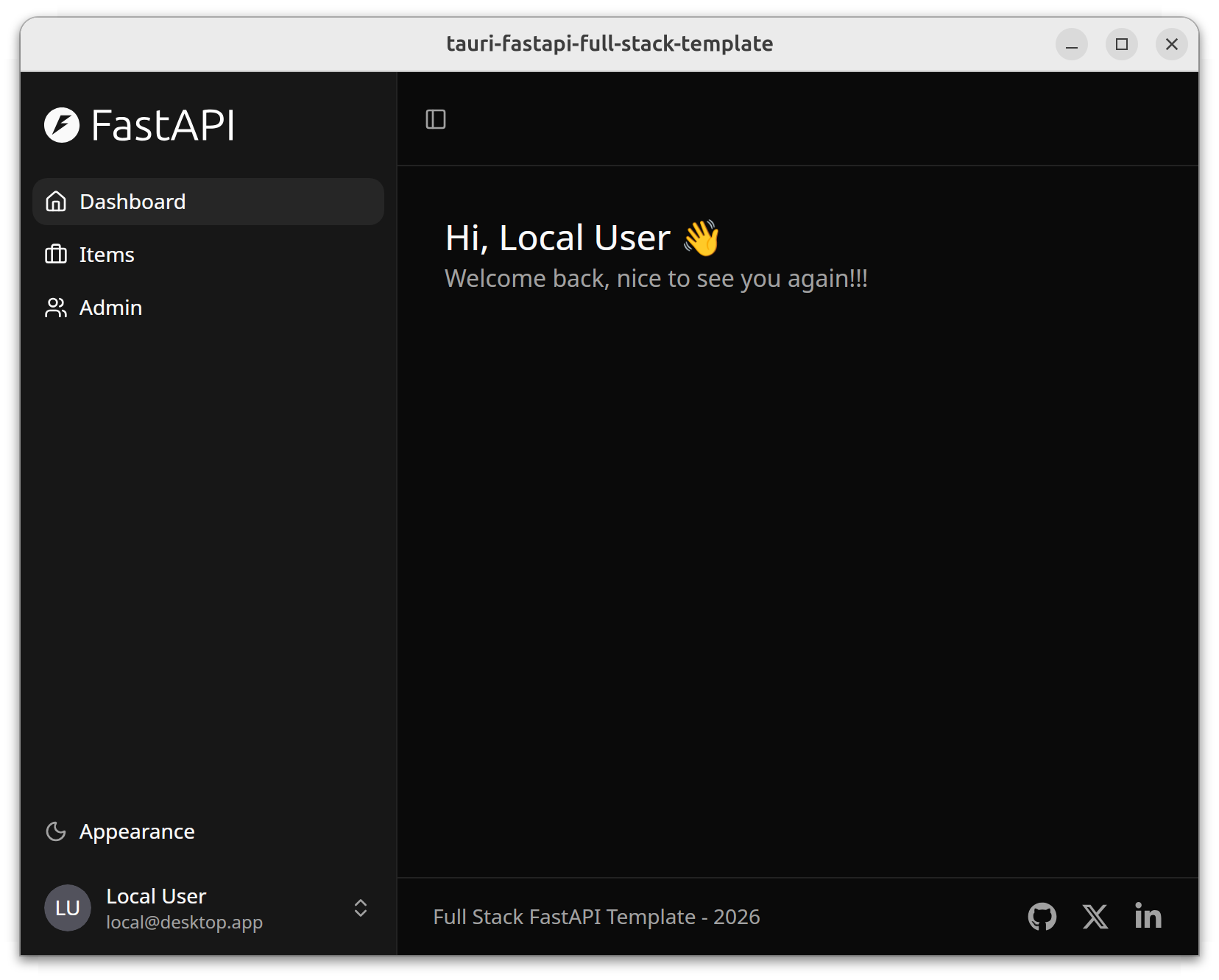
Integrates Tauri, FastAPI, and React across three ends, providing a three-process desktop application skeleton
ViteReactStarter
tauri-fastapi-full-stack-template — Vite Starter Template
By fudanglp
A cross-platform desktop application starter template based on Tauri, FastAPI, and React, using a sidecar architecture to package the Python backend as a standalone binary, with authentication disabled by default, suitable as a starting point for local desktop full-stack projects.
Explore the design
Compare the page layouts and mobile experience. Open any screenshot for a closer look.
Author preview
Author-provided previewTop of page
Preview provided in the project README.
One original preview is available. Open the full image to inspect the design.
Screenshots show visual appearance; interactive behavior may differ.
Recorded 2026-10-03View source
What stands out
A quick read of the recorded project description.
FastAPI is packaged with the application as a sidecar, with PyInstaller generating a single backend binary
Automatically generates TypeScript and Rust types and API clients via OpenAPI schema
Uses SQLite and SQLModel, with Alembic managing database migrations
Authentication is disabled by default, targeting local desktop use, and can be enabled in configuration as needed
Provides Makefile targets and documentation on IPC, data management, etc., covering the development to packaging process
Template Details
This is a full-stack starter template for building cross-platform desktop applications, combining Tauri (Rust), FastAPI (Python), and React (TypeScript). The project is integrated from two upstream templates, Tauri and FastAPI Full Stack Template, and is positioned as a starting skeleton for developers to customize further, rather than a product ready for release.
Architecturally, it uses a three-process model: the React frontend runs in a WebView, calling Tauri capabilities on the Rust side (native operations such as windows and file dialogs) via IPC commands, and accessing the FastAPI backend (database queries and business logic) via HTTP REST. Tauri performs a health check on FastAPI via HTTP at startup, and FastAPI can call desktop features back through a Unix socket. In development mode, the backend runs independently for hot reload and debugging, and Tauri does not launch the sidecar binary.
In terms of the tech stack, the frontend uses React + TypeScript, Vite, TanStack Router (file-based routing), TanStack Query, Tailwind CSS, and shadcn/ui; the backend uses FastAPI, SQLite, SQLModel, Alembic migrations, and Pydantic configuration; the desktop layer is Rust and Tauri 2. Data models automatically generate TypeScript and Rust types via OpenAPI schema, and the API client is generated by scripts. The database is located at .data/app.db in the project root during development, and in the standard application data directory for each operating system in production. Authentication is disabled by default, targeting local desktop use cases.
For the build process, PyInstaller packages the Python backend into a single binary, and Tauri generates native installers for each platform. The project provides Makefile targets covering dependency installation, development running, database initialization, client generation, and packaging. Before use, you need to install system tools such as Rust, bun, and uv yourself.
ViteReactLauncher
Is it right for your project?
Use Cases
- Projects that need Python as the business backend while delivering a desktop client
- Desktop applications that want to use React and TypeScript for the frontend and reuse the shadcn/ui component system
- Offline or standalone tools that require local SQLite storage and database migration capabilities
- Development teams that want to start with a ready-made full-stack skeleton and then replace it with their own business models
Suitable For
- Developers familiar with the basic development workflows of React, Python, and Rust
- Projects that need cross-platform (Linux, macOS, Windows) desktop delivery
- Scenarios where the template is accepted as a starting point for further customization, rather than being released directly as a finished product
Getting started & customization
Use these recorded setup notes alongside the repository instructions for your chosen version.
- 1
You need to install three system tools separately first: Rust (rustup), bun, and uv
- 2
Run make setup for the first time to install the Tauri CLI, frontend dependencies, and Python packages
- 3
During development, you need two terminals to run make fastapi and make dev respectively
- 4
The frontend defaults to localhost:1420, and the backend API to localhost:1430
- 5
After modifying models, you need to run Alembic migrations and run make generate-client to regenerate the client
License & source material
Usage conditions & limitations
Free to use · keep license noticeThis entry covers the free version under the MIT license in a public repository; the free scope is the code of that version and does not mean that external services or third-party assets are free.
Must comply with when using
- You are allowed to use, modify, commercialize, and distribute the code of this version for free.
- When distributing copies or substantial portions of the code, retain the original author's copyright notice and the full MIT license notice.
- The code is provided as is; warranties and limitations of liability are governed by the original license and applicable law.
Additional costs & items to verify
- This project is a starting template that requires further customization, not a product ready for release; users must replace branding, models, and business logic before using it in actual applications.
- Before use, you must install system tools such as Rust (rustup), bun, and uv yourself; the template does not include these runtime environments.
- In development mode, you need to start the backend and desktop processes in two separate terminals; Tauri does not automatically launch the sidecar binary, and the debugging process relies on manual process management.
- Authentication is disabled by default, targeting local desktop scenarios; if multi-user or networked use is required, you must enable it in configuration and implement appropriate security measures yourself.
- Demo images, fonts, icons, and other third-party assets need to be checked against their respective licenses and cannot be judged solely based on the code's MIT license.
- External services such as domains, hosting, databases, payments, or AI may incur additional charges.
View Original Text Basis
Permission is hereby granted, free of charge
Original License Text
This is a **starter template** designed to be customized for your own application.
Original README
**System tools** (install separately first):
Original README
**Why two terminals?** In development mode, the backend runs separately so you get hot-reload and easier debugging. Tauri doesn't spawn the sidecar binary in dev mode.
Original README
https://github.com/fudanglp/tauri-fastapi-full-stack-template/blob/master/LICENSEhttps://github.com/fudanglp/tauri-fastapi-full-stack-template/blob/master/README.md**Auth**: Optional - disabled by default for local desktop use
Original README
Compiled by DeepSeek based on repository license and README ·2026-10-03. Results only cover the materials read; dependencies, images, fonts, and subsequent term changes are subject to their respective original texts.
Project checks & description sources
Template Information
- Source platforms
- GitHub
- Documentation and maintenance reference score
- More documented · 80 / 100
- Technologies
- Vite · React
- Website type
- Starter
How this score is calculated
Our heuristic uses license records (up to 30), a demo link (12), a preview (10), stars (15), recorded maintenance (15), description completeness (8), feature records (5) and classification data (5). It is not a code, security or performance test, or a Google score. A link does not establish tested functionality.
What to verify for this project
- Repository update recorded
- 2026-02-08
- Screenshot last checked
- 2026-10-03
No demo link is recorded. Use the repository instructions to evaluate the project locally; the screenshot alone cannot establish interactive behavior.
The catalog identifies Vite as the primary stack. Check the actual dependency manifest and lockfile for versions and hosting requirements. These notes use recorded metadata, not a code audit or a deployment test.
Use a selection guide →How this description was prepared
AI-assisted description based on catalog records and repository material. Repository authors are not automatically the reviewers of this description.
Automatically checked against source and license rules; no manual editorial review.
Inspect the recorded source material
SHA-256: b06d420f486f197b4fb0df15fd57cad2815d0c5d9fea1c633376921919c1277c
2026-10-03T02:48:13.913Z
Source file / repository# Tauri + FastAPI Full Stack Template
> A **template** for building desktop applications with Tauri (Rust), FastAPI (Python), and React (TypeScript).
This project combines two excellent templates:
- **[Tauri](https://tauri.app)** - Cross-platform desktop apps with Rust
- **[FastAPI Full Stack Template](https://github.com/fastapi/full-stack-fastapi-template)** - Production-ready backend/frontend stack (forked from commit [`1c6d656`](https://github.com/fastapi/full-stack-fastapi-template/commit/1c6d6564))
This is a **starter template** designed to be customized for your own application. It provides a complete full-stack desktop app foundation with optional authentication.

## Architecture & Tech Stack
### Technology Stack
- **Frontend**: React + TypeScript with Vite, TanStack Router, TanStack Query, Tailwind CSS, shadcn/ui
- **Backend**: FastAPI with SQLite, SQLModel, Alembic migrations, Pydantic settings
- **Desktop**: Tauri 2 with sidecar architecture (FastAPI runs as bundled binary)
- **Auth**: Optional - disabled by default for local desktop use
- **Build**: PyInstaller bundles Python backend into single binary, Tauri creates native installers
### Architecture Overview
This is a **three-process desktop application**:
```mermaid
graph TB
subgraph "Tauri Desktop App"
Frontend[React Frontend<br/>WebView]
Rust[Rust Backend<br/>Tauri]
Frontend <-->|IPC Commands| Rust
end
Frontend -->|HTTP REST<br/>localhost:1420→1430| FastAPI
FastAPI -->|Unix Socket| Rust
subgraph "FastAPI Sidecar"
FastAPI[FastAPI<br/>Python]
DB[(SQLite DB)]
FastAPI --> DB
end
```
**How the processes communicate**:
- **Frontend → Tauri**: IPC commands (native operations like windows, file dialogs)
- **Frontend → FastAPI**: HTTP REST (database queries, business logic)
- **Tauri → FastAPI**: HTTP (health checks during startup)
- **FastAPI → Tauri**: Unix socket (desktop features like window control)
📖 **See [docs/IPC.md](docs/IPC.md)** for complete documentation on communication patterns.
### Project Structure
```
├── frontend/ # React + TypeScript + Vite
│ ├── src/
│ │ ├── routes/ # TanStack Router file-based routing
│ │ ├── components/
│ │ ├── client/ # API client (auto-generated)
│ │ └── hooks/ # React hooks (useAuth, etc.)
│ └── openapi.json # OpenAPI schema (auto-generated)
├── fastapi/ # Python FastAPI backend
│ ├── app/
│ │ ├── api/ # API routes
│ │ ├── core/ # Config, DB, logging
│ │ ├── models.py # SQLModel database models
│ │ └── crud/ # Database operations
│ └── alembic/ # Database migrations
├── tauri/ # Rust desktop app
│ ├── src/
│ │ ├── lib.rs # Main app, sidecar management
│ │ └── config.rs # Rust config from env vars
│ └── binaries/ # Bundled sidecar binary (generated)
└── scripts/ # Utility scripts (generate-client, etc.)
```
### Data Management
**Database**: SQLite (included with Python standard library, no external server needed)
**Location**:
- **Dev**: `.data/app.db` (project root)
- **Production (Linux)**: `~/.local/share/com.example.tauri-fastapi-full-stack-template/app.db`
- **Production (macOS)**: `~/Library/Application Support/com.example.tauri-fastapi-full-stack-template/app.db`
- **Production (Windows)**: `%APPDATA%\com.example.tauri-fastapi-full-stack-template\app.db`
**Models**: SQLModel with automatic TypeScript/Rust type generation via OpenAPI
```mermaid
flowchart LR
A[FastAPI Models<br/>SQLModel] --> B[OpenAPI Schema<br/>openapi.json]
B --> C[TypeScript Types<br/>auto-gen]
B --> D[Rust Types<br/>auto-gen]
```
**Migrations**: Alembic for schema version control
📖 **See [docs/data-management.md](docs/data-management.md)** for complete documentation on data storage, migrations, and models.
## Development
### Quick Start
Get the app running in 3 steps:
**1. Install system tools** (first time only):
- [Rust](https://www.rust-lang.org/tools/install) (via rustup)
- [bun](https://bun.sh/docs/installation/) (includes Node.js)
- [uv](https://docs.astral.sh/uv/getting-started/installation/) (includes Python)
**2. Install project dependencies** (first time only):
```bash
make setup
```
This installs:
- Tauri CLI (via cargo)
- Frontend dependencies (via bun)
- Backend Python packages (via uv)
**3. Run the app**:
```bash
# Terminal 1: Start the FastAPI backend
make fastapi
# Terminal 2: Start the Tauri desktop app
make dev
```
The app opens at http://localhost:1420 with the backend API at http://localhost:1430.
**Why two terminals?** In development mode, the backend runs separately so you get hot-reload and easier debugging. Tauri doesn't spawn the sidecar binary in dev mode.
### Requirements
**System tools** (install separately first):
1. **[Rust](https://www.rust-lang.org/tools/install)** (via rustup)
- Required by Tauri
- After installing Rust, `make setup` will install [Tauri CLI](https://tauri.app/v2/guides/getting-started/prerequisites)
2. **[bun](https://bun.sh/docs/installation/)**
- Includes [Node.js](https://nodejs.org/) runtime
- Frontend package manager
3. **[uv](https://docs.astral.sh/uv/getting-started/installation/)**
- Includes [Python 3.11+](https://www.python.org/downloads/) runtime
- Backend package manager
4. **System**: Linux, macOS, or Windows
### Frontend Development
**Stack**: React + TypeScript, Vite, TanStack Router (file-based), TanStack Query, Tailwind CSS, shadcn/ui
**File structure**:
```
frontend/src/
├── routes/ # File-based routing (TanStack Router)
├── components/ # Reusable UI components
├── client/ # Auto-generated API client
└── hooks/ # Custom React hooks
```
**Typical tasks**:
1. **Add a new page/route**:
```bash
# Create route file
touch frontend/src/routes/about.tsx
```
```typescript
// frontend/src/routes/about.tsx
import { createFileRoute } from '@tanstack/react-router'
export const Route = createFileRoute('/about')({
component: About,
})
function About() {
return <div>About Page</div>
}
```
2. **Add a widget/component**:
```bash
# Create component
touch frontend/src/components/StatsCard.tsx
```
```typescript
// frontend/src/components/StatsCard.tsx
export function StatsCard({ title, value }: { title: string; value: number }) {
return (
<div className="p-4 border rounded-lg">
<h3 className="text-lg font-semibold">{title}</h3>
<p className="text-2xl">{value}</p>
</div>
)
}
```
3. **Call API endpoints**:
```typescript
import { client } from '@/client/client'
import { useQuery, useMutation } from '@tanstack/react-query'
// GET request
const { data: users } = useQuery({
queryKey: ['users'],
queryFn: () => client.GET('/api/v1/users/'),
})
// POST request
const createUser = useMutation({
mutationFn: (data: UserCreate) =>
client.POST('/api/v1/users/', { body: data }),
})
```
4. **Styling with Tailwind**:
```typescript
// Utility classes for styling
<div className="flex items-center gap-4 p-4 bg-white rounded-lg shadow">
{/* Content */}
</div>
```
**Hot reload**: Vite automatically reloads the frontend when you save changes.
### FastAPI Backend Development
**Stack**: FastAPI, SQLModel, Alembic (migrations), Pydantic (validation)
**File structure**:
```
fastapi/app/
├── api/ # API routes
├── core/ # Config, database, logging
├── models.py # SQLModel database models
└── crud.py # Database operations
```
**Data models** (detailed docs: [docs/data-management.md](docs/data-management.md)):
1. **Add a new model**:
```python
# fastapi/app/models.py
from sqlmodel import SQLModel, Field
from datetime import datetime
from uuid import UUID, uuid4
class ProductBase(SQLModel):
name: str = Field(max_length=255)
price: float = Field(gt=0)
class Product(ProductBase, table=True):
id: UUID = Field(default_factory=uuid4, primary_key=True)
created_at: datetime = Field(default_factory=datetime.utcnow)
```
2. **Create database migration**:
```bash
cd fastapi
uv run alembic revision --autogenerate -m "add products"
uv run alembic upgrade head
```
3. **Regenerate API clients**:
```bash
make generate-client
```
4. **Add API endpoint**:
```python
# fastapi/app/api/routes/products.py
from fastapi import APIRouter, Depends
from app.models import Product, ProductCreate
from app.crud import create_product
router = APIRouter()
@router.post("/", response_model=Product)
def create_new_product(
product: ProductCreate,
session: Session = Depends(get_session),
):
return create_product(session, product)
```
5. **Update model (add/remove fields)**:
```python
# Edit model in models.py
class ProductBase(SQLModel):
name: str = Field(max_length=255)
price: float = Field(gt=0)
description: str | None = Field(default=None) # New field
# Create migration
cd fastapi
uv run alembic revision --autogenerate -m "add product description"
uv run alembic upgrade head
# Regenerate API clients
make generate-client
```
**Test API**:
- Swagger UI: http://localhost:1430/docs (interactive API docs)
- ReDoc: http://localhost:1430/redoc (alternative docs)
### Tauri (Rust) Development
**Stack**: Rust, Tauri 2
**File structure**:
```
tauri/src/
├── lib.rs # Main app, Tauri commands
├── config.rs # Rust config from environment variables
└── socket_server.rs # Unix socket server for FastAPI → Rust communication
```
**Typical tasks**:
1. **Add a Rust dependency**:
```toml
# tauri/Cargo.toml
[dependencies]
serde_json = "1.0"
```
2. **Add a Tauri command (IPC)**:
```rust
// tauri/src/lib.rs
#[tauri::command]
fn greet(name: &str) -> String {
format!("Hello, {}!", name)
}
// Register in main()
fn main() {
tauri::Builder::default()
.invoke_handler(tauri::generate_handler![greet])
.run(tauri::generate_context!())
.expect("error while running tauri application");
}
```
3. **Call Tauri command from frontend**:
```typescript
import { invoke } from '@tauri-apps/api/core'
const greeting = await invoke('greet', { name: 'World' })
```
4. **Test Tauri commands**:
```bash
# Run Tauri dev (requires backend running separately)
make dev
```
5. **Build Rust backend**:
```bash
# Build only the Rust part
cd tauri
cargo build
```
**Communication with FastAPI**: See [docs/IPC.md](docs/IPC.md) for Unix socket communication patterns.
### Make Targets
```bash
make setup # Install all dependencies
make dev # Run development mode (requires backend running)
make dev-frontend # Frontend only (if backend is already running)
make fastapi # Backend only (for debugging)
make init-db # Initialize/reset database
make generate-client # Generate API clients from OpenAPI schema
make package-backend # Package FastAPI backend binary
make package # Package production bundles
make clean # Clean all build artifacts
make help # Show all targets
```
### Customization
This is a **template** - customize these project-specific settings for your application:
**1. Rename the app** - Edit `tauri/tauri.conf.json`:
```json
{
"productName": "your-app-name",
"identifier": "com.yourcompany.your-app-name",
"title": "Your App Name"
}
```
**2. Update backend config** - Edit `fastapi/app/core/config.py`:
```python
PROJECT_NAME: str = "Your App Name"
AUTH_REQUIRED: bool = False # Set to True to enable authentication
```
**3. Update frontend branding** - Edit `frontend/src/routes/_layout.tsx`:
```typescript
// Change page title, branding, etc.
```
For adding features (routes, models, API endpoints), see the [Development](#development) sections above.
### Building for Production
Package the distributable application:
```bash
# Package everything (frontend + backend binary + Tauri app)
make package
# Or package step by step:
make package-backend # PyInstaller: tauri/binaries/fastapi-server-{arch}-{os}
cargo tauri build # Creates .deb, .rpm, .AppImage (Linux)
```
Output: `tauri/target/release/bundle/`
**What happens during build**:
1. Frontend builds to static files
2. Python backend bundles into PyInstaller binary
3. Tauri creates platform-specific installers
4. In production, Tauri automatically spawns the FastAPI sidecar with proper data directory
## License
MIT - use this template for anything you want.
Explore similar templates
Compare previews and descriptions within the same stack and category.

react-starter-kit
A full-stack SaaS monorepo starter built on Vite and React, with Bun, TypeScript, tRPC, Drizzle ORM, Better Auth, Stripe, and Cloudflare Workers. It includes email OTP, passkey, Google OAuth, organizations, subscription billing, Drizzle migrations, seed scripts, and Terraform infrastructure.
Vite · SaaS

cove
Cove is a minimal TanStack Start starter template maintained by mugnavo, integrating React, TanStack Router/Query, Tailwind CSS, shadcn/ui, Drizzle ORM with PostgreSQL, Better Auth, Vite Plus, and Nitro.
Vite · SaaS

vite-react-boilerplate
A production-ready Vite + React starter template with TypeScript, Tailwind CSS, TanStack Router/Query/Table, Storybook, React Hook Form + Zod, Vitest and Playwright testing, plus Husky/Commitizen/Commitlint commit conventions.
Vite · Starter

react-vite-admin
A backend management starter built on Vite and React, integrating Recoil, React Query, TypeScript, and Axios, with Ant Design-style interface screenshots. Suitable as a starting point for management-side projects, licensed under MIT, with Chinese documentation and common scripts.
Vite · Admin dashboard

typescript-react_best_practices-vite_template
A Vite + React + TypeScript starter template by CodelyTV, preconfigured with Jest and React Testing Library unit tests, Cypress end-to-end tests, ESLint and Prettier using Codely's shared configuration, GitHub Actions workflows, a Makefile, and Sass.
Vite · Starter

cloudflare-starter-kit
A Cloudflare Workers project scaffolding template maintained by kriasoft, using Vite and TypeScript, with three built-in workspaces: api, app, and edge, and preconfigured local testing, multiple environments, and a GitHub Actions deployment workflow.
Vite · Starter