Eleventy v3(ESM)配合清晰的目录布局
Eleventy启动器
11ty-project-base — Eleventy 启动器模板
作者 gdewalters
一个基于 Eleventy v3 和 Tailwind CSS v4 的静态站点起步模板,包含暗色模式、404/500 页面、JS 打包与 Netlify 部署配置。
看看你的网站会是什么样
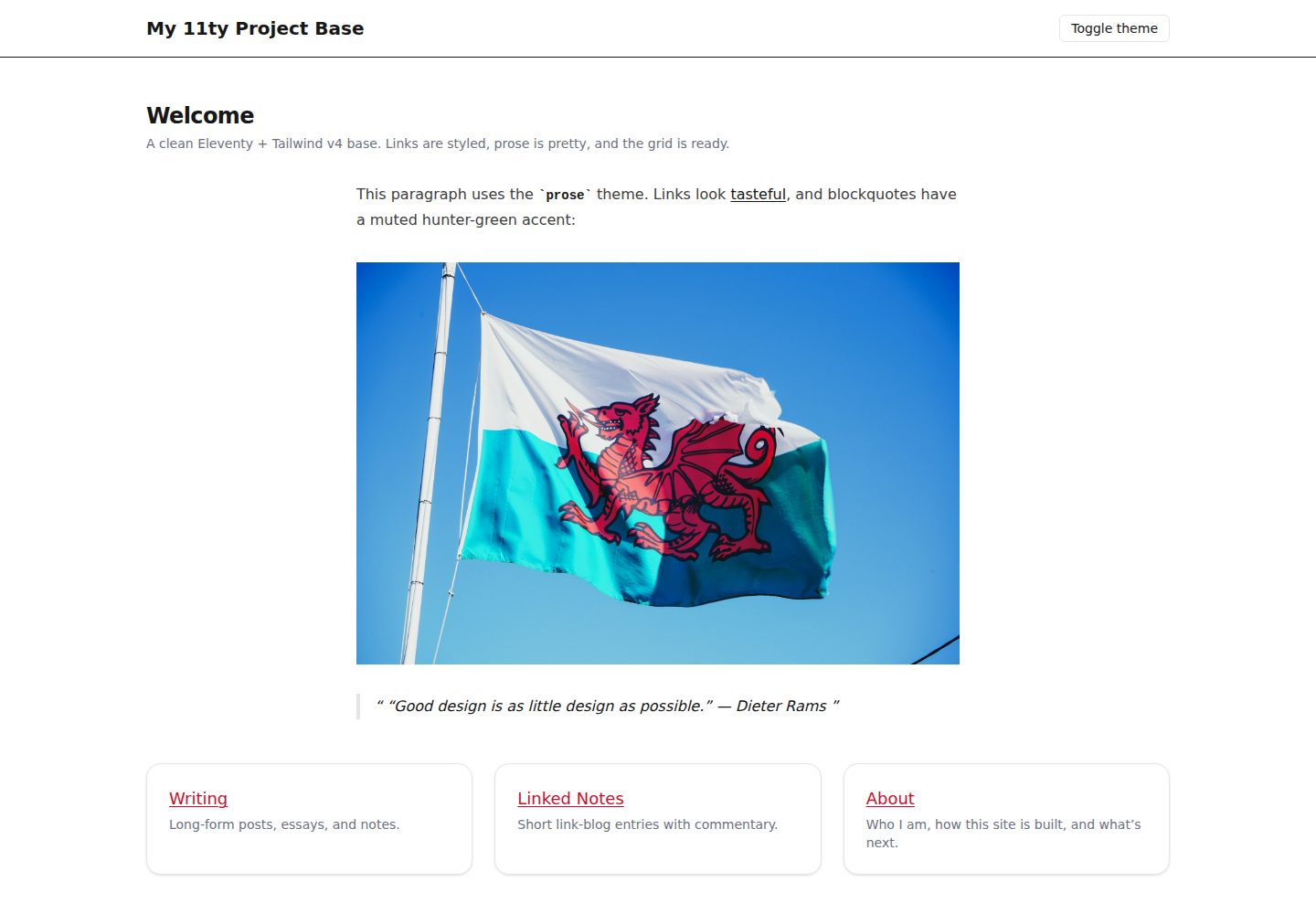
浏览真实页面截图,比较内容排版与手机效果。点击下方缩略图切换,放大查看整页细节。
全部页面与视图 2
截图用于了解视觉与布局,交互效果请以实际项目为准。
采集于 2026-10-13查看来源
值得关注的模板亮点
从已有项目资料中,快速了解它的特点。
Tailwind CSS v4 CLI,通过 @theme 定义令牌并集成 Typography 插件
暗色模式切换,无 FOUC 并遵循操作系统偏好
生产环境使用 html-minifier-terser 压缩 HTML,XML/RSS 保持安全
根路径下的 404 与 500 页面,带 noindex 并排除在集合之外
通过 esbuild 的 context API 打包 JavaScript,输出到 public/assets/js
模板详细介绍
该模板是一个 Eleventy v3(ESM)静态站点起步项目,使用 Tailwind CSS v4 CLI 处理样式,并通过 esbuild 打包 JavaScript。README 说明其包含暗色模式切换(无 FOUC、遵循系统偏好)、生产环境 HTML 压缩、根路径下的 404 与 500 页面(带 noindex)、可选的 SPA 回退(通过 _redirects 或 vercel.json)、Netlify 部署配置以及一个聚合开发命令 npm run dev:all。目录结构区分了内容、布局、数据、配置、样式源文件和脚本入口。
使用方式上,README 提供了三种从模板创建新项目的途径:GitHub 模板界面、GitHub CLI 和浅克隆。初始化后需要更新 package.json 元数据、_data/site.js 中的站点名称、base.njk 中的导航链接,并替换示例图片。开发需要 Node v20+,生产构建输出到 _site/。部署部分以 Netlify 为例,给出了构建命令、发布目录和 Node 版本设置,并说明 netlify.toml 中的头部配置会被自动读取。
README 未提供关于性能、可访问性合规、浏览器兼容范围或除 Netlify 之外平台的具体部署步骤的说明。模板本身不包含内容管理系统或数据库集成,其定位是静态站点起步基础。
Eleventy启动器
适合你的项目吗?
适用场景
- 从模板快速创建一个新的 Eleventy 静态站点项目
- 需要暗色模式与基础排版主题的博客或文档站点起步
- 使用 Netlify 部署并希望预置构建、头部与重定向配置的静态站点
- 需要可选 SPA 回退或自定义重定向的静态站点项目
适合人群
- 熟悉 Node.js 与 npm 的前端开发者
- 希望以 Eleventy 和 Tailwind CSS 构建静态站点的团队
- 需要可定制起步模板而非完整 CMS 的项目
上手与定制指南
结合仓库当前版本的说明,按下面的资料检查内容、配置与运行要求。
- 1
需要 Node v20+(见 .nvmrc)与 npm。
- 2
通过 GitHub 模板、GitHub CLI 或浅克隆创建新项目后运行 npm install 与 npm run dev:all。
- 3
初始化后更新 package.json 元数据、_data/site.js 中的站点名称、base.njk 中的导航链接,并替换示例图片。
- 4
生产构建使用 npm run build:all,输出到 _site/。
- 5
Netlify 部署时设置构建命令 npm run build:all、发布目录 _site、Node 版本 20。
授权与来源资料
使用条件与限制
免费使用 · 保留许可声明本次收录的是公开仓库中采用 ISC 许可的免费版本;免费范围为该版本代码,不代表外部服务或第三方素材免费。
使用时需要遵守
- 允许为任何目的免费使用、复制、修改和分发,包括商用。
- 所有副本均需保留原版权声明和许可声明。
- 代码按现状提供;担保与责任限制以原许可证及适用法律为准。
额外费用与待核对事项
- 演示图片、字体、图标及其他第三方素材需按各自许可核对,不能仅凭代码的 ISC 许可判断。
- 域名、托管、数据库、支付或 AI 等外部服务可能另外收费。
- 开发与构建需要 Node.js v20 或更高版本(见 .nvmrc),低于该版本无法运行。
- 部署示例以 Netlify 为目标,需要连接 Netlify 账户并配置构建命令与发布目录。
- 启用 SPA 回退(取消注释 /* /index.html 200)会禁用静态 404 页面,二者不能同时使用。
- 不能同时启用 SPA 回退并保留静态 404 页面,必须二选一。
- GitHub Pages 不支持重写规则,若需部署 SPA 必须使用 404-as-SPA loader 技巧。
查看原文依据
for any purpose with or without fee is hereby granted
许可证原文
- Ensure Node **v20+** (run `nvm use` if you use `nvm`; see `.nvmrc`).
README 原文
- Connect the new repo in Netlify.
README 原文
- **Optional SPA**: uncomment `/* /index.html 200` to route all paths to the homepage (disables static 404).
README 原文
> Do not enable SPA fallback **and** keep a static 404 at the same time. Pick one.
README 原文
https://github.com/gdewalters/11ty-project-base/blob/main/LICENCEhttps://github.com/gdewalters/11ty-project-base/blob/main/README.md- **GitHub Pages**: no rewrites; use the “404‑as‑SPA loader” trick if you must ship an SPA.
README 原文
DeepSeek 根据仓库许可证和 README 整理 ·2026-10-13。结果仅覆盖已读取资料,依赖、图片、字体及后续条款变更以各自原文为准。
项目核对记录与介绍依据
模板资料
- 来源平台
- GitHub
- 资料与维护参考分
- 资料一般 · 74 / 100
- 技术栈
- Eleventy
- 网站类型
- 启动器
这个分数如何计算
本站按许可资料(最高30分)、演示链接(12分)、预览图(10分)、Star数(15分)、记录的维护时间(15分)、描述完整度(8分)、功能记录(5分)和分类资料(5分)计算。它不是代码、安全或性能测试,也不是 Google 评分;有链接不代表已实测可用。
这个项目需要核对什么
- 记录的仓库更新时间
- 2025-09-02
- 截图检查日期
- 2026-10-13
已收录演示链接。请用你的内容与屏幕尺寸检查;有演示不代表表单、认证或支付已经可用。
目录记录的主要技术栈是 Eleventy。请通过依赖清单和锁文件核对实际版本与托管要求。这些说明基于收录资料,不代表代码审计或部署实测。
查看具体选型方法 →介绍的制作与核对状态
介绍由 AI 辅助整理目录与仓库资料。仓库作者不等于这篇介绍的审核者。
审核声明: codex-user-requested-batch-review-20261015 · 2026-10-15
查看当时使用的来源资料
SHA-256: a1315c52de62ee0ab5a3ac4826fd6a11002c47a215c0f2db7396127bf4567acb
2026-10-13T13:49:41.856Z
来源文件 / 仓库# 11ty project base A clean, future‑proof Eleventy v3 starter wired with Tailwind CSS v4, a tasteful prose theme, dark mode, smart minification, first‑class 404/500 pages, optional SPA fallback, and a one‑command dev workflow. Minimal ceremony, maximum mileage. --- ## Features - **Eleventy v3 (ESM)** with a tidy directory layout - **Tailwind v4 (CLI)** with tokens via `@theme`, Typography plugin, and a tiny base prose theme - **Dark mode** toggle (no FOUC, respects OS preference) - **Minification in production** (`html-minifier-terser`), XML/RSS kept safe - **404 & 500 pages** at the site root; SEO‑safe `noindex` - **Optional SPA fallback** via `_redirects` (or `vercel.json`) - **JS bundling** via esbuild (context API), outputs to `public/assets/js` - **Netlify‑ready** (`netlify.toml` with headers + Node version) - **One command to rule them all**: `npm run dev:all` --- ## Using this starter for a new project Spin up a fresh site from this starter in a brand-new directory. Pick the route that suits you: ### Option A — GitHub “Use this template” (UI) 1. Open this repo on GitHub and click **Use this template → Create a new repository**. 2. Name your new repo (e.g. `my-new-site`) and create it. 3. Clone it locally: ```bash git clone [email protected]:<YOUR-GH-USER>/my-new-site.git cd my-new-site npm install npm run dev:all ``` ### Option B — GitHub CLI (from template) Replace `OWNER/REPO` with this starter’s full name. ```bash gh repo create my-new-site --template OWNER/REPO --public --clone cd my-new-site npm install npm run dev:all ``` ### Option C — Shallow clone (no template UI) ```bash git clone --depth=1 [email protected]:OWNER/REPO.git my-new-site cd my-new-site rm -rf .git git init -b main git add . git commit -m "chore: bootstrap from starter" # (optional) set up the remote: # git remote add origin [email protected]:<YOUR-GH-USER>/my-new-site.git # git push -u origin main npm install npm run dev:all ``` --- ### Post-setup checklist (2 minutes) - **Project metadata** - `package.json`: update `name`, `description`, `repository`, `author`, `homepage`, `bugs`. - `README.md`: change the short description to match the new site. - `LICENCE`: ensure the copyright holder/year suit this project. - **Site identity** - `_data/site.js`: set your site `name` (and any other fields you add later). - `_includes/layouts/base.njk`: update header nav links (and email in 404/500). - Replace `public/assets/images/example.jpg` with a real image or remove it. - **Dev & build** - Ensure Node **v20+** (run `nvm use` if you use `nvm`; see `.nvmrc`). - Dev: `npm run dev:all` → http://localhost:8080 - Prod build: `npm run build:all` (outputs to `_site/`) - **Deploy (Netlify)** - Connect the new repo in Netlify. - Build command: `npm run build:all` - Publish directory: `_site` - Node version: 20 (in **Site settings** or via `netlify.toml`). - `_redirects` and headers in `netlify.toml` are picked up automatically. - **CI (GitHub Actions)** - The included workflow builds on pushes/PRs to `main`/`master`. - Check the **Actions** tab after your first push. --- ### Common tweaks - Want a different container width? Adjust `.container-page` (and optionally add `.container-narrow`) in `styles/Tailwind.css`. - Need extra colours or typography? Add tokens under `@theme` and style `.prose` as needed. - Not using JS yet? Remove the `JS` process from `dev:all` or leave it—it’s harmless. --- ## Directory structure ``` 11ty-project-base/ ├─ _config/ # Eleventy hooks │ ├─ filters.js │ ├─ shortcodes.js │ └─ transforms.js ├─ _data/ # Global data │ ├─ env.js │ └─ site.js ├─ _helpers/ │ └─ build-js.js # esbuild bundler (context API) ├─ _includes/ │ └─ layouts/ │ | └─ base.njk │ └─ partials/ ├─ content/ # Eleventy input │ ├─ 404.njk │ ├─ 500.njk │ ├─ index.njk │ └─ styles/ │ └─ main.css # generated by Tailwind CLI (gitignored) ├─ public/ # passthrough to site root │ ├─ _redirects # optional │ └─ assets/ │ └─ images/ │ └─ example.jpg ├─ scripts/ # your app JS entry(ies) │ └─ main.js ├─ styles/ │ └─ Tailwind.css # Tailwind v4 entry (source) ├─ _site/ # Eleventy output (gitignored) ├─ .gitignore ├─ .nvmrc ├─ eleventy.config.js ├─ netlify.toml └─ package.json ``` --- ## Requirements - Node **v20+** (see `.nvmrc`) - npm --- ## Quick start ```bash npm install npm run dev:all # open http://localhost:8080 ``` **Production build:** ```bash npm run build:all ``` --- ## NPM scripts ```json { "scripts": { "dev": "ELEVENTY_ENV=dev eleventy --serve", "build": "ELEVENTY_ENV=prod eleventy", "clean": "rimraf _site", "tw:init": "tailwindcss -i styles/Tailwind.css -o content/styles/main.css", "tw:watch": "tailwindcss -i styles/Tailwind.css -o content/styles/main.css --watch", "tw:build": "tailwindcss -i styles/Tailwind.css -o content/styles/main.css --minify", "js:watch": "node _helpers/build-js.js --watch", "js:build": "node _helpers/build-js.js", "predev:all": "npm run tw:init", "dev:all": "concurrently -k -n ELEVENTY,TAILWIND,JS -c auto \"npm:dev\" \"npm:tw:watch\" \"npm:js:watch\"", "build:all": "npm run tw:build && npm run js:build && npm run build" } } ``` - `dev:all` runs Eleventy + Tailwind watcher + esbuild watcher. - `build:all` compiles Tailwind, bundles JS, then builds Eleventy (with minification). --- ## Eleventy configuration `eleventy.config.js`: - **Input**: `content/` - **Includes**: `_includes/` - **Data**: `_data/` - **Output**: `_site/` - **Passthrough**: `public/` → `/`, `content/styles/` → `/assets` (so compiled CSS is served as `/assets/main.css`) - **Watches**: `content/styles`, `styles`, `scripts` - **Transforms**: registered from `_config/transforms.js` - **Template engines**: Nunjucks for html/md/data --- ## Minification and XML safety `_config/transforms.js` includes two transforms: 1. **`html-minify`** (prod only): uses `html-minifier-terser` for `.html?` files with safe defaults (`collapseWhitespace`, `removeComments`, `minifyJS/CSS`, etc.). 2. **`xml-preserve`**: for `.xml`, `.rss`, `.atom`, `.xsl`, we **do not minify**; we only **normalise** newlines and trim trailing whitespace to keep feeds/sitemaps parser‑friendly. Production mode is toggled by `ELEVENTY_ENV=prod` in the `build` script. --- ## Tailwind v4 setup - Entry CSS: `styles/Tailwind.css` - Output CSS: `content/styles/main.css` (gitignored; copied to `/assets/main.css`) - Plugins: `@tailwindcss/typography` - Tokens: declared via `@theme` (e.g., `--color-vividcrimson`, `--color-huntergreen`) - Sources: `@import "tailwindcss" source("../content");` and `@source "../_includes";` to scan Eleventy templates. ### Base prose theme and links - All links: subtle underline, medium weight, **crimson**; underline removed on hover/focus. - `.prose` content: neutral text, **muted hunter‑green** blockquotes (text + left border), sensible code/pre colours. Apply to Markdown/CMS output by wrapping rendered HTML with `.prose` (e.g., on article containers or template partials). --- ## Dark mode (no FOUC + toggle) - I set `<html data-theme="dark|light">` early via a tiny inline script in `base.njk` (uses `localStorage` or OS preference). - Dark tokens adjust link colour (brighter crimson), quote accents, prose neutrals, and card backgrounds. - A **“Toggle theme”** button in the header flips state and saves preference. You can move the toggle script into `scripts/main.js` later if you prefer bundling. --- ## Header/footer layout - Header/footer content is wrapped with `.container-page` (or `.container-narrow` if enabled) to align with main content. - Optional subtle backgrounds with dark‑mode variants to separate header/footer from main content. --- ## 404 & 500 pages - `content/404.njk` → `/404.html` - `content/500.njk` → `/500.html` - Both use `noindex` and are excluded from collections. - Eleventy Dev Server routes unknown paths to `/404.html` locally. - Netlify/Vercel/Cloudflare Pages/GitHub Pages use `/404.html` automatically for static sites. --- ## Redirects & SPA fallback - `public/_redirects` is passed through to the site root: - Add custom redirects like `/old /new 301`. - **Optional SPA**: uncomment `/* /index.html 200` to route all paths to the homepage (disables static 404). - **Vercel**: use `vercel.json` rewrites if you need SPA behaviour. - **GitHub Pages**: no rewrites; use the “404‑as‑SPA loader” trick if you must ship an SPA. > Do not enable SPA fallback **and** keep a static 404 at the same time. Pick one. --- ## JavaScript bundling - Entry: `scripts/main.js` - Bundler: `_helpers/build-js.js` uses **esbuild context API** for watching: - Output: `public/assets/js/bundle.js` (passthrough to `_site/assets/js`) - Include in layout: `<script src="/assets/js/bundle.js" defer></script>` --- ## Netlify deploy `netlify.toml`: ```toml [build] command = "npm run build:all" publish = "_site" [build.environment] NODE_VERSION = "20" [[headers]] for = "/assets/*" [headers.values] Cache-Control = "public, max-age=31536000, immutable" [[headers]] for = "/*" [headers.values] Referrer-Policy = "strict-origin-when-cross-origin" X-Content-Type-Options = "nosniff" X-Frame-Options = "DENY" ``` - Netlify will also read `_redirects` from the published root. - If you convert to an SPA later, add a 200 rewrite here **or** in `_redirects` (not both). --- ## Global data - `_data/site.js`: name/year for layout chrome. - `_data/env.js`: simple environment surface (`ELEVENTY_ENV`, Node version) for templates/data. --- ## Customising - Add collections (e.g., `content/posts/`) and define them in `eleventy.config.js`. - Extend typography (e.g., `.prose-lg` sections) with component classes. - Add more filters/shortcodes in `_config/filters.js` and `_config/shortcodes.js`. - Replace the grid tiles on the homepage with your real sections. --- ## Troubleshooting - **Passthrough collision**: Error: “Multiple passthrough copy files are trying to write to the same output file (`_site/assets/main.css`).” Fix: only passthrough **compiled** CSS (`content/styles` → `/assets`). Do **not** passthrough `styles/`. - **esbuild “Invalid option 'watch'”**: Use the **context API** (`const ctx = await esbuild.context(opts); await ctx.watch();`) as implemented in `_helpers/build-js.js`. - **No CSS on first load**: Ensure `predev:all` runs `tw:init` so `content/styles/main.css` exists before Eleventy starts. - **SPA fallback eats 404**: If you enable `/* /index.html 200`, you will not see your static 404. That’s expected. - **Dark mode flashes**: Make sure the inline theme bootstrap runs **before** the CSS link in `base.njk`. --- ## Licence See [`LICENCE`](LICENCE). --- ## Credits Built with Eleventy and Tailwind. Happy building!
看看同类模板
对比同技术栈与用途的模板,找到更适合的视觉与内容结构。

eleventy-base-blog
A starter repository for a blog web site using the Eleventy static site generator.
Eleventy · 博客

eleventy-garden
:seedling: A starter site for building a mind garden with eleventy
Eleventy · 启动器

eleventastic
An Eleventy Starter Kit
Eleventy · 启动器

neat-starter
Starter Template for Netlify CMS, Eleventy, Alpine JS & Tailwind CSS
Eleventy · 启动器

Eleventy-Starter-Boilerplate
🚀 Eleventy Starter is production-ready with SEO-friendly for quickly starting a blog. ⚡ Built with Eleventy, …
Eleventy · 博客

eleventy-plus-vite
A clean and fast Eleventy Starter Project with Vite
Eleventy · 启动器