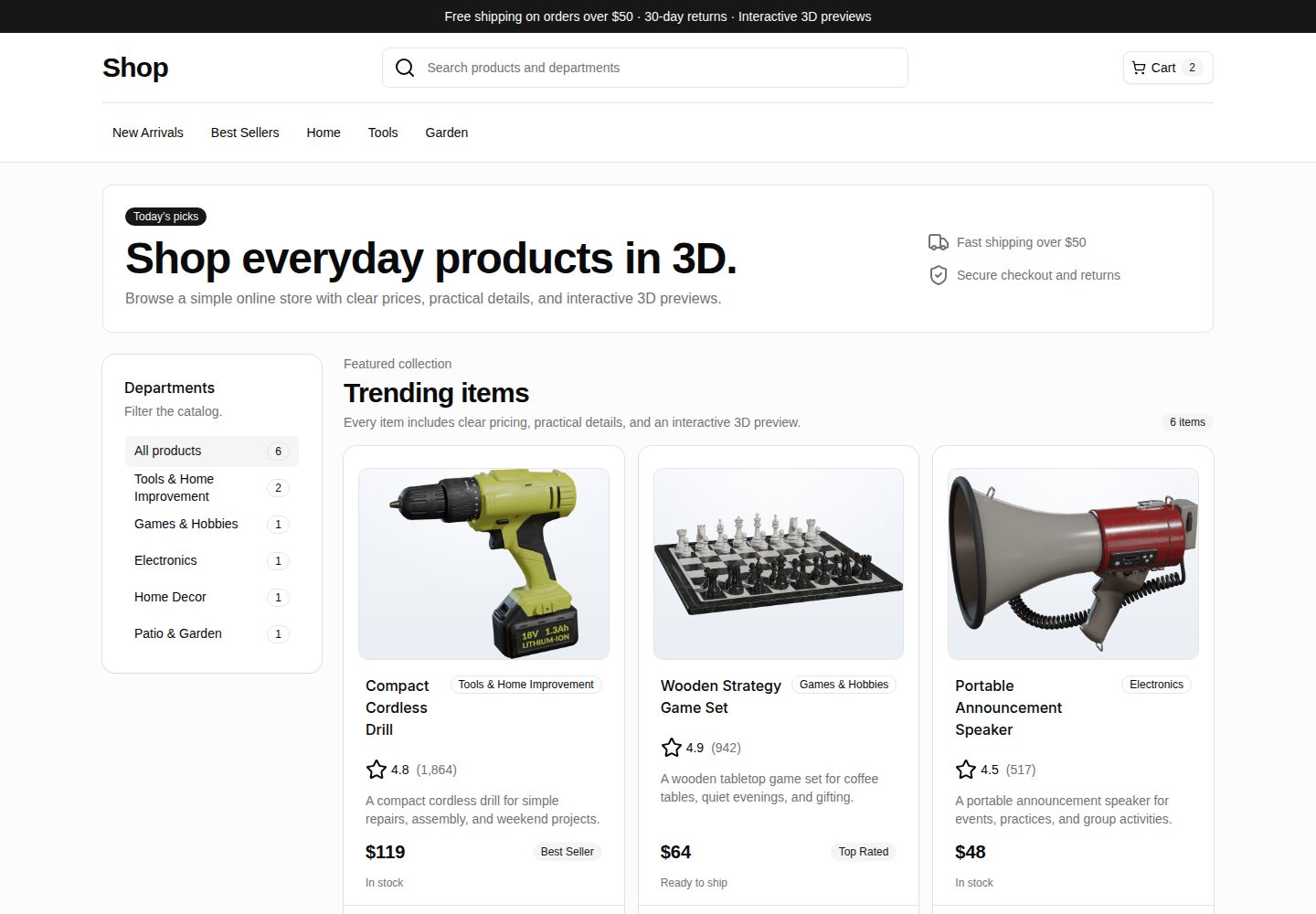
响应式电商店面,含分类筛选、商品卡片与商品详情路由
ViteReact电商启动器
webspatial-shop — Vite 电商模板
作者 georgebutler
WebSpatial Shop 是一个基于 Vite 与 React 的电商店面示例,用普通网页展示商品目录,并在支持的运行时把商品媒体升级为 WebSpatial 3D 模型预览。
看看你的网站会是什么样
浏览真实页面截图,比较内容排版与手机效果。点击下方缩略图切换,放大查看整页细节。
全部页面与视图 3
截图用于了解视觉与布局,交互效果请以实际项目为准。
采集于 2026-10-02查看来源
值得关注的模板亮点
从已有项目资料中,快速了解它的特点。
商品数据模型覆盖价格、评分、库存、卖点、规格、缩略图与 GLB 资源路径
通过 @webspatial/react-sdk 渐进式渲染 3D 模型,不支持时回退为缩略图
详情页在空间渲染可用时使用 WebSpatial 模型引用播放动画
示例 3D 资产来自 Poly Haven,仓库内提供来源与署名说明
包含 Vercel 静态部署配置,构建产物可由任意静态托管服务提供
模板详细介绍
WebSpatial Shop 是一个 React 电商店面演示项目,用于展示传统电商体验如何逐步过渡到空间化界面。它提供一个小型日用品目录,包含响应式浏览、分类筛选、商品卡片与商品详情路由,商品数据涵盖价格、评分、库存状态、卖点与规格。
在桌面和移动浏览器中,项目作为普通 Vite 应用运行,商品媒体以缩略图形式渲染,保证常规网页访问可用。在支持 WebSpatial 的运行时中,同一个媒体组件会改用 @webspatial/react-sdk 的 <Model enable-xr> 渲染商品 GLB 模型,详情页还可通过模型引用播放动画。渐进式渲染逻辑集中在 src/components/Model3D.tsx,商品内容与静态资源路径位于 src/data/products.ts。
项目使用 React、TypeScript、Vite、React Router、Tailwind CSS 与 shadcn/ui 风格组件,并包含 Vercel 静态部署配置。示例目录中的 3D 资产来自 Poly Haven,仓库内附有来源链接与署名说明;代码采用 MIT 许可,但第三方素材需按其自身许可核对。
ViteReact电商启动器
适合你的项目吗?
适用场景
- 了解传统电商页面如何在不放弃标准 Web 交付的前提下接入空间化 3D 商品预览
- 作为 React + Vite 电商店面起步模板,替换商品数据与页面文案后搭建自己的目录页
- 在支持 WebSpatial 的运行时中验证 <Model enable-xr> 的模型渲染与详情页动画行为
- 参考 Model3D 组件的渐进式渲染写法,为现有商品媒体增加 3D 模型与图片回退
适合人群
- 需要 React 电商目录与详情页示例的开发者
- 希望研究 WebSpatial 空间化渲染与图片回退方案的团队
- 准备用 Vite 构建静态部署电商原型的个人或小组
上手与定制指南
结合仓库当前版本的说明,按下面的资料检查内容、配置与运行要求。
- 1
需要 Node.js 与 npm,安装依赖后运行 npm run dev 启动 Vite 开发服务器
- 2
常规浏览器预览使用缩略图回退,验证 3D 模型路径需运行 npm run avp,该命令会执行 webspatial-builder run
- 3
商品与资源在 src/data/products.ts 中维护,缩略图和 GLB 模型放在 public/models/ 下,路径通过 publicAsset 辅助函数基于 import.meta.env.BASE_URL 拼接
- 4
生产构建使用 npm run build,输出可由任意静态主机提供;仓库包含 Vercel 配置
- 5
示例 3D 资产来自 Poly Haven,替换或再分发时需核对对应素材的许可与署名要求
授权与来源资料
使用条件与限制
免费使用 · 保留许可声明本次收录的是公开仓库中采用 MIT 许可的免费版本;免费范围为该版本代码,不代表外部服务或第三方素材免费。
使用时需要遵守
- 允许免费使用、修改、商用和分发该版本代码。
- 分发代码副本或实质性部分时,保留原作者版权声明和完整 MIT 许可声明。
- 代码按现状提供;担保与责任限制以原许可证及适用法律为准。
额外费用与待核对事项
- 空间 3D 模型预览为可选功能,需额外安装 WebSpatial / visionOS 工具链;普通浏览器仅显示缩略图回退,不安装该工具无法验证 3D 渲染路径。
- 运行 npm run avp 会调用外部命令 webspatial-builder,需另行安装 WebSpatial 构建工具,属于项目代码之外的外部依赖。
- 仓库内示例 3D 资产(缩略图与 GLB)不随 MIT 代码许可授权,仍受 Poly Haven 各自素材许可约束;再分发或替换素材时须自行核对许可与署名要求。
- 再分发本项目或替换示例素材时,需自行审查所添加素材的许可与署名要求,该义务不在 MIT 代码许可范围内。
- 演示图片、字体、图标及其他第三方素材需按各自许可核对,不能仅凭代码的 MIT 许可判断。
- 域名、托管、数据库、支付或 AI 等外部服务可能另外收费。
查看原文依据
Permission is hereby granted, free of charge
许可证原文
Optional: WebSpatial / visionOS tooling for spatial preview
README 原文
This builds the app and runs: ```bash webspatial-builder run --base=http://localhost:5173 ```
README 原文
The included 3D assets remain subject to their source asset licenses.
README 原文
https://github.com/georgebutler/webspatial-shop/blob/main/LICENSEhttps://github.com/georgebutler/webspatial-shop/blob/main/README.mdIf you redistribute this project or replace the sample assets, review the license and attribution requirements for any assets you add.
README 原文
DeepSeek 根据仓库许可证和 README 整理 ·2026-10-02。结果仅覆盖已读取资料,依赖、图片、字体及后续条款变更以各自原文为准。
项目核对记录与介绍依据
模板资料
- 来源平台
- GitHub
- 资料与维护参考分
- 资料较完整 · 85 / 100
- 技术栈
- Vite · React
- 网站类型
- 电商 · 启动器
这个分数如何计算
本站按许可资料(最高30分)、演示链接(12分)、预览图(10分)、Star数(15分)、记录的维护时间(15分)、描述完整度(8分)、功能记录(5分)和分类资料(5分)计算。它不是代码、安全或性能测试,也不是 Google 评分;有链接不代表已实测可用。
这个项目需要核对什么
- 记录的仓库更新时间
- 2026-06-09
- 截图检查日期
- 2026-10-02
已收录演示链接。请用你的内容与屏幕尺寸检查;有演示不代表表单、认证或支付已经可用。
目录记录的主要技术栈是 Vite。请通过依赖清单和锁文件核对实际版本与托管要求。这些说明基于收录资料,不代表代码审计或部署实测。
查看具体选型方法 →介绍的制作与核对状态
介绍由 AI 辅助整理目录与仓库资料。仓库作者不等于这篇介绍的审核者。
已完成服务器许可规则与 AI 来源核对;未经过人工编辑审核。
查看当时使用的来源资料
SHA-256: 3cf34aff31f7fc1d20b632a8a452a942fbc7c0e0ef9aaa677e9cd6ac197ab212
2026-10-02T19:47:44.732Z
来源文件 / 仓库# WebSpatial Shop
WebSpatial Shop is a React storefront demo that shows how a conventional ecommerce experience can progressively become spatial. It presents a small catalog of everyday products with responsive browsing, detail pages, thumbnail fallbacks, and WebSpatial-powered 3D model previews for supported runtimes.
The project is designed as a practical reference for building spatial web interfaces without abandoning standard web delivery. It works as a normal Vite app in desktop and mobile browsers, then upgrades product media to interactive WebSpatial models when launched in a compatible spatial environment.
## Highlights
- Responsive storefront with category filters, product cards, and product detail routes.
- Product catalog data model with prices, ratings, availability, highlights, specs, thumbnails, and GLB asset paths.
- Progressive 3D rendering through `@webspatial/react-sdk` with image fallbacks for unsupported browsers.
- Detail-page model animation using WebSpatial model refs when spatial rendering is available.
- Sample public product assets organized for static hosting and Vercel deployment.
- Vite, React, TypeScript, Tailwind CSS, and shadcn/ui-style primitives.
## Demo experience
The app behaves like a lightweight online shop:
1. Visitors land on a catalog page with department filters and featured product cards.
2. Each product card links to a detail page with price, rating, stock status, options, highlights, and specs.
3. In regular browsers, product media renders thumbnail images so the app remains fast and accessible.
4. In WebSpatial-capable runtimes, the same media component renders a WebSpatial `<Model enable-xr>` using the product GLB file.
The progressive rendering logic lives in `src/components/Model3D.tsx`. Product content and asset references live in `src/data/products.ts`.
## Tech stack
- React 19
- TypeScript
- Vite
- React Router
- Tailwind CSS
- shadcn/ui-style components
- WebSpatial SDK
- Vercel-ready static deployment
## Project structure
```text
public/
manifest.webmanifest Spatial launch metadata
models/ Product thumbnails and GLB models
src/
components/
Model3D.tsx WebSpatial model renderer with image fallback
ProductCard.tsx Catalog card UI
ui/ Reusable UI primitives
data/products.ts Product catalog and static asset paths
MainPage.tsx Storefront and category filtering
ProductPage.tsx Product detail page and model animation
Router.tsx App route definitions
```
## Prerequisites
- Node.js
- npm
- A modern browser for the standard web preview
- Optional: WebSpatial / visionOS tooling for spatial preview
## Getting started
Install dependencies:
```bash
npm install
```
Start the development server:
```bash
npm run dev
```
Open the local Vite URL, typically:
```text
http://localhost:5173
```
## Available scripts
```bash
npm run dev # Start the Vite development server
npm run lint # Run the TypeScript build check
npm run build # Type-check and create a production build
npm run preview # Build and preview the production app locally
npm run avp # Build and launch through the WebSpatial builder flow
```
## Running with WebSpatial tooling
To validate the spatial model path, run:
```bash
npm run avp
```
This builds the app and runs:
```bash
webspatial-builder run --base=http://localhost:5173
```
Use this flow when testing the WebSpatial `<Model>` rendering behavior. Standard browsers will intentionally show thumbnail fallbacks instead.
## Building for production
```bash
npm run build
```
The production output is generated by Vite and can be served by any static host.
## Deployment
The repository includes Vercel configuration and can be deployed with:
```bash
vercel deploy --prod
```
If the repository is connected to Vercel, pushes to the production branch can trigger deployments automatically.
## Customizing the catalog
- Add or edit products in `src/data/products.ts`.
- Place thumbnails and GLB models under `public/models/`.
- Keep product asset paths relative to `import.meta.env.BASE_URL` using the existing `publicAsset` helper.
- Update storefront and product page copy in `src/MainPage.tsx` and `src/ProductPage.tsx`.
- Adjust model sizing and fallback presentation in `src/components/Model3D.css` and the page-level CSS files.
## Asset attribution
The sample catalog uses public product-style 3D assets from Poly Haven. Generated thumbnails and converted GLB files are included under `public/models` for sample convenience.
- Drill 01: <https://polyhaven.com/a/drill_01>
- Chess Set: <https://polyhaven.com/a/chess_set>
- Megaphone 01: <https://polyhaven.com/a/megaphone_01>
- Potted Plant 02: <https://polyhaven.com/a/potted_plant_02>
- Garden Gnome: <https://polyhaven.com/a/garden_gnome>
- Lubricant Spray: <https://polyhaven.com/a/lubricant_spray>
If you redistribute this project or replace the sample assets, review the license and attribution requirements for any assets you add.
## License
Source code in this repository is available under the [MIT License](LICENSE).
The included 3D assets remain subject to their source asset licenses. See [Asset attribution](#asset-attribution) for source links.
看看同类模板
对比同技术栈与用途的模板,找到更适合的视觉与内容结构。

react-starter-kit
Modern React starter kit with Bun, TypeScript, Tailwind CSS, tRPC, Stripe, and Cloudflare Workers. Production-…
Vite · SaaS

cove
The Cove Stack: 🏝️ minimal TanStack Start template with Vite+, Better Auth, Drizzle ORM, shadcn/ui
Vite · SaaS

vite-react-boilerplate
A production ready, scalable starter template for Vite + React
Vite · 启动器

react-vite-admin
This Starter utilizes React, Recoil, React Query, React Hooks, Typescript, Axios And Vite. 全新技术栈的后台管理系统
Vite · 后台

typescript-react_best_practices-vite_template
<⚡⚛️> Start your React project with Vite following code best practices (TypeScript, Linting, testing, CI/CD…)
Vite · 启动器

cloudflare-starter-kit
Template (boilerplate) repository for scaffolding Cloudflare Workers projects
Vite · 启动器