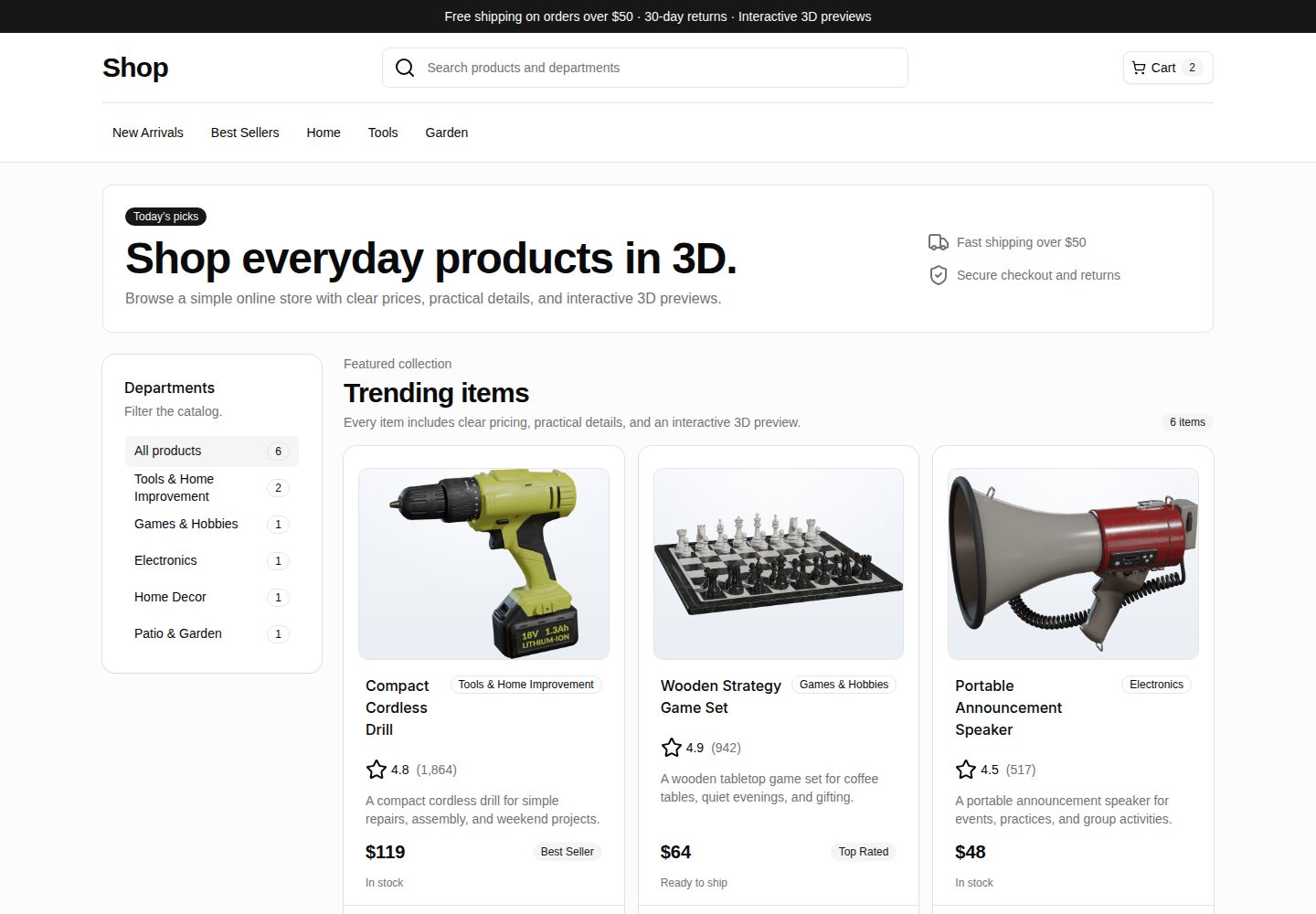
Responsive e-commerce storefront with category filtering, product cards, and product detail routes
ViteReactE-commerceStarter
webspatial-shop — Vite Ecommerce Template
By georgebutler
WebSpatial Shop is a Vite and React e-commerce storefront example that displays a product catalog as a standard web page and upgrades product media to WebSpatial 3D model previews in supported runtimes.
Explore the design
Compare the page layouts and mobile experience. Open any screenshot for a closer look.
Desktop homepage1 / 3
Desktop captureTop of page
Actual screenshot captured by the server browser.
All pages & views 3
Screenshots show visual appearance; interactive behavior may differ.
Recorded 2026-10-02View source
What stands out
A quick read of the recorded project description.
Product data model covers price, rating, stock, selling points, specifications, thumbnails, and GLB asset paths
Progressive 3D model rendering via @webspatial/react-sdk, falling back to thumbnails when unsupported
Detail page plays animations using WebSpatial model references when spatial rendering is available
Example 3D assets come from Poly Haven, with source and attribution notes provided in the repository
Includes Vercel static deployment configuration; build output can be served by any static hosting service
Template Details
WebSpatial Shop is a React e-commerce storefront demo project that shows how a traditional e-commerce experience can gradually transition to a spatial interface. It provides a small catalog of daily necessities, including responsive browsing, category filtering, product cards, and product detail routes. Product data covers price, rating, stock status, selling points, and specifications.
In desktop and mobile browsers, the project runs as a standard Vite app, rendering product media as thumbnails to keep regular web access usable. In WebSpatial-supported runtimes, the same media component switches to rendering product GLB models via @webspatial/react-sdk's <Model enable-xr>, and the detail page can also play animations through model references. The progressive rendering logic is centralized in src/components/Model3D.tsx, while product content and static asset paths are in src/data/products.ts.
The project uses React, TypeScript, Vite, React Router, Tailwind CSS, and shadcn/ui-style components, and includes Vercel static deployment configuration. The 3D assets in the example catalog come from Poly Haven, and the repository includes source links and attribution notes; the code is MIT-licensed, but third-party assets must be checked against their own licenses.
ViteReactE-commerceStarter
Is it right for your project?
Use Cases
- Understand how a traditional e-commerce page can add spatial 3D product previews without giving up standard web delivery
- Use as a React + Vite e-commerce storefront starter template, replacing product data and page copy to build your own catalog pages
- Verify <Model enable-xr> model rendering and detail page animation behavior in a WebSpatial-supported runtime
- Refer to the Model3D component's progressive rendering approach to add 3D models and image fallbacks to existing product media
Suitable For
- Developers who need a React e-commerce catalog and detail page example
- Teams looking to study WebSpatial spatial rendering and image fallback approaches
- Individuals or small groups preparing to build a statically deployed e-commerce prototype with Vite
Getting started & customization
Use these recorded setup notes alongside the repository instructions for your chosen version.
- 1
Requires Node.js and npm; after installing dependencies, run npm run dev to start the Vite development server
- 2
Regular browser previews use the thumbnail fallback; to verify the 3D model path, run npm run avp, which executes webspatial-builder run
- 3
Products and assets are maintained in src/data/products.ts; thumbnails and GLB models go under public/models/, with paths assembled by the publicAsset helper based on import.meta.env.BASE_URL
- 4
Production builds use npm run build, and the output can be served by any static host; the repository includes Vercel configuration
- 5
Example 3D assets come from Poly Haven; when replacing or redistributing them, check the license and attribution requirements for the corresponding assets
License & source material
Usage conditions & limitations
Free to use · keep license noticeThis listing covers the free version under the MIT license in the public repository; the free scope is the code of that version and does not mean external services or third-party assets are free.
Must comply with when using
- You may use, modify, commercialize, and distribute the code of this version for free.
- When distributing copies or substantial portions of the code, retain the original author's copyright notice and the full MIT license notice.
- The code is provided as is; warranties and limitations of liability are governed by the original license and applicable law.
Additional costs & items to verify
- Spatial 3D model previews are optional and require installing the WebSpatial / visionOS toolchain separately; regular browsers only show the thumbnail fallback, and the 3D rendering path cannot be verified without that toolchain.
- Running npm run avp invokes the external command webspatial-builder, which requires installing the WebSpatial build tool separately and is an external dependency outside the project code.
- The example 3D assets in the repository (thumbnails and GLB) are not licensed under the MIT code license and remain subject to the respective Poly Haven asset licenses; when redistributing or replacing assets, you must check the license and attribution requirements yourself.
- When redistributing this project or replacing example assets, you must review the license and attribution requirements of the assets you add; this obligation is outside the scope of the MIT code license.
- Demo images, fonts, icons, and other third-party assets must be checked against their own licenses and cannot be judged solely by the code's MIT license.
- External services such as domains, hosting, databases, payments, or AI may incur separate charges.
View Original Text Basis
Permission is hereby granted, free of charge
Original License Text
Optional: WebSpatial / visionOS tooling for spatial preview
Original README
This builds the app and runs: ```bash webspatial-builder run --base=http://localhost:5173 ```
Original README
The included 3D assets remain subject to their source asset licenses.
Original README
https://github.com/georgebutler/webspatial-shop/blob/main/LICENSEhttps://github.com/georgebutler/webspatial-shop/blob/main/README.mdIf you redistribute this project or replace the sample assets, review the license and attribution requirements for any assets you add.
Original README
Compiled by DeepSeek based on repository license and README ·2026-10-02. Results only cover the materials read; dependencies, images, fonts, and subsequent term changes are subject to their respective original texts.
Project checks & description sources
Template Information
- Source platforms
- GitHub
- Documentation and maintenance reference score
- More documented · 85 / 100
- Technologies
- Vite · React
- Website type
- E-commerce · Starter
How this score is calculated
Our heuristic uses license records (up to 30), a demo link (12), a preview (10), stars (15), recorded maintenance (15), description completeness (8), feature records (5) and classification data (5). It is not a code, security or performance test, or a Google score. A link does not establish tested functionality.
What to verify for this project
- Repository update recorded
- 2026-06-09
- Screenshot last checked
- 2026-10-02
A demo link is listed. Check it with your own content and viewport sizes; its presence does not confirm that forms, authentication or payments work.
The catalog identifies Vite as the primary stack. Check the actual dependency manifest and lockfile for versions and hosting requirements. These notes use recorded metadata, not a code audit or a deployment test.
Use a selection guide →How this description was prepared
AI-assisted description based on catalog records and repository material. Repository authors are not automatically the reviewers of this description.
Automatically checked against source and license rules; no manual editorial review.
Inspect the recorded source material
SHA-256: 3cf34aff31f7fc1d20b632a8a452a942fbc7c0e0ef9aaa677e9cd6ac197ab212
2026-10-02T19:47:44.732Z
Source file / repository# WebSpatial Shop
WebSpatial Shop is a React storefront demo that shows how a conventional ecommerce experience can progressively become spatial. It presents a small catalog of everyday products with responsive browsing, detail pages, thumbnail fallbacks, and WebSpatial-powered 3D model previews for supported runtimes.
The project is designed as a practical reference for building spatial web interfaces without abandoning standard web delivery. It works as a normal Vite app in desktop and mobile browsers, then upgrades product media to interactive WebSpatial models when launched in a compatible spatial environment.
## Highlights
- Responsive storefront with category filters, product cards, and product detail routes.
- Product catalog data model with prices, ratings, availability, highlights, specs, thumbnails, and GLB asset paths.
- Progressive 3D rendering through `@webspatial/react-sdk` with image fallbacks for unsupported browsers.
- Detail-page model animation using WebSpatial model refs when spatial rendering is available.
- Sample public product assets organized for static hosting and Vercel deployment.
- Vite, React, TypeScript, Tailwind CSS, and shadcn/ui-style primitives.
## Demo experience
The app behaves like a lightweight online shop:
1. Visitors land on a catalog page with department filters and featured product cards.
2. Each product card links to a detail page with price, rating, stock status, options, highlights, and specs.
3. In regular browsers, product media renders thumbnail images so the app remains fast and accessible.
4. In WebSpatial-capable runtimes, the same media component renders a WebSpatial `<Model enable-xr>` using the product GLB file.
The progressive rendering logic lives in `src/components/Model3D.tsx`. Product content and asset references live in `src/data/products.ts`.
## Tech stack
- React 19
- TypeScript
- Vite
- React Router
- Tailwind CSS
- shadcn/ui-style components
- WebSpatial SDK
- Vercel-ready static deployment
## Project structure
```text
public/
manifest.webmanifest Spatial launch metadata
models/ Product thumbnails and GLB models
src/
components/
Model3D.tsx WebSpatial model renderer with image fallback
ProductCard.tsx Catalog card UI
ui/ Reusable UI primitives
data/products.ts Product catalog and static asset paths
MainPage.tsx Storefront and category filtering
ProductPage.tsx Product detail page and model animation
Router.tsx App route definitions
```
## Prerequisites
- Node.js
- npm
- A modern browser for the standard web preview
- Optional: WebSpatial / visionOS tooling for spatial preview
## Getting started
Install dependencies:
```bash
npm install
```
Start the development server:
```bash
npm run dev
```
Open the local Vite URL, typically:
```text
http://localhost:5173
```
## Available scripts
```bash
npm run dev # Start the Vite development server
npm run lint # Run the TypeScript build check
npm run build # Type-check and create a production build
npm run preview # Build and preview the production app locally
npm run avp # Build and launch through the WebSpatial builder flow
```
## Running with WebSpatial tooling
To validate the spatial model path, run:
```bash
npm run avp
```
This builds the app and runs:
```bash
webspatial-builder run --base=http://localhost:5173
```
Use this flow when testing the WebSpatial `<Model>` rendering behavior. Standard browsers will intentionally show thumbnail fallbacks instead.
## Building for production
```bash
npm run build
```
The production output is generated by Vite and can be served by any static host.
## Deployment
The repository includes Vercel configuration and can be deployed with:
```bash
vercel deploy --prod
```
If the repository is connected to Vercel, pushes to the production branch can trigger deployments automatically.
## Customizing the catalog
- Add or edit products in `src/data/products.ts`.
- Place thumbnails and GLB models under `public/models/`.
- Keep product asset paths relative to `import.meta.env.BASE_URL` using the existing `publicAsset` helper.
- Update storefront and product page copy in `src/MainPage.tsx` and `src/ProductPage.tsx`.
- Adjust model sizing and fallback presentation in `src/components/Model3D.css` and the page-level CSS files.
## Asset attribution
The sample catalog uses public product-style 3D assets from Poly Haven. Generated thumbnails and converted GLB files are included under `public/models` for sample convenience.
- Drill 01: <https://polyhaven.com/a/drill_01>
- Chess Set: <https://polyhaven.com/a/chess_set>
- Megaphone 01: <https://polyhaven.com/a/megaphone_01>
- Potted Plant 02: <https://polyhaven.com/a/potted_plant_02>
- Garden Gnome: <https://polyhaven.com/a/garden_gnome>
- Lubricant Spray: <https://polyhaven.com/a/lubricant_spray>
If you redistribute this project or replace the sample assets, review the license and attribution requirements for any assets you add.
## License
Source code in this repository is available under the [MIT License](LICENSE).
The included 3D assets remain subject to their source asset licenses. See [Asset attribution](#asset-attribution) for source links.
Explore similar templates
Compare previews and descriptions within the same stack and category.

react-starter-kit
A full-stack SaaS monorepo starter built on Vite and React, with Bun, TypeScript, tRPC, Drizzle ORM, Better Auth, Stripe, and Cloudflare Workers. It includes email OTP, passkey, Google OAuth, organizations, subscription billing, Drizzle migrations, seed scripts, and Terraform infrastructure.
Vite · SaaS

cove
Cove is a minimal TanStack Start starter template maintained by mugnavo, integrating React, TanStack Router/Query, Tailwind CSS, shadcn/ui, Drizzle ORM with PostgreSQL, Better Auth, Vite Plus, and Nitro.
Vite · SaaS

vite-react-boilerplate
A production-ready Vite + React starter template with TypeScript, Tailwind CSS, TanStack Router/Query/Table, Storybook, React Hook Form + Zod, Vitest and Playwright testing, plus Husky/Commitizen/Commitlint commit conventions.
Vite · Starter

react-vite-admin
A backend management starter built on Vite and React, integrating Recoil, React Query, TypeScript, and Axios, with Ant Design-style interface screenshots. Suitable as a starting point for management-side projects, licensed under MIT, with Chinese documentation and common scripts.
Vite · Admin dashboard

typescript-react_best_practices-vite_template
A Vite + React + TypeScript starter template by CodelyTV, preconfigured with Jest and React Testing Library unit tests, Cypress end-to-end tests, ESLint and Prettier using Codely's shared configuration, GitHub Actions workflows, a Makefile, and Sass.
Vite · Starter

cloudflare-starter-kit
A Cloudflare Workers project scaffolding template maintained by kriasoft, using Vite and TypeScript, with three built-in workspaces: api, app, and edge, and preconfigured local testing, multiple environments, and a GitHub Actions deployment workflow.
Vite · Starter