基于 Astro 与 React 构建,组件使用 TypeScript 编写
AstroReact作品集
Astro-Theme-Astroway — Astro 作品集模板
作者 gio-del
Astro-Theme-Astroway 是一个基于 Astro 与 React 的个人作品集模板,包含关于、项目、博客、联系等区块,使用 Tailwind CSS 样式,并内置深色模式、博客模糊搜索、RSS 与基础 SEO 文件。
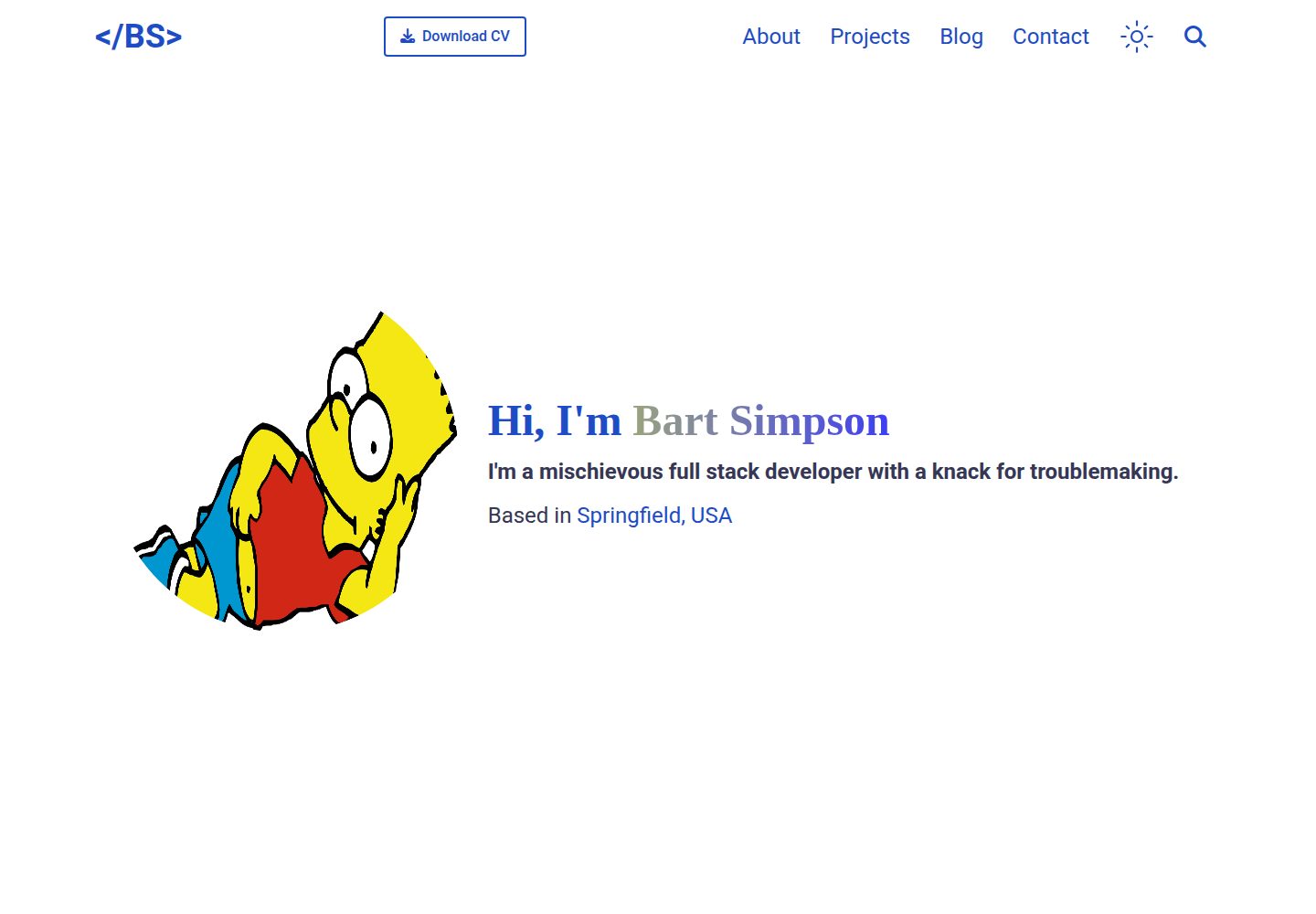
看看你的网站会是什么样
浏览真实页面截图,比较内容排版与手机效果。点击下方缩略图切换,放大查看整页细节。
全部页面与视图 2
截图用于了解视觉与布局,交互效果请以实际项目为准。
采集于 2026-10-02查看来源
值得关注的模板亮点
从已有项目资料中,快速了解它的特点。
首页包含关于、教育、经历、项目、博客与联系等区块
使用 Tailwind CSS 控制样式,主题色可在 tailwind.config.mjs 中调整
内置深色模式切换与响应式布局
博客支持基于 Fuse.js 的模糊搜索,并提供 RSS 订阅
包含 robots.txt、sitemap.xml 等 SEO 相关文件
模板详细介绍
Astro-Theme-Astroway 是发布在 GitHub 上的个人作品集模板,仓库由 gio-del 维护,采用 MIT 许可。模板以 Astro 为主框架,部分交互组件使用 React 与 TypeScript 编写,样式基于 Tailwind CSS。
页面结构覆盖常见的作品集需求:首页包含关于(教育、经历)、项目、博客与联系区块,博客文章以 Markdown 文件放在 src/pages/posts 目录下,并提供文章列表页与文章详情布局。个人数据集中在 src/data/info.ts 中维护,项目卡片与轮播、联系表单等组件位于 src/components 下。
功能方面,模板提供深色模式切换、响应式布局、基于 Fuse.js 的博客模糊搜索、RSS 订阅以及 robots.txt 与 sitemap.xml 等 SEO 相关文件。README 中列出的待办包括国际化(i18n)与项目集合(Projects collection),说明这两项尚未实现。
使用限制与注意事项:联系区块的数据在 info.ts 与 Contact.tsx 两处分别维护,增删条目时需要同步修改;RSS 需要在 astro.config.mjs 中填写站点地址,并调整 pages 目录下的 rss.xml.js;SEO 信息需在 BaseLayout.astro 的 head 部分修改;主题色通过根目录的 tailwind.config.mjs 调整。仓库中的演示图片、字体、图标等第三方素材需按各自许可单独核对。
AstroReact作品集
适合你的项目吗?
适用场景
- 搭建个人作品集网站,展示教育背景、工作经历与项目
- 在作品集中附带 Markdown 博客,并需要文章搜索与 RSS 订阅
- 希望使用 Astro 与 React 混合技术栈、以 Tailwind CSS 定制样式的站点
- 需要深色模式与响应式布局的静态个人站点
适合人群
- 具备 npm 与 Astro 基础、能自行修改配置和组件的开发者
- 需要快速起步的个人作品集或简历型站点
- 希望以 Markdown 维护博客内容的用户
上手与定制指南
结合仓库当前版本的说明,按下面的资料检查内容、配置与运行要求。
- 1
通过仓库的 Use this template 创建新仓库,克隆后运行 npm install 安装依赖
- 2
运行 npm run dev 启动本地开发服务器,默认地址为 localhost:4321
- 3
在 src/data/info.ts 中填写个人信息;增删联系区块条目时需同步修改 src/components/contact_section/Contact.tsx
- 4
在 astro.config.mjs 中设置站点地址,并调整 src/pages/rss.xml.js 以生成正确的 RSS
- 5
在 src/layouts/BaseLayout.astro 的 head 部分修改 SEO 信息,主题色在 tailwind.config.mjs 中调整
授权与来源资料
使用条件与限制
免费使用 · 保留许可声明本次收录的是公开仓库中采用 MIT 许可的免费版本;免费范围为该版本代码,不代表外部服务或第三方素材免费。
使用时需要遵守
- 允许免费使用、修改、商用和分发该版本代码。
- 分发代码副本或实质性部分时,保留原作者版权声明和完整 MIT 许可声明。
- 代码按现状提供;担保与责任限制以原许可证及适用法律为准。
额外费用与待核对事项
- 联系区块数据需在 info.ts 与 Contact.tsx 两处分别维护,增删条目时必须同步修改 Contact.tsx,否则页面显示不一致。
- RSS 订阅功能需手动在 astro.config.mjs 中填写站点 URL,并调整 pages 目录下的 rss.xml.js,否则生成的订阅链接不正确。
- SEO 信息需手动修改 src/layouts/BaseLayout.astro 的 head 部分,模板不会自动生成站点专属的元数据。
- 主题配色需通过根目录的 tailwind.config.js 调整,默认样式不会自动适配个人品牌色。
- 国际化(i18n)与项目集合(Projects collection)尚未实现,属于待办功能,当前版本不提供。
- 演示图片、字体、图标及其他第三方素材需按各自许可核对,不能仅凭代码的 MIT 许可判断。
- 域名、托管、数据库、支付或 AI 等外部服务可能另外收费。
查看原文依据
Permission is hereby granted, free of charge
许可证原文
If you add/remove something from the contact section in the `info.ts` file, you will need to update the `Contact.tsx` file located in the `src/components/contact_section` directory by simply reflecting the changes you made in the `info.ts` file.
README 原文
Update the `site` entry in the `astro.config.mjs` file with your site url.
README 原文
Modify the head section of the `BaseLayout.astro` file located in the `src/layouts` directory to reflect your site's information.
README 原文
This portfolio template uses Tailwind CSS for styling. You can modify the colors used in the portfolio by updating the `tailwind.config.js` file located in the root of the project.
README 原文
https://github.com/gio-del/Astro-Theme-Astroway/blob/main/LICENSEhttps://github.com/gio-del/Astro-Theme-Astroway/blob/main/README.md- [ ] Internationalization (i18n) - [ ] Projects collection
README 原文
DeepSeek 根据仓库许可证和 README 整理 ·2026-10-02。结果仅覆盖已读取资料,依赖、图片、字体及后续条款变更以各自原文为准。
项目核对记录与介绍依据
模板资料
- 来源平台
- GitHub
- 资料与维护参考分
- 资料较完整 · 86 / 100
- 技术栈
- Astro · React
- 网站类型
- 作品集
这个分数如何计算
本站按许可资料(最高30分)、演示链接(12分)、预览图(10分)、Star数(15分)、记录的维护时间(15分)、描述完整度(8分)、功能记录(5分)和分类资料(5分)计算。它不是代码、安全或性能测试,也不是 Google 评分;有链接不代表已实测可用。
这个项目需要核对什么
- 记录的仓库更新时间
- 2025-01-24
- 截图检查日期
- 2026-10-02
已收录演示链接。请用你的内容与屏幕尺寸检查;有演示不代表表单、认证或支付已经可用。
目录记录的主要技术栈是 Astro。请通过依赖清单和锁文件核对实际版本与托管要求。这些说明基于收录资料,不代表代码审计或部署实测。
查看具体选型方法 →介绍的制作与核对状态
介绍由 AI 辅助整理目录与仓库资料。仓库作者不等于这篇介绍的审核者。
已完成服务器许可规则与 AI 来源核对;未经过人工编辑审核。
查看当时使用的来源资料
SHA-256: f6e8e282ba051277ff62be8d50f8b7b96b9d913d38924a166068b856e3095c3b
2026-10-02T09:43:19.023Z
来源文件 / 仓库# 1. Astro Portfolio Template
[](https://stackblitz.com/github/gio-del/Astro-Portfolio-Template)
[](https://codesandbox.io/p/sandbox/github/gio-del/Astro-Portfolio-Template)
[](https://app.codeanywhere.com/#https://github.com/https://github.com/gio-del/Astro-Portfolio-Template)
## 1.1. Table of Contents
- [1. Astro Portfolio Template](#1-astro-portfolio-template)
- [1.1. Table of Contents](#11-table-of-contents)
- [1.2. Features :open\_hands:](#12-features-open_hands)
- [1.3. What's next? :rocket:](#13-whats-next-rocket)
- [1.4. How to use this template :toolbox:](#14-how-to-use-this-template-toolbox)
- [1.4.1. Notes about the contact section :email:](#141-notes-about-the-contact-section-email)
- [1.4.2. Notes about RSS feed :newspaper:](#142-notes-about-rss-feed-newspaper)
- [1.4.3. Notes about SEO :robot:](#143-notes-about-seo-robot)
- [1.4.4. Notes about styles :art:](#144-notes-about-styles-art)
- [1.5. Project Structure :rocket:](#15-project-structure-rocket)
- [1.6. Commands :genie\_man:](#16-commands-genie_man)
- [1.7. Tools Used :hammer\_and\_wrench:](#17-tools-used-hammer_and_wrench)
- [1.8. Contributing :building\_construction:](#18-contributing-building_construction)
- [1.9. License :memo:](#19-license-memo)
## 1.2. Features :open_hands:
- Dark mode toggle
- Responsive design
- Easy to customize and extend personal data
- Fuzzy search for blog posts
- SEO friendly (robots.txt, sitemap.xml)
- RSS feed
## 1.3. What's next? :rocket:
- [ ] Internationalization (i18n)
- [ ] Projects collection
- Feel free to open an issue or submit a pull request with your ideas for improving this portfolio template (see [Contributing](#18-contributing-building_construction))
## 1.4. How to use this template :toolbox:
Note: this mini-guide assumes you have `npm` installed on your machine, if you don't, you can download it following the instructions [here](https://docs.npmjs.com/downloading-and-installing-node-js-and-npm)
1. Click on the "Use this template" button at the top of the repository.
2. Create a new repository based on this template.
3. Clone the repository to your local machine.
4. Install the dependencies by running `npm install`
5. You can now start the development server by running `npm run dev` (see this [section](#16-commands-genie_man) for more commands)
6. Now you can start customizing the portfolio template by updating the `/data/info.ts` file with your personal information.
### 1.4.1. Notes about the contact section :email:
If you add/remove something from the contact section in the `info.ts` file, you will need to update the `Contact.tsx` file located in the `src/components/contact_section` directory by simply reflecting the changes you made in the `info.ts` file. Although, this choice may seem redundant, it allows to separate the data from the view.
### 1.4.2. Notes about RSS feed :newspaper:
The RSS feed is generated using the `astro-plugin-feed` plugin.
To customize it:
1. Update the `site` entry in the `astro.config.mjs` file with your site url.
2. Modify the `rss.xml.js` file located in the `pages` directory to reflect your site's information.
### 1.4.3. Notes about SEO :robot:
Modify the head section of the `BaseLayout.astro` file located in the `src/layouts` directory to reflect your site's information.
### 1.4.4. Notes about styles :art:
This portfolio template uses Tailwind CSS for styling. You can modify the colors used in the portfolio by updating the `tailwind.config.js` file located in the root of the project.
## 1.5. Project Structure :rocket:
Inside of this portfolio template, you will find the following files and directories:
```text
.
├── astro.config.mjs
├── LICENSE
├── package.json
├── package-lock.json
├── public
│ ├── favicon.svg
│ ├── pic.jpg
│ └── Resume.pdf
├── README.md
├── src
│ ├── components
│ │ ├── about_section
│ │ │ ├── About.tsx
│ │ │ ├── Education.tsx
│ │ │ └── Experience.tsx
│ │ ├── contact_section
│ │ │ └── Contact.tsx
│ │ ├── navbar
│ │ │ ├── Hamburger.tsx
│ │ │ └── Nav.jsx
│ │ ├── post_section
│ │ │ ├── Blog.astro
│ │ │ └── Post.astro
│ │ ├── projects_section
│ │ │ ├── ProjectCard.tsx
│ │ │ └── ProjectCarousel.tsx
│ │ ├── search
│ │ │ └── Search.tsx
│ │ ├── ToggleDarkMode.jsx
│ │ └── TopButton.jsx
│ ├── data
│ │ └── info.ts
│ ├── env.d.ts
│ ├── layouts
│ │ ├── BaseLayout.astro
│ │ └── PostLayout.astro
│ ├── pages
│ │ ├── index.astro
│ │ ├── posts
│ │ │ └── your-post-title.md
│ │ └── posts.astro
│ └── styles
│ └── global.css
├── tailwind.config.mjs
└── tsconfig.json
```
## 1.6. Commands :genie_man:
All commands are run from the root of the project, from a terminal:
| Command | Action |
| :------------------------ | :----------------------------------------------- |
| `npm install` | Installs dependencies |
| `npm run dev` | Starts local dev server at `localhost:4321` |
| `npm run build` | Build your production site to `./dist/` |
| `npm run preview` | Preview your build locally, before deploying |
| `npm run astro ...` | Run CLI commands like `astro add`, `astro check` |
| `npm run astro -- --help` | Get help using the Astro CLI |
## 1.7. Tools Used :hammer_and_wrench:
This portfolio template uses the following tools/libraries/resources:
- [Astro](https://astro.build/)
- [Tailwind CSS](https://tailwindcss.com/)
- [Font Awesome](https://fontawesome.com/)
- [React](https://reactjs.org/)
- [TypeScript](https://www.typescriptlang.org/)
- [Fuse.js](https://fusejs.io/)
## 1.8. Contributing :building_construction:
If you would like to contribute to the Astro Portfolio Template, follow these steps:
1. Fork the repository.
2. Create a new branch for your feature or bug fix.
3. Make your changes and commit them.
4. Push your changes to your forked repository.
5. Submit a pull request to the main repository.
Thank you very much for your contributions!
See the [CONTRIBUTING.md](CONTRIBUTING.md) file for more information.
## 1.9. License :memo:
This project is licensed under the MIT License - see the [LICENSE](LICENSE) file for details.
看看同类模板
对比同技术栈与用途的模板,找到更适合的视觉与内容结构。

astro-theme-cactus
A simple Astro theme. Use it to create your blog or website.
Astro · 作品集

astrofy
Astrofy is a free and open-source template for your Personal Portfolio Website built with Astro and TailwindCS…
Astro · 作品集

astro-nano
Astro Nano is a static, minimalist, lightweight, lightning fast portfolio and blog.
Astro · 作品集

astro-erudite
An opinionated, unstyled static blogging template built with Astro and native CSS.
Astro · 作品集

astro-sphere
Astro Sphere is a static, minimalist, lightweight, lightning fast portfolio and blog.
Astro · 作品集

astro-micro
Blog theme for Astro with search and comments built-in. Zero frameworks.
Astro · 作品集