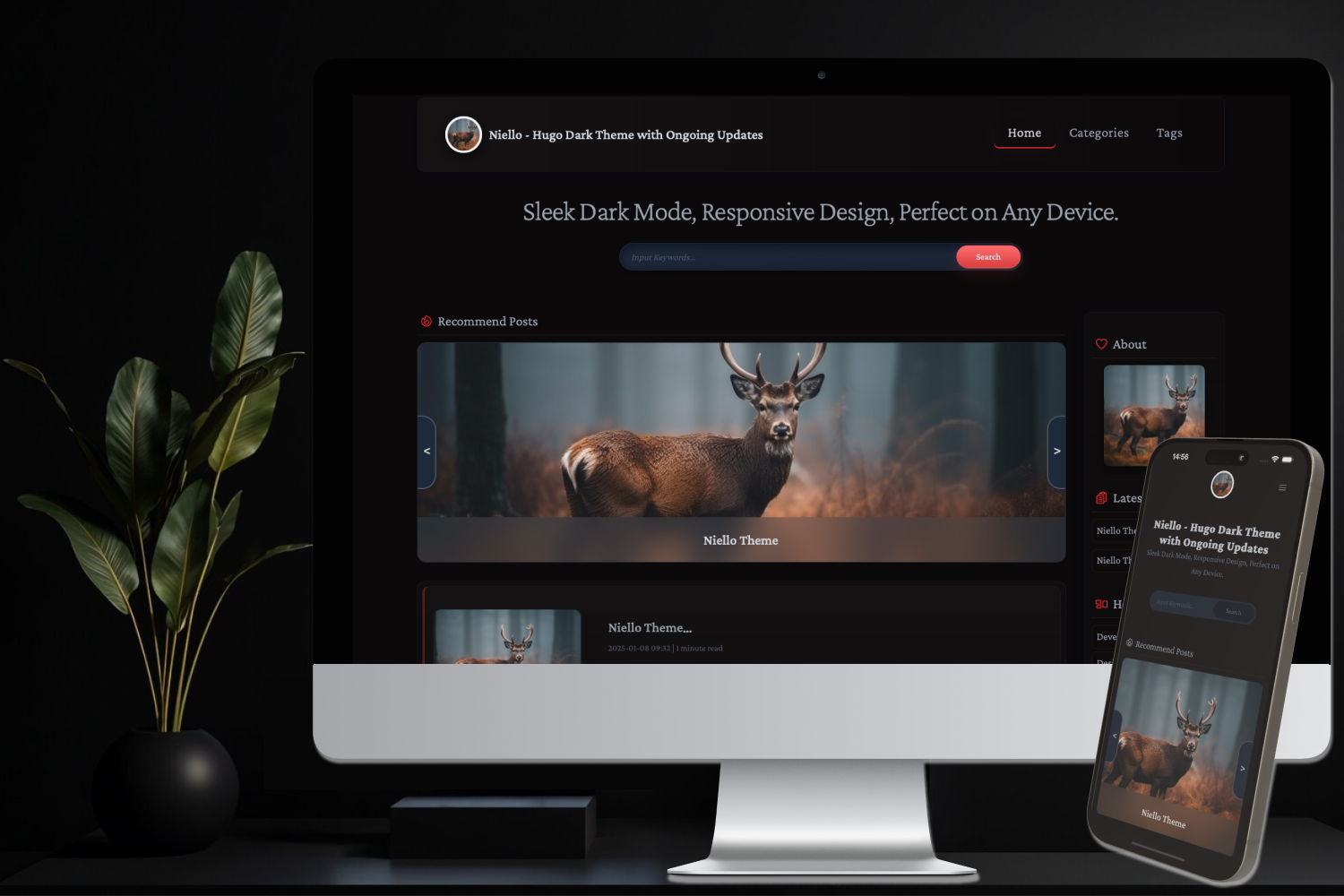
深色主题外观,使用 TailwindCSS 编写样式
Hugo启动器
Niello — Hugo 启动器模板
作者 guangmean
Niello 是一个基于 Hugo 的深色主题,使用 TailwindCSS 构建,内置多语言、搜索、归档、AdSense 与 GA4 等配置项。
看看你的网站会是什么样
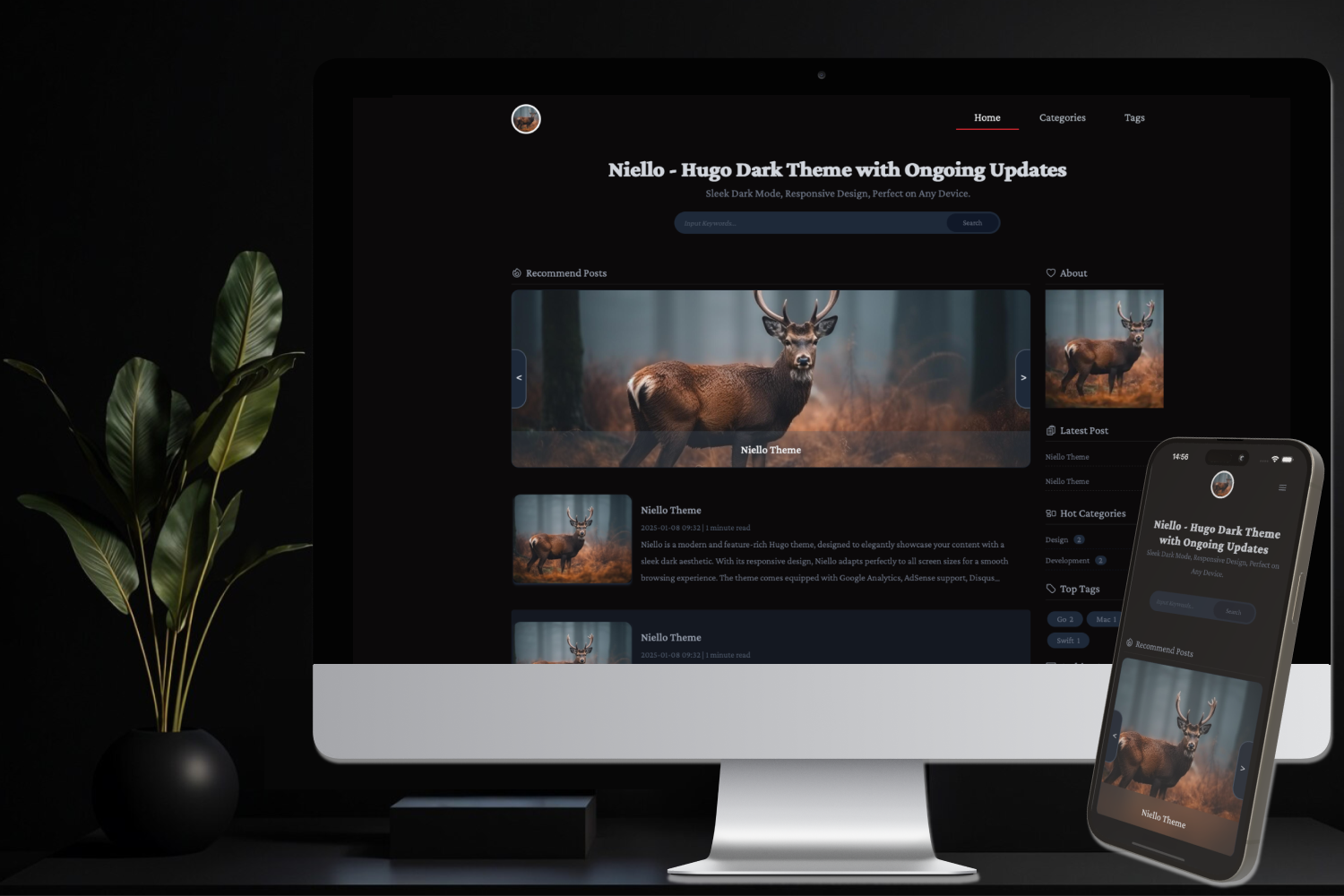
浏览真实页面截图,比较内容排版与手机效果。点击下方缩略图切换,放大查看整页细节。
目前有 1 张原始预览,可打开完整图片查看设计细节。
截图用于了解视觉与布局,交互效果请以实际项目为准。
采集于 2026-10-03查看来源
值得关注的模板亮点
从已有项目资料中,快速了解它的特点。
响应式布局,适配不同屏幕尺寸
内置多语言(i18n)支持,可按语言配置菜单与内容目录
内容搜索功能,需为 home 输出 JSON 并提供 search 布局页面
可选集成 Google AdSense、GA4、Disqus 评论与 ShareThis 分享
支持按日期归档,并可通过分类配置隐藏指定文章
模板详细介绍
Niello 是一个面向 Hugo 的深色主题,仓库描述为“A Dark Theme for Hugo”,采用 MIT 许可发布。主题使用 TailwindCSS 处理样式,页面为响应式布局,并内置多语言(i18n)支持。
功能层面,README 列出内容搜索、自动从文章中提取图片、按日期展示的归档页、隐藏指定分类的文章,以及 Google AdSense、Google Analytics 4、Disqus 评论和 ShareThis 分享等集成项。搜索需要站点在 hugo.toml 中为 home 输出 JSON,并在 content 下提供带 layout = "search" 的搜索页;归档需要在 content 根目录或各语言目录添加 archives.md;隐藏文章通过 params.ignore.categories 配置,且被忽略的文章需在 front matter 中带有对应分类。
使用限制方面,主题以 git clone 方式安装到 themes/Niello,配置以 hugo.toml 为例,包含 languages、params 等段落。若要修改主题源码,需在主题目录内初始化 TailwindCSS 并运行其 CLI 构建命令。AdSense、GA4、Disqus、ShareThis 均为可选配置,需要自行填写对应参数。演示图片、字体、图标等第三方素材的许可需单独核对,代码的 MIT 许可不覆盖这些素材。
Hugo启动器
适合你的项目吗?
适用场景
- 搭建以深色阅读体验为主的 Hugo 博客或内容站点
- 需要多语言内容目录与语言切换菜单的站点
- 希望为文章接入 AdSense 广告或 GA4 统计的站点
- 需要站内搜索、归档页与分类隐藏能力的 Hugo 项目
适合人群
- 使用 Hugo 并偏好深色主题的博客作者
- 需要中英等多语言内容组织的站点维护者
- 希望在主题层配置广告、统计与评论服务的开发者
- 需要站内搜索与按日期归档的内容站点
上手与定制指南
结合仓库当前版本的说明,按下面的资料检查内容、配置与运行要求。
- 1
在 Hugo 站点根目录执行 git clone https://github.com/guangmean/Niello.git themes/Niello 完成安装
- 2
在 hugo.toml 中设置 theme = "Niello",并按示例配置 languages、params 等段落
- 3
启用搜索需为 home 输出 JSON,并在 content 下创建带 layout = "search" 的搜索页
- 4
启用归档需在 content 根目录或各语言目录添加 archives.md,并设置 layout = "archives"
- 5
修改主题源码前需在 themes/Niello 内安装 TailwindCSS 及其 CLI,并运行构建监听命令
授权与来源资料
使用条件与限制
免费使用 · 保留许可声明本次收录的是公开仓库中采用 MIT 许可的免费版本;免费范围为该版本代码,不代表外部服务或第三方素材免费。
使用时需要遵守
- 允许免费使用、修改、商用和分发该版本代码。
- 分发代码副本或实质性部分时,保留原作者版权声明和完整 MIT 许可声明。
- 代码按现状提供;担保与责任限制以原许可证及适用法律为准。
额外费用与待核对事项
- Google AdSense 为可选功能,需自行填写发布商 ID 才能启用广告。
- Google Analytics 4 为可选功能,需自行填写 GA4 衡量 ID 才能启用统计。
- ShareThis 分享为可选功能,需自行申请并填写 ShareThis appid。
- Disqus 评论为可选功能,需自行注册并填写 Disqus shortname。
- 站内搜索需在 hugo.toml 中为 home 配置 JSON 输出,并创建带 search 布局的搜索页。
- 归档功能需手动在 content 根目录或各语言目录添加 archives.md 文件。
- 修改主题源码前需在主题目录内安装 TailwindCSS 及其 CLI 并运行构建命令。
- 演示图片、字体、图标及其他第三方素材需按各自许可核对,不能仅凭代码的 MIT 许可判断。
- 域名、托管、数据库、支付或 AI 等外部服务可能另外收费。
查看原文依据
Permission is hereby granted, free of charge
许可证原文
google_ad_client = "ca-pub-******" //Optional, replace ca-pub-****** with your content
README 原文
ga4 = "G-******" //Optional, replace G-****** with your Google Analytics GA4
README 原文
sharethis = "******" // Optional, Add hou ShareThis appid here
README 原文
shortname = "******" // Optional, Disqus Comment Short Name
README 原文
To enable the search functionality, you need to configure JSON output in the hugo.toml file
README 原文
To enable the archives functionality, you need to manually add an archives.md file to the content root directory
README 原文
https://github.com/guangmean/Niello/blob/master/LICENSEhttps://github.com/guangmean/Niello/blob/master/README.mdBefore making changes, ensure you initialize TailwindCSS in your project and follow the setup instructions
README 原文
DeepSeek 根据仓库许可证和 README 整理 ·2026-10-03。结果仅覆盖已读取资料,依赖、图片、字体及后续条款变更以各自原文为准。
项目核对记录与介绍依据
模板资料
- 来源平台
- Hugo Themes
- 资料与维护参考分
- 资料一般 · 67 / 100
- 技术栈
- Hugo
- 网站类型
- 启动器
这个分数如何计算
本站按许可资料(最高30分)、演示链接(12分)、预览图(10分)、Star数(15分)、记录的维护时间(15分)、描述完整度(8分)、功能记录(5分)和分类资料(5分)计算。它不是代码、安全或性能测试,也不是 Google 评分;有链接不代表已实测可用。
这个项目需要核对什么
- 记录的仓库更新时间
- 2025-12-25
- 截图检查日期
- 2026-10-03
目前没有记录演示链接。请依据仓库说明在本地评估;仅凭截图无法确认交互行为。
目录记录的主要技术栈是 Hugo。请通过依赖清单和锁文件核对实际版本与托管要求。这些说明基于收录资料,不代表代码审计或部署实测。
查看具体选型方法 →介绍的制作与核对状态
介绍由 AI 辅助整理目录与仓库资料。仓库作者不等于这篇介绍的审核者。
审核声明: [email protected] · 2026-10-04
查看当时使用的来源资料
SHA-256: 9c4de371118f528409a7296ab883fa61ef8423467ae0cfa5f93af4b7a61b4444
2026-10-03T15:58:43.776Z
来源文件 / 仓库# Niello - Hugo Dark Theme with Ongoing Updates
---
Niello is a modern and feature-rich Hugo theme, designed to elegantly showcase your content with a sleek dark aesthetic. Built with TailwindCSS for clean and scalable styling, its responsive design adapts perfectly to all screen sizes for a smooth browsing experience. The theme comes equipped with Google Analytics, AdSense support, Disqus comments, social sharing, and built-in search functionality, making it easy to manage and expand your online presence.
---
## Key Features
- [x] Offers a sleek dark theme for enhanced readability and visual appeal.
- [x] Responsive Design, adapts seamlessly to any screen size for a smooth browsing experience.
- [x] Multi-language Support (i18n), ready for global audiences with built-in internationalization.
- [x] Content Search, easily locate articles with integrated search functionality.
- [x] Automatic Image Extraction, automatically pulls images from articles for a richer presentation.
- [x] Monetization:
- [x] Google AdSense, supports ads for easy site monetization.
- [x] Google Analytics, track site performance and user engagement.
- [x] Enhanced Styling:
- [x] Tailwind CSS, based on Tailwind for fast and flexible styling.
- [x] Syntax Highlighting, provides clear code display for technical content.
- [x] Organized Archives, displays past posts by date, making content easier to navigate.
- [x] Ignore Some Categories, hide the posts that you don’t want to show.
---
## Screenshot
---
## Installation
To install the Niello theme, run the following command in the root directory of your Hugo site:
```shell
git clone https://github.com/guangmean/Niello.git themes/Niello
```
---
## Configuration
Below is an example of the hugo.toml file(previously config.toml) for your site:
```toml
baseURL = "https://www.angularcorp.com/" # Must end with splash
defaultContentLanguage = "en"
defaultContentLanguageInSubdir = true
staticDir = ["themes/Niello/static", "static"]
theme = "Niello"
[languages]
[languages.en]
title = "{CodeTrace} - Discover Issues, Share Solutions."
languageCode = "en-us"
LanguageName = "🇺🇸EN"
contentDir = "content/en"
weight = 1
[[languages.en.menus.main]]
name = 'Home'
pageRef = '/'
weight = 1
[[languages.en.menus.main]]
name = 'Categories'
pageRef = '/categories'
weight = 2
[[languages.en.menus.main]]
name = 'Tags'
pageRef = '/tags'
weight = 3
[[languages.en.menus.main]]
name = 'Contact'
pageRef = '/contact'
weight = 4
[languages.zh]
title = "{码途轨迹} - 发现问题,分享解决."
languageCode = "zh-cn"
LanguageName = "🇨🇳CN"
contentDir = "content/zh"
weight = 2
[[languages.zh.menus.main]]
name = '首页'
pageRef = '/'
weight = 1
[[languages.zh.menus.main]]
name = '文章分类'
pageRef = '/categories'
weight = 2
[[languages.zh.menus.main]]
name = '标签'
pageRef = '/tags'
weight = 3
[[languages.zh.menus.main]]
name = '联系我们'
pageRef = '/contact'
weight = 4
[params]
[params.google]
google_ad_client = "ca-pub-******" //Optional, replace ca-pub-****** with your content
ga4 = "G-******" //Optional, replace G-****** with your Google Analytics GA4
[params.bannershowcase]
categories = ["AI"]
limit = 2
[params.email]
contact = "[email protected]"
[params.ignore]
categories = ["privacy", "terms", "archives", "cookie"]
[params.license]
copyright = "© 2019 ~ 2025 by guangmean. All Rights Reserved."
[params.share]
sharethis = "******" // Optional, Add hou ShareThis appid here
[params.disqus]
shortname = "******" // Optional, Disqus Comment Short Name
[outputs]
home = ["HTML", "JSON"]
```
---
## Overriding Theme i18n Keys
If you need to customize certain translation keys without modifying theme files, you can override the theme's i18n keys at the site level. Simply create an `i18n` folder in your site’s root directory and add the keys you want to override there.
To override `sitename`, `siteslogan`, `siteseokeywords` and `siteseodescription` from the theme’s i18n file, follow these steps:
1. In your site’s root directory, create an `i18n` folder if it doesn’t already exist.
2. Inside the `i18n` folder, create the appropriate language file (e.g., `en.toml`).
3. Add the following content to override the theme's i18n keys:
```shell
# File path: i18n/en.toml
[sitename]
other = "Site Name"
[siteslogan]
other = "Site Slogan"
[siteseokeywords]
other = "Site Home SEO Keywords"
[siteseodescription]
other = "Site Home SEO Description"
```
---
## Customizing the Theme by Editing Source Code
If you plan to modify this theme, note that it is built with TailwindCSS. Before making changes, ensure you initialize TailwindCSS in your project and follow the setup instructions to properly configure your development environment.
```shell
cd themes/Niello
# Run the command to install Tailwind CSS
npm install tailwindcss @tailwindcss/cli
# Run the command to build and watch for updates
npx @tailwindcss/cli -i assets/css/main.css -o assets/css/app.css --minify --watch
```
---
## Google Adsense & Google Analytics 4 (GA4)
Niello supports Google AdSense by configuring the googleadclient parameter in the [params] block and Google Analytics 4 (GA4) by setting the ga parameter in the hugo.toml file(previously config.toml), as shown above.
---
## Search
To enable the search functionality, you need to configure JSON output in the hugo.toml file by adding the following:
```shell
[outputs]
home = ["HTML", "JSON"]
```
And a search folder with an _index.md file under the content directory is required, for example: content/en/search/_index.md
+++
title = "Search Results"
date = 2024-12-13T15:00:00+08:00
draft = false
layout = "search"
+++
With this setup, the search URL will be /en/search/?q=keywords
---
## Archives(Options)
To enable the archives functionality, you need to manually add an archives.md file to the content root directory:
```shell
|--- content
|-------| archives.md
```
or multilingual exampl:
```shell
|--- content
|-------| en
|----------| archives.md # English
|-------| zh
|----------| archives.md # Chinese
```
The content should be as follows:
```shell
+++
title = 'Archives'
date = 2024-10-25T09:16:03+08:00
draft = false
categories = ["archives"]
layout = "archives"
+++
```
---
## Ignore Posts(Options)
To exclude posts like cookie.md, privacy.md, and terms.md, configure the site parameters as follows:
```shell
[params]
[params.ignore]
categories = ["privacy", "terms", "archives", "cookie"]
```
The content structure is as follows, and posts to be ignored must have categories specified in their front matter.
```shell
|---content/en
|---cookie.md
|---privacy.md
|---terms.md
|
|---/example1
|---example1-1.md
|---example1-2.md
|---/example2
|---example2-1.md
|---example2-2.md
|---example2-3.md
|---content/fr
|---content/zh
|---content/de
```
## ShareThis
Niello supports sharing your content to other platforms via [ShareThis](https://sharethis.com).
---
## Live Demo
A full demo is available here: [https://www.angularcorp.com](https://www.angularcorp.com/en/post/)
---
## How to run the exampleSite
Run the following command in your site root directory to launch the example site
```shell
hugo server --source themes/Niello/exampleSite --themesDir ../.. --theme Niello
```
---
## Buy a Coffee for Me
[](https://ko-fi.com/I2I1NFXI2)
看看同类模板
对比同技术栈与用途的模板,找到更适合的视觉与内容结构。

hugo-xmin
eXtremely Minimal Hugo theme: about 140 lines of code in total, including HTML and CSS (with no dependencies)
Hugo · 启动器

hugo-theme-gallery
Gallery Theme for Hugo
Hugo · 启动器

reveal-hugo
📽️ Create rich HTML-based presentations with Hugo and Reveal.js
Hugo · 启动器

anatole
Anatole is a minimalistic two-column theme for Hugo.
Hugo · 启动器

hugo-theme-diary
Moments piled up. A Hugo theme ported from SumiMakito/hexo-theme-Journal.
Hugo · 启动器

risotto
A minimalist, responsive hugo theme inspired by terminal ricing aesthetics.
Hugo · 启动器