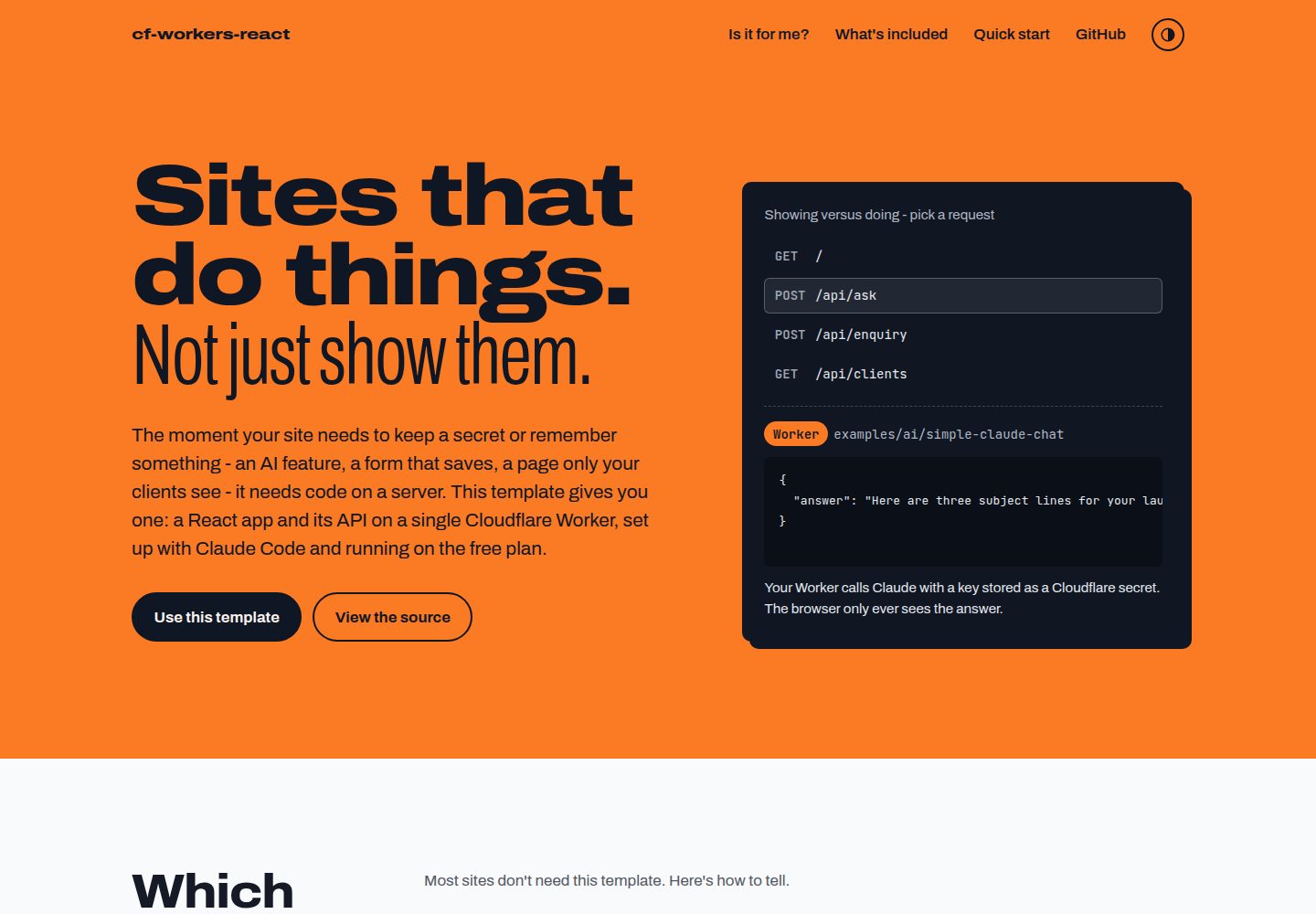
React 应用与 /api/* 后端运行在同一个 Cloudflare Worker 上
ViteReact启动器
cloudflare-workers-react-boilerplate — Vite 启动器模板
作者 henkisdabro
面向需要服务端逻辑的站点:在单个 Cloudflare Worker 上同时运行 React 应用与 /api/* 后端,内置 Claude Code 配置、CI 部署与 D1、KV 示例。
看看你的网站会是什么样
浏览真实页面截图,比较内容排版与手机效果。点击下方缩略图切换,放大查看整页细节。
全部页面与视图 2
截图用于了解视觉与布局,交互效果请以实际项目为准。
采集于 2026-10-04查看来源
值得关注的模板亮点
从已有项目资料中,快速了解它的特点。
内置 GitHub Actions 工作流:拉取请求与 main 推送时执行 lint、类型检查、测试和构建,之后部署
提供 AI 调用隐藏密钥、表单写入 D1、KV 会话等示例代码
包含 Claude Code 的 AGENTS.md、斜杠命令和 /start 引导设置
依赖使用精确版本锁定,并设置三天的 minimumReleaseAge 以降低供应链风险
使用 Vite 与 Cloudflare Vite 插件,pnpm dev 在 workerd 运行时中运行 Worker
模板详细介绍
这是一个基于 Vite 与 React 的启动器模板,把前端 React 应用和后端 /api/* 路由放在同一个 Cloudflare Worker 上。它面向需要隐藏密钥、保存表单数据或按用户返回不同内容的站点,例如调用 AI 模型、预约或等待名单表单、客户门户和内部仪表盘。模板不包含登录功能,KV 会话示例只覆盖 cookie 部分,客户门户可考虑在应用前使用 Cloudflare Access。项目使用 TypeScript,并配有 Vitest 与 Testing Library 测试、ESLint 配置,以及 GitHub Actions 工作流在拉取请求和推送到 main 时执行 lint、类型检查、测试和构建,随后从 main 部署。仓库还提供 Claude Code 的斜杠命令、AGENTS.md 和示例代码,帮助完成初始设置与添加 Cloudflare 功能。
ViteReact启动器
适合你的项目吗?
适用场景
- 需要调用 AI 模型且不希望在前端暴露 API 密钥的站点
- 把用户提交的表单数据保存到 D1 数据库的预约或等待名单页面
- 为不同客户展示各自数据的客户门户或内部仪表盘
- 希望用 Claude Code 辅助开发并需要项目级代理配置的 React 项目
适合人群
- 需要服务端逻辑、密钥管理或数据持久化的个人或小团队项目
- 使用 Cloudflare Workers 免费计划起步并需要 CI 部署流程的开发者
- 熟悉 React、TypeScript 和 Vite,希望快速搭建全栈原型的开发者
- 希望借助 Claude Code 进行项目设置和功能扩展的开发者
上手与定制指南
结合仓库当前版本的说明,按下面的资料检查内容、配置与运行要求。
- 1
需要 Node.js 24、Cloudflare 账号、GitHub 账号和 pnpm;pnpm 可通过 npx get-pnpm 安装
- 2
点击 GitHub 的 Use this template 后克隆并运行 pnpm install 与 pnpm dev,本地地址为 http://localhost:5173
- 3
在 Claude Code 中输入 /start 可引导完成重命名项目、收集 Cloudflare 凭据、添加 GitHub secrets、可选配置 @claude 与自定义域名并部署
- 4
手动设置需修改 package.json 和 wrangler.jsonc 中的 name,替换 AGENTS.md,获取 Cloudflare 账户 ID 与 API token,并在 GitHub 仓库添加 CLOUDFLARE_API_TOKEN 和 CLOUDFLARE_ACCOUNT_ID secrets
- 5
模板自带文件需清理:删除 CHANGELOG.md 和 docs 下的推广站点文件,LICENSE 为模板作者的 MIT 许可,应替换为自己的名字或删除
授权与来源资料
使用条件与限制
免费使用 · 保留许可声明本次收录的是公开仓库中采用 MIT 许可的免费版本;免费范围为该版本代码,不代表外部服务或第三方素材免费。
使用时需要遵守
- 允许免费使用、修改、商用和分发该版本代码。
- 分发代码副本或实质性部分时,保留原作者版权声明和完整 MIT 许可声明。
- 代码按现状提供;担保与责任限制以原许可证及适用法律为准。
额外费用与待核对事项
- 使用该模板需要注册免费的 Cloudflare 账号,并获取账户 ID 与 API token 才能部署。
- 若使用 D1 数据库,所创建的 Cloudflare API token 需额外授予 D1 编辑权限。
- GitHub Actions 自动部署依赖仓库中配置 CLOUDFLARE_API_TOKEN 与 CLOUDFLARE_ACCOUNT_ID 两个密钥。
- Workers Logs 默认开启,自 2026-12-01 起将按 Cloudflare Observability 计费,可能产生费用。
- 自动创建 D1、KV、R2 等资源时,API token 需对相应产品具备编辑权限。
- 模板自带的 MIT 许可证署名为原作者,生成项目后应替换为自己的名字或删除。
- 使用模板后需手动删除 CHANGELOG.md 及 docs 下的推广站点文件,否则会残留在项目中。
- 模板不包含登录功能,KV 会话示例仅覆盖 cookie 部分,客户门户需自行接入 Cloudflare Access 等方案。
- 演示图片、字体、图标及其他第三方素材需按各自许可核对,不能仅凭代码的 MIT 许可判断。
- 域名、托管、数据库、支付或 AI 等外部服务可能另外收费。
查看原文依据
Permission is hereby granted, free of charge
许可证原文
a free [Cloudflare account](https://dash.cloudflare.com/sign-up)
README 原文
Add D1 edit permission if you will use D1.
README 原文
It needs two repository secrets: `CLOUDFLARE_API_TOKEN` and `CLOUDFLARE_ACCOUNT_ID`.
README 原文
Workers Logs are on by default (`observability` in `wrangler.jsonc`) and move to Cloudflare Observability pricing from 2026-12-01.
README 原文
The API token needs edit permission for each product it provisions.
README 原文
`LICENSE` is the template's MIT licence in its author's name - put your own name in it, or delete it.
README 原文
Delete `CHANGELOG.md` and the promotional site (`docs/index.html`, `docs/404.html`, `docs/.nojekyll`, `docs/css/`, `docs/js/`, `docs/README.md`).
README 原文
https://github.com/henkisdabro/cloudflare-workers-react-boilerplate/blob/main/LICENSEhttps://github.com/henkisdabro/cloudflare-workers-react-boilerplate/blob/main/README.mdSign-in is not built in.
README 原文
DeepSeek 根据仓库许可证和 README 整理 ·2026-10-04。结果仅覆盖已读取资料,依赖、图片、字体及后续条款变更以各自原文为准。
项目核对记录与介绍依据
模板资料
- 来源平台
- GitHub
- 资料与维护参考分
- 资料较完整 · 92 / 100
- 技术栈
- Vite · React
- 网站类型
- 启动器
这个分数如何计算
本站按许可资料(最高30分)、演示链接(12分)、预览图(10分)、Star数(15分)、记录的维护时间(15分)、描述完整度(8分)、功能记录(5分)和分类资料(5分)计算。它不是代码、安全或性能测试,也不是 Google 评分;有链接不代表已实测可用。
这个项目需要核对什么
- 记录的仓库更新时间
- 2026-10-04
- 截图检查日期
- 2026-10-04
已收录演示链接。请用你的内容与屏幕尺寸检查;有演示不代表表单、认证或支付已经可用。
目录记录的主要技术栈是 Vite。请通过依赖清单和锁文件核对实际版本与托管要求。这些说明基于收录资料,不代表代码审计或部署实测。
查看具体选型方法 →介绍的制作与核对状态
介绍由 AI 辅助整理目录与仓库资料。仓库作者不等于这篇介绍的审核者。
审核声明: [email protected] · 2026-10-04
查看当时使用的来源资料
SHA-256: 92ae90d7056e878881346624614b993f6133c008b4980ba20a9cbdfb4d842073
2026-10-04T03:47:28.703Z
来源文件 / 仓库# Cloudflare Workers + React Boilerplate [](https://github.com/henkisdabro/cloudflare-workers-react-boilerplate/actions/workflows/deploy.yml) [](https://github.com/henkisdabro/cloudflare-workers-react-boilerplate/releases) [](LICENSE) [](https://github.com/henkisdabro/cloudflare-workers-react-boilerplate/generate) [](https://react.dev) [](https://vite.dev) [](https://www.typescriptlang.org/) [](https://nodejs.org/) [](https://pnpm.io) [](https://developers.cloudflare.com/workers/) [](https://claude.com/claude-code) **For sites that do things, not just show them.** The moment your site needs to keep a secret or remember something - an AI feature, a form that saves, a page only your clients see - it needs code on a server. This GitHub template gives you one: a React app and its `/api/*` back end on a single Cloudflare Worker, set up with [Claude Code](https://claude.com/claude-code) and running on the free plan. Site: <https://henkisdabro.github.io/cloudflare-workers-react-boilerplate/> ## Is this for you? Most sites don't need it. Pick by what your site has to do: | Your site... | Use | |---|---| | **shows things** - portfolio, brochure, landing page, docs | Plain files on [Workers static assets](https://developers.cloudflare.com/workers/static-assets/), or [Astro](https://developers.cloudflare.com/workers/framework-guides/web-apps/astro/). Not this. | | **lives on search** - blog, content-led shop, anything where ranking and link previews come first | A server-rendered framework: [Astro](https://developers.cloudflare.com/workers/framework-guides/web-apps/astro/), [React Router](https://developers.cloudflare.com/workers/framework-guides/web-apps/react-router/) or [TanStack Start](https://developers.cloudflare.com/workers/framework-guides/web-apps/tanstack-start/). Not this. | | **does things** - calls an AI model with your key, saves what people send, shows each client their own data | **This template.** | It is built for one person or a small team shipping an app with Claude Code: a paid AI tool, a booking or waitlist form backed by a database, a client portal, an internal dashboard. Workers run per request, so it is not the place for a long-running Node.js server. ### Why not `pnpm create cloudflare`? Cloudflare's own starter gives you the same React and Worker setup in one command - use it if you are happy wiring up the rest yourself. This template adds the parts a solo builder otherwise spends their first week on: - **Guided setup** - `/start` takes you through Cloudflare credentials, GitHub secrets, a custom domain and the first deploy. - **A safety net** - CI tests every pull request and deploys `main` only after lint, types, tests and build pass. - **The hard parts, done once** - working examples for AI calls with hidden keys, forms saved to D1 and sessions in KV. - **An agent that knows the project** - `AGENTS.md`, slash commands and guides written for Claude Code. Sign-in is not built in. The KV sessions example covers the cookie side; for a client portal, [Cloudflare Access](https://developers.cloudflare.com/cloudflare-one/applications/configure-apps/self-hosted-public-app/) in front of the app is the quickest route. ## What you get - **Vite 8 + React 19 + TypeScript 6** with `@vitejs/plugin-react` and the [Cloudflare Vite plugin](https://developers.cloudflare.com/workers/vite-plugin/), so `pnpm dev` runs your Worker in the real `workerd` runtime alongside hot reload. - **A Worker back end** (`worker/index.ts`) with `GET /api/health`, a catch-all `/api/*` route and security headers on API responses. Everything else is served as static assets with SPA fallback. - **Vitest 5 + Testing Library** with jsdom, and **ESLint 10** flat config. - **CI and deploy** in `.github/workflows/deploy.yml`: lint, type-check, test and build on every pull request and push to `main`, then deploy from `main`. - **Claude Code commands** for setup, planning and adding Cloudflare features - see [below](#claude-code-commands). - **Supply-chain defaults**: exact-pinned dependencies and a three-day `minimumReleaseAge` in `pnpm-workspace.yaml`, so a version published in the last three days refuses to install. ## Quick start You need [Node.js 24](https://nodejs.org/en/download) (pinned in `.nvmrc`), a free [Cloudflare account](https://dash.cloudflare.com/sign-up), a GitHub account and pnpm. No pnpm yet? Run `npx get-pnpm` once and open a new terminal; from then on pnpm switches to the version pinned in `packageManager` by itself. 1. Click **Use this template** on GitHub. 2. Clone, install and run - swap in your repository's URL and folder name, and leave it running: ```bash git clone https://github.com/you/your-app.git && cd your-app && pnpm install && pnpm dev ``` The app is at <http://localhost:5173>, the API at `/api/health`. 3. In a second terminal, open the project in Claude Code the way you usually do - `cd your-app && claude`, the desktop app or your editor's extension. 4. Type `/start` into Claude Code, or follow [Manual setup](#manual-setup). `/start` renames the project from its placeholder name, replaces the template's `AGENTS.md` with a project version, collects your Cloudflare account ID and API token, adds the GitHub secrets, optionally sets up `@claude` on GitHub and a custom domain, and deploys. ### Manual setup 1. **Rename the project.** `name` in `package.json` and `wrangler.jsonc` both ship as `init`; the Wrangler name becomes your Worker's name and its `workers.dev` address. 2. **Replace the agent file.** Copy `docs/PROJECT-AGENTS-TEMPLATE.md`'s starter block over `AGENTS.md` and fill it in. The template's own `AGENTS.md` describes the template, not your project. 3. **Get credentials.** Your [account ID](https://developers.cloudflare.com/fundamentals/account/find-account-and-zone-ids/) and an [API token](https://developers.cloudflare.com/fundamentals/api/get-started/create-token/) made from the **Edit Cloudflare Workers** template. Add D1 edit permission if you will use D1. 4. **Add GitHub secrets** under **Settings > Secrets and variables > Actions**: `CLOUDFLARE_API_TOKEN` and `CLOUDFLARE_ACCOUNT_ID`. 5. **Clean up the template's own files.** Delete `CHANGELOG.md` and the promotional site (`docs/index.html`, `docs/404.html`, `docs/.nojekyll`, `docs/css/`, `docs/js/`, `docs/README.md`). `LICENSE` is the template's MIT licence in its author's name - put your own name in it, or delete it. 6. **Push to `main`.** The workflow deploys and prints the URL. If it ran before the secrets existed, re-run it from the Actions tab. ## Project structure ``` . ├── src/ # React app (App.tsx, main.tsx, test/setup.ts) ├── worker/index.ts # Worker: /api/* routes and security headers ├── public/ # Static files copied as-is ├── examples/ # Copy-in reference code: ai/ and database/ ├── docs/ # Beginner guides, plus the GitHub Pages site (index.html) ├── PRPs/ # Plans written by /generate-prp ├── .claude/ # Slash commands, /start branches, templates and settings ├── .github/workflows/ # deploy.yml (CI and deploy) ├── wrangler.jsonc # Worker config: assets, observability, commented binding examples ├── worker-configuration.d.ts # Generated by `pnpm cf-typegen` - commit it ├── vite.config.ts # React + Cloudflare plugins ├── vitest.config.ts ├── tsconfig.*.json # Separate projects for app, worker and node tooling ├── AGENTS.md # Agent instructions (CLAUDE.md imports it) ├── .mcp.json # Cloudflare API MCP server for Claude Code ├── CHANGELOG.md # Template release notes - /start deletes it └── LICENSE # MIT - /start asks whether to keep it ``` ## Scripts | Command | What it does | | -------------------- | --------------------------------------------------------------- | | `pnpm dev` | Vite dev server with the Worker running in `workerd` | | `pnpm build` | Type-check all projects (`tsc -b`) and build | | `pnpm preview` | Build, then serve the production output locally | | `pnpm lint` | ESLint | | `pnpm test` | Vitest once (`pnpm test:watch` to watch, `pnpm test:coverage` for a report) | | `pnpm run deploy` | Build, then `wrangler deploy` (`pnpm deploy` is a pnpm built-in) | | `pnpm cf-typegen` | Regenerate `worker-configuration.d.ts` after any binding change | Before pushing, run `pnpm lint && pnpm test && pnpm build`. CI runs the same three, plus `wrangler types --check`. Wrangler is a dev dependency, so call it through pnpm: `pnpm exec wrangler tail`, `pnpm exec wrangler secret put NAME`, `pnpm exec wrangler d1 migrations apply DB --remote`. ## Deploying Pick one way to deploy to production. They can all coexist with local `pnpm run deploy`. ### GitHub Actions (default) `.github/workflows/deploy.yml` has two jobs: - **verify** runs on every pull request and push to `main`: frozen-lockfile install, `wrangler types --check`, lint, test, build. - **deploy** runs after verify on pushes to `main` only, using [`cloudflare/wrangler-action`](https://github.com/cloudflare/wrangler-action). It is skipped in the template repository itself and runs once your generated repository is no longer a template. It needs two repository secrets: `CLOUDFLARE_API_TOKEN` and `CLOUDFLARE_ACCOUNT_ID`. Node and pnpm versions come from `.nvmrc` and `packageManager`, so CI matches your machine. ### Workers Builds (Cloudflare's Git integration) [Workers Builds](https://developers.cloudflare.com/workers/ci-cd/builds/) builds and deploys from Cloudflare when you push, posts preview URLs on pull requests and needs no GitHub secrets. To switch: 1. Delete the `deploy` job from `.github/workflows/deploy.yml`. Keep `verify` so pull requests are still checked. 2. In the Cloudflare dashboard, open **Workers & Pages**, create or select the Worker and connect the repository. The Worker name must match `name` in `wrangler.jsonc`. 3. Set the build command to `pnpm run build`, and add a `PNPM_VERSION` build variable matching `packageManager` - the build image ships an older pnpm by default. See [limits and pricing](https://developers.cloudflare.com/workers/ci-cd/builds/limits-and-pricing/) for build minutes on each plan. ### From your machine ```bash pnpm exec wrangler login # once pnpm run deploy ``` Alternatively, put `CLOUDFLARE_API_TOKEN` and `CLOUDFLARE_ACCOUNT_ID` in `.env` (see `.env.example`). ### Bindings and auto-provisioning `wrangler.jsonc` carries commented D1, KV, R2 and Workers AI bindings. KV, D1 and Queues bindings may leave out their ID, and R2 its bucket name: `wrangler deploy` creates the resource and writes the ID back to `wrangler.jsonc` ([automatic provisioning](https://developers.cloudflare.com/workers/wrangler/configuration/#automatic-provisioning)). Run that first deploy from your machine and commit the result - a CI deploy creates the resource but writes the ID only into the runner's throwaway checkout. The API token needs edit permission for each product it provisions. Run `pnpm cf-typegen` after any binding change, or CI's `wrangler types --check` fails. ## Free tier The template runs on the Workers Free plan: 100,000 requests a day and 10 ms of CPU per request, with free tiers for D1, KV and R2. Workers Logs are on by default (`observability` in `wrangler.jsonc`) and move to Cloudflare Observability pricing from 2026-12-01. Check [Workers pricing](https://developers.cloudflare.com/workers/platform/pricing/) and [limits](https://developers.cloudflare.com/workers/platform/limits/) for current figures, and [docs/cloudflare-products-explained.md](docs/cloudflare-products-explained.md) for a plain-English overview. ## Secrets - **Local:** `cp .dev.vars.example .dev.vars` and fill it in. Values appear on the Worker's `env` during `pnpm dev`. `.dev.vars` is gitignored. - **Production:** `pnpm exec wrangler secret put ANTHROPIC_API_KEY`. - **CI:** repository secrets, as above. ## Claude Code commands | Command | Use it to | | ------------------------- | ------------------------------------------------------------------ | | `/start` | Set up a new project from the template - run this first | | `/generate-prp <feature>` | Research a feature and write a plan to `PRPs/` | | `/execute-prp <file>` | Implement a plan and run its validation gates | | `/add-ai-feature` | Add Claude API, Workers AI or AI Gateway features | | `/setup-database` | Add D1 or KV, with migrations and types | | `/add-binding` | Add R2, Queues, Durable Objects and other bindings | | `/setup-sandbox` | Add the Cloudflare Sandbox SDK for isolated code execution | Details are in [.claude/README.md](.claude/README.md). `.mcp.json` connects the [Cloudflare API MCP server](https://developers.cloudflare.com/agents/model-context-protocol/mcp-servers-for-cloudflare/), which lets Claude Code inspect and manage resources in your Cloudflare account. To have Claude answer `@claude` mentions on pull requests and issues, see [docs/GITHUB_ACTIONS_CLAUDE.md](docs/GITHUB_ACTIONS_CLAUDE.md). ## Documentation | Guide | Covers | | -------------------------------------------------------------------------- | ------------------------------------------------------- | | [CLOUDFLARE_WORKERS.md](CLOUDFLARE_WORKERS.md) | Bindings, Worker patterns and operations | | [AI_INTEGRATION.md](AI_INTEGRATION.md) | Claude API, Workers AI and AI Gateway | | [SANDBOX.md](SANDBOX.md) | Sandbox SDK | | [examples/README.md](examples/README.md) | Copying the AI and database examples into your app | | [docs/GITHUB_ACTIONS_CLAUDE.md](docs/GITHUB_ACTIONS_CLAUDE.md) | `@claude` in GitHub pull requests and issues | | [docs/choosing-deployment.md](docs/choosing-deployment.md) | Deployment options in plain English | | [docs/cloudflare-products-explained.md](docs/cloudflare-products-explained.md) | Workers, KV, D1 and R2 for beginners | | [docs/glossary.md](docs/glossary.md) | Terms used in these docs | | [docs/CONVENTIONS.md](docs/CONVENTIONS.md) | Spelling and punctuation conventions | ## Contributing Issues and pull requests are welcome on [henkisdabro/cloudflare-workers-react-boilerplate](https://github.com/henkisdabro/cloudflare-workers-react-boilerplate). Read [AGENTS.md](AGENTS.md) first: every file here is copied into every generated project, so changes must hold true in projects you have never seen. ## Licence [MIT](LICENSE).
看看同类模板
对比同技术栈与用途的模板,找到更适合的视觉与内容结构。

react-starter-kit
Modern React starter kit with Bun, TypeScript, Tailwind CSS, tRPC, Stripe, and Cloudflare Workers. Production-…
Vite · SaaS

cove
The Cove Stack: 🏝️ minimal TanStack Start template with Vite+, Better Auth, Drizzle ORM, shadcn/ui
Vite · SaaS

vite-react-boilerplate
A production ready, scalable starter template for Vite + React
Vite · 启动器

react-vite-admin
This Starter utilizes React, Recoil, React Query, React Hooks, Typescript, Axios And Vite. 全新技术栈的后台管理系统
Vite · 后台

typescript-react_best_practices-vite_template
<⚡⚛️> Start your React project with Vite following code best practices (TypeScript, Linting, testing, CI/CD…)
Vite · 启动器

cloudflare-starter-kit
Template (boilerplate) repository for scaffolding Cloudflare Workers projects
Vite · 启动器