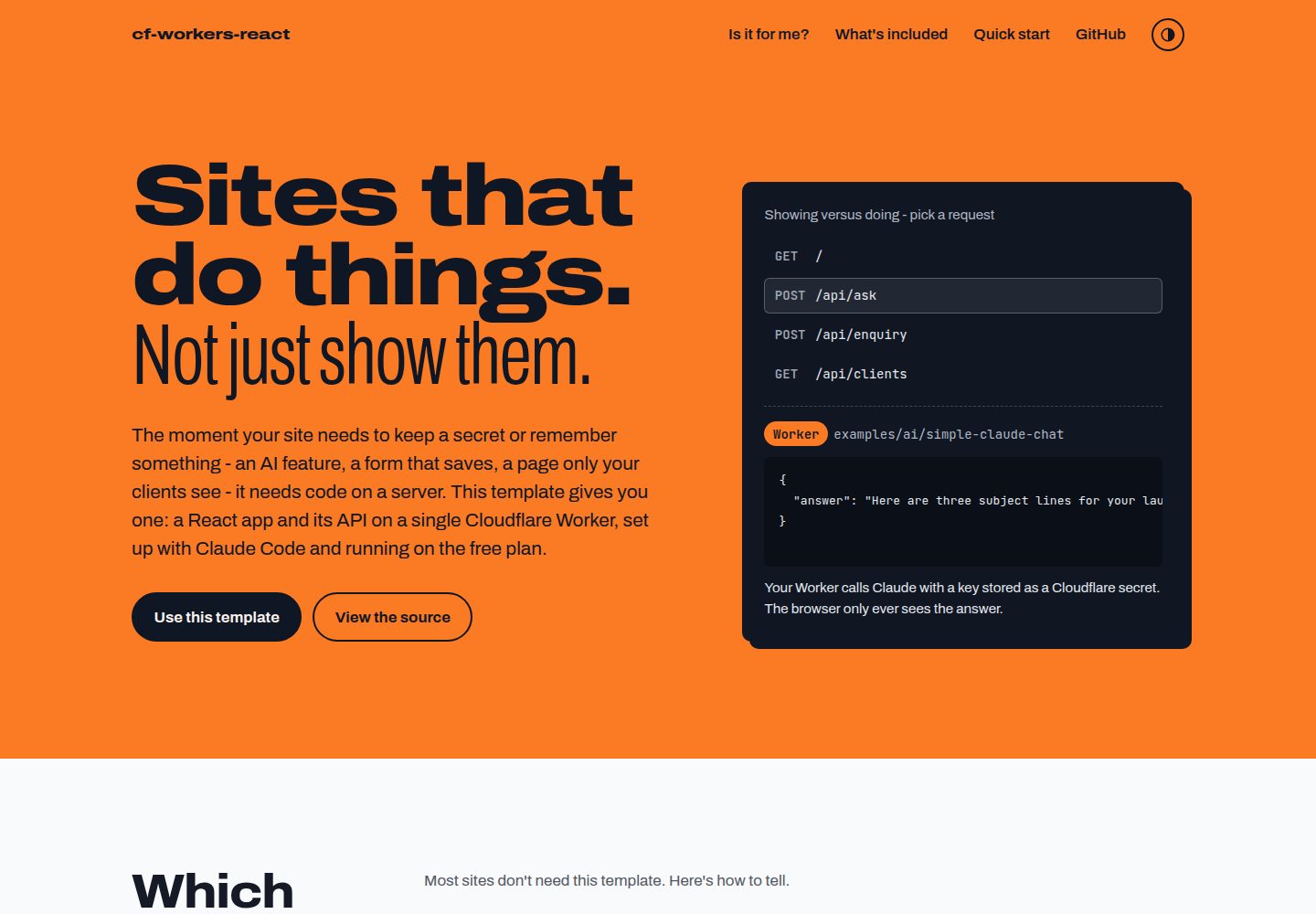
React app and /api/* backend run on the same Cloudflare Worker
ViteReactStarter
cloudflare-workers-react-boilerplate — Vite Starter Template
By henkisdabro
For sites that need server-side logic: run a React app and /api/* backend on a single Cloudflare Worker, with built-in Claude Code configuration, CI deployment, and D1 and KV examples.
Explore the design
Compare the page layouts and mobile experience. Open any screenshot for a closer look.
Desktop homepage1 / 2
Desktop captureTop of page
Actual screenshot captured by the server browser.
All pages & views 2
Screenshots show visual appearance; interactive behavior may differ.
Recorded 2026-10-04View source
What stands out
A quick read of the recorded project description.
Built-in GitHub Actions workflow: runs lint, type checking, tests, and builds on pull requests and main pushes, then deploys
Example code for AI calls with hidden keys, form writes to D1, and KV sessions
Includes Claude Code AGENTS.md, slash commands, and /start guided setup
Dependencies are pinned to exact versions, with a three-day minimumReleaseAge to reduce supply chain risk
Uses Vite and the Cloudflare Vite plugin; pnpm dev runs the Worker in the workerd runtime
Template Details
This is a starter template based on Vite and React that puts a frontend React app and backend /api/* routes on the same Cloudflare Worker. It targets sites that need to hide secrets, save form data, or return different content per user, such as calling AI models, appointment or waitlist forms, customer portals, and internal dashboards. The template does not include login functionality; the KV session example only covers the cookie portion, and customer portals might consider using Cloudflare Access in front of the app. The project uses TypeScript and includes Vitest and Testing Library tests, ESLint configuration, and GitHub Actions workflows that run lint, type checking, tests, and builds on pull requests and pushes to main, then deploy from main. The repository also provides Claude Code slash commands, AGENTS.md, and example code to help with initial setup and adding Cloudflare features.
ViteReactStarter
Is it right for your project?
Use Cases
- Sites that need to call AI models without exposing API keys in the frontend
- Appointment or waitlist pages that save user-submitted form data to a D1 database
- Customer portals or internal dashboards that show different data to different customers
- React projects that want to use Claude Code for development and need project-level agent configuration
Suitable For
- Individual or small-team projects that need server-side logic, secret management, or data persistence
- Developers starting on the Cloudflare Workers free plan who need a CI deployment process
- Developers familiar with React, TypeScript, and Vite who want to quickly build a full-stack prototype
- Developers who want to use Claude Code for project setup and feature expansion
Getting started & customization
Use these recorded setup notes alongside the repository instructions for your chosen version.
- 1
Requires Node.js 24, a Cloudflare account, a GitHub account, and pnpm; pnpm can be installed via npx get-pnpm
- 2
After clicking Use this template on GitHub, clone and run pnpm install and pnpm dev; the local address is http://localhost:5173
- 3
Enter /start in Claude Code to guide you through renaming the project, collecting Cloudflare credentials, adding GitHub secrets, optionally configuring @claude and a custom domain, and deploying
- 4
Manual setup requires changing the name in package.json and wrangler.jsonc, replacing AGENTS.md, obtaining the Cloudflare account ID and API token, and adding CLOUDFLARE_API_TOKEN and CLOUDFLARE_ACCOUNT_ID secrets to the GitHub repository
- 5
Template files need cleanup: delete CHANGELOG.md and the promotional site files under docs; the LICENSE is the template author's MIT license and should be replaced with your own name or removed
License & source material
Usage conditions & limitations
Free to use · keep license noticeThis entry covers the free version under the MIT license in the public repository; the free scope is the code in that version and does not mean external services or third-party assets are free.
Must comply with when using
- You may use, modify, commercialize, and distribute this version of the code for free.
- When distributing copies or substantial portions of the code, retain the original author's copyright notice and the full MIT license notice.
- The code is provided as is; warranties and limitations of liability are governed by the original license and applicable law.
Additional costs & items to verify
- Using this template requires registering for a free Cloudflare account and obtaining an account ID and API token to deploy.
- If using a D1 database, the created Cloudflare API token needs additional D1 edit permissions.
- GitHub Actions automatic deployment depends on configuring the CLOUDFLARE_API_TOKEN and CLOUDFLARE_ACCOUNT_ID secrets in the repository.
- Workers Logs are enabled by default and will be billed under Cloudflare Observability starting 2026-12-01, which may incur costs.
- When automatically creating resources such as D1, KV, and R2, the API token needs edit permissions for the corresponding products.
- The template's MIT license is attributed to the original author; after generating a project, replace it with your own name or remove it.
- After using the template, manually delete CHANGELOG.md and the promotional site files under docs, otherwise they will remain in the project.
- The template does not include login functionality; the KV session example only covers the cookie portion, and customer portals need to integrate solutions such as Cloudflare Access themselves.
- Demo images, fonts, icons, and other third-party assets need to be checked against their respective licenses and cannot be judged solely by the code's MIT license.
- External services such as domains, hosting, databases, payments, or AI may incur additional charges.
View Original Text Basis
Permission is hereby granted, free of charge
Original License Text
a free [Cloudflare account](https://dash.cloudflare.com/sign-up)
Original README
Add D1 edit permission if you will use D1.
Original README
It needs two repository secrets: `CLOUDFLARE_API_TOKEN` and `CLOUDFLARE_ACCOUNT_ID`.
Original README
Workers Logs are on by default (`observability` in `wrangler.jsonc`) and move to Cloudflare Observability pricing from 2026-12-01.
Original README
The API token needs edit permission for each product it provisions.
Original README
`LICENSE` is the template's MIT licence in its author's name - put your own name in it, or delete it.
Original README
Delete `CHANGELOG.md` and the promotional site (`docs/index.html`, `docs/404.html`, `docs/.nojekyll`, `docs/css/`, `docs/js/`, `docs/README.md`).
Original README
https://github.com/henkisdabro/cloudflare-workers-react-boilerplate/blob/main/LICENSEhttps://github.com/henkisdabro/cloudflare-workers-react-boilerplate/blob/main/README.mdSign-in is not built in.
Original README
Compiled by DeepSeek based on repository license and README ·2026-10-04. Results only cover the materials read; dependencies, images, fonts, and subsequent term changes are subject to their respective original texts.
Project checks & description sources
Template Information
- Source platforms
- GitHub
- Documentation and maintenance reference score
- More documented · 92 / 100
- Technologies
- Vite · React
- Website type
- Starter
How this score is calculated
Our heuristic uses license records (up to 30), a demo link (12), a preview (10), stars (15), recorded maintenance (15), description completeness (8), feature records (5) and classification data (5). It is not a code, security or performance test, or a Google score. A link does not establish tested functionality.
What to verify for this project
- Repository update recorded
- 2026-10-04
- Screenshot last checked
- 2026-10-04
A demo link is listed. Check it with your own content and viewport sizes; its presence does not confirm that forms, authentication or payments work.
The catalog identifies Vite as the primary stack. Check the actual dependency manifest and lockfile for versions and hosting requirements. These notes use recorded metadata, not a code audit or a deployment test.
Use a selection guide →How this description was prepared
AI-assisted description based on catalog records and repository material. Repository authors are not automatically the reviewers of this description.
Review declaration: [email protected] · 2026-10-04
Inspect the recorded source material
SHA-256: 92ae90d7056e878881346624614b993f6133c008b4980ba20a9cbdfb4d842073
2026-10-04T03:47:28.703Z
Source file / repository# Cloudflare Workers + React Boilerplate [](https://github.com/henkisdabro/cloudflare-workers-react-boilerplate/actions/workflows/deploy.yml) [](https://github.com/henkisdabro/cloudflare-workers-react-boilerplate/releases) [](LICENSE) [](https://github.com/henkisdabro/cloudflare-workers-react-boilerplate/generate) [](https://react.dev) [](https://vite.dev) [](https://www.typescriptlang.org/) [](https://nodejs.org/) [](https://pnpm.io) [](https://developers.cloudflare.com/workers/) [](https://claude.com/claude-code) **For sites that do things, not just show them.** The moment your site needs to keep a secret or remember something - an AI feature, a form that saves, a page only your clients see - it needs code on a server. This GitHub template gives you one: a React app and its `/api/*` back end on a single Cloudflare Worker, set up with [Claude Code](https://claude.com/claude-code) and running on the free plan. Site: <https://henkisdabro.github.io/cloudflare-workers-react-boilerplate/> ## Is this for you? Most sites don't need it. Pick by what your site has to do: | Your site... | Use | |---|---| | **shows things** - portfolio, brochure, landing page, docs | Plain files on [Workers static assets](https://developers.cloudflare.com/workers/static-assets/), or [Astro](https://developers.cloudflare.com/workers/framework-guides/web-apps/astro/). Not this. | | **lives on search** - blog, content-led shop, anything where ranking and link previews come first | A server-rendered framework: [Astro](https://developers.cloudflare.com/workers/framework-guides/web-apps/astro/), [React Router](https://developers.cloudflare.com/workers/framework-guides/web-apps/react-router/) or [TanStack Start](https://developers.cloudflare.com/workers/framework-guides/web-apps/tanstack-start/). Not this. | | **does things** - calls an AI model with your key, saves what people send, shows each client their own data | **This template.** | It is built for one person or a small team shipping an app with Claude Code: a paid AI tool, a booking or waitlist form backed by a database, a client portal, an internal dashboard. Workers run per request, so it is not the place for a long-running Node.js server. ### Why not `pnpm create cloudflare`? Cloudflare's own starter gives you the same React and Worker setup in one command - use it if you are happy wiring up the rest yourself. This template adds the parts a solo builder otherwise spends their first week on: - **Guided setup** - `/start` takes you through Cloudflare credentials, GitHub secrets, a custom domain and the first deploy. - **A safety net** - CI tests every pull request and deploys `main` only after lint, types, tests and build pass. - **The hard parts, done once** - working examples for AI calls with hidden keys, forms saved to D1 and sessions in KV. - **An agent that knows the project** - `AGENTS.md`, slash commands and guides written for Claude Code. Sign-in is not built in. The KV sessions example covers the cookie side; for a client portal, [Cloudflare Access](https://developers.cloudflare.com/cloudflare-one/applications/configure-apps/self-hosted-public-app/) in front of the app is the quickest route. ## What you get - **Vite 8 + React 19 + TypeScript 6** with `@vitejs/plugin-react` and the [Cloudflare Vite plugin](https://developers.cloudflare.com/workers/vite-plugin/), so `pnpm dev` runs your Worker in the real `workerd` runtime alongside hot reload. - **A Worker back end** (`worker/index.ts`) with `GET /api/health`, a catch-all `/api/*` route and security headers on API responses. Everything else is served as static assets with SPA fallback. - **Vitest 5 + Testing Library** with jsdom, and **ESLint 10** flat config. - **CI and deploy** in `.github/workflows/deploy.yml`: lint, type-check, test and build on every pull request and push to `main`, then deploy from `main`. - **Claude Code commands** for setup, planning and adding Cloudflare features - see [below](#claude-code-commands). - **Supply-chain defaults**: exact-pinned dependencies and a three-day `minimumReleaseAge` in `pnpm-workspace.yaml`, so a version published in the last three days refuses to install. ## Quick start You need [Node.js 24](https://nodejs.org/en/download) (pinned in `.nvmrc`), a free [Cloudflare account](https://dash.cloudflare.com/sign-up), a GitHub account and pnpm. No pnpm yet? Run `npx get-pnpm` once and open a new terminal; from then on pnpm switches to the version pinned in `packageManager` by itself. 1. Click **Use this template** on GitHub. 2. Clone, install and run - swap in your repository's URL and folder name, and leave it running: ```bash git clone https://github.com/you/your-app.git && cd your-app && pnpm install && pnpm dev ``` The app is at <http://localhost:5173>, the API at `/api/health`. 3. In a second terminal, open the project in Claude Code the way you usually do - `cd your-app && claude`, the desktop app or your editor's extension. 4. Type `/start` into Claude Code, or follow [Manual setup](#manual-setup). `/start` renames the project from its placeholder name, replaces the template's `AGENTS.md` with a project version, collects your Cloudflare account ID and API token, adds the GitHub secrets, optionally sets up `@claude` on GitHub and a custom domain, and deploys. ### Manual setup 1. **Rename the project.** `name` in `package.json` and `wrangler.jsonc` both ship as `init`; the Wrangler name becomes your Worker's name and its `workers.dev` address. 2. **Replace the agent file.** Copy `docs/PROJECT-AGENTS-TEMPLATE.md`'s starter block over `AGENTS.md` and fill it in. The template's own `AGENTS.md` describes the template, not your project. 3. **Get credentials.** Your [account ID](https://developers.cloudflare.com/fundamentals/account/find-account-and-zone-ids/) and an [API token](https://developers.cloudflare.com/fundamentals/api/get-started/create-token/) made from the **Edit Cloudflare Workers** template. Add D1 edit permission if you will use D1. 4. **Add GitHub secrets** under **Settings > Secrets and variables > Actions**: `CLOUDFLARE_API_TOKEN` and `CLOUDFLARE_ACCOUNT_ID`. 5. **Clean up the template's own files.** Delete `CHANGELOG.md` and the promotional site (`docs/index.html`, `docs/404.html`, `docs/.nojekyll`, `docs/css/`, `docs/js/`, `docs/README.md`). `LICENSE` is the template's MIT licence in its author's name - put your own name in it, or delete it. 6. **Push to `main`.** The workflow deploys and prints the URL. If it ran before the secrets existed, re-run it from the Actions tab. ## Project structure ``` . ├── src/ # React app (App.tsx, main.tsx, test/setup.ts) ├── worker/index.ts # Worker: /api/* routes and security headers ├── public/ # Static files copied as-is ├── examples/ # Copy-in reference code: ai/ and database/ ├── docs/ # Beginner guides, plus the GitHub Pages site (index.html) ├── PRPs/ # Plans written by /generate-prp ├── .claude/ # Slash commands, /start branches, templates and settings ├── .github/workflows/ # deploy.yml (CI and deploy) ├── wrangler.jsonc # Worker config: assets, observability, commented binding examples ├── worker-configuration.d.ts # Generated by `pnpm cf-typegen` - commit it ├── vite.config.ts # React + Cloudflare plugins ├── vitest.config.ts ├── tsconfig.*.json # Separate projects for app, worker and node tooling ├── AGENTS.md # Agent instructions (CLAUDE.md imports it) ├── .mcp.json # Cloudflare API MCP server for Claude Code ├── CHANGELOG.md # Template release notes - /start deletes it └── LICENSE # MIT - /start asks whether to keep it ``` ## Scripts | Command | What it does | | -------------------- | --------------------------------------------------------------- | | `pnpm dev` | Vite dev server with the Worker running in `workerd` | | `pnpm build` | Type-check all projects (`tsc -b`) and build | | `pnpm preview` | Build, then serve the production output locally | | `pnpm lint` | ESLint | | `pnpm test` | Vitest once (`pnpm test:watch` to watch, `pnpm test:coverage` for a report) | | `pnpm run deploy` | Build, then `wrangler deploy` (`pnpm deploy` is a pnpm built-in) | | `pnpm cf-typegen` | Regenerate `worker-configuration.d.ts` after any binding change | Before pushing, run `pnpm lint && pnpm test && pnpm build`. CI runs the same three, plus `wrangler types --check`. Wrangler is a dev dependency, so call it through pnpm: `pnpm exec wrangler tail`, `pnpm exec wrangler secret put NAME`, `pnpm exec wrangler d1 migrations apply DB --remote`. ## Deploying Pick one way to deploy to production. They can all coexist with local `pnpm run deploy`. ### GitHub Actions (default) `.github/workflows/deploy.yml` has two jobs: - **verify** runs on every pull request and push to `main`: frozen-lockfile install, `wrangler types --check`, lint, test, build. - **deploy** runs after verify on pushes to `main` only, using [`cloudflare/wrangler-action`](https://github.com/cloudflare/wrangler-action). It is skipped in the template repository itself and runs once your generated repository is no longer a template. It needs two repository secrets: `CLOUDFLARE_API_TOKEN` and `CLOUDFLARE_ACCOUNT_ID`. Node and pnpm versions come from `.nvmrc` and `packageManager`, so CI matches your machine. ### Workers Builds (Cloudflare's Git integration) [Workers Builds](https://developers.cloudflare.com/workers/ci-cd/builds/) builds and deploys from Cloudflare when you push, posts preview URLs on pull requests and needs no GitHub secrets. To switch: 1. Delete the `deploy` job from `.github/workflows/deploy.yml`. Keep `verify` so pull requests are still checked. 2. In the Cloudflare dashboard, open **Workers & Pages**, create or select the Worker and connect the repository. The Worker name must match `name` in `wrangler.jsonc`. 3. Set the build command to `pnpm run build`, and add a `PNPM_VERSION` build variable matching `packageManager` - the build image ships an older pnpm by default. See [limits and pricing](https://developers.cloudflare.com/workers/ci-cd/builds/limits-and-pricing/) for build minutes on each plan. ### From your machine ```bash pnpm exec wrangler login # once pnpm run deploy ``` Alternatively, put `CLOUDFLARE_API_TOKEN` and `CLOUDFLARE_ACCOUNT_ID` in `.env` (see `.env.example`). ### Bindings and auto-provisioning `wrangler.jsonc` carries commented D1, KV, R2 and Workers AI bindings. KV, D1 and Queues bindings may leave out their ID, and R2 its bucket name: `wrangler deploy` creates the resource and writes the ID back to `wrangler.jsonc` ([automatic provisioning](https://developers.cloudflare.com/workers/wrangler/configuration/#automatic-provisioning)). Run that first deploy from your machine and commit the result - a CI deploy creates the resource but writes the ID only into the runner's throwaway checkout. The API token needs edit permission for each product it provisions. Run `pnpm cf-typegen` after any binding change, or CI's `wrangler types --check` fails. ## Free tier The template runs on the Workers Free plan: 100,000 requests a day and 10 ms of CPU per request, with free tiers for D1, KV and R2. Workers Logs are on by default (`observability` in `wrangler.jsonc`) and move to Cloudflare Observability pricing from 2026-12-01. Check [Workers pricing](https://developers.cloudflare.com/workers/platform/pricing/) and [limits](https://developers.cloudflare.com/workers/platform/limits/) for current figures, and [docs/cloudflare-products-explained.md](docs/cloudflare-products-explained.md) for a plain-English overview. ## Secrets - **Local:** `cp .dev.vars.example .dev.vars` and fill it in. Values appear on the Worker's `env` during `pnpm dev`. `.dev.vars` is gitignored. - **Production:** `pnpm exec wrangler secret put ANTHROPIC_API_KEY`. - **CI:** repository secrets, as above. ## Claude Code commands | Command | Use it to | | ------------------------- | ------------------------------------------------------------------ | | `/start` | Set up a new project from the template - run this first | | `/generate-prp <feature>` | Research a feature and write a plan to `PRPs/` | | `/execute-prp <file>` | Implement a plan and run its validation gates | | `/add-ai-feature` | Add Claude API, Workers AI or AI Gateway features | | `/setup-database` | Add D1 or KV, with migrations and types | | `/add-binding` | Add R2, Queues, Durable Objects and other bindings | | `/setup-sandbox` | Add the Cloudflare Sandbox SDK for isolated code execution | Details are in [.claude/README.md](.claude/README.md). `.mcp.json` connects the [Cloudflare API MCP server](https://developers.cloudflare.com/agents/model-context-protocol/mcp-servers-for-cloudflare/), which lets Claude Code inspect and manage resources in your Cloudflare account. To have Claude answer `@claude` mentions on pull requests and issues, see [docs/GITHUB_ACTIONS_CLAUDE.md](docs/GITHUB_ACTIONS_CLAUDE.md). ## Documentation | Guide | Covers | | -------------------------------------------------------------------------- | ------------------------------------------------------- | | [CLOUDFLARE_WORKERS.md](CLOUDFLARE_WORKERS.md) | Bindings, Worker patterns and operations | | [AI_INTEGRATION.md](AI_INTEGRATION.md) | Claude API, Workers AI and AI Gateway | | [SANDBOX.md](SANDBOX.md) | Sandbox SDK | | [examples/README.md](examples/README.md) | Copying the AI and database examples into your app | | [docs/GITHUB_ACTIONS_CLAUDE.md](docs/GITHUB_ACTIONS_CLAUDE.md) | `@claude` in GitHub pull requests and issues | | [docs/choosing-deployment.md](docs/choosing-deployment.md) | Deployment options in plain English | | [docs/cloudflare-products-explained.md](docs/cloudflare-products-explained.md) | Workers, KV, D1 and R2 for beginners | | [docs/glossary.md](docs/glossary.md) | Terms used in these docs | | [docs/CONVENTIONS.md](docs/CONVENTIONS.md) | Spelling and punctuation conventions | ## Contributing Issues and pull requests are welcome on [henkisdabro/cloudflare-workers-react-boilerplate](https://github.com/henkisdabro/cloudflare-workers-react-boilerplate). Read [AGENTS.md](AGENTS.md) first: every file here is copied into every generated project, so changes must hold true in projects you have never seen. ## Licence [MIT](LICENSE).
Explore similar templates
Compare previews and descriptions within the same stack and category.

react-starter-kit
A full-stack SaaS monorepo starter built on Vite and React, with Bun, TypeScript, tRPC, Drizzle ORM, Better Auth, Stripe, and Cloudflare Workers. It includes email OTP, passkey, Google OAuth, organizations, subscription billing, Drizzle migrations, seed scripts, and Terraform infrastructure.
Vite · SaaS

cove
Cove is a minimal TanStack Start starter template maintained by mugnavo, integrating React, TanStack Router/Query, Tailwind CSS, shadcn/ui, Drizzle ORM with PostgreSQL, Better Auth, Vite Plus, and Nitro.
Vite · SaaS

vite-react-boilerplate
A production-ready Vite + React starter template with TypeScript, Tailwind CSS, TanStack Router/Query/Table, Storybook, React Hook Form + Zod, Vitest and Playwright testing, plus Husky/Commitizen/Commitlint commit conventions.
Vite · Starter

react-vite-admin
A backend management starter built on Vite and React, integrating Recoil, React Query, TypeScript, and Axios, with Ant Design-style interface screenshots. Suitable as a starting point for management-side projects, licensed under MIT, with Chinese documentation and common scripts.
Vite · Admin dashboard

typescript-react_best_practices-vite_template
A Vite + React + TypeScript starter template by CodelyTV, preconfigured with Jest and React Testing Library unit tests, Cypress end-to-end tests, ESLint and Prettier using Codely's shared configuration, GitHub Actions workflows, a Makefile, and Sass.
Vite · Starter

cloudflare-starter-kit
A Cloudflare Workers project scaffolding template maintained by kriasoft, using Vite and TypeScript, with three built-in workspaces: api, app, and edge, and preconfigured local testing, multiple environments, and a GitHub Actions deployment workflow.
Vite · Starter