基于 Astro 的静态作品集主题,使用 TypeScript 与 Tailwind CSS
Astro作品集
monolume — Astro 作品集模板
作者 heshify
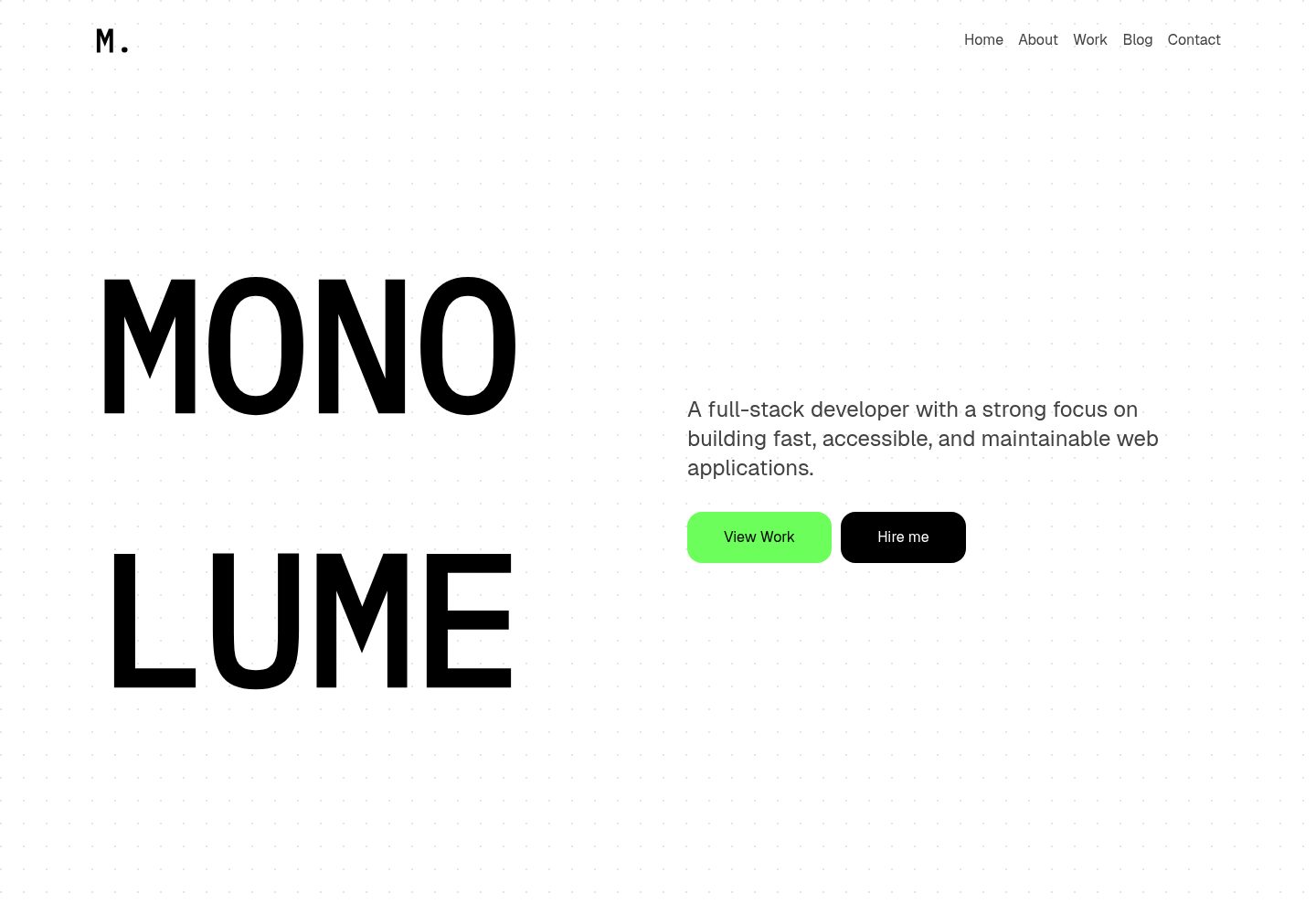
Monolume 是一个基于 Astro 的作品集主题,采用粗野主义排版与简洁的开发者风格,包含项目展示、博客与联系表单页面。
看看你的网站会是什么样
浏览真实页面截图,比较内容排版与手机效果。点击下方缩略图切换,放大查看整页细节。
全部页面与视图 3
截图用于了解视觉与布局,交互效果请以实际项目为准。
采集于 2026-10-03查看来源
值得关注的模板亮点
从已有项目资料中,快速了解它的特点。
包含项目展示与博客两套内容集合,分别位于 src/content/projects 与 src/content/blog
页面覆盖首页、关于、联系、博客列表/详情、项目列表/详情与 404
组件化结构,含 Hero、About、Contact、Projects、Posts、Card、Header、Footer 等
仓库采用 MIT 许可,允许免费使用、修改、商用与分发
模板详细介绍
Monolume 是一个用 Astro 构建的作品集主题,面向开发者、设计师和自由职业者展示个人作品。它强调极简而醒目的排版,整体风格偏向粗野主义(brutalist)与开发者导向的干净设计。
主题提供项目展示(projects)与博客(blog)两套内容集合,页面包括首页、关于、联系、博客列表与详情、项目列表与详情,以及 404 页面。组件目录中包含 Hero、About、Contact、Projects、Posts、Card、Header、Footer 等,便于按页面结构替换内容。
技术栈方面,README 列出 Astro、TypeScript 与 Tailwind CSS,并使用 pnpm 作为包管理命令。内容通过 src/content 下的 blog 与 projects 目录管理,配合 content.config.ts 定义集合。
许可方面,仓库采用 MIT 许可,允许免费使用、修改、商用和分发该版本代码;分发时需保留版权声明与完整 MIT 许可文本。演示图片、字体、图标等第三方素材需单独核对其许可,域名、托管等外部服务可能另行收费。
Astro作品集
适合你的项目吗?
适用场景
- 开发者或设计师搭建个人作品集网站,展示项目与博客文章
- 自由职业者用项目列表与联系表单呈现服务与联系方式
- 需要粗野主义排版风格的静态站点,作为 Astro 主题二次修改的起点
适合人群
- 使用 Astro 并希望以内容集合管理项目与博客的开发者
- 偏好极简、醒目排版风格的个人作品集站点
- 需要 MIT 许可代码以便修改和商用的使用者
上手与定制指南
结合仓库当前版本的说明,按下面的资料检查内容、配置与运行要求。
- 1
使用 pnpm install 安装依赖,pnpm dev 在 localhost:4321 启动本地开发服务器
- 2
pnpm build 生成生产站点到 ./dist/,pnpm preview 可在部署前本地预览构建结果
- 3
项目与博客内容放在 src/content/projects 与 src/content/blog,集合定义见 src/content.config.ts
- 4
演示图片、字体、图标等第三方素材需按各自许可单独核对,不能仅依据代码的 MIT 许可判断
授权与来源资料
使用条件与限制
免费使用 · 保留许可声明本次收录的是公开仓库中采用 MIT 许可的免费版本;免费范围为该版本代码,不代表外部服务或第三方素材免费。
使用时需要遵守
- 允许免费使用、修改、商用和分发该版本代码。
- 分发代码副本或实质性部分时,保留原作者版权声明和完整 MIT 许可声明。
- 代码按现状提供;担保与责任限制以原许可证及适用法律为准。
额外费用与待核对事项
- README 提到作者站点同时提供免费与付费(premium)主题;付费主题属于站点的其他产品,与本仓库 MIT 许可的免费代码无关,使用本模板无需购买。
- 演示图片、字体、图标及其他第三方素材需按各自许可核对,不能仅凭代码的 MIT 许可判断。
- 域名、托管、数据库、支付或 AI 等外部服务可能另外收费。
查看原文依据
Permission is hereby granted, free of charge
许可证原文
https://github.com/heshify/monolume/blob/main/LICENSEhttps://github.com/heshify/monolume/blob/main/README.mdcheck out more free and premium themes at
README 原文
DeepSeek 根据仓库许可证和 README 整理 ·2026-10-03。结果仅覆盖已读取资料,依赖、图片、字体及后续条款变更以各自原文为准。
项目核对记录与介绍依据
模板资料
- 来源平台
- Astro Themes
- 资料与维护参考分
- 资料较完整 · 87 / 100
- 技术栈
- Astro
- 网站类型
- 作品集
这个分数如何计算
本站按许可资料(最高30分)、演示链接(12分)、预览图(10分)、Star数(15分)、记录的维护时间(15分)、描述完整度(8分)、功能记录(5分)和分类资料(5分)计算。它不是代码、安全或性能测试,也不是 Google 评分;有链接不代表已实测可用。
这个项目需要核对什么
- 记录的仓库更新时间
- 2026-03-18
- 截图检查日期
- 2026-10-03
已收录演示链接。请用你的内容与屏幕尺寸检查;有演示不代表表单、认证或支付已经可用。
目录记录的主要技术栈是 Astro。请通过依赖清单和锁文件核对实际版本与托管要求。这些说明基于收录资料,不代表代码审计或部署实测。
查看具体选型方法 →介绍的制作与核对状态
介绍由 AI 辅助整理目录与仓库资料。仓库作者不等于这篇介绍的审核者。
审核声明: [email protected] · 2026-10-04
查看当时使用的来源资料
SHA-256: 3c61928b10ea88b294b2bbb7a3a0685b54b23df83e0a05a7a254e4897f04d22a
2026-10-03T17:05:14.723Z
来源文件 / 仓库# Monolume
Monolume is a clean, modern portfolio theme built with Astro.
It’s designed for developers, designers, and freelancers who want to showcase their work with style
## Demo
[Live Preview](https://monolume.vercel.app)
✨ Features
- Minimal, bold typography
- Responsive & mobile-friendly
- Work/projects showcase layout
- Blog support
- Contact form
- SEO-friendly
- Built with Astro + Tailwind CSS (easy to customize)
## Tech Stack
- [Astro](https://astro.build/) – Static site builder
- [TypeScript](https://www.typescriptlang.org/) – Type-safe development
- [Tailwind CSS](https://tailwindcss.com/) – Utility-first styling
## 🚀 Project Structure
Inside of your Astro project, you'll see the following folders and files:
```text
├── public/
├── src/
│ ├── components/
│ ├── About.astro
│ │ ├── Card.astro
│ │ ├── Contact.astro
│ │ ├── Footer.astro
│ │ ├── FormattedDate.astro
│ │ ├── Head.astro
│ │ ├── Header.astro
│ │ ├── Hero.astro
│ │ ├── Posts.astro
│ │ └── Projects.astro
│ ├── content/
│ │ ├── blog/
│ │ └── projects/
│ ├── layouts/
│ │ └── Layout.astro
│ ├── pages/
│ │ ├── 404.astro
│ │ ├── about.astro
│ │ ├── blog
│ │ │ ├── [...id].astro
│ │ │ └── index.astro
│ │ ├── contact.astro
│ │ ├── index.astro
│ │ └── projects
│ │ ├── [...id].astro
│ │ └── index.astro
│ └── styles/
│ └── global.css
├── consts.ts
│ ├── content.config.ts
├── astro.config.mjs
├── package.json
└── tsconfig.json
```
To learn more about the folder structure of an Astro project, refer to [our guide on project structure](https://docs.astro.build/en/basics/project-structure/).
## 🧞 Commands
All commands are run from the root of the project, from a terminal:
| Command | Action |
| :--------------------- | :----------------------------------------------- |
| `pnpm install` | Installs dependencies |
| `pnpm dev` | Starts local dev server at `localhost:4321` |
| `pnpm build` | Build your production site to `./dist/` |
| `pnpm preview` | Preview your build locally, before deploying |
| `pnpm astro ...` | Run CLI commands like `astro add`, `astro check` |
| `pnpm astro -- --help` | Get help using the Astro CLI |
## ❤️ Like this theme?
If you found this theme useful, check out more free and premium themes at
👉 https://themes.mhsh.in
看看同类模板
对比同技术栈与用途的模板,找到更适合的视觉与内容结构。

astro-theme-cactus
A simple Astro theme. Use it to create your blog or website.
Astro · 作品集

astrofy
Astrofy is a free and open-source template for your Personal Portfolio Website built with Astro and TailwindCS…
Astro · 作品集

astro-nano
Astro Nano is a static, minimalist, lightweight, lightning fast portfolio and blog.
Astro · 作品集

astro-erudite
An opinionated, unstyled static blogging template built with Astro and native CSS.
Astro · 作品集

astro-sphere
Astro Sphere is a static, minimalist, lightweight, lightning fast portfolio and blog.
Astro · 作品集

astro-micro
Blog theme for Astro with search and comments built-in. Zero frameworks.
Astro · 作品集