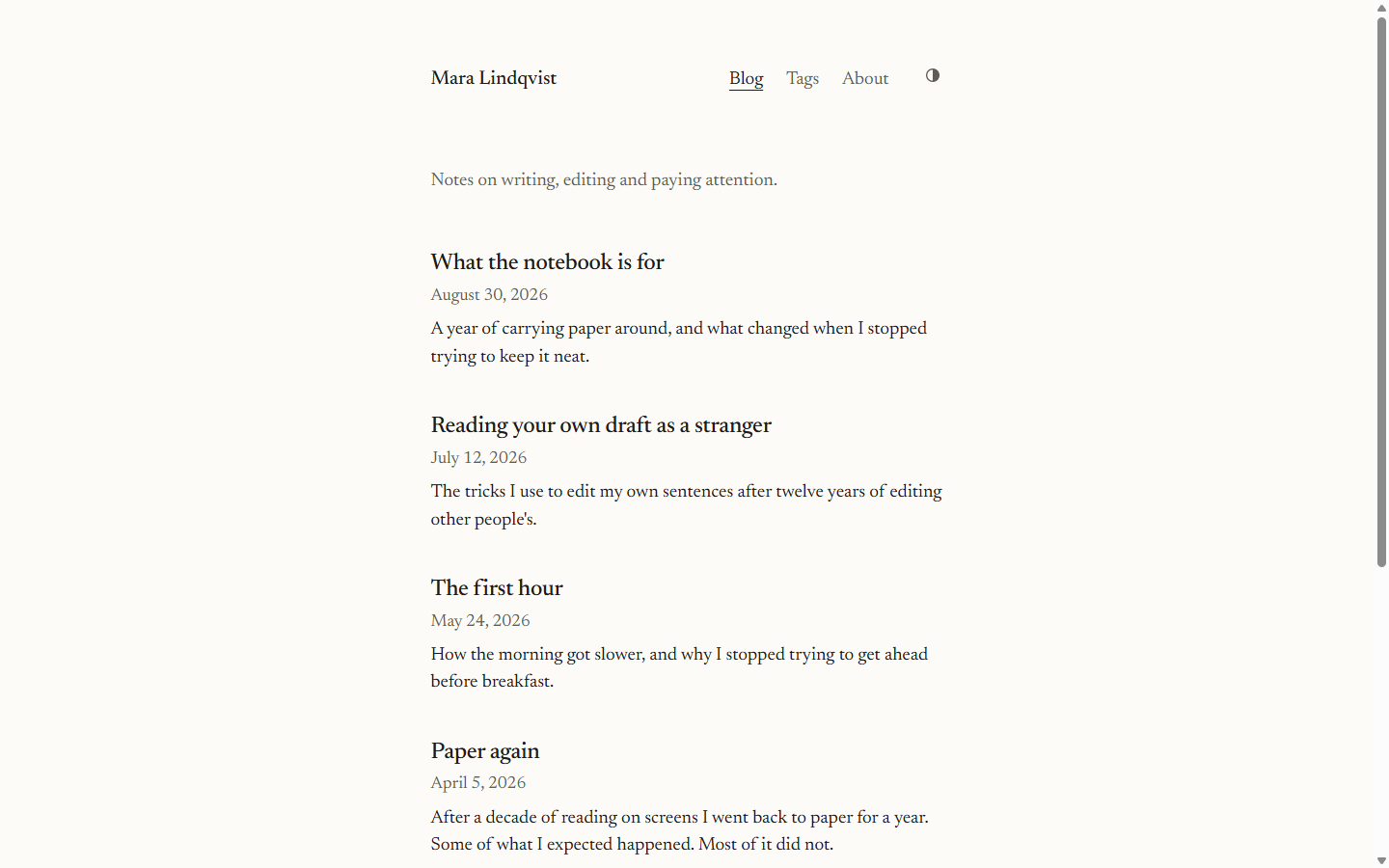
单栏文本布局,正文宽度 65 到 70 字符,使用自托管 Newsreader 衬线字体
Astro博客
tessera-plain — Astro 博客模板
作者 HeviSlav
Plain 是一个面向 Astro 的极简博客主题,单栏排版、衬线字体、支持明暗主题,除主题切换外不引入客户端 JavaScript。
看看你的网站会是什么样
浏览真实页面截图,比较内容排版与手机效果。点击下方缩略图切换,放大查看整页细节。
目前有 1 张原始预览,可打开完整图片查看设计细节。
截图用于了解视觉与布局,交互效果请以实际项目为准。
采集于 2026-10-13查看来源
值得关注的模板亮点
从已有项目资料中,快速了解它的特点。
明暗主题默认跟随系统,提供可持久化切换且加载无闪烁
除主题切换外无客户端 JavaScript,所有页面为静态 HTML
支持 Markdown 与 MDX,含脚注、表格、图表和随主题切换的代码块
内置分页首页、标签页、关于页、404 页、全文 RSS、站点地图和 Open Graph 标签
包含语义化地标、跳转链接、可见焦点环和减少动态效果支持
模板详细介绍
Plain 是一个为 Astro 编写的极简博客主题,定位是给写作者使用的静态博客。页面采用单栏文本布局,正文宽度控制在 65 到 70 个字符之间,使用自托管的 Newsreader 衬线字体,没有卡片、首屏大图、阴影或渐变。明暗主题默认跟随系统,并提供可持久化的切换按钮,加载时不会闪烁;除该切换按钮外没有客户端 JavaScript,每个页面都是静态 HTML。
内容方面,文章支持 Markdown 或 MDX,可用脚注、表格、图表和代码块,代码块会随页面主题切换。站点包含带分页的首页、标签页、用 Markdown 撰写的关于页和 404 页,并提供包含全文的 RSS、站点地图、robots.txt 以及每页的 Open Graph 标签。可访问性上包含语义化地标、跳转链接、可见焦点环、对减少动态效果的尊重,两种主题下对比度均高于 4.5:1。样式基于 Tailwind 4 手写正文样式,不使用排版插件、图标包或字体包。
配置集中在 src/config.ts,可调整语言、站点标题、描述、生产 URL、作者、页头导航、页脚链接、版权名、每页文章数和页脚署名开关。颜色以 CSS 变量形式放在 src/styles/global.css 顶部,明暗各一套;正文样式也在同一文件的 .prose 下。字体从 public/fonts/ 加载,替换 @font-face 规则和 --font-serif 即可换字体。
构建产物为静态文件,可部署到任意静态托管。需要注意:Plain 假设站点位于域名根路径,若部署在子路径下,需要在 astro.config.mjs 中设置 base 并给链接加前缀。代码采用 MIT 许可,Newsreader 字体单独使用 SIL Open Font License。演示图片、字体、图标等第三方素材需按各自许可核对。
Astro博客
适合你的项目吗?
适用场景
- 撰写以文字为主的个人博客,希望页面结构简单、没有多余装饰
- 需要静态输出并部署到 Cloudflare Pages、Netlify、Vercel 或 GitHub Pages 等静态托管
- 希望文章支持 Markdown 或 MDX,并使用脚注、表格、图表和代码块
- 需要 RSS 全文、站点地图和 Open Graph 标签等基础 SEO 与订阅能力
- 需要在明暗主题间切换,并让主题跟随系统偏好
适合人群
- 以文字写作为主的个人博主
- 偏好极简单栏排版的写作者
- 使用 Astro 并希望内容以 Markdown 或 MDX 管理的用户
- 需要静态站点并自行选择静态托管的开发者
上手与定制指南
结合仓库当前版本的说明,按下面的资料检查内容、配置与运行要求。
- 1
安装依赖后运行 npm install 与 npm run dev,本地地址为 http://localhost:4321
- 2
npm run build 输出到 dist/,npm run preview 预览该目录,npm run check 运行 astro check
- 3
文章放在 src/content/blog/,文件名决定 URL;updated 与 draft 为可选字段,草稿仅在开发模式可见
- 4
站点信息、导航、分页数量和页脚署名开关在 src/config.ts 中配置;颜色与正文样式在 src/styles/global.css
- 5
部署到子路径时需在 astro.config.mjs 设置 base 并给链接加前缀;部署前把 src/config.ts 的 url 改为实际地址
授权与来源资料
使用条件与限制
免费使用 · 保留许可声明本次收录的是公开仓库中采用 MIT 许可的免费版本;免费范围为该版本代码,不代表外部服务或第三方素材免费。
使用时需要遵守
- 允许免费使用、修改、商用和分发该版本代码。
- 分发代码副本或实质性部分时,保留原作者版权声明和完整 MIT 许可声明。
- 代码按现状提供;担保与责任限制以原许可证及适用法律为准。
额外费用与待核对事项
- 演示图片、字体、图标及其他第三方素材需按各自许可核对,不能仅凭代码的 MIT 许可判断。
- 域名、托管、数据库、支付或 AI 等外部服务可能另外收费。
- 部署限制:Plain 假设站点位于域名根路径;若部署在子路径下,需在 astro.config.mjs 中设置 base 并为链接加前缀,否则链接会失效。
- 字体素材单独授权:Newsreader 字体按 SIL Open Font License 单独许可,使用或替换字体时需遵守该字体许可,与代码的 MIT 许可不同。
- 商业背景说明:Plain 本身免费,但由同时开发付费高级主题的工作室维护;README 中提及的 Meridian 等高级主题为付费产品,不属于本免费项目。
查看原文依据
Permission is hereby granted, free of charge
许可证原文
Plain assumes it lives at the root of a domain, so a project site under a subpath also needs `base` in `astro.config.mjs` and prefixed links
README 原文
The Newsreader font is licensed separately under the SIL Open Font License, see `public/fonts/OFL.txt`.
README 原文
https://github.com/HeviSlav/tessera-plain/blob/main/LICENSEhttps://github.com/HeviSlav/tessera-plain/blob/main/README.mdPlain is free and maintained by [Tessera](https://tessera.hevislav.workers.dev), a small studio that also makes premium Astro themes.
README 原文
DeepSeek 根据仓库许可证和 README 整理 ·2026-10-13。结果仅覆盖已读取资料,依赖、图片、字体及后续条款变更以各自原文为准。
项目核对记录与介绍依据
模板资料
- 来源平台
- GitHub
- 资料与维护参考分
- 资料一般 · 68 / 100
- 技术栈
- Astro
- 网站类型
- 博客
这个分数如何计算
本站按许可资料(最高30分)、演示链接(12分)、预览图(10分)、Star数(15分)、记录的维护时间(15分)、描述完整度(8分)、功能记录(5分)和分类资料(5分)计算。它不是代码、安全或性能测试,也不是 Google 评分;有链接不代表已实测可用。
这个项目需要核对什么
- 记录的仓库更新时间
- 2026-09-13
- 截图检查日期
- 2026-10-13
目前没有记录演示链接。请依据仓库说明在本地评估;仅凭截图无法确认交互行为。
目录记录的主要技术栈是 Astro。请通过依赖清单和锁文件核对实际版本与托管要求。这些说明基于收录资料,不代表代码审计或部署实测。
查看具体选型方法 →介绍的制作与核对状态
介绍由 AI 辅助整理目录与仓库资料。仓库作者不等于这篇介绍的审核者。
审核声明: [email protected] · 2026-10-13
查看当时使用的来源资料
SHA-256: 2bf83661deccff8acb526db51b8e2b8829696d2593b22bff8ea874f0c76995e0
2026-10-13T01:22:15.253Z
来源文件 / 仓库# Plain A minimalist blog theme for [Astro](https://astro.build), made for people who write. One column of text set in a serif face, generous line height, and almost no chrome: no cards, no hero, no shadows, no gradients. Dark mode follows the system and can be toggled. The only client side JavaScript is the theme toggle, and every page is static HTML.  ## Features - One text column, 65 to 70 characters wide, set in Newsreader (self hosted, SIL Open Font License) - Light and dark themes: system preference by default, a toggle that persists, no flash on load - Posts in Markdown or MDX with footnotes, tables, figures and code blocks that switch theme with the page - Front page with pagination, tag pages, an about page written in Markdown, a 404 page - RSS feed with full post content, sitemap, robots.txt and Open Graph tags on every page - Semantic landmarks, skip link, visible focus rings, reduced motion respected, contrast above 4.5:1 in both themes - Hand written prose styles on Tailwind 4, no typography plugin, no icon or font packages ## Quick start ```sh npm install npm run dev ``` Open `http://localhost:4321`. `npm run build` writes the site to `dist/`, `npm run preview` serves that folder, and `npm run check` runs `astro check`. ## Writing a post Add a Markdown file to `src/content/blog/`. The file name becomes the URL, so `src/content/blog/paper-again.md` is served at `/blog/paper-again/`. ```md --- title: "Paper again" description: "One line shown in the post list, in search results and in the feed." date: 2026-04-05 updated: 2026-04-20 tags: [reading, attention] draft: false --- The post starts here. Footnotes[^1], tables, code blocks and raw HTML all work. [^1]: Footnotes are rendered by GitHub flavored Markdown. ``` `updated` and `draft` are optional. Draft posts are visible while running `npm run dev` and left out of the build. For a figure with a caption, write the HTML directly: ```html <figure> <img src="/images/notebook.svg" alt="What the picture shows" width="800" height="500" loading="lazy"> <figcaption>The caption.</figcaption> </figure> ``` Images go in `public/images/`. Give every image a width and height so the page does not shift while it loads. The about page is `src/content/pages/about.md`. ## Configuration Everything you are likely to change lives in `src/config.ts`: language, site title, description, production URL, author, header navigation, footer links, copyright name, posts per page, and the `credit` switch for the "Made with Plain" line in the footer. Colors live at the top of `src/styles/global.css` as CSS variables, one set for light and one for dark. Prose styles are in the same file under `.prose`. The font is loaded from `public/fonts/`; swap the `@font-face` rules and the `--font-serif` stack to use another face. `npm run og` regenerates `public/og.png`, the image used for link previews. It is a plain mark with no text, so it works for any site title. ## Deployment The build is static, so any host that serves files works. Set `url` in `src/config.ts` to the address you deploy to; it is used for canonical links, the sitemap and the RSS feed. - Cloudflare Pages: build command `npm run build`, output directory `dist` - Netlify: build command `npm run build`, publish directory `dist` - Vercel: framework preset Astro, or build command `npm run build` with output directory `dist` - GitHub Pages: use the official [Astro action](https://docs.astro.build/en/guides/deploy/github/); Plain assumes it lives at the root of a domain, so a project site under a subpath also needs `base` in `astro.config.mjs` and prefixed links ## License MIT. The Newsreader font is licensed separately under the SIL Open Font License, see `public/fonts/OFL.txt`. ## More themes Plain is free and maintained by [Tessera](https://tessera.hevislav.workers.dev), a small studio that also makes premium Astro themes. If you need more than a blog, have a look at [Meridian](https://meridian-demo.hevislav.workers.dev), an editorial marketing site theme for SaaS and startups.
看看同类模板
对比同技术栈与用途的模板,找到更适合的视觉与内容结构。

astrowind
⭕️ AstroWind: A free template using Astro v7 and Tailwind CSS v4. Astro starter theme.
Astro · 博客

astro-paper
A minimal, accessible and SEO-friendly Astro blog theme.
Astro · 博客

fuwari
✨A static blog template built with Astro.
Astro · 博客

Firefly
Firefly 是一款基于 Astro 的静态博客主题,由 CuteLeaf 在 saicaca 的 Fuwari 模板基础上二次开发,主打清新美观的视觉风格。
Astro · 博客

astro-theme-cactus
A simple Astro theme. Use it to create your blog or website.
Astro · 作品集

astrofy
Astrofy is a free and open-source template for your Personal Portfolio Website built with Astro and TailwindCS…
Astro · 作品集