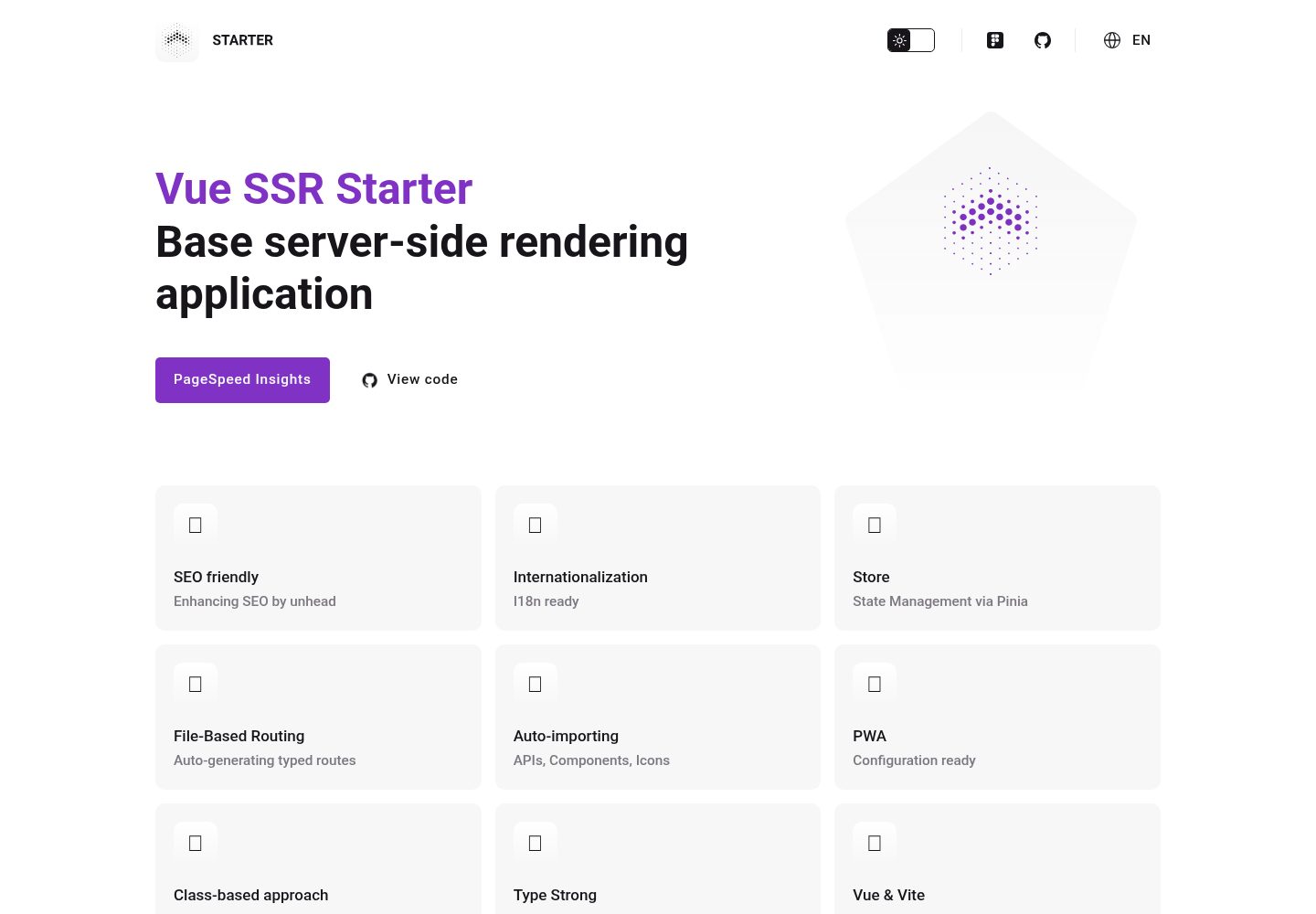
支持服务端渲染(SSR),提供客户端 hydration 与服务端渲染入口
VueVite启动器
vue-ssr-starter — Vue 启动器模板
作者 hotcom-agency
基于 Vue 3 和 Vite 的 SSR 起始模板,集成多语言、文件路由、Pinia 状态管理、PWA 配置与 TypeScript,并提供 Express 服务端入口。
看看你的网站会是什么样
浏览真实页面截图,比较内容排版与手机效果。点击下方缩略图切换,放大查看整页细节。
全部页面与视图 2
截图用于了解视觉与布局,交互效果请以实际项目为准。
采集于 2026-10-17查看来源
值得关注的模板亮点
从已有项目资料中,快速了解它的特点。
通过 Vue I18n 实现多语言支持
基于 src/client/pages 文件自动生成类型化路由,并可在 vite.config.client.ts 中配置布局
集成 Pinia 与 Pinia Colada,用于状态管理和声明式数据获取、缓存与失效
提供 PWA 配置,并支持完整 TypeScript
提供 useContext 组合式函数,统一处理 cookies、URL、请求/响应、重定向和服务端响应写入
模板详细介绍
该模板用于创建基于 Vue 3 与 Vite 的服务端渲染(SSR)应用。README 说明其包含 SSR 支持、通过 Vue I18n 实现的多语言、基于文件自动生成类型化路由、Pinia 与 Pinia Colada 状态管理、PWA 配置、完整 TypeScript 支持,以及基于 ESBuild 的开发流程。项目结构分为 src/client 前端应用与 src/server 服务端(Express),并提供了 useContext 组合式函数作为服务端与客户端之间的上下文桥梁,可访问 cookies、当前 URL、请求/响应对象,并支持重定向与写入服务端响应。安装步骤包括复制 .env.example 为 .env、安装依赖、运行开发模式、生产构建与预览。环境变量涉及 VITE_SERVER_HOST 与 VITE_SERVER_PORT。README 未说明具体生产部署细节、性能指标或与其他系统的集成方式,也未提供依赖清单中的具体版本号。
VueVite启动器
适合你的项目吗?
适用场景
- 需要 Vue 3 + Vite 服务端渲染基础结构的项目起步
- 需要多语言支持与文件路由的 Vue 应用
- 需要在服务端与客户端统一处理 cookies、重定向和 HTTP 状态码的 SSR 项目
- 希望使用 Pinia 与 Pinia Colada 管理状态和数据获取的 Vue 应用
适合人群
- 熟悉 Vue 3、TypeScript 和 Vite 的开发者
- 需要 SSR 起始模板以快速搭建项目结构的团队
- 需要多语言与 PWA 配置基础的项目
上手与定制指南
结合仓库当前版本的说明,按下面的资料检查内容、配置与运行要求。
- 1
复制 .env.example 为 .env,并按需配置 VITE_SERVER_HOST 与 VITE_SERVER_PORT
- 2
运行 npm install 安装依赖
- 3
开发模式使用 npm run dev
- 4
生产构建使用 npm run build,生产预览使用 npm run preview
- 5
README 未提供具体部署步骤,需参考项目内其他文档或自行配置
授权与来源资料
使用条件与限制
免费使用 · 保留许可声明本次收录的是公开仓库中采用 MIT 许可的免费版本;免费范围为该版本代码,不代表外部服务或第三方素材免费。
使用时需要遵守
- 允许免费使用、修改、商用和分发该版本代码。
- 分发代码副本或实质性部分时,保留原作者版权声明和完整 MIT 许可声明。
- 代码按现状提供;担保与责任限制以原许可证及适用法律为准。
额外费用与待核对事项
- 演示图片、字体、图标及其他第三方素材需按各自许可核对,不能仅凭代码的 MIT 许可判断。
- 域名、托管、数据库、支付或 AI 等外部服务可能另外收费。
查看原文依据
https://github.com/hotcom-agency/vue-ssr-starter/blob/main/LICENSEhttps://github.com/hotcom-agency/vue-ssr-starter/blob/main/README.mdPermission is hereby granted, free of charge
许可证原文
DeepSeek 根据仓库许可证和 README 整理 ·2026-10-17。结果仅覆盖已读取资料,依赖、图片、字体及后续条款变更以各自原文为准。
项目核对记录与介绍依据
模板资料
- 来源平台
- GitHub
- 资料与维护参考分
- 资料较完整 · 85 / 100
- 技术栈
- Vue · Vite
- 网站类型
- 启动器
这个分数如何计算
本站按许可资料(最高30分)、演示链接(12分)、预览图(10分)、Star数(15分)、记录的维护时间(15分)、描述完整度(8分)、功能记录(5分)和分类资料(5分)计算。它不是代码、安全或性能测试,也不是 Google 评分;有链接不代表已实测可用。
这个项目需要核对什么
- 记录的仓库更新时间
- 2026-08-26
- 截图检查日期
- 2026-10-17
已收录演示链接。请用你的内容与屏幕尺寸检查;有演示不代表表单、认证或支付已经可用。
目录记录的主要技术栈是 Vue。请通过依赖清单和锁文件核对实际版本与托管要求。这些说明基于收录资料,不代表代码审计或部署实测。
查看具体选型方法 →介绍的制作与核对状态
介绍由 AI 辅助整理目录与仓库资料。仓库作者不等于这篇介绍的审核者。
审核声明: codex-user-requested-batch-review-20261018 · 2026-10-18
查看当时使用的来源资料
SHA-256: 51c3bfe38b04198cda35b20799c8ccb548edcc677b7284e53173dacd41e8590e
2026-10-17T19:57:09.039Z
来源文件 / 仓库# SSR Starter (Vue + Vite)
Starter template for creating server-side rendering (SSR) applications based on Vue 3 and Vite.
[Live Demo](https://starter.hotcom.agency) · [Документация на русском](README.ru.md)
## Features
- ⚙️ SSR (Server-Side Rendering)
- 🌍 Multi-language support via Vue I18n
- 🗂 Auto-generating typed routes based on files
- 📦 Pinia store with Pinia Colada
- 📲 PWA configuration ready
- 🦾 Full TypeScript support
- 🚀 Fast development with ESBuild
## Installation
To run the project, execute the following commands:
```bash
# Create .env file
cp .env.example .env
# Install dependencies
npm install
# Development mode
npm run dev
# Production build
npm run build
# Production preview
npm run preview
```
## Architecture
### Structure
```text
src/
│
├── _shared/models/ # DTO models shared between client and server
├── client/ # Frontend application
│ ├── assets/ # Fonts, icons, styles
│ ├── components/ # Vue components
│ ├── composables/ # useContext, useLocale, etc.
│ ├── layouts/ # Page layouts
│ ├── locales/ # i18n JSON files
│ ├── modules/ # Auto-loaded app modules
│ ├── pages/ # File-based routes
│ ├── repositories/ # API data fetching layer
│ ├── stores/ # Pinia stores
│ ├── types/ # TypeScript declarations
│ ├── utils/ # Helpers, SSR utils, etc.
│ ├── App.vue # Root component
│ ├── entry-client.ts # Client hydration entry
│ ├── entry-server.ts # Server render entry
│ └── main.ts # App factory
│
└── server/ # SSR/API application (Express)
```
### Environment Configuration
Configure the following variables in your `.env` file:
- `VITE_SERVER_HOST` - Server host (default: `http://localhost`)
- `VITE_SERVER_PORT` - Server port (default: `3000`)
### File-Based Routing & Layouts
Routes are automatically generated based on files in the `src/client/pages/` folder. Layout assignment is configured in `vite.config.client.ts`:
```typescript
VueRouter({
routesFolder: 'src/client/pages',
extendRoute: (route) => {
if (route.fullPath.startsWith('/examples')) {
route.addToMeta({ layout: 'example' })
}
}
})
```
## SSR Context
The SSR context (`useContext()`) is the central bridge between server and client. It provides universal access to cookies, current URL, request/response objects, and server control methods.
```typescript
import { useContext } from '~/composables/useContext'
const context = useContext()
```
<details><summary><b>Type definition</b></summary>
```typescript
type Context = {
// Current request URL
url: URL | Location
// Universal cookies handler
cookies: Cookies
// Boolean if running on client side
isClient: boolean
// Server (express) request object
request?: Request
// Server (express) response object
response?: Response
// Redirect function
redirect: (params: {
location: string,
status?: number
}) => void
// Function to write server response data
writeServerResponse: (params: {
status?: number,
statusText?: string,
headers?: Record<string, string>
}) => void
}
```
</details>
### Page state
Routes are automatically generated based on files in the `src/client/pages/` folder. To handle various HTTP statuses, a special wrapper `src/client/pages/[...state].vue` is used, which is responsible for displaying page content or error state.
Statuses can be set through stores, for example:
```typescript
<script setup lang="ts">
import { usePageStore } from '~/stores'
const pageStore = usePageStore()
pageStore.setStatus(401)
</script>
```
### Cookies
Works identically on both server and client sides via `universal-cookie`.
```typescript
<script setup lang="ts">
import { useContext } from '~/composables/useContext'
import { isClient } from '~/utils/env'
const context = useContext()
const authToken = context.cookies.get('auth-token')
console.info(`authToken cookie (${isClient ? 'client' : 'server'}):`, authToken)
onMounted(() => {
if (!authToken) { context.cookies.set('auth-token', 'value') }
})
</script>
```
**Shorthand Composable `useCookies`**
```typescript
import { useCookies } from '~/composables/useCookies'
const cookies = useCookies() // = useContext().cookies
```
### Server response
```typescript
<script setup lang="ts">
import { useContext } from '~/composables/useContext'
const context = useContext()
onServerPrefetch(() => {
context.writeServerResponse({
status: 401,
headers: { 'X-Custom-Header': 'custom-value' }
})
})
</script>
```
### Redirect
```typescript
<script setup lang="ts">
import { useContext } from '~/composables/useContext'
const context = useContext()
context.redirect({ location: '/', status: 301 })
</script>
```
## Main plugins
[Vue Router](https://router.vuejs.org/) - Official router for Vue.js that enables seamless navigation and routing capabilities.
[Vue I18n](https://kazupon.github.io/vue-i18n/) - Internationalization plugin for multi-language support.
[@unhead/vue](https://github.com/unjs/unhead) - SEO toolkit for Vue that enables dynamic meta tags management.
[Pinia](https://pinia.vuejs.org/) - Intuitive store for Vue.js.
[Pinia Colada](https://github.com/posva/pinia-colada) - Provides declarative data fetching, caching and invalidation strategies for Pinia stores.
[unplugin-vue-components](https://github.com/antfu/unplugin-vue-components) - On-demand component auto importing for Vue, automatically imports components when used in templates.
[unplugin-icons](https://github.com/antfu/unplugin-icons) - Allows using icons from various icon sets directly as Vue components, providing access to thousands of icons from popular collections.
[vite-plugin-pwa](https://vite-plugin-pwa.netlify.app/) - Enables Progressive Web App capabilities with zero configuration.
<br/>
[](https://www.figma.com/site/5j5d1aYilIj5JiScTSxoYV/Starter)
看看同类模板
对比同技术栈与用途的模板,找到更适合的视觉与内容结构。

vitesse
🏕 Opinionated Vite + Vue Starter Template
Vue · 启动器

vitesse-webext
⚡️ WebExtension Vite Starter Template
Vue · 启动器

laravel-vue-spa
A Laravel-Vue SPA starter kit.
Vue · 启动器

vue3-h5-template
vue3-h5-template 是一个面向移动端 H5 项目的启动模板,基于 Vue3、Vite 和 Vant4 构建,同时集成了 TypeScript、Tailwindcss、Pinia、Vue-router 等常用…
Vue · 启动器

tov-template
vite + vue3 + ts 开箱即用现代开发模板 | vite + vue3 + ts out-of-the-box modern development template
Vue · 启动器

shadcn-vue-landing-page
New design 🎉 Vue + Shadcn-vue + TypeScript + Tailwind. Landing page template ease-to-use
Vue · 企业官网