Supports server-side rendering (SSR), providing client hydration and a server rendering entry
VueViteStarter
vue-ssr-starter — Vue Starter Template
By hotcom-agency
An SSR starter template based on Vue 3 and Vite, integrating multilingual support, file-based routing, Pinia state management, PWA configuration, and TypeScript, with an Express server entry.
Explore the design
Compare the page layouts and mobile experience. Open any screenshot for a closer look.
Desktop homepage1 / 2
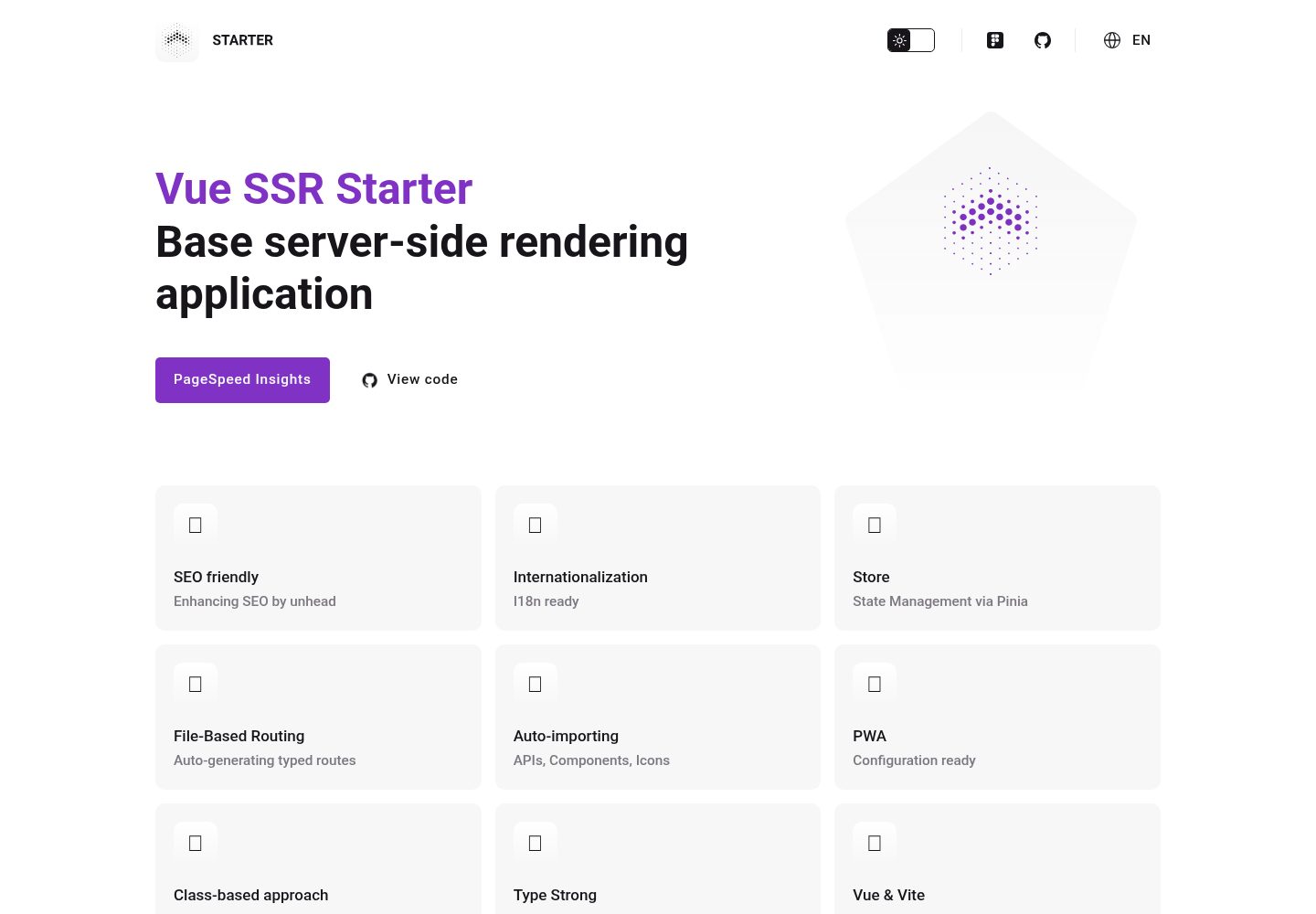
Desktop captureTop of page
Actual screenshot captured by the server browser.
All pages & views 2
Screenshots show visual appearance; interactive behavior may differ.
Recorded 2026-10-17View source
What stands out
A quick read of the recorded project description.
Multilingual support via Vue I18n
Automatically generates typed routes based on files in src/client/pages, with layouts configurable in vite.config.client.ts
Integrates Pinia and Pinia Colada for state management and declarative data fetching, caching, and invalidation
Provides PWA configuration and supports full TypeScript
Provides a useContext composable that uniformly handles cookies, URL, request/response, redirects, and server response writing
Template Details
This template is for creating server-side rendering (SSR) applications based on Vue 3 and Vite. The README states it includes SSR support, multilingual support via Vue I18n, file-based automatic generation of typed routes, Pinia and Pinia Colada state management, PWA configuration, full TypeScript support, and an ESBuild-based development workflow. The project structure is divided into src/client for the frontend application and src/server (Express) for the server side, and provides a useContext composable as a context bridge between server and client, which can access cookies, the current URL, request/response objects, and supports redirects and writing server responses. Installation steps include copying .env.example to .env, installing dependencies, running development mode, production build, and preview. Environment variables involve VITE_SERVER_HOST and VITE_SERVER_PORT. The README does not document specific production deployment details, performance metrics, or integration methods with other systems, nor does it provide specific version numbers in the dependency list.
VueViteStarter
Is it right for your project?
Use Cases
- Project kickoff requiring a Vue 3 + Vite server-side rendering foundation
- Vue applications requiring multilingual support and file-based routing
- SSR projects that need to uniformly handle cookies, redirects, and HTTP status codes on both server and client
- Vue applications that want to use Pinia and Pinia Colada for state management and data fetching
Suitable For
- Developers familiar with Vue 3, TypeScript, and Vite
- Teams that need an SSR starter template to quickly set up project structure
- Projects that need a foundation for multilingual and PWA configuration
Getting started & customization
Use these recorded setup notes alongside the repository instructions for your chosen version.
- 1
Copy .env.example to .env, and configure VITE_SERVER_HOST and VITE_SERVER_PORT as needed
- 2
Run npm install to install dependencies
- 3
Use npm run dev for development mode
- 4
Use npm run build for production build, and npm run preview for production preview
- 5
The README does not provide specific deployment steps; refer to other documentation in the project or configure it yourself
License & source material
Usage conditions & limitations
Free to use · keep license noticeThis listing covers the free version under the MIT license in the public repository; the free scope is the code of this version and does not mean external services or third-party assets are free.
Must comply with when using
- Free use, modification, commercial use, and distribution of this version's code are permitted.
- When distributing copies or substantial portions of the code, the original author's copyright notice and the full MIT license notice must be retained.
- The code is provided as-is; warranties and liability limitations are governed by the original license and applicable law.
Additional costs & items to verify
- Demo images, fonts, icons, and other third-party assets must be checked against their respective licenses and cannot be judged solely by the code's MIT license.
- External services such as domains, hosting, databases, payments, or AI may incur separate charges.
View Original Text Basis
https://github.com/hotcom-agency/vue-ssr-starter/blob/main/LICENSEhttps://github.com/hotcom-agency/vue-ssr-starter/blob/main/README.mdPermission is hereby granted, free of charge
Original License Text
Compiled by DeepSeek based on repository license and README ·2026-10-17. Results only cover the materials read; dependencies, images, fonts, and subsequent term changes are subject to their respective original texts.
Project checks & description sources
Template Information
- Source platforms
- GitHub
- Documentation and maintenance reference score
- More documented · 85 / 100
- Technologies
- Vue · Vite
- Website type
- Starter
How this score is calculated
Our heuristic uses license records (up to 30), a demo link (12), a preview (10), stars (15), recorded maintenance (15), description completeness (8), feature records (5) and classification data (5). It is not a code, security or performance test, or a Google score. A link does not establish tested functionality.
What to verify for this project
- Repository update recorded
- 2026-08-26
- Screenshot last checked
- 2026-10-17
A demo link is listed. Check it with your own content and viewport sizes; its presence does not confirm that forms, authentication or payments work.
The catalog identifies Vue as the primary stack. Check the actual dependency manifest and lockfile for versions and hosting requirements. These notes use recorded metadata, not a code audit or a deployment test.
Use a selection guide →How this description was prepared
AI-assisted description based on catalog records and repository material. Repository authors are not automatically the reviewers of this description.
Review declaration: codex-user-requested-batch-review-20261018 · 2026-10-18
Inspect the recorded source material
SHA-256: 51c3bfe38b04198cda35b20799c8ccb548edcc677b7284e53173dacd41e8590e
2026-10-17T19:57:09.039Z
Source file / repository# SSR Starter (Vue + Vite)
Starter template for creating server-side rendering (SSR) applications based on Vue 3 and Vite.
[Live Demo](https://starter.hotcom.agency) · [Документация на русском](README.ru.md)
## Features
- ⚙️ SSR (Server-Side Rendering)
- 🌍 Multi-language support via Vue I18n
- 🗂 Auto-generating typed routes based on files
- 📦 Pinia store with Pinia Colada
- 📲 PWA configuration ready
- 🦾 Full TypeScript support
- 🚀 Fast development with ESBuild
## Installation
To run the project, execute the following commands:
```bash
# Create .env file
cp .env.example .env
# Install dependencies
npm install
# Development mode
npm run dev
# Production build
npm run build
# Production preview
npm run preview
```
## Architecture
### Structure
```text
src/
│
├── _shared/models/ # DTO models shared between client and server
├── client/ # Frontend application
│ ├── assets/ # Fonts, icons, styles
│ ├── components/ # Vue components
│ ├── composables/ # useContext, useLocale, etc.
│ ├── layouts/ # Page layouts
│ ├── locales/ # i18n JSON files
│ ├── modules/ # Auto-loaded app modules
│ ├── pages/ # File-based routes
│ ├── repositories/ # API data fetching layer
│ ├── stores/ # Pinia stores
│ ├── types/ # TypeScript declarations
│ ├── utils/ # Helpers, SSR utils, etc.
│ ├── App.vue # Root component
│ ├── entry-client.ts # Client hydration entry
│ ├── entry-server.ts # Server render entry
│ └── main.ts # App factory
│
└── server/ # SSR/API application (Express)
```
### Environment Configuration
Configure the following variables in your `.env` file:
- `VITE_SERVER_HOST` - Server host (default: `http://localhost`)
- `VITE_SERVER_PORT` - Server port (default: `3000`)
### File-Based Routing & Layouts
Routes are automatically generated based on files in the `src/client/pages/` folder. Layout assignment is configured in `vite.config.client.ts`:
```typescript
VueRouter({
routesFolder: 'src/client/pages',
extendRoute: (route) => {
if (route.fullPath.startsWith('/examples')) {
route.addToMeta({ layout: 'example' })
}
}
})
```
## SSR Context
The SSR context (`useContext()`) is the central bridge between server and client. It provides universal access to cookies, current URL, request/response objects, and server control methods.
```typescript
import { useContext } from '~/composables/useContext'
const context = useContext()
```
<details><summary><b>Type definition</b></summary>
```typescript
type Context = {
// Current request URL
url: URL | Location
// Universal cookies handler
cookies: Cookies
// Boolean if running on client side
isClient: boolean
// Server (express) request object
request?: Request
// Server (express) response object
response?: Response
// Redirect function
redirect: (params: {
location: string,
status?: number
}) => void
// Function to write server response data
writeServerResponse: (params: {
status?: number,
statusText?: string,
headers?: Record<string, string>
}) => void
}
```
</details>
### Page state
Routes are automatically generated based on files in the `src/client/pages/` folder. To handle various HTTP statuses, a special wrapper `src/client/pages/[...state].vue` is used, which is responsible for displaying page content or error state.
Statuses can be set through stores, for example:
```typescript
<script setup lang="ts">
import { usePageStore } from '~/stores'
const pageStore = usePageStore()
pageStore.setStatus(401)
</script>
```
### Cookies
Works identically on both server and client sides via `universal-cookie`.
```typescript
<script setup lang="ts">
import { useContext } from '~/composables/useContext'
import { isClient } from '~/utils/env'
const context = useContext()
const authToken = context.cookies.get('auth-token')
console.info(`authToken cookie (${isClient ? 'client' : 'server'}):`, authToken)
onMounted(() => {
if (!authToken) { context.cookies.set('auth-token', 'value') }
})
</script>
```
**Shorthand Composable `useCookies`**
```typescript
import { useCookies } from '~/composables/useCookies'
const cookies = useCookies() // = useContext().cookies
```
### Server response
```typescript
<script setup lang="ts">
import { useContext } from '~/composables/useContext'
const context = useContext()
onServerPrefetch(() => {
context.writeServerResponse({
status: 401,
headers: { 'X-Custom-Header': 'custom-value' }
})
})
</script>
```
### Redirect
```typescript
<script setup lang="ts">
import { useContext } from '~/composables/useContext'
const context = useContext()
context.redirect({ location: '/', status: 301 })
</script>
```
## Main plugins
[Vue Router](https://router.vuejs.org/) - Official router for Vue.js that enables seamless navigation and routing capabilities.
[Vue I18n](https://kazupon.github.io/vue-i18n/) - Internationalization plugin for multi-language support.
[@unhead/vue](https://github.com/unjs/unhead) - SEO toolkit for Vue that enables dynamic meta tags management.
[Pinia](https://pinia.vuejs.org/) - Intuitive store for Vue.js.
[Pinia Colada](https://github.com/posva/pinia-colada) - Provides declarative data fetching, caching and invalidation strategies for Pinia stores.
[unplugin-vue-components](https://github.com/antfu/unplugin-vue-components) - On-demand component auto importing for Vue, automatically imports components when used in templates.
[unplugin-icons](https://github.com/antfu/unplugin-icons) - Allows using icons from various icon sets directly as Vue components, providing access to thousands of icons from popular collections.
[vite-plugin-pwa](https://vite-plugin-pwa.netlify.app/) - Enables Progressive Web App capabilities with zero configuration.
<br/>
[](https://www.figma.com/site/5j5d1aYilIj5JiScTSxoYV/Starter)
Explore similar templates
Compare previews and descriptions within the same stack and category.

vitesse
Vitesse is an opinionated Vite + Vue 3 starter template maintained by antfu-collective, offering file-based routing, component and API auto-import, Pinia, UnoCSS, PWA, i18n, Markdown, vite-ssg, TypeScript, Vitest, and Cypress.
Vue · Starter

vitesse-webext
vitesse-webext is a Vite-powered WebExtension starter template using Vue 3 and TypeScript, with built-in popup, options, and content script examples. It targets Chrome and Firefox, integrates webextension-polyfill, webext-bridge, UnoCSS, VueUse, and unplugin tools, and supports hot reload during development.
Vue · Starter

laravel-vue-spa
A Laravel + Vue SPA starter kit for quickly building a decoupled web application skeleton. It includes login, registration, email verification, and password reset flows, uses JWT for authentication, and integrates Laravel Socialite with GitHub as an example provider.
Vue · Starter

vue3-h5-template
A mobile H5 starter template built on Vue3, Vite, and Vant4, with TypeScript by default and JavaScript and i18n branches.
Vue · Starter

tov-template
tov-template is an MIT-licensed Vite + Vue 3 + TypeScript starter maintained by dishait. It bundles file-based routing, layouts, Mock, auto-imports, UnoCSS, Pinia, vue-request, Vitest, i18n, dark mode, Dockerfile, and engineering scripts.
Vue · Starter

shadcn-vue-landing-page
A Vue + Shadcn-Vue + TypeScript + Tailwind landing page template with sections like Navbar, Hero, Pricing, FAQ, Team, and Contact, plus dark mode and responsive layout.
Vue · Corporate Website