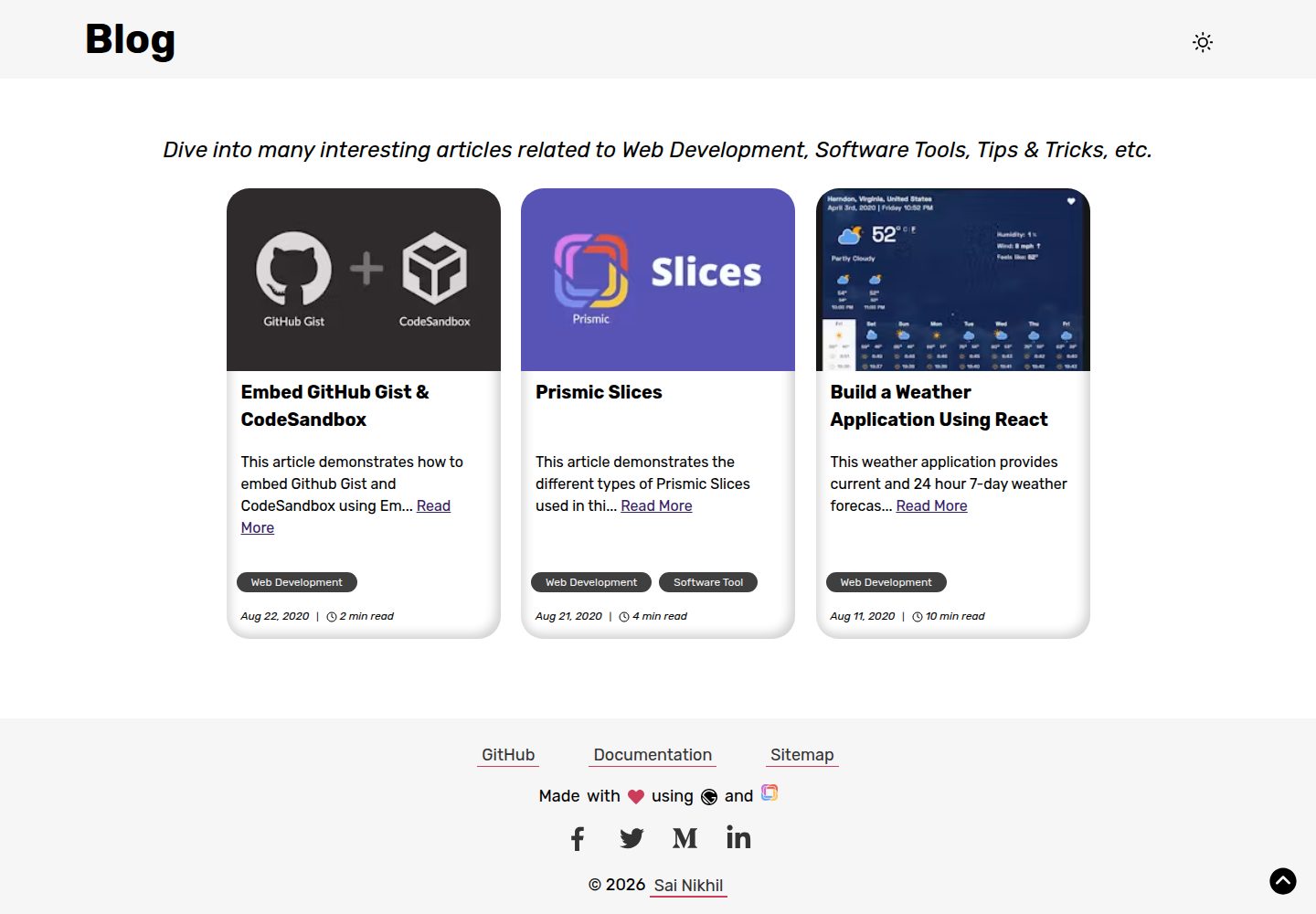
以 Prismic 作为无头 CMS,文章、作者、分类通过自定义类型管理,标签在文章创建时设置
GatsbyReact博客启动器
gatsby-prismic-blog-starter — Gatsby 博客模板
作者 iamsainikhil
基于 Gatsby 与 Prismic 无头 CMS 的博客启动器,通过 Prismic Slices 组织文章内容,并内置分类、作者、标签与评论等博客结构。
看看你的网站会是什么样
浏览真实页面截图,比较内容排版与手机效果。点击下方缩略图切换,放大查看整页细节。
全部页面与视图 3
截图用于了解视觉与布局,交互效果请以实际项目为准。
采集于 2026-09-30查看来源
值得关注的模板亮点
从已有项目资料中,快速了解它的特点。
文章内容由 Prismic Slices 组成,支持富文本、引用、提示框、图片、嵌入、链接元信息和代码块等区块
图片区块经 gatsby-plugin-image 处理,提供响应式尺寸、Traced SVG 懒加载与 WebP、AVIF 支持
内置站点地图、OpenGraph 与 Twitter 标签、favicon、离线支持和 WebApp Manifest
使用 Theme UI 进行样式与主题定制,代码高亮由 Prism React Renderer 与 PrismJS 提供
集成 DISQUS 评论,页头、页脚与社交链接为硬编码内容,可直接在代码中修改
模板详细介绍
这是一个用 Gatsby 构建、以 Prismic 作为无头 CMS 的博客启动器。文章内容通过 Prismic 的 Slices 机制组织,可在 Prismic 后台按需插入富文本、引用、提示框、图片、嵌入内容、链接元信息和代码块等区块,并调整顺序。图片区块会经由 gatsby-plugin-image 处理,生成响应式图片并支持 WebP、AVIF 与 Prismic Imgix 变换。
站点结构方面,文章、作者、分类由 Prismic 的自定义类型(可重复类型)管理,标签在创建文章时设置;页头、页脚与社交媒体链接为硬编码内容,可直接在代码中修改。文章支持分类与作者关联字段,并集成 DISQUS 评论。样式使用 Theme UI,代码高亮使用 Prism React Renderer 与 PrismJS,字体通过 Typeface 包引入。
配置集中在 gatsby-config.js 与 theme.js:前者用于修改主要站点信息,后者用于主题定制。项目还包含站点地图、OpenGraph 与 Twitter 标签、favicon、离线支持与 WebApp Manifest。使用前需要先在 Prismic 创建账户与项目,并按仓库中的 JSON schema 建立 Article、Author、Category 三个自定义类型,同时准备环境变量。README 提到 Gatsby develop 进程有时会卡在 onPostBootstrap,需要终止并重启。
GatsbyReact博客启动器
适合你的项目吗?
适用场景
- 希望用 Prismic 作为内容后台、以 Gatsby 生成静态博客的开发者
- 需要在文章中灵活插入引用、提示框、图片、嵌入内容或代码块等模块化区块的博客
- 需要作者页、分类页与标签组织的多作者或分类博客
- 希望基于现成 Gatsby 博客结构进行主题与样式定制的项目
适合人群
- 熟悉 Gatsby 与 React,并愿意使用 Prismic 作为 CMS 的开发者
- 需要模块化文章内容编辑体验的技术博客或内容站点
- 希望以 MIT 许可的启动器为基础搭建博客的项目
上手与定制指南
结合仓库当前版本的说明,按下面的资料检查内容、配置与运行要求。
- 1
需先在 Prismic 创建账户与项目,获取仓库名称和 Permanent Access Token
- 2
按 src/schemas 中的 JSON schema 在 Prismic 建立 Article、Author、Category 三个自定义类型
- 3
在项目根目录创建 .env,填入 GATSBY_PRISMIC_REPOSITORY_NAME、PRISMIC_ACCESS_TOKEN 与 GATSBY_DISQUS_NAME,GA_ID 可选
- 4
使用 gatsby new 或 npm install 安装依赖后运行 npm run start,站点默认在 http://localhost:8000
- 5
若 Gatsby develop 卡在 onPostBootstrap,终止进程后重新启动
授权与来源资料
使用条件与限制
免费使用 · 保留许可声明本次收录的是公开仓库中采用 MIT 许可的免费版本;免费范围为该版本代码,不代表外部服务或第三方素材免费。
使用时需要遵守
- 允许免费使用、修改、商用和分发该版本代码。
- 分发代码副本或实质性部分时,保留原作者版权声明和完整 MIT 许可声明。
- 代码按现状提供;担保与责任限制以原许可证及适用法律为准。
额外费用与待核对事项
- 使用前必须先在 Prismic 创建账户与项目,并准备好文章、作者、分类等数据,否则无法正常启动使用。
- 需要注册 Prismic 账户并创建项目,属于外部服务依赖。
- 必须从 Prismic 获取 Permanent Access Token 并配置到环境变量中。
- 必须提供 Prismic 仓库名称,否则项目无法运行。
- 必须提供 Prismic 永久访问令牌,否则项目无法运行。
- 评论功能依赖 DISQUS,必须提供 DISQUS 项目短名。
- 评论功能需要 DISQUS 账户与项目名称,属于外部服务依赖。
- Google Analytics 为可选,需要提供 GA 跟踪 ID 才能启用统计。
- 自动部署 Webhook 需要 Vercel 账户并创建 Deploy Hook。
- 自动触发部署需要在 Prismic 创建 Webhook。
- 演示图片、字体、图标及其他第三方素材需按各自许可核对,不能仅凭代码的 MIT 许可判断。
- 域名、托管、数据库、支付或 AI 等外部服务可能另外收费。
查看原文依据
Permission is hereby granted, free of charge
许可证原文
you need to have the required data first before start using this starter
README 原文
Create your Prismic account
README 原文
grab the Permanent Access Token
README 原文
GATSBY_PRISMIC_REPOSITORY_NAME=<your prismic repository name> (Required)
README 原文
PRISMIC_ACCESS_TOKEN=<your prismic permanent access token> (Required)
README 原文
GATSBY_DISQUS_NAME=<your disqus project shortname> (Required)
README 原文
This project has the support for [DISQUS](https://disqus.com/) comments section which need your DISQUS project name
README 原文
GA_ID=<your Google Analytics tracking ID> (Optional)
README 原文
Create a Deploy Hook in Vercel
README 原文
https://github.com/iamsainikhil/gatsby-prismic-blog-starter/blob/master/LICENSEhttps://github.com/iamsainikhil/gatsby-prismic-blog-starter/blob/master/README.mdCreate a Prismic Webhook
README 原文
DeepSeek 根据仓库许可证和 README 整理 ·2026-10-01。结果仅覆盖已读取资料,依赖、图片、字体及后续条款变更以各自原文为准。
项目核对记录与介绍依据
模板资料
- 来源平台
- GitHub
- 资料与维护参考分
- 资料较完整 · 92 / 100
- 技术栈
- Gatsby · React
- 网站类型
- 博客 · 启动器
这个分数如何计算
本站按许可资料(最高30分)、演示链接(12分)、预览图(10分)、Star数(15分)、记录的维护时间(15分)、描述完整度(8分)、功能记录(5分)和分类资料(5分)计算。它不是代码、安全或性能测试,也不是 Google 评分;有链接不代表已实测可用。
这个项目需要核对什么
- 记录的仓库更新时间
- 2026-09-28
- 截图检查日期
- 2026-10-01
已收录演示链接。请用你的内容与屏幕尺寸检查;有演示不代表表单、认证或支付已经可用。
目录记录的主要技术栈是 Gatsby。请通过依赖清单和锁文件核对实际版本与托管要求。这些说明基于收录资料,不代表代码审计或部署实测。
查看具体选型方法 →介绍的制作与核对状态
介绍由 AI 辅助整理目录与仓库资料。仓库作者不等于这篇介绍的审核者。
已完成服务器许可规则与 AI 来源核对;未经过人工编辑审核。
查看当时使用的来源资料
SHA-256: 70233320283e5fb31cee44fdbfe466737d334369ad53331ce9508ce61b64b252
2026-10-01T14:04:28.873Z
来源文件 / 仓库<p align="center">
<a href="https://gatsby-prismic-blog-starter.vercel.app/">
<img alt="Gatsby" src="https://github.com/iamsainikhil/gatsby-prismic-blog-starter/raw/master/README_images/gatsby_prismic.png" width="300" />
</a>
</p>
<h1 align="center">
Gatsby Prismic Blog Starter
</h1>
<p align="center">
<a href="https://www.npmjs.com/package/gatsby-prismic-blog-starter" target="_blank" rel="noreferrer noopener">
<img alt="npm" src="https://img.shields.io/npm/v/gatsby-prismic-blog-starter?style=for-the-badge">
</a>
<a href="https://www.npmjs.com/package/gatsby-prismic-blog-starter" target="_blank" rel="noreferrer noopener" style="margin: 0 0.25rem;">
<img alt="npm downloads" src="https://img.shields.io/npm/dt/gatsby-prismic-blog-starter?style=for-the-badge">
</a>
<a href="https://github.com/iamsainikhil/gatsby-prismic-blog-starter/raw/master/README_images/LICENSE" target="_blank" rel="noreferrer noopener">
<img alt="GitHub" src="https://img.shields.io/github/license/iamsainikhil/gatsby-prismic-blog-starter?style=for-the-badge">
</a>
</p>
Kick off your project with this blog starter. This starter ships with the main Gatsby configuration files you might need to get up and running blazing fast with the blazing fast app generator for React.
_Have another more specific idea? You may want to check out the vibrant collection of Gatsby's [official and community-created starters](https://www.gatsbyjs.org/docs/gatsby-starters/)._
# 👀 Demo
- [https://gatsby-prismic-blog-starter.vercel.app/](https://gatsby-prismic-blog-starter.vercel.app/)
- [https://blog.iamsainikhil.com](https://blog.iamsainikhil.com/)
- Prismic Slices available with the starter can be seen in action [here](https://gatsby-prismic-blog-starter.vercel.app/article/prismic-slices).
[](https://codesandbox.io/s/gatsby-prismic-blog-starter-fh9sf?fontsize=14&hidenavigation=1&theme=dark)
# 🎉 **Features**
Multiple features of Prismic are used in this starter:
- **Slices**: Enrich your blogposts with custom quotes, images or codeblocks. You can order them how you like. When you used the *Image-Slice* the image will get inserted and optimized by **gatsby-plugin-image**
- **Relationship fields**: Categorize your blog articles in Categories via a relationship field. You can change categories on the fly
- **Both custom types (Single / Repeatable)**: Articles, Tags, Categories, Author sections of the website are managed with Prismic. The social media links or the header & footer sections are hardcoded content which can be customized easily!
Therefore the starter has following features:
- Prismic as Headless CMS
- [Theme UI](https://theme-ui.com/home) for styling
- Prism React Renderer plugin using PrismJS highlighting
- Responsive images (gatsby-plugin-image)
- The right image size for every screen size
- Traced SVG Loading (Lazy-Loading)
- WebP & AVIF Support
- Prismic Imgix transformations
- SEO
- Sitemap
- OpenGraph Tags
- Twitter Tags
- Favicons
- Offline Support
- WebApp Manifest Support
- [Typeface](https://github.com/KyleAMathews/typefaces/tree/master/README_images/packages) package based fonts
- Configurable
- Use the `gatsby-config.js` to easily change the most important information
- Themeable with `theme.js`
**⚠️ Note: This blog starter uses [Prismic](https://prismic.io/) as the Content Management System. Hence, you need to have the required data first before start using this starter.**
# 🛠️ **Prismic Setup**
## Account
- Create your Prismic account [here](https://prismic.io/signup)
- Create a project
## API Token
- After creating an account, head over to settings of the project you created earlier.
- Go to _API & Security_ section, grab the Permanent Access Token with _Access to master/README_images_.
## Custom Types
### Article
- Create a _Repeatable_ custom type with name _Article._
- Simply paste the JSON schema in `_src/schemas/article.json_` file in the _JSON editor_ of the `_Article_` type in _Prismic_. This will create all the below fields in the _Article_ type on the fly for you.
- Beauty of Prismic Slices is that they are optional data sections which can be customized very easily in the Prismic UI.
- **`Primary`** content of the article:
- **uid** → ID of the article which you will find in the URL
- **created** → Created date of the article
- **modified** → Modified date of the article
- **title** → Title of the article
- **excerpt** → Short description of the article
- **read_time** → Total time to read the article
- **article_image** → Image of the article (ex- Thumbnail)

- **`Slices`**(Optional):
- **Content**: This slice has 2 types (Rich Text and Quote) based on which the `content` is rendered in the UI.
- **Text** (Rich Text Section) **→** Rich WYSIWYG editor content which is consumed in the UI as the HTML. Support for `inline code` which appear in the HTML with a class `codespan`.
- **Quote** (Blockquote Section) → Select this type to have any blockquote content in the article

- **Alert**: This slice has 4 types (Info, Success, Warning, and Danger) based on which the `alert` UI will have different background color as well as border color.

- **Image** (banner or gallery) → Use this slice to show a `banner` (single image with caption) or a `gallery` (group of images)

- **Embed** → Use this slice to embed any platform content like YouTube, Vimeo, GitHub Gist, CodeSandbox, CodePen, etc.
- **type** → Type of the embed like `GitHub Gist` or `Default` (YouTube, Vimeo, CodeSandbox, etc).
- **embed_title** → Title of the embed.
- **embed_url →** URL of the embed which will be consumed in an iframe in the UI

- **Meta Information** (Website URL meta info Section) → Use this slice to show a meta info of any URL. You can obtain all the below information using [https://www.heymeta.com/](https://www.heymeta.com/)
- **website_title →** Title of the website
- **website_description →** Description of the website
- **website_image** → Image of the website
- **website_url →** URL of the website

- **Code →** Use this slice to show any code block in the article
- **type →** Mention the type of scenario where this code block is used. For ex- type of "List" will add some padding to the code block.
- **lang →** Language of the code to have appropriate syntax highlighting using PrismJS
- **code →** Actual code content

- **`Meta`** (meta information of the article)
- **Categories** (repeatable section) with fields like:
- category → Category of the article
- slug → Category name in the URL
_Category_ custom type is discussed later.
- **Author** (non-repeatable section) → relationship field with _Author_ custom type discussed later.
- **`Tags` →** This is not defined in the Article type but can be set when you create any article like below:

### Author
- Create a _Repeatable_ custom type with name _Author._
- Simply paste the JSON schema in `_src/schemas/author.json_` file in the _JSON editor_ of the `_Author_` type in _Prismic_. This will create all the below fields in the _Author_ type on the fly for you.
- Contents:
- **uid →** URL slug of the author
- **name →** Name of the author
- **bio →** About the author
- **avatar →** Image of the author
- **social_links** (repeatble section) **→** Social links of the author
- **platform_name →** Name of the platform (Facebook, Twitter, LinkedIn, Medium, GitHub, CodePen, Portfolio (website). However, you can customize the icons which is discussed later.
- **platform_url →** URL of the platform


### Category
- Create a _Repeatable_ custom type with name _Category._
- Simply paste the JSON schema in `_src/schemas/category.json_` file in the _JSON editor_ of the `_Category_` type in _Prismic_. This will create all the below fields in the _Category_ type on the fly for you.
- Contents:
- **name →** Name of the category
# 💻 Quick start
1. **Create a Gatsby site.**
Use the [Gatsby CLI](https://www.gatsbyjs.org/tutorial/part-zero/) to create a new site, specifying the default starter.
```bash
npm install -g gatsby-cli
# create a new Gatsby site using this starter
gatsby new <name> https://github.com/iamsainikhil/gatsby-prismic-blog-starter
```
2. **Install the packages**
Install the packages using the command `npm install`
3. **Environment File**
- Go to _API & Security_ section of your _Prismic_ project, grab the Permanent Access Token with _Access to master/README_images_.
- The Repository Name is the name you have entered at the creation of the repository (you’ll also find it as the subdomain in the URL)
- This project has the support for [DISQUS](https://disqus.com/) comments section which need your DISQUS project name which can be found at _https://<your-project-shortname>.disqus.com/admin/settings/general/_
- Create an `.env` file in the root directory of the project. Add the following properties in it:
```json
GA_ID=<your Google Analytics tracking ID> (Optional)
GATSBY_PRISMIC_REPOSITORY_NAME=<your prismic repository name> (Required)
PRISMIC_ACCESS_TOKEN=<your prismic permanent access token> (Required)
GATSBY_DISQUS_NAME=<your disqus project shortname> (Required)
GATSBY_TELEMETRY_DISABLED=1 (Optional to disable GATSBY analytics)
```
4. **Start developing.**
Navigate into your new site’s directory and start it up.
```bash
# Go to project directory
cd <name>
# start the application
npm run start
```
5. **Troubleshooting**
If the application start process got stuck, just kill the process and restart the application.
> **Known issue**: _Gatsby develop process sometimes get stuck at onPostBootstrap process. When this happens, just kill and restart the app. For more info, check [here](https://github.com/gatsbyjs/gatsby/issues/25216)._
6. **Open the source code and start editing!**
Your site is now running at `http://localhost:8000`!
\_Note: You'll also see a second link: `http://localhost:8000/___graphql`. This is a tool you can use to experiment with querying your data. Learn more about using this tool in the [Gatsby tutorial](https://www.gatsbyjs.org/tutorial/part-five/#introducing-graphiql).\_
Open the `<name>` directory in your code editor of choice and edit `gatsby-config.js`. Save your changes and the browser will update in real time!
# ⚙️ Available Scripts
---
In the project directory, you can run:
`npm run start`
Runs the app in the development mode.Open `[http://localhost:8000](http://localhost:3000/)` to view it in the browser. The page will reload if you make edits. You will also see any lint or gatsby develop errors in the console.
`npm test`
Launches the test runner in the interactive watch mode. See the section about
**[running tests](https://www.gatsbyjs.org/docs/unit-testing/)** for more information.
`npm run build`
Builds the app for production to the `build` folder.It correctly bundles React in production mode and optimizes the build for the best performance.
The build is minified and the filenames include the hashes. Your app is ready to be deployed!
See the section about **[deployment](https://www.gatsbyjs.org/docs/overview-of-the-gatsby-build-process/)** for more information.
`npm format`
Formats the app files like _js, jsx, json, and md_ using Prettier. You can learn more about the format **[here](https://prettier.io/docs/en/install.html)**.
# **🧐 What's inside?**
A quick look at the top-level files and directories you'll see in a Gatsby project.
```
.
├── node_modules
├── src
├── .gitignore
├── .eslintrc.js
├── .prettierignore
├── .prettierrc
├── gatsby-browser.js
├── gatsby-config.js
├── gatsby-node.js
├── gatsby-ssr.js
├── LICENSE
├── package-lock.json
├── package.json
└── README.md
```
1. **`/node_modules`**: This directory contains all of the modules of code that your project depends on (npm packages) are automatically installed.
2. **`/src`**: This directory will contain all of the code related to what you will see on the front-end of your site (what you see in the browser) such as your site header or a page template. `src` is a convention for “source code”.
3. **`.gitignore`**: This file tells git which files it should not track / not maintain a version history for.
4. **`.eslintrc.js`**: This is a configuration file for [ESLint](https://eslint.org/). ESLint is a tool to help find and fix problems in the JavaScript code.
5. **`.prettierrc`**: This is a configuration file for [Prettier](https://prettier.io/). Prettier is a tool to help keep the formatting of your code consistent.
6. **`gatsby-browser.js`**: This file is where Gatsby expects to find any usage of the [Gatsby browser APIs](https://www.gatsbyjs.org/docs/browser-apis/) (if any). These allow customization/extension of default Gatsby settings affecting the browser.
7. **`gatsby-config.js`**: This is the main configuration file for a Gatsby site. This is where you can specify information about your site (metadata) like the site title and description, which Gatsby plugins you’d like to include, etc. (Check out the [config docs](https://www.gatsbyjs.org/docs/gatsby-config/) for more detail).
8. **`gatsby-node.js`**: This file is where Gatsby expects to find any usage of the [Gatsby Node APIs](https://www.gatsbyjs.org/docs/node-apis/) (if any). These allow customization/extension of default Gatsby settings affecting pieces of the site build process.
9. **`gatsby-ssr.js`**: This file is where Gatsby expects to find any usage of the [Gatsby server-side rendering APIs](https://www.gatsbyjs.org/docs/ssr-apis/) (if any). These allow customization of default Gatsby settings affecting server-side rendering.
10. **`LICENSE`**: Gatsby Prismic Blog Starter is licensed under the MIT license.
11. **`package-lock.json`** (See `package.json` below, first). This is an automatically generated file based on the exact versions of your npm dependencies that were installed for your project. **(You won’t change this file directly).**
12. **`package.json`**: A manifest file for Node.js projects, which includes things like metadata (the project’s name, author, etc). This manifest is how npm knows which packages to install for your project.
13. **`README.md`**: A text file containing useful reference information about your project.
# 🔬 **What's inside the `src`?**
A quick look at the top-level files and directories you'll see in a `src`.
```
src
├── components
├── fonts
├── gatsby-plugin-theme-ui
├── graphql_fragments
├── images
├── pages
├── schemas
├── slices
├── styles
├── templates
├── utils
```
1. **`components`:** This directory contain all of the reusable React components like Chip, Icon, Image, Listing, Layout, SEO, SliceZone, etc.
2. **`fonts`:** This directory contain any custom font files which are imported in `styles/_fonts.scss` and later consumed in `gatsby-plugin-theme-ui/theme.js`.
3. **`gatsby-plugin-theme-ui`:** This directory contain custom theme files related to [theme-ui](https://theme-ui.com/theme-spec) custom theme configuration.
4. **`graphql_fragments`:** This directory contain [GraphQL](https://www.gatsbyjs.org/docs/using-graphql-fragments/) query fragments which will significantly make these fragments reusable across several queries in the components.
5. **`images`:** This directory contain images which are used in the components and later be created in the `public/static` during gatsby build.
6. **`pages`:** This directory contain files which represent web pages like 404, index.js (homepage), etc. Moreover, you can generate pages based on the data using `createPage` method in `gatsby-node.js`.
7. **`schemas`:** This directory contain JSON schema files which represent each custom type defined in Prismic.
8. **`slices`:** This directory is the ❤️ of the article page with files representing the slices discussed earlier in Prismic setup section.
9. **`styles`:** This directory contain scss files which include further styling of the HTML using old school process. PS: New process is to just use `Emotion` based `CSS-in-JS` styling which is also used extensively across the project.
10. **`templates`:** This directory contain UI templates (components) for the dynamically generated pages as discussed in `6`.
11. **`utils`:** This directory contain general utility JS functions to reuse the functionality across the components.
# 🔌 Plugins
A list of plugins used in this starter project.
1. **`gatsby-source-prismic`:** Gatsby source plugin for building websites using [prismic.io](http://prismic.io/) as a data source. Note: this is different from `gatsby-source-prismic-graphql` . Check for more info [here](https://user-guides.prismic.io/en/articles/3647135-how-to-migrate-a-project-from-gatsby-source-prismic-to-gatsby-source-prismic-graphql).
2. **`gatsby-plugin-react-helmet`:** Provides drop-in support for server rendering data added with [React Helmet](https://github.com/nfl/react-helmet). Ract Helmet is a component which lets you control your document head using their React component. For more info, check [here](https://www.gatsbyjs.org/packages/gatsby-plugin-react-helmet/).
3. **`gatsby-plugin-theme-ui`:** Gatsby plugin for adding Theme UI to the project. For more info, check [here](https://theme-ui.com/packages/gatsby-plugin/).
4. **`gatsby-plugin-sass`:** Plugin to help use `scss` in Gatsby project. For more info, check [here](https://www.gatsbyjs.org/docs/sass/).
5. **`gatsby-plugin-sitemap`:** Plugin to create a sitemap for your Gatsby site. For more info, check [here](https://www.gatsbyjs.org/packages/gatsby-plugin-sitemap/).
6. **`gatsby-source-filesystem`:** A Gatsby source plugin for sourcing data into your Gatsby application from your local filesystem. For more info, check [here](https://www.gatsbyjs.org/packages/gatsby-source-filesystem/).
7. **`gatsby-transformer-sharp` & `gatsby-plugin-sharp`:** Creates ImageSharp nodes from image types that are supported by the Sharp image processing library and provides fields in their GraphQL types for processing your images in a variety of ways including resizing, cropping, and creating responsive images. For more info, check [here](https://www.gatsbyjs.org/packages/gatsby-transformer-sharp/).
8. **`gatsby-plugin-manifest`:** Plugin provides generation of web app manifest for PWA. For more info, check [here](https://www.gatsbyjs.org/packages/gatsby-plugin-manifest/).
9. **`gatsby-plugin-disqus`:** A plugin that simplifies adding DISQUS comments to your Gatsby website. For more info, check [here](https://www.gatsbyjs.org/packages/gatsby-plugin-disqus/).
10. **`gatsby-plugin-offline`:** Adds drop-in support for making a Gatsby site work offline and more resistant to bad network connections. For more info, check [here](https://www.gatsbyjs.org/packages/gatsby-plugin-offline/).
11. `**gatsby-plugin-google-gtag`:\*\* Easily add Google Analytics/GA4 tracking to your Gatsby site. For more info, check [here](https://www.gatsbyjs.com/plugins/gatsby-plugin-google-gtag/).
# 🧰 3rd Party Packages
A list of packages used in this starter project.
1. **`dayjs`:** A 2KB immutable date library alternative to Moment.js with the same modern API. For more info, check [here](https://github.com/iamkun/dayjs).
2. **`npm-run-all`:** A CLI tool to run multiple npm-scripts in parallel or sequential. For more info, check [here](https://github.com/mysticatea/npm-run-all).
3. **`theme-ui`:** Build consistent, themeable React apps based on constraint-based design principles. For more info, check [here](https://github.com/system-ui/theme-ui).
4. **`prism-react-renderer`:** Renders highlighted Prism output to React (+ theming & vendored Prism). This package is used to syntax highlight the code blocks in article. For more info, check [here](https://github.com/FormidableLabs/prism-react-renderer).
5. **`react-copy-to-clipboard`:** Copy-to-clipboard React component used in Code slice `src/slices/Code.jsx`. For more info, check [here](https://github.com/nkbt/react-copy-to-clipboard).
7. **`react-headroom`:** A handy react component to hide the site header until you need it. For more info, check [here](https://github.com/KyleAMathews/react-headroom).
8. **`react-icons`:** Absolutely useful package to get svg react icons of popular icon packs. For more info, check [here](https://github.com/react-icons/react-icons).
9. **`yet-another-react-lightbox`:** Modern, customizable lightbox for React, used for image galleries. For more info, check [here](https://github.com/igordanchenko/yet-another-react-lightbox).
11. **`react-toastify`:** React notification made easy. This is used to notify users of which code block they copied to clipboard used in Code slice `src/slices/Code.jsx`. For more info, check [here](https://github.com/fkhadra/react-toastify).
12. **`typeface-rubik`, `typeface-fira-code` & `typeface-inter`:** Typeface is a beautiful package which allows installation of fonts through npm. Rubik is used for the entire site content and titles, Fira Code is used for code blocks where it supports font ligatures, and Inter for body. For more info, check [here](https://github.com/KyleAMathews/typefaces/tree/master/README_images/packages). If you don't want these fonts or use typeface based fonts, uninstall these packages as well as remove loading these fonts in `gatsby-browser.js`.
> Removed: `gatsby-image`, `gatsby-plugin-google-analytics`, `react-gist`, `react-images`, `react-snakke`, `node-sass` as part of the Gatsby 5+ and ecosystem migration. See latest release notes in the repo for details.
# ⛏️ Customization
List of files where you can customize stuff to make this starter your own!!
1. **`gatsby-browser.js`:** You can enable/disable `typefaces` declared here. You can also customize `shouldUpdateScroll` method provided by Gatsby to update the scroll position of the page you visited earlier.
2. **`gatsby-config.js`:** As the name suggests, bulk of the customization resides in this file. I left so many comments which help you customize the options for several plugins. Note: Update `siteMetadata` & `gatsby-plugin-manifest` options for sure!!
3. **`theme.js`:** This is the 👁️ of the project with all the theme options declared in this file. Take some time understanding the theme-ui configuration [here](https://theme-ui.com/theme-spec).
4. **`Listing.jsx` & `Footer.jsx`:** Sample tracking logic is setup in the code which can be used as an example to customize the GA tracking events. You can remove this code logic entirely or customize to your needs.
5. **`src/images/site_image.png`:** Replace this image to update website meta image.
# 🚀 Deploy
[](https://app.netlify.com/start/deploy?repository=https://github.com/iamsainikhil/gatsby-prismic-blog-starter)
[](https://vercel.com/import/project?template=https://github.com/iamsainikhil/gatsby-prismic-blog-starter)
# ⚓ Prismic Webhook
Prismic Webhook allows you to automatically or manually trigger a deployment process in Netlify or Vercel if any post is published or unpublished OR for other events in Prismic. I use Vercel as the example and I guess it might be quite similar for Netlify or any other cloud service.
## Steps:
- Create a Deploy Hook in Vercel [here](https://vercel.com/iamsainikhil/gatsby-prismic-blog-starter/settings/git-integration). For more info, check [here](https://vercel.com/docs/v2/more/deploy-hooks)

- Copy the hook link and past in the URL section of the prismic Webhook
- Create a Prismic Webhook [here](https://iamsainikhil-blog.prismic.io/settings/webhooks/). For more info, check [here](https://user-guides.prismic.io/en/articles/790505-webhooks). -

- The `Secret` field is _optional_ in the Prismic Webhook. If you set it, Prismic will send the content to your server, so that you can verify that the request is coming from prismic.io.
- After successful creation of the Webhook, you can manually trigger it and can also see the logs.

> You can create any number of Webhooks for a prismic project!
# 🏎 Roadmap
- [x] Publish this starter as a template
- [x] Analytics support (Google Analytics)
- [ ] Prismic Preview Setup
- [ ] Pagination Feature
- [ ] Search Feature
- [ ] Testing
# **🙌 Contribution**
- Open pull request with improvements.
- If you have any new idea, check the **[feature request](https://github.com/iamsainikhil/gatsby-prismic-blog-starter/raw/master/README_images/.github/ISSUE_TEMPLATE/feature_request.md)** template to create a request.
- If you found any issue or a bug, check the **[bug report](https://github.com/iamsainikhil/gatsby-prismic-blog-starter/raw/master/README_images/.github/ISSUE_TEMPLATE/bug_report.md)** template to create a report.
# **📃 License**
Have a look at the **[license file](https://github.com/iamsainikhil/gatsby-prismic-blog-starter/raw/master/README_images/LICENSE)** for details
# **📧 Contact**
Whether you’d like to discuss about this starter template or simply say “hello”, I’d love to hear from you.
Email: **[[email protected]](mailto:[email protected])**
# 🙏 Acknowledgements
Special thanks to [Kyle Mathews](https://github.com/KyleAMathews) & [Lennart](https://github.com/LekoArts) for creating respective gatsby based starter templates from which I gained a lot of knowledge and developed this template.
Orginally this starter was started using this [one](https://github.com/gatsbyjs/gatsby-starter-default).
PS: If you need to develop a customizable whole webiste using Gatsby & Prismic, I recommend you to check this [template](https://github.com/LekoArts/gatsby-starter-prismic) created by Lennart.
See this [page](https://github.com/iamsainikhil/gatsby-prismic-blog-starter/wiki/Acknowledgements) on the wiki for a list of Acknowledgements for the plugins used in this starter.
# **🎓 Learning Gatsby**
Looking for more guidance? Full documentation for Gatsby lives [on the website](https://www.gatsbyjs.org/). Here are some places to start:
- **For most developers, I recommend starting with the [in-depth tutorial for creating a site with Gatsby](https://www.gatsbyjs.org/tutorial/).** It starts with zero assumptions about your level of ability and walks through every step of the process.
- **To dive straight into code samples, head [to the documentation](https://www.gatsbyjs.org/docs/).** In particular, check out the *Guides*, *API Reference*, and *Advanced Tutorials* sections in the sidebar.
# **🎓 Learning Prsimic**
Looking for more guidance? Full documentation for Prismic lives [on the website](https://prismic.io/docs). Here are some places to start:
- **For most developers, I recommend starting with our [in-depth tutorial for creating a site with Gatsby & Prismic](https://prismic.io/docs/gatsby/getting-started/home).** It starts with zero assumptions about your level of ability and walks through every step of the process.
- **To dive straight into code samples, check the** [How To Guides](https://user-guides.prismic.io/en/collections/22550-how-to-guides)**.**
# **🌈 Accessibility**
This starter successfully passed the color contrast and accessibility tests.
- a11y Color Contrast Accessibility tested at [a11y](https://color.a11y.com/Contrast/) 
- Web Accessibility tested at [ACHECKER](https://achecker.ca/checker/index.php) 
看看同类模板
对比同技术栈与用途的模板,找到更适合的视觉与内容结构。

gatsby-starter-gcn
gatsby-starter-gcn 是一个面向静态网站构建的 Gatsby 启动器,将内容管理、部署和前端开发串联起来。
Gatsby · 博客
devblog
A lightweight, customizable personal blog template built with GatsbyJS and React
Gatsby · 博客

gatsby-starter-morning-dew
:rocket: A Gatsby theme/starter to build lightning-fast blog/websites
Gatsby · 博客

starter-gatsby-blog
这是一个由 Contentful 社区维护的 Gatsby 博客启动器,目标是把静态站点的低维护成本与 Contentful 的友好编辑界面结合起来。
Gatsby · 社区

automatic-gatsbyjs-app-landing-page
Automatic GatsbyJS App Landing Page - Automatically generate iOS app landing page using GatsbyJS
Gatsby · 工具站
gatsby-starter-cv
A simple starter to get up and developing your digital curriculum with GatsbyJS
Gatsby · 启动器