不使用 Tailwind,主题颜色与样式集中在 src/styles/global.css 的 CSS 自定义属性中
Astro博客
astro-ataraxia-theme — Astro 博客模板
作者 inakicalvo
Ataraxia 是一个基于 Astro 的博客主题,使用纯 CSS 自定义属性而非 Tailwind,围绕 Atkinson Hyperlegible 字体与 WCAG 2.2 AA 可访问性构建,提供暗色模式、标签页、分页、目录、RSS 与 MDX 支持。
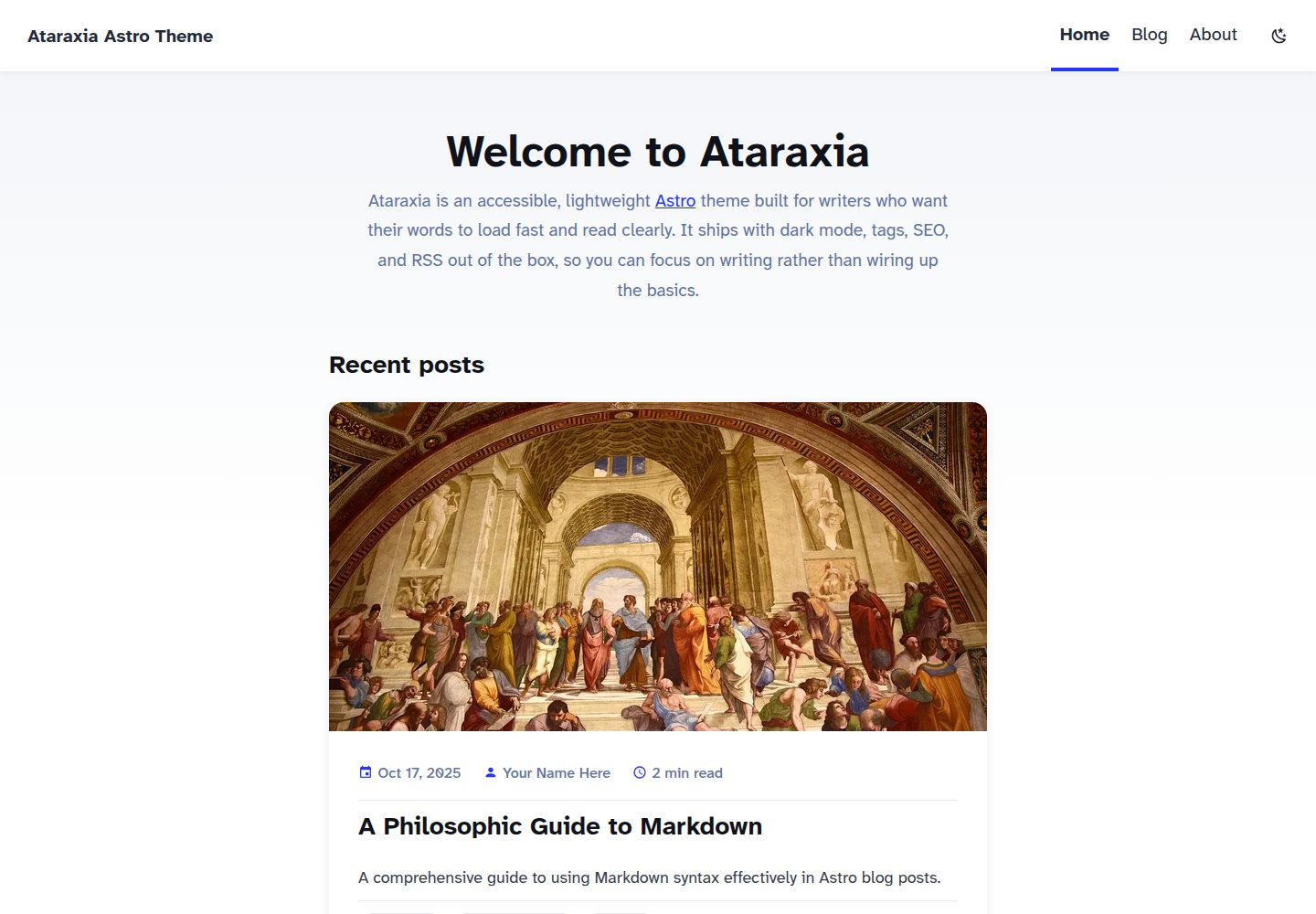
看看你的网站会是什么样
浏览真实页面截图,比较内容排版与手机效果。点击下方缩略图切换,放大查看整页细节。
全部页面与视图 3
截图用于了解视觉与布局,交互效果请以实际项目为准。
采集于 2026-10-02查看来源
值得关注的模板亮点
从已有项目资料中,快速了解它的特点。
使用 Atkinson Hyperlegible 可变字体,通过 Astro 原生 fonts API 本地加载,支持 100–900 字重
围绕可访问性构建:键盘导航、跳转链接、ARIA 标签与地标、焦点指示器,README 声明符合 WCAG 2.2 AA
内容集合配合 Zod 校验,文章支持标签、heroImage、draft 字段,草稿在生产构建中排除
内置标签页与标签云、可折叠目录、阅读时长、分页、面包屑、RSS 与 sitemap
支持 Markdown 与 MDX,图片通过 Sharp 处理
模板详细介绍
Ataraxia 是一个面向 Astro 的博客主题,定位为“安静、可访问、以阅读为中心”。它不使用 Tailwind,颜色与主题变量集中在 src/styles/global.css 的 CSS 自定义属性中,组件与页面各自从 src/styles/components/ 与 src/styles/pages/ 引入独立样式表,选择器以类名为主。字体采用 Atkinson Hyperlegible 可变字体,通过 Astro 原生 fonts API 的 fontProviders.local() 从 src/assets/fonts/ 加载,并暴露为 --font-atkinson 与 --font-atkinson-mono 变量,支持 100–900 字重。
内容层面使用 Astro 内容集合与 Zod 校验,文章放在 src/content/blog/,支持 Markdown 与 MDX;每篇文章要求至少一个标签,可选 heroImage 与 draft 字段,草稿在生产构建中被过滤、在开发环境可见。主题内置标签页与标签云、按标题自动生成的可折叠目录、阅读时长估算、博客索引分页、面包屑导航、RSS 订阅与 sitemap,并通过 BaseHead.astro 输出 canonical 与 OpenGraph 元数据。站点标题、描述、作者与每页文章数在 src/consts.ts 中配置,生产 URL 在 astro.config.mjs 的 site 字段设置。
主题基于 Astro 官方博客起始模板与 Bear Blog 的极简设计思路构建,仓库采用 MIT 许可。README 中标注的 Astro v7 与 WCAG 2.2 AA 声明来自项目自述,未在本次资料中独立核验;演示图片、字体等第三方素材的许可需单独确认。
Astro博客
适合你的项目吗?
适用场景
- 搭建以文字阅读为主的个人博客,希望界面干扰少、排版清晰
- 需要暗色模式、标签分类、分页与 RSS 订阅的静态博客站点
- 希望用纯 CSS 自定义属性而非 Tailwind 工具类来维护主题样式
- 需要为低视力读者提供更好可读性字体与键盘可访问导航的站点
- 使用 Astro 内容集合与 MDX 撰写文章,并需要草稿本地预览功能
适合人群
- 熟悉 Astro 与内容集合、愿意直接编辑 CSS 与 Astro 组件的开发者
- 偏好极简、无 Tailwind 依赖的博客主题的个人作者
- 需要将博客部署到 Netlify、Vercel、Cloudflare Pages 或 GitHub Pages 等静态托管平台的用户
- 重视可访问性与阅读体验、愿意自行核对第三方素材许可的使用者
上手与定制指南
结合仓库当前版本的说明,按下面的资料检查内容、配置与运行要求。
- 1
可通过 npm create astro@latest -- --template inakicalvo/astro-ataraxia-theme 创建项目,或克隆仓库后运行 npm install
- 2
在 src/consts.ts 中设置 SITE_TITLE、SITE_DESCRIPTION、SITE_AUTHOR 与 POSTS_PER_PAGE
- 3
在 astro.config.mjs 中把 site 改为你的生产域名,以便 canonical、RSS 与 sitemap 正确生成
- 4
文章放在 src/content/blog/,需包含 title、description、pubDate 与至少一个 tags,可选 heroImage 与 draft
- 5
构建命令为 npm run build,输出到 ./dist/;本地开发用 npm run dev,预览构建用 npm run preview
授权与来源资料
使用条件与限制
免费使用 · 保留许可声明本次收录的是公开仓库中采用 MIT 许可的免费版本;免费范围为该版本代码,不代表外部服务或第三方素材免费。
使用时需要遵守
- 允许免费使用、修改、商用和分发该版本代码。
- 分发代码副本或实质性部分时,保留原作者版权声明和完整 MIT 许可声明。
- 代码按现状提供;担保与责任限制以原许可证及适用法律为准。
额外费用与待核对事项
- 演示图片、字体、图标及其他第三方素材需按各自许可核对,不能仅凭代码的 MIT 许可判断。
- 域名、托管、数据库、支付或 AI 等外部服务可能另外收费。
查看原文依据
https://github.com/inakicalvo/astro-ataraxia-theme/blob/master/LICENSEhttps://github.com/inakicalvo/astro-ataraxia-theme/blob/master/README.mdPermission is hereby granted, free of charge
许可证原文
DeepSeek 根据仓库许可证和 README 整理 ·2026-10-02。结果仅覆盖已读取资料,依赖、图片、字体及后续条款变更以各自原文为准。
项目核对记录与介绍依据
模板资料
- 来源平台
- GitHub
- 资料与维护参考分
- 资料较完整 · 87 / 100
- 技术栈
- Astro
- 网站类型
- 博客
这个分数如何计算
本站按许可资料(最高30分)、演示链接(12分)、预览图(10分)、Star数(15分)、记录的维护时间(15分)、描述完整度(8分)、功能记录(5分)和分类资料(5分)计算。它不是代码、安全或性能测试,也不是 Google 评分;有链接不代表已实测可用。
这个项目需要核对什么
- 记录的仓库更新时间
- 2026-09-19
- 截图检查日期
- 2026-10-02
已收录演示链接。请用你的内容与屏幕尺寸检查;有演示不代表表单、认证或支付已经可用。
目录记录的主要技术栈是 Astro。请通过依赖清单和锁文件核对实际版本与托管要求。这些说明基于收录资料,不代表代码审计或部署实测。
查看具体选型方法 →介绍的制作与核对状态
介绍由 AI 辅助整理目录与仓库资料。仓库作者不等于这篇介绍的审核者。
已完成服务器许可规则与 AI 来源核对;未经过人工编辑审核。
查看当时使用的来源资料
SHA-256: 97f97bca3b5478c4386838faa53b4f5160011c1ba6c271f6d725b7930806a58a
2026-10-02T09:50:31.429Z
来源文件 / 仓库# Ataraxia 🏛️
**A calm, accessible Astro blog theme. No Tailwind, no clutter — just your words.**
<!-- TODO: add a real screenshot or short GIF of the homepage/blog index here, light and dark side by side, e.g.  -->
[](https://astro.build)
[](https://www.typescriptlang.org/)
[](./LICENSE)
[Live demo](https://astro-ataraxia-theme.netlify.app/) · [Astro themes page](https://astro.build/themes/details/ataraxia-astro-theme/)
```bash
npm create astro@latest -- --template inakicalvo/astro-ataraxia-theme
```
[](https://app.netlify.com/start/deploy?repository=https://github.com/inakicalvo/astro-ataraxia-theme)
[](https://vercel.com/new/clone?repository-url=https://github.com/inakicalvo/astro-ataraxia-theme)
## Why Ataraxia?
- **No Tailwind.** Plain CSS custom properties — colors live in one file, no utility-class soup.
- **WCAG 2.2 AA**, built around Atkinson Hyperlegible, the typeface designed by the Braille Institute for
low-vision readers.
- **Made for reading**. Generous spacing, careful typography, and no visual noise around your content.
## ✨ Features
- ✅ **Astro v7** - Built with the latest Astro features
- ✅ **Dark Mode** - Toggle between light and dark themes with smooth transitions
- ✅ **Accessible** - WCAG 2.2 AA compliant with keyboard navigation and screen reader support
- ✅ **Atkinson Hyperlegible Fonts** - Variable fonts optimized for readability
- ✅ **Tag System** - Organize posts by tags with dedicated tag pages
- ✅ **Reading Time** - Estimated reading time on every post
- ✅ **Table of Contents** - Auto-generated from post headings, collapsible
- ✅ **Pagination** - Built-in pagination for the blog index
- ✅ **Draft Posts** - Mark posts as drafts to preview locally without publishing
- ✅ **Responsive Design** - Mobile-first with hamburger navigation
- ✅ **Content Collections** - Type-safe blog posts with Zod validation
- ✅ **SEO Optimized** - Canonical URLs, OpenGraph data, and sitemap
- ✅ **RSS Feed** - Auto-generated RSS feed for subscribers
- ✅ **MDX Support** - Enhanced markdown with component support
- ✅ **Breadcrumb Navigation** - Clear navigation paths
- ✅ **Performance** - Optimized images with Sharp
- ✅ **Minimal Styling** - Clean design based on Astro Starter Kit: Blog and Bear Blog
## 🎨 Theme Features
### Dark Mode
- Automatic system preference detection
- Manual toggle with localStorage persistence
- Smooth color transitions
- Sun/moon icons with rotation animations
### Typography
- **Atkinson Hyperlegible** variable fonts for optimal readability
- Support for weights 100-900
- Italic variants included
- Monospace variant for code blocks
### Tag System
- Required tags for all blog posts
- Dedicated tag pages for filtering
- Tag cloud with post counts
- Reusable `TagList` component
### Accessibility
- Keyboard navigation support
- Skip links for main content
- ARIA labels and landmarks
- Sufficient color contrast ratios
- Focus indicators on all interactive elements
- Screen reader friendly
<!-- TODO: run a Lighthouse audit and note the score here, and name the screen readers you actually tested with (e.g. VoiceOver, NVDA) once you have real results. -->
## 🧞 Commands
All commands are run from the root of the project:
| Command | Action |
| :------------------------ | :----------------------------------------------- |
| `npm install` | Installs dependencies |
| `npm run dev` | Starts local dev server at `localhost:4321` |
| `npm run build` | Build your production site to `./dist/` |
| `npm run preview` | Preview your build locally, before deploying |
| `npm run astro ...` | Run CLI commands like `astro add`, `astro check` |
| `npm run astro -- --help` | Get help using the Astro CLI |
## 📝 Creating Blog Posts
1. Create a new `.md` or `.mdx` file in `src/content/blog/`
2. Add the required frontmatter:
```markdown
---
title: 'Your Post Title'
description: 'A brief description of your post'
pubDate: 'Oct 03 2025'
tags: ['astro', 'blogging'] # At least one tag required
heroImage: '../../assets/your-image.jpg' # Optional
draft: true # Optional - excluded from production builds, visible in dev
---
Your content here...
```
3. The file name becomes the URL slug (e.g., `my-post.md` → `/blog/my-post/`)
## ⚙️ Configuration
Edit `src/consts.ts` to customize your site:
```typescript
export const SITE_TITLE = 'Your Site Title';
export const SITE_DESCRIPTION = 'Your site description';
export const SITE_AUTHOR = 'Your Name';
export const POSTS_PER_PAGE = 6;
```
Update `astro.config.mjs` for your production URL:
```javascript
export default defineConfig({
site: 'https://your-site.com',
// ...
});
```
## 🎨 Customization
### Colors
Edit CSS variables in `src/styles/global.css`:
- Light theme: `:root` selector
- Dark theme: `[data-theme="dark"]` selector
### Component and page styles
Components and pages carry no `<style>` blocks. Each one imports its own stylesheet from `src/styles/components/` or `src/styles/pages/` (e.g. `Header.astro` imports `src/styles/components/header.css`). Because these files are plain global CSS, selectors are class-based (`.site-header`, `.post-card`, …) rather than bare element selectors.
### Fonts
Fonts use Astro's native `fonts` API (`fontProviders.local()`) in `astro.config.mjs`, sourced from `src/assets/fonts/` and exposed as the `--font-atkinson` / `--font-atkinson-mono` CSS variables. Variable fonts support any weight from 100-900.
### Navigation
Add or remove links in `src/components/Header.astro`
## 🚀 Project Structure
```text
├── public/
│ └── favicon.svg
├── src/
│ ├── assets/
│ │ └── fonts/ # Atkinson Hyperlegible variable fonts
│ ├── components/
│ │ ├── BaseHead.astro # SEO and meta tags
│ │ ├── Breadcrumb.astro # Navigation breadcrumbs
│ │ ├── Footer.astro # Site footer
│ │ ├── FormattedDate.astro
│ │ ├── Header.astro # Responsive header with navigation
│ │ ├── HeaderLink.astro
│ │ ├── MetaItem.astro # Icon + label pair for post metadata
│ │ ├── Pagination.astro # Prev/next + page-number nav
│ │ ├── PostCard.astro # Post preview card
│ │ ├── PostMeta.astro # Layout wrapper for MetaItem rows
│ │ ├── TableOfContents.astro # Collapsible per-post TOC
│ │ ├── TagList.astro # Display post tags
│ │ └── ThemeToggle.astro # Dark/light mode toggle
│ ├── content/
│ │ └── blog/ # Markdown/MDX blog posts
│ ├── layouts/
│ │ └── BlogPost.astro # Blog post layout
│ ├── pages/
│ │ ├── about.astro
│ │ ├── index.astro
│ │ ├── rss.xml.js # RSS feed
│ │ ├── blog/
│ │ │ ├── [...slug].astro # Dynamic blog post routes
│ │ │ └── [...page].astro # Paginated blog list
│ │ └── tags/
│ │ ├── [tag].astro # Tag filter pages
│ │ └── index.astro # All tags page
│ ├── styles/
│ │ ├── global.css # Global styles and CSS variables
│ │ ├── components/ # One stylesheet per component (header.css, post-card.css, pagination.css, …)
│ │ └── pages/ # One stylesheet per page/layout (blog-post.css, tag.css, …)
│ ├── utils/
│ │ ├── posts.ts # Published-posts query (filters drafts in prod)
│ │ ├── readingTime.ts # Word-count based reading time estimate
│ │ └── slugify.ts # URL slug generation
│ ├── consts.ts # Site configuration
│ └── content.config.ts # Content collection schema
├── astro.config.mjs
├── package.json
└── tsconfig.json
```
## 📦 Dependencies
- **Astro** - Static site generator
- **@astrojs/mdx** - MDX support
- **@astrojs/rss** - RSS feed generation
- **@astrojs/sitemap** - Sitemap generation
- **astro-icon** - Icon component
- **@iconify-json/mdi** - Material Design Icons
- **@iconify-json/simple-icons** - Brand icons (e.g. the footer's GitHub link)
- **sharp** - Image optimization
## 🌐 Deployment
Build your site with `npm run build`. The output will be in the `./dist/` directory, ready to deploy to your favorite hosting platform:
[](https://app.netlify.com/start/deploy?repository=https://github.com/inakicalvo/astro-ataraxia-theme)
[](https://vercel.com/new/clone?repository-url=https://github.com/inakicalvo/astro-ataraxia-theme)
- [Netlify](https://www.netlify.com/)
- [Vercel](https://vercel.com/)
- [Cloudflare Pages](https://pages.cloudflare.com/)
- [GitHub Pages](https://pages.github.com/)
## 📑 Learn More
- [Astro Documentation](https://docs.astro.build)
- [Astro Discord](https://astro.build/chat)
- [Content Collections Guide](https://docs.astro.build/en/guides/content-collections/)
- [Astro Pagination Guide](https://docs.astro.build/en/guides/routing/#pagination)
## 🌍 Sites using Ataraxia
<!-- TODO: add real sites built with this theme here as they appear -->
- _None yet — [open a PR](https://github.com/inakicalvo/astro-ataraxia-theme/pulls) to add yours!_
## 🫶 Credit
This theme is inspired by and built upon:
- [Astro Starter Kit: Blog](https://github.com/withastro/astro/tree/main/examples/blog) - Official Astro blog starter
- [Bear Blog](https://github.com/HermanMartinus/bearblog/) - Minimal blog design
- The philosophical concept of **Ataraxia** (ἀταραξία) - tranquility and freedom from worry
## 📄 License
[MIT](./LICENSE) © 2026 Iñaki Calvo. Feel free to use this theme for your projects!
---
If this theme helped you, consider giving it a ⭐ on GitHub!
看看同类模板
对比同技术栈与用途的模板,找到更适合的视觉与内容结构。

astrowind
⭕️ AstroWind: A free template using Astro v7 and Tailwind CSS v4. Astro starter theme.
Astro · 博客

astro-paper
A minimal, accessible and SEO-friendly Astro blog theme.
Astro · 博客

fuwari
✨A static blog template built with Astro.
Astro · 博客

Firefly
Firefly 是一款基于 Astro 的静态博客主题,由 CuteLeaf 在 saicaca 的 Fuwari 模板基础上二次开发,主打清新美观的视觉风格。
Astro · 博客

astro-theme-cactus
A simple Astro theme. Use it to create your blog or website.
Astro · 作品集

astrofy
Astrofy is a free and open-source template for your Personal Portfolio Website built with Astro and TailwindCS…
Astro · 作品集