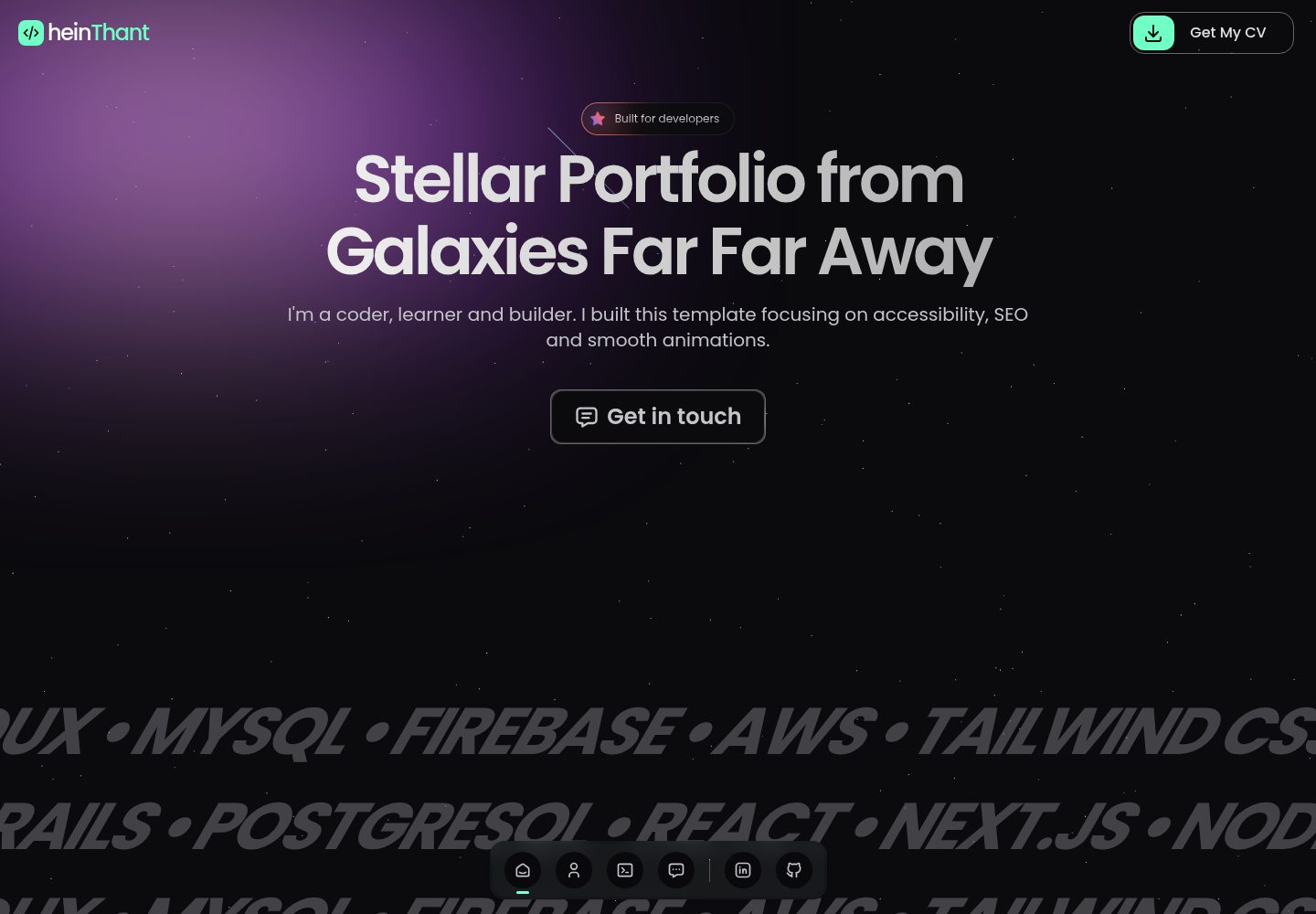
使用 Next.js 构建,支持静态页面与 SEO 优化,自动生成 sitemap 并通过 next/og 支持 Open Graph。
Next.jsReact作品集
stellar-portfolio — Next.js 作品集模板
作者 IndieCoderMM
基于 Next.js 的开发者作品集模板,集成 Sanity CMS 管理项目与技能等内容,并通过 EmailJS 实现联系表单邮件发送。
看看你的网站会是什么样
浏览真实页面截图,比较内容排版与手机效果。点击下方缩略图切换,放大查看整页细节。
全部页面与视图 3
截图用于了解视觉与布局,交互效果请以实际项目为准。
采集于 2026-10-13查看来源
值得关注的模板亮点
从已有项目资料中,快速了解它的特点。
集成 Sanity CMS,可在 /dashboard 路径下管理项目、技能等动态内容。
联系表单通过 EmailJS 发送邮件,需配置 service ID、template ID 和 user ID。
页面内容可在 /config/ 文件夹中修改,无需深入组件即可自定义。
包含动画效果与响应式设计,适配不同屏幕尺寸。
模板详细介绍
Stellar Portfolio 是一个面向开发者的作品集网站模板,使用 Next.js 构建,并集成 Sanity CMS 用于内容管理。README 说明其包含现代布局、动画效果、SEO 优化(静态页面、自动生成 sitemap、通过 next/og 支持 Open Graph)、响应式设计,以及基于 EmailJS 的联系表单。页面内容可在 /config/ 目录中修改,动态内容(如项目、技能)通过 Sanity 仪表板管理。模板提供克隆仓库、安装依赖、配置环境变量、运行开发服务器等步骤,并说明可将 Sanity Studio 与前端一起部署。README 未提供具体性能数据、框架版本号或生产环境验证信息。
Next.jsReact作品集
适合你的项目吗?
适用场景
- 开发者搭建个人作品集网站,展示项目与技能。
- 需要通过 CMS 实时编辑作品集内容,而不修改代码。
- 希望使用 EmailJS 实现联系表单邮件发送。
- 需要 SEO 优化和 Open Graph 支持的静态作品集站点。
适合人群
- 熟悉 Next.js 和 React 的开发者。
- 愿意使用 Sanity CMS 管理内容的用户。
- 需要快速搭建并自定义作品集网站的开发者。
- 接受使用 EmailJS 处理联系表单的用户。
上手与定制指南
结合仓库当前版本的说明,按下面的资料检查内容、配置与运行要求。
- 1
克隆仓库后运行 npm install 安装依赖。
- 2
复制 .env.example 为 .env.local 并填入 Sanity 项目 ID、数据集名称以及 EmailJS 的 service ID、template ID 和 user ID。
- 3
运行 npm run dev 启动开发服务器,默认地址为 http://localhost:3000。
- 4
在 Sanity 数据集中添加数据后再部署或使用站点。
- 5
部署时需在部署平台设置环境变量,Vercel 为推荐平台。
授权与来源资料
使用条件与限制
免费使用 · 保留许可声明本次收录的是公开仓库中采用 Unlicense 许可的免费版本;免费范围为该版本代码,不代表外部服务或第三方素材免费。
使用时需要遵守
- 允许免费复制、修改、发布、使用、编译、销售和分发该版本代码,包括商业用途。
- 作者通过公有领域贡献声明放弃相关版权;该声明的法律效果取决于适用司法辖区。
- 代码按现状提供;担保与责任限制以原许可证及适用法律为准。
额外费用与待核对事项
- 演示图片、字体、图标及其他第三方素材需按各自许可核对,不能仅凭代码的 Unlicense 许可判断。
- 域名、托管、数据库、支付或 AI 等外部服务可能另外收费。
- 使用 Sanity CMS 需先在 sanity.io 创建项目,并获取项目 ID 与数据集名称。
- 必须将 Sanity 项目 ID 和数据集名称填入 .env.local 才能正常使用内容管理功能。
- 联系表单依赖 EmailJS,需在 emailjs.com 注册账号。
- 需在 EmailJS 创建服务并连接到一个邮箱账户,联系表单才能发送邮件。
- 需在 EmailJS 创建邮件模板,联系表单才能正常工作。
- 需获取 EmailJS 的 service ID、template ID 和 user ID(公钥)。
- 必须将 EmailJS 的 service ID、template ID 和 user ID 添加到 .env.local。
- 部署或使用站点前,必须先在 Sanity 数据集中添加数据。
- 部署时必须在部署平台设置环境变量。
查看原文依据
for any purpose, commercial or non-commercial, and by any means
许可证原文
1. Create a project at [sanity.io](https://www.sanity.io/)
README 原文
2. Copy the project ID and dataset name into your `.env.local` file
README 原文
- Sign up at [emailjs.com](https://www.emailjs.com/)
README 原文
- Create a service and connect it to an email account
README 原文
- Create an email template for the contact form.
README 原文
- Get your EmailJS service ID, template ID, and user ID (public key)
README 原文
- Add those to your `.env.local` file
README 原文
> Make sure to add your data to the Sanity dataset before deploying or using the site.
README 原文
https://github.com/IndieCoderMM/stellar-portfolio/blob/main/LICENSEhttps://github.com/IndieCoderMM/stellar-portfolio/blob/main/README.mdMake sure to set environment variables in your deployment settings.
README 原文
DeepSeek 根据仓库许可证和 README 整理 ·2026-10-13。结果仅覆盖已读取资料,依赖、图片、字体及后续条款变更以各自原文为准。
项目核对记录与介绍依据
模板资料
- 来源平台
- GitHub
- 资料与维护参考分
- 资料较完整 · 88 / 100
- 技术栈
- Next.js · React
- 网站类型
- 作品集
这个分数如何计算
本站按许可资料(最高30分)、演示链接(12分)、预览图(10分)、Star数(15分)、记录的维护时间(15分)、描述完整度(8分)、功能记录(5分)和分类资料(5分)计算。它不是代码、安全或性能测试,也不是 Google 评分;有链接不代表已实测可用。
这个项目需要核对什么
- 记录的仓库更新时间
- 2026-05-17
- 截图检查日期
- 2026-10-13
已收录演示链接。请用你的内容与屏幕尺寸检查;有演示不代表表单、认证或支付已经可用。
目录记录的主要技术栈是 Next.js。请通过依赖清单和锁文件核对实际版本与托管要求。这些说明基于收录资料,不代表代码审计或部署实测。
查看具体选型方法 →介绍的制作与核对状态
介绍由 AI 辅助整理目录与仓库资料。仓库作者不等于这篇介绍的审核者。
审核声明: codex-user-requested-batch-review-20261015 · 2026-10-15
查看当时使用的来源资料
SHA-256: dd19e3fafba25aa04e4b151c7b34517dbfbc3dc86228335e8280ffccbe49dfea
2026-10-13T22:04:29.646Z
来源文件 / 仓库
# Stellar Portfolio
[](https://vercel.com/new/git/external?repository-url=https://github.com/IndieCoderMM/stellar-portfolio)
A modern developer portfolio website built with [Next.js](https://nextjs.org), packed with smooth animations, customizable content, and [Sanity CMS](https://www.sanity.io) integration.
Perfect for developers who want a fast, unique, and fully customizable site to showcase their work.
## Features
- Sleek, modern layout – Clean design focused on clarity and structure.
- Subtle motion effects – Thoughtful animations add life without getting in the way.
- Optimized for SEO – Static pages, auto-generated sitemap and built-in Open Graph support via `next/og`.
- Live content editing – Change content live using integrated Sanity dashboard.
- Easy customization – Personalize site content and structure easily.
- Built-in contact form – Emails are delivered instantly with EmailJS integration.
- Responsive by default – Designed to look great on all screen sizes out of the box.
## Tech Stack
- Next.js – React framework for SSR and performance
- Sanity.io – Headless CMS for content management
- Motion.dev – Animation library for React
- Tailwind CSS – Utility-first CSS framework
- EmailJS – Email service for handling contact form messages
## Getting Started
1. **Clone the repo**
```bash
git clone https://github.com/indiecodermm/stellar-portfolio.git
cd stellar-portfolio
```
2. **Install dependencies**
```bash
npm install
```
3. **Set up environment variables**
Copy the example env file and add your own config:
```bash
cp .env.example .env.local
```
4. **Run the dev server**
```bash
npm run dev
```
Your app should now be running at [http://localhost:3000](http://localhost:3000)
5. **Open Sanity Dashboard**
Once the app is running, you can access the Sanity Studio at [http://localhost:3000/dashboard](http://localhost:3000/dashboard) to manage your content.
> [!NOTE]
> Make sure to add your data to the Sanity dataset before deploying or using the site.
## Customization
All page content can be modified in the `/config/` folder.
_No need to dig into components unless you want to._
## Content Management (Sanity)
This template is integrated with [Sanity Studio](https://www.sanity.io/) for flexible content editing.
- You can manage projects, skills, and other dynamic content through the Sanity dashboard.
- The Sanity Studio is available at `/dashboard` once the project is running.
- To set it up:
1. Create a project at [sanity.io](https://www.sanity.io/)
2. Copy the project ID and dataset name into your `.env.local` file
3. Run both frontend and Sanity Studio locally, or deploy them together
You can also customize the schema or extend it for additional content types as needed.
> [!NOTE]
> If you want to change the refresh frequency, customize `contentRefreshInterval` in `/config/index.ts` to set how often the content is fetched from Sanity. _Default is 3600 seconds (1 hr)._
## Contact Form
The contact form uses **EmailJS** for sending messages.
- Sign up at [emailjs.com](https://www.emailjs.com/)
- Create a service and connect it to an email account
- Create an email template for the contact form.
<details>
<summary>Sample Email Template</summary>
```
Hello,
You’ve received a new message from your website. Here’s what they had to say:
Name: {{name}}
Email: {{email}}
Message:
{{message}}
```
</details>
- Get your EmailJS service ID, template ID, and user ID (public key)
- Add those to your `.env.local` file
## Deploy
Deploy anywhere Next.js is supported:
- **Vercel** (Recommended)
Make sure to set environment variables in your deployment settings.
## Contributing
Feel free to fork, customize, or contribute. Open an issue or PR if you have suggestions or improvements.
## License
This project is released under [The Unlicense](https://unlicense.org/), which means you can use, modify, and distribute it however you want.
Do whatever you like. No credit required (but appreciated).
## Credits
Thanks to all the amazing developers and designers whose work have inspired me to create this project.
Animattions and UI elements are from these awesome resources:
- Acternity UI – for the elegant components and design inspiration.
- Uiverse.io – for the open-source UI interactions and effects.
---
_I hope this template helps you build your own stunning portfolio site!_
_Happy building 🚀_
看看同类模板
对比同技术栈与用途的模板,找到更适合的视觉与内容结构。

react-resume-template
A personal resume website template built with React.js, Typescript, Next.js, and styled with Tailwind css
Next.js · 作品集

nxt-lnk
Custom bio links for creatives who love coding. A perfect custom alternative for linktree, bio and other short…
Next.js · 作品集

sylph
A minimal portfolio template.
Next.js · 作品集

sleek-portfolio
sleek-portfolio 是一个面向开发者个人品牌展示的现代作品集模板,基于 Next.js 15、TypeScript、Tailwind CSS 和 Shadcn UI 构建。
Next.js · 作品集

research-website-template
React + Next.js template for research websites (for PhD students, researchers, etc)
Next.js · 作品集

shadcn-portfolio
shadcn-portfolio 是一个面向开发者的作品集模板,技术栈为 Next.js 15、shadcn/ui、Tailwind CSS 和 Framer Motion。
Next.js · 作品集