明暗主题:自动检测系统偏好,通过 localStorage 持久化,README 称无闪烁
Next.jsReact作品集
portfolio-template-1 — Next.js 作品集模板
作者 isaacnewton123
基于 Next.js App Router 的个人作品集模板,包含明暗主题、响应式布局、打字效果、3D/2D 画廊、滚动进度与 Python 简历 PDF 生成脚本。
看看你的网站会是什么样
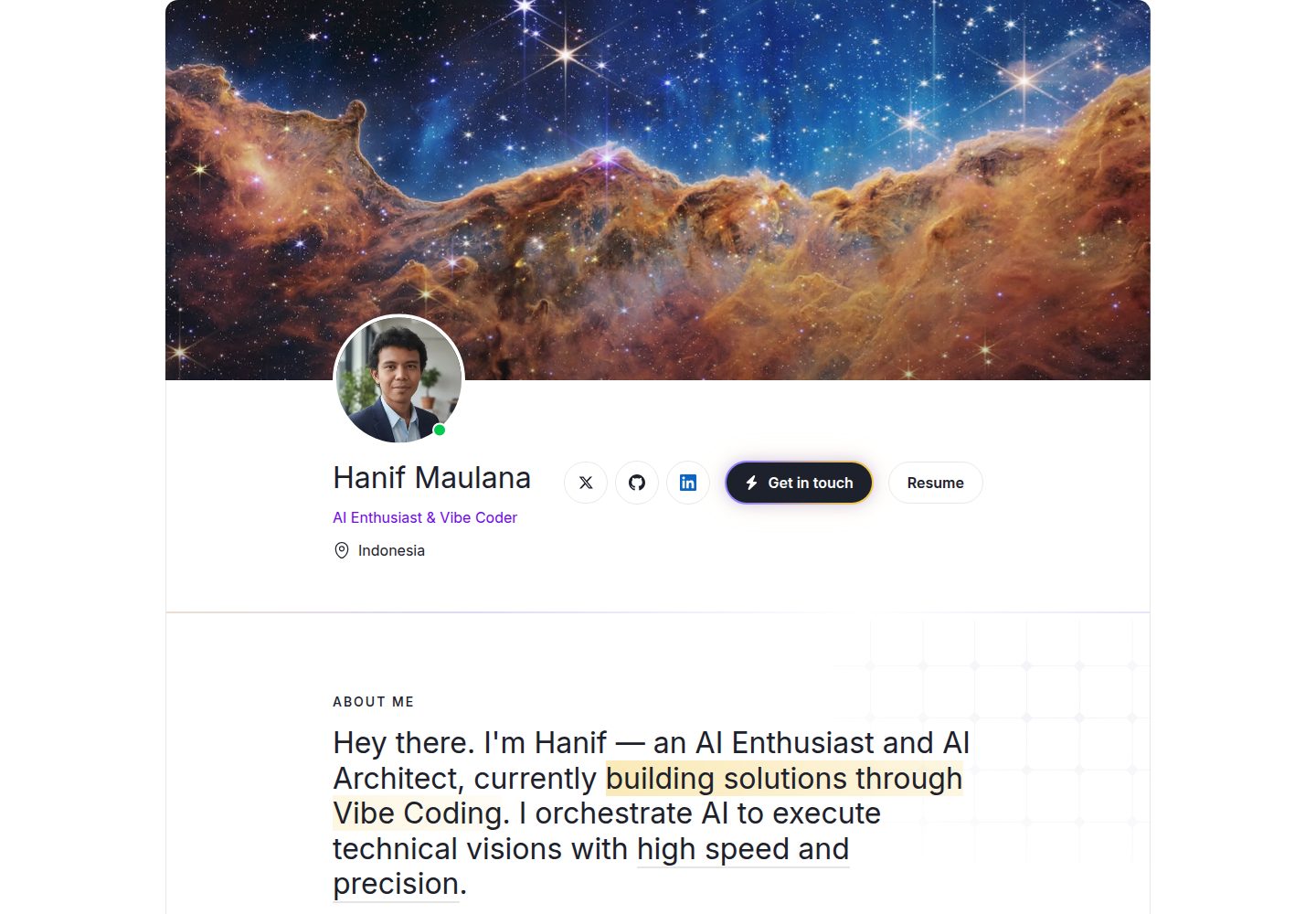
浏览真实页面截图,比较内容排版与手机效果。点击下方缩略图切换,放大查看整页细节。
全部页面与视图 2
截图用于了解视觉与布局,交互效果请以实际项目为准。
采集于 2026-10-14查看来源
值得关注的模板亮点
从已有项目资料中,快速了解它的特点。
移动优先的响应式布局,适配手机、平板与桌面
Hero 区角色文字打字效果
3D 画廊嵌入 Sketchfab 交互模型,2D 画廊带灯箱弹窗
滚动阅读进度条与返回顶部按钮
generate-resume.py 结合 Python 与 WeasyPrint 生成 PDF 简历,Vercel/Netlify 构建时自动执行
模板详细介绍
该模板是一个使用 Next.js 16 App Router、React、TypeScript 与 Tailwind CSS v4 构建的个人作品集站点,字体通过 next/font 引入 Inter。README 列出的界面功能包括:明暗主题(自动检测系统偏好并写入 localStorage)、移动优先的响应式布局、Hero 区角色文字打字效果、3D 画廊(嵌入 Sketchfab 交互模型)、带灯箱的 2D 作品画廊、滚动阅读进度条与返回顶部、以及 SEO 相关的 Open Graph 与 Twitter Card 元标签。项目结构按 src/app、components、context、hooks 划分,组件涵盖 Navbar、Hero、About、Projects、Artwork、Contact、Footer 和 ScrollProgress。
简历生成部分依赖 Python 与 WeasyPrint,通过 generate-resume.py 产出 PDF;README 说明 Vercel 与 Netlify 的部署配置已包含在仓库中,构建时会自动安装 Python 依赖并生成 PDF,也给出了本地 pip 安装与运行脚本的方式。README 未提供内容管理方式、数据来源、浏览器兼容范围、无障碍支持程度、测试与 CI 配置等说明,也未说明除 Vercel 与 Netlify 之外平台的部署步骤。
Next.jsReact作品集
适合你的项目吗?
适用场景
- 搭建个人作品集网站,展示项目与艺术作品
- 需要明暗主题切换与响应式布局的静态个人站点
- 在页面中嵌入 Sketchfab 3D 模型作为画廊内容
- 希望通过脚本自动生成 PDF 简历并随站点部署更新
适合人群
- 熟悉 Next.js App Router 与 TypeScript 的前端开发者
- 需要快速起步个人作品集、并愿意替换示例内容的用户
- 计划部署到 Vercel 或 Netlify 的个人项目
- 希望用 Python 脚本生成简历 PDF 的开发者
上手与定制指南
结合仓库当前版本的说明,按下面的资料检查内容、配置与运行要求。
- 1
克隆仓库后执行 npm install,再用 npm run dev 启动本地开发服务器(默认 http://localhost:3000)
- 2
简历生成需安装 Python 包 weasyprint,然后运行 python3 generate-resume.py 或 npm 快捷命令 bun run generate-resume
- 3
部署到 Vercel 或 Netlify 前,先在 generate-resume.py 中更新个人信息,再提交并推送代码
- 4
README 称 Vercel 与 Netlify 会在构建时自动安装 Python 依赖并生成 PDF,无需本地配置 Python 环境
授权与来源资料
使用条件与限制
免费使用 · 保留许可声明本次收录的是公开仓库中采用 MIT 许可的免费版本;免费范围为该版本代码,不代表外部服务或第三方素材免费。
使用时需要遵守
- 允许免费使用、修改、商用和分发该版本代码。
- 分发代码副本或实质性部分时,保留原作者版权声明和完整 MIT 许可声明。
- 代码按现状提供;担保与责任限制以原许可证及适用法律为准。
额外费用与待核对事项
- 演示图片、字体、图标及其他第三方素材需按各自许可核对,不能仅凭代码的 MIT 许可判断。
- 域名、托管、数据库、支付或 AI 等外部服务可能另外收费。
- 3D 画廊功能依赖嵌入 Sketchfab 交互式 3D 模型,使用该功能需通过 Sketchfab 平台提供模型,可能涉及第三方服务与账号。
- 简历生成功能依赖 Python 与 WeasyPrint,需安装 Python 包 weasyprint 才能生成 PDF 简历。
- README 称项目为 Vercel 一键部署并包含配置,部署到 Vercel 需使用该外部托管平台。
- 部署配置面向 Vercel 与 Netlify,构建时在云端自动安装 Python 依赖并生成 PDF,使用这些平台需相应账号。
- 本地生成 PDF 简历需先执行 pip install weasyprint 安装 Python 依赖。
查看原文依据
Permission is hereby granted, free of charge
许可证原文
- 🧊 **3D Gallery** — Embedded Sketchfab interactive 3D models
README 原文
- 📄 **Resume Generator** — Automated PDF resume generation via Python & WeasyPrint (`generate-resume.py`)
README 原文
- ☁️ **Vercel-Ready** — One-click deploy with config included
README 原文
We have pre-configured the deployment settings for **Vercel** (`vercel.json`) and **Netlify** (`netlify.toml`). This means you don't need to generate the PDFs locally or worry about Python environments—everything happens automatically in the cloud during the build process!
README 原文
https://github.com/isaacnewton123/portfolio-template-1/blob/main/LICENSEhttps://github.com/isaacnewton123/portfolio-template-1/blob/main/README.mdpip install weasyprint
README 原文
DeepSeek 根据仓库许可证和 README 整理 ·2026-10-14。结果仅覆盖已读取资料,依赖、图片、字体及后续条款变更以各自原文为准。
项目核对记录与介绍依据
模板资料
- 来源平台
- GitHub
- 资料与维护参考分
- 资料较完整 · 88 / 100
- 技术栈
- Next.js · React
- 网站类型
- 作品集
这个分数如何计算
本站按许可资料(最高30分)、演示链接(12分)、预览图(10分)、Star数(15分)、记录的维护时间(15分)、描述完整度(8分)、功能记录(5分)和分类资料(5分)计算。它不是代码、安全或性能测试,也不是 Google 评分;有链接不代表已实测可用。
这个项目需要核对什么
- 记录的仓库更新时间
- 2026-05-09
- 截图检查日期
- 2026-10-14
已收录演示链接。请用你的内容与屏幕尺寸检查;有演示不代表表单、认证或支付已经可用。
目录记录的主要技术栈是 Next.js。请通过依赖清单和锁文件核对实际版本与托管要求。这些说明基于收录资料,不代表代码审计或部署实测。
查看具体选型方法 →介绍的制作与核对状态
介绍由 AI 辅助整理目录与仓库资料。仓库作者不等于这篇介绍的审核者。
审核声明: codex-user-requested-batch-review-20261015 · 2026-10-15
查看当时使用的来源资料
SHA-256: 1aed171c61fa667aeea5485f85204e289dc7ca2ac81f7bbb801f9ee476a9a05d
2026-10-14T19:08:39.731Z
来源文件 / 仓库# 🚀 Next.js Portfolio Template
A modern, responsive personal portfolio built with **Next.js 16**, **React**, and **Tailwind CSS v4**.
🔗 **Live Demo:** [Demo Link](https://hanifmaulana-portfolio.vercel.app/)




---
## ✨ Features
- 🌗 **Dark / Light Theme** — Auto-detects OS preference, persists via localStorage, zero-flash
- 📱 **Fully Responsive** — Mobile-first layouts for phones, tablets, and desktops
- ⚡ **Ultra-Fast Performance** — Stripped of heavy CSS filters and layout shifts for maximum speed
- 🤖 **Vibe Coding** — Architected entirely through AI orchestration
- ⌨️ **Typing Effect** — Rotating role text in hero
- 🧊 **3D Gallery** — Embedded Sketchfab interactive 3D models
- 🖼️ **2D Gallery** — Artwork gallery with lightbox modal
- 📊 **Scroll Progress** — Reading progress bar + back-to-top
- 📄 **Resume Generator** — Automated PDF resume generation via Python & WeasyPrint (`generate-resume.py`)
- 🔍 **SEO Optimized** — Open Graph, Twitter Card meta tags & RealFaviconGenerator integration
- ☁️ **Vercel-Ready** — One-click deploy with config included
## 🛠 Tech Stack
| Layer | Technology |
|-------|-----------|
| Framework | [Next.js 16](https://nextjs.org/) (App Router) |
| Language | [TypeScript](https://www.typescriptlang.org/) |
| Styling | [Tailwind CSS v4](https://tailwindcss.com/) |
| Font | [Inter](https://fonts.google.com/specimen/Inter) via `next/font` |
| Deploy | [Vercel](https://vercel.com/) |
## 📁 Structure
```
.
├── generate-resume.py # Python script for generating PDF resumes
├── src/
│ ├── app/
│ ├── globals.css # Theme, utilities
│ ├── layout.tsx # Root layout + SEO
│ └── page.tsx # Page assembly
├── components/
│ ├── Navbar.tsx # Nav + mobile drawer
│ ├── Hero.tsx # Hero + typing effect
│ ├── About.tsx # Bio, skills, CV
│ ├── Projects.tsx # Featured projects (MultiPost, eslint-plugin-ai-guardrails)
│ ├── Artwork.tsx # 3D/2D tabbed gallery
│ ├── Contact.tsx # Social links
│ ├── Footer.tsx
│ └── ScrollProgress.tsx
├── context/
│ └── ThemeContext.tsx # Dark/light theme
└── hooks/
└── useInView.ts # Intersection Observer
```
## 🚀 Quick Start
```bash
# Clone
git clone https://github.com/isaacnewton123/portfolio-template-1.git
cd portfolio
# Install
npm install
# Dev
npm run dev
# → http://localhost:3000
```
## 📦 Resume Generation & Deployment
This project uses Python and WeasyPrint to automatically generate beautiful PDF versions of your resume based on `generate-resume.py`.
We have pre-configured the deployment settings for **Vercel** (`vercel.json`) and **Netlify** (`netlify.toml`). This means you don't need to generate the PDFs locally or worry about Python environments—everything happens automatically in the cloud during the build process!
### Deploying to Vercel or Netlify
1. Update your details in `generate-resume.py`.
2. Commit and push your code to GitHub:
```bash
git add .
git commit -m "Update my resume details"
git push origin main
```
3. **That's it!** If your repository is connected to Vercel or Netlify, the platform will automatically:
- Install the required Python packages (`weasyprint`)
- Generate your newest PDFs (`Resume_John_Doe_EN.pdf`, etc.)
- Build and deploy your Next.js application
### Local Generation (Optional)
If you just want to generate the PDFs locally to test or see them on your machine, you can run:
```bash
# Install the required Python package
pip install weasyprint
# Run the generator script
python3 generate-resume.py
# Or use the npm shortcut: bun run generate-resume
```
## 🤝 Contributing
Contributions are welcome! Feel free to:
1. Fork the repository
2. Create a feature branch (`git checkout -b feature/amazing`)
3. Commit changes (`git commit -m 'Add amazing feature'`)
4. Push to branch (`git push origin feature/amazing`)
5. Open a Pull Request
## 💖 Support
If you found this project helpful, consider supporting:
- **Ko-fi**: [ko-fi.com/isaacnewton1](https://ko-fi.com/isaacnewton1)
- **Trakteer**: [trakteer.id/isaacnewton1/link](https://trakteer.id/isaacnewton1/link)
## 📝 License
This project is open source under the [MIT License](LICENSE).
---
Made with ❤️ by [Hanif Maulana](https://github.com/isaacnewton123)
看看同类模板
对比同技术栈与用途的模板,找到更适合的视觉与内容结构。

react-resume-template
A personal resume website template built with React.js, Typescript, Next.js, and styled with Tailwind css
Next.js · 作品集

nxt-lnk
Custom bio links for creatives who love coding. A perfect custom alternative for linktree, bio and other short…
Next.js · 作品集

sylph
A minimal portfolio template.
Next.js · 作品集

sleek-portfolio
sleek-portfolio 是一个面向开发者个人品牌展示的现代作品集模板,基于 Next.js 15、TypeScript、Tailwind CSS 和 Shadcn UI 构建。
Next.js · 作品集

research-website-template
React + Next.js template for research websites (for PhD students, researchers, etc)
Next.js · 作品集

shadcn-portfolio
shadcn-portfolio 是一个面向开发者的作品集模板,技术栈为 Next.js 15、shadcn/ui、Tailwind CSS 和 Framer Motion。
Next.js · 作品集