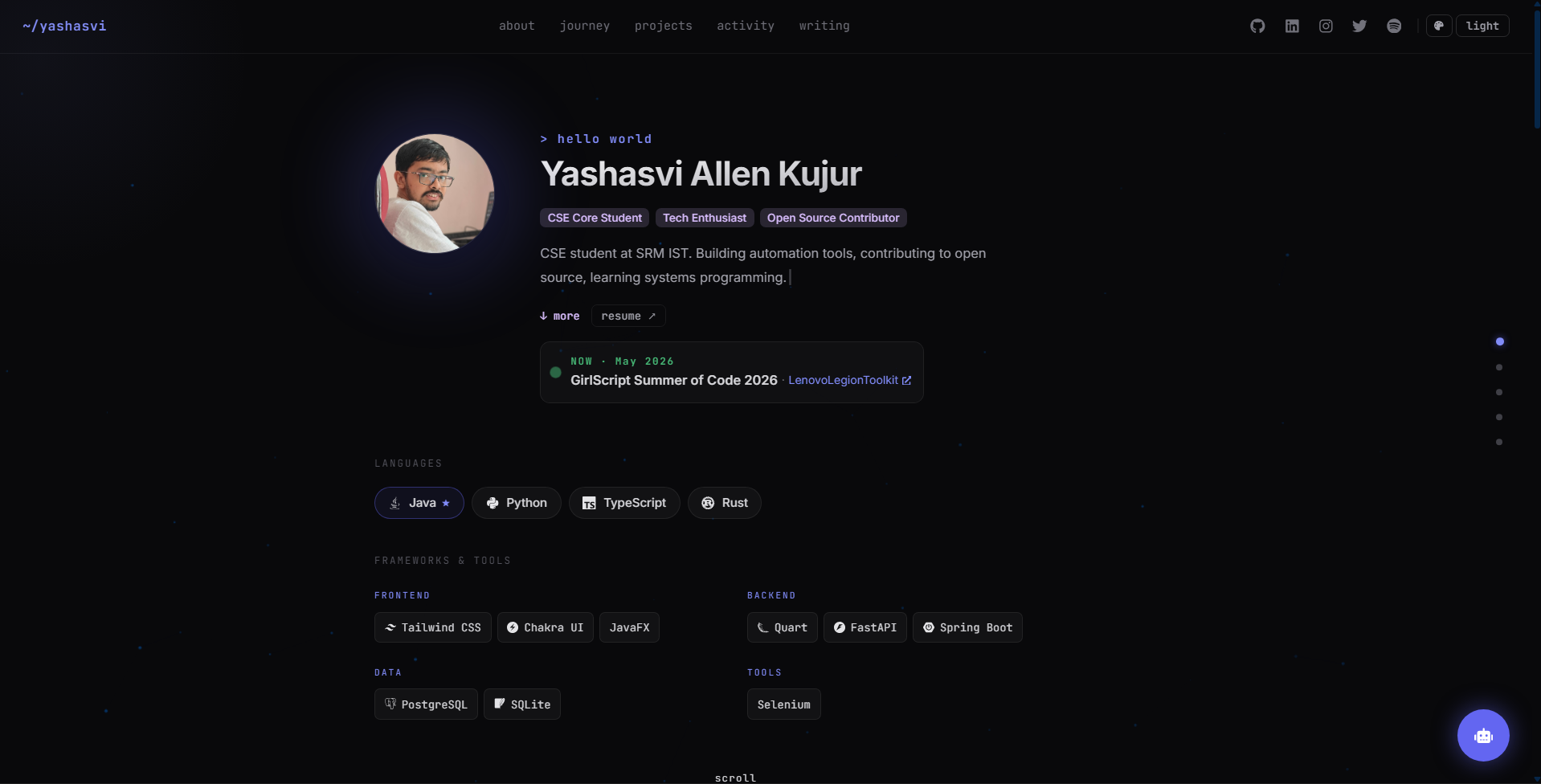
所有个人信息集中在 src/data/me.ts,无需修改组件代码
ViteReact作品集
portfolio-template (JavaProgswing) — Vite 作品集模板
作者 JavaProgswing
基于 React、TypeScript 和 Vite 的个人作品集模板,所有内容集中在 src/data/me.ts 一个文件中,无需改动组件代码即可替换个人信息。
看看你的网站会是什么样
浏览真实页面截图,比较内容排版与手机效果。点击下方缩略图切换,放大查看整页细节。
目前有 1 张原始预览,可打开完整图片查看设计细节。
截图用于了解视觉与布局,交互效果请以实际项目为准。
采集于 2026-10-02查看来源
值得关注的模板亮点
从已有项目资料中,快速了解它的特点。
单页滚动六个区块,桌面端圆点导航与顶部粘性导航可跳转
项目网格按 GitHub 星标、更新时间和主题自动排序,支持合并手写项目
十套配色主题,四套极简主题支持浅色模式,可通过命令面板或 URL 参数切换
内置命令面板、键盘导航、控制台页面、小游戏和留言板等交互
AI 聊天、留言板、访客计数等可选功能由 FastAPI 后端支持,缺失时优雅降级
模板详细介绍
这是一个用 React、TypeScript 和 Vite 构建的个人作品集模板,内容与组件分离:姓名、简介、经历、项目、博客文章、联系方式等全部写在 src/data/me.ts 中,组件代码无需改动。页面为单页滚动结构,包含六个区块,桌面端有右侧圆点导航,顶部有粘性导航,两者都能在各区块间跳转。
模板自带粒子星座背景、鼠标视差和光标聚光效果,提供十套配色主题,其中四套极简主题支持浅色模式。交互方面有命令面板(⌘K)、键盘导航、快捷键弹窗、控制台页面、小游戏、留言板和隐藏成就等。项目区块会从 GitHub 按星标、更新时间和主题自动排序,也可以把手写项目合并进排序网格。活动区块用标签页展示 Codeforces 与 LeetCode 的公开 API 数据、GitHub Events API 的近期贡献,以及你关注的账号和项目。博客文章在页面内展开,不需要外部 CMS。
可选功能包括 AI 聊天挂件(后端代理 Gemini API,密钥保留在服务端)、留言板、访客计数和 Spotify 正在播放徽章,这些依赖一个 FastAPI 后端;不部署后端时相关功能会降级,站点其余部分正常工作。构建产物输出到 dist/,可部署到任意静态托管。
使用限制:演示图片、字体、图标等第三方素材需按各自许可单独核对,不能仅凭代码的 MIT 许可判断;域名、托管、数据库或 AI 等外部服务可能另外收费。
ViteReact作品集
适合你的项目吗?
适用场景
- 个人开发者搭建展示经历、项目和文章的作品集站点
- 需要把内容与组件分离、只改一个数据文件即可上线的场景
- 希望用 GitHub 仓库数据自动生成项目列表并排序
- 想加入命令面板、主题切换、小游戏等交互元素的个人站点
- 部署到 Vercel、Netlify、GitHub Pages 或 Cloudflare Pages 等静态托管
适合人群
- 熟悉 React 和 TypeScript、愿意编辑数据文件的开发者
- 需要快速替换内容而不改动组件结构的个人作品集
- 接受可选后端依赖、或不需要 AI 聊天与留言板功能的用户
- 希望用 MIT 许可代码进行修改和分发的个人或团队
上手与定制指南
结合仓库当前版本的说明,按下面的资料检查内容、配置与运行要求。
- 1
克隆仓库后运行 npm install,首次 npm run dev 会从示例文件生成 src/data/*
- 2
编辑 src/data/me.ts 填写姓名、简介、经历、项目、博客和联系方式
- 3
运行 npm run fetch-repos 从 GitHub 拉取并评分项目仓库
- 4
AI 聊天需在 backend/.env 中配置 GEMINI_API_KEY,密钥保留在服务端
- 5
npm run build 输出 dist/,可部署到任意静态托管;可选后端需单独部署
授权与来源资料
使用条件与限制
免费使用 · 保留许可声明本次收录的是公开仓库中采用 MIT 许可的免费版本;免费范围为该版本代码,不代表外部服务或第三方素材免费。
使用时需要遵守
- 允许免费使用、修改、商用和分发该版本代码。
- 分发代码副本或实质性部分时,保留原作者版权声明和完整 MIT 许可声明。
- 代码按现状提供;担保与责任限制以原许可证及适用法律为准。
额外费用与待核对事项
- 留言板、访客计数、Spotify 代理和 AI 聊天依赖可选的 FastAPI 后端;不部署后端时这些功能会降级,站点其余部分仍可正常使用。
- AI 聊天功能需要自行申请 Gemini API 密钥并配置在 backend/.env 中,属于外部服务依赖。
- Spotify 正在播放徽章需要额外部署第三方 spotify-github-profile 服务并配置端点,否则仅显示普通链接。
- 自动发现 Vercel 项目需要配置 VERCEL_TOKEN(团队范围还需 VERCEL_TEAM_ID),属于外部服务凭据要求。
- 项目网格的自动排序依赖从 GitHub 拉取仓库数据,需要可访问 GitHub API。
- 演示图片、字体、图标及其他第三方素材需按各自许可核对,不能仅凭代码的 MIT 许可判断。
- 域名、托管、数据库、支付或 AI 等外部服务可能另外收费。
查看原文依据
Permission is hereby granted, free of charge
许可证原文
The FastAPI backend (guestbook, visitor count, Spotify proxy, AI chat) is optional. Without it, those features fall back gracefully.
README 原文
Get a free key at [aistudio.google.com/apikey](https://aistudio.google.com/apikey)
README 原文
Set `nowPlayingApi` on the Spotify contact in `me.ts` to a deployed [spotify-github-profile](https://github.com/kittinan/spotify-github-profile) endpoint.
README 原文
or set `VERCEL_TOKEN` (and `VERCEL_TEAM_ID` for team scopes) when running `npm run probe-deploys` to discover Vercel projects automatically.
README 原文
https://github.com/JavaProgswing/portfolio-template/blob/main/LICENSEhttps://github.com/JavaProgswing/portfolio-template/blob/main/README.mdProject repos are auto-fetched and scored from GitHub with `npm run fetch-repos`.
README 原文
DeepSeek 根据仓库许可证和 README 整理 ·2026-10-02。结果仅覆盖已读取资料,依赖、图片、字体及后续条款变更以各自原文为准。
项目核对记录与介绍依据
模板资料
- 来源平台
- GitHub
- 资料与维护参考分
- 资料一般 · 73 / 100
- 技术栈
- Vite · React
- 网站类型
- 作品集
这个分数如何计算
本站按许可资料(最高30分)、演示链接(12分)、预览图(10分)、Star数(15分)、记录的维护时间(15分)、描述完整度(8分)、功能记录(5分)和分类资料(5分)计算。它不是代码、安全或性能测试,也不是 Google 评分;有链接不代表已实测可用。
这个项目需要核对什么
- 记录的仓库更新时间
- 2026-10-02
- 截图检查日期
- 2026-10-02
目前没有记录演示链接。请依据仓库说明在本地评估;仅凭截图无法确认交互行为。
目录记录的主要技术栈是 Vite。请通过依赖清单和锁文件核对实际版本与托管要求。这些说明基于收录资料,不代表代码审计或部署实测。
查看具体选型方法 →介绍的制作与核对状态
介绍由 AI 辅助整理目录与仓库资料。仓库作者不等于这篇介绍的审核者。
已完成服务器许可规则与 AI 来源核对;未经过人工编辑审核。
查看当时使用的来源资料
SHA-256: b70cf1f1fd12ad0357844f9f3b63b50e18008102054274eeda7ce47f11fde1d3
2026-10-02T11:35:14.279Z
来源文件 / 仓库# Portfolio
A personal portfolio template built with React, TypeScript, and Vite. All content lives in one file (`src/data/me.ts`), so you fill in your details and never touch component code.
### Hero

One scrolling page, six sections. A right-side dot navigator (desktop) and a sticky top nav both jump between them.
Avatar, an animated typing bio, and role tags. A live **Now** card highlights what you are currently working on. Below it, your stack: primary languages as pills (first one starred), then frameworks and tools grouped side by side into **Frontend**, **Backend**, **Data**, and **Tools**. Unrecognized tools show their name without a placeholder icon.
### My Journey

A vertical timeline of roles and milestones. Each entry is dated and can carry "evidence" links that back up the claim (repos, demos, write-ups).
### What I've Built

Pinned flagship work sits on top, marked with a star accent. Below it, a grid auto-ranked from your GitHub by stars, recency, and topics. Cards show language, stars/forks, and links to repo and live demo. You can also merge hand-written projects into the ranked grid.
### Beyond Projects

Tabbed activity:
- **competitive** - live Codeforces and LeetCode stats via public APIs, with graceful fallback if an API is slow or down
- **open source** - recent contributions from the GitHub Events API
- **what i follow** - accounts and projects you keep up with
### Notes & Posts

An inline blog. Posts expand in place with tags, references, and a comment link, so there is no external CMS to run.

The footer carries a `⌘K` command-palette hint, a guestbook link, a console prompt, and a live clock.
## Features
- Particle constellation background with mouse parallax, plus a cursor spotlight
- 10 color themes; several add audio-visual effects, the four minimal ones also support light mode
- Command palette (`⌘K`), keyboard navigation (`g` then a section key), and a `?` shortcuts modal
- Console page, mini-games (`/play`), guestbook, and hidden achievements
- Easter eggs: Konami code, matrix rain, rainbow mode, logo-click confetti
- AI chat widget backed by the Gemini API, proxied server-side and primed on your `me.ts`
- Responsive and mobile-friendly; respects `prefers-reduced-motion`
## Quick Start
```bash
git clone https://github.com/yourusername/my-portfolio.git
cd my-portfolio
npm install
npm run dev # first run creates src/data/* from the examples
```
Then edit `src/data/me.ts`.
Open [http://localhost:5173](http://localhost:5173).
`me.ts` is the single source of truth: name, bio, journey, projects, blog posts, contacts, and theme defaults. Project repos are auto-fetched and scored from GitHub with `npm run fetch-repos`.
### Your data files
Nothing personal is hardcoded in components. Everything you own lives in gitignored files; each has a checked-in example that `scripts/init-data.mjs` copies on first `dev`/`build`.
| File | What it holds |
|---|---|
| `src/data/me.ts` | Profile, journey, projects, blog posts, contacts, `lab` overrides |
| `src/data/certificates.json` | Certificates and hackathon results for `/certificates` and `/resume`. Put the files in `public/files/certificates/` |
| `src/data/lab-sites.json` | Live sites with no GitHub repo homepage (CLI deploys, private repos) for `/lab` |
| `src/data/repo-curation.json` | Ranking hints for `npm run fetch-repos` |
| `portfolio.config.json` | Machine-specific script settings: SSH deploy target, resume PDF path |
| `public/resume.pdf`, `public/me.jpg` | Your resume and photo |
Generated by scripts (also gitignored): `repos.json` (fetch-repos), `deploy-status.json`, `github-stats.json`, `vercel-sites.json` (probe-deploys).
### Live sites in `/lab`
`/lab` shows your GitHub repos on a Windows / Ubuntu / Debian style desktop, and visitors can load any GitHub user. A repo counts as deployed when its GitHub **Website** field points at a live site, so new repos appear without a rebuild. Sites without a repo go in `lab-sites.json`, or set `VERCEL_TOKEN` (and `VERCEL_TEAM_ID` for team scopes) when running `npm run probe-deploys` to discover Vercel projects automatically. `probe-deploys` also records which sites are down or block embedding.
The FastAPI backend (guestbook, visitor count, Spotify proxy, AI chat) is optional. Without it, those features fall back gracefully. See [`backend/README.md`](backend/README.md) to deploy, and [`DEPLOY.md`](DEPLOY.md) for full production setup (nginx + systemd).
## AI Chat (optional)
A floating widget calls the backend at `/api/portfolio/chat`, which proxies the Gemini API. The key stays server-side. The system prompt is built from `me.ts`.
1. Get a free key at [aistudio.google.com/apikey](https://aistudio.google.com/apikey)
2. Add to `backend/.env`:
```bash
GEMINI_API_KEY=AIza...
GEMINI_MODEL=gemini-2.0-flash # default, works on all free-tier keys
```
3. Restart: `sudo systemctl restart portfolio-api`
If the key is missing, the chat button shows offline and the rest of the site works normally. Model options and rate limits live in [`backend/README.md`](backend/README.md).
## Spotify Now Playing (optional)
Set `nowPlayingApi` on the Spotify contact in `me.ts` to a deployed [spotify-github-profile](https://github.com/kittinan/spotify-github-profile) endpoint. The badge then shows a live now-playing popover; without it, it stays a plain link.
## Project Structure
```
src/
components/ UI sections and widgets
pages/ Routed pages (console, play, guestbook, ...) + games/
data/ Your content (gitignored) + *.example templates
themes/ Theme palettes
services/ Tech and social icon mapping
lib/ Achievements, theme sound engine, /lab data
hooks/ Custom hooks
App.tsx Routes and layout
theme.ts Chakra theme
index.css Global styles and per-theme variables
```
## Deployment
```bash
npm run build # outputs to dist/
```
Deploy `dist/` to any static host (Vercel, Netlify, GitHub Pages, Cloudflare Pages). The optional backend deploys separately.
## Themes
Ten palettes ship by default. Switch from the nav, deep-link with `?theme=<key>`, or pick one from the command palette. The choice is saved to `localStorage`.
### Requesting a theme
Open a GitHub issue with:
- a name and a one-line vibe (and any inspiration: an editor theme, a game, a site)
- three hex colors: a background and two accents
- optional: whether it should support light mode or audio-visual effects
That is enough for a maintainer to build it.
### Adding a theme
The minimum is two files, both keyed by the same lowercase `key`.
1. `src/themes/palettes.ts` - add an entry to `THEMES`:
```ts
{
key: "mytheme", // unique slug, referenced everywhere
name: "My Theme",
desc: "Short one-line vibe",
swatch: ["#0b0b0f", "#ff7a59", "#ffd36e"], // [bg, accent1, accent2] for the switcher preview
}
```
2. `src/index.css` - add a matching block with the same slug:
```css
body[data-palette="mytheme"] {
background-color: #0b0b0f !important;
background-image: radial-gradient(ellipse at 50% 0%, #15151f 0%, #060608 70%) !important;
--chakra-colors-brand-300: #ffd36e;
--chakra-colors-brand-400: #ff7a59; /* primary accent, used the most */
--chakra-colors-brand-500: #e0563b;
--chakra-colors-brand-600: #c0432c;
--cursor-glow: rgba(255, 122, 89, 0.12);
}
```
The `brand-300..600` vars retint every accent across the site; `--cursor-glow` colors the cursor spotlight. That is all a theme needs - the switcher and command palette read `THEMES` directly, so it appears automatically.
#### Optional: light mode
Add the key to `MINIMAL_THEMES` in `palettes.ts`, then add a light override in `index.css` (higher specificity wins over the dark block):
```css
body[data-palette="mytheme"][data-mode="light"] {
background-color: #faf7f0 !important;
background-image: radial-gradient(ellipse at 50% 0%, #fffdf8 0%, #efe9dd 70%) !important;
--chakra-colors-brand-400: #c0432c; /* darker accents for contrast on a light bg */
/* ...brand-300/500/600, --cursor-glow */
}
```
Only themes listed in `MINIMAL_THEMES` show the light/dark toggle; the rest are dark-only.
#### Optional: audio-visual effects
Register a `SetupFn` under the same key in `THEME_FX` (`src/components/ThemeFx.tsx`). The simplest route is `liteTheme({ intro, onClick, ambient })`; see the existing themes. Sounds come from `src/lib/sound.ts` (mallet, bell, pluck, blip8, ... all routed through a shared reverb + compressor bus); `nextNote(key, root, scale)` makes repeated clicks walk a scale. Tag any DOM you inject with `data-themefx="1"` so it is removed on theme change. Add the theme's `fx` flags in `palettes.ts` so the picker shows the right icons. The global mute (`src/lib/fx.ts`) silences everything automatically.
Each theme can also have an at-rest identity (heading font, background texture, button shapes) in the "Theme identities" block at the end of `src/index.css`.
### Where themes are referenced
| File | Role |
|------|------|
| `src/themes/palettes.ts` | Source of truth: `THEMES`, `DEFAULT_THEME`, `MINIMAL_THEMES`, `isMinimalTheme`, `applyTheme`, `resolveInitialTheme` |
| `src/index.css` | `body[data-palette="<key>"]` colors, optional `[data-mode="light"]` overrides, and `fx-*` keyframes |
| `src/components/ThemeFx.tsx` | `THEME_FX` registry of per-theme click/ambient effects |
| `src/lib/sound.ts`, `src/lib/fx.ts` | Synth voices + audio bus, and the global mute |
| `src/components/ThemeSwitcher.tsx` | Renders the palette grid from `THEMES` (no edits needed) |
| `src/components/Shortcuts.tsx` | Adds one command-palette entry per theme (no edits needed) |
| `src/components/NavBar.tsx`, `src/components/ColorModeSync.tsx` | Gate light mode via `isMinimalTheme` |
| `src/pages/ColophonPage.tsx` | Prose list of themes - update by hand |
`applyTheme(key)` sets `document.body.dataset.palette`, persists to `localStorage`, and dispatches a `themechange` event that `ThemeFx`, the nav, and `ColorModeSync` listen for.
## License
[MIT](LICENSE)
看看同类模板
对比同技术栈与用途的模板,找到更适合的视觉与内容结构。

Resumify
Free, privacy-first resume builder — 6 ATS-friendly templates, full customization, JSON import/export. No sign…
Vite · 作品集

showlit
✨ Showlit - A modern and clean template for creating a personal website
Vite · 作品集

folium
Professional developer portfolio boilerplate (React • TypeScript • Tailwind • Vite) with simple content custom…
Vite · 作品集

kurizu-discord
A Discord themed website built using React & Vite
Vite · 作品集

about-me-personal-portfolio-website-template
Simple Personal Website Template, built with bootstrap and vite js project.
Vite · 作品集
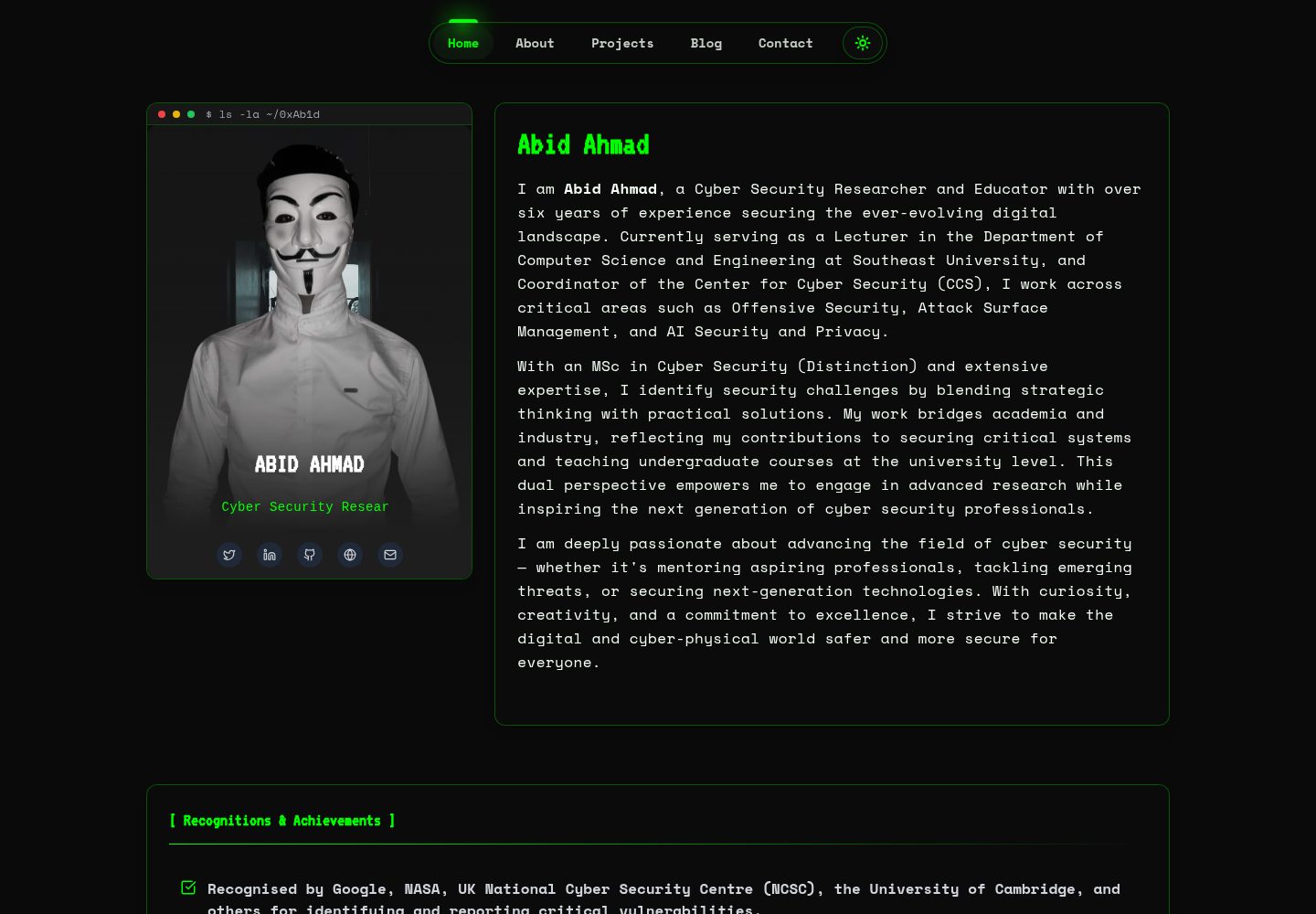
HackFolio
A high-performance, SEO-optimized hacker-themed portfolio website tailored for for ethical hackers, penetratio…
Vite · 作品集