基于 Astro 的静态博客模板,文章使用 MDX 编写,frontmatter 支持标题、日期、摘要、标签、草稿与封面图
Astro博客
serene-ink — Astro 博客模板
作者 jiseeeh
Serene Ink 是一个基于 Astro 的极简博客模板,内置 MDX、标签、分页、草稿、搜索、深浅色切换与 RSS 等写作向功能,配置集中在 src/config.ts。
看看你的网站会是什么样
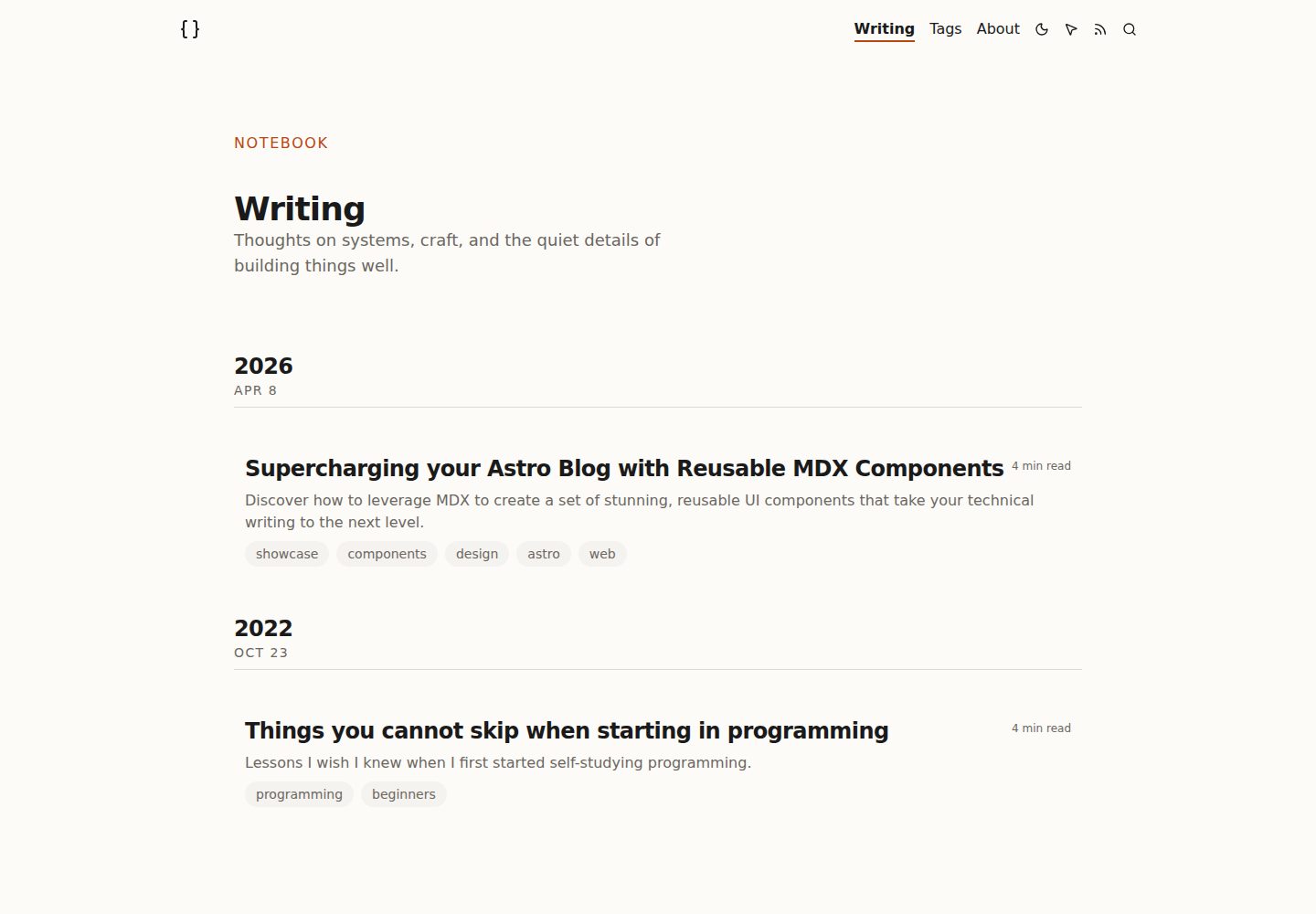
浏览真实页面截图,比较内容排版与手机效果。点击下方缩略图切换,放大查看整页细节。
全部页面与视图 3
截图用于了解视觉与布局,交互效果请以实际项目为准。
采集于 2026-10-02查看来源
值得关注的模板亮点
从已有项目资料中,快速了解它的特点。
内置标签、分页、相关文章、草稿隐藏、代码片段展示与自定义 MDX 组件
界面包含深浅色切换与视图过渡、Cmd+K 搜索、阅读进度条和动态目录
配置集中在 src/config.ts,可统一修改站点信息、导航、社交链接、每页文章数与 RSS 参数
SEO 相关配置包含 RSS、canonical URL、Open Graph、站点地图与结构化数据
提供 pnpm run new-post 命令生成新文章,并支持按子目录组织文章与 URL 结构
模板详细介绍
Serene Ink 是面向开发者、写作者与内容创作者的 Astro 博客模板,仓库采用 MIT 许可,演示站点部署在 Cloudflare Pages。模板以写作流程为中心:文章放在 src/posts/ 目录,使用 .mdx 文件与 frontmatter 描述标题、日期、摘要、标签、草稿状态和封面图,并可通过 pnpm run new-post 命令生成新文章。内容支持按子目录组织,Astro 会据此生成对应 URL 结构。
功能上,模板提供标签、分页、相关文章、草稿隐藏、代码片段展示与自定义 MDX 组件;界面包含深浅色切换与视图过渡、Cmd+K 搜索、阅读进度条和动态目录。SEO 与订阅方面配置了 RSS、canonical URL、Open Graph、站点地图与结构化数据,并预留 Umami 分析接入位。站点信息、导航、社交链接、每页文章数、RSS 与分析参数集中在 src/config.ts 中修改,作者页内容在 src/components/Author.astro 中调整。
构建产物为静态站点,README 说明可部署到 Cloudflare Pages、Vercel 或 Netlify,并给出 Cloudflare Pages 的构建命令与输出目录。模板本身不包含后端、数据库或评论系统,分析功能依赖外部 Umami 服务,需要自行提供 Website ID 与脚本地址;演示图片、字体、图标等第三方素材的许可需单独核对。
Astro博客
适合你的项目吗?
适用场景
- 搭建个人技术博客或写作站点,用 MDX 撰写带标签与代码示例的长文
- 需要深浅色切换、站内搜索与阅读进度等阅读体验的静态内容站
- 希望将站点信息、导航与 RSS 等设置集中在一个配置文件中维护的项目
- 部署到 Cloudflare Pages、Vercel 或 Netlify 等静态托管平台的博客
适合人群
- 使用 Astro 并希望快速开始写作的开发者与内容创作者
- 偏好 MDX 与 frontmatter 管理文章、不依赖后端数据库的博客作者
- 需要标签、分页、相关文章、草稿与 RSS 等基础博客能力的个人站点
- 接受自行配置托管、域名与 Umami 分析等外部服务的用户
上手与定制指南
结合仓库当前版本的说明,按下面的资料检查内容、配置与运行要求。
- 1
克隆仓库后使用 pnpm install 安装依赖,pnpm dev 启动本地开发服务器,默认访问 localhost:4321
- 2
在 src/config.ts 中修改站点标题、描述、站点 URL、作者信息、导航、社交链接、每页文章数与 RSS 参数
- 3
在 astro.config.mjs 中更新 site 为生产环境 URL,并替换 public/favicon.svg 与 public/favicon.ico
- 4
文章放在 src/posts/ 目录,可用 pnpm run new-post 生成,或手动创建 .mdx 并填写 title、date、frontmatter、tags 等 frontmatter 字段
- 5
如需 Umami 分析,在 src/config.ts 中填入 websiteId 与脚本地址;两项留空时不注入分析脚本
授权与来源资料
使用条件与限制
免费使用 · 保留许可声明本次收录的是公开仓库中采用 MIT 许可的免费版本;免费范围为该版本代码,不代表外部服务或第三方素材免费。
使用时需要遵守
- 允许免费使用、修改、商用和分发该版本代码。
- 分发代码副本或实质性部分时,保留原作者版权声明和完整 MIT 许可声明。
- 代码按现状提供;担保与责任限制以原许可证及适用法律为准。
额外费用与待核对事项
- 启用内置的 Umami 分析功能需要外部服务:需在 umami.is 注册免费账户(或自行自托管),并获取 Website ID 与脚本地址填入 src/config.ts;两项留空时不注入分析脚本。
- 部署依赖第三方静态托管平台(如 Cloudflare Pages、Vercel、Netlify),需自行注册相应平台账户并配置构建命令与输出目录,可能受各平台自身条款与费用约束。
- 演示图片、字体、图标及其他第三方素材需按各自许可核对,不能仅凭代码的 MIT 许可判断。
- 域名、托管、数据库、支付或 AI 等外部服务可能另外收费。
查看原文依据
Permission is hereby granted, free of charge
许可证原文
Create a free account at [umami.is](https://umami.is/) (or self-host).
README 原文
https://github.com/jiseeeh/serene-ink/blob/main/LICENSEhttps://github.com/jiseeeh/serene-ink/blob/main/README.mdThis template is configured as a static site, compatible with hosts like **Cloudflare Pages**, **Vercel**, and **Netlify**.
README 原文
DeepSeek 根据仓库许可证和 README 整理 ·2026-10-02。结果仅覆盖已读取资料,依赖、图片、字体及后续条款变更以各自原文为准。
项目核对记录与介绍依据
模板资料
- 来源平台
- GitHub
- 资料与维护参考分
- 资料较完整 · 79 / 100
- 技术栈
- Astro
- 网站类型
- 博客
这个分数如何计算
本站按许可资料(最高30分)、演示链接(12分)、预览图(10分)、Star数(15分)、记录的维护时间(15分)、描述完整度(8分)、功能记录(5分)和分类资料(5分)计算。它不是代码、安全或性能测试,也不是 Google 评分;有链接不代表已实测可用。
这个项目需要核对什么
- 记录的仓库更新时间
- 2026-08-21
- 截图检查日期
- 2026-10-02
已收录演示链接。请用你的内容与屏幕尺寸检查;有演示不代表表单、认证或支付已经可用。
目录记录的主要技术栈是 Astro。请通过依赖清单和锁文件核对实际版本与托管要求。这些说明基于收录资料,不代表代码审计或部署实测。
查看具体选型方法 →介绍的制作与核对状态
介绍由 AI 辅助整理目录与仓库资料。仓库作者不等于这篇介绍的审核者。
已完成服务器许可规则与 AI 来源核对;未经过人工编辑审核。
查看当时使用的来源资料
SHA-256: 8629e62d3a9586da23f10c4bae9a26fe6d061ce263912b10ef2e064b07029150
2026-10-02T16:49:52.134Z
来源文件 / 仓库# Serene Ink
Serene Ink is a minimalist, elegant, and blazing-fast Astro blog template designed for developers, writers, and creators. It features a clean UI, dark/light mode toggle, and MDX support out of the box, ensuring you can focus entirely on your writing.
## 🚀 Features
- **Modern Stack:** Built with Astro, MDX, and Tailwind CSS v4 for ultimate developer experience and performance (100/100 Lighthouse scores).
- **Rich Blogging:** Includes tags, pagination, related posts, draft support, expressive code snippets, and a variety of custom MDX components out of the box.
- **Premium UX/UI:** Dark/light mode toggle with view transitions, Cmd+K search, smooth custom cursor, reading progress bar, and a dynamic Table of Contents.
- **SEO & Analytics:** Fully configured with RSS, canonical URLs, Open Graph, sitemaps, structured data, and a ready-to-use Umami analytics integration.
- **Centralized Config:** Easily personalize the entire site from a single `src/config.ts` file without digging into component code.
## 🧞 Setting Up
1. **Clone the repository** (or use the template):
```sh
git clone https://github.com/your-username/serene-ink.git my-blog
cd my-blog
```
2. **Install dependencies**:
```sh
pnpm install
```
3. **Start the local development server**:
```sh
pnpm dev
```
Open `localhost:4321` in your browser.
## ✍️ Personalization
### Quick Start — `src/config.ts`
This is the **primary configuration file**. Open it and update these values to make the template yours:
```ts
export const siteConfig = {
title: "Your Blog Name",
description: "Your blog description.",
siteUrl: "https://your-domain.com",
author: {
name: "Your Name",
bio: "A short bio about yourself.",
},
nav: [
{ label: "Writing", href: "/" },
{ label: "About", href: "/about" },
],
socials: {
github: "https://github.com/your-username",
twitter: "", // leave empty to hide
linkedin: "", // leave empty to hide
},
postsPerPage: 5,
analytics: {
umami: {
websiteId: "", // e.g., "a1b2c3d4-..."
src: "", // e.g., "https://cloud.umami.is/script.js"
},
},
rss: {
title: "Your Blog",
description: "Your RSS feed description.",
},
};
```
### Additional Personalization
1. **Domain config:** Open `astro.config.mjs` and update `site` to match your production URL.
2. **Author Profile & Projects:** Open `src/components/Author.astro` to customize the About page — timeline, projects, activity cards, and introductory text.
3. **Favicon:** Replace `/public/favicon.svg` and `/public/favicon.ico` with your brand's icon.
## 📝 Adding New Blogs
All content lives in the `src/posts/` folder.
To create a new blog post, use the built-in command:
```sh
pnpm run new-post "Your Awesome Catchy Title"
```
Alternatively, create a new `.mdx` file and include the following frontmatter:
```mdx
---
title: "Your Awesome Catchy Title"
date: "03/12/2024"
frontmatter: "A short description or summary of your post."
tags: ["astro", "learning", "random"]
draft: false
image: ""
---
Your content goes here...
```
### Frontmatter Fields
| Field | Type | Required | Description |
|---|---|---|---|
| `title` | string | ✅ | The post title |
| `date` | string | ✅ | Publish date in `MM/DD/YYYY` format |
| `frontmatter` | string | ✅ | Short summary (used on listing, RSS, and search) |
| `tags` | string[] | ✅ | Array of tags for categorization |
| `draft` | boolean | ❌ | Set to `true` to hide from all listings (default: `false`) |
| `updatedDate` | string | ❌ | Last updated date in `MM/DD/YYYY` format |
| `image` | string | ❌ | Path to a cover image (relative to `src/assets/`) |
### Organizing Posts
You can organize your posts into subdirectories inside `src/posts/` (e.g., `src/posts/2024/tutorials/my-post.mdx`). Astro will automatically generate the corresponding URL structure (`/posts/2024/tutorials/my-post`).
When nesting posts, use the `@/` alias to comfortably import out-of-the-box components without worrying about relative path depths:
```mdx
import Callout from '@/components/ui/Callout.astro';
```
*(Note that the `image` frontmatter property still requires relative paths like `../../../assets/images/cover.webp` when deeply nested.)*
## 📊 Analytics
Serene Ink supports [Umami](https://umami.is/) analytics out of the box. To enable it:
1. Create a free account at [umami.is](https://umami.is/) (or self-host).
2. Add your website and get your **Website ID** and **Script URL**.
3. Update `src/config.ts`:
```ts
analytics: {
umami: {
websiteId: "your-website-id",
src: "https://cloud.umami.is/script.js",
},
},
```
When both fields are empty, no analytics script is injected.
## 🌐 Deployment
This template is configured as a static site, compatible with hosts like **Cloudflare Pages**, **Vercel**, and **Netlify**.
**Deploying to Cloudflare Pages:**
1. Push your code to a GitHub or GitLab repository.
2. Log in to your Cloudflare dashboard → **Workers & Pages** → **Create application** → **Pages** → **Connect to Git**.
3. Select your repository and configure:
- **Framework preset:** Astro
- **Build command:** `pnpm run build`
- **Build output directory:** `dist`
4. Click **Save and Deploy**.
*(Don't forget to update your `site` URL in `astro.config.mjs` once deployed!)*
## 📜 License
This project is open-source and released under the [MIT License](LICENSE). Feel free to use it for personal or commercial projects.
看看同类模板
对比同技术栈与用途的模板,找到更适合的视觉与内容结构。

astrowind
⭕️ AstroWind: A free template using Astro v7 and Tailwind CSS v4. Astro starter theme.
Astro · 博客

astro-paper
A minimal, accessible and SEO-friendly Astro blog theme.
Astro · 博客

fuwari
✨A static blog template built with Astro.
Astro · 博客

Firefly
Firefly 是一款基于 Astro 的静态博客主题,由 CuteLeaf 在 saicaca 的 Fuwari 模板基础上二次开发,主打清新美观的视觉风格。
Astro · 博客

astro-theme-cactus
A simple Astro theme. Use it to create your blog or website.
Astro · 作品集

astrofy
Astrofy is a free and open-source template for your Personal Portfolio Website built with Astro and TailwindCS…
Astro · 作品集