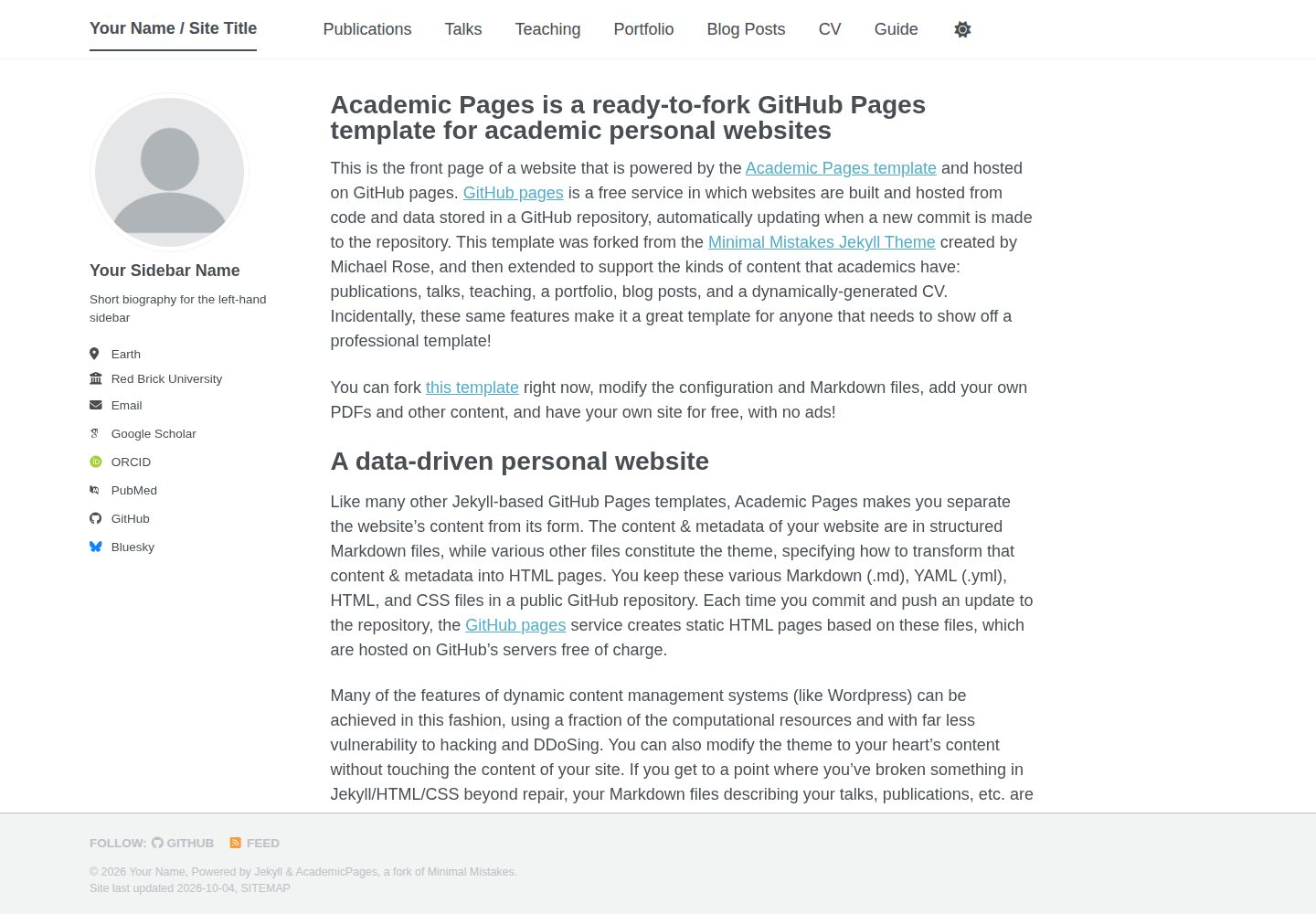
从 Minimal Mistakes Jekyll 主题派生的学术个人网站模板,以静态站点形式部署在 GitHub Pages
HTML作品集
jmquintero.com — HTML 作品集模板
作者 jmquintero925
基于 Jekyll 的学术个人网站模板,从 Minimal Mistakes 主题派生,用于在 GitHub Pages 上发布个人主页、简历、出版物与作品集。
看看你的网站会是什么样
浏览真实页面截图,比较内容排版与手机效果。点击下方缩略图切换,放大查看整页细节。
全部页面与视图 3
截图用于了解视觉与布局,交互效果请以实际项目为准。
采集于 2026-10-05查看来源
值得关注的模板亮点
从已有项目资料中,快速了解它的特点。
区分站点级配置与内容元数据,支持页面、文章与集合等不同内容类型
提供 markdown_generator 目录,可用 Jupyter notebook 或 Python 脚本从 TSV 生成出版物与演讲的 Markdown
files/ 目录用于存放 PDF、zip 等文件,通过 /files/ 路径对外访问
底层代码改动以「code change」标签的已关闭 issue 记录,附对应提交或差异链接
模板详细介绍
这是一个面向学术场景的个人网站模板,仓库由 jmquintero925 维护,代码源自 academicpages.github.io,而后者又是从 Michael Rose 的 Minimal Mistakes Jekyll 主题派生并分离出来的。模板以 HTML/Jekyll 静态站点形式组织,通过 GitHub Pages 发布,站点地址通常为「用户名.github.io」。
内容结构上,模板提供站点级配置与内容元数据两套设置入口,并区分页面、文章与集合等不同内容类型;README 提到可用 markdown_generator 目录下的 Jupyter notebook 或 Python 脚本,从 TSV 文件生成出版物和演讲的 Markdown 文件。文件类资源(如 PDF、zip)可放入 files/ 目录,并通过 /files/ 路径访问。
使用方式以 Fork 为主:注册 GitHub 账号并确认邮箱,Fork 仓库后将仓库重命名为「用户名.github.io」,再修改站点配置并创建内容。若需在本地运行,需安装 ruby-dev、bundler 与 nodejs,执行 bundle install 后通过 bundle exec jekyll liveserve 在 localhost:4000 预览,本地服务器会在改动后自动重建刷新。README 还提示,如果收到安全漏洞通知,可删除 Gemfile.lock 文件。
该模板的已知限制在于更新维护:Fork 后自行定制再拉取上游改动容易产生合并冲突,官方建议删除仓库重新 Fork,或手动打补丁;所有底层代码改动以带「code change」标签的已关闭 issue 形式记录,便于对照单个提交或差异进行修补。仓库采用 MIT 许可,但演示图片、字体、图标等第三方素材需按各自许可另行核对。
HTML作品集
适合你的项目吗?
适用场景
- 在 GitHub Pages 上搭建学术个人主页,展示个人简介、出版物与演讲
- 把本地 PDF 或压缩包作为附件发布到网站供他人下载
- 用 TSV 数据批量生成出版物和演讲的 Markdown 页面
- 在本地以 Jekyll 服务预览站点改动,再推送到 GitHub Pages
适合人群
- 需要学术个人网站并愿意使用 GitHub Pages 的研究人员或学生
- 熟悉或愿意学习 Jekyll 与 Markdown 内容组织的用户
- 希望以 Fork 方式维护站点、并能接受手动同步上游改动的使用者
上手与定制指南
结合仓库当前版本的说明,按下面的资料检查内容、配置与运行要求。
- 1
注册 GitHub 账号并确认邮箱,Fork 仓库后将仓库重命名为「用户名.github.io」
- 2
在仓库设置中修改站点级配置,并按需创建内容与元数据
- 3
本地运行需安装 ruby-dev、bundler 与 nodejs,执行 bundle install 后用 bundle exec jekyll liveserve 在 localhost:4000 预览
- 4
若收到安全漏洞通知,可删除 Gemfile.lock 文件
- 5
Fork 后自行定制再拉取上游更新易产生合并冲突,需删除重 Fork 或按 code change issue 手动打补丁
授权与来源资料
使用条件与限制
免费使用 · 保留许可声明本次收录的是公开仓库中采用 MIT 许可的免费版本;免费范围为该版本代码,不代表外部服务或第三方素材免费。
使用时需要遵守
- 允许免费使用、修改、商用和分发该版本代码。
- 分发代码副本或实质性部分时,保留原作者版权声明和完整 MIT 许可声明。
- 代码按现状提供;担保与责任限制以原许可证及适用法律为准。
额外费用与待核对事项
- 演示图片、字体、图标及其他第三方素材需按各自许可核对,不能仅凭代码的 MIT 许可判断。
- 域名、托管、数据库、支付或 AI 等外部服务可能另外收费。
- 使用该模板必须注册 GitHub 账号并确认邮箱,属于平台账号要求。
- 部署方式要求先 Fork 指定仓库,而非直接下载独立使用。
- 仓库必须重命名为「用户名.github.io」,站点 URL 由此决定,绑定 GitHub Pages 命名规则。
- 本地运行需自行安装 ruby-dev、bundler 与 nodejs 依赖。
- 本地预览依赖 Jekyll 与 bundler 命令,需具备相应 Ruby 环境。
- 收到安全漏洞通知时需删除 Gemfile.lock 文件,属于维护操作限制。
- Fork 后自行定制再拉取上游更新容易产生合并冲突,同步维护受限。
- 同步上游改动只能删除仓库重新 Fork 或手动打补丁,无自动升级途径。
查看原文依据
Permission is hereby granted, free of charge
许可证原文
1. Register a GitHub account if you don't have one and confirm your e-mail (required!)
README 原文
Fork [this repository](https://github.com/academicpages/academicpages.github.io) by clicking the "fork" button in the top right.
README 原文
Rename the repository "[your GitHub username].github.io", which will also be your website's URL.
README 原文
Make sure you have ruby-dev, bundler, and nodejs installed: `sudo apt install ruby-dev ruby-bundler nodejs`
README 原文
Run `bundle exec jekyll liveserve` to generate the HTML and serve it from `localhost:4000`
README 原文
if you are using this repo and now get a notification about a security vulnerability, delete the Gemfile.lock file.
README 原文
If you fork this repository, customize it, then pull again, you'll probably get merge conflicts.
README 原文
https://github.com/jmquintero925/jmquintero.com/blob/master/LICENSEhttps://github.com/jmquintero925/jmquintero.com/blob/master/README.mdyou can delete the repository and fork it again. Or you can manually patch.
README 原文
DeepSeek 根据仓库许可证和 README 整理 ·2026-10-05。结果仅覆盖已读取资料,依赖、图片、字体及后续条款变更以各自原文为准。
项目核对记录与介绍依据
模板资料
- 来源平台
- GitHub
- 资料与维护参考分
- 资料较完整 · 83 / 100
- 技术栈
- HTML
- 网站类型
- 作品集
这个分数如何计算
本站按许可资料(最高30分)、演示链接(12分)、预览图(10分)、Star数(15分)、记录的维护时间(15分)、描述完整度(8分)、功能记录(5分)和分类资料(5分)计算。它不是代码、安全或性能测试,也不是 Google 评分;有链接不代表已实测可用。
这个项目需要核对什么
- 记录的仓库更新时间
- 2026-10-05
- 截图检查日期
- 2026-10-05
已收录演示链接。请用你的内容与屏幕尺寸检查;有演示不代表表单、认证或支付已经可用。
目录记录的主要技术栈是 HTML。请通过依赖清单和锁文件核对实际版本与托管要求。这些说明基于收录资料,不代表代码审计或部署实测。
查看具体选型方法 →介绍的制作与核对状态
介绍由 AI 辅助整理目录与仓库资料。仓库作者不等于这篇介绍的审核者。
审核声明: [email protected] · 2026-10-06
查看当时使用的来源资料
SHA-256: e0a44da2bc437dcf72a04596f93e03acb5912724408ae8055e7f28604910eb47
2026-10-05T23:35:42.501Z
来源文件 / 仓库A Github Pages template for academic websites. This was forked (then detached) by [Stuart Geiger](https://github.com/staeiou) from the [Minimal Mistakes Jekyll Theme](https://mmistakes.github.io/minimal-mistakes/), which is © 2016 Michael Rose and released under the MIT License. See LICENSE.md. I think I've got things running smoothly and fixed some major bugs, but feel free to file issues or make pull requests if you want to improve the generic template / theme. ### Note: if you are using this repo and now get a notification about a security vulnerability, delete the Gemfile.lock file. # Instructions 1. Register a GitHub account if you don't have one and confirm your e-mail (required!) 1. Fork [this repository](https://github.com/academicpages/academicpages.github.io) by clicking the "fork" button in the top right. 1. Go to the repository's settings (rightmost item in the tabs that start with "Code", should be below "Unwatch"). Rename the repository "[your GitHub username].github.io", which will also be your website's URL. 1. Set site-wide configuration and create content & metadata (see below -- also see [this set of diffs](http://archive.is/3TPas) showing what files were changed to set up [an example site](https://getorg-testacct.github.io) for a user with the username "getorg-testacct") 1. Upload any files (like PDFs, .zip files, etc.) to the files/ directory. They will appear at https://[your GitHub username].github.io/files/example.pdf. 1. Check status by going to the repository settings, in the "GitHub pages" section 1. (Optional) Use the Jupyter notebooks or python scripts in the `markdown_generator` folder to generate markdown files for publications and talks from a TSV file. See more info at https://academicpages.github.io/ ## To run locally (not on GitHub Pages, to serve on your own computer) 1. Clone the repository and made updates as detailed above 1. Make sure you have ruby-dev, bundler, and nodejs installed: `sudo apt install ruby-dev ruby-bundler nodejs` 1. Run `bundle clean` to clean up the directory (no need to run `--force`) 1. Run `bundle install` to install ruby dependencies. If you get errors, delete Gemfile.lock and try again. 1. Run `bundle exec jekyll liveserve` to generate the HTML and serve it from `localhost:4000` the local server will automatically rebuild and refresh the pages on change. # Changelog -- bugfixes and enhancements There is one logistical issue with a ready-to-fork template theme like academic pages that makes it a little tricky to get bug fixes and updates to the core theme. If you fork this repository, customize it, then pull again, you'll probably get merge conflicts. If you want to save your various .yml configuration files and markdown files, you can delete the repository and fork it again. Or you can manually patch. To support this, all changes to the underlying code appear as a closed issue with the tag 'code change' -- get the list [here](https://github.com/academicpages/academicpages.github.io/issues?q=is%3Aclosed%20is%3Aissue%20label%3A%22code%20change%22%20). Each issue thread includes a comment linking to the single commit or a diff across multiple commits, so those with forked repositories can easily identify what they need to patch. # Isaac's Notes Using the directions [here](https://jayrobwilliams.com/posts/2020/06/academic-website/) Helpful info on pages vs posts vs collections [here](https://ben.balter.com/2015/02/20/jekyll-collections/)
看看同类模板
对比同技术栈与用途的模板,找到更适合的视觉与内容结构。

simplefolio
⚡️ A minimal portfolio template for Developers
HTML · 作品集

Freelancer
Freelancer 是 Start Bootstrap 出品的单页作品集模板,专为自由职业者、设计师和小型工作室设计。 页面结构清晰,包含多个内容区块、响应式作品集网格,每个作品项目配有模态窗口展示详情。
HTML · 作品集

Resume
Resume 是 Start Bootstrap 推出的简历与 CV 主题,基于 Bootstrap 构建,采用固定侧边栏加内容区块的结构。
HTML · 作品集

Creative
Creative 是 Start Bootstrap 团队维护的一款单页营销模板,定位明确:为创意机构或产品服务提供一个以作品展示和行动号召为核心的落地页。
HTML · 企业官网

Grayscale
Grayscale 是 Start Bootstrap 出品的深色系单页 HTML 模板,基于 Bootstrap 构建。 它的视觉重心放在大尺寸首屏和清晰的内容分区上,整体氛围偏暗,适合摄影、活动或品牌叙事类网站。
HTML · 企业官网

startbootstrap-stylish-portfolio
Stylish Portfolio 是 Start Bootstrap 维护的单页作品集主题,基于 Bootstrap 构建,采用多个内容区块加离屏导航菜单的结构。
HTML · 作品集